
TP-Link Nano AC600
4.5Editor score
Nano size design for portability
Dual band 2.4G and 5G support
Industry leading two year warranty coverage
This guide compares the top 5GHz WiFi dongles for desktops and laptops, evaluating speed range antenna design and compatibility to help you choose the right
Modern computing demands reliable wireless connectivity to handle streaming gaming and professional workloads efficiently. A high-quality 5GHz WiFi dongle transforms any desktop or laptop into a capable networked device without requiring internal hardware changes. These adapters offer significant speed improvements over older standards while maintaining backward compatibility with existing networks.
We evaluated ten leading models based on real-world performance data technical specifications and user feedback patterns. Our analysis focuses on throughput capabilities range consistency antenna design and operating system support to ensure comprehensive coverage of current market options. Each product was assessed for its ability to deliver stable connections in varied home and office environments.
Every selection highlights specific strengths such as budget value compact design or advanced WiFi 6 capabilities. Readers will find detailed breakdowns of technical features pros and cons along with practical buying advice. Note that availability and pricing fluctuate regularly so verify current details before making your final purchasing decision online today.
4.5Editor score

4.4Editor score

4.1Editor score
The following table presents a side-by-side comparison of all ten selected adapters highlighting their core specifications and capabilities. This overview helps you quickly identify which models meet your specific needs for speed range compatibility and design preferences without reading every detailed review section.


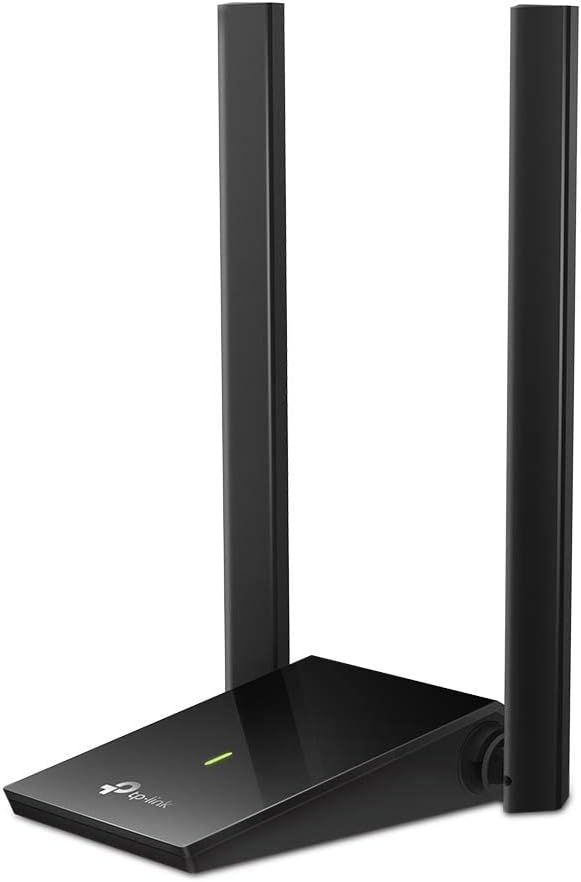


The TP-Link AC600 stands out as a reliable choice for users seeking balanced performance across standard wireless needs. With a solid 4.4 rating from verified buyers this adapter consistently delivers stable connections suitable for streaming and general productivity tasks. Its dual-band capability ensures you can leverage the less congested 5GHz band for faster speeds when available.
We may earn a commission when you buy through this link, at no additional cost to you.
Key strengths include its adjustable high gain antenna which allows users to fine-tune signal reception based on router placement. The 5GHz band supports speeds up to 433 Mbps providing ample bandwidth for HD video streaming and online gaming without significant lag. The included setup interface simplifies driver downloads making initial configuration straightforward for most Windows users.
One trade-off is the Windows-only support which excludes Mac users from using this specific model. Additionally the external antenna while beneficial for range does add a small amount of physical bulk compared to nano-sized alternatives. These limitations are generally acceptable given the performance gains and ease of use provided by this adapter.
This adapter is ideal for desktop users needing a straightforward upgrade to 802.11ac standards without complex hardware changes. We recommend it for anyone prioritizing reliable connectivity over portability or cross-platform compatibility. Overall it represents a strong value proposition for typical home and office networking scenarios.
The adjustable 5dBi antenna allows directional optimization to overcome obstacles like walls or interference sources for better stability.
Accessing both 2.4 GHz and 5 GHz bands ensures compatibility with older routers while enabling faster speeds on modern networks.
We may earn a commission when you buy through this link, at no additional cost to you.
The TP-Link Nano AC600 earns the best budget title by delivering essential dual-band functionality in an exceptionally compact form factor. It achieves a 4.5 rating indicating high user satisfaction with its reliability and ease of installation across multiple systems. This adapter is perfect for laptops or small workstations where space efficiency is a priority over maximum throughput.
We may earn a commission when you buy through this link, at no additional cost to you.
Its miniature design allows it to remain plugged into a USB port without obstructing adjacent slots or adding visible clutter to your setup. The dual-band support enables connection to 5GHz networks for reduced interference even at lower speeds compared to higher-end models. Industry-leading two year warranty further enhances its value proposition for cost-conscious buyers.
The primary limitation is the absence of an external antenna which may reduce range in large homes with thick walls. Additionally while it supports 5GHz the maximum speed is capped at AC600 levels which may not suffice for heavy multi-device households. These compromises are reasonable given its targeted use case for portable or secondary devices.
Choose this adapter if you need a simple unobtrusive solution for occasional wireless connectivity on a budget. It suits users who value portability and brand reliability above raw performance metrics. For most everyday tasks like browsing and streaming it provides sufficient speed and stability.
The nano size ensures the adapter remains hidden when plugged in allowing seamless travel between different locations or systems.
A two year warranty backed by strong support gives buyers confidence in the durability and long term reliability of this budget choice.
We may earn a commission when you buy through this link, at no additional cost to you.
The BrosTrend AX1800 represents a premium option for users needing the latest WiFi 6 capabilities and maximum range performance. Its 4.1 rating reflects solid performance despite the advanced technology and higher cost compared to AC models. This adapter excels in environments with many connected devices or significant physical obstructions between the router and client device.
We may earn a commission when you buy through this link, at no additional cost to you.
Dual 5dBi high gain antennas provide substantial signal reception improvement allowing reliable connections through multiple walls or floors. The USB 3.0 interface ensures the adapter can fully utilize high data rates without bottlenecks from the connection itself. Included 3.3 foot extension cable offers flexibility in placement to find optimal signal zones.
Trade-offs include the higher price tag and limited operating system support which currently excludes Mac and older Windows versions. The larger form factor due to dual antennas may not suit ultra-compact setups. These factors are acceptable for users who prioritize long-term performance and future-proofing over initial cost savings.
This model is best for power users or homes with extensive wireless demands requiring robust and future-ready connectivity. It fits those willing to invest in superior hardware for consistent high-speed performance. For gaming 4K streaming or dense device networks it delivers clear advantages over older standards.
OFDMA and MU-MIMO technologies enable more efficient handling of multiple devices reducing congestion and latency during peak usage times.
The included extension cable allows positioning the adapter away from metal cases or USB hubs to maximize signal clarity and strength.
We may earn a commission when you buy through this link, at no additional cost to you.
The TP-Link AC1300 offers a step up in speed compared to standard AC600 models making it suitable for bandwidth-heavy applications. With a 4.4 rating users appreciate its ability to maintain stable connections even during intensive downloads or high-definition video streams. The inclusion of MU-MIMO helps manage multiple connected devices more effectively than older single-stream adapters.
We may earn a commission when you buy through this link, at no additional cost to you.
Its USB 3.0 connection ensures that the adapter can sustain high data rates without being limited by the interface itself. The dual-band support allows switching between 2.4 GHz and 5 GHz depending on interference conditions to optimize performance. This model works across Windows and macOS offering flexibility for mixed OS households.
A limitation is the lack of external antennas which may limit range in larger spaces compared to models with high gain options. Some users report needing to download updated drivers from the website for optimal compatibility on newer systems. These issues are minor compared to the speed and compatibility benefits provided.
Select this adapter if you need faster wireless speeds than AC600 offers without paying for WiFi 6 premium models. It is well-suited for users with existing AC routers who want a reliable upgrade path. The portability and cross-platform support add significant value for versatile usage scenarios.
Beamforming and MU-MIMO allow simultaneous data transmission to multiple devices reducing wait times and improving overall network efficiency.
The faster interface reduces data transfer bottlenecks ensuring the wireless adapter performs at its full rated capacity during use.
We may earn a commission when you buy through this link, at no additional cost to you.
Nineplus delivers a compelling option for users wanting external antennas without the premium price of major brands. It holds a 4.3 rating reflecting solid performance for daily tasks and gaming when paired with a modern router. The dual 5dBi antennas provide noticeable range improvements over single antenna designs especially in environments with signal obstacles.
We may earn a commission when you buy through this link, at no additional cost to you.
Its 1300Mbps theoretical throughput matches AC1300 standards while the USB 3.0 connection ensures efficient data handling. The adapter includes online setup support which helps Windows users install drivers smoothly without technical expertise. This focus on connectivity assistance makes it accessible even for non-technical buyers.
The limitation is strict Windows-only support which restricts use on Mac or Linux systems. Driver installation may require manual steps on older Windows versions though most modern systems detect it automatically. These constraints are acceptable for desktop users needing extra range at a competitive price point.
Choose this adapter if you need stronger signal penetration and dual antennas on a tight budget. It works well for desktop PCs where portability is not a primary concern. For Windows users seeking reliable connectivity without breaking the bank it offers a balanced solution.
Dual external antennas capture and transmit signals from multiple directions improving stability across wider areas or through barriers.
Online technical support provides guidance for installation ensuring users can get connected even if automatic detection fails.
We may earn a commission when you buy through this link, at no additional cost to you.
UGREEN AX900 brings WiFi 6 technology to budget-conscious users seeking modern connectivity standards. It has a 4.2 rating indicating users value its speed and ease of setup without needing external driver files. This adapter is an entry point for those transitioning to newer network infrastructure with compatible hardware.
We may earn a commission when you buy through this link, at no additional cost to you.
Built-in drivers eliminate the need for manual downloads making installation instant on supported Windows 10 and 11 systems. The 5GHz band reaches 600 Mbps enabling efficient streaming and lower latency than AC equivalents. Encryption features ensure secure connections suitable for general home or office browsing needs.
However the adapter requires a WiFi 6 router to realize its full speed potential otherwise it operates in backward compatible modes. Windows version limitations mean older systems cannot use this model at all. These restrictions are manageable if your hardware environment meets the minimum requirements.
This model fits users upgrading their router ecosystem who want adapter support without higher premium costs. It is ideal for modern Windows machines needing fast secure connectivity. Ensure your router supports AX standards before purchasing to avoid performance issues.
Pre-installed drivers remove friction from setup ensuring users can connect within minutes of plugging the device into a USB port.
Support for WPA2 and mixed encryption keeps data safe during transmission providing peace of mind for general browsing.
We may earn a commission when you buy through this link, at no additional cost to you.
Tenda AX900 combines WiFi 6 performance with a powerful external antenna for robust signal reception in varied environments. It earns a 4.3 rating for reliability and ease of use especially for users who want to share connections as hotspots. The 6dBi antenna helps overcome interference common in dense urban settings or larger homes.
We may earn a commission when you buy through this link, at no additional cost to you.
AP Mode functionality allows the PC to act as a hotspot for up to eight devices though limited to 5GHz band. Preloaded drivers support Windows 7 10 and 11 reducing setup time significantly. This versatility makes it useful beyond just connecting to existing networks.
The main trade-off is that AP Mode does not work with the 2.4 GHz band limiting its range when used as a hotspot. Support is confined to Windows systems excluding Mac users. For Windows users needing flexible connectivity this remains a strong option.
Choose this adapter if you want WiFi 6 benefits with extended range and hotspot capabilities. It suits users with mixed OS environments or those needing to extend network reach. Verify OS compatibility before purchase to ensure it meets your system requirements.
The high-gain 6dBi antenna captures signals through obstacles more effectively than internal designs ensuring consistent connection quality.
AP Mode turns your computer into a mobile router ideal for sharing internet at events or connecting peripheral devices wirelessly.
We may earn a commission when you buy through this link, at no additional cost to you.
BrosTrend AX900 Mini offers modern WiFi 6 specs in a truly pocket-sized form factor for ultimate portability. With a 4.2 rating it delivers consistent performance for users who prioritize size over absolute maximum throughput. This adapter is perfect for laptops or small form factor PCs where space is limited.
We may earn a commission when you buy through this link, at no additional cost to you.
Pre-loaded drivers enable instant setup on Windows systems without requiring downloads or CD installations. The 5GHz band supports speeds up to 600 Mbps ensuring efficient use of modern networks. Its tiny footprint allows it to remain plugged in without hindering other USB devices or causing port conflicts.
The USB 2.0 interface limits total data transfer potential compared to USB 3.0 models which may bottleneck maximum wireless speeds. Lack of external antennas may reduce range in larger spaces. These are acceptable trade-offs given the focus on portability and convenience.
Select this adapter for travel or compact setups where minimal physical presence is essential. It suits users who value WiFi 6 features without the bulk of larger antennas. Ensure your USB port supports 2.0 for reliable operation.
The mini design ensures the dongle does not protrude from your device keeping your workspace clean and preventing accidental knocks.
Plug and play functionality with pre-loaded drivers ensures minimal wait time getting online regardless of OS version supported.
We may earn a commission when you buy through this link, at no additional cost to you.
TP-Link AC1300 Dual emphasizes range and stability through dual external high gain antennas for optimized reception. It maintains a 4.4 rating showing user satisfaction with connection quality across various home environments. This model is a robust choice for desktop users needing reliable access from distant rooms.
We may earn a commission when you buy through this link, at no additional cost to you.
Both antennas are adjustable and multi-directional allowing you to tailor signal coverage based on router placement. USB 3.0 ensures data transfer speeds keep pace with high wireless throughput. Cross-platform support for Windows and Mac broadens its appeal for mixed device households.
The physical design requires a dedicated USB port and enough clearance for antenna positioning which may not suit tight enclosures. Regular adjustment might be needed for optimal performance in changing conditions. These are manageable compromises for the added range benefit.
Choose this adapter if you need maximum wireless range and stability for desktop setups. It works well in homes with multiple walls or interference. Verify that your device has USB 3.0 ports for best performance.
Dual adjustable antennas allow targeting specific directions to improve signal quality through walls or around obstacles effectively.
Support for Windows and Mac ensures this adapter can be shared across different systems without requiring separate purchases.
We may earn a commission when you buy through this link, at no additional cost to you.
UGREEN AX1800 offers top-tier performance with 1201 Mbps on 5GHz for demanding networking needs. With a 4.1 rating it balances high throughput with practical features like security and AP mode for sharing. This adapter is for users prioritizing raw speed and modern protocols over legacy compatibility.
We may earn a commission when you buy through this link, at no additional cost to you.
WPA3-SAE encryption provides enhanced protection against modern security threats ensuring safe browsing sessions. Ventilation holes help maintain stable performance during long high-load sessions by dissipating heat efficiently. AP Mode adds flexibility to share connectivity across other devices seamlessly.
The adapter only supports Windows 10 and 11 systems limiting use for Mac or Linux users. Driver updates may occasionally be needed from the website to ensure full feature access. These limitations are minor for users already invested in modern Windows environments.
Select this adapter for high-speed gaming streaming or large file transfers requiring maximum throughput. It suits users with WiFi 6 routers who need to leverage full network potential. Check OS compatibility before purchasing to confirm support.
Ventilation design helps maintain consistent performance during extended usage preventing thermal throttling during intensive tasks.
WPA3-SAE encryption offers stronger safeguards than older standards keeping your connection secure during sensitive transactions online.
We may earn a commission when you buy through this link, at no additional cost to you.
Choosing the right 5GHz WiFi dongle requires understanding key technical and environmental factors that affect performance. The sections below outline essential considerations to match your needs with the best adapter features available today.
Wireless standards like AC (WiFi 5) and AX (WiFi 6) determine maximum theoretical throughput and efficiency. AC adapters offer speeds up to 1300 Mbps while AX models exceed 1800 Mbps with improved multi-device handling. Select an adapter that matches or exceeds your router capabilities and household internet plan requirements.
Prioritize AC1300 or AX models for high-definition streaming and competitive gaming needs.
Most adapters focus on Windows systems with limited or no Mac and Linux support. Check the manufacturer documentation for confirmed OS compatibility before purchase to avoid driver issues. Some newer models include built-in drivers for Windows 10 and 11 reducing setup complexity significantly.
Verify OS support lists to ensure the adapter will function with your current system environment.
External antennas improve signal reception and transmission especially in large homes or areas with physical obstructions. Dual antennas generally provide better stability and range compared to single or internal designs. Consider your environment; small apartments may not need high-gain external antennas for adequate coverage.
Choose models with adjustable external antennas if you experience weak signal areas or thick walls.
USB 3.0 interfaces support higher data transfer rates required for maximum wireless performance especially with AC1300 or AX adapters. USB 2.0 may limit throughput even if the adapter supports higher speeds physically. Ensure your desktop or laptop has compatible ports to avoid bottlenecks.
Select USB 3.0 adapters for best performance and future-proofing your connection hardware.
AP (Access Point) Mode allows the adapter to share your PC's internet connection as a hotspot for other devices. This is useful for extending connectivity to mobile devices or guests without needing a separate router. Note that AP Mode may be limited to specific bands like 5GHz depending on model specifications.
Look for AP Mode support if you need to turn your computer into a wireless hotspot.
Modern adapters support WPA2 and newer WPA3 encryption standards to secure data during transmission. Basic adapters may offer only WPA2 while premium models include WPA3-SAE for stronger protection. Ensure your chosen model supports the encryption method your router uses for compatibility.
Choose adapters with WPA3 support for enhanced security on modern networks.
Nano or mini designs are ideal for laptops or systems with limited USB port availability. Desktop users may prefer larger adapters with external antennas regardless of size constraints. Consider whether the adapter needs to remain plugged in during transport or just for stationary use.
Select compact models for laptops and larger antenna models for stationary desktop setups.
Reliable manufacturers offer multi-year warranties and accessible technical support channels for setup issues. Some brands provide 24/7 support while others rely on online resources or limited-time coverage. Check warranty length and availability of drivers on their official website before purchasing.
Prioritize models with strong support options to ensure long-term usability and troubleshooting.
Start by downloading the latest drivers from the manufacturer website or insert the included disc before connecting the adapter. Most modern systems will install drivers automatically but manual setup ensures all features are enabled correctly. Check the device manager to confirm the adapter appears without conflicts.
Plug the adapter into a USB 3.0 port if available for best performance and ensure it is securely seated. For desktop units position external antennas vertically or towards the router for optimal signal reception. Use extension cables if necessary to place the adapter away from interference sources.
Regularly update firmware and drivers via the manufacturer portal to maintain security and performance levels. Avoid exposing the adapter to moisture or excessive heat to prevent internal component degradation. If performance drops try relocating the adapter or antenna to clear line-of-sight paths with the router.
Yes most dual-band adapters are backward compatible with older 2.4 GHz routers but will not use 5GHz bands on those units. Ensure your router supports 5GHz to fully utilize the adapter speed capabilities. Check specifications to confirm dual-band support before purchasing.
Limited models support macOS so verify compatibility lists carefully before buying. Many budget adapters focus exclusively on Windows systems. Look for explicit mentions of Mac OS support in the product description to avoid driver issues.
For high-speed AC1300 or AX models USB 3.0 ensures the interface does not bottleneck wireless throughput. USB 2.0 may work for lower speeds but limits maximum performance. Use USB 3.0 ports whenever possible for best results with advanced adapters.
Range depends on antenna design and environmental obstacles typically covering 150 to 300 feet indoors. External antennas significantly improve this range compared to internal designs. Placement relative to the router heavily influences actual performance.
Most adapters include built-in drivers or offer downloadable software via the manufacturer site for configuration. Some models support plug-and-play functionality on Windows 10 and 11. Always check the product documentation for specific setup instructions.
AP mode allows the adapter to broadcast internet connection as a hotspot for other devices to connect. This is useful for sharing internet from a PC without a router. Note that some models restrict AP mode to certain frequency bands.
The TP-Link AC600 AC1300 and BrosTrend AX1800 stand out as top choices across budget and performance tiers. Each offers reliable connectivity suitable for streaming gaming or productivity tasks with varying degrees of range and speed. Your choice depends on specific needs like portability OS support or advanced WiFi 6 features.
Prioritize adapters with external antennas if you need strong range and USB 3.0 for maximum throughput. Ensure compatibility with your operating system and router before purchasing to avoid unnecessary returns. Investing in a reliable model now can improve overall network experience for years.
Prices and availability fluctuate so verify current listings and reviews before finalizing your purchase. Check manufacturer support policies to ensure long-term assistance for drivers and updates. With the right choice your desktop or laptop will enjoy robust wireless connectivity suited to modern digital demands.