
Thrustmaster T-Flight Hotas X USB Flight Sim Stick
4.5Editor score
Detachable throttle design
12 programmable buttons
Adjustable stick resistance
Discover the top Mac Game Flight Controllers for realistic simulation. We compare features, compatibility, and performance to help you choose the right gear.
Flight simulation on Mac requires precise hardware to truly immerse yourself in the cockpit. A quality controller transforms simple mouse clicks into authentic aviation experiences, allowing pilots to manage complex systems effortlessly.
We evaluated ten top-rated flight controllers based on build quality, Mac compatibility, and feature sets. Each product was analyzed for ergonomic design, programmable inputs, and software support to ensure reliable performance during long sessions.
This guide highlights the best options for budget and premium setups, detailing strengths and weaknesses. Prices and availability change frequently, so verify current details on the retailer pages before making your final purchasing decision.
4.5Editor score

4.3Editor score

4.4Editor score
This comprehensive comparison table outlines the key specifications and features of the top ten flight controllers available for Mac users, helping you decide which system best fits your simulation needs.





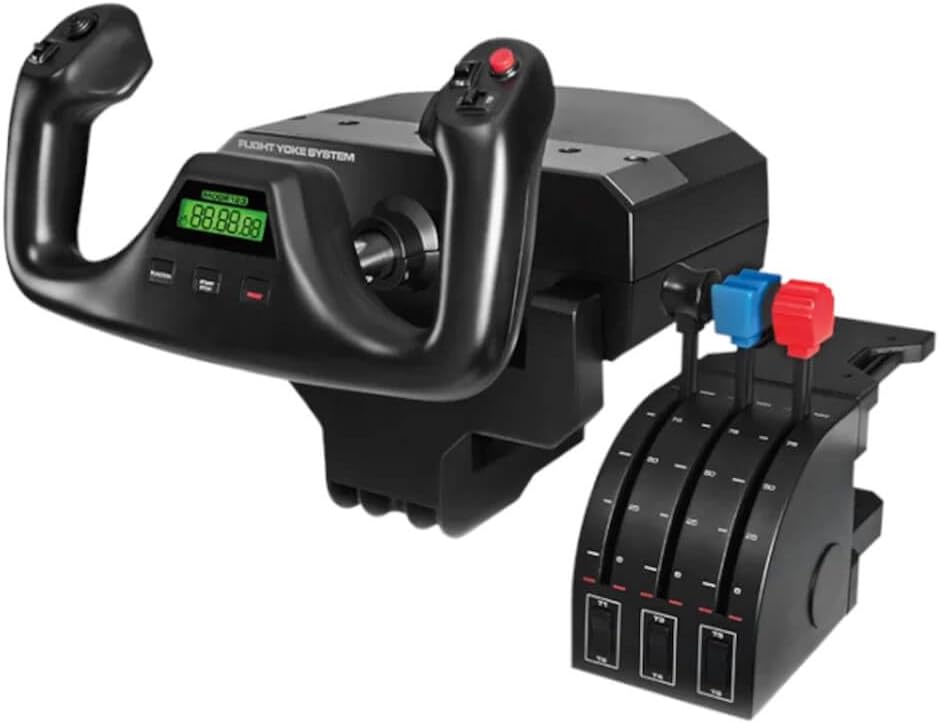

The Logitech G PRO Flight Yoke System stands out as a top choice for Mac enthusiasts seeking professional-grade simulation. With a 4.3 rating, it delivers realistic controls that help pilots build essential muscle memory for flight maneuvers.
We may earn a commission when you buy through this link, at no additional cost to you.
Its stainless steel yoke shaft ensures smooth and accurate inputs during critical phases of flight. The system includes a flight throttle quadrant and offers at least 54 programmable controls, giving you comprehensive access to aircraft functions under your fingertips.
While it requires an optional software download for full functionality on certain sims, the investment pays off in precision. The robust desk clamp provides secure mounting on a wide range of desks, keeping your setup stable during intense sessions.
Pilots of all experience levels will benefit from the intuitive layout and durable build quality. This system is ideal for those serious about upgrading their Mac flight sim setup to a more immersive and authentic experience.
The stainless steel shaft and robust construction mimic real aircraft controls, enhancing immersion and accuracy.
With over 50 programmable controls, you can map complex aircraft systems to match your specific simulation needs.
We may earn a commission when you buy through this link, at no additional cost to you.
The Thrustmaster T-Flight Hotas X offers an affordable entry point into flight simulation without sacrificing essential comfort. Boasting a 4.5 rating, its ergonomic design allows for hours of fatigue-free flying on Mac systems with proper configuration.
We may earn a commission when you buy through this link, at no additional cost to you.
The detachable throttle provides flexible setup options, letting you choose between a compact arrangement or a full cockpit mount. High precision joystick with adjustable resistance lets you fine-tune stick tension to match your flying style preferences.
Although it lacks advanced Mac-native software, the plug-and-play functionality ensures immediate takeoff readiness. Preconfigured controls and built-in memory save your programming even when disconnected, ensuring you are always ready for your next mission.
This controller is perfect for beginners or casual pilots who value comfort and ease of use. It balances cost and performance effectively, making it one of the best value picks available in this category today.
Wide hand rests and natural throttle shapes keep hands in position, reducing strain during long flight sessions.
The detachable throttle allows you to adapt the controller to your desk space and preferred mounting style easily.
We may earn a commission when you buy through this link, at no additional cost to you.
The Honeycomb Alpha Flight Controls Yoke represents the pinnacle of home simulation hardware with its advanced engineering and design. Rated 4.4, it offers a realistic full 180-degree yoke rotation that closely mirrors actual aircraft movement for Mac users.
We may earn a commission when you buy through this link, at no additional cost to you.
The included switch panel adds critical functionality with master, alternator, and avionics switches, bringing realism to your cockpit setup. Dual mounting solutions allow you to choose between heavy-duty clamps or a suction pad, giving flexibility for different desks.
Developed by pilots and aerospace engineers, the yoke ensures the most realistic experience possible through solid steel shafts and dampened self-centering mechanisms. This attention to detail makes it a preferred choice for serious simmers.
If you seek high-fidelity simulation and have the budget for premium gear, this system is unmatched. It provides an authentic feel that transforms your Mac into a professional training environment for flight enthusiasts.
Full 180-degree rotation and dual linear ball bearings provide smooth, frictionless control similar to real aircraft.
The built-in switch panel includes essential controls like ignition and avionics, enhancing system management realism.
We may earn a commission when you buy through this link, at no additional cost to you.
The Logitech G X56 H.O.T.A.S is designed for users seeking military-grade precision and extensive customization options. With a 4.0 rating, it features over 180 programmable controls that cater to complex flight scenarios on supported Mac systems.
We may earn a commission when you buy through this link, at no additional cost to you.
Its RGB backlighting enhances immersion by allowing you to match lighting to your gaming rig. The X-56 places controls under your fingers for easy navigation in VR, helping you distinguish button shapes and feels in low light.
Advanced sensors and spring systems provide adjustable stick force and accurate axis control for precise maneuvers. While the software is primarily Windows-focused, Mac users can access basic plug-and-play functions for immediate gameplay experiences.
This controller is ideal for combat flight enthusiasts who demand high performance and visual feedback. Despite software limitations, its hardware quality and feature set remain top-tier for immersive flight simulation setups.
Controls are positioned for easy access and distinction in VR headsets, enhancing situational awareness.
With over 189 controls, you can map virtually every aircraft function for total command over your flight.
We may earn a commission when you buy through this link, at no additional cost to you.
The Turtle Beach VelocityOne Flightstick brings innovative features like an integrated OLED display to the flight control market. With a 4.2 rating, it offers high-precision non-contact axes that ensure smooth and accurate control for Mac users.
We may earn a commission when you buy through this link, at no additional cost to you.
Its ambidextrous design supports both left and right-handed users comfortably, making it versatile for shared setups. The touchpad navigation sensor allows for full cursor control without needing a mouse, streamlining cockpit management tasks.
Compatibility extends across Xbox and PC platforms, providing flexibility for multi-console households. However, Mac users may need to rely on generic drivers, as official macOS support remains limited compared to Windows environments.
This controller is perfect for those seeking modern design and ease of use in a compact form. It balances functionality and comfort well, making it a strong contender for casual to mid-level flight simulation fans.
The integrated OLED display provides real-time flight data and quick performance tuning without looking away.
Ambidextrous design ensures that both left and right-handed pilots can fly comfortably without adjustments.
We may earn a commission when you buy through this link, at no additional cost to you.
The Logitech G Saitek X52 Pro is a classic choice known for its robust performance and detailed feedback systems. Rating 3.9, it features illuminated buttons and an LCD multi-function display that enhances gameplay through intuitive status monitoring on Mac.
We may earn a commission when you buy through this link, at no additional cost to you.
Its progressive throttle includes resistance adjustments and detents for afterburner and idle settings, offering tactile realism. The 5-position handle adjustment system suits all hand sizes with a soft-touch contoured grip for maximum gaming comfort during sessions.
Program your controller for each game using the powerful smart technology software to customize layouts precisely. While it is an older model, its proven reliability and feature density make it a solid option for dedicated simmers.
This system is best for pilots who prioritize functional depth over modern aesthetics. It remains a capable tool for flight simulation, provided you have the patience to configure the software for Mac compatibility.
The LCD display shows critical data directly on the joystick, reducing the need to glance at your monitor.
Five handle positions allow you to adjust the grip to fit your hand size for long-term comfort.
We may earn a commission when you buy through this link, at no additional cost to you.
The Logitech G Pro Flight Yoke System plus Rudder Pedals Bundle offers a complete solution for realistic flight simulation. With a 4.6 rating, this combo adds another layer of control to your setup, essential for accurate aircraft handling on Mac.
We may earn a commission when you buy through this link, at no additional cost to you.
Differential toe brakes deliver the full control needed when bringing your aircraft up to its stand on the runway. The foot rests adjust to accommodate a wide range of sizes and include non-slip materials to keep your position secure.
Combining the yoke with separate pedals allows for a full cockpit experience without mixing brands or compatibility issues. While the footprint is large, the realism and immersion gained are well worth the desk space required.
This bundle is the ultimate choice for users wanting a professional-grade environment. It ensures that pitch, roll, and yaw inputs are managed with precision, making it a top recommendation for serious Mac aviation fans.
Having both yoke and pedals ensures every control surface is covered for total immersion in your flights.
Adjustable foot rests and non-slip materials keep your lower body comfortable and steady during long sessions.
We may earn a commission when you buy through this link, at no additional cost to you.
The Turtle Beach VelocityOne H.O.T.A.S features extensive programmable inputs and advanced Hall-Effect sensors for high-resolution control. Rated 2.6, it offers a full-color display for real-time flight data, appealing to users who prefer visual feedback in their cockpit.
We may earn a commission when you buy through this link, at no additional cost to you.
Swappable dual throttle detents deliver tactile thrust reference points, while adjustable resistance settings let you tune the feel to your liking. The expandable ecosystem supports pedals and mounting solutions for a full cockpit setup that grows with your needs.
Despite its feature set, user feedback suggests some complexities in setup and reliability that may hinder the experience. Mac users should verify driver support carefully before purchase to ensure seamless operation with their simulation software.
This controller is best for tech-savvy pilots willing to tweak settings for maximum customization. It provides a powerful range of inputs but requires patience and technical know-how to unlock its full potential effectively.
A full-color display provides quick performance tuning and flight data directly on the controller for efficiency.
Support for pedals and mounts allows you to build a larger cockpit setup over time.
We may earn a commission when you buy through this link, at no additional cost to you.
The Logitech G PRO Flight Yoke System combines durability with functional design, offering a stainless steel shaft for precise control. Rated 4.4, it features an integrated USB 2.0 port hub, reducing cable clutter on your desk during Mac sessions.
We may earn a commission when you buy through this link, at no additional cost to you.
With 75 programmable controls and configurable throttle knobs, you have extensive access to aircraft functions under your fingertips. The LCD display provides essential status updates, keeping you informed of critical flight parameters without switching windows.
This model requires Windows 10 or later for optimal performance, so Mac users should check compatibility carefully. The robust build and ergonomic design make it a strong contender for those prioritizing tactile feedback and reliability.
Ideal for pilots seeking a blend of modern features and traditional yoke control, this system delivers consistent performance. Its high user satisfaction score reflects its ability to meet the demands of serious simulation enthusiasts effectively.
An integrated USB hub allows you to connect multiple peripherals without needing extra ports on your computer.
Configurable throttle knobs and a steel shaft provide a satisfying tactile feel that mimics real aircraft.
We may earn a commission when you buy through this link, at no additional cost to you.
The Logitech G Saitek PRO USB Flight Yoke System (Renewed) offers a cost-effective way to access professional aviation simulation hardware. Rating 4.2, it features a stainless steel shaft with ultra-precise bearings for exceptionally smooth pitch and roll control inputs on Mac.
We may earn a commission when you buy through this link, at no additional cost to you.
Its integrated digital chronograph is perfect for brushing up on IFR and cross-country procedures, adding utility beyond just flight. Saitek's Smart Technology software ensures complete customizability of control configuration to match your specific simulation preferences.
While being renewed means it has been previously used, rigorous testing ensures it meets performance standards. Mac OS compatibility extends its usability across multiple operating systems, making it a versatile choice for various setups.
This model is ideal for budget-conscious pilots who still want high-end features. It provides reliable performance and essential controls at a lower cost than new units, making it a smart pick for value seekers.
Buying renewed offers access to premium hardware features at a fraction of the cost of a new unit.
The built-in chronograph supports learning and practicing instrument flight procedures effectively.
We may earn a commission when you buy through this link, at no additional cost to you.
Selecting the right flight controller involves weighing several technical and practical factors to ensure a seamless experience on your Mac.
Verify that the controller supports macOS natively or through compatible drivers. Many products are optimized for Windows, so check for explicit Mac OS mentions in the product description before purchasing.
This ensures you avoid driver conflicts and can use all programmable functions without needing a separate PC or workarounds.
Choose between a joystick, yoke, or HOTAS based on the aircraft types you fly. Yokes are better for airliners and general aviation, while joysticks suit fighter jets and combat simulations.
Selecting the correct type enhances immersion and ensures you have the right physical layout for your favorite simulator scenarios.
Look for durable materials like stainless steel shafts, solid plastic bases, and high-quality switches. A sturdy controller withstands frequent use and provides realistic feedback during turbulent simulation events.
Investing in a well-built device ensures longevity and maintains precision over years of active use.
Count the number of buttons and axes available for mapping. A higher number of programmable inputs allows you to access complex aircraft functions directly without keyboard shortcuts.
More controls mean better immersion and efficiency during flight operations, reducing the need for keyboard interruptions.
Check if the manufacturer provides robust configuration software. Good software allows for easy profile switching, button mapping, and calibration adjustments to fine-tune your experience.
User-friendly software simplifies setup and ensures your preferences are saved correctly across different games or sessions.
Consider how the controller attaches to your desk. Options include heavy-duty clamps, suction pads, or standalone bases. Ensure your desk thickness and material support the chosen mounting method.
Secure mounting prevents unwanted movement during intense maneuvers, maintaining accuracy and safety during gameplay.
Balance the cost with your needs. Entry-level controllers offer basic functionality, while premium options deliver realism and durability. Decide how much you are willing to invest for your simulation experience.
Setting a clear budget helps narrow down choices and prevents overspending on features you may not use.
Assess the comfort level of the grip and throttle layout. Controllers with adjustable handles or thumb rests reduce strain during long sessions, ensuring you can fly without fatigue.
Comfortable design is crucial for extended use, preventing wrist or hand discomfort that could disrupt your immersion.
Start by connecting the controller to a USB port on your Mac and installing the necessary drivers or software from the manufacturer. Ensure that the device is recognized by your system before launching any flight simulator.
Take time to map buttons and axes according to your preferred flight style. Use the provided software to create profiles for different aircraft types, allowing for quick switching between civilian and military setups.
Regularly clean the controller with a soft, dry cloth to remove dust and debris from buttons and sensors. Avoid using harsh chemicals and store it in a cool, dry place when not in use to prolong its lifespan.
Most controllers support major flight simulators like X-Plane and Microsoft Flight Simulator via Windows virtualization. Check specific game compatibility lists to ensure seamless integration with your preferred title.
Use the manufacturer's configuration software to run calibration wizards. Follow on-screen instructions to center axes and adjust sensitivity levels for optimal responsiveness.
Yes, many models feature detachable throttles allowing separate mounting. This flexibility helps you customize your cockpit layout for better ergonomics and space management.
Most brands offer Windows-focused software. Mac users may need alternatives like Joystick Mapper or rely on built-in macOS system preferences for basic mapping.
Entry-level models like the T-Flight Hotas X are beginner-friendly with plug-and-play features. They provide essential controls without overwhelming complexity for new pilots.
High-quality controllers with steel shafts and Hall sensors can last many years with proper care. Regular cleaning and avoiding excessive force help maintain their performance.
Choosing a Mac Game Flight Controller depends on your specific simulation goals and budget constraints. We recommend the Logitech G PRO Flight Yoke System for overall quality and the Honeycomb Alpha Yoke for premium realism.
Prioritize ergonomic design and Mac compatibility to ensure a smooth and comfortable flying experience. Investing in a controller that fits your hands well makes a significant difference in session longevity.
Remember that prices and availability vary, so always check current listings before buying. With the right setup, you can transform your Mac into a powerful tool for aviation training and entertainment.