
Coral M.2 Accelerator B+M Key
5.0Editor score
4 TOPS Peak Performance
Debian Linux Compatible
TensorFlow Lite Support
This guide compares the top M2 Accelerator Cards for AI and storage, evaluating performance, compatibility, power efficiency, and software support to help you
M2 Accelerator Cards are essential hardware components designed to boost machine learning and storage performance in modern computing systems. They provide dedicated processing power for AI tasks or high-speed data access via PCIe interfaces. Selecting the right card depends on your specific workload requirements and system compatibility.
We evaluated ten leading M2 Accelerator Cards based on performance metrics, power efficiency, software ecosystem support, and hardware compatibility. Our analysis focuses on real-world capabilities like inference speed, throughput, and ease of integration. This list covers options ranging from edge AI modules to high-bandwidth storage expanders.
Each product entry details key specifications, pros, cons, and ideal use cases to guide your purchasing decision. Ratings reflect user feedback and technical benchmarks where available. Please note that pricing and availability may change over time, so verify current details before buying.
5.0Editor score

4.3Editor score

The following table provides a side-by-side comparison of all ten M2 Accelerator Cards. It highlights key specifications such as interface type, performance metrics, and compatibility to help you quickly identify the best fit for your setup.


The MX3 M.2 AI Accelerator stands out as a top choice for demanding AI workloads. It offers high-performance processing with energy efficiency. Its compatibility with standard M.2 slots makes it versatile. Users appreciate its robust software development kit.
We may earn a commission when you buy through this link, at no additional cost to you.
This card excels in computer vision tasks with optimized performance. It supports Linux seamlessly and integrates easily into existing systems. The comprehensive SDK simplifies deployment for developers. Its energy efficient design reduces power consumption significantly.
Trade-offs include a focus on Linux which limits Windows users. Integration with Raspberry Pi 5 requires a specific HAT accessory. These limitations are acceptable given the high performance. It remains a strong recommendation for Linux-based AI projects.
Buyers seeking powerful AI acceleration should consider the MX3. It delivers efficiency and performance for demanding workloads. Verify Linux compatibility before purchase. This card is ideal for developers needing reliable edge AI solutions.
Designed to handle complex computer vision tasks efficiently. Delivers performance that meets demanding application requirements.
Comprehensive software toolkit simplifies development workflows. Access documentation and tools via the official developer website.
We may earn a commission when you buy through this link, at no additional cost to you.
This adapter supports two Edge TPU modules for enhanced AI power. It delivers 8 TOPS peak performance with energy efficiency. The M.2 2230 E-key format fits standard slots. Ideal for scaling AI workloads without major system changes.
We may earn a commission when you buy through this link, at no additional cost to you.
Dual TPUs provide parallel processing for faster inference. Each TPU connects via dedicated PCIe Gen2 x1 lanes. This ensures consistent performance across tasks. The power efficiency is a standout feature for edge devices.
E-key slots are not universal across all motherboards. PCIe Gen2 speeds may bottleneck extremely high-bandwidth scenarios. These constraints are minor for most ML tasks. It offers excellent value for dual-TPU configurations.
Choose this for scalable AI projects needing dual-TPU performance. Confirm your system has an E-key slot. It suits developers looking to expand Edge TPU capacity affordably.
Dual TPU setup enables simultaneous inference streams. Improves throughput for multi-model AI applications.
Optimized for high performance per watt. Ideal for battery-powered or power-constrained environments.
We may earn a commission when you buy through this link, at no additional cost to you.
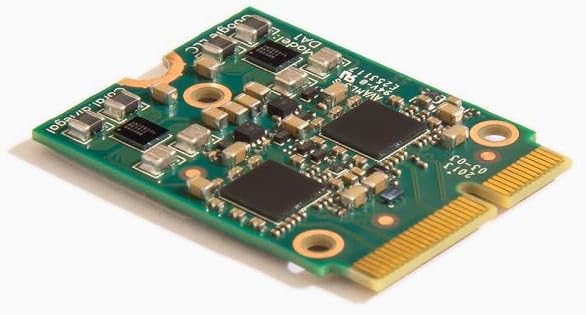
The Coral M.2 Accelerator offers excellent value with 4 TOPS. It integrates well with Debian-based Linux systems. Supports TensorFlow Lite for easy model deployment. Users highlight its energy efficiency and speed for vision tasks.
We may earn a commission when you buy through this link, at no additional cost to you.
Edge TPU coprocessor handles state-of-the-art models efficiently. Achieves high frame rates with minimal power use. AutoML Vision Edge allows custom model deployment easily. No ground-up model building is required for standard tasks.
Linux compatibility limits use on Windows systems. Model compilation adds initial setup steps. These steps are straightforward with documentation. It remains a top pick for budget-conscious developers.
Affordable option for high-performance edge AI projects. Ensure your system supports Debian Linux. Ideal for vision tasks needing reliable TPU acceleration.
Executes MobileNet models at high speeds. Perfect for real-time image analysis tasks.
Simplifies custom model creation with AutoML Vision Edge. Accelerates deployment for specialized classification.
We may earn a commission when you buy through this link, at no additional cost to you.
QNAP card enhances storage and network performance simultaneously. Features two M.2 NVMe slots and a 10GbE port. Uses Marvell controller for reliable high-speed connectivity. Supports QNAP OS and Windows Linux environments.
We may earn a commission when you buy through this link, at no additional cost to you.
Ideal for NAS systems needing fast caching. 10GbE port enables rapid data transfers on network. Low-profile bracket ensures easy installation in standard cases. Performance is consistent under heavy workloads.
Requires QNAP systems for full feature support. High power draw may need adequate system cooling. These are standard for high-performance expansion cards. Excellent for enterprise or prosumer storage needs.
Select for NAS storage and network upgrades. Verify system compatibility before purchase. Best suited for high-throughput data environments.
M.2 NVMe slots improve storage performance. Ideal for caching frequently accessed data.
10GbE port supports fast data transfers. Connects seamlessly with high-speed networking devices.
We may earn a commission when you buy through this link, at no additional cost to you.
Rocket card offers next-gen PCIe 5.0 performance. Supports up to four M.2 NVMe devices. Dedicated lanes ensure maximum throughput. Compatible with mainstream OS and multiple platforms.
We may earn a commission when you buy through this link, at no additional cost to you.
Future-proof design for highest storage speeds. Ideal for workstation or server environments. Native support across Intel, AMD, ARM systems. High bandwidth benefits demanding data workloads.
Premium pricing may be steep for average users. Needs system with PCIe Gen5 slots. These requirements ensure top performance. Recommended for professional high-speed storage setups.
Best for users needing maximum PCIe performance. Confirm motherboard compatibility before buying. Premium choice for high-end storage arrays.
PCIe 5.0 ensures maximum data transfer rates. Future-proofs storage expansion investments.
Native support across Intel AMD and ARM systems. Easy integration into diverse hardware.
We may earn a commission when you buy through this link, at no additional cost to you.
Adapter enables dual Edge TPU performance via PCIe. Converts PCIe Gen3 x4 to four Gen2 lanes. Includes heatsink for thermal management. Ideal for AI edge computing deployments.
We may earn a commission when you buy through this link, at no additional cost to you.
Maximizes hardware investment without new system. Perfect for TensorFlow Lite and computer vision. Room to grow as projects scale. Reduces need for multiple PCIe slots.
PCIe slot availability is a prerequisite. Thermal management depends on case airflow. These are minor considerations. Great value for scaling AI capabilities.
Use to expand AI performance on existing hardware. Verify PCIe slot availability. Suitable for developers needing TPU clustering.
Splits PCIe lanes for multiple accelerators. Ensures stable performance across devices.
Dual TPU power in single slot. Saves space in crowded chassis.
We may earn a commission when you buy through this link, at no additional cost to you.
ASUS card supports four NVMe drives with 512 Gbps bandwidth. Uses server-grade PCB for reliability. Active cooling maintains optimal temperatures. Supports RAID functions across platforms.
We may earn a commission when you buy through this link, at no additional cost to you.
Ideal for bootable RAID arrays. Heatsink and fan control ensure unthrottled speeds. Two-phase power solution supports latest drives. Compatible with AMD and Intel systems.
Requires dedicated PCIe slot and power connector. Power use may impact low-power systems. These are trade-offs for performance. Best for professional multi-drive setups.
Choose for multi-drive RAID or high-bandwidth storage. Ensure PCIe slot availability. Excellent for workstation or server environments.
Active cooling reduces temperatures effectively. Maintains performance during heavy data transfers.
Create bootable arrays with four drives. Improves data redundancy and speed.
We may earn a commission when you buy through this link, at no additional cost to you.
Hailo-8 module delivers 26 TOPS performance efficiently. Low power draw at 2.5W typical. Supports Linux and Windows seamlessly. Ideal for Raspberry Pi 5 integration.
We may earn a commission when you buy through this link, at no additional cost to you.
Scalable for multi-stream processing. Real-time low-latency AI on edge. Compatible with major frameworks like TensorFlow and PyTorch. Official wiki resources aid developers.
Operates in wide temperature range. Module-only design needs additional mounting. These fit standard use cases. Top choice for high-performance edge AI.
Buy for high-TOPS edge AI projects. Verify Raspberry Pi 5 compatibility. Excellent for scalable AI inference tasks.
Handles simultaneous multi-streams easily. Supports multi-model AI applications.
Works with TensorFlow, PyTorch, and more. Simplifies model deployment workflows.
We may earn a commission when you buy through this link, at no additional cost to you.
Coral accelerator integrates Edge TPU for 4 TOPS. Supports A+E key for easy integration. Provides 2 TOPS per watt. Compatible with Linux and Windows.
We may earn a commission when you buy through this link, at no additional cost to you.
Industrial-grade reliability suits harsh environments. Wide OS support enhances flexibility. Low power design ideal for embedded apps. Consistent performance across tasks.
Requires specific A+E key slots. Model compilation is standard for Edge TPU. Trade-offs are minimal. Best for embedded AI systems.
Choose for embedded or industrial AI. Check slot compatibility. Strong performer for low-power tasks.
Operates in -20 to 85°C. Withstands harsh conditions.
2 TOPS per watt efficiency. Ideal for energy-constrained setups.
We may earn a commission when you buy through this link, at no additional cost to you.
Adapter designed for dual TPU modules. Maximizes AI inference performance. Bidirectional Gen2 bandwidth supports dual TPU. Includes mounting screw for secure fit.
We may earn a commission when you buy through this link, at no additional cost to you.
Space-efficient dual TPU without extra PCIe slots. Prevents errors by excluding incompatible models. Vibration-resistant PCB ensures stability. Ideal for specific Coral setups.
Gen2 limits high-bandwidth use. Not compatible with Pi CM4 or USB enclosures. These prevent incorrect purchases. Best for dedicated TPU builds.
Use for dual TPU optimization. Verify module compatibility. Strong adapter for targeted AI tasks.
Includes stainless steel screw for stability. Reduces risk of loose connections.
Explicit incompatibility notes avoid errors. Ensures buyers select correct boards.
We may earn a commission when you buy through this link, at no additional cost to you.
Selecting the right M2 Accelerator Card depends on specific workload needs and system compatibility. Consider performance metrics, interfaces, and software support.
Performance is measured in TOPS (Trillions of Operations Per Second) for AI or throughput for storage. Higher TOPS means faster inference. Match performance to your workload intensity.
Focus on sustained performance under load rather than peak bursts.
Check your system's M.2 key (B, M, E, A+E). M-key supports NVMe; E-key supports Wi-Fi; A+E supports AI accelerators. Ensure physical fit and protocol support.
Verify PCIe lane availability and version to avoid bottlenecks.
Some cards support only Linux while others offer Windows. Verify drivers and framework support like TensorFlow Lite or ONNX.
Choose cards with comprehensive documentation for your OS.
Energy-efficient designs reduce heat and power use. Look for TOPS per watt ratings especially for embedded systems.
Prioritize low power for battery or portable devices.
Support for common frameworks simplifies development. Comprehensive SDKs aid deployment and customization.
Verify available resources and community support.
High performance generates heat. Check for heatsinks or fans to avoid throttling.
Active cooling ensures consistent speeds under load.
Consider future growth. Some cards support multiple devices or lane splitting.
Choose expandable options if workload may increase.
Balance cost with performance needs. Premium models offer higher speed but may be unnecessary for simple tasks.
Budget picks often meet basic requirements effectively.
Install the card into a compatible M.2 or PCIe slot following hardware guidelines. Ensure secure seating and connect any required power cables.
Install drivers and SDKs from the manufacturer. Configure software to detect the accelerator for AI tasks or storage acceleration.
Monitor temperatures and ensure proper airflow. Update firmware regularly for performance improvements and security.
An M2 Accelerator Card is a hardware component that boosts performance for AI inference or high-speed storage. It uses M.2 form factors to interface with your system. These cards provide dedicated processing power.
Not all cards support Raspberry Pi. Only specific models like Hailo-8 or MX3 mention Pi compatibility via specific HATs. Verify hardware requirements before purchase.
Most AI accelerators focus on Linux but some support Windows. Check OS compatibility carefully if using Windows systems to ensure driver support.
Edge TPU is a Google-designed accelerator for TensorFlow Lite. It offers high efficiency for vision tasks. Other accelerators may support broader frameworks.
M2 cards are optimized for AI or storage, not graphics gaming. They do not replace GPUs for rendering games. Their use cases are specialized.
Check your motherboard manual or inspect the slot notch. B-key is for SATA; M-key is for NVMe; E-key is for wireless modules. Match your card to the slot type.
Most plug into standard M.2 or PCIe slots. Installation requires screwing down the card and installing drivers. Some may need a case fan for cooling.
Many cards include heatsinks. High-power models may need extra fans. Check thermal specifications if using in enclosed cases.
The MX3 offers the best overall AI performance, while Coral provides budget-friendly options. Rocket and ASUS lead in premium storage speed. Pick based on your primary use case.
Prioritize compatibility with your OS and hardware slots. Performance and power efficiency are key factors for edge deployments. Consider future scalability when choosing adapter solutions.
Always check current prices and availability as these vary over time. Verify driver support and community resources before purchasing. This guide helps narrow choices effectively.