
ASRock B550M-HDV Socket AM4 Micro-ATX Motherboard, Supports AMD Ryzen 5000/4000/3000 Series Processors, DDR4 4733+(OC), PCIe 4.0, Gigabit LAN
4.5Editor score
Affordable AM4 platform support
PCIe 4.0 ready slot
Stable 6 phase power design
Discover the top low power motherboard options for energy efficient builds. Our guide compares features performance and connectivity for NAS home and office
Finding the right low power motherboard is essential for building energy efficient systems that run cool and quietly. Whether you need a NAS server or a compact home PC the right board ensures reliable performance without wasting electricity.
We evaluated ten top rated models based on processor efficiency connectivity options and thermal management. Each entry offers unique strengths for specific use cases ranging from basic office tasks to intensive virtualization projects requiring steady power.
Every pick highlights key specifications and real world strengths to help you decide quickly. Please note that prices and availability change often so verify details before you buy to ensure you get the best deal available today.
4.5Editor score

4.5Editor score

5.0Editor score
This section provides a direct side by side look at every model listed in our guide. We highlight core specs like form factor CPU support and connectivity so you can quickly identify which board fits your specific project needs best.





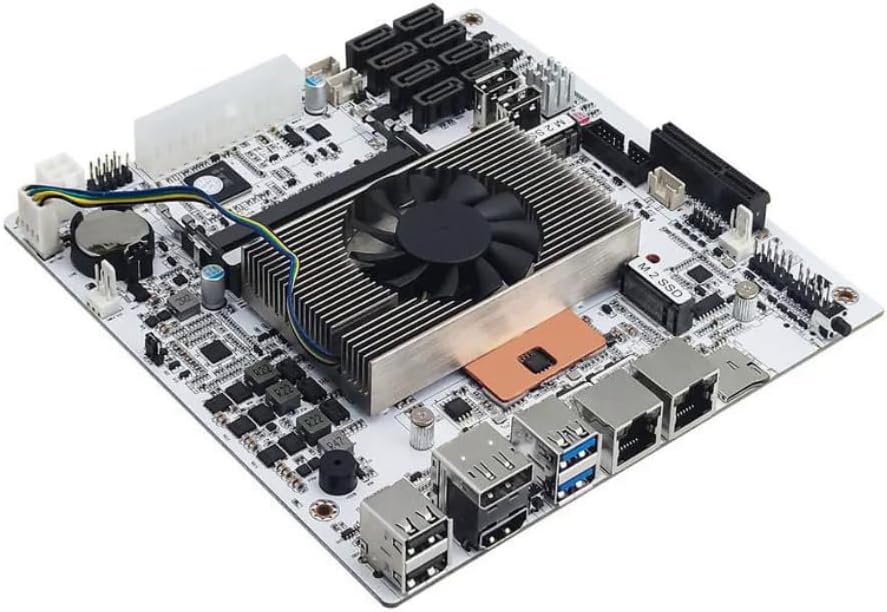
This board stands out as the top pick for efficient home labs and network appliances. With a Celeron N5105 processor and four fast network ports it delivers robust performance while keeping power draw minimal.
We may earn a commission when you buy through this link, at no additional cost to you.
The standout feature is the quad 2.5GbE networking which enables high speed data transfer for NAS or firewall setups. It also supports up to 32GB RAM and six SATA drives plus two M.2 NVMe slots for flexible storage expansion.
Users should note the board needs both 24PIN and 4PIN power connectors to start up. Additionally the first boot may take several minutes to read memory which is normal behavior for this hardware.
Choose this model if you need a powerful low wattage server that can handle multiple network connections and large storage arrays. It is ideal for enthusiasts building dedicated media centers or virtualization hosts.
The four dedicated network ports allow you to separate traffic for management storage and client access without needing extra NIC cards.
Dual HDMI and DP outputs support two 4K monitors at 60Hz making it easy to connect multiple screens for monitoring tasks.
We may earn a commission when you buy through this link, at no additional cost to you.
The D1800M offers a straightforward solution for ultra budget builds or light office tasks. It uses an Intel J1800 CPU which is integrated directly onto the board to save space and reduce power use.
We may earn a commission when you buy through this link, at no additional cost to you.
This model relies on DDR3 memory and older PCI Express lanes which limits its speed but ensures stability for basic computing. It includes essential video ports like HDMI and DVI for connecting monitors easily.
You will find only basic storage and USB options here so it may not suit heavy workloads. However for a thin client or simple web terminal this board provides solid and dependable performance.
Pick this board if you already have DDR3 components or need a cheap option for a low duty cycle device. It fits well into projects where cost is the primary concern.
With a modest price tag this board allows you to build a functional low wattage PC without spending much on new hardware components.
If you have old DDR3 RAM or legacy peripherals this board keeps them usable in a new energy efficient system setup.
We may earn a commission when you buy through this link, at no additional cost to you.
The B550M K is a solid choice for those entering the AMD ecosystem on a tight budget. It supports modern Ryzen processors and offers PCIe 4.0 which helps future proof your build for faster storage.
We may earn a commission when you buy through this link, at no additional cost to you.
It comes with two M.2 slots that enable quick NVMe storage upgrades. The board uses a simple 3+3 power phase design which is sufficient for non overlocked CPUs but limits heavy overclocking potential.
While it lacks advanced features like onboard WiFi the essential ports and audio are present for everyday use. The Q Flash utility makes BIOS updates easy without needing a CPU installed first.
Select this board if you want a clean reliable platform for a mid range AMD CPU without paying extra for bells and whistles. It works well for light gaming or workstation tasks.
Dual M.2 slots allow you to run an OS drive and a scratch drive at high speeds without slowing down system performance.
Q Flash lets you update the BIOS using a USB drive which is convenient if you swap in older CPUs for testing.
We may earn a commission when you buy through this link, at no additional cost to you.
The PRO B550M-P brings smart thermal management to your system with its Frozr AI cooling feature. It adjusts fan speeds automatically based on GPU and CPU temps which helps keep noise low during light tasks.
We may earn a commission when you buy through this link, at no additional cost to you.
This board supports high speed DDR4 RAM overclocking and includes both Gen4 and Gen3 M.2 slots for flexible storage configurations. The Core Boost technology ensures stable power to the CPU for better performance.
Network and USB ports are standard but the audio is limited to basic HD audio. For users who do not need integrated WiFi this board offers a solid feature set for the price.
Buy this board if you value intelligent cooling and memory performance. It is great for users who want a reliable platform that adapts to workload changes without manual tuning.
The AI cooling feature monitors temperatures and adjusts fans so you get low noise when idle and more cooling when under load.
High memory speeds improve application response times and are useful for tasks like video editing or large data processing.
We may earn a commission when you buy through this link, at no additional cost to you.
This board features an integrated J4125 quad core processor which is well suited for low wattage home office setups. It supports standard DDR4 memory and includes a key E slot for adding wireless connectivity if needed.
We may earn a commission when you buy through this link, at no additional cost to you.
The board is compact and easy to fit into small enclosures. While it uses older PCIe 2.0 lanes it still provides enough bandwidth for most standard network cards or capture devices.
It is worth noting the customer rating is lower which may indicate some compatibility quirks with memory or BIOS settings. Check support lists before buying to avoid installation headaches.
Choose this model for basic web browsing or lightweight server tasks where cost matters most. It is a simple solution that avoids the need for a separate CPU purchase.
The M.2 Key E slot allows you to add a wireless card so you can use WiFi without using external USB adapters.
Its micro ATX size lets you use smaller cases which is great for saving desk space in tight home offices.
We may earn a commission when you buy through this link, at no additional cost to you.
The B550M-HDV offers strong value with support for Ryzen processors and PCIe 4.0. It includes three video outputs which makes it easy to connect older monitors or use multiple screens for productivity.
We may earn a commission when you buy through this link, at no additional cost to you.
It supports memory speeds up to 4733MHz and uses a stable 6 phase power design to keep CPU temps manageable. Full Spike Protection guards your ports from electrical surges which helps extend component life.
You get a good range of USB ports and audio options for daily use. The main limitation is having only two RAM slots which caps future memory upgrades if you need more than 64GB.
This is the pick for builders who want modern AMD features at a low cost. It suits small office PCs or home media boxes where budget is a top priority.
With HDMI DVI and VGA ports you can connect old and new displays at once for flexible multitasking without buying adapters.
Full Spike Protection shields your ports from power spikes which is valuable in areas with unstable electricity.
We may earn a commission when you buy through this link, at no additional cost to you.
This mini ITX board is perfect for tiny builds where space is limited. It includes Intel WiFi and Bluetooth out of the box so you do not need extra adapters for wireless connectivity.
We may earn a commission when you buy through this link, at no additional cost to you.
The 6 phase digital PWM with 55A DrMOS provides clean stable power for Ryzen CPUs. It also features Q Flash Plus which allows BIOS updates even without a CPU installed if you need to switch processors.
There are three display outputs which help with multi screen setups in a small case. However it supports only one M.2 NVMe slot and two RAM sticks which limits storage and memory expansion.
Pick this board for small form factor PCs that need wireless and low power usage. It works well for living room media hubs or portable systems.
Integrated WiFi and Bluetooth remove the need for external antennas keeping the system clean and easy to place in tight spots.
Q Flash Plus lets you update the BIOS using just power and a USB drive which is handy for troubleshooting or CPU swaps.
We may earn a commission when you buy through this link, at no additional cost to you.
This model is rated perfect by users for its robust feature set. It includes Wi-Fi 6E which gives low latency wireless access and supports fast memory speeds for responsive computing.
We may earn a commission when you buy through this link, at no additional cost to you.
The audio uses a Realtek ALC1220 codec with Nahimic software for immersive sound. There are plenty of USB ports and a solid 8 phase power design which handles Ryzen CPUs with ease.
It supports both HDMI and DP outputs for multi monitor setups. The only downside is the cost compared to non WiFi boards which may not be needed for wired environments.
Choose this board if you want top tier audio and wireless in a compact package. It suits premium home PCs that need both performance and connectivity.
The 6GHz band support reduces interference so you get faster stable wireless speeds even in crowded networks.
The premium codec delivers clear sound that works well for music and gaming without needing extra audio gear.
We may earn a commission when you buy through this link, at no additional cost to you.
This board targets home server builders needing large storage and fast networking. It uses an 8th Gen U series CPU with eight threads which handles virtual machines well while staying efficient.
We may earn a commission when you buy through this link, at no additional cost to you.
It features eight SATA ports and two M.2 NVMe slots giving you room to expand your array. Dual 2.5GbE LAN lets you separate data and management traffic for better security.
The unit comes with a dual fan cooler but be aware of a known sleep mode bug. You may also need to wait a few minutes on first boot to read RAM info.
Select this board for a dedicated NAS or firewall appliance where storage count and virtualization matter. It fits well in 1U rack cases or small desktop chassis.
Eight SATA ports mean you can fill the drive bays in your case without needing extra PCIe adapters or controllers.
VT-x and VT-d support allow you to run multiple VMs smoothly which is key for labs or advanced home server tasks.
We may earn a commission when you buy through this link, at no additional cost to you.
This board uses an i5 8265U processor which offers strong single core performance for low wattage tasks. It supports eight SATA ports and dual 2.5GbE LAN to handle large NAS setups and heavy traffic.
We may earn a commission when you buy through this link, at no additional cost to you.
You get two M.2 NVMe slots for cache or boot drives and a PCIe x4 slot for expansion. The board includes a TF slot and supports passthrough for virtualization which is useful for advanced setups.
Note that it does not support sleep mode which is common for server boards. It also uses an ES version CPU so check compatibility before committing to avoid driver issues.
Pick this board for a powerful 8 bay NAS or virtualization host. It works well with open source systems like TrueNAS or unRAID for robust storage solutions.
Storage and NIC passthrough enable you to give VMs direct hardware access which improves performance for specific tasks.
The i5 quad core design provides enough headroom to run multiple services or virtual machines at once efficiently.
We may earn a commission when you buy through this link, at no additional cost to you.
Selecting the right low power motherboard requires looking beyond the name tag. You must weigh processor type form factor connectivity and power delivery to match your project goals and energy needs.
The processor decides how much power your system will draw under load. Low power boards often use integrated CPUs like Intel Celeron or AMD Ryzen G series which balance performance and efficiency.
Choose a processor that fits your workload whether that is basic web browsing or heavy virtualization tasks.
Form factor affects how much room your build needs inside a case. Mini ITX boards are best for small enclosures while Micro ATX offers more ports and expansion slots.
Verify your case supports the size before you buy to ensure a proper fit.
Look at how many USB audio and network ports you need. Some boards include multiple LAN ports which are vital for network appliances or NAS builds.
Count your current peripherals to make sure the board has enough connections for all your devices.
Check if the board supports DDR3 or DDR4 memory and how many slots are available. More slots allow you to add capacity later if your needs grow.
Ensure the memory speed matches your CPU for best performance without wasting energy on slow RAM.
Storage interfaces like SATA and M.2 determine how many drives you can add. High count SATA ports are key for media servers while M.2 offers faster read speeds.
Plan your storage array size to select a board with enough ports for your drives.
Power delivery refers to how stable the electricity is to your CPU. Boards with better VRM designs keep temps low and ensure stable operation under load.
Aim for a board with quality capacitors and chokes if you plan to run heavy tasks.
Networking can make or break a server setup. Boards with dual or quad Ethernet ports allow you to separate traffic for better security and speed.
Choose a board with at least one gigabit port if you need fast data transfer.
Expansion slots let you add WiFi network or sound cards if the board lacks them. PCIe 4.0 slots offer faster data transfer for modern GPUs and storage.
Check your PCIe slot count and speed to see if it fits your expansion plans.
Begin by installing the CPU and memory before placing the board in your case to avoid pin damage. Secure it firmly with standoffs and plug in the power and data cables.
Set up your BIOS by pressing the DEL key during boot and ensure all fans and drives are detected. Update the BIOS to the latest version for better stability and CPU support.
Keep the inside of your case clean from dust which can block airflow and raise temps. Use compressed air to clean fans and heatsinks regularly to maintain low power efficiency.
A low power motherboard uses efficient components and integrated processors that draw less energy than standard parts. It also often includes sleep modes and optimized voltage regulators to reduce overall power use.
Yes but you should pick one with PCIe 4.0 support and enough VRM cooling for your CPU. Most low power CPUs are fine for casual gaming but may struggle with high end titles.
Some low power boards have built in WiFi but many do not. Check the product specs carefully or plan to add a PCIe or M.2 WiFi card if you need wireless access.
DDR4 is more efficient and faster than DDR3 but requires newer hardware. If you need modern performance choose DDR4. If you have old parts DDR3 can still work for basic tasks.
Only boards with sockets support CPU upgrades. Integrated CPU boards cannot be changed so make sure you pick one that fits your future needs if you plan to upgrade.
Most use less than 65 watts idle and under load compared to standard boards that can exceed 200 watts. The exact number depends on your CPU memory and number of drives.
We explored ten top models including the Celeron N5105 NAS board and the Ryzen based boards for general use. Each offers unique strengths for different tasks from simple offices to advanced home servers.
When deciding focus on your key needs like port count storage options and thermal efficiency. A board that fits your current setup may not suit your goals if you need to expand later.
Always verify current prices and availability before you buy as stock can change quickly. Checking multiple sources ensures you get the best deal for your chosen low power motherboard.