
Logitech MX Keys Mini
4.4Editor score
Smart illumination adjusts to light
Multi-device connectivity via Bluetooth
USB-C rechargeable for long use
Discover the top lightweight keyboard options for productivity and travel. This guide compares features, battery life, and portability across ten leading
Finding the right lightweight keyboard can transform your daily workflow and travel experience. Whether you are a remote worker, a student, or a digital nomad, portability without sacrificing comfort is key to staying productive on the go.
We have evaluated ten top-rated models based on design, connectivity, battery performance, and typing feel. Our analysis focuses on real-world usability, durability, and how well each option fits into a mobile lifestyle or compact workspace.
Each pick highlights specific strengths like multi-device switching, ergonomic layouts, or ultra-slim profiles. Please note that product availability and pricing can change frequently, so always verify the latest details before making your final purchase decision.
4.4Editor score

4.3Editor score
4.5Editor score
This side-by-side comparison breaks down the key specifications and unique selling points of each model to help you find the perfect match for your specific needs and usage scenarios.



The GEODMAER 65% Gaming Keyboard stands out as a budget-friendly option for users needing a compact layout without sacrificing essential functions. It offers a solid typing experience with backlighting features that appeal to gamers and office workers alike.
We may earn a commission when you buy through this link, at no additional cost to you.
Its 65% design saves desk space while retaining arrow keys and essential navigation controls. The detachable Type-C cable ensures a stable connection, and the membrane keys provide a quiet typing experience suitable for shared environments.
While it lacks wireless capability, the wired connection minimizes latency for gaming. The LED modes are customizable, though the membrane feel may not satisfy enthusiasts seeking tactile feedback from mechanical switches.
This keyboard is ideal for students or remote workers with limited desk space who want a functional, lightweight setup. Its combination of portability and affordability makes it a strong contender in the entry-level category.
The 65% layout removes the numpad but keeps arrow keys, balancing portability with usability for most daily tasks.
Backlight modes can be adjusted for brightness and breathing effects, enhancing visibility in low-light settings.
We may earn a commission when you buy through this link, at no additional cost to you.
The Logitech Pebble Keys 2 K380s is a sleek, portable option designed for users who switch between devices frequently. Its slim profile fits easily into bags, making it a great companion for travelers and mobile professionals.
We may earn a commission when you buy through this link, at no additional cost to you.
With Bluetooth connectivity, you can pair up to three devices and switch between them with a simple button press. The keys are designed to be quiet and comfortable, reducing finger fatigue during long typing sessions.
The keyboard uses recycled materials and offers a battery life that extends up to three years with normal use. While it lacks backlighting, its energy efficiency ensures you won't need to replace batteries often.
This model is best suited for office workers or students who value simplicity and portability. Its reliable performance and eco-friendly design make it a smart choice for everyday use.
Switching between laptops, tablets, and phones is seamless with dedicated Easy-Switch buttons on the top row.
Made with significant recycled plastic content, this keyboard aligns with sustainability goals without compromising quality.
We may earn a commission when you buy through this link, at no additional cost to you.
The Arteck 2.4G Wireless Keyboard offers a full-size layout in an ultra-slim form factor, perfect for users who need a number pad for data entry. Its stainless steel construction gives it a premium, durable feel.
We may earn a commission when you buy through this link, at no additional cost to you.
Using a 2.4GHz connection, it ensures stable performance with minimal lag. The rechargeable battery lasts up to six months on a single charge, reducing the need for frequent battery replacements.
While it uses a USB receiver rather than Bluetooth, the connection is reliable for desktop setups. The low-profile keys provide a quiet typing experience, making it suitable for office environments.
This keyboard is an excellent choice for home office users who want a full-size typing experience without the bulk. Its combination of durability and battery life makes it a practical investment.
The stainless steel body adds strength and a sleek look, ensuring the keyboard withstands daily wear and tear.
With six months of battery life, this model reduces maintenance and keeps you productive without interruptions.
We may earn a commission when you buy through this link, at no additional cost to you.
The ProtoArc XK01 is a unique solution for travelers who need a full-size typing experience on the go. It folds down to a compact size but expands to provide all standard keys, including a number pad.
We may earn a commission when you buy through this link, at no additional cost to you.
Its Bluetooth 5.1 connection allows you to pair three devices and switch between them instantly. The scissor switches offer a quiet, comfortable typing experience that minimizes noise in public spaces.
The keyboard charges via USB-C and features a long standby time, ensuring it is ready when you need it. While unfolding requires a moment, the benefit of a full layout outweighs this minor inconvenience.
This model is perfect for professionals who travel frequently but still require complex input capabilities. Its blend of functionality and portability makes it a standout choice in the foldable category.
The tri-fold mechanism protects keys during transport and sets up quickly on hotel desks or airplane trays.
Supporting up to three devices, you can manage your phone, tablet, and laptop from one reliable keyboard.
We may earn a commission when you buy through this link, at no additional cost to you.
The TECKNET 2.4G Wireless Keyboard is designed for users who prioritize portability and media control. Its small size makes it ideal for entertainment centers or tight desks where space is limited.
We may earn a commission when you buy through this link, at no additional cost to you.
Dedicated media hotkeys allow you to control volume and playback without switching apps. The 2.4GHz connection ensures a stable link, and the battery life extends up to twelve months with normal use.
Because it uses a USB receiver, compatibility is broad across Windows and Mac systems. The compact layout may require a short adjustment period if you are used to full-size keys.
This keyboard is great for living room setups or light travelers who need basic typing and media control. Its simplicity and reliable performance make it a solid accessory for home entertainment.
Hotkeys provide quick access to volume and playback, enhancing your experience with PCs or smart TVs.
With twelve months of battery usage, you can rely on this keyboard for long periods without interruption.
We may earn a commission when you buy through this link, at no additional cost to you.
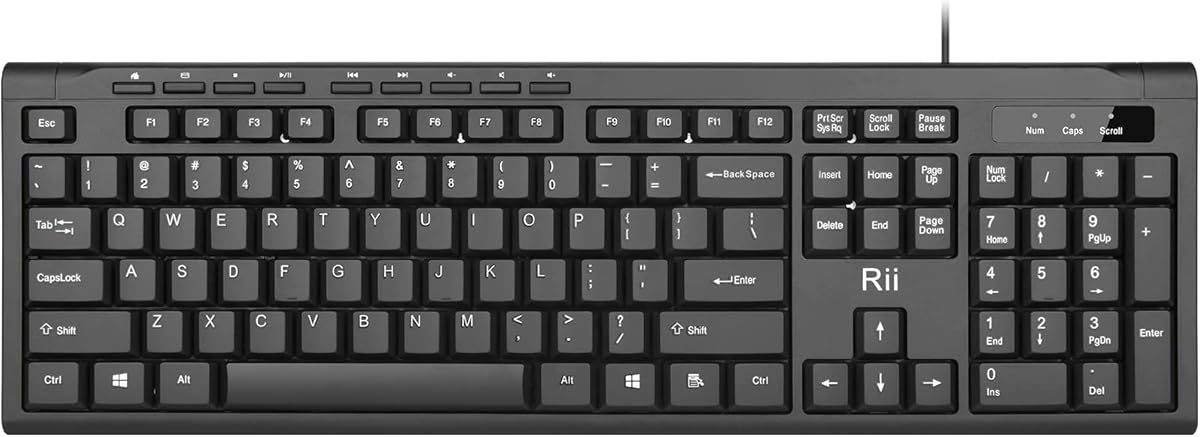
The Rii RK907 offers exceptional value for users needing a basic, reliable keyboard on a tight budget. Its ultra-slim profile fits easily into any space, and the low-profile keys provide a comfortable typing experience.
We may earn a commission when you buy through this link, at no additional cost to you.
As a wired model, it eliminates the need for batteries and ensures constant connectivity. The splash-resistant design adds a layer of durability, protecting against accidental spills during daily use.
While it lacks advanced features like backlighting or Bluetooth, it delivers exactly what is needed for straightforward tasks. The quiet keys make it suitable for shared workspaces or quiet environments.
This keyboard is perfect for secondary setups, kiosks, or temporary workstations. Its low cost and reliable performance make it an excellent choice for budget-conscious buyers.
Providing essential typing functions at a low price, this keyboard is ideal for cost-effective deployment.
The slim profile complements modern monitors and laptops, adding a clean look to any desk setup.
We may earn a commission when you buy through this link, at no additional cost to you.
The Logitech MX Keys Mini is a premium compact keyboard designed for professionals who demand high performance and style. Its smart illumination lights up when your hands approach, saving power while improving visibility.
We may earn a commission when you buy through this link, at no additional cost to you.
Featuring spherical key shapes, it offers a comfortable typing experience that aligns with your fingertips. You can pair up to three devices and switch between them effortlessly, supporting a seamless multi-device workflow.
The rechargeable battery provides weeks of use on a single charge, and the USB-C connection ensures modern compatibility. While it is a significant investment, the build quality and features justify the cost for power users.
This keyboard is ideal for creatives and executives who need a reliable, portable tool for demanding work. Its polished design and functional excellence set it apart as a top-tier choice.
Sensors detect hand movement to activate backlighting automatically, providing convenience without manual adjustments.
Switching between computers is fluid, allowing you to copy and paste across devices with compatible software.
We may earn a commission when you buy through this link, at no additional cost to you.
The ProtoArc XK04 is a pocket-sized keyboard specifically optimized for mobile devices like tablets and phones. Its two-fold design keeps it compact, and the included PU leather cover protects it from scratches during travel.
We may earn a commission when you buy through this link, at no additional cost to you.
With Bluetooth 5.1, it connects quickly to devices with a range of up to thirty-three feet. The lightweight construction makes it easy to carry in a bag without adding significant weight.
While the keycaps are smaller than a full desktop keyboard, they provide a reliable physical typing option for mobile use. This is ideal for drafting emails or notes while away from a computer.
This keyboard suits travelers and mobile users who need typing capability on the go. Its balance of protection, portability, and performance makes it a practical accessory for modern lifestyles.
The PU leather cover serves as both a stand and a shield, ensuring durability during everyday carry.
Layout choices prioritize essential keys needed for mobile tasks, avoiding unnecessary bulk for phone usage.
We may earn a commission when you buy through this link, at no additional cost to you.
The Arteck 2.4G Wireless Keyboard combines a sleek stainless steel body with ultra-slim dimensions, appealing to users who value aesthetics. Its low-profile keys provide a quiet and comfortable typing experience suitable for any environment.
We may earn a commission when you buy through this link, at no additional cost to you.
With a rechargeable battery that lasts up to six months, it reduces the need for disposable batteries. The 2.4GHz connection ensures a stable link, and the design is compatible with a wide range of systems.
While the metal finish may show fingerprints, it adds a durable and professional look to your setup. The keyboard balances functionality with style, making it a visually appealing addition to any desk.
This model is best for home office users who prefer a clean, modern design. Its reliable performance and elegant look make it a strong option for daily productivity tasks.
The stainless steel finish offers a premium look that complements modern hardware and minimalist desk setups.
Using a dedicated USB receiver ensures a stable connection that is not affected by Bluetooth interference.
We may earn a commission when you buy through this link, at no additional cost to you.
The Logitech K400 Plus is designed specifically for navigating PC-connected TVs and entertainment systems. Its integrated touchpad eliminates the need for a separate mouse, simplifying control from the couch.
We may earn a commission when you buy through this link, at no additional cost to you.
With a wireless range of up to thirty-three feet, you can move around comfortably while navigating menus. The battery life extends up to eighteen months, ensuring reliable performance over long periods.
While it is optimized for media control rather than heavy typing, it is perfect for smart TV setups. The spill-resistant design adds durability, making it suitable for living room environments.
This keyboard is an excellent solution for home theater users. Its combination of touchpad convenience and long battery life makes it a practical choice for media consumption.
The touchpad replaces the need for a mouse, allowing cursor control directly from the keyboard for easier navigation.
Specialized keys provide quick access to volume and media functions, enhancing your TV viewing experience.
We may earn a commission when you buy through this link, at no additional cost to you.
Selecting the right lightweight keyboard involves evaluating several key factors to ensure it meets your specific usage needs and lifestyle requirements.
Decide between wired and wireless options. Wireless Bluetooth or 2.4GHz dongle keyboards offer freedom from cables, while wired models ensure stable connection without battery concerns.
Choose wireless for portability and wired for uninterrupted performance.
Look for models with long battery life or rechargeable options. Rechargeable batteries reduce waste and are more convenient for frequent travelers.
Prioritize rechargeable models to minimize maintenance and ensure continuous use.
Consider whether you need a full-size layout or a compact option. Compact keyboards save space but may require adaptation to missing keys or smaller sizes.
Choose a layout that balances portability with the keys you need daily.
Materials like stainless steel or high-quality plastic impact durability. Lightweight yet sturdy materials ensure the keyboard withstands travel and daily use.
Select robust materials that maintain quality without adding unnecessary weight.
Key profile height and switch type affect comfort. Low-profile keys are quieter and lighter, while mechanical switches provide tactile feedback for serious typists.
Test key feel if possible to ensure it suits your typing style.
Ensure the keyboard works with your operating system. Some models offer specific drivers or layouts for Mac, Windows, or mobile devices.
Check compatibility to avoid connection issues or function key problems.
Foldable designs or included cases protect your keyboard during travel. Weigh the device to ensure it truly fits your travel needs.
Opt for features like folding or slim cases to maximize convenience.
Extras like backlighting, multimedia keys, or multi-device support enhance usability. Evaluate if these features align with your workflow requirements.
Look for features that add value to your daily tasks.
Connect your keyboard by pairing via Bluetooth or inserting the USB receiver. Ensure your device recognizes the input before starting your work.
Clean regularly by brushing dust from between keys and wiping the surface with a dry cloth. Avoid using liquid cleaners directly on the keys.
Store in a protective case or bag to prevent damage during transport. Turn off the device when not in use to preserve battery life.
Yes, many lightweight keyboards are designed with travel in mind using durable materials like stainless steel or reinforced plastic. Models with foldable designs also offer built-in protection for keys during transit.
Battery life varies by model, ranging from months to years. Rechargeable options typically last weeks on a single charge, while AA/AAA powered models can last months depending on usage.
Many modern lightweight keyboards support multi-device switching via Bluetooth or dedicated buttons. This allows seamless transitions between computers, tablets, and phones.
Most models are compatible with both Mac and Windows, though some may have specific key mappings. Always check the product details for OS support before purchasing.
Yes, some compact mechanical keyboards exist but are often heavier due to switch mechanisms. Membrane options are more common in ultra-lightweight portable models.
Use a soft brush or compressed air to remove debris from between keys. Wipe the surface with a slightly damp cloth, ensuring no moisture enters the internal components.
We have reviewed ten top models ranging from budget-friendly wired options to premium Bluetooth solutions. Each offers unique benefits depending on your specific needs for portability, features, and comfort.
Consider your daily workflow to decide between full-size layouts and compact designs. Battery life and connectivity options should also guide your decision to ensure long-term satisfaction.
Prices and availability may fluctuate, so verify current details on Amazon before purchasing. Finding the right match will enhance your productivity and ease of travel.