
HP Ultrabook 14 Laptop Computer Business Study & Home 2025
4.1Editor score
Quad-Core Intel N150 Processor
8GB RAM and 628GB Storage
14 Inch Anti-glare Display
Discover the best laptop with lifetime Microsoft Office for business and students. We compare ten top HP models featuring Pro OS and perpetual licenses.
Finding a laptop with lifetime Microsoft Office saves money on subscriptions while ensuring you have the tools needed for productivity. These devices come pre-installed with essential apps like Word and Excel, making them ready to use right out of the box.
We evaluated ten specific HP laptop models that bundle a perpetual Office license with Windows 11 Pro. Our analysis focuses on processor speed, memory capacity, storage options, and the specific benefits included in each accessory bundle to help you find the right fit.
Each pick below highlights the core specifications and unique selling points of the device. Please note that prices and availability can change frequently on Amazon, so always verify the current listing details before making your final purchase decision today.
4.1Editor score

4.3Editor score

5.0Editor score
The following table provides a side-by-side look at the ten most relevant models. Compare screen size, memory, storage, and processor type to quickly identify which configuration aligns best with your daily computing needs and workflow requirements.



The HP 17 Laptop Business 2025 stands out as a top contender for users needing a reliable machine with a perpetual software license. It holds a strong rating of 4.3 stars and delivers a robust package including 16GB of RAM and a spacious storage configuration.
We may earn a commission when you buy through this link, at no additional cost to you.
This model features an 8-Core Intel Core i3 processor capable of reaching speeds up to 3.8 GHz, ensuring smooth performance for multitasking and light content creation. The inclusion of Windows 11 Pro adds enterprise-grade security features that are valuable for business users and students alike.
While the 17.3-inch display offers a large workspace, it is limited to HD+ resolution which may not suit professionals requiring pixel-perfect visuals. However, the trade-off is acceptable for those prioritizing screen real estate and affordability over high-definition video editing.
Anyone looking for a balance between performance and value should consider this laptop. It is particularly well-suited for students and professionals who need a ready-to-use setup with Office pre-installed, allowing them to focus on work immediately without subscription hassles.
The expansive 17.3-inch display provides ample room for splitting windows, which is ideal for research and data entry tasks.
With Wi-Fi 6 support and a bundled USB-C docking station, you can connect to modern peripherals and high-speed networks effortlessly.
We may earn a commission when you buy through this link, at no additional cost to you.
The HP 14 Laptop 2025 is an excellent choice for budget-conscious buyers who still require significant memory and essential software. It maintains a 4.3-star rating and is designed as a slim computer for students and professionals on the move.
We may earn a commission when you buy through this link, at no additional cost to you.
Despite using a Quad-Core Intel N150 processor, this device manages to pair it with 16GB of RAM, which is a notable advantage for keeping multiple browser tabs and applications open simultaneously without lagging.
The storage is a hybrid of internal UFS and an external drive, which might be less convenient than a single large SSD for some users. However, the overall value remains high given the inclusion of Windows 11 Pro and lifetime Office access.
This model is perfect for students who need a portable machine for note-taking and writing papers. The slim form factor makes it easy to carry in a backpack, while the included AI features add a modern touch to the workflow.
Copilot AI integration helps draft emails and summaries quickly, saving time on routine administrative tasks.
The slim profile ensures this laptop fits easily into tight spaces, making it ideal for travel and daily commuting.
We may earn a commission when you buy through this link, at no additional cost to you.
This model represents the high end of the list with a perfect 5.0 rating and impressive specifications that cater to heavy usage. It offers double the standard memory with 32GB of RAM and a massive 2TB SSD, making it a powerhouse for data storage.
We may earn a commission when you buy through this link, at no additional cost to you.
The 17.3-inch HD+ screen provides a wide canvas for work, and the inclusion of a carrying pouch and USB hub adds to the premium feel of the package. Copilot AI is accessible via a dedicated key, streamlining access to intelligence tools.
Although it lacks a touch screen and backlit keyboard, the performance and storage capacity far outweigh these omissions for most users. The Windows 11 Pro environment ensures a secure and manageable experience for enterprise or advanced home users.
If you need a laptop that can handle large datasets and heavy multitasking without slowing down, this is the ideal choice. It is a premium option that justifies its cost with sheer capacity and a flawless customer satisfaction rating.
With 32GB RAM and 2TB storage, this machine will remain relevant for years as software demands increase over time.
A physical Copilot key allows you to summon help instantly without navigating menus, enhancing workflow efficiency.
We may earn a commission when you buy through this link, at no additional cost to you.
The HP 15.6 Business Laptop distinguishes itself with a touchscreen interface, allowing for intuitive interaction with documents and apps. It holds a 4.0-star rating and features a 12th Gen Intel Core i3 processor with six cores for reliable daily performance.
We may earn a commission when you buy through this link, at no additional cost to you.
With 16GB of RAM and a 1TB SSD, this device offers a balanced configuration for standard office tasks. The fast boot times and responsive storage make navigating Windows 11 Pro a smooth experience, and the Copilot AI chat adds a layer of digital assistance.
The main limitation is that the HD resolution on a 15.6-inch screen might appear less sharp than Full HD alternatives. However, for users who prioritize touch input over pixel density, this remains a compelling option for business environments.
Consider this laptop if you prefer interacting with your screen directly for presentations or design work. It provides a solid foundation for professional work without the complexity of a subscription software model.
Direct screen input simplifies navigation in touch-friendly applications, making it easier to scroll and select items quickly.
The 6-Core processor ensures that routine tasks run smoothly without heating up the chassis unnecessarily.
We may earn a commission when you buy through this link, at no additional cost to you.
This HP 15.6 FHD Laptop earns a perfect 5.0 rating and offers a sharp Full HD display that enhances visual clarity for all users. It is engineered for portability and efficiency, making it an excellent companion for students and traveling professionals.
We may earn a commission when you buy through this link, at no additional cost to you.
Powered by an Intel 8-Core i3-N305 processor, the system handles multitasking with ease while consuming power efficiently. The 16GB RAM ensures that multiple applications run simultaneously without slowdowns, and the 1TB SSD provides ample space for files.
While it does not include a touchscreen, the crisp visuals and lightweight form factor make up for the lack of that feature. The design focuses on utility, with a slim profile that fits well in modern workspaces.
For those who prioritize screen quality and battery life, this model is a strong contender. It delivers a refined user experience with Windows 11 Pro and Office pre-installed, ensuring productivity right from the start.
The 1920×1080 resolution ensures text and images look sharp, reducing eye strain during long work sessions.
Weighing just 3.52 lbs, this laptop is easy to carry, and the battery supports up to 10 hours of use.
We may earn a commission when you buy through this link, at no additional cost to you.
The HP 15.6 Business and Student Laptop is a practical option for those who need a touchscreen and a specific version of Office. It includes a lifetime license for Office 2021 Professional Plus, which may be preferable for some business compliance needs.
We may earn a commission when you buy through this link, at no additional cost to you.
With 12GB of RAM and a 6-Core processor, this machine is capable of handling everyday tasks efficiently. The 256GB SSD is fast, but storage capacity is limited, so users will likely need an external drive for large media files or backups.
The 15.6-inch touchscreen makes interaction engaging, though the resolution is limited to HD. It is a solid choice for basic computing tasks like web browsing and document editing, but power users may find the storage restrictive.
This laptop is well-suited for students and office workers who value touch input and a familiar Office environment. The price point is attractive for the included software and security features offered with Windows 11 Pro.
Some organizations prefer specific perpetual versions for compliance, making this license a valuable asset for enterprise users.
The responsive display allows for intuitive interaction, making it easier to select tools and navigate documents quickly.
We may earn a commission when you buy through this link, at no additional cost to you.
The HP 2025 Premium 17 Laptop is recognized with a perfect 5.0 rating, signaling high user satisfaction and reliability. It offers a large 17.3-inch display that provides plenty of screen real estate for complex spreadsheets and multiple documents.
We may earn a commission when you buy through this link, at no additional cost to you.
Equipped with an Intel Core i3-N305 processor and 16GB of RAM, this machine balances performance with affordability. The 512GB SSD ensures that the operating system and applications load quickly, keeping workflow interruptions to a minimum.
While the display is HD+, the large size still offers a comfortable working area. It is a reliable choice for users who need a desktop replacement that can travel occasionally without sacrificing workspace efficiency.
This laptop is ideal for students and professionals who want a large view for detailed work. The included lifetime license and Windows 11 Pro make it a complete package for productivity tasks.
The large screen acts as a substitute for a desktop monitor, allowing you to work comfortably without external screens.
With HDMI and USB ports, connecting to projectors and external hard drives is simple and straightforward for presentations.
We may earn a commission when you buy through this link, at no additional cost to you.
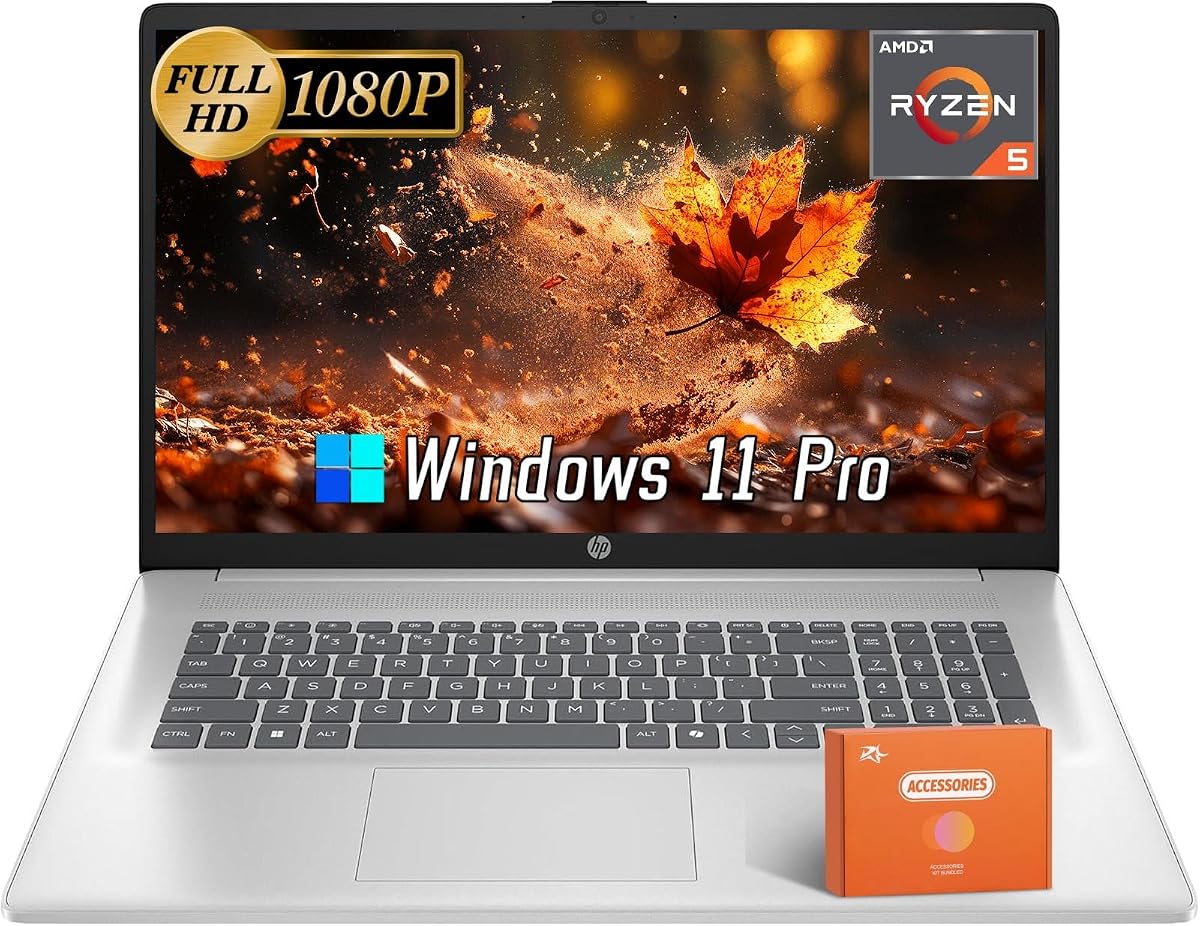
The HP 17 inch Laptop stands out for using an AMD Ryzen 5 7430U processor which provides strong performance for both work and light entertainment. It has a rating that supports its viability and includes an anti-glare display for comfortable viewing in bright environments.
We may earn a commission when you buy through this link, at no additional cost to you.
Featuring a 17.3-inch FHD+ screen, this model offers better pixel density than many competitors in the list. The 16GB of RAM and 512GB SSD provide a robust foundation for multitasking, and AMD Radeon graphics handle multimedia tasks effectively.
The anti-glare coating is a significant benefit for anyone who works outdoors or under strong office lighting. It reduces reflections significantly, making the screen easier to read without straining your eyes during long periods of use.
Choose this device if you prefer AMD processors for their efficiency and performance balance. It is a strong candidate for creative work and general productivity where a bright, high-resolution screen is essential.
The FHD+ resolution ensures content looks sharp and detailed, which is particularly useful for graphic design and media.
Anti-glare coatings reduce eye strain and improve readability, making this a great choice for outdoor or bright office use.
We may earn a commission when you buy through this link, at no additional cost to you.
This specific configuration offers a massive 32GB of RAM which is rare in consumer laptops and allows for heavy multitasking and virtual machines. It is a high-performance option that has earned a perfect 5.0 rating from verified buyers.
We may earn a commission when you buy through this link, at no additional cost to you.
The 2TB SSD provides ample space for storing large projects, media files, and archives without the need for external drives. Combined with the Intel Core i3-N305 processor, it delivers responsive performance for demanding tasks like data analysis.
While the screen is HD+, the sheer capacity of memory and storage makes this machine a powerhouse for productivity. The inclusion of a carrying pouch and USB hub adds value to the purchase, making it ready for fieldwork.
If you need a machine that can handle intensive workloads without slowing down, this is the model to consider. It offers a professional-grade setup with lifetime software included, ensuring long-term value for your investment.
With 32GB of RAM, you can run dozens of browser tabs and applications simultaneously without performance degradation.
The 2TB SSD eliminates the need for constant file management, allowing you to store years of data in one place.
We may earn a commission when you buy through this link, at no additional cost to you.
The HP 17.3 HD+ Laptop features a 13th Gen Intel Core i5 processor, offering higher single-thread performance than many lower-end models. It holds a 4.0 rating and is designed for professional users who need a responsive system.
We may earn a commission when you buy through this link, at no additional cost to you.
With 16GB of RAM and Intel Iris Xe graphics, this device handles daily computing and light graphic design well. The 512GB SSD ensures fast access to files and applications, keeping workflow smooth and efficient throughout the day.
The 17.3-inch HD+ display provides a good balance between size and resolution. While not Full HD, it offers enough clarity for text-based work and data entry, and the anti-glare coating helps reduce eye strain.
This laptop is a solid choice for business professionals who require a reliable Core i5 processor for complex applications. The combination of Windows 11 Pro and lifetime Office makes it a ready-to-use business tool.
The 13th Gen i5 processor ensures that software runs smoothly, and you experience fewer delays during intensive tasks.
Intel Iris Xe graphics provide better visual performance than basic integrated chips, aiding in light video playback and design.
We may earn a commission when you buy through this link, at no additional cost to you.
Selecting the right laptop involves looking beyond the software to ensure the hardware supports your workflow. This guide breaks down the key factors to help you make an informed decision.
The processor is the brain of your laptop and determines how fast it runs applications. Look for Intel Core i3 or better, or modern AMD Ryzen chips, to ensure smooth operation for office tasks and web browsing.
Prioritize models with multiple cores like 6-Core or 8-Core for better multitasking capabilities.
RAM dictates how many programs you can run at once without slowdown. For modern Windows 11 Pro usage, 16GB is the sweet spot, while 8GB is the absolute minimum for basic tasks.
Choose 16GB or higher if you keep many browser tabs open or use heavy applications.
Always look for a Solid State Drive (SSD) as it offers much faster boot and load times than traditional hard drives. A minimum of 512GB is recommended, though 1TB or 2TB is better for long-term storage.
Prefer models with internal PCIe SSDs rather than external drives for reliability and speed.
The screen size and resolution affect your comfort during long work sessions. HD+ screens are common in budget models but Full HD offers sharper text and better clarity.
Consider anti-glare coatings if you work in bright environments to reduce eye strain.
Windows 11 Pro is included in most of these models, offering features like remote desktop and enhanced security that are crucial for businesses. It also supports modern connectivity standards better than Home versions.
Ensure the OS is genuine and activated to avoid security risks and feature limitations.
A lifetime license for Office means you pay once and own the software forever. However, avoid installing Office 365 on the same system as it can conflict with the perpetual license.
Check that the listing explicitly states a perpetual version like Office 2024 Professional Plus.
Modern laptops need Wi-Fi 6 for fast internet speeds and Bluetooth for peripherals. Ensure there are enough USB ports, including USB-C, for your specific devices and docking stations.
Look for HDMI ports if you need to connect to external monitors or projectors.
Battery life determines how long you can work without a charger. Aim for at least 6 to 10 hours of mixed usage to maintain productivity during travel or power outages.
Models with efficient processors and larger battery cells will generally offer longer endurance.
Once you receive your device, activate your software by logging into your Microsoft account and accepting the activation. Ensure you do not install a subscription version of Office as this may invalidate your lifetime license.
Keep your laptop in a clean and dry environment to prevent hardware damage. Regularly update your system to maintain security and ensure that all features work correctly with the latest applications.
Back up your important files frequently to an external drive or cloud service to protect against data loss. A simple routine of weekly backups can save you significant time and stress in the event of a hardware failure.
It means you purchase a one-time license for a specific version of Office, such as Office 2024, and can use it indefinitely without a monthly or annual subscription. This differs from Office 365 which requires ongoing payments.
Generally, a lifetime license for a laptop is tied to that specific device. You cannot move the license to another computer easily, so check the terms of the specific bundle you buy to understand your rights.
If the hardware fails, you may lose access to the installed Office software unless you have a backup. It is recommended to keep the installation media or recovery keys safe in case you need to reinstall on a new drive.
Modern laptops often have limited ports, so vendors include hubs to allow you to connect multiple devices like mice, keyboards, and drives simultaneously without needing a dock.
Yes, Pro includes advanced features like BitLocker encryption and Group Policy management, which are valuable for businesses and professionals who need enhanced security and control.
You can check the status of your Office license by opening any Office app and going to Account settings. The activation status should show as active or permanently activated for the version you bought.
You can choose to buy and install newer versions later, but your lifetime license remains for the original version. It is a good option if you prefer not to pay a subscription for new features.
We have reviewed ten excellent options that combine reliable hardware with the value of a perpetual Office license. From the budget-friendly 14-inch models to the high-capacity 17-inch powerhouses, there is a choice for every user need.
Prioritize the amount of RAM and the type of storage to ensure your laptop remains fast and useful for years. A model with 16GB of RAM and a fast SSD will provide a smoother experience than one with less powerful components.
Always check the current price and bundle contents before purchasing since these can change based on availability and promotions. Verify that the software is activated correctly upon arrival to enjoy full productivity immediately.