
Redragon K710 Wireless Typewriter Mechanical Gaming Keyboard
4.5Editor score
Tri-mode connectivity support
Metal panel construction
Customizable RGB lighting
This guide compares the top ten keyboards that sound like a typewriter to help you find the perfect clicky mechanical typing experience today.
Finding a keyboard that sounds like a typewriter brings nostalgia and satisfaction to your daily workflow. These mechanical boards feature round keycaps and clicky switches that mimic vintage machines while offering modern performance for work or gaming.
We evaluated ten top-rated models based on switch feel, build quality, connectivity options, and aesthetic design. Each product was selected for its ability to deliver that authentic clack and thock while maintaining reliability across different operating systems and usage scenarios.
Each pick highlights unique strengths such as hot-swappable switches, wireless freedom, or premium metal construction. Please note that prices and availability can change frequently, so check the current listings before making your final decision on a new desktop setup.
4.5Editor score

4.3Editor score

4.5Editor score
This side-by-side comparison reviews all ten selected typewriter-style keyboards to highlight their distinct features and specifications. Read through to understand how each model compares in terms of switches, connectivity, battery life, and overall build quality.



This retro mechanical keyboard delivers an authentic typewriter experience with satisfying blue switches and a vintage aesthetic. It holds a solid rating for its fluid typing action and minimal hand fatigue during long sessions.
We may earn a commission when you buy through this link, at no additional cost to you.
The hot-swappable design allows you to change switches without tools while the Bluetooth connectivity supports up to three devices seamlessly. The stainless-steel levers and knobs make brightness and volume adjustments quick and intuitive.
While the absence of a numeric keypad might limit some data entry tasks, the compact size saves valuable desk space. The round keycaps and punk styling add a unique personality that stands out on any modern desk.
This keyboard is ideal for writers and professionals who value both nostalgia and modern functionality. Its combination of clicky feedback and wireless freedom makes it a top contender for daily typing needs.
The blue switches provide the sharp click sound and tactile bump that typewriter enthusiasts crave without requiring heavy force.
You can switch between laptop tablet and phone via Bluetooth or USB-C allowing a clean workflow across multiple platforms.
We may earn a commission when you buy through this link, at no additional cost to you.
The YUNZII QL75 combines retro aesthetics with modern features like tri-mode connectivity and hot-swappable switches. It offers a rich typing experience with ergonomic key heights and a built-in stand for tablets or phones.
We may earn a commission when you buy through this link, at no additional cost to you.
Its compatibility with QMK and VIA software allows deep customization for macros and key mapping. The large battery ensures long wireless use while the pre-lubed switches provide a smooth thocky feel.
Some users may find the programming software complex at first but the flexibility it offers is worth the initial setup. The wood finish adds a touch of elegance that fits well in home office settings.
This is a great choice for enthusiasts on a budget who want full control over their typing experience. It balances cost and performance effectively while delivering the classic typewriter charm.
QMK and VIA support let you remap keys and create macros tailored to your specific workflow preferences.
The rising key design and wood accents create a sturdy chassis that feels premium despite the competitive price point.
We may earn a commission when you buy through this link, at no additional cost to you.
This full-size keyboard offers a classic typewriter look with modern performance features like a solid metal frame and pre-lubricated switches. It earns high marks for its stability and smooth typing feel across long sessions.
We may earn a commission when you buy through this link, at no additional cost to you.
The web-based software allows easy key customization without heavy downloads while the shine-through keycaps ensure visibility in low light. The metal shell provides a premium tactile feel that plastic boards cannot match.
The lack of wireless connectivity might limit desk freedom but the wired connection ensures zero lag for gaming or intensive typing. The additional weight keeps it firmly in place during rapid keystrokes.
Professionals who need a full numpad and maximum reliability will find this model excellent. It delivers the vintage vibe with the durability required for heavy daily use.
Pre-lubricated switches come ready to use with minimal friction and a satisfying sound right out of the box.
Online software lets you adjust lighting and macros directly from your browser without installing local drivers.
We may earn a commission when you buy through this link, at no additional cost to you.
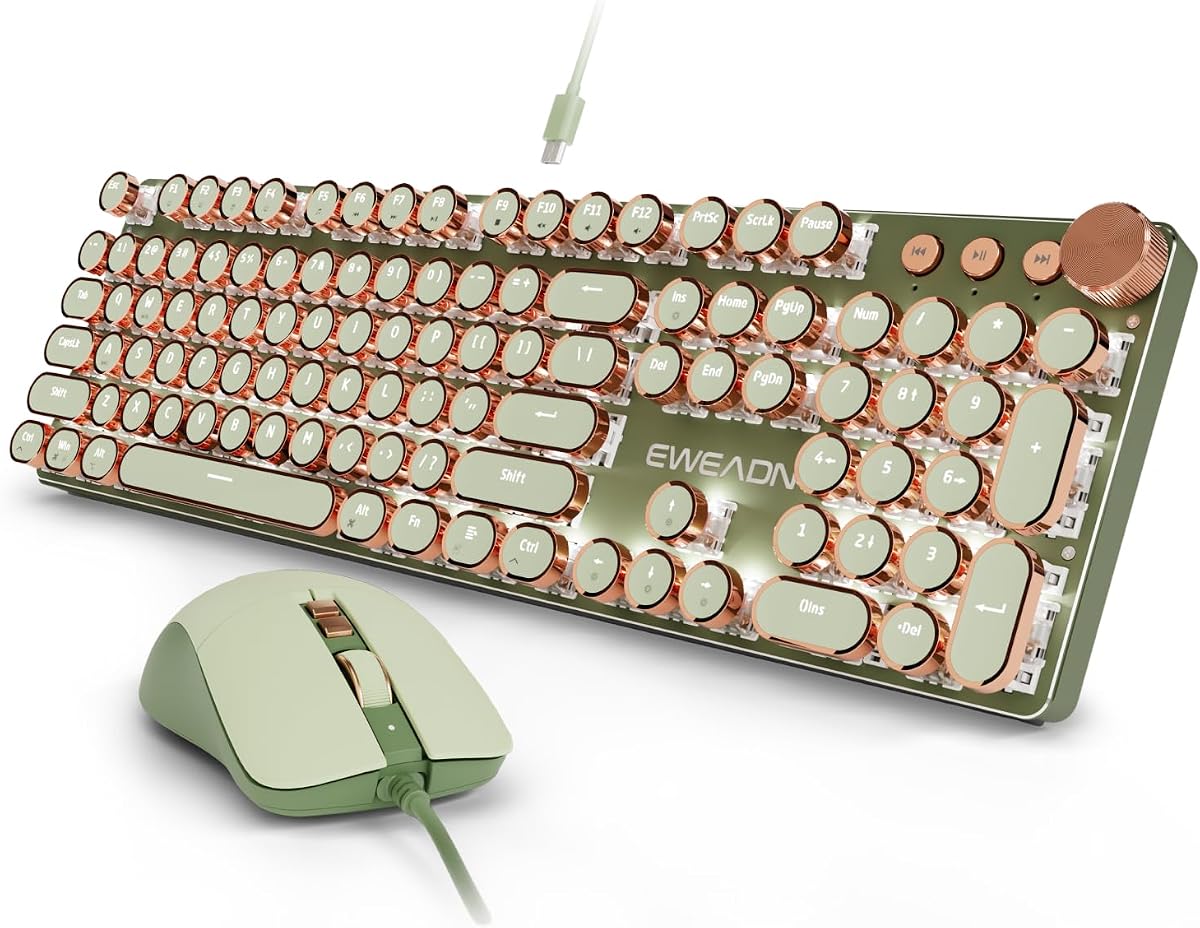
This combo set merges vintage aesthetics with practical functionality including a matching mouse and a keyboard with a rotary knob. It delivers a gentle typing noise that suits quiet offices while maintaining accuracy.
We may earn a commission when you buy through this link, at no additional cost to you.
The green and white design with round chrome keycaps creates a striking visual appeal. The ergonomic mouse complements the keyboard layout to support comfortable workflows during extended use.
While the wired setup limits desk flexibility it ensures reliable connections without battery concerns. The separate mouse cable can be managed easily with cable organizers for a tidy look.
Users seeking a complete budget-friendly upgrade with a touch of personality will appreciate this bundle. The soft switches reduce distraction while still providing enough feedback for confident typing.
Pink linear switches dampen harsh sounds making this suitable for shared workspaces or late night writing sessions.
The rotary knob allows quick volume tweaks without needing to navigate software menus or use function keys.
We may earn a commission when you buy through this link, at no additional cost to you.
This keyboard introduces the typewriter aesthetic at an accessible price with white LED backlighting and a solid panel. It offers reliable performance with full anti-ghosting for responsive inputs during typing or gaming.
We may earn a commission when you buy through this link, at no additional cost to you.
The vintage steampunk round keycaps paired with a metal shell create a sturdy device that fits modern setups well. Detachable cabling makes transport and storage convenient for users on the move.
The linear switches provide a smooth glide without tactile bumps which might not appeal to clicky enthusiasts. However the lighting customization gives plenty of visual flair to match personal desk themes.
If you want the look and feel without a high investment this model serves as a great starting point. It balances basic mechanical performance with a nostalgic design effectively.
Nineteen effects range from static to dynamic modes allowing you to set the mood for any environment.
An aluminum alloy plate ensures stability and a premium touch feel under the keys.
We may earn a commission when you buy through this link, at no additional cost to you.
This keyboard offers a stylish pink typewriter design with robust wireless capabilities and a massive battery life. It excels in connecting multiple devices smoothly while maintaining a classic clicky feedback for writers.
We may earn a commission when you buy through this link, at no additional cost to you.
The tri-mode connectivity ensures you can switch between Bluetooth 2.4GHz and wired modes effortlessly. The curved layout and metal faceplate provide a comfortable and stable surface for long typing sessions.
The white backlight might limit visual customization for those who prefer RGB but the battery life is exceptional. This model keeps your desk clutter-free without sacrificing performance or style.
Ideal for creators and professionals who need mobility and a distinct aesthetic. The combination of power efficiency and tactile precision makes it a top wireless pick.
A five thousand mAh cell supports weeks of use on a single charge reducing recharging interruptions.
Connect up to five devices via wireless or wired modes to streamline tasks across different machines.
We may earn a commission when you buy through this link, at no additional cost to you.
This bundle includes a keyboard mouse and wrist rest plus a phone holder to enhance desk ergonomics. The magnetic rest is easy to attach and supports your wrists during long typing tasks effectively.
We may earn a commission when you buy through this link, at no additional cost to you.
The seven color backlight options add variety while the wireless receiver simplifies setup without extra software. Both Mac and Windows layouts are included ensuring compatibility across different ecosystems.
While the switches are not highly tactile the comfort features make up for it in daily office use. The phone holder keeps devices visible for multitasking without extra desk clutter.
Users seeking a complete ergonomic solution for home offices will find this kit practical. The combination of comfort accessories and simple connectivity offers excellent value.
Soft sponge padding with a magnetic mount reduces strain during extended typing and gaming sessions.
A built-in phone holder allows you to view messages or calls without leaving your typing position.
We may earn a commission when you buy through this link, at no additional cost to you.
This keyboard brings vintage steampunk elegance to gaming with blue switches and full key rollover support. It ensures every input registers accurately while the aluminum build adds a premium tactile touch.
We may earn a commission when you buy through this link, at no additional cost to you.
The adjustable RGB modes allow you to create an immersive atmosphere for gaming or writing tasks. The ergonomic design with adjustable feet provides a comfortable angle for varied desk setups.
Although it lacks wireless freedom the wired connection guarantees stability for competitive gaming. The price point makes it accessible for those entering the mechanical keyboard market.
Gamers and writers who prioritize performance and classic looks will find this model suitable. It balances retro charm with modern gaming reliability effectively.
Full N-key rollover ensures every keystroke registers even during fast-paced gaming or rapid typing sequences.
A matte aluminum alloy finish ensures durability and stability against accidental impacts or spills.
We may earn a commission when you buy through this link, at no additional cost to you.
This model blends nostalgia with high tech using wheels and a lever to mimic real typewriters. It supports up to five devices simultaneously which makes it a powerful hub for multi-screen workflows.
We may earn a commission when you buy through this link, at no additional cost to you.
The aluminum wheels control brightness and volume with precision while the ergonomic angle reduces neck strain. A built-in stand holds your devices in place creating a cohesive workspace experience.
The unique lever actuation might feel unusual at first but adds to the authentic charm. The high capacity battery ensures you rarely need to worry about power during daily use.
Tech enthusiasts who love retro details and advanced connectivity will enjoy this board. Its robust features justify the price for power users needing a centralized typing hub.
Solid aluminum wheels adjust brightness and volume providing a satisfying tactile experience without menus.
A five thousand mAh cell minimizes charge interruptions supporting consistent performance throughout the week.
We may earn a commission when you buy through this link, at no additional cost to you.
The K710 delivers a dependable mechanical typing experience with steampunk keys and robust wireless options. It is praised for its durability and responsiveness making it a favorite for both work and play.
We may earn a commission when you buy through this link, at no additional cost to you.
Redragon software unlocks advanced macros and lighting controls to suit individual preferences. The metal panel ensures the board stays stable while the battery life supports extended wireless sessions.
Some users may prefer pre-installed firmware but the software provides deep control over functions and lighting effects. The value offered is strong compared to higher priced competitors in this category.
Those looking for a reliable all-rounder with strong support will find this keyboard ideal. Its mix of quality and affordability makes it a standout choice for daily use.
A solid metal faceplate resists flex and adds a premium weight that keeps the keyboard stable.
Official drivers allow custom lighting macros and key mapping to enhance productivity and gaming.
We may earn a commission when you buy through this link, at no additional cost to you.
Choosing the right typewriter-style keyboard requires considering several key factors to match your workflow and aesthetic preferences.
The core of any typewriter-like keyboard is the switch type. Clicky blue switches replicate the loud distinct sound and tactile bump of vintage machines while linear pink switches offer a smoother quieter experience. Consider your environment and how much feedback you want from each keystroke before deciding on a switch family.
Look for clicky switches if you crave auditory and tactile confirmation of every letter typed.
Wireless models using Bluetooth or 2.4GHz receivers offer cleaner desks and multi-device switching. Wired keyboards provide zero latency and consistent power which is vital for competitive gaming. Some models offer tri-mode connectivity to balance both worlds allowing you to switch between devices seamlessly.
Decide based on whether you prioritize mobility or absolute stability for your primary tasks.
Metal panels and aluminum cases provide stability and a premium feel that plastic cannot match. Round keycaps often feature higher profiles to mimic classic typewriters while durable legends prevent fading over time. A sturdy build ensures the board remains flat and reliable even under heavy typing pressure.
Prioritize metal construction if you need a board that stays put during intense work sessions.
Wireless mechanical keyboards need substantial battery capacity to last through long workweeks. Models with 5000mAh batteries offer weeks of use on a single charge reducing downtime. Check charging methods such as USB-C for convenience and ensure the device supports efficient power management during sleep modes.
Opt for larger batteries if you plan to use the keyboard without frequent recharging interruptions.
Compact layouts save desk space while full-size boards include numeric keypads for data entry. Eighty three or seventy-five percent layouts suit writers who value ergonomics while full keyboards suit finance users. Ensure the key spacing matches your hand size to prevent strain during marathon typing sessions.
Choose a layout that supports your specific tasks whether that is data entry or creative writing.
Hot-swappable PCBs allow you to change switches without soldering enabling future upgrades. Software support for macros and lighting effects adds flexibility to adapt the board to different projects. Programmable keys can streamline complex workflows and reduce repetitive strain over time.
Look for hot-swap and software support if you plan to tweak your board as needs evolve.
Backlighting helps visibility in low light environments and adds visual appeal to a desk setup. LED modes range from simple white to dynamic RGB patterns that match your mood or software themes. Ensure the lighting is bright enough for night typing without overwhelming your workspace.
Select lighting that enhances readability and complements the vintage aesthetic you prefer.
Extras like wrist rests phone holders or rotary volume knobs improve ergonomics and functionality. Some models include stands for tablets and phones keeping your workflow integrated on one desk surface. Accessories can enhance comfort during long hours and reduce the need for extra peripherals.
Consider bundles that include ergonomic rests or holders to maximize desk utility immediately.
Place your keyboard on a flat stable surface to ensure even key registration. Use the included feet to adjust the tilt angle for better wrist alignment during typing. Keep cables organized if using a wired model to prevent accidental disconnections or tangles.
Regularly clean the keycaps with compressed air to remove dust from the switches. Wipe the surface with a soft dry cloth to maintain the aesthetic and prevent grime buildup. For wireless models charge the battery before the indicator light turns red to preserve cell health.
Avoid exposing the device to excessive moisture or extreme temperatures. Store it in a dry place when not in use to protect electronic components. Use keycap pullers only if you need to clean beneath caps to avoid damaging internal switches.
Typewriter-style keyboards often use clicky switches that produce a distinct audible sound. This is intentional to mimic vintage machines but can be disruptive in quiet offices. Consider quieter switches if noise is a concern for your environment.
Most modern typewriter keyboards support multiple operating systems including macOS. Look for models that explicitly mention Mac compatibility for correct key mappings. Some include dual-system layouts to switch between Mac and Windows easily.
Wireless models with high capacity batteries can last weeks on a single charge. Usage varies based on backlight brightness and frequency of use. Always check specific battery ratings to ensure they meet your daily workflow needs.
Many mechanical keyboards feature hot-swappable switches allowing you to replace them without soldering. Check product details for compatibility with your desired switch types. This flexibility extends the life of your keyboard as you change preferences over time.
Yes most typewriter keyboards support full N-key rollover and anti-ghosting for gaming. The tactile switches provide clear feedback useful for gaming inputs. Look for models with low latency modes if competitive play is a priority.
Basic functions work out of the box without software. Advanced customization like macros and lighting effects often requires specific apps. Ensure your system can run the provided software for full feature access.
Our top picks range from budget-friendly bundles to premium wireless boards with advanced customization. Each model offers a unique take on the typewriter aesthetic while delivering reliable mechanical performance. Whether you prioritize battery life switch feel or build quality there is a match for your needs.
Focus on the factors that matter most such as connectivity and ergonomics when narrowing down choices. The right keyboard enhances both your productivity and desk style making typing a more enjoyable task. Consider your workflow and desk space before committing to a specific layout.
Prices and availability change frequently so review current listings before purchasing to secure the best deal. This guide provides a solid starting point for selecting a typewriter-style keyboard that fits your lifestyle. Invest in a model that balances nostalgia with modern technology for the best experience.