
V-one Wired USB Gaming Controller Gamepad Joystick
4.2Editor score
Works on Windows 11
Vibration feedback
Multi-mode support
This guide compares the top 10 best joysticks for Windows 11 to help gamers find the perfect flight and simulation controller for their setup.
Finding the right joystick for your Windows 11 PC can transform your gaming experience significantly. Whether you are piloting fighter jets in flight simulators or maneuvering heavy machinery in farming games, a quality controller offers precision that a keyboard and mouse simply cannot match. The market is filled with options ranging from budget-friendly entry-level sticks to high-end professional systems designed for serious enthusiasts.
We have carefully evaluated ten distinct models to create this comprehensive roundup. Our analysis focuses on build quality, button layout, compatibility with modern Windows 11 systems, and overall value for money. We looked at user feedback, technical specifications, and real-world performance in popular simulation titles to ensure our recommendations are reliable and accurate for current users.
Each pick in this list highlights specific strengths tailored to different needs and budgets. From compact single-stick units to full Hotas setups with throttle quadrants, there is something for every type of simulator pilot. Please note that product availability and pricing can fluctuate frequently, so always check the current listings before making your final purchase decision online.
4.2Editor score

4.4Editor score

4.0Editor score
The following table provides a side-by-side comparison of all ten products reviewed in this guide to help you quickly identify key specifications and differences.




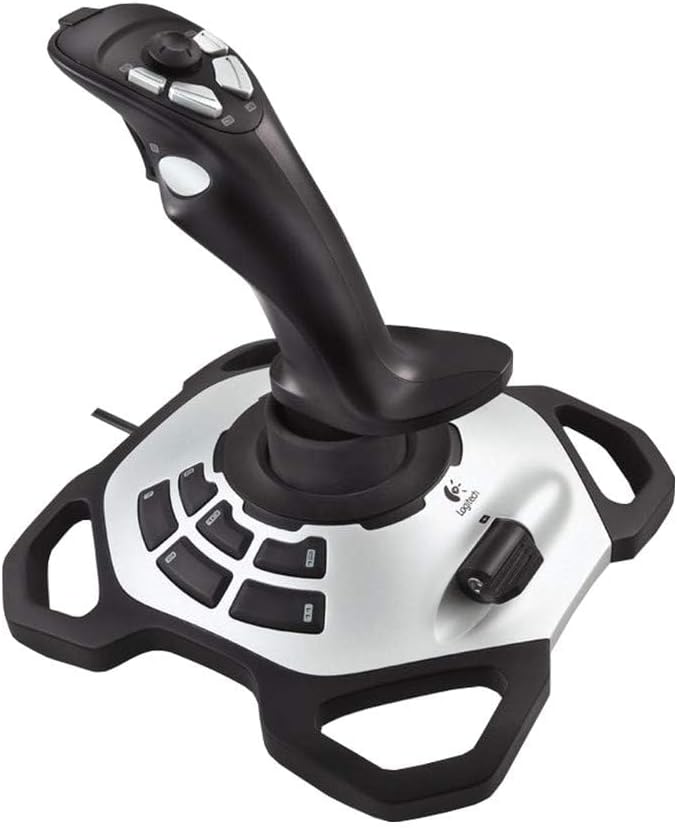


The PXN 2113PRO is a budget-friendly flight stick that aims to bring affordable simulation control to Windows 11 users. With a rating of 3.6 it represents an entry-level option for those new to flight sims who do not want to spend heavily upfront.
We may earn a commission when you buy through this link, at no additional cost to you.
This controller offers 12 programmable buttons and an 8-way hat switch to manage various in-game functions without needing a keyboard. The vibration feedback adds immersion during turbulence or impacts, though users report needing to adjust driver settings to feel it properly.
While it is designed for PC only and lacks support for consoles, the solid build and ergonomic grip make it comfortable for longer sessions. The suction cups on the base help secure it to smooth desks during intense maneuvers.
If you are looking for an inexpensive way to start playing titles like Microsoft Flight Simulator or War Thunder this is a viable starter option. Just be prepared to spend time calibrating the vibration and mapping keys to get the best experience.
Drivers are optional and the unit is recognized immediately by most Windows 11 systems for quick play.
It works well with popular PC flight sims including World of Tanks and Assault Horizon for diverse gameplay.
We may earn a commission when you buy through this link, at no additional cost to you.
The Thrustmaster T-Flight Hotas One is a highly rated controller that delivers a full hands-on-throttle-and-stick experience for Windows 11 gamers. Its 4.4 rating reflects strong performance and reliability among users who value realism in their simulation setup.
We may earn a commission when you buy through this link, at no additional cost to you.
A standout feature is the detachable throttle which allows you to use the stick on your lap while keeping the throttle on a desk or vice versa. This flexibility suits different play environments and makes it easy to switch between flight and combat modes.
Although some users find the plastic construction feels light compared to premium models the ergonomic layout and responsive trigger make it comfortable for extended use. The adjustable resistance on the stick helps mimic different aircraft flight characteristics.
Ideal for beginners and intermediate pilots this Hotas offers excellent value without the complexity of high-end rigs. It is a great choice for those who want a complete setup that works seamlessly across both PC and Xbox Series X platforms.
The ability to separate the throttle from the stick gives you creative freedom in how you arrange your cockpit area.
Seamless compatibility with Xbox Series X and Windows 11 ensures you can play the same games on both devices.
We may earn a commission when you buy through this link, at no additional cost to you.
The V-one Wired USB Gaming Controller is a versatile gamepad that supports Windows 11 PCs alongside Android devices and older consoles like the PS3. With a rating of 4.2 it is a solid choice for casual gamers who need broad compatibility across multiple systems.
We may earn a commission when you buy through this link, at no additional cost to you.
It features Xinput and Dinput modes to ensure it works with a wide range of PC games whether they expect a modern gamepad or a legacy joystick. The vibration feedback and turbo function add tactile response and rapid fire capabilities for action titles.
While it does not support the Xbox 360 or PS4 the inclusion of OTG support for Android means you can take your controls on the go with a tablet or phone. The red color design is simple but distinct on your desk or entertainment center.
This controller is best suited for players who want one device for multiple purposes without breaking the bank. It is particularly useful if you alternate between PC flight sims and mobile strategy games that benefit from physical input.
With the right adapter this gamepad turns your Android device into a console-like experience for compatible apps.
Windows 11 recognizes this device immediately so you can start playing without installing extra software drivers.
We may earn a commission when you buy through this link, at no additional cost to you.
The Thrustmaster USB Joystick is a straightforward entry-level flight stick designed for Windows PCs including Windows 11. With a rating of 3.9 it serves as a basic but functional tool for pilots who need essential controls without complex programming.
We may earn a commission when you buy through this link, at no additional cost to you.
A unique feature is the Point-of-View button which lets you quickly adjust camera angles during missions without reaching for the keyboard. This immersion tool is valuable for flight and space sims where situational awareness is key to survival.
The joystick uses a simple 3-axis design with four action buttons and one trigger which keeps the learning curve low for new users. The ergonomic handle ensures you can hold it comfortably during takeoff and landing sequences.
If you want a no-fuss controller that handles the basics of flight simulation well this is a reliable choice. It is best for casual gamers or those who prefer simplicity over advanced programmability in their cockpit setup.
The dedicated POV button streamlines viewing angles so you can focus more on piloting than menus.
This device requires no special installation steps and works right out of the box with supported games.
We may earn a commission when you buy through this link, at no additional cost to you.
The Microsoft Sidewinder Precision 2 Joystick is a classic model known for its innovative rotating handle that provides precise rudder control. With a rating of 4.0 it remains a favorite for older titles and specific flight sims that benefit from its unique design.
We may earn a commission when you buy through this link, at no additional cost to you.
Its integrated 146-degree throttle lever allows you to manage engine power without moving your hand to a separate unit. The 16 programmable functions let you customize commands for different aircraft or scenarios to optimize your workflow.
You can save game-specific controller profiles directly to the hardware which makes switching between titles quick and seamless. The USB connection ensures it is compatible with modern Windows 11 systems despite being an older product line.
While it may not have the modern aesthetics of newer sticks the mechanical quality and precision of the rudder control are hard to beat. It is an excellent pick for enthusiasts who appreciate classic engineering and functionality.
Having the throttle on the stick reduces hand movement and keeps you in one position for better reaction times.
The ability to store profiles on the device means you do not need software to switch configurations easily.
We may earn a commission when you buy through this link, at no additional cost to you.
The Logitech Extreme 3D Pro is a robust flight stick that offers precise control and a high level of customization for Windows 11 gamers. Its 4.2 rating speaks to the durability and performance that Logitech is known for in the peripheral market.
We may earn a commission when you buy through this link, at no additional cost to you.
A unique feature is the adjustable pivot point which lets you change the resistance and range of motion to match your comfort preferences. The rapid fire trigger is particularly useful for combat games where quick weapon activation matters.
With 12 programmable buttons and a D-pad you have ample options for mapping weapons and systems without reaching for the keyboard. The base is solid and often includes suction cups to keep it stable during aggressive maneuvers.
This stick is best for users who want a premium feel and reliable performance in flight sims and space shooters. It is a strong middle-ground option that balances professional features with accessibility for home users.
Changing the pivot point allows you to customize how much effort is needed to move the stick left or right.
The rapid fire trigger gives you an edge in air combat scenarios by allowing quick burst firing sequences.
We may earn a commission when you buy through this link, at no additional cost to you.
The VOYEE PC Controller is a budget-friendly gamepad that mimics the familiar layout of an Xbox 360 controller for Windows 11 systems. With a rating of 4.3 it is a popular choice for general gaming and casual play on PC.
We may earn a commission when you buy through this link, at no additional cost to you.
It features responsive buttons and joysticks that react quickly to player commands which helps in action games requiring precise timing. The automatic vibration feedback enhances immersion by providing tactile cues during explosions or collisions.
The ergonomic contours of the grips are designed to fit comfortably in your hands during long sessions without causing fatigue. The included 7.2-foot cable gives you the freedom to sit back on a couch without needing a wireless connection.
While it is not a flight stick this controller is perfect for titles that do not support specialized hardware. It is a practical and affordable solution for users who want a reliable wired gamepad for daily use.
A wired connection eliminates battery worries and ensures a consistent signal without interference.
The ergonomic design means your hands rest naturally reducing strain during extended play sessions.
We may earn a commission when you buy through this link, at no additional cost to you.
The Thrustmaster SimTask FarmStick is a specialized controller built specifically for Farming Simulator 25 on Windows 11 and Xbox. With a rating of 4.3 it offers a dedicated solution for players who want realistic control over tractors and heavy machinery.
We may earn a commission when you buy through this link, at no additional cost to you.
It uses Hall Effect magnetic sensors to provide ultra-accurate performance without drift which is crucial for precision farming tasks. The 33 programmable inputs allow you to control every function of your equipment without ever touching a keyboard.
The ambidextrous design means you can set it up for left or right-handed use depending on your preference and desk layout. However you will need a steering wheel for full operation as it is designed to work in conjunction with one.
If you are serious about farming simulations this is the top choice for realism and ease of use. It transforms the gameplay experience by making complex machinery feel authentic and manageable.
The Hall Effect sensors ensure that your inputs translate accurately to machinery movements without signal loss.
With 33 inputs you can map every light and tool to a button for complete command over your vehicle.
We may earn a commission when you buy through this link, at no additional cost to you.
The Logitech G X56 H.O.T.A.S is a high-end throttle and joystick combo designed for serious flight simulation enthusiasts on Windows 11. With a rating of 4.0 it delivers a professional grade experience with over 189 programmable controls for total command.
We may earn a commission when you buy through this link, at no additional cost to you.
The adjustable spring system lets you customize the force needed to move the stick to match different aircraft physics. RGB lighting helps you identify buttons in the dark and can be synced with your other gaming peripherals for a cohesive look.
It requires two USB ports but this allows for independent communication between the stick and throttle for better stability. The mini analog stick on the throttle adds another layer of control for pitch roll and yaw functions.
This system is ideal for users who build dedicated sim rigs and want the best performance available. While expensive the level of customization and build quality justifies the investment for avid pilots.
Adjusting the spring tension gives you the option to mimic light fighters or heavy bombers with ease.
The lighting can be programmed to show button states or match your room theme for a pro feel.
We may earn a commission when you buy through this link, at no additional cost to you.
The Thrustmaster T.16000M FCS is widely regarded as one of the best single sticks on the market with a strong 4.4 rating. It features H.E.A.R.T technology which provides precision that does not degrade over time due to mechanical wear.
We may earn a commission when you buy through this link, at no additional cost to you.
The joystick is fully ambidextrous meaning you can swap components to make it comfortable for left or right-handed use. With 16 action buttons and 4 independent axes you have ample control for complex flight maneuvers without a full throttle.
The TARGET software allows you to create specific mapping profiles for each game so you do not have to reconfigure controls manually. This level of flexibility makes it suitable for a wide variety of titles from flight sims to space games.
If you want a durable and accurate stick that will serve you well for years this is a top tier option. It offers an excellent balance of performance and usability for both beginners and experts.
The H.E.A.R.T sensors ensure consistent accuracy throughout the life of the device without degradation.
Swappable components allow you to customize the grip to match your dominant hand comfortably.
We may earn a commission when you buy through this link, at no additional cost to you.
Selecting the right joystick involves considering several key factors that impact performance and comfort during gameplay.
Ensure the joystick explicitly supports Windows 11 to avoid driver conflicts or recognition issues. Most modern controllers include native support so installation is often automatic.
Look for plug and play functionality to simplify setup and reduce troubleshooting time.
More buttons allow you to map complex commands without relying on the keyboard during intense situations. This is crucial for simulating real cockpit layouts where multiple systems must be controlled simultaneously.
Choose a unit with enough inputs to cover your most frequently used actions for efficient gameplay.
A solid base and high quality materials ensure the stick remains stable during rapid movements and turbulence. Look for features like suction cups or heavy bases that keep the unit anchored to your desk.
Durable switches and sensors will extend the life of the device even with heavy daily usage.
The shape of the handle and the placement of buttons should feel natural in your hand to prevent fatigue. A comfortable design allows you to play for longer periods without discomfort or strain.
Check if the unit is ambidextrous if you switch hands or share the device with others.
Decide if you need a combined stick and throttle or a standalone unit. A throttle quadrant adds realism for flight sims but requires more desk space and budget.
A detachable throttle offers flexibility by letting you use the stick separately when a throttle is not needed.
Vibration feedback adds immersion by providing tactile responses to game events like impacts or engine shakes. This feature enhances the overall experience but may require driver adjustment for optimal effect.
Check user reviews to ensure the vibration is noticeable and does not feel weak or inconsistent.
Advanced software tools allow you to create specific profiles for different games with complex mapping options. This feature saves time when switching between titles with different control schemes.
Ensure the software is updated to support Windows 11 for smooth profile management and updates.
Set a realistic budget that balances cost with the features you actually need for your type of gaming. Entry level options can be sufficient for casual play while serious pilots may prefer investing in premium hardware.
Compare the features against the price to ensure you are getting the best value for your money.
Always connect your joystick to a USB port before launching the game to ensure Windows recognizes it properly. Most modern devices are plug and play so you may not need to install extra drivers for basic functionality.
Take time to map your buttons using the game settings or provided software so that critical actions are easy to reach. Test each mapping in the practice area to confirm the joystick responds as expected during flight maneuvers.
Keep the base of the joystick clean and free from dust to prevent it from slipping during intense use. If your unit includes suction cups make sure the desk surface is smooth and clean for a strong seal.
Most modern joysticks are designed to work natively with Windows 11 without needing special drivers. They utilize standard USB HID protocols that Windows recognizes automatically. However checking the product page for explicit compatibility claims is always recommended.
This issue often occurs because the game does not have the joystick selected as the active input device. Go into the game control settings and ensure the joystick is enabled and mapped to the correct axes.
Many flight sticks are cross compatible with Xbox Series X and S on PC which broadens your game options. Look for devices that explicitly mention Xbox support to ensure seamless performance across both platforms.
You can calibrate a joystick through the Windows Control Panel under Game Controllers. Select the device and click properties to access the test and calibration tabs to ensure all axes respond accurately.
A separate throttle adds realism and extra control but is not strictly necessary for casual play. Many entry level sticks include a built in throttle lever that is sufficient for basic flight simulation.
Xinput is the modern standard used by Xbox controllers and most Windows games while Dinput is an older legacy standard. Ensure your joystick supports Xinput if you plan to play newer titles on PC.
We have reviewed ten top joysticks ranging from budget-friendly gamepads to professional Hotas systems to help you find the right fit. Each model offers unique strengths whether you need versatility for multiple platforms or specialized controls for flight.
When making your choice prioritize build quality and button layout that match your specific gaming habits. A comfortable and reliable controller will enhance your immersion and improve your performance in simulation titles significantly.
Remember that prices and availability can change so check the current listings on Amazon before you finalize your order. We hope this guide helps you select the perfect joystick to elevate your Windows 11 gaming experience.