
TP-Link Ethernet Splitter 1 to 2
4.6Editor score
Gigabit speed support
USB power included
Compact design
This guide compares the top internet splitter models for 2026 to help you expand your network ports efficiently without sacrificing speed or reliability.
Finding the right internet splitter can transform how you connect devices in your home or office. A good model ensures stable connections and supports high-speed data transfer for multiple users simultaneously.
We evaluated leading options based on speed, compatibility, build quality, and ease of setup. Each product was analyzed for real-world performance and value to bring you a reliable curated list.
Every pick highlights key strengths and ideal use cases for different needs. Prices and availability change frequently so verify current details before making your final purchasing decision today.
4.6Editor score

4.7Editor score

4.5Editor score
Here is a side-by-side comparison of all ten internet splitters to help you quickly identify the model that fits your network needs and budget best.



The TP-Link TL-SG105 earns our Editor's Choice award for its robust performance and reliability. With a 4.7 rating it stands out as a top choice for expanding wired networks efficiently.
We may earn a commission when you buy through this link, at no additional cost to you.
Its five Gigabit ports support auto negotiation and flow control ensuring smooth data transmission. The fanless metal design keeps it quiet and durable while saving energy through efficient technology.
While it is a bit larger than passive splitters it offers more ports without needing complex configuration. This makes it ideal for offices or homes needing multiple stable connections simultaneously.
If you need a dependable solution that handles traffic well this switch is highly recommended. Its warranty and support add confidence for long-term network expansion needs.
This device uses innovative technology to reduce power consumption while maintaining full speed across all ports.
The metal casing ensures protection against daily wear and heat while maintaining a professional appearance.
We may earn a commission when you buy through this link, at no additional cost to you.
This TP-Link splitter offers excellent value for those needing a quick two-port expansion. With a 4.6 rating it delivers stable Gigabit speeds at a very accessible price for most users.
We may earn a commission when you buy through this link, at no additional cost to you.
It supports up to 1000Mbps total bandwidth with backward compatibility for older networks. The compact design fits easily behind desks or TVs making it discreet and portable for travel.
Keep in mind that it requires a USB power source to function which may limit some setups. However the included cable simplifies setup and ensures reliable operation without extra costs.
For budget conscious buyers who still want quality this is a smart choice. It handles streaming and gaming well for two devices without compromising on essential features.
No drivers are needed to get started so you can connect your devices and start using immediately.
Its small size allows for flexible placement in tight spaces without cluttering your workspace.
We may earn a commission when you buy through this link, at no additional cost to you.
The UGREEN splitter stands out with its premium build and aesthetic appeal. With a 4.5 rating it offers robust performance for users who value design and reliability in equal measure.
We may earn a commission when you buy through this link, at no additional cost to you.
Its aluminum alloy casing and gold-plated pins ensure stable signal transmission without interference. The space grey finish complements modern setups while the compact size makes it highly portable.
Though it costs more than basic models the quality materials justify the price for many users. It supports Gigabit speeds effectively for two devices without crosstalk or signal loss.
Choose this if you want a durable and stylish solution for your network. It works well for home and office setups where performance and look matter.
Gold-plated pins and full metal protection prevent interference for consistent data transfer speeds.
Its lightweight form factor allows you to carry it in a laptop bag for business trips easily.
We may earn a commission when you buy through this link, at no additional cost to you.
This Gigabit Ethernet Splitter provides a solid solution for expanding ports with clear status indicators. It earned a 4.3 rating for its ability to handle multiple devices at high speeds reliably.
We may earn a commission when you buy through this link, at no additional cost to you.
The six LED lights help you quickly identify active devices which simplifies troubleshooting. It supports various cable types from Cat5 to Cat8 ensuring broad compatibility with your existing gear.
Note that the device needs a 5V USB power source to operate correctly. While this adds a small requirement it ensures stable transmission without signal degradation over time.
For those who want visual feedback on connection status this is a practical pick. It works well in home offices where monitoring devices is helpful.
LED indicators show which connected devices are running so you can monitor network activity easily.
It works with most routers and switches making it versatile for various network environments.
We may earn a commission when you buy through this link, at no additional cost to you.
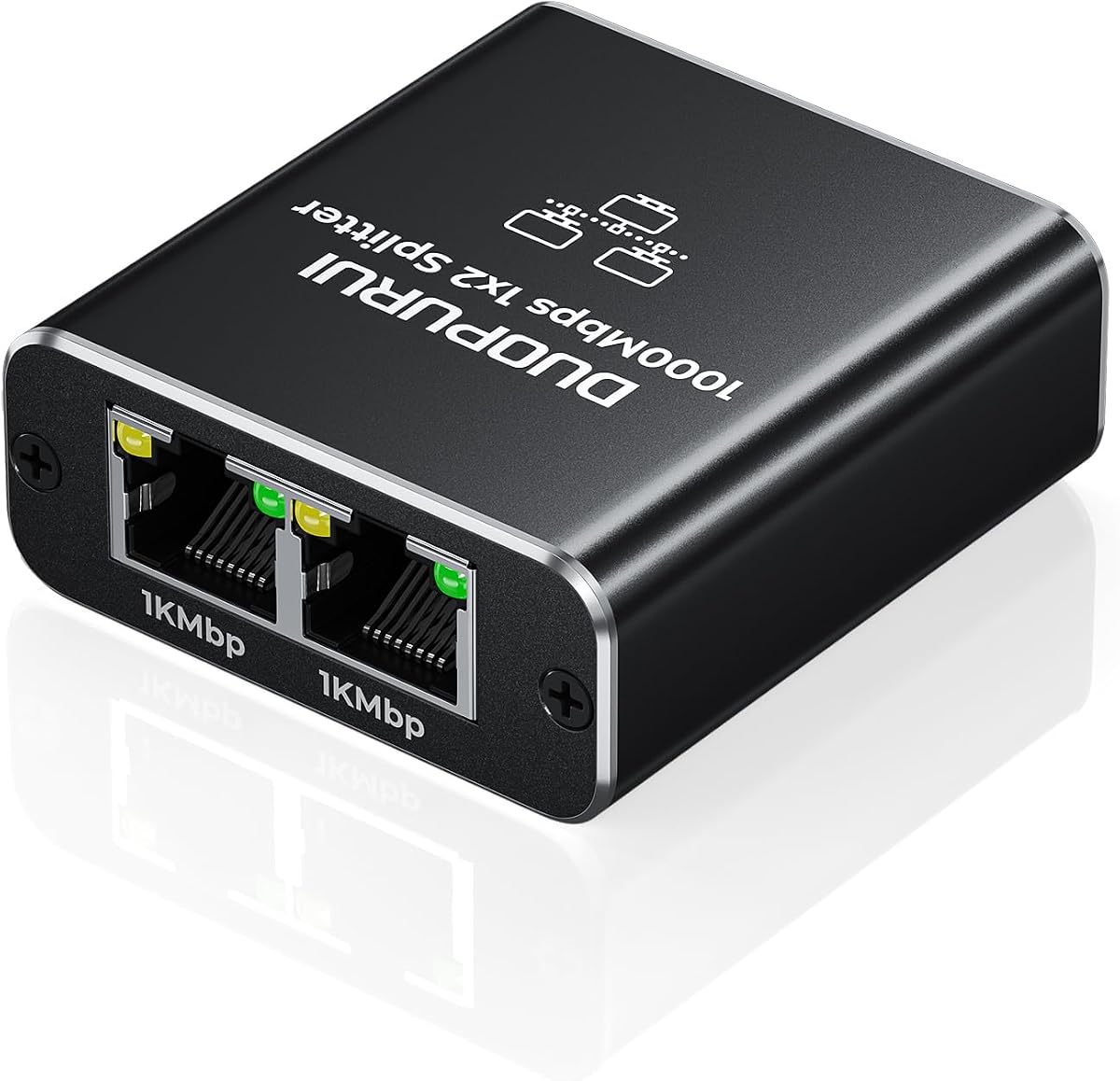
The DUOPURUI Ethernet Splitter offers good performance for dual device connectivity at a reasonable price. It received a 4.4 rating for its ability to maintain stable speeds across connections.
We may earn a commission when you buy through this link, at no additional cost to you.
Its adaptive matching supports speeds up to 1000Mbps and backward compatibility with older networks. The alloy shell provides durability and helps dissipate heat during extended use sessions.
You will need to use a USB power adapter for best stability as laptops may not supply enough power. This requirement ensures the splitter runs smoothly without dropouts during critical tasks.
Consider this option if you need a reliable splitter without extra features. It works well for streaming and gaming where consistent bandwidth is key.
All ports support Gigabit speeds so you can transfer files quickly without bottlenecks.
The alloy casing protects internal circuits from damage and improves heat dissipation.
We may earn a commission when you buy through this link, at no additional cost to you.
This four-port splitter expands your network significantly for multiple users. With a 4.4 rating it handles four devices simultaneously providing fast and stable connections for your home or office.
We may earn a commission when you buy through this link, at no additional cost to you.
It supports up to 1000Mbps and comes with a Cat6 LAN cable for immediate setup. The lightweight design makes it portable so you can create a connection anywhere you need one.
Just remember that a USB power source is necessary for operation to ensure stability. Without it the device will not function but with power it runs smoothly and reliably.
If you need more than two ports this is a great choice without buying a full switch. It simplifies setup and keeps costs low while offering flexibility.
Four ports allow you to connect multiple PCs or consoles without needing extra hardware.
The included LAN cable helps you start using the device right out of the box.
We may earn a commission when you buy through this link, at no additional cost to you.
This 1 in 4 out splitter gives you more ports without a full switch. With a 4.4 rating it supports high-speed data transfer making it suitable for streaming and gaming devices.
We may earn a commission when you buy through this link, at no additional cost to you.
It includes a USB-C power cable for reliable operation and supports all common Ethernet cables. The setup is simple requiring no configuration so you can start using it right away.
As with many splitters it needs a power source to function which is standard for active splitters. This ensures consistent speeds across all four connected devices without signal loss.
Choose this if you need four wired connections in one compact unit. It is a cost-effective way to expand your network ports.
Supports up to 1000Mbps for reliable connections across multiple devices simultaneously.
USB-C cable ensures modern compatibility for power connections in various setups.
We may earn a commission when you buy through this link, at no additional cost to you.
This simple splitter delivers reliable performance for two devices with clear status lights. With a 4.3 rating it is a solid choice for expanding connectivity in home or office setups.
We may earn a commission when you buy through this link, at no additional cost to you.
LED indicators show active ports while nickel-plated jacks ensure stable signal transmission. It includes a Cat6 cable and supports up to 100 meters of transmission distance for flexibility.
You may need to connect power to get the best performance but setup is straightforward. It works seamlessly with most routers and switches for immediate use.
If you want a basic and functional splitter this model fits the bill well. It handles everyday tasks without complications or extra steps.
LEDs display working status for each port so you can monitor connections easily.
Supports up to 100 meters allowing use across larger rooms or offices.
We may earn a commission when you buy through this link, at no additional cost to you.
This mini splitter expands one port to three with solid performance for multiple users. It earned a 4.5 rating for its compact size and ability to handle high-speed data well.
We may earn a commission when you buy through this link, at no additional cost to you.
The aluminum body ensures durability while the compact design fits easily in travel bags. It supports Gigabit speeds and includes LED indicators to show active connections clearly.
Keep in mind that three devices share the total bandwidth so plan accordingly. Still it works well for streaming and gaming where stable connections matter.
For those needing three ports without a large switch this is a great portable option. It simplifies network expansion without complexity or heavy hardware.
Its small size fits in a laptop bag making it perfect for hotel or office use.
Aluminum construction provides heat dissipation and long-term stability during use.
We may earn a commission when you buy through this link, at no additional cost to you.
This Dockteck splitter offers three ports for multiple device connections at fast speeds. With a 4.5 rating it provides a reliable solution for expanding your wired network easily.
We may earn a commission when you buy through this link, at no additional cost to you.
It is plug and play requiring no configuration so you can get started quickly. The aluminum body ensures durability and stability for long-term use across various environments.
As with any three-port model devices share bandwidth so prioritize essential traffic. Still it handles streaming and large files well when setup correctly.
If you need three connections without a full switch this is a practical choice. It balances performance and portability effectively for home and office needs.
No drivers or reboot needed so you can connect devices and use immediately.
High-quality aluminum provides durability and helps manage heat during extended use.
We may earn a commission when you buy through this link, at no additional cost to you.
Choosing the right internet splitter involves considering speed, port count, build quality, and power needs to ensure compatibility with your existing network setup.
Determine how many devices you need to connect at once. A 1 to 2 splitter works for two devices while 1 to 3 or 1 to 4 models serve larger setups.
Choose a port count that matches your current and future needs without overcomplicating your network.
Look for splitters that support Gigabit speeds of up to 1000Mbps for fast data transfer. This ensures your connection won't bottleneck when streaming or gaming.
Confirm the splitter matches your internet plan speed for optimal performance across all connected devices.
Many active splitters need USB power to function properly. Check if a power adapter is included or if you need to supply your own USB source.
Ensure you have a convenient power outlet nearby to avoid cable clutter and unstable operation.
Select models with metal casings like aluminum or alloy for better durability and heat dissipation. Plastic units may work but often lack long-term reliability in high-use environments.
A solid build protects internal circuits and ensures stable performance over time.
Verify the splitter supports your existing Ethernet cable types like Cat5e, Cat6, or Cat8. Universal compatibility ensures it works without needing new cables.
Using the right cable type helps maintain high speeds and prevents connection issues.
Consider the physical size especially if you plan to move the splitter between rooms or locations. Compact models fit better in tight spaces and are easier to travel with.
Lightweight designs offer flexibility for setups that change frequently or for business trips.
Prioritize plug and play models that don't require software or complex configuration. This saves time and reduces the risk of setup errors.
Simple setup ensures you can expand your network quickly without technical support.
Choose well-known brands with positive reviews and good customer support. Established companies often provide better warranties and reliability for your investment.
Strong brand backing means better long-term support if issues arise with your network.
Connect the splitter to your router using an Ethernet cable and plug the power adapter into a USB port. Then attach your devices to the output ports to begin sharing the connection.
Avoid bending or twisting the Ethernet cables excessively to prevent internal wire damage. Keep the splitter in a well-ventilated area to ensure proper heat dissipation.
Regularly check connection lights to confirm devices are active. If speeds drop, restart the splitter and devices to reset the network path.
Active splitters designed for Gigabit speeds maintain high bandwidth but devices share total capacity. This means each device gets a portion of the total speed depending on current usage.
A switch manages data traffic intelligently and usually doesn't require power. A passive splitter is simpler but active ones require power to maintain signal integrity across ports.
Yes, most splitters work with gaming consoles like Xbox or PlayStation. Ensure the device supports Gigabit speeds for low latency and stable online gaming performance.
Many modern splitters require USB power to function correctly. Check the product specs and use a reliable power source to avoid connection drops.
Cascading splitters can expand ports further but may introduce signal degradation. Use one splitter per router port to maintain stable network performance.
Yes, splitters connect to the Ethernet output of your fiber modem. They distribute that signal to multiple wired devices without affecting fiber connection speed.
We found the TP-Link TL-SG105 and 1 to 2 models deliver reliable performance across different needs. Each pick offers solid speed and ease of use for various network setups.
Consider your required port count and power availability when selecting a model. Prioritize build quality and compatibility for long-term stability in your home or office.
Prices and stock fluctuate frequently so check the latest details before buying. With the right splitter your network expansion will be smooth and efficient.