
MINISFORUM NAB9S
4.5Editor score
Core i9-13900HK Processor
Dual 2.5G Ethernet Ports
Quad Screen Display Support
Discover the top Intel Core i9 Mini PC models for 2026. We compare performance, connectivity, and value to help you choose the right compact desktop for your
The Intel Core i9 Mini PC represents the pinnacle of compact computing power available today. These devices pack high-end desktop processors into spaces smaller than a book, delivering exceptional performance for work and play without consuming valuable desk real or requiring complex setups.
We evaluated ten top models based on processing power, thermal efficiency, connectivity options, and build quality. Our analysis covers the latest generations of Intel Core i9 processors, examining how each system handles demanding tasks like video editing, 3D rendering, and multi-monitor productivity setups under real-world conditions.
Each selection highlights specific strengths ranging from budget-friendly options to enterprise-grade workstations. Note that pricing fluctuates frequently based on availability and seasonal promotions. We recommend verifying current details before purchasing to ensure you get the best value for your specific workflow requirements.
4.5Editor score

4.5Editor score
4.6Editor score
This side-by-side comparison breaks down the core specifications of each model. We focus on processor generation, memory configuration, storage capabilities, and unique features that differentiate these compact systems for various professional and personal use cases.


The MINISFORUM M1-1390 stands out as the top choice for professionals requiring desktop-class power in a tiny footprint. With its Intel Core i9-13900HX processor offering 24 cores and 32 threads, this machine handles heavy multitasking with ease. Its 4.5-star rating reflects consistent satisfaction among users who demand reliability for daily workflows.
We may earn a commission when you buy through this link, at no additional cost to you.
Performance is where this model truly shines. The hybrid architecture intelligently distributes tasks between performance and efficiency cores. Whether you are rendering 3D models or editing 4K video, the system maintains smooth operation without thermal throttling. The integrated Intel UHD Graphics further support complex design software effectively.
While the system excels in processing power, there are minor trade-offs to consider. Accessing internal expansion slots requires removing the bottom panel which some users might find slightly inconvenient during frequent upgrades. Additionally the chassis construction uses lightweight plastic that feels less premium than metal alternatives despite its functional design.
For office workers creative professionals and home users seeking a powerful yet space-saving solution this mini PC delivers excellent value. Its combination of high-speed networking extensive connectivity options and robust thermal management makes it a reliable long-term investment. We highly recommend it for anyone needing flagship-level performance in a compact form.
The extensive port selection including HDMI DP and USB-C allows you to connect multiple monitors and peripherals without needing a hub. This significantly streamlines your workspace and improves multitasking efficiency across various professional applications.
Advanced cooling mechanisms ensure the processor runs at peak speeds even during sustained workloads. This prevents performance degradation over time and keeps noise levels low for quiet office environments or home offices.
We may earn a commission when you buy through this link, at no additional cost to you.
The Beelink GTi13 earns its premium status through unmatched connectivity options that few competitors offer. It features Thunderbolt 4 support and a dedicated PCIe x8 slot for expandability making it ideal for users who need to attach high-speed storage or external GPUs. Its 4.6-star rating highlights strong satisfaction among technical users and enthusiasts.
We may earn a commission when you buy through this link, at no additional cost to you.
This model stands out for its advanced networking capabilities. The dual 2.5G LAN ports support link aggregation and redundancy essential for server applications or heavy data transfers. Furthermore the inclusion of AI voice interaction and fingerprint sensors adds a layer of smart convenience not found in standard mini PCs.
While powerful the system comes at a higher price compared to similar configurations. Users must also consider the potential need for a docking station to fully utilize the PCIe slot which adds to the overall cost and footprint. These factors make it better suited for specific professional scenarios than general consumers.
Tech enthusiasts and power users who need flexible hardware expansion will find this model unmatched in its class. The combination of high-speed memory fast storage and versatile ports creates a robust platform for demanding applications. We recommend it for those prioritizing connectivity and future-proofing over budget.
Thunderbolt 4 offers up to 40Gbps data transfer speeds allowing rapid file transfers and external device connections. This makes it perfect for creative professionals working with large datasets or video files daily.
Built-in AI voice recognition and fingerprint sensors provide secure and convenient access. These features enhance usability in shared workspaces or home environments where quick and safe authentication is crucial.
We may earn a commission when you buy through this link, at no additional cost to you.
The MINISFORUM NAB9S proves that you do not need to spend a fortune to access top-tier computing power. It features the powerful Intel Core i9-13900HK processor at a competitive price point making it accessible for small businesses and home offices. Its 4.5-star rating confirms that users find excellent value in its performance-to-cost ratio.
We may earn a commission when you buy through this link, at no additional cost to you.
Connectivity is a major strength of this budget-friendly unit. It supports up to four independent displays via dual HDMI and dual USB-C ports which is rare at this price level. This makes it a fantastic choice for traders or data analysts who rely on multi-monitor setups without needing a full desktop tower.
The primary trade-off is the limited storage capacity out of the box. The 500GB SSD fills up quickly with large applications or media libraries requiring an early upgrade. Additionally the design is functional rather than premium which might not appeal to those seeking a sleek aesthetic for client-facing environments.
For users seeking powerful computing on a budget this model offers an incredible entry point. Its robust processing power and extensive connectivity options make it versatile for various tasks. We recommend it for anyone needing reliable performance for office work or light creative tasks without overspending.
Supporting four displays allows you to organize workspaces efficiently without extra hardware costs. This is particularly useful for monitoring dashboards financial charts or code windows simultaneously in professional settings.
Dual 2.5G Ethernet ports enable network segmentation or bonding which is ideal for homelab enthusiasts or small network administrators. This adds significant utility beyond typical consumer mini PC capabilities.
We may earn a commission when you buy through this link, at no additional cost to you.
The KAMRUI Hyper H2 delivers cutting-edge performance with the latest 14th Gen Intel Core i9-14900HX processor. This model is explicitly designed for gaming and intensive workloads ensuring that high clock speeds are maintained during extended sessions. With a 4.5-star rating users appreciate its ability to handle demanding tasks efficiently.
We may earn a commission when you buy through this link, at no additional cost to you.
One of its standout features is the professional-grade cooling system. The all-copper structure and centrifugal fan design ensure stable performance even when the CPU reaches high temperatures. This prevents thermal throttling and maintains consistent frame rates or rendering speeds during long usage periods.
While the cooling system is effective it adds a slight bulk to the chassis compared to slimmer models. Under maximum load the fans may become audible which could be distracting in quiet environments. Users should weigh these physical factors against the raw performance benefits when considering their setup.
Gamers and content creators needing high-end processing power will find this model ideal. Its support for triple 4K displays and expandable storage makes it versatile for both entertainment and professional work. We recommend it for those who prioritize peak performance over absolute silence or compact size.
The 14th Gen architecture provides significant improvements in single-core and multi-core efficiency. This translates to faster load times in games and quicker file processing in professional applications.
Improved heat dissipation ensures the system remains stable during continuous heavy workloads. This longevity protection is crucial for users who rely on their system for daily professional tasks without interruption.
We may earn a commission when you buy through this link, at no additional cost to you.
The MINISFORUM MS-01 is designed for enterprise environments requiring robust networking and expandability. It features 10Gbps SFP+ ports and a PCIe x16 slot allowing for high-speed data transfer and external GPU attachment. Its 4.5-star rating reflects satisfaction among professionals needing reliable server-grade capabilities in a compact form.
We may earn a commission when you buy through this link, at no additional cost to you.
Networking capabilities are exceptional on this workstation. The dual 10Gbps SFP+ ports support link aggregation enabling rapid file transfers to network storage devices. This makes it suitable for video editing teams or IT administrators managing large datasets efficiently within a local network.
However this level of performance comes with a higher price tag and complexity. General consumers might find the advanced networking features unnecessary and the setup process daunting without technical knowledge. It is tailored specifically for business or homelab scenarios demanding enterprise-level standards.
For businesses or advanced users requiring high-speed networking and maximum hardware flexibility this workstation is unmatched. Its ability to support U.2 drives and external graphics cards extends its lifespan significantly. We recommend it for those needing a compact server or powerful creative workstation.
10Gbps SFP+ ports provide speeds ten times faster than standard Gigabit connections. This is essential for seamless collaboration on large files and reducing wait times in professional workflows.
Support for multiple SSD types including U.2 allows for massive storage configurations. This ensures you can scale capacity as your data needs grow without replacing the entire unit.
We may earn a commission when you buy through this link, at no additional cost to you.
The GEEKOM IT13 MAX introduces local AI acceleration to the mini PC category with its Intel Ultra 9 processor. This feature allows users to run large language models and AI tasks directly on-device without cloud reliance. With a 4.6-star rating users value the privacy and speed benefits of on-device processing.
We may earn a commission when you buy through this link, at no additional cost to you.
Silent operation is another highlight of this model. The IceBlast 3.0 cooling system maintains low noise levels even under load making it perfect for shared offices or classrooms. This design ensures that productivity remains uninterrupted by distracting fan noise during critical tasks.
The base configuration includes only 16GB of RAM which might be limiting for heavy multitasking. Additionally the system is not designed for extensive local upgrades compared to open chassis models. These limitations mean users must select the right configuration at purchase.
Creatives and developers focusing on AI workflows will find this model particularly useful. The combination of privacy-focused local processing and silent performance suits professional environments well. We recommend it for those needing AI capabilities without sacrificing audio comfort or data privacy.
Running AI models locally reduces latency and ensures sensitive data remains private. This is crucial for legal medical and corporate environments where cloud uploads are restricted.
A three-year warranty provides peace of mind for business users and long-term adopters. This commitment to quality ensures minimal downtime and reliable support for professional hardware investments.
We may earn a commission when you buy through this link, at no additional cost to you.
The MINISFORUM MS-01 Barebone offers unparalleled flexibility for users who wish to build a custom workstation. By excluding RAM and storage it allows for tailored upgrades that fit specific budget and performance needs. Its 4.5-star rating reflects satisfaction among advanced users who value control over their hardware choices.
We may earn a commission when you buy through this link, at no additional cost to you.
Networking is a standout feature with dual 10G SFP+ ports. This enables ultra-fast data transfer rates that are rare in compact devices. Professionals needing rapid access to network storage can leverage this capability for efficient workflows without additional network infrastructure.
However assembling this system requires technical knowledge and separate purchases of memory and storage. Users must also install an operating system which adds time and complexity to the setup process. It is not suitable for those seeking a plug-and-play experience out of the box.
For system builders and homelab enthusiasts this barebone unit provides an excellent foundation. The support for high-speed networking and large storage drives makes it a versatile platform for advanced applications. We recommend it for those comfortable with PC assembly and configuration.
Choosing your own RAM and storage allows you to prioritize specific needs like capacity or speed. This ensures you do not pay for components you do not need or lack components you require.
10G networking facilitates high-speed file sharing and server management. This is essential for media production houses or IT professionals managing large local networks efficiently.
We may earn a commission when you buy through this link, at no additional cost to you.
The GEEKOM XT13 Pro focuses on long-term value with an industry-leading three-year warranty. This commitment provides peace of mind for businesses investing in reliable hardware. With a 4.1-star rating users acknowledge its strong performance and generous storage configuration despite some minor connectivity limitations.
We may earn a commission when you buy through this link, at no additional cost to you.
Storage is a major advantage with 2TB of PCIe 4.0 SSD included out of the box. This ample space eliminates the need for immediate upgrades even for users with large media libraries or extensive project files. The 32GB RAM ensures smooth multitasking for heavy workflows without performance bottlenecks.
Connectivity options are standard but not exceptional compared to workstation models. Users needing specific high-speed ports like Thunderbolt may find this model lacking. However for general productivity and gaming the standard ports provide sufficient bandwidth for most peripherals.
For small businesses and individuals seeking a reliable device with strong after-sales support this model is a smart choice. The combination of generous storage and extended warranty reduces long-term ownership risks. We recommend it for those prioritizing durability and value over niche technical features.
A three-year warranty covers potential hardware failures significantly reducing replacement costs. This financial security is vital for businesses minimizing downtime and maintenance expenses.
The 2TB SSD ensures ample room for large software installations and media files. This capacity supports professional workflows without needing frequent external drives or cloud storage.
We may earn a commission when you buy through this link, at no additional cost to you.
The GEEKOM GT13 MAX emphasizes privacy through local AI processing with its NPU. This allows users to run AI models without uploading sensitive data to the cloud. With a 4.4-star rating users appreciate the combination of security and performance suitable for professional corporate environments.
We may earn a commission when you buy through this link, at no additional cost to you.
Connectivity is robust with support for up to four simultaneous displays. This makes it ideal for multitasking across multiple screens without needing a larger footprint. The inclusion of Wi-Fi 7 ensures fast wireless connectivity for high-bandwidth tasks in wireless environments.
The base RAM configuration of 16GB may require an upgrade for heavier workloads. Additionally the price point is high relative to standard configurations offering similar raw performance. This premium is justified by the specialized AI features and enterprise-grade reliability standards.
For enterprises and professionals handling sensitive data this model offers a secure alternative to cloud-based AI. The ability to process locally ensures compliance with strict data privacy regulations. We recommend it for businesses prioritizing security alongside high-end computing power.
Processing data locally on the NPU prevents sensitive information from leaving your physical device. This is essential for compliance with corporate security policies and government regulations.
Supporting four displays allows for extensive workspace customization. This benefits traders developers and designers who need multiple windows open simultaneously for efficient workflows.
We may earn a commission when you buy through this link, at no additional cost to you.
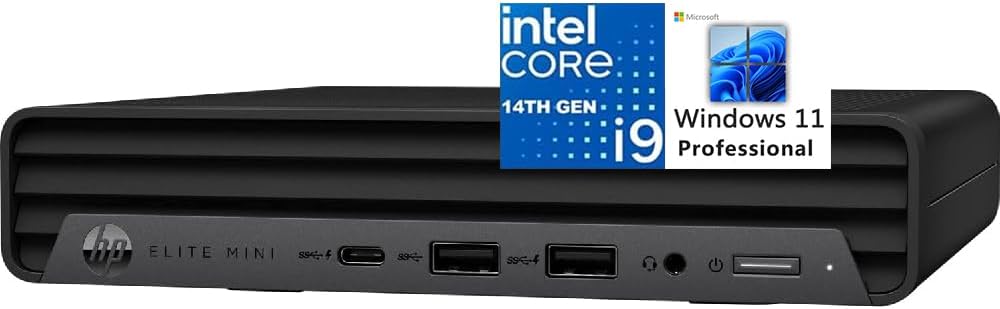
The HP Elite Mini 800 G9 is the top-tier option for business users seeking reliability and premium support. It features the Intel Core i9-14900T processor optimized for energy efficiency and performance. With a 4.6-star rating users value its stability and professional-grade build quality for office environments.
We may earn a commission when you buy through this link, at no additional cost to you.
This system includes Windows 11 Pro out of the box providing advanced management tools and security features. The ultra-quiet design ensures a distraction-free environment suitable for conference rooms or executive offices. Its premium construction aligns with enterprise standards for long-term reliability.
The cost is the highest on this list and memory is not easily upgradeable. Users are locked into the initial 16GB RAM configuration which may limit future scaling. However for businesses with standardized procurement needs the included software and support offset these limitations.
For large organizations requiring standardized high-performance PCs this model is a solid investment. The combination of professional software efficient cooling and durable design makes it a trusted choice. We recommend it for corporate IT deployments prioritizing reliability over customization.
Windows 11 Pro includes security and management tools essential for business environments. This reduces the need for additional software licenses and simplifies IT administration.
Optimized thermal design ensures minimal noise even under load. This keeps offices quiet and reduces energy consumption which benefits both budget and environmental goals.
We may earn a commission when you buy through this link, at no additional cost to you.
Selecting the right Mini PC requires evaluating specific technical specs against your workflow needs. We break down the key factors that define performance reliability and usability in modern compact systems.
Newer processors offer better instruction sets and power efficiency which directly impacts system responsiveness and heat output. Look for models with hybrid architectures that balance performance and efficiency cores for smooth multitasking.
Prioritize 13th or 14th Gen Intel Core i9 processors for long-term relevance and speed.
While many Mini PCs come with soldered memory some models feature open slots for future expansion. Ensure you check if the RAM is user-upgradable or locked to the initial configuration.
Choose models with at least two M.2 slots to accommodate high-speed NVMe drives easily.
The number and type of ports determine how many peripherals you can connect without using hubs. Look for HDMI DisplayPort USB-C and Ethernet options that match your existing monitors and network setup.
Ensure your model has sufficient USB 3.x ports for fast external drive connections.
Compact systems run hot so effective cooling is crucial to prevent performance throttling during long tasks. Check for models with dual-fan designs or high-quality copper heat pipes.
Prioritize units with low decibel ratings if you work in quiet environments.
For file transfers and server tasks faster network ports are essential. Standard Gigabit Ethernet is common but 2.5G or 10G SFP+ ports offer significantly higher throughput.
Select models with dual Ethernet ports if you need link aggregation or network redundancy.
Longer warranties indicate manufacturer confidence in hardware durability. Check if the warranty covers onsite service or only mail-in repairs.
Opt for brands offering extended coverage to protect your investment against unexpected failures.
Consider where you plan to place the device. VESA mounts allow you to attach the PC behind a monitor saving valuable desk space.
Ensure the chassis is sturdy enough to withstand potential movement if placed on open shelves.
When setting up your Mini PC ensure it is placed on a hard flat surface with adequate airflow. Avoid placing it inside enclosed cabinets where heat can accumulate quickly during operation.
Regularly clean dust from vents using compressed air to maintain optimal cooling efficiency. This simple maintenance step prevents overheating and extends the lifespan of internal components.
Keep firmware and BIOS updates current to ensure compatibility with new peripherals and security patches. Regular system checks help maintain peak performance and reduce the risk of software-related slowdowns.
Yes these systems can handle modern titles effectively depending on the specific processor and integrated graphics. While they do not match dedicated GPUs they are capable of smooth gameplay at 1080p resolution. Many models support external GPU enclosures for higher graphical demands.
It depends on the specific model. Some units have soldered memory while others feature open slots for expansion. Always check the manufacturer specifications before purchasing to confirm upgrade options.
Most modern Mini PCs support two to four displays via HDMI DisplayPort and USB-C outputs. Verify the specific port capabilities of your chosen model to ensure it meets your multi-monitor workflow needs.
Yes they typically consume significantly less power than traditional desktop towers. The efficient processors used in these units help reduce electricity costs and lower heat output.
With proper care and maintenance a Mini PC can last three to five years or longer. Regular cleaning and software updates help ensure the hardware remains reliable over time.
Most models support major Linux distributions out of the box. Drivers for Wi-Fi audio and graphics are generally available though checking community compatibility for specific hardware is recommended.
We have reviewed ten exceptional models ranging from budget-friendly options to enterprise-grade workstations. The MINISFORUM M1-1390 stands out for overall performance while the HP Elite Mini 800 G9 leads in business reliability.
When selecting a model prioritize the processor generation RAM capacity and connectivity options that align with your daily tasks. Understanding your specific needs ensures you get the best value from your investment.
Prices and availability change frequently so we recommend checking current listings before buying. Verify warranty terms and return policies to secure the best deal for your specific setup.