
Redragon K617 Wired
4.6Editor score
Compact 60 percent layout
Vibrant RGB lighting modes
Durable 50 million keystroke switches
Explore our expert comparison of the top ten hot swappable keyboards for October 2026 to find the perfect customizable typing solution for your needs.
Hot swappable keyboards offer enthusiasts the freedom to change switches without soldering. This feature allows for endless customization of typing feel and sound. Whether you seek a tactile thock or a silent linear press, these boards deliver versatility.
We compared ten top-rated models based on build quality, connectivity options, and switch compatibility. Our analysis focuses on gasket mounts, keycap materials, and software support. Each pick balances performance with value for gamers and professionals alike.
Every product review highlights unique strengths and potential trade-offs for your setup. Prices and availability change frequently so please check current listings before buying. We aim to guide you toward the most reliable option for your workflow.
4.6Editor score

4.7Editor score

4.5Editor score
This side-by-side comparison highlights the core specifications of every model featured in our guide to help you identify the right board for your specific typing and gaming preferences quickly.





The Keychron C1 offers a fantastic entry into the world of hot swappable keyboards. With a strong rating, it delivers reliable performance for daily work and light gaming. Its tenkeyless design saves desk space while keeping essential keys.
We may earn a commission when you buy through this link, at no additional cost to you.
Its hot-swap socket allows you to change switches without soldering tools. The included Gateron G Pro Brown switches provide a tactile feel that many users enjoy. The Mac layout ensures seamless compatibility with Apple devices out of the box.
While the ABS keycaps are durable, they may develop a shine over time compared to PBT. The lack of wireless connectivity means it relies on a USB Type-C cable which limits placement flexibility. These trade-offs are minor for the price.
Ideal for those seeking a reliable wired board with customization potential. The C1 strikes a balance between affordability and features. We recommend this for users who prioritize typing comfort and layout flexibility.
You can replace switches freely to match your typing preference without technical skills.
Includes extra keycaps for both operating systems to ensure full functional compatibility.
We may earn a commission when you buy through this link, at no additional cost to you.
The Logitech G316 X 98 stands out with its premium gasket-mounted structure and high-speed response. It is designed for gamers who need precision and a refined typing sound. The white aesthetic adds a unique touch to any setup.
We may earn a commission when you buy through this link, at no additional cost to you.
Its near-instantaneous 8 kHz report rate ensures that your inputs are registered quickly. The gasket mount and sound dampening layers provide a quiet and satisfying feel. PBT keycaps resist shine and ensure long-term durability for heavy users.
This board comes at a higher price compared to budget options which may not suit everyone. The full feature set requires the G HUB software which can be complex for some users. However the hardware quality is top tier.
Best for serious gamers seeking high performance and premium build quality. The combination of speed and comfort makes it a top contender. We suggest this for those willing to invest in a high-end peripheral.
The 8 kHz report rate minimizes latency for competitive gaming scenarios.
A dedicated dial and display let you manage settings without leaving your game.
We may earn a commission when you buy through this link, at no additional cost to you.
The AULA F99 brings wireless freedom to hot swappable enthusiasts with a massive battery. It supports three connection modes allowing you to switch between devices effortlessly. The pre-lubed switches offer a smooth typing experience right out of the box.
We may earn a commission when you buy through this link, at no additional cost to you.
Its gasket structure and foam layers reduce noise and improve the typing feel. The 8000mAh battery ensures you can use it for weeks without needing a charge. This makes it ideal for users who switch between work and gaming devices often.
Some users find the software for customization to be less robust than competitors. The RGB lighting offers many effects but may lack fine control compared to high-end models. Despite this the hardware performance is excellent.
Perfect for users who need wireless connectivity and customization without a high cost. The battery life alone makes it a strong choice. We recommend this for anyone seeking a versatile wireless mechanical keyboard.
The large battery capacity means fewer interruptions for charging during long sessions.
Hot-swap PCB supports most 3-pin and 5-pin MX style switches for flexibility.
We may earn a commission when you buy through this link, at no additional cost to you.
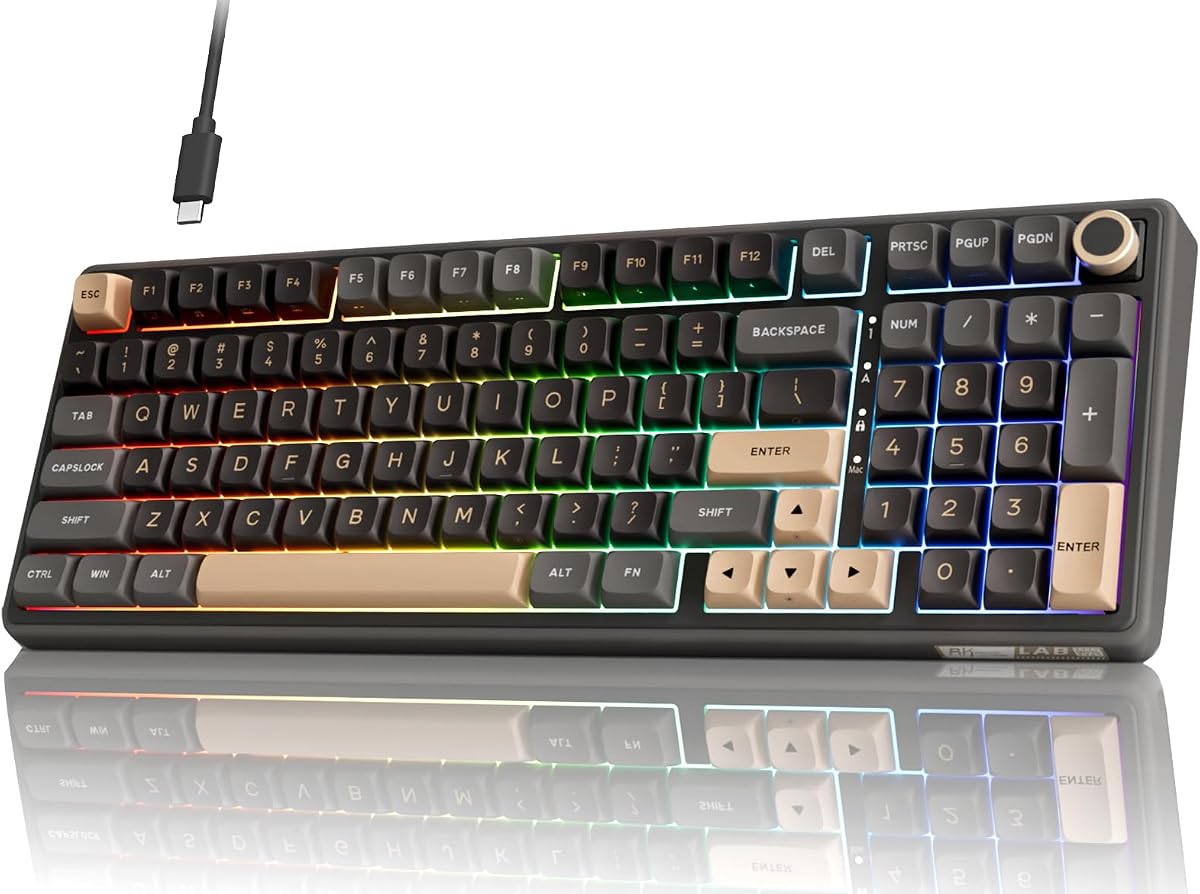
The Redragon K617 proves that hot swappable features do not have to be expensive. It is a compact 60 percent board perfect for smaller desks. The RGB lighting adds a vibrant touch to your setup without breaking the bank.
We may earn a commission when you buy through this link, at no additional cost to you.
You can swap switches easily to try different feels without soldering. The stock switches are quiet and suitable for shared environments. Its software allows for macro programming which enhances productivity for specific tasks.
The lack of a numpad means it is not ideal for heavy data entry. The keycaps are functional but may not feel as premium as others. However for the price it offers incredible value for beginners.
Ideal for gamers with limited desk space who want customization. The affordability makes it accessible to everyone. We suggest this as a first hot swappable keyboard to experiment with.
Ditching the numpad frees up room for wide mouse swipes during gaming.
Up to twenty preset lighting modes help you match your gaming rig style.
We may earn a commission when you buy through this link, at no additional cost to you.
The Redragon K771 combines a full-size layout with wireless convenience. Its ten dedicated hotkeys provide quick access to essential controls. The pre-lubed linear switches ensure a smooth and consistent typing feel across the board.
We may earn a commission when you buy through this link, at no additional cost to you.
Noise dampening layers absorb hollow sounds for a more satisfying experience. The massive battery supports marathon gaming sessions without interruption. This board is designed for those who need all the keys for productivity.
Its size might be too large for smaller desks compared to compact alternatives. The software allows for customization but lacks the depth of premium brands. Despite this the build quality is solid for the price point.
Best for office workers and gamers needing a full keyboard without wires. The comfort and battery life are its main selling points. We recommend this for anyone seeking a reliable full-size wireless board.
Four extra hotkeys streamline workflow by placing essential controls at your fingertips.
Five layers of foam ensure a clean acoustic experience for shared spaces.
We may earn a commission when you buy through this link, at no additional cost to you.
The RK ROYAL KLUDGE R98 Pro stands out with its detachable volume knob and gasket mount. The creamy pre-lubed switches provide a unique tactile feel that enthusiasts love. Its 96 percent layout retains the numpad in a smaller frame.
We may earn a commission when you buy through this link, at no additional cost to you.
The PBT keycaps have a matte finish that resists wear and shine over time. The gasket mount improves stability and adds flexibility to the typing angle. This makes it comfortable for long coding sessions or work days.
While it lacks wireless connectivity it excels in build quality for its price. The online driver is needed to unlock full macro features which might be a hurdle. Overall it is a robust option for desktop users.
Perfect for users who want premium features like a knob and gasket mount. The keycap quality adds a touch of luxury to the experience. We suggest this for those who prioritize typing feel and style.
The CNC metal knob allows for quick volume adjustments during media playback.
MDA profile PBT keycaps offer a strong sense of wrapping when typing.
We may earn a commission when you buy through this link, at no additional cost to you.
The Logitech G512 X introduces revolutionary TMR analog sensors for gaming precision. You can switch between analog and mechanical switches on dedicated beds for maximum versatility. This technology allows for rapid trigger and adjustable actuation points.
We may earn a commission when you buy through this link, at no additional cost to you.
The rapid trigger feature enables instant re-actuation which is ideal for competitive shooters. The dual swap design means you can customize the entire keyboard to your specific needs. The build quality uses recycled plastic and a silicone gasket mount.
This premium technology comes at a higher price which may not suit casual users. Understanding the actuation settings requires time and experimentation. However for serious gamers the competitive edge is worth the investment.
Best for competitive players who need every millisecond advantage. The ability to tune actuation is unmatched. We recommend this for those seeking the ultimate in gaming keyboard technology.
Tunnel Magneto-Resistance sensors provide high-resolution responsiveness for smooth gameplay.
Three dedicated beds allow you to mix analog and mechanical switches easily.
We may earn a commission when you buy through this link, at no additional cost to you.
The TECKNET Mechanical Keyboard offers a robust metal frame and a long warranty. It supports three wireless modes ensuring you stay connected across multiple devices. The Sky switches are tuned for smooth keystrokes and a thocky sound.
We may earn a commission when you buy through this link, at no additional cost to you.
Its 5-layer dampening structure reduces noise significantly during typing. The compact 96 percent layout saves space while keeping essential keys. This makes it suitable for office work where silence is appreciated.
Software customization is restricted on Mac systems which limits some users. The RGB effects are standard but lack advanced programming on all platforms. Still the build quality and warranty are strong selling points.
Ideal for users seeking reliability and a metal construction. The warranty provides peace of mind for long-term use. We suggest this for those who prioritize durability over software features.
The metal build ensures stable performance even during intense gaming sessions.
A thirty-six-month warranty and round-the-clock support ensure you are covered.
We may earn a commission when you buy through this link, at no additional cost to you.
The EPOMAKER X Aula F75 MAX features a unique TFT screen for customization. The display allows you to view battery status and customize lighting visually. This adds a high-tech element to your desk setup.
We may earn a commission when you buy through this link, at no additional cost to you.
It comes with a gasket mount and flex-cut plate for a soft typing feel. The factory lubed stabilizers ensure a quiet and consistent experience. The 75 percent layout balances size and function for most users.
Battery life is shorter than larger boards which means frequent charging. The software for full customization can be complex for casual users. Despite this the unique display and build are compelling.
Best for tech enthusiasts who want a screen and premium typing feel. The ergonomic design helps reduce wrist strain. We recommend this for those seeking a distinctive and comfortable mechanical keyboard.
The smart display helps you monitor battery and customize lighting with ease.
Adjustable kickstands and low front height help prevent wrist strain.
We may earn a commission when you buy through this link, at no additional cost to you.
The Keychron K10 HE uses Hall Effect magnetic switches for durability and speed. These switches detect keypresses without physical contact reducing wear over time. The rapid trigger feature allows for instant reset during intense gameplay.
We may earn a commission when you buy through this link, at no additional cost to you.
Its full-size layout ensures you have access to all keys needed for work. The wood sidings and PBT keycaps give it a refined organic look. The tri-mode connectivity supports up to three devices via Bluetooth.
Setting up the actuation points requires using the Launcher web configurator. This adds a step to the setup process. The price is high but the technology is advanced for longevity.
Ideal for those who want cutting-edge technology and a classic design. The magnetic switches offer a unique tactile feel. We suggest this for users seeking long-term reliability and wireless freedom.
Magnetic sensors reduce physical wear so the keyboard lasts longer.
Set actuation points from 0.2mm to 3.8mm to suit your style.
We may earn a commission when you buy through this link, at no additional cost to you.
Selecting a hot swappable keyboard involves several factors that define your typing experience. This guide helps you prioritize features to match your needs and budget effectively.
Ensure the board supports 3-pin and 5-pin switches to maximize your options. Most modern hot-swap sockets allow for a wide range of mechanical switches.
Look for boards that explicitly state support for major brands to avoid fit issues.
Decide between full size tenkeyless or compact layouts based on desk space. Full sizes are better for productivity while compact boards save room for mouse movement.
Choose a layout that retains the keys you need daily without excess bulk.
If you prefer a clean desk check for tri-mode connectivity including Bluetooth. Wireless adds convenience but usually comes with a shorter battery life.
Prioritize boards with USB-C charging and large batteries for longer use.
Gasket mounts and metal frames provide a more stable and premium feel. Plastic cases are affordable but may flex during heavy typing sessions.
Invest in materials that offer durability and reduce vibration for comfort.
Robust software allows for macros and lighting customization to fit your workflow. Some brands have limited options on Mac systems so check compatibility.
Ensure the driver supports your operating system before making a purchase.
PBT keycaps are more durable and resist shine compared to ABS plastics. This difference impacts both the texture and longevity of the keyboard.
Choose PBT if you want a matte finish that lasts longer.
Hot swappable keyboards range from budget-friendly to premium models. Determine your spending limit to narrow down the best options.
Balance price with features like wireless or advanced sensors.
If aesthetics matter look for per-key RGB instead of basic backlighting. Advanced boards offer multiple modes and brightness controls.
Prioritize boards that sync lighting with your system or games.
To change switches use the included keycap and switch pullers carefully. Align the switch legs with the hot-swap sockets and push down firmly without tilting.
Clean your keyboard regularly with a compressed air blower to remove dust. Wipe the keycaps with a microfiber cloth to prevent grime buildup over time.
Store your keyboard in a dry environment to protect the internal electronics. If using wireless keep the battery charged to extend its overall lifespan.
No they are designed for easy modification without soldering. Most kits come with tools to remove and insert switches effortlessly. The process is simple enough for beginners.
Most boards support standard 3-pin and 5-pin MX style switches. It is best to check the product specs to ensure compatibility. Some may have specific requirements for LED compatibility.
No hot-swap functions work without software. However software is needed for custom lighting and macro programming. Basic functionality is available out of the box.
If done correctly with the proper tools it will not damage the board. Avoid pulling switches too hard as excessive force can bend the sockets. Gentle use ensures longevity.
PBT keycaps are more durable and resist shine compared to ABS. They offer a textured feel that is preferred by many users. They last longer under heavy typing.
Yes modern wireless hot-swap keyboards offer stable connections. Tri-mode support ensures you can switch between devices easily. Latency is minimal for general tasks.
We have reviewed ten top models ranging from budget options to premium picks. Each keyboard offers unique features to suit different needs and preferences.
Prioritize build quality and switch compatibility when making your final decision. Your typing experience depends heavily on these two factors.
Please check current prices and availability before buying to ensure the best deal.