
NZXT H5 Flow
4.7Editor score
Perforated PSU shroud
Ultra-fine mesh panels
Two pre-installed fans
This guide compares the top ten high airflow PC cases for October 2026 focusing on thermal performance build quality and design features for gamers and pros.
Choosing a high airflow PC case is essential for maintaining optimal temperatures during intense gaming sessions or heavy workloads. Proper ventilation ensures that your components run efficiently without thermal throttling or excessive noise levels.
We have evaluated ten leading models based on fan configuration mesh design radiator support and overall build quality. Each selection offers unique advantages tailored to different budgets and specific cooling requirements for modern hardware.
Every pick highlights standout features pros and cons to help you make an informed decision for your next build. Please note that availability and pricing can change frequently so verify details before purchasing.
4.7Editor score

4.8Editor score

4.8Editor score
Below you will find a detailed side-by-side comparison of all ten high airflow PC cases. This table highlights key specifications and features to help you quickly identify the right model for your needs.





The MONTECH AIR 903 MAX stands out as a top contender in the high airflow PC case category with its impressive thermal performance and thoughtful design. Rated highly by users and experts alike this case delivers exceptional cooling potential straight from the box thanks to its included fan setup.
We may earn a commission when you buy through this link, at no additional cost to you.
Its front mesh panel allows unrestricted airflow while the chassis supports demanding components including E-ATX motherboards and graphics cards up to 400mm. The inclusion of four 140mm fans ensures that your system stays cool even under heavy load without requiring additional purchases.
While the glass side panel might show fingerprints easily the build quality and ventilation more than make up for this minor aesthetic issue. The cable management options are solid and the front I/O layout is practical for daily use with multiple ports available.
If you are building a high performance gaming PC or workstation this case offers a perfect balance of cooling capability and price. It is ideal for anyone who wants reliable thermal management without compromising on style or future upgrade paths.
The ventilated mesh front and large fan capacity create an efficient path for air to flow through the chassis keeping components cool.
With support for E-ATX boards and massive GPUs this case ensures your build won't outgrow the chassis with next gen hardware.
We may earn a commission when you buy through this link, at no additional cost to you.
The NZXT H5 Flow proves that you do not need to spend a fortune to get excellent airflow in your PC build. This compact mid-tower case delivers on its promise of thermal efficiency with a design that prioritizes air intake and exhaust paths.
We may earn a commission when you buy through this link, at no additional cost to you.
Its perforated PSU shroud is a standout feature that enables additional cooling for your graphics card by allowing air to intake from the bottom and sides. The ultra-fine mesh on all critical panels ensures dust is filtered while maintaining maximum air volume flow.
While the pre-installed fans are not the quietest or most powerful on the market they provide a solid baseline for most users. The cable management system is intuitive and keeps your build looking clean which is always a plus for budget cases.
This case is perfect for budget conscious builders who still want a modern look and reliable cooling for their components. It is a great entry point into custom PC building without sacrificing essential thermal performance or style.
The unique PSU shroud design allows air to reach the graphics card directly improving temperatures during intensive gaming sessions.
Despite its smaller size this case supports high-performance parts and radiators making it ideal for smaller desk setups.
We may earn a commission when you buy through this link, at no additional cost to you.
The Cooler Master HAF II 500 represents the pinnacle of airflow focused design with its oversized fan configuration and robust chassis. This case is built for enthusiasts who need the absolute best cooling performance for their high-end hardware without compromise.
We may earn a commission when you buy through this link, at no additional cost to you.
The inclusion of two 220mm front fans and a large 180mm rear fan creates a powerful wind tunnel effect that pushes air through the system efficiently. The split-level cable management design ensures that cables do not obstruct airflow while keeping the interior organized and tidy.
While the price is higher than many competitors the quality and performance justify the investment for serious builders. The MasterRail mounting system offers flexibility for various radiator and fan sizes allowing for customized cooling setups.
If you are building a flagship system with top tier components this case will handle the heat load with ease. It is the ultimate choice for those who prioritize thermal performance and build quality over cost or compact size.
The large diameter fans move more air at lower RPMs reducing noise while maximizing thermal dissipation efficiency.
Heavy duty materials and precise engineering ensure this case stands up to daily use and heavy component loads.
We may earn a commission when you buy through this link, at no additional cost to you.
The CORSAIR 4000D RS takes the popular 4000D design and enhances it with the innovative FRAME modular system. This feature allows you to customize and upgrade your case over time making it a future proof choice for evolving builds.
We may earn a commission when you buy through this link, at no additional cost to you.
Pre-installed RS ARGB fans deliver strong performance while maintaining a quiet operation thanks to their Zero RPM mode. The InfiniRail mounting system gives you unprecedented flexibility in positioning fans where you need them most for targeted cooling.
While the modular upgrades can add to the cost the base case already offers excellent value and performance. The 3D Y-Pattern panel ensures minimal restriction for air intake which is critical for maintaining low component temperatures.
This case is perfect for users who value flexibility and customization alongside great cooling. It is a top choice for those planning to build a system that will adapt to their needs over the years.
The modular FRAME system lets you swap panels and trays to match your specific aesthetic or functional needs.
The included fans run silently at low loads and spin up only when needed for high cooling demand.
We may earn a commission when you buy through this link, at no additional cost to you.
The LIAN LI LANCOOL 216 offers a compelling combination of airflow performance and features at a very competitive price point. It is designed to handle high performance components without breaking the bank for budget aware builders.
We may earn a commission when you buy through this link, at no additional cost to you.
The two 160mm front fans provide a significant amount of air volume compared to standard 140mm units ensuring your GPU and CPU stay cool. The modular motherboard I/O tray allows you to adjust the position for better clearance or cable management.
While the RGB lighting is vibrant and may not suit all tastes it can be controlled or disabled via software if desired. The build quality is robust and the internal space is well utilized for storage and cooling components.
This case is a fantastic choice for anyone seeking a balance between cost and performance. It delivers on its promise of high airflow and ease of use making it a reliable option for many build types.
The larger fan size allows for greater air movement at lower speeds reducing noise while improving cooling efficiency.
The modular I/O and spacious interior make it easy to route cables and install components without frustration.
We may earn a commission when you buy through this link, at no additional cost to you.
The Antec Flux Pro is a full tower powerhouse designed for those who need maximum room for their components and cooling solutions. It stands out with a unique aesthetic that blends metal glass and wood for a high quality texture.
We may earn a commission when you buy through this link, at no additional cost to you.
With six pre-installed PWM fans this case offers comprehensive cooling coverage right out of the box. The multi-directional vent design supports large radiators simultaneously making it ideal for extreme liquid cooling setups.
While its size may be prohibitive for smaller desks it offers unparalleled room for expansion and airflow management. The iShift PSU mount is a clever feature that helps organize cables and improve airflow paths around the power supply.
This case is perfect for enthusiasts building extreme systems with multiple GPUs or high-end cooling. It delivers on performance and style making it a standout choice for those who need a premium full tower option.
The ability to support two large radiators ensures even the most heat demanding systems can be cooled effectively.
The combination of materials gives the case a distinctive look that sets it apart from standard black boxes.
We may earn a commission when you buy through this link, at no additional cost to you.
The CORSAIR 3500X RS brings a panoramic viewing experience to the table without sacrificing essential cooling capabilities. This case is perfect for users who want to showcase their build while still maintaining good thermal performance.
We may earn a commission when you buy through this link, at no additional cost to you.
The wraparound glass design gives you a clear view of your components and lighting effects. Despite the glass panels the case is designed with ample space for airflow and mounting points for fans.
The removable glass panels make installation and maintenance straightforward which is a practical benefit often overlooked in glass cases. The RS fans included provide a good balance of lighting and cooling for most builds.
If you prioritize aesthetics and want a case that turns heads this model is a strong contender. It offers the best of both worlds by combining style with functional cooling performance.
The wraparound glass provides an unobstructed view of your build allowing you to enjoy your components and lighting.
Despite the glass front the case is designed to ensure air flows efficiently to keep components running cool.
We may earn a commission when you buy through this link, at no additional cost to you.
The Lian Li V100 is designed with the future in mind by supporting back-connect motherboards for a cleaner look. This feature eliminates cables on the front of the motherboard resulting in a pristine build aesthetic.
We may earn a commission when you buy through this link, at no additional cost to you.
With four pre-installed PWM fans this case ensures that you have adequate cooling out of the box. The tool-less side panels allow for quick access to your components which is convenient for maintenance and upgrades.
While back-connect motherboards are still emerging technology this case is ready for them making it a forward-thinking choice. The included ARGB strip adds a nice touch of lighting that can be synchronized with your system.
This case is ideal for builders who value clean aesthetics and are looking to adopt new technologies early. It offers excellent airflow and build quality that suits modern component requirements.
Supporting back-connect motherboards allows for a cable-free appearance on the front of the system.
The tool-less mounting for panels means you can access your components quickly without needing a screwdriver.
We may earn a commission when you buy through this link, at no additional cost to you.
The NZXT H9 Flow combines the dual-chamber design philosophy with a panoramic glass aesthetic for a modern build experience. This layout separates components to improve thermal performance and cable management significantly.
We may earn a commission when you buy through this link, at no additional cost to you.
Its perforated steel panels ensure that air flows efficiently through the case while the glass panels provide a seamless view of your hardware. The ten fan capacity allows you to customize the cooling setup to your exact needs.
While the pre-installed fans are not the top tier the case provides a solid foundation for airflow and expansion. The inclusion of back-connect support makes it ready for the next generation of motherboard designs.
This case is a great choice for those who want a clean look with the practical benefits of a dual-chamber layout. It balances style and function well making it suitable for a wide range of builds.
Separating the PSU and drives from main components helps manage heat and keeps cables organized in a dedicated space.
The seamless glass panels give you a stunning view of your build without compromising on modern cooling design.
We may earn a commission when you buy through this link, at no additional cost to you.
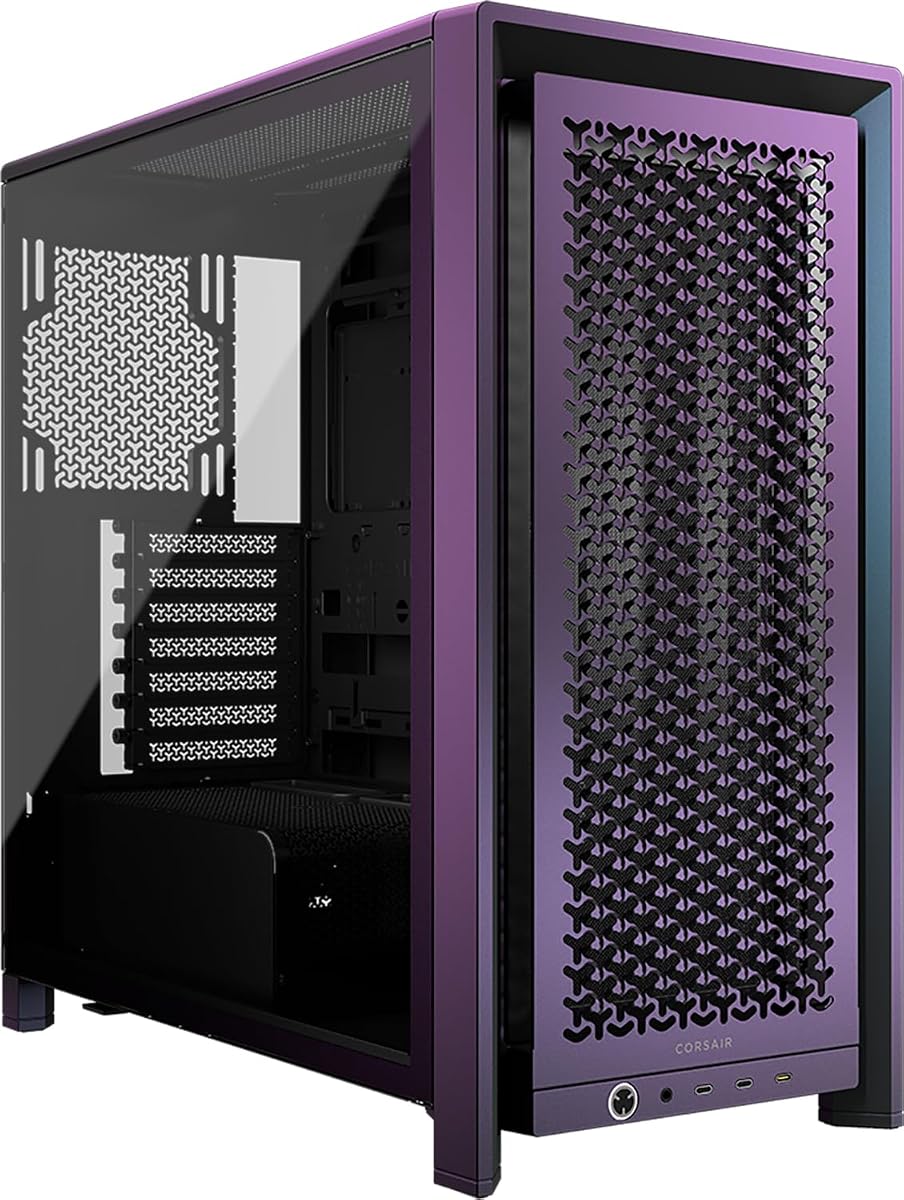
The CORSAIR Frame 4000D Vault is a special limited edition release that offers the same great airflow features as the standard version. This case is ideal for collectors or those who want something unique and exclusive.
We may earn a commission when you buy through this link, at no additional cost to you.
With the modular FRAME system and dual 360mm radiator support it offers excellent cooling flexibility. The 3D Y-Pattern panel ensures minimal restriction for air intake making it a strong performer for high-end parts.
Since this is a limited edition unit each case is individually numbered adding to its exclusivity. The unique Galaxy finish makes it stand out on any desk providing a premium look and feel.
This case is perfect for those who appreciate collectible hardware and want a case that performs as well as it looks. It is a great option for a special build that stands out from the crowd.
The limited run and individually numbered units make this case a unique collectible for enthusiasts.
Despite its special status the case delivers on the core promise of excellent airflow and thermal management.
We may earn a commission when you buy through this link, at no additional cost to you.
Selecting the right high airflow PC case involves balancing several factors including design cooling capacity and build quality. This section breaks down the key elements you should consider.
The front panel of your case plays a critical role in how much air can enter the system. Mesh panels generally provide better airflow than solid glass panels which restrict air intake. When looking for a high airflow case prioritize models with perforated or mesh front designs to ensure your components get enough cool air.
Look for mesh panels to maximize air intake while keeping the case looking modern and clean.
Check how many fans come pre-installed and where they are positioned within the case. Cases that include multiple fans especially at the front and rear help establish a solid airflow path immediately. More fans allow you to balance intake and exhaust pressures effectively without needing extra purchases.
Opt for cases that include multiple fans to ensure balanced and efficient air movement out of the box.
If you plan on using liquid cooling ensure the case supports the radiator size you intend to install. Also check the maximum graphics card length to guarantee it fits comfortably inside. A case that supports larger components gives you room to upgrade without needing to replace the chassis later.
Verify that the case supports your desired radiator size and GPU length before making a final purchase.
Good cable management features help keep your build tidy and improve overall airflow by reducing obstructions. Look for ample space behind the motherboard tray along with straps and tie points. Clean cable routing ensures air can flow freely through the chassis rather than getting blocked by messy wires.
Prioritize cases with spacious cable routing areas to keep the interior clean and unobstructed.
A well-built case made of quality materials will be more stable and durable over time. Steel frames and tempered glass panels are common in high-end cases and provide a solid structure. Investing in a sturdy case ensures that your components are protected and the case holds up well in daily use.
Choose a case with robust materials to ensure stability and longevity for your PC components.
While performance is key the visual appearance of your case matters for your personal setup. ARGB fans and glass panels can enhance the look of your build but may show fingerprints easily. Decide how important aesthetics are to you and choose a design that matches your style preferences.
Balance aesthetic features like lighting and glass with practical cooling performance for the best overall choice.
Some cases offer modular components like removable panels or customizable trays that allow for greater flexibility. These features can help you adapt the case as your needs change or if you add new components later. Modular options provide better value over time since you can upgrade specific parts of the case easily.
Consider modular cases if you want flexibility to upgrade or change your case configuration later.
Determine your budget early to narrow down choices to cases that offer the best value for your money. Often higher priced cases provide more fans and better build quality but budget options can still offer great airflow. Compare features across different price points to find a model that meets your needs without overspending.
Compare features against the price to ensure you get the best performance and build quality for your budget.
Start by placing your PC case in a well ventilated area away from walls or furniture to ensure it can draw in cool air effectively. Proper placement helps prevent heat buildup around the case and keeps internal temperatures lower.
Regularly clean the filters and panels to remove dust that can restrict airflow over time. Using a can of compressed air to gently blow out dust from fans and vents keeps the cooling system efficient and quiet.
Monitor your system temperatures using software tools to ensure the airflow is working as expected. If you notice higher than normal temps check if fans are spinning and if vents are blocked by dust or objects.
Airflow is vital because it carries away heat generated by components like the CPU and GPU. Good ventilation prevents overheating which can cause throttling reduced performance or damage to hardware. A case with high airflow keeps your system running at optimal temperatures during use.
While mesh panels are more functional they often have a modern industrial look that many users appreciate. You can find cases that combine mesh front panels with glass sides to get both cooling and aesthetics. It is possible to balance style and performance with the right design choices.
A standard setup usually includes at least three fans two for intake and one for exhaust. Adding more fans can improve cooling but may increase noise levels. Choose a case that supports your fan count needs to build a custom airflow path.
Most high airflow cases support large graphics cards but you should check the specific length limits. Look for models that support cards over 350mm to ensure compatibility with modern high-end GPUs. Always verify dimensions before purchasing to avoid fit issues.
Many modern cases come with quality fans that provide solid baseline cooling for most users. If you need extreme cooling you might upgrade these fans later but for general use they are sufficient. Check reviews for fan quality before buying to manage expectations.
Tempered glass panels can restrict airflow compared to mesh or perforated metal panels. However modern cases with glass often have mesh tops or fronts to compensate for this. Consider your priorities and choose a case with balanced ventilation and style.
Use the cable ties and channels provided to route cables neatly behind the motherboard tray. Keeping cables away from the front of the case prevents them from blocking air intake. Proper cable management is a simple way to improve airflow without extra hardware.
A back-connect motherboard has power and data connections on the rear side to hide cables. This design requires a compatible case with special mounting options for the best results. Look for cases supporting these boards if you want a cleaner build aesthetic.
We have explored ten top performing high airflow PC cases that deliver excellent thermal management and modern design features. Each model offers unique strengths whether you prioritize customization cooling power or aesthetic appeal.
When selecting a case consider your specific needs such as component size fan requirements and budget constraints. A well chosen case ensures your PC stays cool and performs reliably during demanding tasks.
Remember to verify current availability and details before purchasing as product specs can change over time. With the right choice you can build a system that looks great and runs efficiently for years to come.