
2×2 4k Video Wall Controller
4.6Editor score
HDMI and DVI inputs
11 splicing modes
Plug and play design
This guide compares the top ten HDMI Video Wall Controller models for seamless multi-screen displays with detailed feature analysis.
Creating a seamless multi-screen display requires a reliable HDMI Video Wall Controller to split and manage video signals effectively across multiple monitors or TVs.
We evaluated ten top-rated models based on resolution support, input flexibility, control options, and ease of setup to help you find the perfect fit.
Each pick highlights key strengths and ideal use cases while noting that prices may fluctuate so check current listings before purchasing your device.
4.6Editor score

4.8Editor score

4.2Editor score
This side-by-side comparison highlights the key specifications and capabilities of each selected HDMI Video Wall Controller to streamline your decision process.



This J-Tech Digital model stands out as the highest-rated option with a 4.8 rating due to its reliable performance and comprehensive feature set.
We may earn a commission when you buy through this link, at no additional cost to you.
It supports 4K input at 30Hz and delivers 1080P outputs with eight display modes including seamless video wall configurations.
While the output resolution is capped at 1080P it excels in flexibility with audio extraction and edge masking for bezel correction.
Ideal for commercial displays or home theaters needing precise screen alignment without complex hardware setup or software.
Edge masking allows fine-tuning up to eight pixels to eliminate visual distortion and align images perfectly across screens.
Integrated SPDIF and 3.5mm ports let you send audio to external speakers without sacrificing screen quality or setup space.
We may earn a commission when you buy through this link, at no additional cost to you.
This controller offers exceptional value with a low price point while still supporting HDMI and DVI inputs for broader device compatibility.
We may earn a commission when you buy through this link, at no additional cost to you.
It features eleven splicing modes and includes a memory function that remembers your last configuration even after unplugging the device.
The inclusion of multiple control options like button press and RS232 makes it versatile for both simple and advanced setups.
Perfect for users seeking a cost-effective solution for basic video wall tasks without sacrificing essential features like audio output.
Supporting DVI inputs alongside HDMI ensures you can connect older professional monitors or projectors without needing extra adapters.
The built-in memory retains your display settings so you do not have to reconfigure the device every time you turn it on.
We may earn a commission when you buy through this link, at no additional cost to you.
This premium unit stands out with 4K60Hz input support and web control via LAN for advanced users managing displays over a network.
We may earn a commission when you buy through this link, at no additional cost to you.
It includes multiviewer presets allowing you to view multiple source signals on one screen which is ideal for monitoring environments.
The ability to upscale and downscale resolutions provides flexibility when mixing content of different native sizes across the video wall.
Best suited for professional environments requiring high fidelity and remote management capabilities despite the higher investment cost.
Web control through LAN allows IT teams to adjust settings remotely without physical access to the device in secure locations.
Upscale and downscale functions let you match various source resolutions to the target video wall layout effortlessly without artifacts.
We may earn a commission when you buy through this link, at no additional cost to you.
This OREI model adds modern versatility with a USB-C input alongside HDMI which accommodates newer laptops and mobile devices easily.
We may earn a commission when you buy through this link, at no additional cost to you.
It supports 4K at 60Hz input which is crucial for smooth motion content like gaming or video editing workflows on high-end displays.
The inclusion of international adapters and dual voltage power makes it a practical choice for businesses operating across different regions.
Users should note lack of HDR10 support but for standard SDR video walls this device delivers strong performance and reliable connectivity.
USB-C input expands your source options beyond traditional HDMI allowing direct connection to modern laptops and tablets for presentations.
Dual voltage supply and included converters ensure the device works reliably regardless of country electrical standards without extra hardware.
We may earn a commission when you buy through this link, at no additional cost to you.
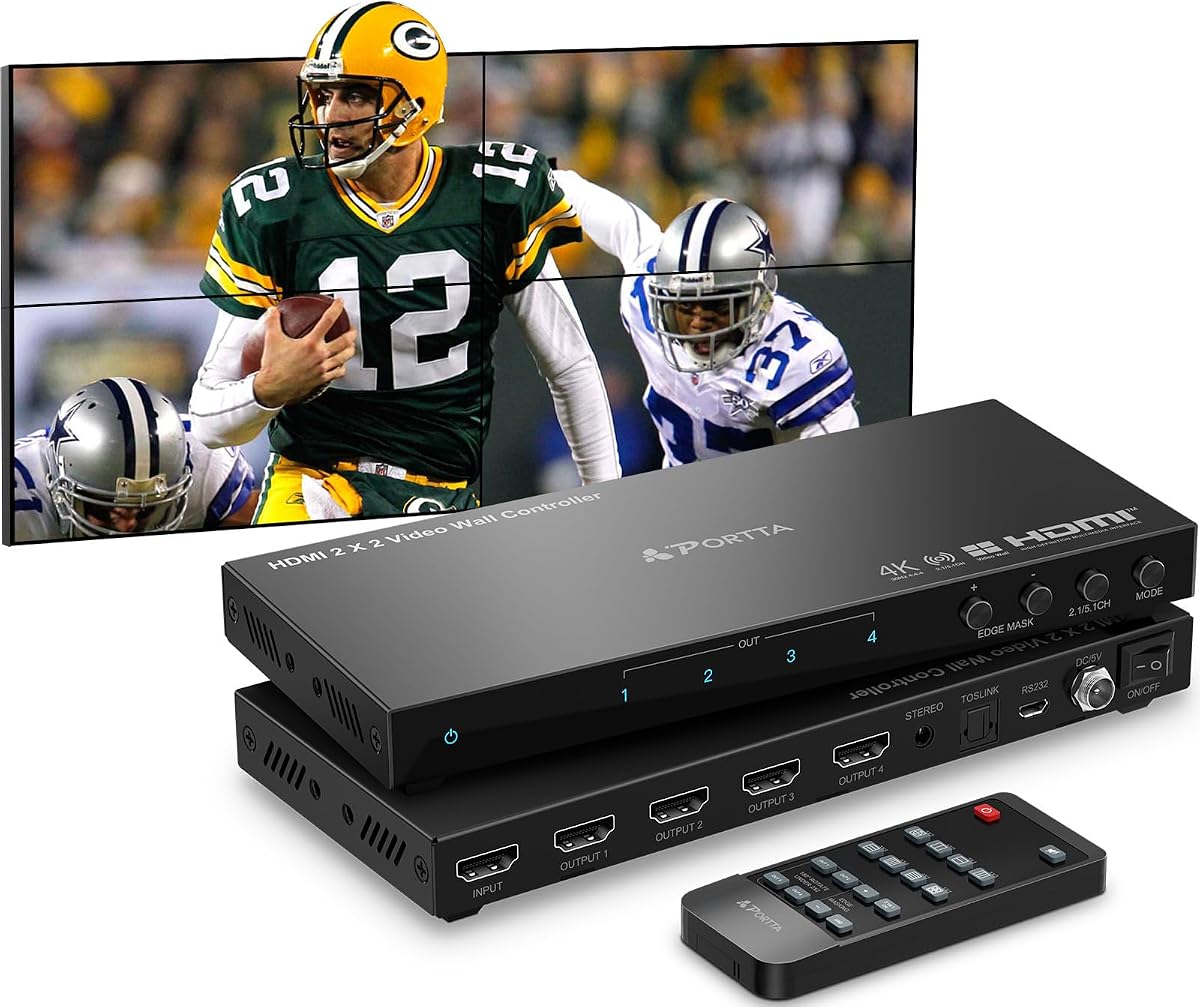
PORTTA offers a solid mid-range solution with a generous two year warranty which provides peace of mind for long-term installations.
We may earn a commission when you buy through this link, at no additional cost to you.
It supports eleven different splicing modes enabling creative layouts such as 1×4 or 4×1 which are useful for portrait orientation displays.
The device includes mounting ears for secure installation which reduces the need to purchase additional rack or wall mounting accessories.
Ideal for retail or lobby displays where durability and flexible layout options matter more than ultra-high resolution processing speed.
Portrait support via rotation allows you to use vertical screens for scrolling content like news tickers or digital menus easily.
Mounting ears are included in the package saving you extra cost and time when securing the controller in a server rack.
We may earn a commission when you buy through this link, at no additional cost to you.
This variant from OREI emphasizes bezel adjustment and EDID management to ensure screens align perfectly without visible gaps or mismatched colors.
We may earn a commission when you buy through this link, at no additional cost to you.
It accepts 4K signals at 60Hz but outputs at 1080p which balances performance with bandwidth limits for most standard commercial displays.
RS-232 control allows integration into professional automation systems which is essential for controlled environments like corporate boardrooms.
Good for users prioritizing seamless visuals and professional integration over native 4K output capabilities across the entire video wall.
Built-in bezel adjustment tools help align images precisely across physical screen borders to create a uniform single picture effect.
RS-232 control allows this device to be managed by central control systems for automated operation in enterprise environments.
We may earn a commission when you buy through this link, at no additional cost to you.
This unit moves beyond simple splitting to offer full matrix switching allowing any of four sources to be routed to any display.
We may earn a commission when you buy through this link, at no additional cost to you.
It supports 4K at 60Hz and includes web control for management which is powerful for scenarios where multiple inputs need switching.
The advanced EDID management ensures stable connections even with various monitor types or when displays are turned on and off.
Best for command centers or large rooms where flexible source routing is as important as the multi-screen display wall layout.
Unlike simple splitters this matrix lets you switch different inputs to different screens offering unmatched flexibility for control rooms.
Web control enables you to manage inputs and video wall settings via a browser without needing a dedicated physical controller.
We may earn a commission when you buy through this link, at no additional cost to you.
ISEEVY delivers true 4K resolution on all four output ports making this one of the few options supporting full UHD on every screen.
We may earn a commission when you buy through this link, at no additional cost to you.
It is designed for 24×7 stable work which is critical for public displays that must run continuously without overheating or freezing.
Input options include both HDMI and USB-C which accommodates modern content sources while keeping the layout simple and intuitive.
Ideal for high-end retail or museums where image fidelity across all screens is a priority over cost or additional control features.
Each HDMI port supports full 4K resolution ensuring crisp detail across the entire video wall without downscaling compromises.
Stable work design supports 24×7 operation making it reliable for installations that require uninterrupted content display daily.
We may earn a commission when you buy through this link, at no additional cost to you.
This controller offers unique USB auto display capability allowing it to read directly from a flash drive for standalone content playback.
We may earn a commission when you buy through this link, at no additional cost to you.
It includes detailed image setup options like brightness contrast and color temperature which help tune the video wall for specific lighting conditions.
Support for max resolution up to 4096×2160 ensures compatibility with ultra-high definition sources beyond standard 4K specifications.
Great for signage applications where content can be updated via USB and needs precise color matching across all displays.
USB auto display lets the device play files directly from a flash drive removing the need for a constant PC source.
Image setup tools let you adjust brightness and color temperature to ensure consistent looks across different display panels.
We may earn a commission when you buy through this link, at no additional cost to you.
This model expands capacity to six outputs allowing you to create a larger video wall using up to six TVs in various layouts.
We may earn a commission when you buy through this link, at no additional cost to you.
It maintains 4K support and includes USB-C inputs so you can connect modern devices to drive the expanded screen configuration.
Multiple splice modes include 2×3 and 3×2 configurations which are perfect for larger horizontal or vertical arrangements in rooms.
Best for large venues or exhibition halls needing more than four screens while retaining the features and quality of smaller models.
With six outputs you can build significantly larger video walls to fill wide spaces or tall vertical displays without extra hardware.
Support for modes like 2×3 and 3×2 lets you adapt to unique screen arrangements beyond standard square video wall designs.
We may earn a commission when you buy through this link, at no additional cost to you.
Choosing the right HDMI Video Wall Controller depends on matching resolution support and output flexibility to your specific display setup needs.
Ensure the controller supports the native resolution of your input source and output displays. Most models accept 4K input but output at 1080p which affects image clarity. If you need true 4K across all screens prioritize models advertising 4K output on all HDMI ports.
Verify that the input and output resolutions align with your source devices and screens to avoid downscaling artifacts or signal rejection.
Check whether the controller offers HDMI only or includes USB-C and DVI inputs. USB-C is essential if you plan to connect laptops directly for presentations or modern media players.
DVI support can be useful if you are connecting older professional monitors but HDMI remains the standard for most consumer electronics today.
Different controllers offer varying numbers of split modes like 2×2 1×4 or 4×1. Look for models that support both horizontal and vertical layouts to match your wall configuration.
Portrait mode support is critical if you plan to use screens sideways for tall vertical displays like digital menus or information scrolls.
Rotation allows each screen image to flip 180 degrees which is necessary if your TVs are mounted upside down. Bezels correction or edge masking adjusts the image size to hide screen borders.
These features significantly improve the seamless look of your video wall by reducing visible gaps between individual display units.
HDMI signals carry audio but extracting it to external speakers requires a controller with audio output ports. Look for models with 3.5mm or SPDIF optical outputs.
This ensures you can connect amplifiers or sound systems without relying solely on TV speakers which may lack sufficient power or range.
Basic models use IR remotes but professional installations often require RS-232 or LAN control for integration with automation systems.
If you need remote management across a network prioritize devices that offer web control interfaces to adjust settings from a computer.
Consider dual voltage power supplies if you need to operate internationally. International adapters should be included or available for purchase separately.
Reliable power stability ensures the controller runs continuously without shutting down during operation which is vital for public displays.
Look for models offering at least a one year warranty with accessible technical support. Some brands provide lifetime support which adds long-term value.
Customer support availability ensures you can troubleshoot issues quickly without needing to replace the entire device during critical events.
Connect your source device to the input port on the controller using a high-quality HDMI cable that supports the resolution you plan to use.
Link the outputs to each TV screen individually ensuring the controller is set to the correct video wall layout via the remote or front buttons.
Avoid exposing the controller to direct sunlight or high heat and ensure proper ventilation to maintain stable operation over long periods.
Yes but the output will be limited to the lowest common resolution supported by all displays. You may notice some black bars or scaling differences if sizes vary significantly.
Not necessarily. Most controllers have IR remotes and button controls for basic changes. However for advanced settings RS-232 or LAN may require a PC connection.
USB-C offers modern versatility for laptops but HDMI is more universally compatible with existing AV equipment. Both work well depending on your primary source device.
Most standard models support four screens but specialized matrix models can handle six or more. Always check the number of HDMI output ports before purchasing.
Usually no. Audio output ports provide audio signals to external speakers but volume control is managed by the speakers or amplifier connected to those outputs.
Rotating allows the image to appear normal on TVs mounted upside down. The controller software adjusts the output signal accordingly for seamless visual alignment.
The J-Tech Digital model leads our list with high ratings and versatile display modes suitable for most standard multi-screen installations.
Consider budget options like the 2×2 controller for simple setups while premium models offer advanced features like web control and matrix switching.
Always verify current prices and availability before purchasing to ensure you get the best value for your specific video wall requirements.