
HDMI to RCA Adapter
4.3Editor score
Affordable conversion solution
Supports PAL and NTSC
Plug and play setup
This guide compares the top HDMI to RCA adapters for old TVs to help you connect modern devices to legacy displays with ease and reliability.
Connecting modern streaming devices to older televisions requires reliable conversion tools. This guide explores adapters that transform HDMI signals into RCA inputs for seamless playback on legacy screens.
We evaluated ten top-rated adapters based on compatibility, video quality, and ease of setup. Each product was assessed for its ability to handle various formats and maintain signal stability.
Every pick highlights key features and limitations to help you choose the right adapter. Prices and availability may change, so verify details before purchasing to ensure a smooth upgrade.
4.3Editor score

4.4Editor score

4.3Editor score
This side-by-side comparison highlights the core capabilities and compatibility of each adapter to help you find the right match for your setup.


The Tengchi RCA to HDMI Converter stands out for its reliable performance and clear signal output. With a rating of 4.4, it offers a straightforward way to connect older AV devices to modern displays.
We may earn a commission when you buy through this link, at no additional cost to you.
It converts analog composite input to HDMI 1080p output, ensuring smooth video on HD TVs. The kit includes HDMI and USB cables, simplifying setup without extra purchases.
While it requires a 5V USB power source and lacks 4K support, these trade-offs are acceptable for legacy device connectivity. The plug-and-play design eliminates the need for drivers.
Users looking to restore old game consoles or VCRs to modern TVs will find this adapter practical and efficient for everyday streaming needs.
The inclusion of HDMI and USB cables means you can set up quickly without buying additional accessories.
Compatible with PS2, PS3, Xbox, and VCRs, making it ideal for retro gaming setups.
We may earn a commission when you buy through this link, at no additional cost to you.
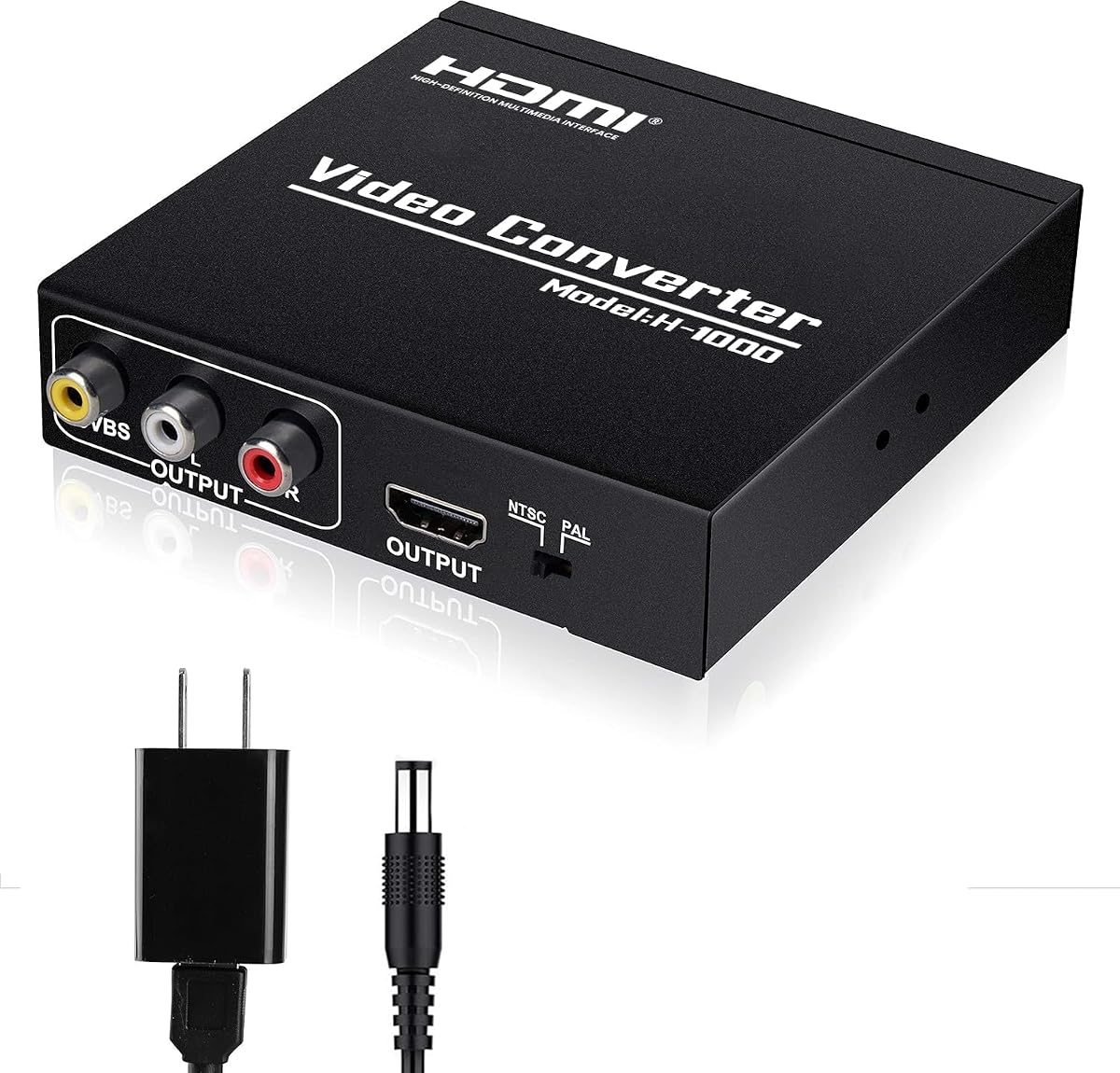
This adapter offers a cost-effective solution for connecting HDMI devices to older TVs. It is ideal for streaming sticks like Fire Stick or Roku, ensuring compatibility with legacy displays.
We may earn a commission when you buy through this link, at no additional cost to you.
It supports HDMI input up to 1080p and includes an NTSC/PAL switch for regional formats. The plug-and-play design ensures quick setup without drivers.
While it lacks support for mobile devices and 4K resolution, it is sufficient for most streaming and console needs. External power via USB is required for operation.
Budget-conscious users who need to connect modern streaming devices to RCA inputs will find this adapter reliable and efficient.
The NTSC/PAL switch helps fix black and white display issues when connecting devices internationally.
Works seamlessly with Fire Stick, Roku, and Apple TV for easy streaming on older TVs.
We may earn a commission when you buy through this link, at no additional cost to you.
This kit provides a complete package for converting analog RCA signals to HDMI outputs. It is perfect for retro gaming setups with PS2, Xbox, or VCRs, offering full cable support.
We may earn a commission when you buy through this link, at no additional cost to you.
The kit includes RCA, HDMI, and USB cables, eliminating the need for additional purchases. An 18-month warranty ensures long-term reliability and customer support.
While it requires external USB power and does not support reverse conversion, the included cables make it a hassle-free choice. Detachable cables allow flexible placement.
Gaming enthusiasts looking to modernize old consoles on new displays will appreciate the completeness and warranty coverage of this adapter kit.
Having all cables included saves time and ensures you have everything needed for a smooth installation.
The 18-month warranty offers peace of mind for long-term use with legacy gaming devices.
We may earn a commission when you buy through this link, at no additional cost to you.
Designed for streaming devices, this adapter connects HDMI sources to older RCA TVs. It works seamlessly with Apple TV and Fire Stick, offering a simple plug-and-play experience.
We may earn a commission when you buy through this link, at no additional cost to you.
It supports HDMI input up to 1080p and includes an NTSC/PAL switch for regional compatibility. No software installation is required for basic functionality.
While it requires external power via micro USB and lacks 4K support, it is effective for standard streaming needs. The switch helps fix format mismatch issues.
Users needing to connect modern streaming boxes to legacy TVs will find this adapter a straightforward and reliable solution for daily use.
Optimized for streaming media boxes, ensuring stable playback on older displays.
The NTSC/PAL switch prevents display issues when using devices from different regions.
We may earn a commission when you buy through this link, at no additional cost to you.
This adapter is ideal for connecting modern HDMI devices to older CRT or Sanyo TVs. It converts HDMI signals to AV inputs, allowing streaming and gaming on legacy displays.
We may earn a commission when you buy through this link, at no additional cost to you.
It supports NTSC and PAL formats and accepts input up to 1080p. The plug-and-play setup ensures quick installation without drivers.
While it requires an external power adapter and does not improve video quality, it is a practical bridge for older TVs. Users should adjust source resolution if needed.
Owners of CRT TVs looking to connect Fire Stick or Xbox will find this adapter effective for restoring compatibility with modern content sources.
Works well with older Sanyo and LG CRT TVs, making them useful for streaming content.
Adjusting the source to 720p ensures stable displays on older CRT screens.
We may earn a commission when you buy through this link, at no additional cost to you.
This adapter is perfect for converting VHS and VCR signals to HDMI for modern displays. It offers selectable output resolution, enhancing clarity on HD TVs.
We may earn a commission when you buy through this link, at no additional cost to you.
It includes RCA and HDMI cables, making setup convenient. The built-in resolution switch allows switching between 720p and 1080p output.
While it does not improve low-resolution source quality and requires external power, it is an effective solution for playing old tapes. The included cables are detachable for flexibility.
Users wanting to watch VHS tapes on new TVs will appreciate the resolution options and included accessories for straightforward setup.
Switch between 720p and 1080p output to match your display capabilities.
Includes RCA and HDMI cables for immediate use without extra purchases.
We may earn a commission when you buy through this link, at no additional cost to you.
Unique for its 3.5mm audio port, this adapter lets you connect external speakers to HDMI sources. It transforms digital signals to analog outputs for legacy TVs.
We may earn a commission when you buy through this link, at no additional cost to you.
It includes a USB C power cable and HDMI cable for full setup. The NTSC/PAL switch ensures correct format output for different regions.
While it lacks 4K support and isn't suitable for tablets, the audio jack adds versatility for sound. External power is required for stable performance.
Users wanting better sound from streaming devices on older TVs will find the audio port a valuable addition to the conversion process.
The 3.5mm port connects external speakers, improving audio from HDMI sources.
Includes USB C power cable for modern power adapters.
We may earn a commission when you buy through this link, at no additional cost to you.
This adapter connects analog RCA devices to HDMI displays, including PCs and gaming consoles. It supports 720p and 1080p output for HD viewing.
We may earn a commission when you buy through this link, at no additional cost to you.
It includes 3.3ft HDMI and RCA cables, ensuring flexible placement. The portable design allows easy transport and setup anywhere.
While it needs external power and lacks 3D support, it offers great compatibility for legacy consoles. The cables are included for immediate use.
Users connecting PCs or old consoles to new TVs will find this converter a reliable choice for standard definition content playback.
Compact and portable, making it easy to carry for different setups.
Works with PS1, PS2, and Wii for retro gaming on modern displays.
We may earn a commission when you buy through this link, at no additional cost to you.
This complete kit includes everything needed to connect HDMI sources to RCA TVs. It supports higher resolutions and offers a seamless setup experience.
We may earn a commission when you buy through this link, at no additional cost to you.
The HDMI adapter and micro USB power cable are included, simplifying installation. The NTSC/PAL switch ensures correct regional format output.
While mobile devices are not supported and external power is needed, the kit is comprehensive. It works well with streaming sticks and Blu-ray players.
Users needing a full package for modern-to-legacy connections will appreciate the included cables and resolution support for clear visuals.
Everything needed for immediate setup is included in the package.
Supports up to 1920×1200 for sharp visuals on compatible displays.
We may earn a commission when you buy through this link, at no additional cost to you.
This splitter allows one HDMI input to connect to both HDMI and RCA displays simultaneously. It is ideal for setups requiring dual outputs for presentations or streaming.
We may earn a commission when you buy through this link, at no additional cost to you.
It includes a power adapter and supports NTSC/PAL formats. The plug-and-play setup ensures quick installation without drivers.
While it has a larger form factor and lacks 4K support, the dual output capability is unique. It works well with Blu-ray players and cameras.
Users needing to mirror displays on both new and old TVs will find this splitter a practical solution for multi-screen setups.
Simultaneous HDMI and RCA output allows content on multiple screens.
The included power adapter ensures stable operation without additional purchases.
We may earn a commission when you buy through this link, at no additional cost to you.
Selecting the right adapter requires understanding your devices and connection needs. Here are the key factors to consider.
Ensure the adapter matches your signal direction. Some converters only change HDMI to RCA, while others handle RCA to HDMI. Mismatched adapters won't work.
Always check if the product supports your specific source and display requirements.
Look for adapters that support your source's maximum resolution. Most options handle up to 1080p input or output, which suits streaming and gaming.
Higher resolution support ensures smoother visuals without signal loss.
NTSC and PAL formats vary by region. Choose an adapter with a switch to toggle between them for correct color output.
Switching formats fixes black and white display issues on older TVs.
Most adapters need external USB power to function. Verify the adapter is included or if you must buy a separate 5V adapter.
Stable power prevents signal interruptions during use.
Some kits include HDMI and RCA cables while others don't. Kits save time and extra costs but are slightly more expensive.
Check the package contents to avoid purchasing cables separately.
Verify the adapter works with your specific devices like consoles or streaming sticks. Some exclude mobile phones or certain tablets.
Compatibility ensures the adapter meets your setup needs.
Durable materials extend the adapter's lifespan. Plastic or metal casings protect internal components from damage.
Investing in quality prevents frequent replacements.
A longer warranty indicates manufacturer confidence. Look for at least a one-year warranty for peace of mind.
Warranty coverage protects against defects and issues.
Start by connecting the source device to the adapter's input port using the HDMI or RCA cable. Then plug the output into your TV's corresponding input.
Connect the adapter to a 5V USB power source to ensure stable operation. Without power, the signal may drop or flicker.
Keep the adapter in a cool, dry place to prevent overheating. Clean connectors with a dry cloth to remove dust that might cause poor connections.
Yes, most adapters need a 5V USB power source to function properly. Without external power, the signal may not be strong enough for stable display.
This happens when the NTSC/PAL format doesn't match the TV. Use the adapter's switch to toggle between formats until the correct color appears.
Most adapters do not support mobile phones or tablets. Check the product specifications to ensure compatibility with your specific devices before purchasing.
Adapters convert signals but do not improve original quality. Lower-resolution sources remain limited by their native output regardless of the adapter.
No, most are unidirectional. Ensure you buy an adapter that matches your source and display direction, like HDMI to RCA or vice versa.
Most adapters support up to 1080p resolution. If your source is 4K, the output will be downgraded to the adapter's supported maximum.
No, most adapters are plug and play. Just connect the cables and power to start using them without installing any software or drivers.
Some adapters have a built-in resolution switch. Use this to toggle between output resolutions based on your TV or monitor's capabilities.
The Tengchi RCA to HDMI Converter leads as the top pick for reliability and included accessories. Other options offer specialized features for budget or premium needs.
Prioritize power requirements and format support to avoid compatibility issues. Ensure the adapter matches your source direction and resolution needs.
Prices and availability change, so verify product details before purchasing. Choose an adapter that fits your specific TV and device setup for the best results.