
E12 Mini Handheld Inkjet Printer
4.7Editor score
Detachable handle design
Ultra-compact size
Quick-dry ink system
This guide compares the top handheld inkjet printers for portable coding and marking on various surfaces to help businesses choose the right labeling solution.
Handheld inkjet printers provide a flexible and efficient way to mark products with dates, batch numbers, and barcodes without bulky equipment. These devices are essential for small businesses, warehouses, and manufacturers who need reliable on-demand coding. A good unit offers fast drying ink, long battery life, and intuitive controls for seamless daily operation.
We evaluated ten top models based on print quality, battery endurance, ease of use, and versatility across different surfaces like metal, plastic, and cardboard. Each product was selected for its ability to deliver crisp, durable markings while remaining portable for field work. Our analysis focuses on real-world performance factors that matter most to industrial and commercial users.
Each pick highlights key strengths, limitations, and ideal use cases to help you match the printer to your specific workflow needs. Prices and availability change frequently so verify details on the product pages before purchasing. Use this guide to streamline your labeling process and reduce manual marking errors effectively.
4.7Editor score

4.7Editor score

4.3Editor score
This side-by-side comparison outlines the core specifications and capabilities of each handheld inkjet printer to help you identify the model that best fits your operational requirements and budget constraints.

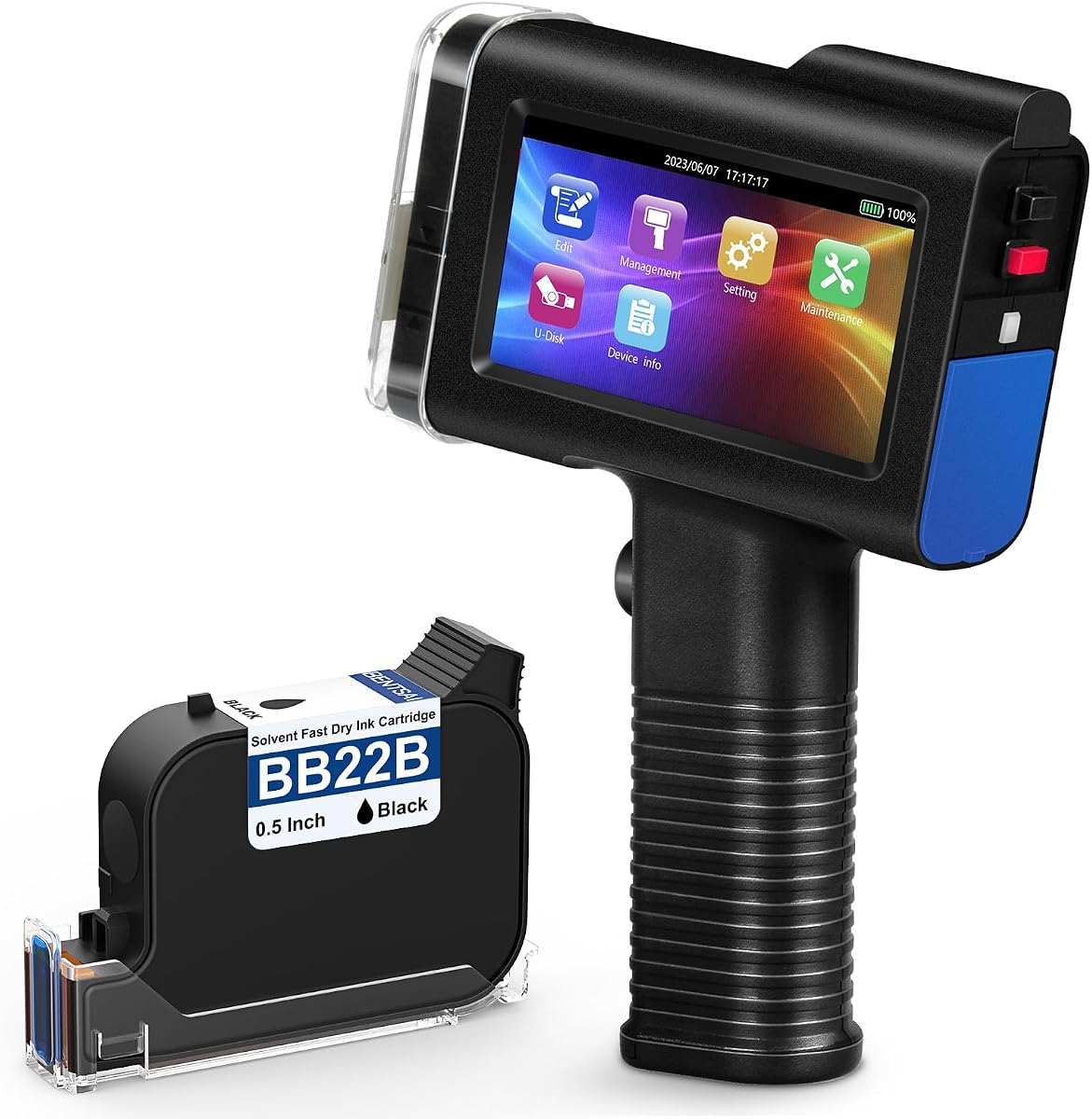


This handheld inkjet printer stands out for its comprehensive feature set and user-friendly design. With a high rating of 4.7 it delivers reliable performance for marking dates batch numbers and logos on diverse surfaces. The combination of long battery life and fast-drying ink ensures uninterrupted workflow in busy environments.
We may earn a commission when you buy through this link, at no additional cost to you.
The 4.3 inch HD capacitive touchscreen makes navigation and template creation straightforward. Users can import corporate logos or custom designs via USB which enhances brand consistency. The 42ml ink cartridge offers high yield and dries in just 2 to 5 seconds which minimizes smearing on porous materials like cardboard and fabric.
While it is heavier than some mini models the ergonomic handle helps reduce hand fatigue during extended use. The leak-proof self-locking mechanism prevents messy spills when the unit is not in use. These design choices reflect a focus on professional industrial applications where durability matters.
Businesses needing a versatile all-rounder should consider this model for daily labeling tasks. It balances portability with robust capabilities making it suitable for warehouses and production lines. The included accessories and warranty support add value for long-term operational reliability.
The ability to edit templates directly on the device reduces dependency on external computers and speeds up the coding process for team members.
Supporting 28 language interfaces allows international teams to use the printer without language barriers improving communication across regions.
We may earn a commission when you buy through this link, at no additional cost to you.
This model emphasizes portability with a lightweight frame and protective features for harsh environments. The 390g weight makes it easy to carry around large warehouses without causing strain. Its drop-resistant design with a wrist strap helps prevent accidents during high-paced industrial tasks.
We may earn a commission when you buy through this link, at no additional cost to you.
The 300-nozzle system ensures crisp output on various materials including curved surfaces and foam. Battery life supports over 16 hours of continuous operation which is ideal for long shifts. The interface supports 25 languages and allows quick data updates via USB for flexibility.
Although it shares many features with other models the focus on weight and durability differentiates it. Users report stable performance on metal and aluminum foils where clear markings are critical. The protective suitcase included in the package adds to its rugged appeal.
Teams needing a lightweight solution for frequent movement should find this unit practical. It handles standard coding needs efficiently while protecting the device from accidental drops. The balance of features makes it a strong contender for mobile labeling work.
The wrist strap and drop-resistant redesign specifically target environments where equipment handling can be rough or unpredictable.
All-day battery life reduces the need for frequent recharging interruptions during critical production or shipping hours.
We may earn a commission when you buy through this link, at no additional cost to you.
This printer is engineered for high-quality markings on challenging surfaces like cement leather and ceramic. The 600 DPI resolution ensures that barcodes and logos appear sharp and scannable. It is suitable for applications where print clarity impacts inventory tracking or compliance.
We may earn a commission when you buy through this link, at no additional cost to you.
Users can create custom templates and edit them directly on the touchscreen. The self-locking cartridge clip prevents ink leaks when the unit is stored. Photoelectric printing capabilities allow it to be mounted on conveyor lines for automated workflows.
The ink cartridge offers a high yield of 2 million characters which is excellent for high-volume operations. However the price reflects its premium capabilities and specialized materials compatibility. The ergonomic handle simplifies prolonged usage for operators.
Manufacturers needing detailed and durable prints on irregular surfaces should consider this model. It bridges the gap between portable handhelds and industrial coding systems. The versatility across porous and non-porous materials makes it a robust choice.
Photoelectric printing support enables seamless connection to conveyor lines increasing throughput in automated packaging lines.
Effective on cement and ceramic expands the range of environments where this device can be deployed successfully.
We may earn a commission when you buy through this link, at no additional cost to you.
This model offers unique adjustability with print heights ranging from 0.03 inches to 1 inch. Such flexibility accommodates a wide variety of marking needs from small text to large identifiers. The upgraded 5-roller system ensures smoother movement across uneven surfaces.
We may earn a commission when you buy through this link, at no additional cost to you.
Extended operation time without shutdown is supported by unique motherboard technology. This reduces interruptions during critical production runs. The device is backed by over 100 global patents indicating advanced proprietary engineering. The ergonomic handle and HD touchscreen facilitate intuitive use.
While it comes at a higher price point the build quality justifies the investment for heavy users. It is suitable for healthcare cosmetic and food industries where compliance and precision are vital. The quick-drying ink works well on foil and concrete.
Enterprises requiring professional-grade reliability should prioritize this model. The combination of adjustability and robust engineering sets it apart in the premium segment. It delivers consistent results across diverse industrial applications.
The ability to print up to 1 inch allows for larger markings without needing secondary equipment.
Over 100 global patents suggest strong R&D support and reliability in complex manufacturing settings.
We may earn a commission when you buy through this link, at no additional cost to you.
This printer uses an independent system powered by a quad core CPU which removes the need for external apps. This autonomy simplifies setup and reduces connectivity issues. The built-in storage memory card allows users to save templates locally for quick access.
We may earn a commission when you buy through this link, at no additional cost to you.
Ink colors include black white yellow and red among others which offers flexibility for coding. The battery capacity supports long use sessions without constant recharging. The device is designed for flat surfaces but also handles curved items with positioning plates.
Users appreciate the ability to input and edit data directly on the device. The range of ink colors helps differentiate product batches visually. However the weight is slightly higher than some competitors. It remains a solid option for varied coding needs.
Small businesses looking for cost-effective labeling solutions may find this appealing. The independent system reduces reliance on smartphones which can be fragile. It balances features with practicality for general commercial use.
The lack of dependency on external apps streamlines workflows for workers who prefer standalone tools.
Multiple ink color options allow for visual coding of different batches or categories.
We may earn a commission when you buy through this link, at no additional cost to you.
This unit offers variable DPI settings that allow users to adjust resolution based on surface requirements. The adjustable print height between 0.08 and 0.5 inches provides flexibility for different label sizes. It is compact and features a touchscreen for direct customization.
We may earn a commission when you buy through this link, at no additional cost to you.
The 42ml ink cartridge ensures quick drying which reduces smearing. It handles diverse industries including warehousing and retail labeling. The package includes an exquisite suitcase which protects the device during transport. Technical support responds within 12 hours for assistance.
While it is affordable the ink is noted as not permanent which may limit some industrial applications. Users should verify ink durability for long-term outdoor exposure. The multi-language support helps diverse teams operate the device easily.
DIY workshops and light commercial use cases find this printer adequate. Its portability and quick setup make it accessible for users without extensive training. It remains a budget-friendly entry point for handheld coding.
Adjustable DPI options help optimize print quality for different material textures and needs.
12-hour technical support response ensures that operational interruptions are resolved promptly.
We may earn a commission when you buy through this link, at no additional cost to you.
This printer features infrared aiming assist to improve positioning accuracy during operation. The 1 inch maximum print height allows for large clear text on products. Its waterproof and fade-resistant ink ensures durability in varied environments.
We may earn a commission when you buy through this link, at no additional cost to you.
The 4.3 inch HD capacitive touchscreen simplifies template creation and file imports. Users can save custom graphics and barcodes locally. The leak-proof self-locking cartridge mechanism prevents spills and maintains cleanliness. Power management supports 16 hours of continuous use.
Beginners benefit from the included user manual and straightforward setup process. The alignment plate provided helps ensure consistent positioning. However some users report the need for calibration to achieve optimal results. The ink yield is substantial for daily batch coding.
Commercial warehouse needs requiring accurate and large markings will appreciate this tool. The infrared feature adds precision which is vital for barcode scanning. It balances performance with ease of use for general labeling tasks.
Infrared aiming assist reduces human error in positioning ensuring scannable codes and aligned text.
Waterproof and fade-resistant properties ensure printed information remains legible over time.
We may earn a commission when you buy through this link, at no additional cost to you.
This model is exceptionally light weighing only 0.54 pounds which minimizes operator fatigue. The independent system allows direct data input without needing external devices. The ER520 ink cartridge is industrial-level quality ensuring quick drying and waterproof results.
We may earn a commission when you buy through this link, at no additional cost to you.
A 2.4 inch resistive touchscreen reduces interference in complex environments. Users can input content via USB or directly on the device. The touch pen prevents accidental touches and improves screen responsiveness. Video tutorials are available to assist with setup.
Despite the smaller screen it offers robust features including 28 language support. The battery supports 2000mAh which sustains all-day operations. The positioning board included enhances accuracy on uneven surfaces. It is suitable for temperature ranges between 0 and 45 degrees Celsius.
Workers needing a portable solution for frequent movement will find this ideal. The combination of light weight and original ink quality ensures reliable output. It is a practical choice for labeling tasks where comfort matters.
The touch pen and lightweight body reduce physical strain during repetitive printing tasks.
ER520 original cartridges prevent clogging and ensure consistent print quality.
We may earn a commission when you buy through this link, at no additional cost to you.
This printer offers a detachable handle that converts between full handheld and mini mode. It weighs only 1.1 lbs and fits easily in a pocket for true portability. The quick-dry ink formula achieves waterproof adhesion in less than 3 seconds.
We may earn a commission when you buy through this link, at no additional cost to you.
It is designed for challenging surfaces like corrugated cardboard and metal components. The 360 degree printing capability allows for curved container marking. Custom logos and barcodes can be imported via USB. The package includes a precision stylus and positioning board.
While it has a lower print height compared to larger models it remains versatile for most standard needs. The battery life supports warehouse ladder climbs and outdoor tasks. Setup videos make it easy for new users to start operating immediately.
Budget-conscious small businesses will find this model efficient. Its compact design saves space and allows for on-the-go labeling. It delivers professional results at a fraction of the cost.
The detachable handle converts the unit to a pocket-sized device for maximum mobility.
360 degree printing capability handles curved containers effectively without extra accessories.
We may earn a commission when you buy through this link, at no additional cost to you.
This printer is designed for efficient on-the-go labeling with USB file upload capabilities. The 390g body and ergonomic grip make it comfortable to hold for long periods. The wrist strap prevents drops during active use in warehouses.
We may earn a commission when you buy through this link, at no additional cost to you.
It supports direct USB data upload for batch coding which streamlines operations. The 42ml ink cartridge dries quickly to prevent smearing. Battery life ensures seamless all-day performance without frequent interruptions. The device supports 25 languages for international users.
Users appreciate the ability to import TXT JPG and BMP files directly. The print height ranges from 0.03 to 0.5 inches for standard needs. It handles curved surfaces with ease when using the positioning plate. Setup is straightforward and requires no extra software.
Logistics and retail teams looking for efficiency should consider this model. The plug-and-print USB feature reduces IT dependencies. It is a practical tool for maintaining organized and readable labels.
Direct USB file upload reduces setup time and eliminates the need for extra software.
Ergonomic grip and wrist strap reduce physical fatigue during extended labeling tasks.
We may earn a commission when you buy through this link, at no additional cost to you.
Selecting the right handheld inkjet printer requires evaluating several critical factors that impact daily productivity and long-term reliability.
Resolution determines how sharp and scannable your barcodes or logos will appear. Higher DPI settings ensure better performance on non-porous materials like metal or glass. Check the maximum print height to ensure it fits your labeling standards.
Larger ink cartridges reduce refill frequency and support high-volume tasks. Quick-drying formulas are essential to prevent smearing on porous surfaces like cardboard. Waterproof ink is critical for products exposed to moisture or outdoor conditions.
Look for units offering over 16 hours of continuous operation to avoid work interruptions. Fast charging capabilities are helpful for multi-shift environments. Reliable power management ensures the printer stays ready even after long breaks.
A responsive touchscreen simplifies template creation and language selection. Models with direct file import reduce reliance on computers and streamline workflows. Intuitive interfaces help new operators learn quickly without extensive training.
Lightweight designs reduce hand fatigue during prolonged use. Ergonomic handles and wrist straps help prevent drops in active environments. Compact models are better suited for small teams needing to move equipment frequently.
Ensure the printer works on both porous and non-porous materials relevant to your operations. Some models excel on curved surfaces or uneven textures like cement. Matching surface compatibility ensures consistent results across all products.
USB support allows importing logos and data without external software. Independent systems with onboard storage provide flexibility for disconnected environments. Check language support if you work with international teams.
Reliable technical support ensures quick resolutions for technical issues. Warranty terms vary so review coverage for the unit and ink cartridges. Manufacturers with strong R&D often provide better long-term reliability.
Before using the printer charge the battery fully and verify the ink cartridge is sealed and secure. Turn on the device and select your preferred language settings to ensure clear menus. Load your desired templates via USB or create them directly on the touchscreen.
During operation maintain a steady hand and use the auxiliary positioning plate to ensure alignment. Move the printer smoothly across the surface to achieve consistent print quality. If marking curved objects hold the device at a uniform distance for best results.
After use replace the protective cap on the nozzle immediately to prevent drying. Store the printer in a dry place away from extreme temperatures and dust. Regularly clean the roller system and touchscreen with a soft cloth to maintain performance.
Handheld inkjet printers work on porous semi-porous and non-porous materials. Common surfaces include cardboard plastic metal glass wood and fabric. Some models are also effective on curved or textured surfaces with positioning plates.
Most quick-dry inks dry in 2 to 5 seconds. This minimizes smearing and allows immediate handling of products. Always verify specific drying times for your chosen model and ink type.
Many handheld printers are standalone and do not need a computer. You can input data directly on the touchscreen or import files via USB. This independence speeds up workflows in busy environments.
Most models offer over 16 hours of continuous operation. This ensures they can last a full work shift without recharging. Always check specs to confirm battery capacity for your specific use case.
Yes most units support importing logos and barcodes via USB. Supported formats often include JPG PNG and BMP. Custom templates can be edited directly on the device for flexible branding.
Always replace the protective cap after use to keep the nozzle moist. Store the printer in a stable environment without extreme temperature shifts. Regular cleaning of the cartridge helps maintain optimal flow.
Yes but choose models with waterproof and fade-resistant ink. Ensure the device has a reliable battery and durable casing for environmental exposure. Proper storage helps extend the printer's lifespan outdoors.
Most handheld printers support at least 25 to 28 languages. This facilitates use by international teams. Check specific models to confirm language availability for your operational needs.
Choosing the right handheld inkjet printer depends on your specific surface requirements and workflow demands. Our top picks highlight models that balance performance portability and ease of use. Whether you need high resolution or compact size there is a unit for every business size.
Prioritize battery life and ink capacity if you operate in high-volume settings. Ensure the interface is intuitive enough for your team to minimize training time. Compatibility with diverse materials will save you from needing multiple devices.
Prices and availability change frequently so verify details on the product pages before purchasing. Use this guide to find a reliable solution that improves your labeling efficiency and product traceability.