
California JOS GPU Support Bracket
4.7Editor score
Adjustable height support
Durable aluminum build
Prevents GPU sag damage
This guide compares the top 10 GPU backplates for cooling, protection, and aesthetics across various graphics card models in October 2026.
GPU backplates serve as essential protective covers for graphics cards, offering structural support against sagging and improved heat dissipation for longer component life. Whether you are building a custom rig or upgrading an existing system, choosing the right backplate ensures your hardware remains stable and cool under demanding workloads.
We evaluated ten distinct backplate options based on material quality, thermal performance, installation ease, and compatibility with popular graphics card models. Each product was assessed for its ability to protect the PCB, reduce flex, and enhance airflow without obstructing ports or interfering with vertical mounting configurations in modern cases.
Each pick in this list highlights unique strengths tailored to specific needs, from budget-friendly passive coolers to premium active cooling solutions. While we do not list specific prices here as they fluctuate frequently, you can find current deals by visiting the provided links for the most up-to-date pricing information available online.
4.7Editor score

4.7Editor score

4.2Editor score
The following comparison table provides a side-by-side overview of all ten products selected for this guide, detailing their key specifications, compatibility, and primary features to help you make an informed decision quickly.




This large aluminum heat sink serves as a robust passive cooling solution designed to reduce thermal stress on graphics cards and other PCB components. With a rating of 4.7 stars, it is highly regarded for its ability to dissipate heat efficiently without requiring additional power or active fans.
We may earn a commission when you buy through this link, at no additional cost to you.
The product features 294 cooling fins that significantly increase the surface area available for heat transfer, ensuring that excess heat generated by the GPU is quickly released into the surrounding air. Its dimensions of 150x93x15mm make it suitable for larger cards, and the pre-applied thermal conductive adhesive tape simplifies the installation process significantly.
While it offers superior cooling capabilities, the weight of the aluminum construction means it adds some bulk to the card, which might require a sturdy case mounting system. Additionally, precise alignment is necessary to ensure it does not interfere with ports or other components on the motherboard or case.
This backplate is ideal for users seeking a reliable, passive cooling upgrade that prioritizes thermal performance and durability. It is particularly recommended for builds where silence is critical and where the user can accommodate the extra weight and size without issue.
The high density of cooling fins maximizes airflow and heat exchange, keeping component temperatures lower under heavy loads.
Pre-applied thermal tape ensures secure attachment without requiring screws or complex mounting hardware.
We may earn a commission when you buy through this link, at no additional cost to you.
The GOWENIC GPU Backplate combines a sturdy aluminum alloy radiator with an integrated 4-pin cooling fan to provide active cooling for graphics cards. It is designed specifically for RTX 3090, 3080, and 3070 models, offering a balanced approach to thermal management and structural support.
We may earn a commission when you buy through this link, at no additional cost to you.
This model stands out because it actively moves air over the back of the card, which helps prevent heat buildup in memory and VRM components that often run hot. The 15mm thickness and included thermal pad ensure good contact with the components, while the CNC-machined design provides a premium look and feel.
However, the addition of a fan introduces a source of noise that passive coolers avoid, and it requires a motherboard fan header connection. This might be a downside for silent builds, but the improved cooling performance generally outweighs the noise for high-performance systems.
Choose this backplate if you need active cooling for an older card that lacks robust back cooling or if you are running sustained heavy workloads that generate significant heat. It is a solid mid-range option for enthusiasts.
The included fan actively dissipates heat from memory and VRMs, enhancing overall system stability.
Supports vertical mounting setups, allowing for aesthetic builds without compromising cooling efficiency.
We may earn a commission when you buy through this link, at no additional cost to you.
Designed specifically for GIGABYTE RTX 5060 and 5050 Low Profile cards, this aluminum backplate offers precise CNC-cutting that matches the PCB layout exactly. It is a specialized solution for compact builds where standard backplates might be too large or interfere with mounting.
We may earn a commission when you buy through this link, at no additional cost to you.
The primary benefit of this product is its ability to add structural rigidity to smaller, low-profile cards that may be prone to flex or sag due to their compact form factor. The pre-drilled holes align perfectly with existing mounting points, making installation a quick and straightforward process for DIY builders.
While the product is highly specialized, it means it cannot be used with other models, limiting its versatility. Some users report mixed reviews regarding fitment quality, so checking the exact model number before purchase is essential.
This is the ideal choice if you own the specific GIGABYTE RTX 5060 or 5050 LP card and need reliable protection and anti-sag support without custom modifications.
Tailored for SFF builds, ensuring stability and protection for low-profile graphics cards.
Pre-drilled holes allow for a quick swap without requiring drilling or permanent changes.
We may earn a commission when you buy through this link, at no additional cost to you.
The Hilitand GPU Backplate Radiator is another strong contender in the active cooling category, featuring an aluminum alloy construction and a standard 4-pin fan interface. It targets the RTX 3090, 3080, and 3070 models, providing a balance between cost and performance.
We may earn a commission when you buy through this link, at no additional cost to you.
Its design focuses on fast heat dissipation, with a 15mm thick radiator that works in tandem with the fan to move heat away from critical memory and VRM areas. The CNC machining ensures a clean finish, and the thermal pad helps maintain good thermal conductivity between the backplate and the GPU components.
The main trade-off here is the reliance on a fan, which requires a fan header and introduces noise. However, the 4-pin connector allows for variable speed control if your motherboard supports it, helping to minimize noise when full power is not needed.
This option is suitable for gamers looking to upgrade cooling on older RTX 30 series cards without spending a fortune. It offers reliable support and cooling for moderate to heavy gaming sessions.
The combination of thick aluminum and fan cooling keeps temperatures stable during long sessions.
Aluminum alloy ensures the unit remains sturdy and resistant to damage during handling.
We may earn a commission when you buy through this link, at no additional cost to you.
This radiator unit offers a highly rated active cooling solution for RTX 30 series cards, combining an aluminum alloy body with a 4-pin fan interface. It shares many design elements with similar models but stands out for its consistent positive user feedback.
We may earn a commission when you buy through this link, at no additional cost to you.
The design prioritizes fast heat dissipation through a thick 15mm aluminum block that helps conduct heat away from the PCB. The included fan is designed for easy installation and connects to standard motherboard headers, allowing for speed adjustments based on system needs.
While it is effective, users should ensure their case has enough space for the added depth of the cooler and fan. Also, the need for a fan header might be a limitation on some older motherboards with limited headers.
This product is a great fit for users who want a proven, reliable active backplate that balances performance with affordability. It is particularly useful for cooling memory modules effectively.
Consistent positive reviews suggest a reliable product that performs well in real-world scenarios.
The standard fan interface makes it easy to integrate into existing cooling ecosystems.
We may earn a commission when you buy through this link, at no additional cost to you.
The California JOS GPU Support Bracket is a specialized accessory focused purely on preventing GPU sag rather than cooling. It is made from high-quality aluminum alloy to ensure durability and provides a robust support for heavy graphics cards in any case configuration.
We may earn a commission when you buy through this link, at no additional cost to you.
Its main strength lies in its adjustability, allowing you to fine-tune the height to match your specific card and case setup. This flexibility ensures that the bracket fits securely and effectively prevents the GPU from drooping over time, which can damage the PCIe slot or PCB.
Since this is a stand and not a backplate, it does not offer thermal benefits or PCB protection on the backside. However, for users whose primary concern is sag prevention, it offers a budget-friendly solution that performs its intended function well.
This bracket is perfect for anyone looking to protect their investment from physical sag without spending much money. It complements other cooling solutions well if you already have a backplate or if your card has adequate cooling.
Protects the PCIe slot and card from the stress of long-term gravity-induced sagging.
Adjustable height ensures it works with various card sizes and case types effectively.
We may earn a commission when you buy through this link, at no additional cost to you.
This heat sink is a passive cooling solution designed to reduce reliance on active fans by using a large aluminum plate with 294 fins. It is ideal for environments where silence is a priority and where case airflow is already optimized.
We may earn a commission when you buy through this link, at no additional cost to you.
The large size and fin count provide ample surface area for heat to transfer from the component to the air naturally. The dimensions are standardized to fit many PCBs, including GPUs, making it a versatile choice for custom cooling projects or standard backplate replacement.
The downside of passive cooling is that it depends heavily on the ambient airflow in your case. If the case is closed up or lacks fans, the cooling efficiency will drop. However, for open-air test benches or well-ventilated cases, it performs exceptionally well.
Consider this option if you want to eliminate noise and heat generation from backplate fans. It is a simple, effective way to boost thermal performance without complexity.
With no moving parts, this cooler ensures your GPU runs completely silently during operation.
The 294 fins maximize contact with air for efficient natural heat dissipation.
We may earn a commission when you buy through this link, at no additional cost to you.
This bracket is designed specifically for EVGA RTX cards to protect the external slot and provide a clean look. It is constructed from sturdy black zinc alloy, ensuring it resists wear and provides a premium feel on the outside of your case.
We may earn a commission when you buy through this link, at no additional cost to you.
Its primary function is aesthetic and protective, covering the empty space around the card's rear connectors. This prevents dust ingress and protects the card interface from accidental bumps. The precise dimensions ensure a tight fit for the targeted EVGA models.
While it is not a full backplate, it serves a niche role for users who prioritize aesthetics and external protection. However, if you need cooling support or PCB reinforcement, you will still need to pair this with another solution.
This accessory is ideal for EVGA users who want to seal the case cleanly and protect the card interface from the elements without adding significant bulk or weight.
Covers the external card slot to keep dust out and protect the connectors.
Zinc alloy offers durability and a consistent black finish for a modern look.
We may earn a commission when you buy through this link, at no additional cost to you.
This backplate is engineered specifically for ZOTAC RTX 5060 and 5050 Solo cards, ensuring a seamless fit with the exact PCB layout and mounting holes. It delivers a factory-like finish that integrates perfectly with the card's design.
We may earn a commission when you buy through this link, at no additional cost to you.
The aluminum construction provides solid structural reinforcement to prevent PCB flex and sag over time. Strategic ventilation cutouts improve airflow, allowing heat to escape without blocking the original cooling system. This design supports stable performance during long gaming sessions.
While it is highly rated, it is limited to ZOTAC models, so compatibility is key. If you have a different card, this product will not fit. However, for ZOTAC owners, it is an excellent upgrade for aesthetics and protection.
Choose this if you own a ZOTAC RTX 5060 or 5050 Solo and want a premium, tailored backplate that enhances durability and airflow.
Precision engineering ensures the backplate aligns perfectly with ZOTAC card mounting points.
Ventilation cutouts allow heat to escape efficiently without obstructing original fans.
We may earn a commission when you buy through this link, at no additional cost to you.
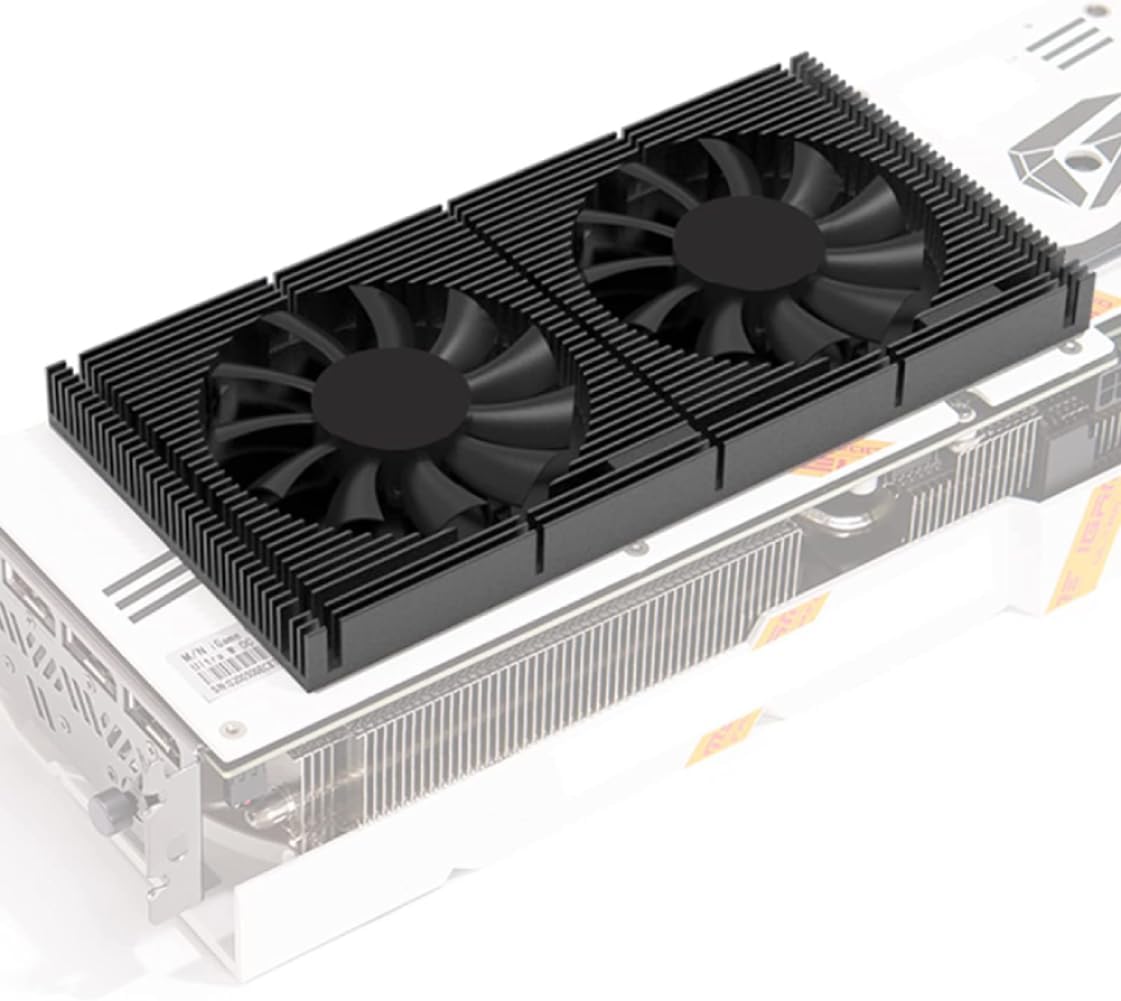
This premium backplate cooler features dual 70mm PWM fans and a robust aviation aluminum 6061 body. It is designed to deliver top-tier cooling performance, making it a strong choice for users who prioritize maximum heat dissipation.
We may earn a commission when you buy through this link, at no additional cost to you.
The fans operate at speeds between 1500 and 2800 RPM, adjusting automatically via PWM to balance noise and cooling. The 1.2mm 7W thermal pad ensures excellent conductivity between the backplate and the card components, helping to transfer heat efficiently.
While it is more expensive and requires two motherboard fan headers, the cooling capacity is superior to single-fan solutions. It is an investment for enthusiasts running high-end RTX 3090s or demanding workstation loads.
This product is the best pick if you need the highest cooling performance and have the case space and motherboard slots to support dual fans effectively.
Two large fans move more air than standard single-fan units for better cooling.
Aviation aluminum and high-wattage thermal pad ensure durability and thermal efficiency.
We may earn a commission when you buy through this link, at no additional cost to you.
Selecting the right GPU backplate involves evaluating several factors to ensure compatibility, performance, and ease of installation. This guide breaks down the critical elements to consider before making your purchase.
The material of a backplate significantly affects its ability to dissipate heat and protect the PCB. Aluminum and aluminum alloys are preferred for their high thermal conductivity and strength, while zinc alloys offer durability but less cooling efficiency. Avoid plastic options if you want structural rigidity and better heat management.
Always prioritize metal backplates for better heat transfer and protection against physical damage.
Passive backplates rely on the case's airflow to dissipate heat and are silent, making them ideal for noise-sensitive builds. Active backplates include fans to push air directly over the back of the card, offering superior cooling but adding noise and requiring a motherboard fan header.
Choose passive for silence and active for maximum thermal performance.
Ensure the backplate dimensions match your specific GPU model to avoid blocking ports or interfering with mounting holes. Custom-fit backplates for specific brands like ZOTAC or GIGABYTE offer precision, while universal sizes may require careful alignment. Check that the backplate does not obstruct vertical mounting brackets if applicable.
Verify the dimensions against your card's layout before purchasing to ensure a perfect fit.
Look for backplates that include pre-applied thermal tape or pre-drilled holes to simplify installation. Some options require screws that align with existing PCB holes, while others are adhesive-based. Avoid products that require permanent modifications like drilling unless you are comfortable with DIY hardware work.
Opt for solutions with pre-drilled holes or adhesive tape for a hassle-free installation experience.
Heavy GPUs can sag over time, putting strain on the motherboard PCIe slot. A rigid metal backplate adds structural reinforcement to prevent this flex, extending the life of your components. This feature is especially important for long cards or systems that use vertical mounting setups.
Select a backplate with reinforced metal to prevent sagging and maintain structural stability.
The visual design of a backplate should complement your PC build. Look for anodized finishes, cutouts, or designs that match your card's branding. Some backplates include ventilation cutouts that maintain a clean look while improving airflow efficiency.
Choose a design that aligns with your build's color scheme and style preferences.
The thermal pad is the interface between the backplate and the components. High-quality pads with higher wattage ratings (like 7W) transfer heat more efficiently than generic options. Ensure the thickness of the pad matches the spacing of your GPU components for optimal contact.
Look for high-wattage thermal pads included in the package to maximize cooling efficiency.
Budget options may offer basic protection and passive cooling, while premium models include fans and advanced materials. Evaluate the cost against the benefits you need; for example, if noise is not a concern, an active cooling unit might be worth the extra expense for better thermal stability.
Balance your budget with the cooling and protection features that matter most to you.
To install a GPU backplate, first power down your computer and disconnect all cables. Remove the existing backplate if there is one, or clear the area on the back of the card. Apply the thermal pad to the heat-generating components like VRMs or memory chips to ensure good contact.
Align the backplate carefully with the screw holes on the PCB. If the product uses screws, secure them firmly but do not overtighten to avoid cracking the motherboard. If it uses adhesive, press the backplate firmly against the card for a few seconds to ensure a strong bond.
Regularly inspect the backplate for dust buildup, especially if it has fans. Use compressed air to clean the fins and fan blades to maintain airflow efficiency. Check screws periodically to ensure they remain tight and that the backplate has not shifted over time.
Yes, GPU backplates can improve cooling by acting as a heat spreader. Passive backplates dissipate heat through their metal body, while active backplates use fans to push air across the components. They help lower VRM and memory temperatures, which can improve system stability.
Most manufacturers allow the installation of third-party backplates as long as no permanent modifications are made to the card. However, it is always best to check your specific warranty terms before installing anything. If the warranty is still active, consult the manufacturer first.
Measure the length, width, and thickness of your card's PCB. Compare these dimensions with the backplate specifications listed in the product details. Ensure the mounting holes align with your card's existing screw points or that the adhesive covers the necessary area.
Yes, you can install a backplate on an existing GPU, but you may need to remove the stock backplate first. Make sure the new backplate is compatible with your specific card model to avoid fitting issues. The process typically involves unscrewing the old plate and securing the new one.
Yes, rigid metal backplates add structural support to the card, which can reduce or prevent GPU sag. This is particularly useful for heavy cards that rely on a single bracket for support. They distribute the weight more evenly across the card structure.
Passive backplates operate silently and do not require power, making them ideal for quiet builds. They are also simpler to install since they do not need a fan header. However, they are generally less effective at moving heat than active fans.
No, backplates vary significantly in size and hole patterns. Many are designed for specific models or brands to ensure a perfect fit. Universal backplates exist but may require more careful alignment or adjustment to fit properly.
It is recommended to clean your backplate every few months to prevent dust buildup. Dust can block airflow and reduce cooling efficiency. Use compressed air to blow out any debris from the fins or fans regularly.
In this guide, we explored ten diverse GPU backplate options ranging from simple passive coolers to advanced dual-fan solutions. Whether you need structural support for a heavy card or extra cooling for memory modules, there is a choice tailored to your specific build requirements.
When making your decision, prioritize compatibility and cooling needs. If silence is your goal, look at passive models like the Large Aluminum Heat Sink. If thermal performance is paramount, consider active options like the Dual Fan Heatsink. Always ensure the material quality matches your expectations for durability.
Prices for these accessories can change frequently, so check the current deals before purchasing to get the best value. Remember that a quality backplate can extend the lifespan of your GPU and improve overall system stability. Thanks for reading, and happy building.