
VOYEE Switch Controllers
4.4Editor score
RGB Lighting Effects
Programmable Buttons
Long Battery Life
This guide compares the top gaming controllers for Apple TV to help you find the perfect wireless gamepad for seamless Apple Arcade and streaming play.
Finding the right gaming controller for Apple TV can transform your living room into a true gaming hub. Whether you play Apple Arcade titles or stream from other services, a quality pad ensures responsive controls and comfort during long sessions.
We evaluated ten top-rated controllers based on compatibility, battery life, build quality, and features like motion controls or programmable buttons. Our list covers options from budget-friendly picks to premium models with Apple licensing for guaranteed support.
Each pick highlights key strengths and trade-offs to help you decide what matters most for your setup. Prices and availability change frequently, so check the current listings before purchasing to ensure you get the best deal available today.
4.4Editor score

4.7Editor score

4.0Editor score
This side-by-side comparison helps you quickly identify which controller matches your specific needs for Apple TV gaming. We highlight key specifications and compatibility notes for each model to simplify your decision-making process.



The 8Bitdo SN30 Pro stands out as a top choice for Apple TV gamers seeking a blend of style and performance. With a high rating and official support for Apple devices, it offers a reliable wireless experience.
We may earn a commission when you buy through this link, at no additional cost to you.
Its Hall Effect joysticks provide superior precision and longevity compared to traditional sensors, reducing drift over time. The full button set includes clickable joysticks and motion controls, ensuring you have all inputs needed for complex games.
While the retro design limits ergonomic customization for some users, the compact size makes it easy to transport. The trade-off in size is acceptable given the high-quality build and extensive compatibility across platforms.
This controller is ideal for players who value precision and nostalgia. If you want a premium feel without sacrificing functionality on Apple TV, the SN30 Pro delivers excellent value and performance.
Hall Effect sensors use magnetism to detect position, offering greater durability and accuracy during long gaming sessions.
Official support ensures quick pairing and stable connectivity with tvOS, minimizing input lag for a smoother experience.
We may earn a commission when you buy through this link, at no additional cost to you.
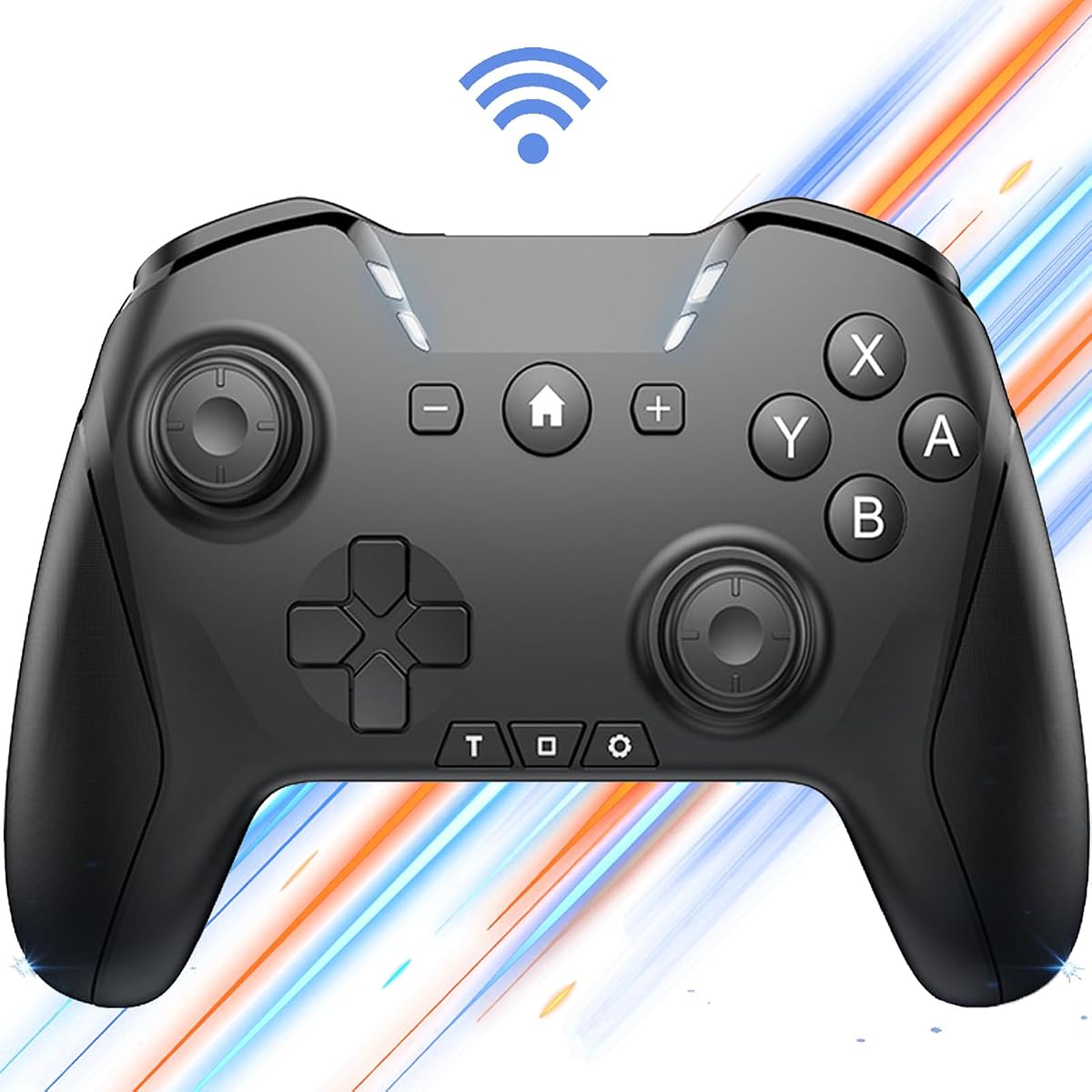
VOYEE offers a compelling budget option for Apple TV users who want extra features without breaking the bank. With a solid rating and customizable lighting, it brings flair to your gaming setup.
We may earn a commission when you buy through this link, at no additional cost to you.
The controller includes M1 and M2 programmable buttons for macros, which can simplify complex commands. Its 4-level vibration system adds immersion, and the RGB lighting offers visual customization to match your vibe.
Build quality is functional but not premium, and connectivity can sometimes require re-pairing. However, these minor issues are forgivable given the low cost and feature set compared to more expensive rivals.
Buy this if you need a versatile controller for casual play. It balances cost and features well, making it a great entry point for new Apple TV gamers.
Program specific button sequences to automate repetitive tasks, enhancing your strategy in action or RPG games.
Choose from solid or strobe LED modes to personalize your controller appearance while playing at night.
We may earn a commission when you buy through this link, at no additional cost to you.
The SteelSeries Nimbus+ is a premium choice designed specifically for Apple ecosystems. With official licensing, it ensures flawless pairing and performance on Apple TV and iOS devices.
We may earn a commission when you buy through this link, at no additional cost to you.
Its standout feature is the 50-hour battery life, allowing weeks of gaming on a single charge. The tactile D-pad and clickable joysticks provide precise input, while the ergonomic design reduces hand fatigue.
The lack of motion controls might deter some players, and the price is higher than third-party alternatives. Yet, for those prioritizing reliability and battery longevity, these trade-offs are often worth the investment.
Choose this if you want a hassle-free, long-lasting controller. It delivers a polished experience for Apple TV gaming with minimal setup and maximum endurance.
Enjoy over 50 hours of playtime, meaning you rarely need to interrupt your sessions for recharging.
Official licensing ensures the controller meets strict quality standards for connectivity and durability on Apple devices.
We may earn a commission when you buy through this link, at no additional cost to you.
GMBACK introduces a controller with advanced macro capabilities for Apple TV users. Its loop function lets you automate repetitive inputs, which is useful for certain game types or grinding tasks.
We may earn a commission when you buy through this link, at no additional cost to you.
The 6-axis gyro and adjustable vibration add depth to gameplay, while the 800mAh battery supports extended sessions. It works seamlessly across Switch, PC, and Apple devices, providing versatile connectivity.
Setting up macros can be tricky for beginners, and the RGB lighting might distract in dark rooms. However, the customization options make it a powerful tool for dedicated players.
This model suits those who want to optimize their gameplay. If macros and cross-platform use are priorities, the GMBACK offers unique value in the Apple TV market.
Record and replay button sequences to automate repetitive in-game tasks, saving time and effort during long sessions.
Works with multiple systems including Apple TV, ensuring you can use one controller for all your gaming devices.
We may earn a commission when you buy through this link, at no additional cost to you.
AceGamer Aurora II brings high-end specs to a competitive price range. Its Hall Effect joysticks reduce drift, ensuring accurate control even after heavy use on Apple TV.
We may earn a commission when you buy through this link, at no additional cost to you.
The 1000mAh battery provides exceptional uptime, and the 2.4G wireless mode offers stable connections with low latency. Programmable back keys add strategic depth to your gameplay without reaching for front buttons.
The need for a receiver dongle for 2.4G can be cumbersome, and the weight might feel substantial for some. Still, the performance and battery life make it a strong contender.
Opt for this if you need reliability and endurance. It is an excellent choice for long gaming sessions on Apple TV where precision is key.
Hall Effect sensors eliminate stick drift issues common in traditional controllers, maintaining accuracy over time.
Use programmable back keys for essential actions like jump or reload without taking thumbs off the joysticks.
We may earn a commission when you buy through this link, at no additional cost to you.
Amazon Luna Wireless Controller offers a clean option for cloud gaming that also works well on Apple TV via Bluetooth. Its offset thumbsticks provide comfort during extended play.
We may earn a commission when you buy through this link, at no additional cost to you.
Cloud Direct technology ensures low latency when streaming, and you can switch devices seamlessly. The design is minimalist yet functional, with precise triggers and a responsive directional pad.
Some features are optimized for Luna, which might feel redundant if you mainly use local Apple Arcade games. Still, the build quality and comfort make it a solid universal controller.
Select this for a reliable Bluetooth experience. It balances simplicity with performance, making it suitable for casual and serious players alike on Apple TV.
Pause on one screen and resume on another instantly, perfect for moving between devices without losing progress.
Offset sticks fit naturally under your thumbs, reducing strain during long gaming sessions on the couch.
We may earn a commission when you buy through this link, at no additional cost to you.
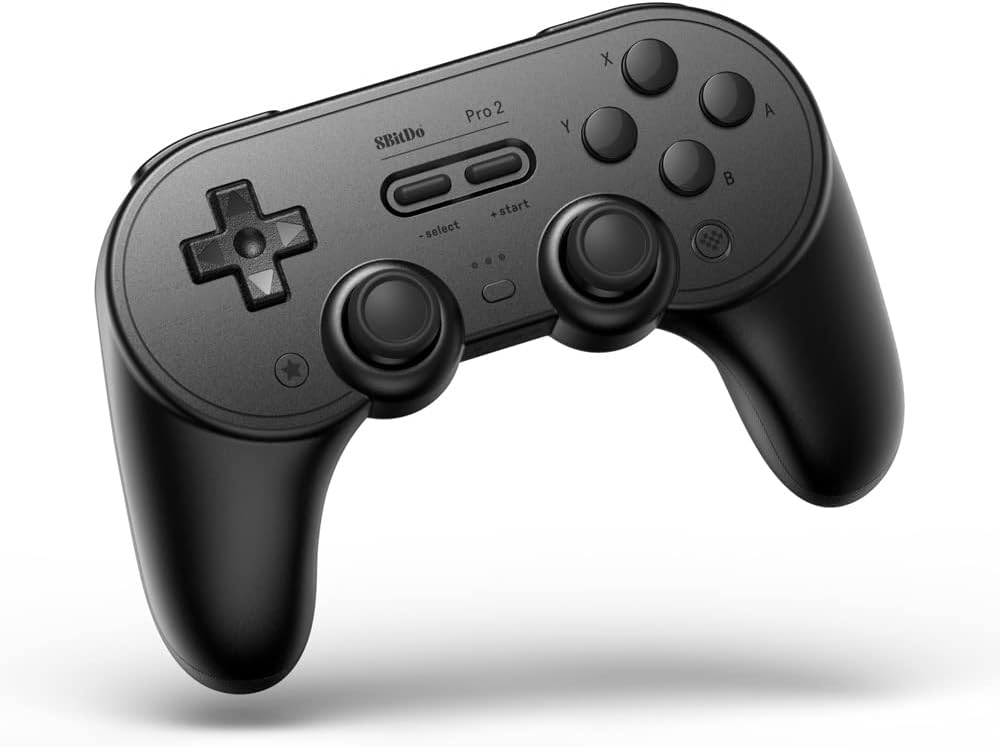
The 8BitDo Pro 2 is a powerhouse known for its robust build and customization. It supports Apple TV officially, ensuring a seamless connection for your favorite games.
We may earn a commission when you buy through this link, at no additional cost to you.
With two pro-level back buttons and custom profile switching, you can tailor inputs to your playstyle. The 20-hour battery is reliable, and the ergonomic grip supports comfortable extended play.
It is relatively heavy, and motion controls are limited to Switch use. However, for most Apple TV gaming needs, the customization and durability are highly valued.
This is ideal for players who want to personalize their setup. If you need a versatile controller that can handle various tasks and platforms, the Pro 2 is a top choice.
Two additional rear buttons give you quick access to essential commands without lifting your thumbs from the sticks.
Switch between different button mappings on the fly, adapting the controller for different game genres instantly.
We may earn a commission when you buy through this link, at no additional cost to you.
This Bluetooth controller focuses on versatility and customization for Apple TV gamers. It supports Turbo and macros, allowing you to optimize your gameplay for specific titles.
We may earn a commission when you buy through this link, at no additional cost to you.
The wake-up function and 6-axis gyro add convenience and precision. With a 650mAh battery and Type-C charging, it keeps you going without frequent interruptions.
Navigating the settings can be complex initially, and the size may feel large for smaller hands. Despite these issues, the feature set is impressive for the price.
Pick this if you want advanced features. It offers great flexibility for players who enjoy tweaking controls to suit their style on Apple TV.
Program button combinations and rapid-fire settings to automate complex tasks and enhance your efficiency in games.
Press a button to wake up your device instantly, saving time and avoiding extra steps during gameplay.
We may earn a commission when you buy through this link, at no additional cost to you.
The Renewed version of the SteelSeries Nimbus+ offers a budget-friendly way to get premium Apple TV controller features. Each unit is professionally inspected for quality and performance.
We may earn a commission when you buy through this link, at no additional cost to you.
It retains the core benefits like stable wireless connection and responsive buttons. For many users, the minor cosmetic imperfections are worth the savings compared to a new unit.
Condition can vary between units, and the warranty is limited. However, if you are comfortable with refurbished products, it provides significant value.
Consider this for an eco-friendly purchase. It is perfect if you want the Nimbus+ experience at a lower price point on Apple TV.
Choosing renewed electronics reduces waste and often costs less while providing reliable performance.
Each item undergoes testing to meet strict standards, ensuring you receive a functional and safe controller.
We may earn a commission when you buy through this link, at no additional cost to you.
This version of the Nimbus+ focuses on core gaming needs for Apple TV. Its reliable wireless connection and responsive controls make it suitable for most game types.
We may earn a commission when you buy through this link, at no additional cost to you.
The rechargeable battery supports long sessions without frequent charging. The ergonomic shape ensures comfort, and the official license guarantees seamless pairing with your device.
It lacks advanced features like motion or macros, but for standard gaming it excels. The price reflects its premium branding and durability.
Select this if you prefer simplicity. It is a solid choice for players who want a dependable controller without extra gimmicks.
Designed to deliver essential features reliably, ensuring a smooth and frustration-free gaming experience.
Apple certification allows instant setup with your TV, so you can start playing right away.
We may earn a commission when you buy through this link, at no additional cost to you.
Choosing the right controller involves evaluating key factors like compatibility, battery life, and features. This guide helps you prioritize aspects that matter most for your Apple TV gaming setup.
Ensure the controller explicitly lists Apple TV or tvOS support. Officially licensed controllers often pair faster and have better input recognition on the platform.
Always check compatibility notes before buying to avoid connectivity issues that disrupt your gaming sessions.
Long battery life is essential for uninterrupted play. Look for controllers offering at least 15 hours per charge to minimize frequent recharging interruptions.
Models with 50+ hours are ideal for heavy users who prefer infrequent charging breaks during extended play.
Your hands should feel supported during long sessions. Controllers with textured grips and balanced weight reduce fatigue and improve overall gameplay comfort.
Try to choose a controller that fits your hand size comfortably to avoid strain over time.
Look for Hall Effect joysticks or high-quality sensors that reduce drift. Precise inputs are critical for accuracy in action and sports games on Apple TV.
Responsive buttons and joysticks ensure your commands are registered instantly during fast-paced gameplay.
Programmable buttons and macros can enhance your strategy in certain games. Consider if you need these features based on the titles you play most often.
Extra back buttons offer alternative inputs that simplify complex control schemes for competitive players.
Premium materials often translate to longer lifespan and better reliability. A sturdy build protects against wear from frequent drops or intensive use.
Investing in a durable controller saves money long term by reducing the need for replacements.
Bluetooth is standard for wireless use, but some controllers offer 2.4G or USB modes for lower latency. Choose based on your preferred connection style.
Check if the controller requires dongles or drivers, as simple plug-and-play is often more convenient for TV setups.
Balance your budget with the features you need. Budget models may lack premium build quality but still deliver solid performance for casual gamers.
Higher-priced options offer better longevity and specialized features, making them worth the investment for serious players.
To pair your controller, enable Bluetooth on your Apple TV settings and put the controller in pairing mode using its specific button combination.
Store your controller in a cool, dry place when not in use to preserve battery health and prevent accidental button presses.
Regularly update controller firmware if supported, and clean buttons and sticks with a soft cloth to maintain responsiveness and hygiene.
No, standard Bluetooth gamepads that support iOS work well with Apple TV. However, controllers with explicit tvOS support ensure the best compatibility and fewer connection issues.
Most controllers offer 10 to 50 hours of play per charge. Higher capacity models provide longer sessions, ideal for binge gaming without frequent interruptions.
Some controllers support motion controls, but app and game support on tvOS varies. Always check if your specific game supports gyro aiming before relying on it.
Yes, many models support PC, Switch, and Android. Versatile controllers let you use one device across multiple systems for convenience.
For Apple Arcade, choose an Apple licensed controller like the SteelSeries Nimbus+ or 8Bitdo SN30 Pro. They offer seamless pairing and optimized performance for these games.
Use the manufacturer's app or software if available. Some controllers update via the connected device. Always consult the user manual for exact steps.
Connection drops often result from low battery, interference, or outdated firmware. Keep the battery charged and update software to maintain stability.
Wireless is generally preferred for comfort and convenience. Wired options are rare on TV due to port limits but can offer zero latency if supported.
We highlighted ten diverse options to suit different budgets and needs. Whether you want premium features or a budget pick, there is a controller here that fits your Apple TV setup.
Focus on battery life and compatibility first, as these impact daily usage the most. Custom features like macros are optional and should align with your play style.
Prices fluctuate regularly, so check current listings before purchasing. This guide helps you make an informed choice for the best gaming experience on Apple TV today.