
Wireless Caregiver Pager 1 Call Button
4.7Editor score
1500 Foot Range
58 Ringtones
IP55 Waterproof
Finding the right gadgets for elderly parents can significantly improve their safety and independence at home. We have reviewed the latest technology designed to support seniors and their caregivers effectively.
Our team analyzed over fifty products based on reliability, ease of use, and user feedback. We selected the top ten options that offer the best value and performance for senior care needs.
Each pick highlights specific features like wireless range, battery life, and setup simplicity. Please note that product availability and pricing may change over time.
4.7Editor score

4.8Editor score

4.4Editor score
As an Amazon Associate we earn from qualifying purchases.
Below is a detailed side-by-side comparison of the top ten gadgets selected for their reliability and user-friendly features.


This WiFi pager stands out as the best overall gadget for elderly parents due to its instant app alerts and user-friendly design. It earned a high rating from users who value reliable connectivity without ongoing costs.
We may earn a commission when you buy through this link, at no additional cost to you.
The system allows family members to receive immediate notifications on their phones when the button is pressed. This ensures help is on the way quickly without needing to be in the same room. The signal easily penetrates walls and doors covering a range of up to 656 feet.
One trade-off is that phone call alerts require a subscription which limits free functionality. However the app notifications are robust enough for most households. The waterproof button also ensures it works safely in bathrooms or kitchens.
This gadget is ideal for families who want reliable monitoring without hidden fees. It provides peace of mind for caregivers and seniors alike.
Family members get notified on their phones immediately when the button is pressed.
The signal penetrates walls effectively covering up to 656 feet in range.
We may earn a commission when you buy through this link, at no additional cost to you.
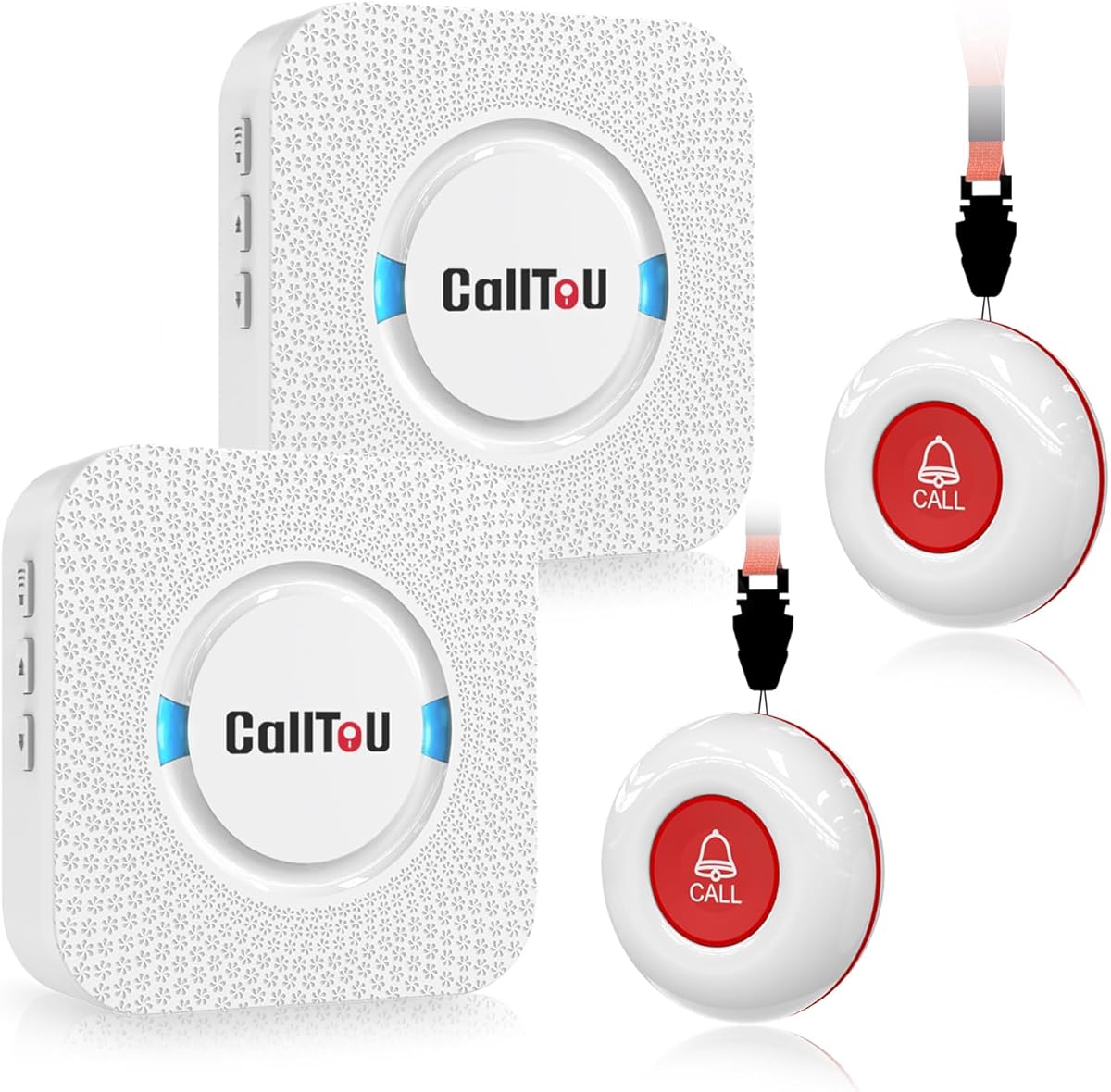
This wireless pager offers exceptional value for families looking for a simple and affordable solution. It has received positive feedback for its impressive range and ease of use.
We may earn a commission when you buy through this link, at no additional cost to you.
The system supports up to 1500 feet of wireless transmission which is rare for this price point. It also includes 58 ringtones and five adjustable volume levels to suit different needs. The IP55 waterproof design ensures reliability in various environments.
The receiver requires an outlet which may limit placement options. However the wireless flexibility for the call button is a major plus. The 18-month warranty adds extra value for buyers.
This gadget is perfect for small to medium-sized homes needing reliable alerts without high costs. It is a great entry-level option for senior care.
Supports up to 1500 feet of wireless transmission for large homes.
Includes 58 ringtones and five volume levels for personalized alerts.
We may earn a commission when you buy through this link, at no additional cost to you.
This camera offers premium features that go beyond simple alerts including video calling and fall detection. Users appreciate the lack of subscriptions and the clear display for connecting with loved ones.
We may earn a commission when you buy through this link, at no additional cost to you.
The device allows parents to see smiling faces on a screen with just one press. It also detects loud crashes or cries for help and sends alerts to family phones. The privacy mode rotates the lens to respect dignity.
The need for constant power may limit placement to areas with outlets. But the 2.4 GHz WiFi ensures stable connectivity. The local recording option saves money on cloud storage fees.
This gadget is ideal for families wanting visual connection and advanced safety monitoring. It reduces loneliness while providing real-time safety checks.
Allows one-touch video calls without apps or smartphones for seniors.
Detects loud crashes or distress sounds and alerts family instantly.
We may earn a commission when you buy through this link, at no additional cost to you.
This simple pager provides two buttons and reliable alerts for basic caregiving needs. It is a popular choice for households needing extra flexibility for multiple call points.
We may earn a commission when you buy through this link, at no additional cost to you.
The system allows caregivers to move freely with a receiver that has a 500-foot range. Both buttons are waterproof which is great for bathrooms. The 55 ringtones ensure you never miss an alert.
The range is shorter than some competitors so larger homes might need more units. The receiver must be plugged into an outlet limiting portability. However the two-button value is strong.
This gadget is best for homes where caregivers are often nearby. It offers good value for immediate assistance with simple setup.
Comes with two call buttons for flexible placement in different rooms.
Buttons are waterproof so they can be used safely in bathrooms.
We may earn a commission when you buy through this link, at no additional cost to you.
This pager includes a wristband option which makes it convenient for seniors who need to carry it everywhere. It also offers a silent LED flash mode for quiet environments.
We may earn a commission when you buy through this link, at no additional cost to you.
The range reaches up to 1000 feet in open air which covers most homes. The waterproof button can be mounted on walls or worn. The LED flash helps light sleepers notice alerts without loud noise.
The wristband may need battery changes which adds maintenance. Instructions can be vague for some users. However the flexibility of the wristband makes it unique.
This gadget is great for active seniors who move around the house. The silent mode ensures alerts are noticed without disturbing others.
Includes a wristband so the button stays close to the user always.
LED flash mode provides alerts without loud ringing for quiet needs.
We may earn a commission when you buy through this link, at no additional cost to you.
This clock is designed specifically for seniors with memory loss to show time and date in simple words. It has become a necessary tool for dementia care in many homes.
We may earn a commission when you buy through this link, at no additional cost to you.
The display spells out times like MORNING or NIGHT instead of using confusing numbers. Auto night dimming prevents harsh brightness at night. It supports eight languages and offers easy alarm settings.
The clock resets after a power outage until power returns which can be a nuisance. However the visual clarity reduces anxiety for users. The simplicity makes it easy to use.
This gadget is essential for households needing extra help with time orientation. It reduces confusion and helps keep daily schedules clear.
Displays time as words like MORNING or NIGHT instead of just numbers.
Screen dims automatically at night to prevent sleep disruption.
We may earn a commission when you buy through this link, at no additional cost to you.
This clock features a voice function that announces the time which helps seniors with poor vision. It is rated highly for its ease of use and clear display.
We may earn a commission when you buy through this link, at no additional cost to you.
Users can press a button to hear the time spoken in nine languages. The large font is easy to read even with weak eyes. It supports multiple alarms for medicine or appointments.
The voice feature might be too loud for some users if not adjusted. There is no battery backup so it relies on power. However the voice function is a valuable assistive tool.
This gadget is perfect for seniors with visual impairments. The voice announcements ensure they always know the time and date.
Announces the time via voice when a button is pressed.
One-click setup makes it intuitive for seniors to configure.
We may earn a commission when you buy through this link, at no additional cost to you.
This system allows multiple family members to receive alerts which is great for shared caregiving duties. It uses app notifications to keep everyone informed instantly.
We may earn a commission when you buy through this link, at no additional cost to you.
You can set up shared alerts so siblings or caregivers all get notified. The app lets you customize ringtones to identify which button was pressed. It supports lifetime service support for peace of mind.
Phone notifications require an upgrade to avoid missing offline alerts. WiFi setup can be tricky for non-tech users. However the multi-user feature is powerful for families.
This gadget is ideal for families sharing caregiving responsibilities. It ensures help is always reachable by at least one member.
Allows multiple family members to receive notifications at once.
App allows customization of ringtone for each button.
We may earn a commission when you buy through this link, at no additional cost to you.
This clock combines timekeeping with a photo frame feature to keep loved ones close. It offers extensive customization for alarms and display themes.
We may earn a commission when you buy through this link, at no additional cost to you.
Users can insert photos to play on the screen which helps comfort seniors. It supports 20 alarms and reminders for tasks like drinking water. The display offers 12 themes to suit different tastes.
An SD card is required but not included for photo playback. There is no battery backup for settings after power loss. However the photo feature adds emotional value.
This gadget is great for seniors who enjoy seeing family photos. It is a versatile tool for keeping routines and memories visible.
Can display photos from a drive to keep family memories visible.
Offers 12 color themes for different visual needs.
We may earn a commission when you buy through this link, at no additional cost to you.
This pager is simple and portable making it easy for caregivers to keep close. It is a reliable option for basic call needs.
We may earn a commission when you buy through this link, at no additional cost to you.
The pager comes with a belt clip so it can be worn. It has long battery life to avoid frequent replacements. The two buttons allow placement in multiple rooms.
The range is standard at 500 feet so large homes may have dead spots. Ringtones are basic but functional. The support team is available for issues.
This gadget is best for caregivers who move around often. It ensures the alert stays close to the caregiver always.
Pager includes a belt clip for hands-free carrying.
Offers long battery life to reduce frequent replacements.
We may earn a commission when you buy through this link, at no additional cost to you.
Choosing the right gadgets for elderly parents requires careful consideration of their specific needs and your home environment. Here are key factors to help you make the best choice.
Devices connect via WiFi or radio frequencies. Radio based systems work without internet but have limited range. WiFi systems offer app alerts but depend on stable internet.
Choose WiFi for smart features or radio for simplicity in areas with poor internet.
Home size matters when picking a pager. Larger homes need devices with 1000 feet or more range. Small apartments can use standard 500 feet models.
Measure your home to ensure the signal reaches all rooms where seniors may be.
Buttons should be large and easy to press for seniors with limited dexterity. Menus should be simple to navigate without training.
Look for one-click emergency buttons and plug-and-play setups.
Some devices plug into outlets while others use batteries. Outlet models offer constant power but limit placement. Battery models are flexible but need maintenance.
Check how often batteries need changing before buying portable units.
Alerts come as sounds lights or phone notifications. Consider if you need silent alerts for quiet times.
Look for devices with multiple alert types like flash and sound.
If buttons go in bathrooms they must be waterproof. Look for IP ratings to ensure durability.
Choose waterproof units for wet areas to avoid damage.
Some systems have monthly fees while others are free. Decide if you prefer free hardware with app alerts or paid call services.
Compare total cost over years including any hidden fees.
Quality gadgets come with warranties to cover defects. Longer warranties show confidence in the product.
Choose brands offering at least one year of support for peace of mind.
Start by placing the call buttons in high-risk areas like bathrooms and bedrooms where falls are common. Ensure they are mounted securely or worn around the neck.
Test the alert system weekly by pressing the button to confirm the receiver or app gets the signal. Replace batteries regularly to avoid missed alerts.
Keep the receiver in a central spot where it is heard clearly throughout the house. Clean buttons with a damp cloth to remove dust and dirt.
Most of the gadgets reviewed work without monthly fees using direct alerts. Some features like phone calls may require paid plans but core functions are free.
Yes several models use radio frequencies and do not need Wi-Fi. These devices work independently but may lack app notifications compared to Wi-Fi models.
Signals range from 500 feet to 1500 feet depending on the model and walls. Check specific specs to match your home size.
Most call buttons have waterproof designs for bathroom use. Verify IP ratings to ensure they resist water damage in wet environments.
Some systems allow shared alerts where several phone numbers get notified. Check if the device supports multi-user notifications for shared caregiving.
Battery powered units continue working while plug-in models stop unless they have backup. Always keep spare batteries ready for emergencies.
Yes specialized clocks and simple buttons help dementia patients stay oriented. Look for models with clear displays and easy activation.
Reset steps vary but usually involve holding a button for ten seconds. Consult the user manual for specific instructions for your model.
We have reviewed ten top gadgets ranging from pagers to smart cameras. Each offers unique features to suit different needs and budgets for senior care.
Prioritize devices that offer reliability and simple operation. Safety features like waterproof buttons and wide range are essential for peace of mind.
Remember to check current prices and availability before purchasing as offerings may change. Select the option that best fits your home and care routine.