
DKE Desktop Computer Power Switch
4.7Editor score
2 meter long extension cable
Simple adhesive mounting plate
Compact and lightweight design
Finding a reliable external PC power button can transform how you interact with your desktop setup. Whether your computer is hidden under a desk or mounted in a hard-to-reach location, an external switch provides convenient control without needing to bend or crawl behind heavy equipment.
We compared ten highly-rated options based on build quality, cable length, installation ease, and additional features like USB hubs or wireless remotes. Our analysis focuses on real-world usability for home users, custom builders, and professionals who need quick access to power controls.
Each pick below highlights specific strengths such as budget-friendly designs, premium aluminum cases, or advanced connectivity. Remember that product availability and pricing can shift quickly online, so verify current stock and deals before making your final purchasing decision today.
4.7Editor score

4.6Editor score

4.5Editor score
As an Amazon Associate we earn from qualifying purchases.
This side-by-side comparison helps you evaluate key specifications like cable length, mounting options, and extra features across all ten selected models to find the perfect fit for your specific desktop environment.

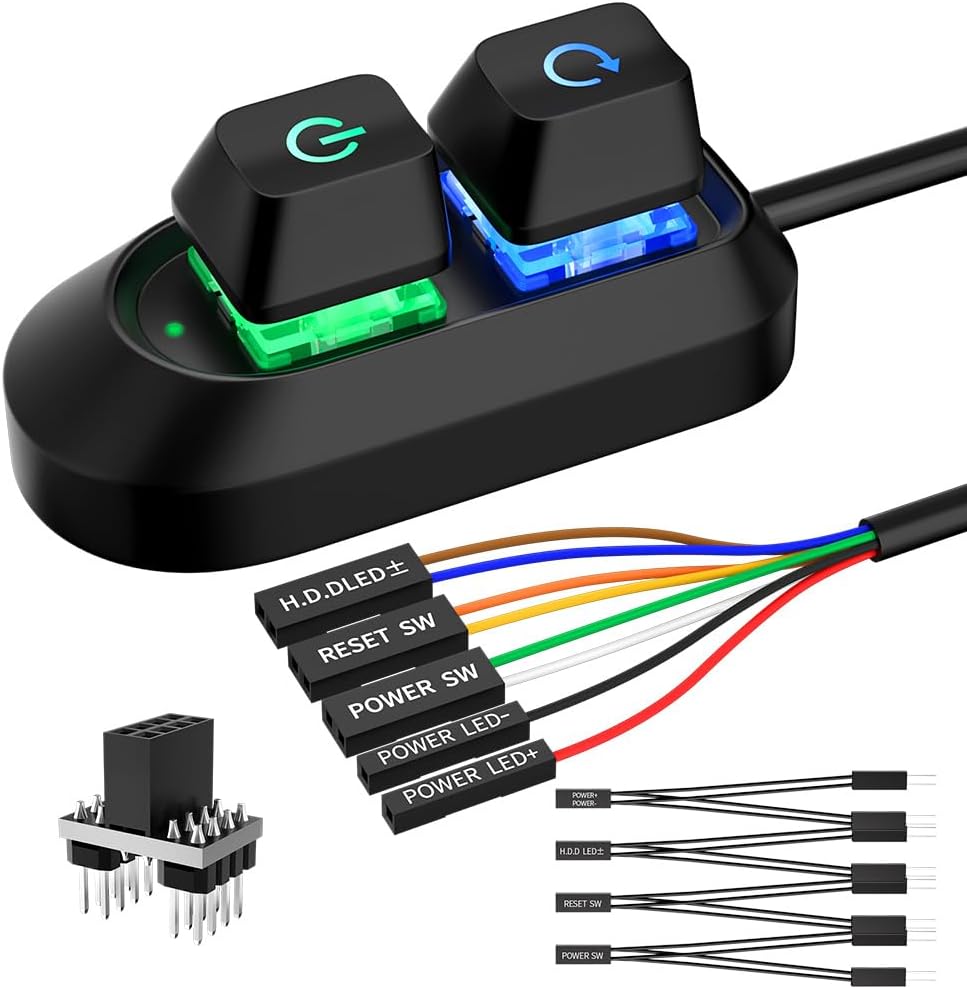




This external power button stands out with its massive 118-inch cable, making it ideal for setups where your PC is hidden far from your desk. It holds a strong 4.6 rating from users who appreciate the flexibility and reliability of the design.
We may earn a commission when you buy through this link, at no additional cost to you.
The standout quality is the included splitter, which lets you keep your original case button while adding an external one. This dual functionality is perfect for test benches or shared workspaces where multiple access points are needed without modifying existing hardware.
While the cable length is a major benefit, it can be challenging to manage in tight spaces. Additionally, the adhesive mounting might struggle on textured or uneven surfaces, requiring careful placement for a secure fit.
Anyone needing maximum reach without complex wiring should choose this model. It balances cost and functionality effectively, making it a top recommendation for standard desktop users looking to upgrade their power access.
The 118-inch cable ensures you can place the switch exactly where you need it, even across a large room or deep under a desk.
The included splitter allows both the external button and original case button to function simultaneously, offering flexibility for different usage scenarios.
We may earn a commission when you buy through this link, at no additional cost to you.
This model offers exceptional value for money, delivering a reliable external switch at a fraction of the cost of premium options. With a 4.7 rating, users consistently praise its simplicity and effectiveness for standard power needs.
We may earn a commission when you buy through this link, at no additional cost to you.
The compact size and 2-meter cable make it versatile enough for most desk setups without taking up much space. Its lightweight design ensures it does not add unnecessary bulk to your workstation area.
The trade-off is a basic plastic construction that lacks the premium feel of aluminum or acrylic models. It also does not include extra features like USB hubs or RGB lighting, focusing purely on core functionality.
Budget-conscious buyers looking for a no-frills solution will find this perfect. It works reliably for powering systems on and off without requiring complex setup or expensive components.
Priced competitively, this switch delivers consistent performance without breaking the bank, making it accessible for students and home users alike.
With included adhesive stickers and clear connector labeling, setting this up takes minimal time and technical knowledge.
We may earn a commission when you buy through this link, at no additional cost to you.
This unique option replaces cables entirely with a wireless remote, allowing you to control your PC from up to 50 feet away. It maintains a solid 4.5 rating thanks to its innovative design and reliable connection technology.
We may earn a commission when you buy through this link, at no additional cost to you.
The key strength is the convenience of not having to route cables through your case or across your floor. You simply plug the PCIe card in and use the remote button for quick power control without physical constraints.
However, it costs more than wired alternatives and requires an available PCIe slot on your motherboard, which might limit compatibility in some compact systems. Installation is simple but adds a hardware step not required by others.
Remote control enthusiasts or those with inaccessible PC locations should consider this premium choice. It offers a level of freedom that wired switches cannot match, justifying the higher investment for many users.
The remote allows power control from across the room, eliminating physical barriers and simplifying cable management significantly.
No software installation is required, as the receiver card handles communication directly with the motherboard for immediate functionality.
We may earn a commission when you buy through this link, at no additional cost to you.
This standard external button provides a straightforward solution for accessing hard-to-reach PC cases. It holds a 4.6 rating from users who find the included splitter and LED indicator useful additions to the basic setup.
We may earn a commission when you buy through this link, at no additional cost to you.
The design focuses on core functionality without unnecessary fluff. The splitter allows the original case button to remain active, which is helpful if you need multiple control points for a single system.
The 1.7 meter cable is shorter than some premium options, potentially limiting placement flexibility in larger rooms. The design is also quite basic, offering no extra features like RGB or USB ports.
Ideal for users needing a simple fix for a broken case button or basic extension needs. It works well for standard desktops where extreme reach is not a priority.
The included splitter enables dual switch operation, allowing you to use both the external and original button simultaneously.
An integrated LED helps you quickly see the power status of your system from a distance.
We may earn a commission when you buy through this link, at no additional cost to you.
This versatile model adds reset and HDD LED support alongside the power switch, making it a complete control solution for power cases. It has earned a 4.5 rating for its comprehensive feature set.
We may earn a commission when you buy through this link, at no additional cost to you.
The inclusion of a splitter board and cable provides flexibility for routing connections. You can manage power and reset signals independently, which is useful for troubleshooting or testing scenarios.
Managing more wires can be tricky in tight cases, and the higher price reflects the additional components. If you do not need reset or HDD indicators, this might be overkill.
Best for custom builders or testers needing full header control in a portable external package. It handles complex setup requirements effectively without needing a new motherboard.
Support for power, reset, and HDD LED signals ensures you have all the standard motherboard functions available externally.
Multiple routing options via the front or back panels allow you to position the button exactly where needed.
We may earn a commission when you buy through this link, at no additional cost to you.
Known for its sleek acrylic design, this button adds a touch of style to your workspace. It holds an impressive 4.8 rating, reflecting high user satisfaction with both its look and performance.
We may earn a commission when you buy through this link, at no additional cost to you.
The compact design fits easily on any surface without taking up much desk real estate. It includes both power and reset switches, ensuring you have full control without needing extra components.
The acrylic surface can show fingerprints easily and may require more frequent cleaning than matte plastic. The 1.6 meter cable is also shorter than some competitors, limiting placement options.
Users prioritizing aesthetics alongside functionality will appreciate this pick. It balances form and function well for those who want a power button that looks as good as it performs.
The acrylic construction gives a premium look that complements modern desktop builds and gaming setups effectively.
Integrated power and reset switches ensure you have all essential controls available without additional hardware.
We may earn a commission when you buy through this link, at no additional cost to you.
This option stands out with its RGB LED effect, adding a visual flair to your setup without requiring software. It maintains a 4.5 rating among users who enjoy the lighting feature alongside reliable performance.
We may earn a commission when you buy through this link, at no additional cost to you.
The RGB lighting breathes automatically, creating a clean glow that matches many gaming or workstation environments. It is fully compatible with standard ATX motherboards, making setup straightforward.
The lack of a reset switch might limit utility for testers or advanced users. Also, since there is no software control, you cannot customize the color or brightness of the LED.
Gamers and builders looking for visual customization will find this appealing. It bridges the gap between a functional switch and a lighting accessory without extra complexity.
The breathing LED effect adds aesthetic value to your desk setup without needing external software configuration.
Designed with low voltage to ensure safe operation without risking damage to your PC components.
We may earn a commission when you buy through this link, at no additional cost to you.
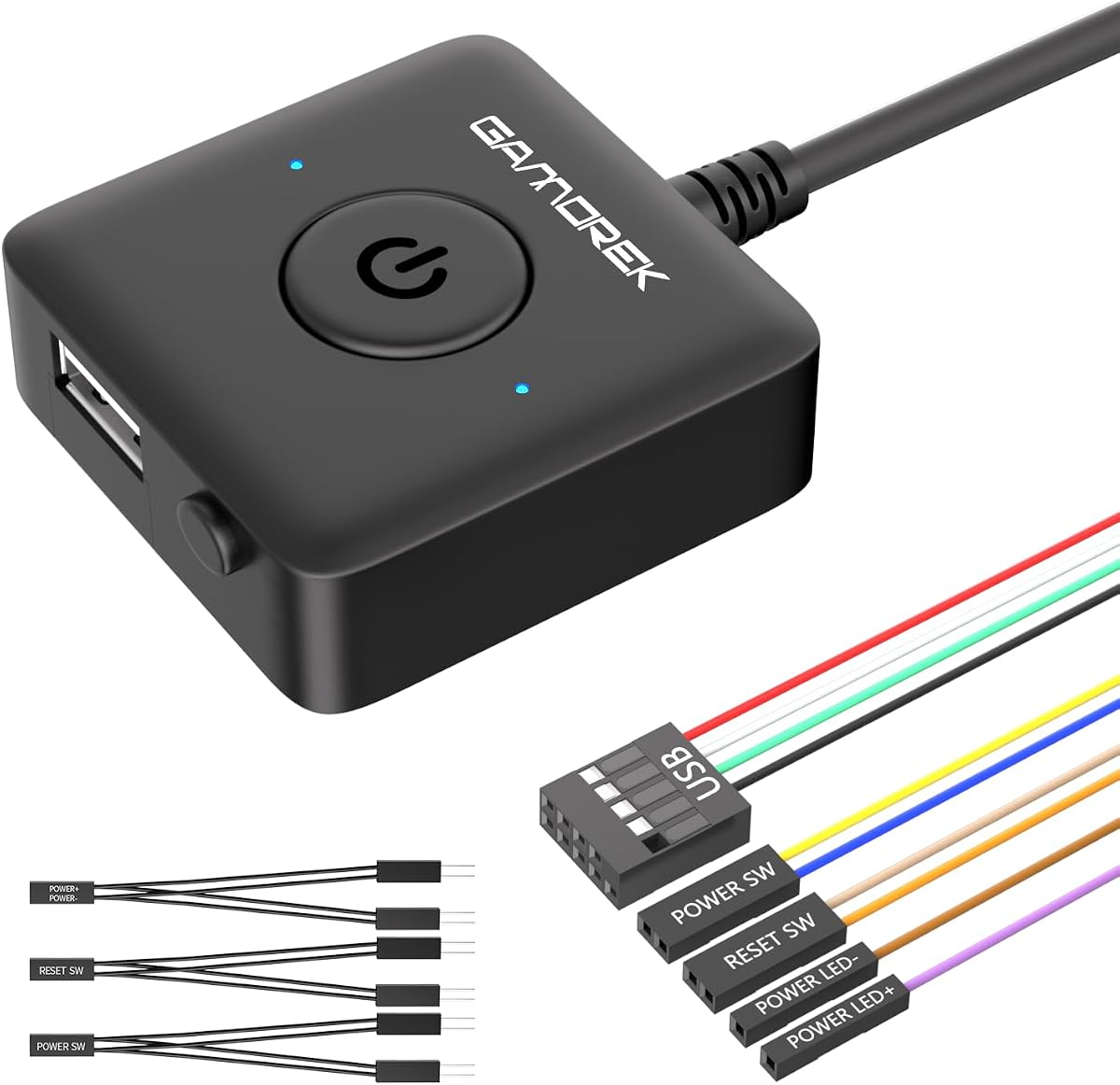
This model uniquely includes USB functionality, allowing you to extend an accessible USB port alongside power control. It holds a 4.7 rating from users who value the extra connectivity in their setups.
We may earn a commission when you buy through this link, at no additional cost to you.
The included PCI bracket helps organize installation, keeping your build cleaner by utilizing an expansion slot efficiently. This is particularly useful for under-desk setups where front ports are hard to reach.
It requires a spare USB header on the motherboard which might not be available on older boards. The cost is slightly higher than basic power switches due to these added features.
Users needing extra USB access without installing a full hub will appreciate this hybrid design. It simplifies connectivity for devices like flash drives or card readers significantly.
An integrated USB header connection extends a convenient port to your desk, reducing the need to reach behind the PC.
The included PCI bracket ensures professional installation and helps maintain a tidy desktop environment.
We may earn a commission when you buy through this link, at no additional cost to you.
Combining a power switch with a 4-port USB 3.0 hub, this unit offers high-speed data access alongside power control. It has a 4.3 rating from users who appreciate the all-in-one convenience for peripherals.
We may earn a commission when you buy through this link, at no additional cost to you.
The USB 3.0 support ensures fast data transfer for drives and accessories without clogging internal ports. The compact design keeps the desk clear while providing essential connectivity at the tip of your hand.
The cable is shorter than many power-only options, limiting placement options. Additionally, you must connect to a USB header, which may not be feasible in all cases.
Ideal for users needing quick USB access for keyboards or drives without a full external hub. It streamlines the setup for those who want power and ports in one device.
Four USB 3.0 ports provide fast connectivity for multiple peripherals directly from the switch location.
Supports 5.0Gbps speeds ensuring quick file transfers and responsive peripheral performance.
We may earn a commission when you buy through this link, at no additional cost to you.
Constructed from aluminum, this button offers superior durability compared to plastic alternatives. It holds a 4.6 rating for its robust build quality and comprehensive feature set for power and reset control.
We may earn a commission when you buy through this link, at no additional cost to you.
The aluminum housing provides a premium feel and better heat resistance than cheaper materials. The included splitter ensures compatibility with original buttons, making it a safe upgrade option for any case.
It is heavier than plastic models which might be less ideal for very light mounts. The higher price reflects the quality materials and additional components included in the package.
Best for users looking for a long-lasting build that feels professional. It is a solid choice for setups where durability and premium aesthetics matter.
Aluminum construction ensures durability and a premium feel that resists wear better than standard plastic.
Supports power, reset, and HDD LED signals for complete motherboard control at a distance.
We may earn a commission when you buy through this link, at no additional cost to you.
Choosing the right external power button involves evaluating several key factors that affect compatibility and usability. This guide outlines the most important considerations to help you make an informed decision.
Cable length is a primary factor when selecting an external switch. Standard options range from 1.5 meters to 118 inches. A longer cable allows you to place the button further away from the tower, such as on a desk or wall, while a shorter cable is suitable for nearby placements.
Measure the distance between your PC case and your desired switch location to ensure the cable reaches comfortably without tension.
Mounting options determine how securely the switch stays in place. Most models use adhesive stickers which work well on smooth surfaces like desks or panels. Some higher-end models include metal brackets for more permanent installations.
Ensure the mounting method is compatible with the surface you plan to use for the best results.
Most external switches use standard 4-pin connectors for POWER SW and RESET SW. Check your motherboard manual to confirm the pinout layout. Some models provide adapters for specific headers to ensure a safe connection.
Always verify connector compatibility before purchasing to avoid connection issues or short circuits.
Some switches offer extras like USB ports, RGB lighting, or reset buttons. USB ports are useful if you need extra connectivity. RGB adds visual flair but may not be necessary for everyone. Reset buttons are vital for advanced users.
Decide if these extra features justify the added cost and complexity for your specific needs.
Build materials range from plastic to acrylic to aluminum. Plastic is lightweight and affordable but less durable. Aluminum offers a premium feel and better longevity. Acrylic provides a unique aesthetic that fits modern designs.
Consider the physical environment where the button will be placed to choose the right material.
Splitter support allows the external switch to work alongside the original case button. This is useful for setups where you want to keep the case accessible while adding a remote option. Look for packages that include a splitter board or cable.
Check if the included splitter is adequate for your motherboard header configuration.
Most models are plug-and-play with clear instructions. Some may require routing cables through case openings which adds a step. Wireless models require a PCIe slot and might be slightly more complex.
Choose a model that matches your technical comfort level for installation.
Prices vary significantly from budget to premium options. Basic buttons cost less while multi-feature ones cost more. Determine your budget early to narrow down choices effectively.
Compare features against price to ensure you get the best value for your investment.
To install, connect the provided power and reset wires to the corresponding headers on your motherboard. Ensure the polarity matches the labels on the motherboard pins for safe operation.
Use the adhesive backing to secure the button to a flat, clean surface. Press firmly for a few seconds to ensure the adhesive sets properly before connecting cables.
Regularly clean the button with a soft cloth to remove dust and debris. If using a metal surface, check periodically for signs of wear or adhesive loosening.
Yes, most external buttons work with any desktop PC using standard ATX motherboards. They connect to the POWER SW header which is standard across almost all consumer motherboards. Just ensure you match the connectors correctly during installation.
Check your motherboard manual for the front panel connector section. Look for a header labeled FRONT PANEL or F_PANEL. If it has a POWER SW pair, the switch will work. Most modern boards include this.
Yes, you can keep your original case button using a splitter. This allows both buttons to function simultaneously. Many packages include a splitter cable for this specific purpose.
No, standard wired switches do not require drivers. They connect directly to hardware headers and work instantly. Wireless models might need a receiver card but typically do not need software drivers either.
That is exactly what these buttons are designed for. You can move the switch to a convenient spot like your desk or wall. This makes turning on the PC much easier without reaching behind the tower.
Yes, they are safe as they operate at low voltage. They simply complete the power circuit like the original button. Just ensure you follow the wiring instructions to avoid short circuits.
Our top picks cover a wide range of needs from budget-friendly basic buttons to premium wireless options. The wireless remote model offers the most convenience while budget choices offer simplicity.
Prioritize cable length and mounting style based on your specific setup. If you need extra features like USB or reset, choose a model that explicitly supports them.
Always check current pricing and availability before buying as deals change frequently. Verify stock availability to ensure you can start your upgrade project without delays.