
Upgraded Watt Power Meter Plug
4.6Editor score
Seven display mode options
Overload protection included
Adjustable backlight settings
Compare the best energy consumption monitors for PC and home devices to track usage, reduce costs, and optimize efficiency with accurate real-time data
Managing energy usage for personal computers and home appliances is essential for reducing electricity bills and maintaining a sustainable lifestyle. Modern energy consumption monitors offer precise insights into power draw, helping users identify wasteful devices and optimize their setup for maximum efficiency without guesswork.
This guide evaluates ten top-rated energy monitors based on accuracy, feature sets, ease of installation, and value. We examined real-time tracking capabilities, data retention, safety certifications, and compatibility with smart home systems to ensure each recommendation meets diverse monitoring needs effectively.
Each pick highlights specific strengths for different scenarios, from budget-friendly plug-in meters to advanced whole-home circuit monitors. Prices and availability change frequently, so verify current details before purchasing. Use these tools to gain clarity on your energy habits and make informed decisions about your electrical consumption.
4.6Editor score

4.6Editor score

4.3Editor score
The following comparison table outlines key specifications and features across all ten selected energy monitors to help you quickly identify the model that best fits your specific monitoring requirements and budget constraints.


The Emporia Vue 3 stands out as a top energy monitor for home use, offering certified safety and detailed real-time tracking. With UL listing and robust features, it provides reliable insights into energy consumption across multiple circuits.
We may earn a commission when you buy through this link, at no additional cost to you.
Its standout qualities include accurate ±2% sensor data, automated energy management through the app, and solar integration for net metering. The ability to monitor critical loads like HVAC and water heaters helps identify major cost drivers.
Trade-offs include reliance on 2.4 GHz Wi-Fi and cloud retention limits for detailed 1-second data. However, hourly and daily data persist indefinitely in the cloud, ensuring long-term analysis without loss of critical historical records.
This monitor is ideal for homeowners seeking deep visibility into whole-home usage and automation potential. It balances safety, functionality, and affordability, making it a recommended choice for proactive energy management.
UL certification ensures rigorous testing for hazards like overheating or short-circuiting, giving peace of mind for electrical monitoring.
Track solar surplus and automate appliance usage to maximize self-consumption and reduce reliance on grid electricity during peak hours.
We may earn a commission when you buy through this link, at no additional cost to you.
The Upgraded Watt Power Meter Plug offers an entry-level solution for monitoring individual appliance energy use at a fraction of the cost of whole-home systems. Its straightforward design makes it accessible for beginners.
We may earn a commission when you buy through this link, at no additional cost to you.
Key strengths include seven display modes for viewing watts, kWh, volts, and cost, along with an adjustable backlight for readability. Overload protection ensures safety by warning when power exceeds set thresholds like 1800W.
Limitations are its focus on single-outlet usage and lack of smart home integration. Data memory helps retain stats during power failures, but long-term historical tracking requires manual recording rather than automated logging.
Best for renters or users wanting quick checks on device consumption, this meter provides immediate feedback to curb waste. It is a practical tool for targeted efficiency improvements without complex installation.
Five backlight duration settings allow flexible visibility without draining battery or causing glare in dark rooms.
Set unit prices to see cumulative electricity costs, helping you budget better and identify high-cost appliances quickly.
We may earn a commission when you buy through this link, at no additional cost to you.
The Meross Smart Home Energy Monitor prioritizes privacy and local control, offering a robust alternative to cloud-dependent systems. It suits tech-savvy users who value data sovereignty and advanced automation.
We may earn a commission when you buy through this link, at no additional cost to you.
Its standout feature is local data retention without cloud reliance, paired with solar integration to automate EV charging or water heating during surplus periods. Custom alerts and detailed charts help manage usage without hidden fees.
Trade-offs involve a steeper learning curve for Home Assistant integration and a higher upfront cost. However, the 2-year warranty and safety compliance justify the investment for those seeking long-term, secure monitoring.
Ideal for smart home enthusiasts and solar owners, this monitor delivers precise control and privacy. It bridges the gap between whole-home monitoring and smart automation, ensuring efficient and safe energy usage.
All energy data stays on your local network, avoiding cloud delays or privacy concerns while supporting advanced Open API control.
Detect solar surplus and redirect power to high-use appliances, reducing grid dependency and maximizing free energy generation.
We may earn a commission when you buy through this link, at no additional cost to you.
The SURAIELEC Outlet Watt Meter supports a broad voltage range and offers reliable Class 1.0 accuracy for household monitoring. Its compact form allows usage without blocking lower outlets.
We may earn a commission when you buy through this link, at no additional cost to you.
Standout qualities include 90-day data memory during power outages, ensuring continuity of stats without needing constant power. Overload indicators and adjustable thresholds enhance safety for diverse appliances.
Trade-offs involve lack of smart features or cloud access, requiring manual checks for historical data. However, the simple interface and fire-resistant build make it a dependable tool for focused tracking.
This meter suits users needing flexible voltage support without complex setup. It balances functionality and cost, providing clear insights for managing energy use in varied electrical environments.
Supports 90-250VAC, making it usable in different regions or with varied power sources for broader appliance coverage.
A built-in battery backup retains stats for months, ensuring no data loss during outages or unplugging.
We may earn a commission when you buy through this link, at no additional cost to you.
This Smart Home Energy Monitor delivers granular tracking with 16 sensors, ideal for landlords or shared housing. Customizable billing templates simplify cost allocation across multiple tenants.
We may earn a commission when you buy through this link, at no additional cost to you.
Standout features include real-time usage views, privacy mode via MQTT without cloud dependence, and compatibility with Home Assistant for automation. It helps landlords allocate costs fairly while giving tenants transparency.
Trade-offs include circuit panel installation and reliance on 2.4GHz Wi-Fi. However, the detailed reporting and billing tools provide clear value for managing multi-unit properties.
Perfect for property managers seeking fair and transparent billing, this system balances technical capability with practical financial tools. It ensures energy accountability across shared spaces.
Use customizable rate templates to automate cost calculations for peak, off-peak, and holiday pricing per circuit.
Run locally without cloud or app, using your own MQTT server for complete data control and independence.
We may earn a commission when you buy through this link, at no additional cost to you.
The HBN Watt Meter Plug provides nine display modes for monitoring detailed electrical parameters from power factor to cost. Its wide-angle screen ensures easy reading from any position.
We may earn a commission when you buy through this link, at no additional cost to you.
Key strengths include automatic backlight conservation and data storage that survives power outages. A reset button allows quick clearing of cumulative stats for new appliance tests.
Trade-offs are its lack of smart features and need for physical interaction. However, its simplicity and clarity make it ideal for users focused on immediate, hands-on checks.
Best for basic, cost-effective monitoring, this plug offers comprehensive data views without complexity. It suits those who value straightforward, reliable readings for daily use.
Toggle between watts, VA, kWh, time, Hz, PF, voltage, current, and cost to gain full insight into device performance.
The backlight turns off after 15 seconds to conserve energy, yet remains visible when actively needed.
We may earn a commission when you buy through this link, at no additional cost to you.
The KETOTEK Watt Meter features intuitive one-click buttons for accessing various parameters quickly. Its clear alarm flashes and wide-angle LCD enhance usability during monitoring sessions.
We may earn a commission when you buy through this link, at no additional cost to you.
Standout features include retaining settings after resets, making it easy to switch between appliances without reconfiguring. Overload alarms with flashing LEDs provide immediate safety warnings.
Trade-offs are its lack of connectivity and reliance on manual checks. However, the user-friendly layout and precise chip ensure dependable, hassle-free measurements for standard appliances.
Ideal for users valuing ease of use and safety alerts, this meter delivers reliable performance with minimal effort. It suits households needing straightforward, accurate power insights.
Dedicated buttons for KWH, Watts, Voltage, Frequency, and Max/Min power streamline data navigation without menus.
Resetting cumulative data does not delete alarm thresholds or unit prices, saving time for repeated monitoring.
We may earn a commission when you buy through this link, at no additional cost to you.
This 2-pack Watt Meter Plug offers cost-effective monitoring for multiple appliances. Its fireproof ABS build and clear backlight ensure safety and visibility during extended use.
We may earn a commission when you buy through this link, at no additional cost to you.
Key strengths include memory that saves unit prices and cumulative data, allowing quick reuse across devices. Overload warnings and eight display modes provide comprehensive tracking without complexity.
Trade-offs are its manual nature and lack of remote access. However, the dual-pack design makes it ideal for tracking several devices in parallel at a low cost.
Best for budget-conscious users needing multiple meters, this set provides reliable, durable monitoring. It suits households wanting to compare appliance efficiency across different outlets.
High-quality ABS material ensures longevity and safety, preventing damage from drops or overheating during use.
Cumulative data and unit prices remain after unplugging, enabling seamless continuation of tracking across sessions.
We may earn a commission when you buy through this link, at no additional cost to you.
The P4400 Kill A Watt remains a reliable choice for straightforward energy tracking. Its large LCD counts kilowatt-hours, offering clear insights into appliance usage over time.
We may earn a commission when you buy through this link, at no additional cost to you.
Standout qualities include simplicity, AC compatibility, and time-based tracking for day, week, or month. It is designed for easy assessment of electrical efficiency without technical barriers.
Trade-offs include lack of modern connectivity or advanced parameters. However, its durability and ease of use make it a practical tool for basic consumption checks.
Ideal for users seeking a proven, easy-to-use meter, this classic device delivers dependable results. It suits those prioritizing simplicity over smart features in daily monitoring.
A big, clear screen makes it easy to read consumption counts without squinting, even in dim light.
View usage by day, week, month, or year to understand long-term efficiency and plan better budgets.
We may earn a commission when you buy through this link, at no additional cost to you.
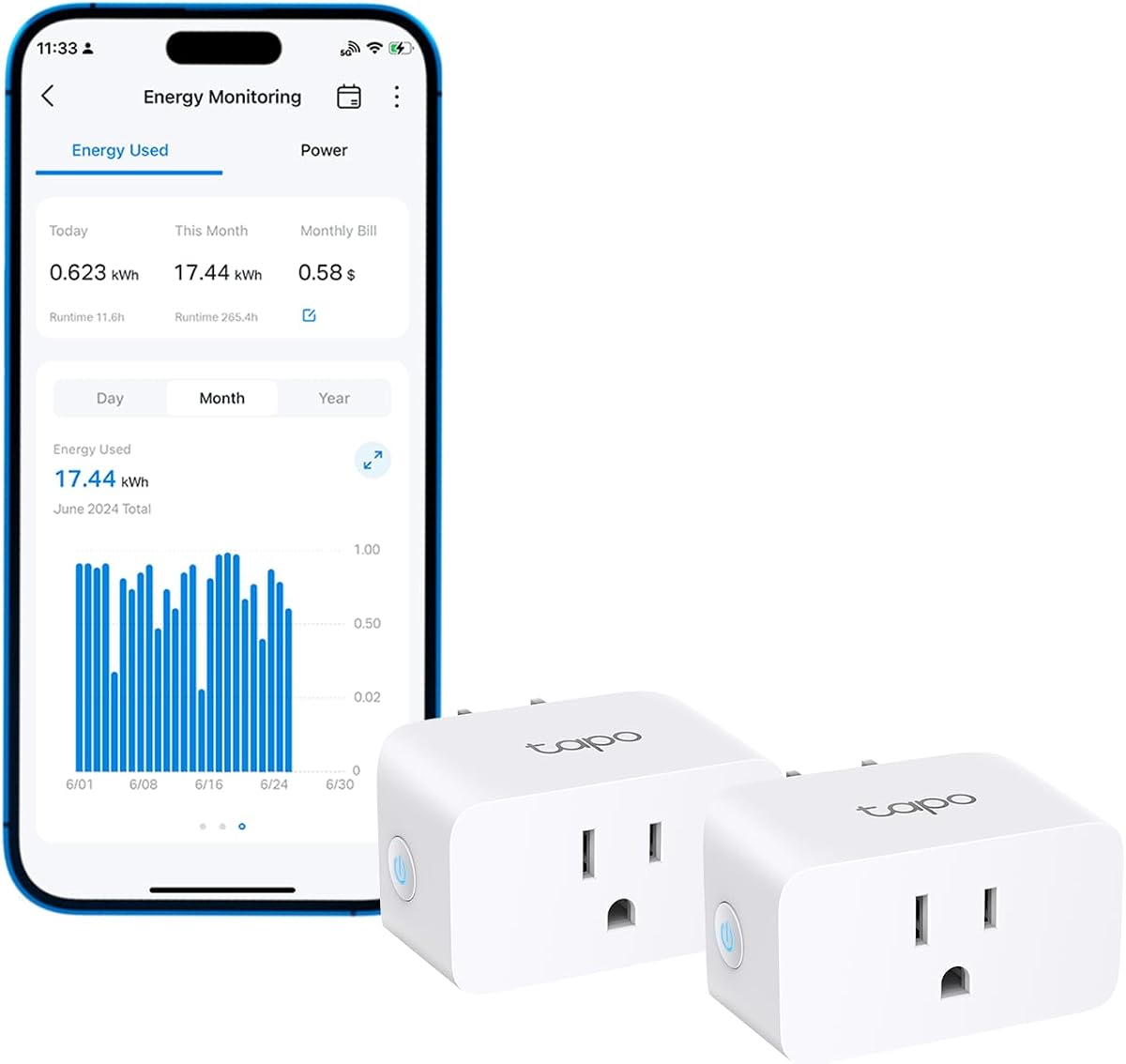
The Tapo Smart Plug Wi-Fi combines energy monitoring with smart home features. Its app provides intuitive charts, and scheduling allows operation during off-peak hours for cost savings.
We may earn a commission when you buy through this link, at no additional cost to you.
Key strengths include voice control, auto-shutoff for overload prevention, and smart charging cutoff to protect devices. The two-pack offers convenience for tracking multiple devices with app control.
Trade-offs are dependency on app connectivity and Wi-Fi stability. However, its automation capabilities and safety features provide a modern, proactive approach to energy management.
Best for tech users wanting smart control, this plug balances monitoring with automation. It suits households seeking convenience and cost optimization through connected home features.
Program high-consumption devices to run during off-peak hours, reducing costs without manual intervention.
Automatically cuts power when devices use too much power, preventing overload and enhancing safety.
We may earn a commission when you buy through this link, at no additional cost to you.
Choosing the right energy monitor depends on your specific monitoring needs, technical comfort, and whether you require whole-home or device-level insights. Consider these key factors to find the best fit.
Determine if you need whole-home circuit monitoring or individual appliance tracking. Whole-home systems offer broad visibility but cost more, while plug-in meters focus on specific devices. Look for accuracy standards like Class 1.0 or ±1–2% error margins to ensure reliable readings.
Prioritize monitors with verified accuracy standards to avoid misleading consumption data that could lead to poor financial decisions.
Smart monitors with Wi-Fi and app integration provide real-time data and remote access, ideal for proactive management. Some models support Home Assistant or MQTT for local privacy. Decide if cloud or local storage suits your needs.
Choose monitors with the connectivity that matches your privacy preferences and desired level of automation control.
Plug-in monitors require no installation, while circuit monitors need panel access and safety precautions. Assess your comfort with electrical work and whether you can access your breaker panel. Some systems come with flexible sensors for busbars.
Ensure you can safely install the chosen system or hire an electrician for panel-level monitors.
Check how long historical data is stored locally or in the cloud. Some retain minutes, hours, or indefinitely, with export options. For long-term analysis, verify retention policies and export capabilities to avoid losing critical data.
Select monitors with data retention periods that support your desired analysis timeline and reporting needs.
Look for UL, ETL, or CE certifications to ensure electrical safety compliance. These standards protect against hazards like overheating or fire. Certified products undergo rigorous testing for consumer safety.
Always verify safety certifications to guarantee reliable and secure operation in your home electrical environment.
Plug-in meters cost under $20, while whole-home systems range from $100 to $200+. Factor in additional sensors or installation costs. Balance your monitoring needs with available budget to find the best value.
Set a realistic budget and compare features to avoid overspending on unnecessary complexity.
Consider display clarity, backlight options, and interface ease. Backlit LCDs help in low light, and multiple display modes provide detailed insights. Intuitive buttons or apps reduce learning curves for daily use.
Choose a display style that ensures readability and ease of use in your typical environment.
Verify compatibility with your power systems, including voltage and wiring types. Smart models may need specific platforms or apps. Ensure the monitor fits your existing smart home or network setup.
Confirm compatibility with your home infrastructure to avoid integration issues or limited functionality.
For plug-in monitors, insert the device between your appliance and wall outlet, then power it on. Set cost parameters or calibration as instructed to ensure accurate billing estimates. Record or sync data regularly for insights.
For whole-home monitors, have a qualified electrician install sensors in your breaker panel. Connect the hub to Wi-Fi or local network via app setup. Review circuit breakdowns and adjust alerts to match your usage patterns.
Maintain monitors by keeping them dry, dust-free, and away from heat sources. Reset data when switching devices to avoid tracking errors. Check for firmware updates or battery replacements to ensure continuous performance.
Plug-in monitors work for standard desktop PCs plugged into wall outlets. Whole-home circuit monitors can track PC circuits but require panel access. Ensure the monitor supports your power rating and socket type.
Yes, certified monitors are safe for long-term use. UL or ETL-certified devices prevent hazards like overheating. Follow installation guidelines and do not exceed rated capacity to maintain safety.
Plug-in meters track one device at a time. Whole-home systems can monitor multiple circuits simultaneously. Use multiple plug-in meters or a circuit-level monitor for multi-device tracking.
Monitors show real-time power (W), voltage, amps, power factor, and cumulative energy (kWh). Some also calculate costs and usage history for billing insights.
Most smart monitors like Meross or Tapo do not require subscriptions. However, check specific models as cloud features may have optional premium tiers.
Accuracy varies from ±1% to ±2% for quality models. Certified monitors adhere to Class 1.0 standards, ensuring reliable data for household analysis.
Yes, advanced monitors support solar and net metering to track surplus and consumption. Verify compatibility with solar inverters or net metering standards.
Plug-in monitors with memory retain data during outages. Whole-home systems may reset but retain cloud data. Models with backup batteries ensure continuous logging.
Selecting the best energy monitor depends on your need for whole-home oversight or focused appliance tracking. Options like Emporia Vue 3 and Meross offer deep insights, while plug-in meters deliver affordability for single-device use.
Prioritize safety certifications, accuracy, and connectivity to match your technical comfort and privacy preferences. Consider installation requirements and data retention features to ensure long-term value and reliability.
Verify current pricing and availability as they change frequently. Use these tools to gain clarity on your energy habits and make informed decisions about reducing consumption and costs.