
Epson Workforce ES-50
4.3Editor score
Ultra-lightweight mobile design
Scans up to 8.5 x 72 inches
Includes Nuance OCR software
Discover the top Document Scanner for iPhone 18 models. We compare speed, portability, and software features to help you choose the right digitization tool.
Finding the right Document Scanner for iPhone 18 means balancing speed with portability. Modern users need tools that handle receipts, contracts, and photos without bulk. This guide explores compact devices designed to streamline your workflow efficiently.
We evaluated each product based on scanning speed, connectivity options, and software capabilities. Our analysis focuses on devices that integrate well with mobile ecosystems while delivering high-quality output. Every entry offers unique strengths for different professional needs.
Each pick highlights key features, pros, and cons to help you decide quickly. Remember that stock levels and pricing fluctuate frequently across retailers. Always verify current availability and costs before finalizing your purchase decision today.
4.3Editor score
4.4Editor score

4.3Editor score
This side-by-side comparison highlights the core specifications of all ten featured document scanners. Each entry provides essential details to help you weigh performance against portability for your specific mobile workflow requirements.





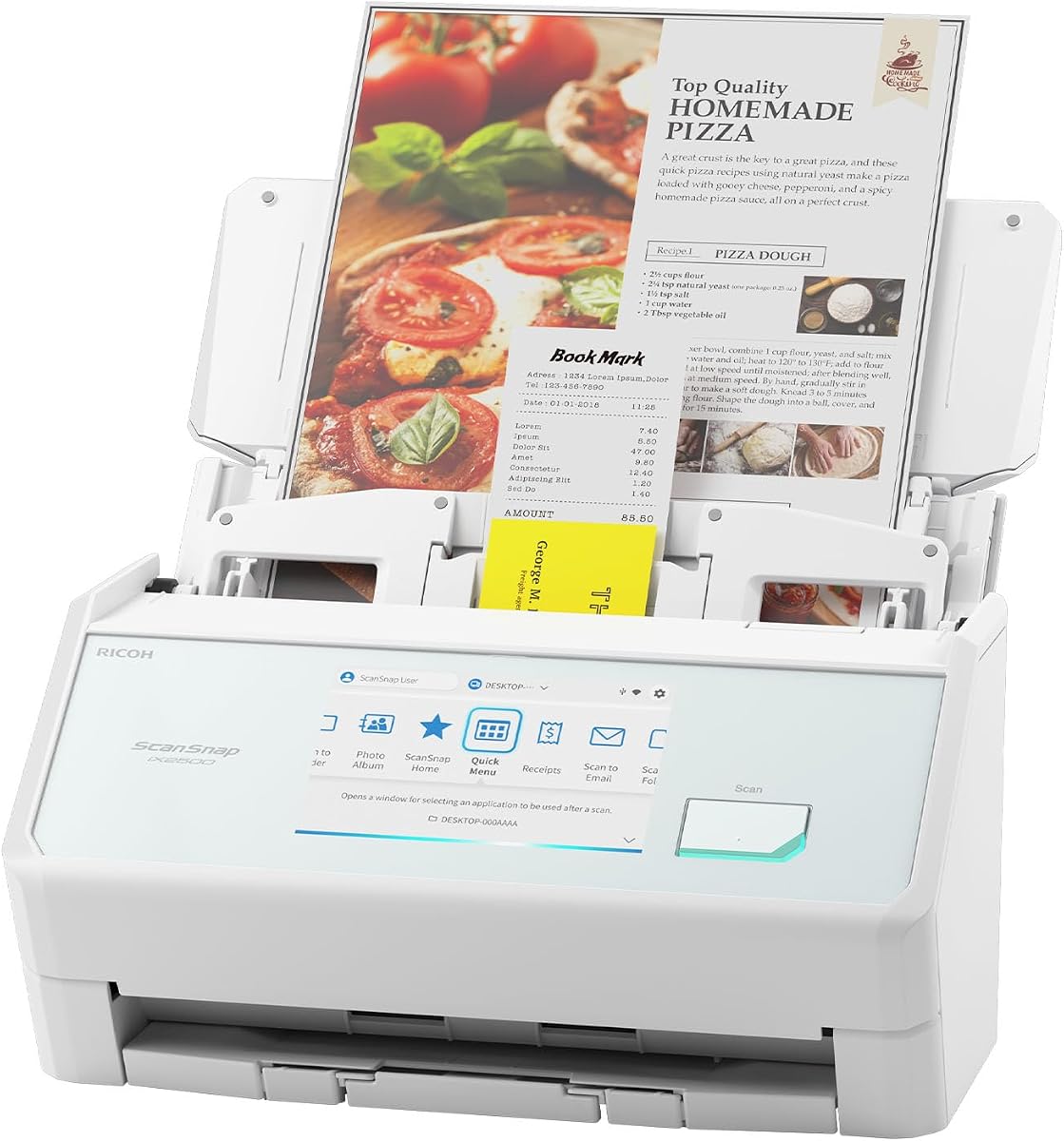
The ScanSnap iX2500 stands out as the most advanced scanner in our lineup. With a 4.4 rating, it delivers fast 45ppm double-sided scanning and supports Wi-Fi 6 for secure wireless connections. Its large touchscreen allows personalized profiles, making it easy to send files directly to your iPhone 18 or cloud services.
We may earn a commission when you buy through this link, at no additional cost to you.
This device excels in workflow automation. The Quick Menu lets you scan and drop files into favorite apps effortlessly. Its brake roller system prevents jams, while multi-feed sensors ensure accurate page handling. Automatic optimization handles text and images, saving you time on post-processing tasks.
While it is a premium device, the cost reflects its robust capabilities. It requires more desk space than compact models, which might be a drawback for travelers. However, for heavy document loads, the speed and reliability justify the investment for professionals seeking efficiency.
If you need a powerhouse for office or home use, the ScanSnap iX2500 is the top choice. It handles receipts, business cards, and photos with equal ease. We recommend this model for users who prioritize speed and cloud integration over portability.
Connect directly to smart devices or cloud services without needing a computer. This flexibility ensures your iPhone 18 receives scans instantly for immediate access.
Automatically name and sort files based on content. The software organizes data into editable formats, simplifying your digital filing system significantly.
We may earn a commission when you buy through this link, at no additional cost to you.
The Epson Workforce ES-50 is the lightest mobile scanner in its class, earning a 4.3 rating. It scans a single page in just 5.5 seconds and works via USB without batteries. This makes it ideal for on-the-go professionals who need quick digitization without bulky equipment or power cords.
We may earn a commission when you buy through this link, at no additional cost to you.
Its versatility in paper handling is impressive for its size. It accommodates documents up to 8.5 by 72 inches, perfect for receipts or long invoices. The included ScanSmart software helps organize files easily, while Nuance OCR turns images into searchable PDFs and Word files.
Since it feeds one sheet at a time, it is not suitable for high-volume batch scanning. However, for personal use or occasional business tasks, this trade-off is acceptable. The lack of external power needs simplifies travel logistics significantly.
Choose this model if you prioritize portability and simplicity. It fits easily into bags or pockets, making it a reliable companion for fieldwork. We recommend it for students or freelancers needing an affordable, efficient tool.
No batteries or external power supply are required. Simply connect to a computer via USB for quick and simple scanning anywhere.
Epson ScanSmart software allows you to scan, review, and save easily. Stay organized with smart tools that simplify your workflow process.
We may earn a commission when you buy through this link, at no additional cost to you.
The Brother DS-640 delivers blazing speeds of up to 16ppm for both color and black-and-white documents. At under one foot in length and 1.5 lbs, it fits virtually anywhere. Powered via Micro USB 3.0, it requires no outlet, making it ready whenever you are for immediate scanning tasks.
We may earn a commission when you buy through this link, at no additional cost to you.
Its software suite includes document management and OCR tools to optimize text and images. Automatic color detection and bleed-through prevention enhance scan quality. You can send scans to multiple destinations, including PC, network, or cloud services, using the free desktop app.
While it lacks iOS compatibility mentioned in the product data, its desktop integration is strong. It is best suited for users who switch between mobile and desktop environments. The compact size ensures it does not clutter your workspace during use.
For premium performance in a small package, this scanner is a strong contender. It balances speed and portability well. We suggest it for small business owners needing reliable, fast scanning without heavy hardware investment.
Use the included Micro USB 3.0 cable to power the device from any PC or laptop. This allows usage even where there is no outlet available nearby.
Send scans to PC, network, cloud services, or email. The free iPrint&Scan app supports Windows, Mac, and Linux environments effectively.
We may earn a commission when you buy through this link, at no additional cost to you.
The CZUR Shine Ultra functions as both a document camera and scanner, ideal for remote teaching via Zoom. It uses a 13MP CMOS camera to scan flat papers and thin books in about 1 second. Patented technology flattens curved pages after pixel transformation for clear results.
We may earn a commission when you buy through this link, at no additional cost to you.
It supports A3 and A4 documents and offers various color modes for different content types. The smart paging and auto-cropping features streamline workflow. However, note that it is not compatible with Android or iOS systems according to its specs.
This limitation makes it better for desktop users with Windows or Mac. The weight of 4 lbs and need for foot pedal operation reduce portability. It excels in specialized tasks like digitizing books rather than mobile field use.
If you need to scan books or teach remotely, this tool is unique. We recommend it for educators or researchers needing high-speed book digitization on a desktop setup.
Apply patented technology to flatten curved surfaces after transformation. This ensures clean scans of thin books without shadowing issues.
Work as a document camera compatible with Zoom and Google Meet. This adds versatility for online lessons and presentations.
We may earn a commission when you buy through this link, at no additional cost to you.
The Brother DS-740D handles single and double-sided documents in a single pass at 16ppm. It features a Desk Saving Design that reduces space by 11 inches. Like the DS-640, it uses a Micro USB 3.0 cable for power, allowing use without an outlet.
We may earn a commission when you buy through this link, at no additional cost to you.
Its software suite supports Windows, Mac, and Linux with automatic color adjustments. You can scan to cloud services or email easily. While it lacks direct iOS integration, its desktop apps offer robust workflow support for professionals.
Duplex capability doubles efficiency for double-sided contracts. The compact size fits in bags for mobile use. However, reliance on desktop software limits full iPhone 18 standalone utility compared to wireless alternatives.
Choose this model for office environments prioritizing duplex speed. We recommend it for users needing consistent document flow without large hardware footprints.
Scan both sides of a document in a single pass at 16ppm. This saves time and effort for double-sided document processing tasks.
Desk Saving Design reduces the space needed to use the device. It saves 11 inches of desk space for more organized workspaces.
We may earn a commission when you buy through this link, at no additional cost to you.
The Canon imageFORMULA R10 is lightweight and portable for home or remote offices. It scans at up to 12ppm with a 20-sheet automatic feeder. It handles various media types, including receipts and embossed cards, using the same imaging tech as Canon cameras.
We may earn a commission when you buy through this link, at no additional cost to you.
Software is built-in and updates automatically for ease of use. It converts paper to searchable PDFs and JPEGs efficiently. While suggested daily volume is 500 scans, it works well for moderate personal or professional tasks.
Energy efficiency is a plus with ENERGY STAR certification. However, it is not meant for photo paper scanning. This distinction is important for users looking to digitize mixed media formats only.
We recommend it for mobile users needing a reliable feeder scanner. Its balance of portability and automation makes it a strong option for everyday document management.
Digitize receipts, business cards, plastic cards, and reports easily. Handles various media types without requiring special settings.
Use the 20-sheet automatic feeder to scan both sides at once. This reduces manual effort for multi-page document workflows.
We may earn a commission when you buy through this link, at no additional cost to you.
The Epson Perfection V19 II excels at photo enlargement with 4800 dpi optical resolution. It scans books and photo albums using a high-rise removable lid. One-touch buttons simplify scanning steps, and Easy Photo Fix technology restores color to faded photos instantly.
We may earn a commission when you buy through this link, at no additional cost to you.
It creates searchable PDFs and editable Office documents via OCR. The built-in kickstand allows vertical placement to save space. However, flatbed scanning means one page at a time, which is slower for document volumes.
This model is best for preserving physical media like old photos. For general documents, it may be inefficient. Consider this if photo quality is more critical than speed.
We recommend it for archives or photo collections needing high fidelity. Its compact design fits easily into home offices for creative or family projects.
Restore color to faded photos with one click. Easy Photo Fix technology simplifies making old images vibrant.
Built-in kickstand allows vertical placement for storage. Saves desk space when the device is not in use actively.
We may earn a commission when you buy through this link, at no additional cost to you.
The Epson Workforce ES-60W is the smallest and lightest wireless mobile scanner. It scans a page in as fast as 4 seconds. You can wirelessly scan critical documents to PCs, Macs, iOS, or Android devices without cables.
We may earn a commission when you buy through this link, at no additional cost to you.
Epson ScanSmart software helps organize and save files easily. Automatic detection switches between USB and battery-powered wireless. It handles documents up to 8.5 by 72 inches, including IDs and receipts. Built-in Nuance OCR creates editable documents.
While it costs more than wired models, the freedom from cables is valuable. Battery status is displayed on LCD for reliability. This makes it perfect for travel or conference settings.
We recommend it for users prioritizing wireless convenience. Its integration with mobile devices ensures seamless workflows for professionals on the go daily.
Scan to a PC, Mac, iOS, or Android device wirelessly. This allows freedom from cables for on-the-go scanning tasks.
Epson ScanSmart Software makes it easy to scan, review, and save. Organize files automatically for better management.
We may earn a commission when you buy through this link, at no additional cost to you.
This handheld scanner uses a 900 DPI sensor to capture images quickly. It supports up to 32GB SD cards for storage without needing a PC. Simply plug and play with Windows imaging software for basic tasks. Its weight of 0.31 lb makes it very easy to carry.
We may earn a commission when you buy through this link, at no additional cost to you.
Scanning is manual but efficient at 10 seconds per page. It supports JPG and PDF formats for sharing. Choose from 300 DPI, 600 DPI, or 900 DPI modes for text or photo quality. It is perfect for students or travelers on a budget.
Manual operation requires steady hands for best results. Software is limited compared to full systems. This makes it suitable for casual use rather than professional document workflows.
We recommend it for quick scans where cost and portability matter. Its simple design avoids complex setup for basic personal needs effectively.
Select from 300 DPI, 600 DPI, or 900 DPI modes. Choose the best resolution for crisp text or vivid colored photos.
Store files on up to 32GB Micro SD card. JPEG and PDF formats fully meet business travel needs.
We may earn a commission when you buy through this link, at no additional cost to you.
Selecting the right document scanner involves evaluating specific needs like portability, speed, and connectivity. This guide breaks down the essential factors to consider for a smart purchase decision.
For users relying on an iPhone 18, portability is key. Look for scanners under 1.5 lbs and compact lengths that fit in bags. Models like the Brother DS-640 or Epson ES-50 are designed for travel.
Prioritize lightweight models to ensure ease of carrying during daily commutes.
Check whether the scanner supports Wi-Fi, USB, or both. Wireless models allow direct connection to mobile devices without cables. Ensure compatibility with your operating system, as some are limited to Windows or Mac.
Wireless connectivity enhances convenience when using your iPhone 18 on the go.
Speed varies significantly, ranging from 1 second to 16 pages per minute. Faster scanners save time for high-volume needs. Consider the average daily scan count to pick a model that fits your pace.
Higher ppm ratings reduce wait times for business users handling heavy workloads.
Some devices use automatic document feeders while others are single-sheet. Feeders allow multi-page scanning into one file. For single-sheet models, consider how often you need to feed pages manually.
Automatic feeders streamline workflows for multi-page contracts or long receipts.
Optical Character Recognition turns scanned images into editable text. Check if the included software supports your language and file formats. Advanced models offer cloud integration for better organization.
Good software ensures your files are searchable and easy to manage.
Battery-powered or USB-powered scanners reduce dependency on outlets. For mobile use, models that draw power from a laptop or internal battery are essential. Verify battery life expectations if using wirelessly.
Power flexibility ensures you can scan anywhere without searching for a plug.
Resolution affects text clarity and photo detail. Standard 300 DPI is usually enough for documents. For photos or detailed graphics, higher DPI like 600 or 4800 may be necessary.
Choose higher resolution if you plan to archive visual content regularly.
Cost ranges from budget-friendly handhelds to premium desktop units. Align the price with your needs to avoid overspending. Consider long-term value based on durability and software updates.
Invest in a model that meets your functional requirements without unnecessary extras.
Begin by setting up your scanner on a flat, stable surface. Install the provided software drivers on your device or ensure wireless pairing is active. Connect the scanner to your iPhone 18 or laptop via USB or Wi-Fi.
Place documents face down on flatbeds or into feeders carefully. Press the scan button on the device or select the scan function within the app. Wait for the scan to complete and verify the digital file on your screen.
Keep the scanner clean by wiping the glass or rollers with a soft cloth. Avoid placing food or liquids near the device to prevent damage. Store it in a dry place when not in use to maintain performance.
Yes, wireless models allow direct connection to your iPhone 18. Ensure the scanner supports iOS or uses a compatible app for scanning. Check manufacturer specs for mobile support.
For mobile users, 16ppm is a solid speed for efficiency. Faster models like the ScanSnap iX2500 reach 45ppm. Choose based on how often you scan batches of documents daily.
Some wireless models store scans on SD cards or send directly to cloud services. Others still need a computer for full setup. Check if the device offers standalone capabilities.
Use OCR software included with the scanner. This turns images into editable Word or PDF text. Ensure the OCR feature is enabled in your settings.
Handheld scanners are more portable but slower for volume. Feeders automate scanning for batches. Choose handhelds for occasional use or feeders for regular tasks.
Most support PDF and JPEG formats. Some allow editable Word or Excel files via OCR. Check the specs for desired format options.
We explored ten powerful options ranging from compact feeders to handheld wands. The ScanSnap iX2500 offers top speed, while the Epson ES-50 provides budget-friendly mobility. Each model addresses different priorities for professional needs.
Prioritize connectivity and power options to match your iPhone 18 workflow. Wireless scanners save time, while battery units offer freedom from outlets. Match the resolution and features to your specific document types.
Prices and stock levels change regularly. Always check current availability on Amazon before purchasing. Your ideal scanner depends on balancing speed, portability, and value.