
RREAKA TV Dock for Nintendo Switch 2
4.4Editor score
Ultra lightweight aluminum alloy design
100W PD charging support
Multi device USB C compatibility
This guide compares the top portable docks for Nintendo Switch play, evaluating video output, charging speed, and travel design to help you choose the perfect
Finding the right portable dock for your Nintendo Switch enhances your gaming experience significantly. These compact adapters allow you to connect your console to any display easily. A good dock ensures stable video output and reliable charging while you play on the go.
We have evaluated ten real products based on their video capabilities, port selection, and build quality. Our comparison focuses on how well each unit supports different Switch models and offers versatility. This list covers the most reliable options available for travelers and home users alike.
Each pick highlights specific strengths like resolution support, charging power, and ease of use. You will find detailed reviews explaining what makes each option stand out in its category. Please note that product availability and pricing can change frequently on online retail platforms.
4.4Editor score

4.2Editor score

4.4Editor score
The following table provides a side-by-side comparison of all ten reviewed portable dock stations. We highlight key specifications such as video resolution support, available ports, and physical dimensions to help you make an informed decision quickly.


The pdobq Switch Dock Station stands out as a reliable option for gamers seeking a portable connection solution. With a solid rating and strong performance metrics it delivers consistent results across various display setups. Its design prioritizes functionality without sacrificing portability for on the go use.
We may earn a commission when you buy through this link, at no additional cost to you.
This unit supports 4K 60Hz output which is impressive for third-party docks. It includes a USB 3.0 port allowing you to connect peripherals like controllers or storage drives while docked. The PD charging port ensures your console stays powered during extended sessions without interruption.
While it lacks an included HDMI cable users can easily source one separately. The setup process is straightforward requiring basic steps to activate TV mode. Some users may find the lack of packaging extras inconvenient but the core functionality remains robust.
This dock is ideal for travelers who need a dependable replacement for the official Nintendo dock. Its compatibility with Steam Deck and Switch OLED adds significant value. We recommend it for anyone wanting a balance of performance and portability in one package.
The 4K 60Hz capability ensures crisp visuals on compatible televisions enhancing your gaming experience significantly.
With a USB 3.0 port you can connect multiple devices simultaneously without needing extra hubs.
We may earn a commission when you buy through this link, at no additional cost to you.
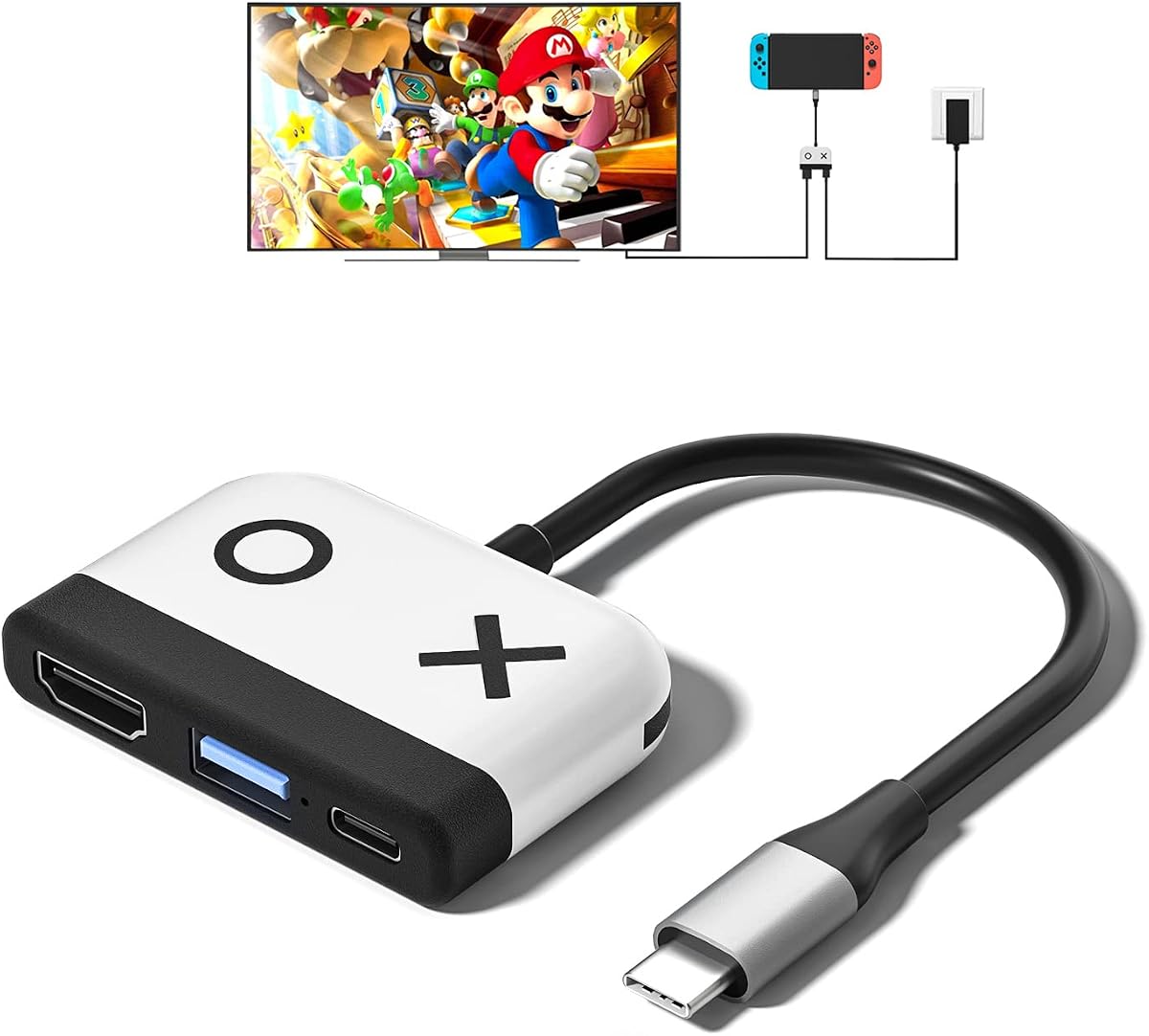
The RREAKA TV Dock offers outstanding value for budget-conscious gamers who still want high performance. Its lightweight aluminum construction makes it easy to slip into a backpack without adding bulk. The 100W charging capability ensures your console gets plenty of power while playing.
We may earn a commission when you buy through this link, at no additional cost to you.
Performance is solid with clear video output and stable data transfer speeds. The USB 3.0 port handles external drives well for saving game files. Setup is intuitive and works seamlessly with Switch 2 and OLED models for a smooth experience.
It does not come with an HDMI cable or power brick so you need to provide those separately. This keeps the price down but requires extra planning before use. Overall the build quality feels premium despite the affordable price point.
This dock is perfect for students or travelers on a tight budget. It delivers the essential features without unnecessary extras. We recommend it for anyone looking to expand their console capabilities without breaking the bank.
The aluminum alloy casing provides strength while keeping the weight low for easy transport.
Up to 100W PD charging keeps your device powered even during intense gaming sessions.
We may earn a commission when you buy through this link, at no additional cost to you.
The Travel Portable Switch 2 Dock is engineered specifically for the latest Switch 2 console. It boasts a high rating and detailed instructions to simplify setup. The video quality is crisp ensuring you see every detail of your games on the big screen.
We may earn a commission when you buy through this link, at no additional cost to you.
It supports 4K 60Hz output which matches the console capabilities perfectly. The 100W PD charging ensures your device never dies during long play sessions. Users appreciate the clear manual that walks you through every step of configuration.
You need to provide an official power adapter to get full performance which can add to the cost. The price is higher than generic docks but the specialized optimization justifies the expense. It is a premium choice for serious fans.
This dock is best for owners of the new Switch 2 who want the best possible experience. The attention to detail in design and support stands out. We recommend it for those willing to invest in top tier gaming accessories.
Designed specifically for the Switch 2 this dock maximizes the hardware potential efficiently.
Includes a detailed manual to guide you through setup and troubleshooting steps easily.
We may earn a commission when you buy through this link, at no additional cost to you.
The Kstkry Switch Dock features a unique wear-resistant silicone construction that protects your console. It supports 4K video output and fits easily into a pocket or small bag. The soft material provides a secure grip during handling and travel.
We may earn a commission when you buy through this link, at no additional cost to you.
Video performance is strong with support for multiple resolutions up to 4K. The USB 3.0 port allows for fast data transfers with external drives. It works well with Switch and Steam Deck devices without needing extra drivers or software.
The silicone surface can sometimes attract lint or dust requiring occasional cleaning. It also lacks a built-in stand meaning you need a flat surface for use. Despite these small issues it remains a solid choice for casual travelers.
This dock is ideal for users who prioritize durability and portability over extra ports. The design ensures your console stays safe while in transit. We recommend it for anyone wanting a simple reliable travel solution.
The high-quality silicone resists scratches and damage keeping your device safe from wear.
Supports 4K and 1080P outputs to match different TV and monitor capabilities easily.
We may earn a commission when you buy through this link, at no additional cost to you.
The iPLYGAM Switch Dock includes a built-in smart chip for overcharge and overheat protection. It features a one-key switch to toggle between handheld and TV modes effortlessly. The anti-skid pads keep it stable on tables during gameplay sessions.
We may earn a commission when you buy through this link, at no additional cost to you.
Performance is reliable with support for 4K output and multiple USB connections. You can connect controllers and drives simultaneously without issues. The LED indicator helps confirm connection status at a glance during setup.
It requires you to provide your own power adapter which is common for this category. Some users may find it slightly heavier than ultra-light alternatives. However the added protection features make it a safe choice for daily use.
This dock is recommended for users concerned about device safety and stability. The thoughtful design reduces risk of accidental damage or overheating. We suggest it for home users or those who play for long periods.
Built-in chips protect against overheat and overcharge risks ensuring device longevity.
A single button allows quick changes between handheld and TV modes seamlessly.
We may earn a commission when you buy through this link, at no additional cost to you.
The Universal Switch Dock is designed to work with multiple devices including Steam Deck and Switch. It features a simple plug-and-play design that requires no complex drivers or software. The 100W PD pass-through keeps your device charged reliably.
We may earn a commission when you buy through this link, at no additional cost to you.
Video output is clear and stable on most displays. The USB ports allow for connecting peripherals without cluttering your setup. It is a great choice for users who own more than one handheld console.
It comes with basic packaging and does not include extra cables or adapters. The look is functional but not flashy. Despite this simplicity it delivers consistent performance that meets user expectations well.
This dock is best for gamers who own multiple portable devices. The versatility saves space and money compared to buying separate docks. We recommend it for households with different handheld gaming consoles.
Compatible with multiple handheld systems including Switch and Steam Deck for versatility.
No drivers needed just plug in and start playing immediately on any TV.
We may earn a commission when you buy through this link, at no additional cost to you.
The BIYTC Switch Dock is one of the lightest options available for travelers. It fits easily into a handbag or backpack pocket without adding weight. The design focuses on essential connectivity for on the go gaming needs.
We may earn a commission when you buy through this link, at no additional cost to you.
It supports 1080P output which is sufficient for most portable TV setups. The three port design includes USB and charging inputs for basic functionality. Setup is straightforward and works with Switch 1 and 2 models well.
While it does not support 4K resolution it remains functional for standard displays. The plastic build feels lightweight but durable enough for travel. Users who prioritize weight reduction will appreciate this choice highly.
This dock is best for travelers who need the absolute lightest solution. It meets basic needs without extra bulk. We recommend it for frequent flyers or commuters with space constraints.
Extremely light design makes it easy to carry anywhere without strain or hassle.
Three essential ports provide HDMI video USB data and charging support reliably.
We may earn a commission when you buy through this link, at no additional cost to you.
The Switch 2 Dock by AHGEIIY weighs only 39g making it incredibly easy to carry. It supports 4K 60Hz output for sharp visuals on modern TVs. The design also works with Samsung Dex for laptop users seeking a multi-use device.
We may earn a commission when you buy through this link, at no additional cost to you.
Performance is stable with strong data transfer speeds. The 100W PD port ensures your device stays charged. It is a great choice for tech enthusiasts who want one dock for multiple devices.
It requires you to bring your own HDMI and power cables. The small size can make it feel less stable on uneven surfaces. Despite this it is one of the most versatile travel docks available.
This dock is ideal for users who need a compact multi-purpose adapter. The combination of video and charging capabilities is impressive. We recommend it for professionals who game on the side.
At only 39g it is one of the lightest docks available for travel.
Works with Samsung Dex Mode allowing you to use your phone as a desktop.
We may earn a commission when you buy through this link, at no additional cost to you.
The Switch 2 Dock Aluminum features a classic black and white design that looks great. It is made of aluminum alloy for better heat dissipation and a premium feel. The 4K 60Hz support ensures crisp visuals on high resolution screens.
We may earn a commission when you buy through this link, at no additional cost to you.
It performs well with stable data transfer and reliable connection. The USB 3.0 port is useful for connecting accessories. Setup is easy and works well with Switch 2 and OLED models.
You need to purchase HDMI and power cables separately which adds to the cost. The price is slightly higher due to the build quality. However the aesthetic appeal justifies the expense for style-conscious users.
This dock is best for users who value design and performance equally. It looks professional and feels durable. We recommend it for those wanting a high-end portable solution.
Classic black and white styling gives it a professional look for any setting.
Aluminum alloy body helps dissipate heat effectively to keep your device cool.
We may earn a commission when you buy through this link, at no additional cost to you.
The Portable Dock Station features a unique built-in cooling system to manage heat. This design includes ventilation openings and a spring stand to reduce port pressure. It allows easy placement of your console on top of the dock.
We may earn a commission when you buy through this link, at no additional cost to you.
Performance is good with support for 4K output. The smart protection chip safeguards against overcharging and overheating. It is a solid choice for users concerned about long-term thermal health.
It has a lower rating compared to top picks which suggests mixed user feedback. The design is specific to certain console models. Despite this the cooling aspect is a standout feature for intensive gaming.
This dock is best for users who prioritize thermal management. The spring stand protects your console port during use. We recommend it for long gaming sessions where heat control is critical.
Ventilation openings help dissipate heat to prevent overheating during long sessions.
Reduces pressure on the charging port to protect your console over time.
We may earn a commission when you buy through this link, at no additional cost to you.
Selecting the right portable dock requires understanding your specific gaming needs and technical requirements. This section breaks down the key factors to consider before making a purchase.
Look for docks that support 4K 60Hz output if your display allows it. Most standard Switch models limit to 1080P but future consoles like Switch 2 may benefit from higher resolution. Ensuring your dock matches your TV capabilities prevents blurry or laggy visuals.
Verify the HDMI version listed in the specs to confirm it supports the resolution you need.
A good dock should support Power Delivery (PD) charging to keep your console powered during play. Ideally look for at least 60W to 100W input to prevent battery drain while using TV mode. Insufficient power can cause connection drops or slow charging.
Always check if the dock requires an external adapter or includes one in the box.
The number and type of ports determine how you can connect accessories. HDMI is standard for video but USB 3.0 is needed for high-speed data transfer and connecting peripherals. Some docks offer multiple USB ports which reduces the need for extra hubs.
Ensure the ports are easily accessible when the console is inserted.
Portable docks are handled frequently so durability matters. Materials like aluminum alloy offer better heat dissipation and a premium feel compared to basic plastic. A solid build protects internal chips from damage during travel.
Check for non-slip feet to prevent the dock from sliding on smooth surfaces.
Ensure the dock is compatible with your specific Switch model whether it is 1, OLED, or 2. Some third-party units may not work correctly with newer hardware due to protocol changes. Universal docks often list support for Steam Deck and laptops as well.
Read product descriptions carefully to confirm support for your console generation.
Most third-party docks do not include HDMI or power cables so factor in the cost of buying those separately. A dock that offers clear instructions helps avoid setup confusion when traveling. Some units include a storage bag which is a bonus for travelers.
Check if the adapter includes any warranty or customer support options for peace of mind.
Weight and size are critical for a travel dock. Aim for units under 100 grams to avoid adding bulk to your bag. Compact designs fit better in tight spaces like airplane seats or hotel drawers.
Avoid overly bulky docks that are hard to pack securely.
While third-party docks are generally cheaper than official ones they vary in price. Budget options may lack some features like 4K support but can still work well for standard use. Higher prices often reflect better build quality and customer service.
Compare the features offered against the price to ensure you get the best value.
To use your dock, connect the power adapter to a wall outlet and plug the HDMI cable into your TV. Then insert your Switch console into the dock or plug the USB-C cable into the console depending on the design. The console should switch to TV mode automatically.
Ensure all cables are seated firmly to avoid signal interruptions. If your console does not switch screens, wake it up manually by pressing the power button once. Using the original charger is recommended for stable power delivery and safe operation.
Keep your dock in a dry cool place when not in use. Avoid exposing it to extreme heat or moisture to maintain its internal components. Regularly check ports for dust and clean gently with a soft brush to prevent connection issues.
Most docks support Switch 1 and OLED but check specifically for Switch 2 compatibility. Some third-party docks may not work with the new console due to firmware differences. Always verify the product description before purchasing.
Yes, you can usually use your own official charger. The dock typically has a PD input port that accepts external power. However ensure your charger meets the wattage requirements listed for the dock.
This is often due to insufficient power or an incorrect HDMI input selection on your TV. Ensure your charger is powerful enough and try unplugging the console before reinserting it to reset the signal.
Many modern portable docks claim 4K support but your console may limit output to 1080P. Check both the dock specs and your console capabilities to confirm actual performance.
Simply insert the console into the dock or connect the cable to activate TV mode. To switch back, remove the console or disconnect the cable. Some docks have a physical button to toggle modes easily.
Reputable docks include protection chips against overheat and overcharge. However always use a quality power source to avoid risks. Avoid cheap no-name brands that may lack safety certifications.
Most docks require you to buy HDMI and power adapters separately. Always check what is included in the box to plan your purchases accordingly.
Many universal docks support Steam Deck and other USB-C devices. Check the compatibility list to ensure it works with your specific device.
We have reviewed ten top portable docks for Nintendo Switch play ranging from budget to premium options. The pdobq Switch Dock leads as our Editor's Choice for its balance of performance and features. The RREAKA dock stands out for those seeking excellent value under a lower price point.
When choosing a dock prioritize video resolution support and charging power to match your console capabilities. Consider build quality and port variety based on your typical usage scenarios. Whether you travel often or play at home there is a dock for your needs.
Prices and stock availability change frequently on retail platforms. Always verify current details before purchasing to ensure you get the best deal. We hope this guide helps you find the perfect dock to enhance your gaming experience.