
Digital Calendar 10.1 Touchscreen
4.4Editor score
Zero subscription fees
Weekly meal manager
10.1 inch HD display
A digital touchscreen organizer transforms chaotic household routines into streamlined workflows. These smart hubs combine calendars, chore charts, and photo displays to keep families synchronized without constant verbal reminders.
We evaluated ten leading models based on screen quality, synchronization reliability, and user interface design. Each product was assessed for ease of setup, feature depth, and long-term usability for diverse household needs.
Every pick highlights unique strengths ranging from budget-friendly basics to premium command centers. Note that availability and specific promotions may change daily, so verify current details before purchasing your ideal home management tool.
4.4Editor score

4.4Editor score

4.6Editor score
As an Amazon Associate we earn from qualifying purchases.
The following comparison table details the core specifications of every top-rated model to help you find the perfect fit for your household organizational needs.


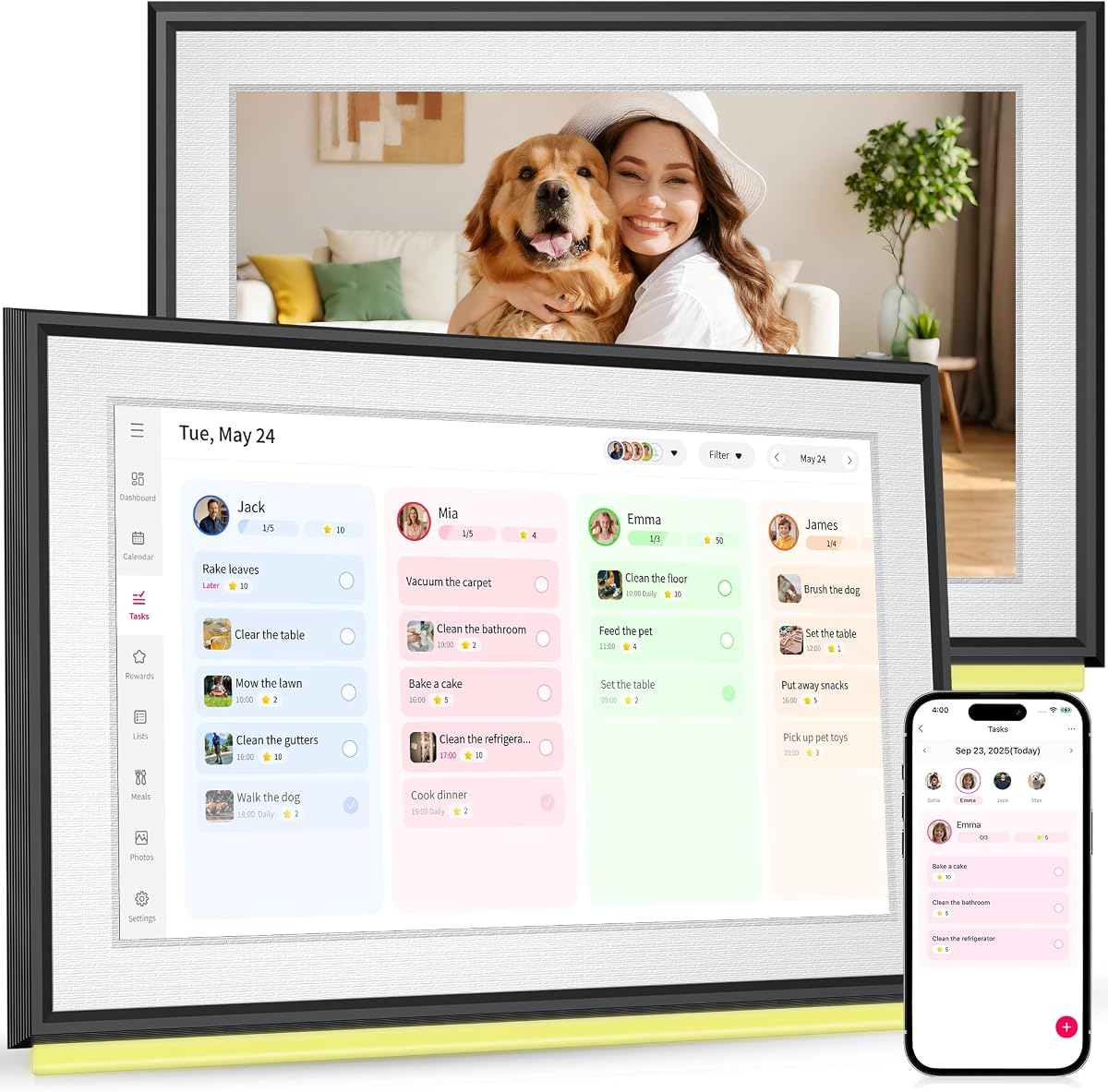

This model stands out as a comprehensive command center for busy households. It earns a strong rating for integrating scheduling, chore tracking, and photo display into one elegant wall-mounted solution.
We may earn a commission when you buy through this link, at no additional cost to you.
Its standout quality is the real-time sync with major platforms like Google and iCloud, allowing all family members to edit schedules simultaneously. The 15.6 inch screen ensures visibility from across the kitchen or hallway.
While the initial setup may require wall mounting hardware, the long-term benefits of a centralized visual hub outweigh the installation effort. It transforms a standard wall into a functional management zone.
It is the ideal choice for families needing robust coordination tools. Parents and kids alike will appreciate the motivational reward system and the ability to manage meal plans effortlessly.
The device acts as a central hub that eliminates the need for scattered paper notes or multiple separate digital devices across the house.
Children gain responsibility through a gamified system where completing tasks unlocks points, making routine chores engaging rather than burdensome.
We may earn a commission when you buy through this link, at no additional cost to you.
The Skylight Calendar offers a refined aesthetic and robust connectivity options for modern homes. It is designed to be the visual heart of a busy household with intuitive controls.
We may earn a commission when you buy through this link, at no additional cost to you.
Its key strength lies in the seamless syncing capabilities and the ability to customize event colors for different family members. The Disney mode adds a unique touch for families with younger children.
The main trade-off is the optional premium subscription which unlocks extra features like magic import. However, the core functionality remains fully usable without any extra costs for most users.
Choose this model if design and user experience are top priorities. It fits beautifully on countertops or walls and keeps everyone in sync with minimal friction.
Users can add or update schedules directly on the device or via a mobile app ensuring everyone stays aligned instantly.
Weekly meal plans are displayed clearly reducing the daily stress of deciding what to cook for dinner.
We may earn a commission when you buy through this link, at no additional cost to you.
This compact organizer delivers exceptional value by combining essential family management tools at an affordable price point. It is perfect for those who want functionality without breaking the bank.
We may earn a commission when you buy through this link, at no additional cost to you.
The standout feature is the complete absence of subscription fees coupled with a robust meal manager that automatically generates grocery lists. This saves time and mental energy for busy parents.
While the screen is smaller than premium options it remains sharp enough for daily use. The sleep save mode ensures energy efficiency without compromising accessibility.
It is a smart choice for budget-conscious families. This model proves you do not need to spend a fortune to get a reliable and effective digital organization system.
The visual weekly manager displays menus beautifully making it easy to plan ahead and reduce last-minute stress.
Idle screens turn into beautiful slideshows of cherished memories keeping the home warm and personalized.
We may earn a commission when you buy through this link, at no additional cost to you.
This unit balances high definition display quality with useful AI features. It serves as a reliable hub for daily tasks and photo sharing with a sleek design.
We may earn a commission when you buy through this link, at no additional cost to you.
Key strengths include the 1080P resolution which makes text and images crisp. The AI powered imports help organize schedules quickly without manual entry.
The trade-off is that some advanced features might require the companion app. However, the core functionality on the device is robust and sufficient for daily use.
It is great for users who prioritize screen clarity. This model ensures that schedules and photos are always clear and easily accessible.
Automatic imports and updates keep your family planner running smoothly without constant manual adjustments.
Whether mounted on a wall or placed on a desk it fits naturally into various home layouts.
We may earn a commission when you buy through this link, at no additional cost to you.
With a perfect rating this device offers a polished experience for families needing a large display. It handles tasks with efficiency and style.
We may earn a commission when you buy through this link, at no additional cost to you.
Its strength lies in the generous screen real estate and the absence of subscription fees. The sleep wake mode ensures it is always ready when you need it.
The only consideration is ensuring you have a proper place to mount it due to its size. This is a minor constraint given its utility.
Highly recommended for those seeking quality and reliability. It delivers on all fronts from planning to entertainment.
Customizable task charts with star tracking build responsibility and consistency for all family members.
Up-to-date weather information displayed right alongside schedules keeps everyone prepared for the day.
We may earn a commission when you buy through this link, at no additional cost to you.
This planner is a solid choice for those wanting a clean and responsive interface. It keeps routines orderly and reduces household friction effectively.
We may earn a commission when you buy through this link, at no additional cost to you.
The color coding system helps distinguish tasks for different members efficiently. It also supports remote photo sharing which aids in keeping extended families connected.
While the app is functional it lacks some advanced customizations. However for daily management it is more than capable.
It is a good fit for tech savvy families. The responsive screen ensures that interaction is smooth and immediate.
Effortless photo sharing allows distant grandparents to watch their grandchildren grow and bond with the family.
One-click recipe saving functions make meal planning and grocery shopping significantly easier.
We may earn a commission when you buy through this link, at no additional cost to you.
This massive calendar redefines the category with its Android flexibility and huge display. It is a true command center for smart homes and large families.
We may earn a commission when you buy through this link, at no additional cost to you.
The dual mode allows switching between simple calendar and full Android app use. Voice assistant integration adds a new layer of hands-free control.
The main drawback is the physical size and cost. However for those who want the ultimate digital experience it is unmatched.
It is best for tech enthusiasts needing a central hub. It turns a wall into a fully connected interface for the entire home.
Switching to Android Mode allows you to download widgets and apps to fully customize your dashboard.
Use Google Gemini to check schedules or control smart devices directly without touching the screen.
We may earn a commission when you buy through this link, at no additional cost to you.
The inclusion of a stand makes this model incredibly versatile for desk or counter placement. It offers the same powerful Android features as larger models.
We may earn a commission when you buy through this link, at no additional cost to you.
Its key strength is the flexibility of the dual mode system which allows for simple scheduling or complex app integration. The anti-glare screen ensures comfort in bright environments.
The main trade-off is the complexity if you prefer simplicity. However the guided setup ensures you can start using it quickly.
It is ideal for home offices or kitchens where space is flexible. It provides a premium experience on a smaller footprint.
Personalize your electronic calendar with widgets for weather clocks meals and smart home controls.
The built-in voice assistant manages reminders and schedules so you can keep your hands free.
We may earn a commission when you buy through this link, at no additional cost to you.
This interactive display provides a simple and visual approach to family planning. It is designed to eliminate chaos and simplify daily schedules.
We may earn a commission when you buy through this link, at no additional cost to you.
The main strength is the color coding system that makes it easy to see who is doing what. Syncing with internet time servers keeps everything precise.
However it is not designed for wall mounting which limits placement options. This might be a drawback for those who prefer a permanent display.
It is a good choice for temporary setups. If you need a flexible planner for a table or desk this model delivers great value.
Color-code tasks and assign them to family members for smooth visual coordination of daily activities.
Transform cherished memories into a dynamic display of family moments for all to enjoy when idle.
We may earn a commission when you buy through this link, at no additional cost to you.
This large calendar is designed for visibility and ease of use across all generations. It combines a robust photo frame with practical planning tools.
We may earn a commission when you buy through this link, at no additional cost to you.
Its key feature is the high resolution screen that offers vibrant colors and wide viewing angles. The interface is specifically designed to be friendly for grandparents.
The trade-off is the time required for initial setup due to its size. However once installed it serves as a central hub for the whole family.
It is perfect for open kitchens or living rooms. The clear display ensures everyone can see the schedule without getting too close.
Customize themes and font sizes to suit your style ensuring the calendar fits your home decor.
A simplified interface ensures everyone from kids to seniors can use the device with ease.
We may earn a commission when you buy through this link, at no additional cost to you.
Selecting the right organizer requires understanding how features like sync and display size impact daily family life.
Screen size determines visibility from across a room. Larger screens like 21.5 inches are ideal for high traffic areas while 10.1 inch models work well for desks.
Choose a size that fits your space and viewing distance. Resolution affects text clarity; look for HD or 1080P to avoid fuzzy text.
Sync capabilities allow your digital calendar to integrate with platforms like Google or iCloud. This ensures everyone on the family is always updated.
Verify that the device supports the calendars you use most. Seamless sync saves time and reduces the chance of scheduling conflicts.
Many organizers require monthly subscriptions for basic features like photo sharing. Some models offer full access with no hidden fees or recurring costs.
Check if premium features are locked behind a paywall. Models with free apps often provide better long-term value for families.
Interactive chore charts with rewards can motivate kids to complete tasks. Look for color coding and gamified points to make routine engaging.
A good chore system simplifies parenting by making responsibilities visible. It helps children learn discipline and accountability through daily routines.
Meal planning tools help reduce the stress of deciding what to cook. Look for devices that generate grocery lists automatically from recipes.
Visual weekly managers help keep the whole family on the same page about dinner plans. This feature saves mental energy for busy parents.
Consider whether you want a wall-mounted unit or a desktop option. Some models include stands while others are strictly for hanging.
Wall mounting is best for central visibility while desktop options offer flexibility. Ensure the hardware is included and easy to install.
The photo frame feature allows you to display cherished memories when the calendar is idle. Storage capacity and remote upload options matter here.
Ensure the device supports your preferred photo sharing methods. A good slideshow mode keeps your home feeling warm and personal.
Advanced models include voice assistants to control schedules or smart devices. This allows hands-free interaction in busy environments.
If you have a smart home ecosystem check compatibility with your devices. Voice control adds a layer of convenience for large households.
Start by connecting the device to your home Wi-Fi network. This allows you to sync with your existing calendars and download any necessary updates.
Clean the screen regularly with a soft microfiber cloth to avoid scratches. Avoid harsh chemicals that could damage the touch sensitivity.
Place the organizer in a central location where everyone can see it. This ensures it gets used daily and becomes a natural part of your routine.
Many modern models offer full functionality without monthly fees. However some premium features like advanced photo sharing may require a subscription. Always check before purchase.
Yes most interfaces are designed to be intuitive for children. They can check their chores and view schedules easily with parental setup.
Most support both iOS and Android through dedicated apps. Ensure the device syncs with the platform you use for your family calendar.
Yes larger screens are ideal for busy kitchens. They are visible from a distance and help manage meal prep efficiently.
Core calendar features usually remain functional offline. However syncing and updates require an internet connection to work correctly.
Absolutely. When idle the screen transitions to a slideshow mode. This displays your photos beautifully without needing extra hardware.
The models reviewed offer unique strengths ranging from budget friendly options to large premium displays. Each serves to reduce household chaos through smart organization.
Prioritize the features that matter most for your home whether it is screen size or sync capabilities. The best choice balances functionality with your daily lifestyle.
Remember to verify current availability and warranty details before purchasing. These tools are investments in a smoother more organized family life.