
Printer Stand for Desk, 17.1"x12.4" Desktop Printer Stand Shelf Organzier
4.6Editor score
Sturdy steel frame supports 100lbs
Rounded corners and anti-slip pads
Multifunctional open shelf design
Finding the right desktop printer stand can transform your workspace by freeing up valuable surface area. A good stand should be sturdy, offer storage solutions, and fit your specific printer size without wobbling or cluttering the desk.
We compared ten highly rated models based on build quality, dimensions, storage options, and user feedback. Each product was evaluated for stability, ease of assembly, and versatility across different office environments.
Each pick highlights key features and ideal use cases to guide your decision. Keep in mind that availability and offers may vary, so always check the latest listings before purchasing.
4.6Editor score

4.8Editor score

4.7Editor score
As an Amazon Associate we earn from qualifying purchases.
The following table presents a side-by-side comparison of all ten selected desktop printer stands, highlighting their dimensions, materials, and key storage features.


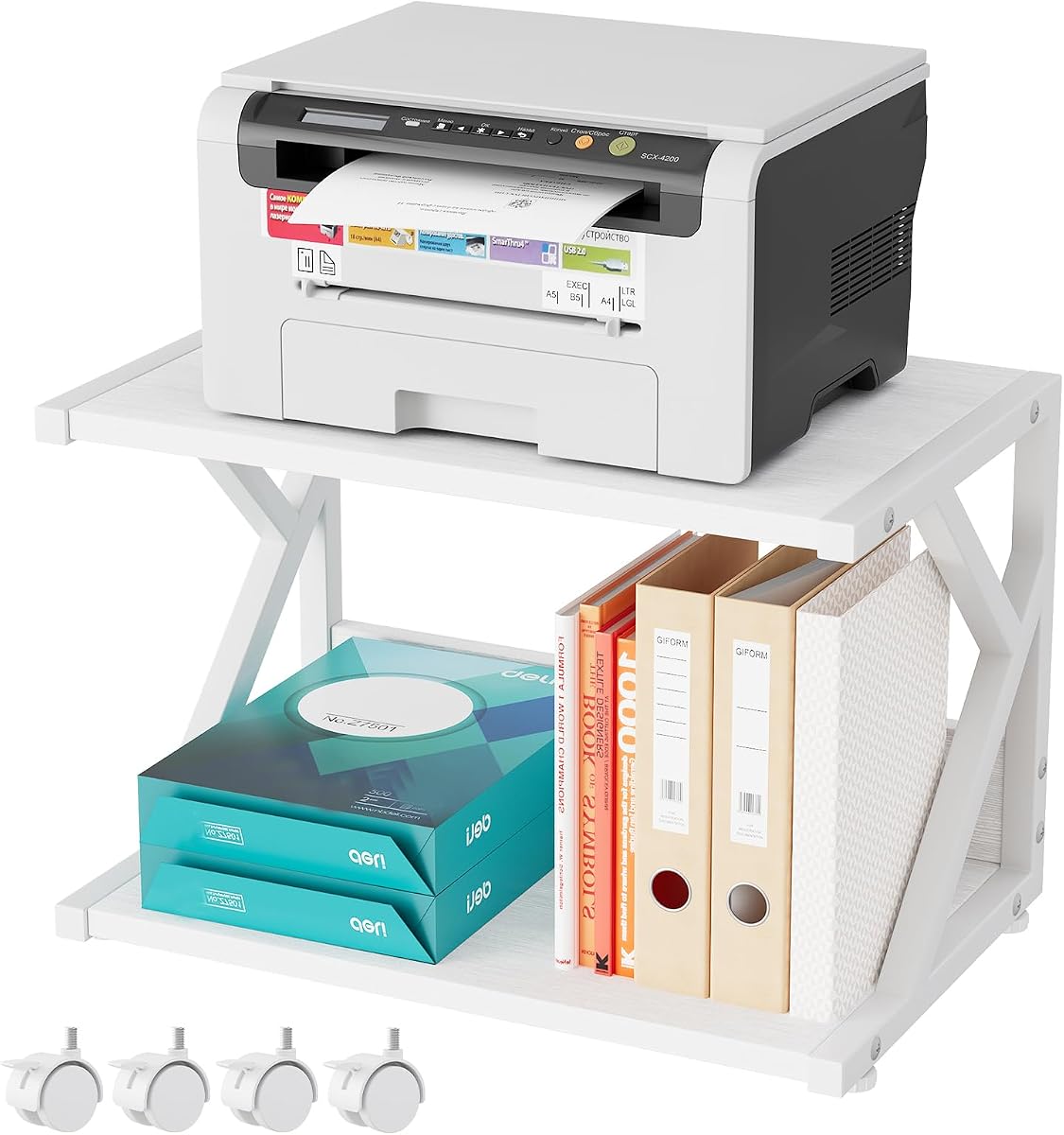
This model offers a straightforward solution for elevating your printer. With a rating of 4.6 stars, users appreciate its sturdy construction and adaptability for various tasks beyond just printing.
We may earn a commission when you buy through this link, at no additional cost to you.
The steel frame combined with a board top supports up to 100lbs, making it suitable for heavy laser printers. Rounded corners and anti-slip pads ensure safety and stability on any desk surface.
While it lacks enclosed drawers, the open shelf allows easy access to supplies underneath. The simple assembly and universal shape fit most standard printer models without issue.
It is ideal for budget-conscious buyers needing a reliable lift. If you prioritize strength and simplicity over hidden storage, this stand delivers excellent value for the investment.
Anti-slip pads and rounded corners enhance safety and keep the stand secure during daily use.
Beyond printers, it works well as a laptop riser or general storage rack in any room.
We may earn a commission when you buy through this link, at no additional cost to you.
This stand features an upgraded design that includes a drawer and pen holders. Users value its practical approach to keeping the desk tidy with built-in organizational tools.
We may earn a commission when you buy through this link, at no additional cost to you.
Constructed from metal mesh and reinforced steel, it offers reliable performance. The paper tray and pen holders help manage small office accessories efficiently within arm's reach.
Assembly takes about 12 minutes according to instructions, ensuring a quick setup. While the open design exposes items, it keeps everything visible and accessible for workflow efficiency.
It is a great choice for offices needing extra organization. If you want to centralize supplies alongside your printer, this model provides a functional and tidy solution.
Built-in drawer and pen holders keep stationery sorted and easily accessible.
Metal mesh and steel frame provide longevity and resistance to wear and tear.
We may earn a commission when you buy through this link, at no additional cost to you.
Rated 4.8 stars, this stand balances space and utility effectively. It features a two-tier design that can fit multiple devices or printers while keeping essentials within reach.
We may earn a commission when you buy through this link, at no additional cost to you.
The middle shelf allows space for 3D printers or scanners. A convenient fabric drawer adds privacy for documents, while the waterproof tabletop ensures easy maintenance.
Users report quick assembly with clear instructions. The compact footprint fits well on most desks without sacrificing storage, making it a top pick for home offices.
It is the best overall choice for its high rating and balanced features. If you need a reliable, stylish stand with mixed open and closed storage, this model stands out.
Two open shelves maximize vertical space for printers or multiple devices.
The waterproof tabletop simplifies cleaning spills or dust buildup quickly.
We may earn a commission when you buy through this link, at no additional cost to you.
This cart is designed for flexibility and under-desk placement. Locking wheels allow it to be moved or fixed in place depending on your preference for a stationary stand.
We may earn a commission when you buy through this link, at no additional cost to you.
The adjustable height allows it to fit under various desks. A drawer with dividers helps organize supplies, while the bottom shelf stores paper or books out of the way.
Assembly is tool-free and stackable, adding to its convenience. While it is best for lighter printers, its mobility makes it a versatile option for dynamic workspaces.
It is perfect for offices needing a movable solution. If you want to tuck the printer away when not in use, this cart offers practical flexibility and storage.
Max height allows fitting under desks while keeping space for a printer on top.
Stackable design enables quick assembly without needing any extra tools.
We may earn a commission when you buy through this link, at no additional cost to you.
This stand features a practical three-tier layout that accommodates two printers simultaneously. The foldable drawer provides flexible storage that can be tucked away when not needed.
We may earn a commission when you buy through this link, at no additional cost to you.
Dual-rod support enhances stability, preventing wobble even with heavier equipment. The vintage particle board and iron pipes give it a rustic charm suitable for home office decor.
Users appreciate the balance between storage and style. While the drawer is non-woven, its foldable nature adds unique utility for saving space in tight corners.
It is ideal for those with multiple printing devices. If you want a stylish stand that handles heavy loads and adapts to your space, this model is a strong contender.
Dual-rod support significantly enhances load-bearing capacity and prevents wobbling.
The fabric drawer folds away to save space when extra storage is not needed.
We may earn a commission when you buy through this link, at no additional cost to you.
This stand offers a neat appearance with two open shelves and a hidden drawer. The rustic brown finish complements various interior styles, from modern to industrial.
We may earn a commission when you buy through this link, at no additional cost to you.
Made of chipboard and metal, it has excellent stability for office supplies. The drawer protects private documents and keeps visible clutter minimal for a clean workspace.
Assembly is effortless within 10 minutes, and the smooth surface wipes clean easily. It works well in kitchens or offices where neatness is a priority for daily tasks.
It is a great choice for rustic decor lovers. If you want a tidy look with hidden storage to organize papers and supplies, this model fits the bill perfectly.
Non-woven drawer protects private documents and hides office supplies.
Industrial design and brown color blend well with diverse interior styles.
We may earn a commission when you buy through this link, at no additional cost to you.
This stand offers extensive storage with three compartments for files and papers. Its large size accommodates bulky printers while keeping the desktop organized and clutter-free.
We may earn a commission when you buy through this link, at no additional cost to you.
Stackable design allows you to add height if needed. Non-slip rubber feet protect work surfaces from scratches, ensuring stability during operation of heavy printing equipment.
Assembly takes around 20 minutes with clear hardware instructions. While it occupies more space, the extra storage and capacity justify the footprint for power users.
It is ideal for heavy-duty office environments. If you need to store many files alongside a large printer, this model provides the storage capacity and stability you require.
Stackable design enables you to add height and storage space over time.
Large size fits big printers and holds up to 90 pounds per shelf.
We may earn a commission when you buy through this link, at no additional cost to you.
This stand includes a built-in charging station with outlets and USB ports. It solves cable clutter by allowing devices to charge near the printer without extra adapters.
We may earn a commission when you buy through this link, at no additional cost to you.
Measuring compact dimensions, it fits well under desks or in corners. The metal frame and thick particleboard ensure stability for up to 44 pounds, supporting most printers.
Users highlight the convenience of charging electronics directly on the stand. The industrial style complements modern decor, making it both functional and aesthetically pleasing.
It is perfect for tech-heavy desks. If you need to charge phones or tablets while printing, this model combines utility with a stylish design seamlessly.
Outlet and USB ports let you charge devices while using the stand.
Small size makes it ideal for corners or under-desk placements.
We may earn a commission when you buy through this link, at no additional cost to you.
This stand features a distinctive Z-shaped design that saves space while adding a modern touch. It offers two tiers for organizing office supplies effectively without cluttering the desk.
We may earn a commission when you buy through this link, at no additional cost to you.
Each tier holds 44 pounds, ensuring security for printers and accessories. The retro colors and minimalist lines allow it to fit into various interior styles seamlessly.
Users praise its neat appearance and sturdy structure. The open design keeps files accessible while maintaining a tidy workspace for daily professional tasks.
It is ideal for modern office setups. If you want a functional organizer with a unique look, this model provides both style and reliable storage capacity.
Z-shaped design utilizes space efficiently and adds a stylish touch.
High load-bearing ensures items stay stable and organized safely.
We may earn a commission when you buy through this link, at no additional cost to you.
This stand features a clean white finish and waterproof MDF construction. It offers two options for the base: wheels for mobility or adjustable foot pads for stability.
We may earn a commission when you buy through this link, at no additional cost to you.
The scratch-resistant surface ensures longevity and ease of cleaning. With 44 pounds per layer capacity, it supports most printers effectively while organizing supplies below.
Assembly takes around 15 minutes with numbered components. While the white color may show dust, it provides a bright and organized look for any workspace.
It is ideal for bright, minimalist offices. If you want a simple, clean stand with flexible mobility options, this model delivers practical utility and aesthetic appeal.
Waterproof MDF wood resists scratches and simplifies cleaning maintenance.
You can choose between wheels for mobility or pads for stability.
We may earn a commission when you buy through this link, at no additional cost to you.
Selecting the right stand requires evaluating dimensions, materials, and storage needs to ensure compatibility and durability for your workspace.
Always measure your printer and desk space before buying. Ensure the stand's width and depth accommodate your device with room for cables and ventilation.
Check the height to confirm it works with your desk clearance or eye level for ergonomic use.
Look for durable materials like steel frames or high-density board to ensure stability. Metal mesh or MDF often provides a balance of strength and cost.
Higher quality materials resist warping and wobbling over time with heavy use.
Consider if you need drawers, shelves, or hooks for supplies. Some stands offer enclosed storage for privacy while others prioritize open access for speed.
Decide on storage based on whether you need to hide clutter or keep items visible.
Verify the weight limit per shelf to support your printer model safely. Heavy laser printers require higher capacity to prevent collapse or tipping.
Always choose a stand rated higher than your printer's actual weight.
Check if the stand requires tools or allows tool-free assembly. Some models include numbered parts for quick setup, while others may take longer.
Easy assembly saves time and ensures you can start using the stand immediately.
Decide if you need wheels for moving or fixed pads for stability. Locking wheels offer flexibility for under-desk use, while pads keep the stand fixed.
Mobility depends on whether you plan to move the printer frequently.
Choose a finish that matches your office decor, whether rustic brown, black, or white. A cohesive look can improve the overall feel of your workspace.
Consider the color to ensure it blends with your existing furniture and walls.
Place the stand on a level surface to ensure stability. Adjust rubber feet if available to prevent wobbling on uneven floors.
Dust the surface regularly with a soft cloth to maintain cleanliness. Avoid harsh chemicals that might damage the finish or coatings.
Check the weight limit and avoid overloading shelves. Regularly inspect joints and screws to maintain structural integrity.
Yes, many stands are built with steel frames capable of supporting up to 100lbs. Always check the specific weight capacity to ensure it matches your printer model.
Some models are designed specifically to fit under desks with adjustable heights. Others work best on top surfaces depending on their dimensions and design.
Use a damp cloth to wipe away dust. Avoid excessive water on wood surfaces to prevent warping and damage over time.
Most models require 10 to 20 minutes for assembly. Many come with clear instructions and numbered parts to simplify the setup process.
Some models offer stackable designs to increase vertical space. Check product details to confirm if stacking is supported safely.
Fabric or enclosed drawers can hide documents and supplies. However, they may not offer full security for sensitive papers.
Not all stands include wheels; some offer optional wheels or fixed pads. Choose based on your need for mobility versus stability.
Steel frames offer the highest durability while MDF provides a clean look. Both options are effective if the design is stable and well-built.
We reviewed ten excellent desktop printer stands that balance price and functionality. Each option offers unique benefits for different workspace needs.
Prioritize capacity and dimensions to ensure the stand fits your printer and room. Consider storage options to keep your workspace organized.
Always verify current availability and details before purchasing. These choices will help you find a reliable stand that elevates your office setup.