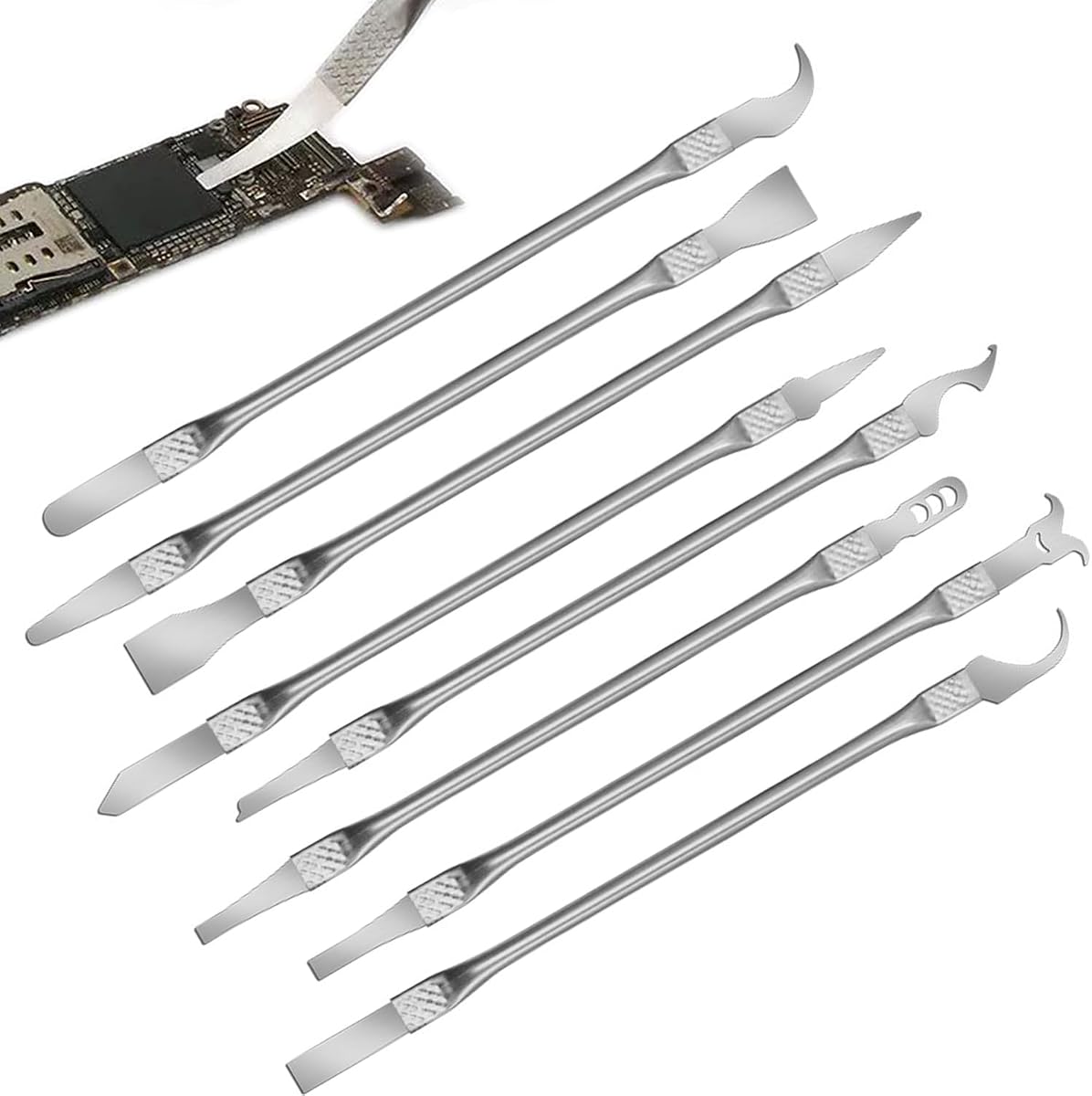
8 Piece Set Multi-Function
4.0Editor score
Affordable price point
Multiple tool options
Lightweight alloy material
This guide compares the top 10 delidding kits for CPUs and GPUs, evaluating blade precision, compatibility, and durability to help you choose the right tool
Delidding kits are specialized tools designed to safely remove the integrated heat spreader from processors, allowing for direct die cooling and improved thermal performance. Choosing the right kit ensures precision and reduces the risk of damaging expensive components during the delicate removal process.
We compared ten leading delidding solutions based on blade quality, material durability, user feedback, and compatibility across various CPU and GPU architectures. Our analysis focuses on tools that offer consistent performance and safety features for both enthusiasts and professional repair technicians.
Each pick highlights specific strengths such as affordability, precision engineering, or specialized compatibility for gaming consoles. Prices and availability change frequently, so verify current details before purchasing to ensure you get the best value for your specific thermal maintenance needs.
4.0Editor score

4.5Editor score

4.1Editor score
The following comparison table details the key specifications and features of each delidding kit to help you quickly identify the best fit for your hardware and skill level.


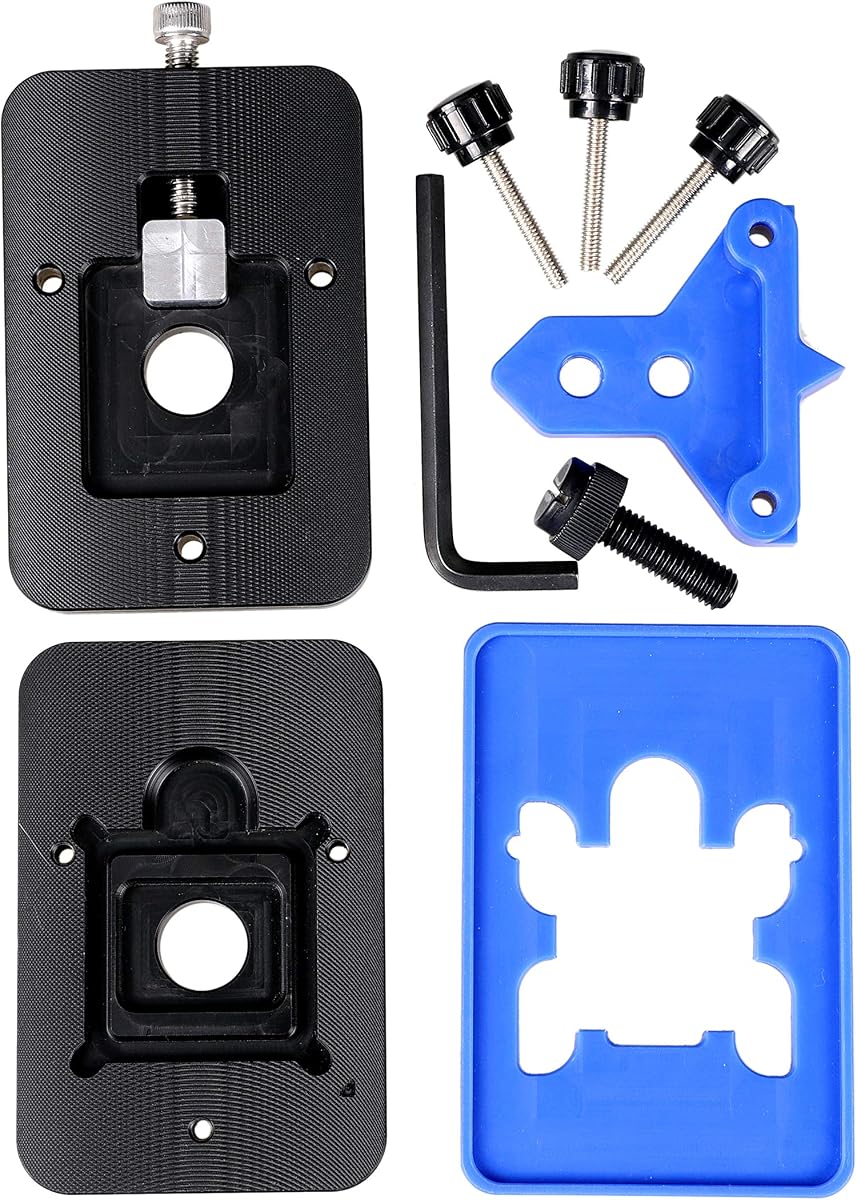


The Thermal Grizzly Delid-Die-Mate stands out as a precision tool designed for modern Intel CPUs, offering reliability and performance for enthusiasts seeking direct die cooling. Its construction quality reflects the brand reputation for thermal solutions.
We may earn a commission when you buy through this link, at no additional cost to you.
Developed with Roman der8auer Hartung, this tool ensures compatibility with 12th and 13th generation processors. The black and red anodized aluminum provides durability while maintaining a professional appearance. It enables efficient removal of the heatspreader to facilitate better heat dissipation.
While it is optimized for specific CPU generations, users with older chips may need alternative tools. The price is higher than generic options but justified by the specialized engineering and brand trust. It simplifies the delidding process for targeted upgrades.
This kit is ideal for users upgrading to 13th Gen Intel systems who prioritize cooling efficiency. The straightforward installation reduces risks associated with manual delidding. For those seeking performance gains, it is a solid investment in thermal maintenance.
Designed specifically for newer Intel architectures, this tool ensures accurate alignment and safe removal without damaging the core components.
By enabling direct die cooling, it allows thermal paste to contact the silicon directly, potentially reducing temperatures significantly.
We may earn a commission when you buy through this link, at no additional cost to you.
The der8auer Delid-Die-Mate X is a premium solution targeted at high-end Intel processors. It transforms a risky DIY process into a routine task, ensuring CPU die protection. The build quality is exceptional for serious hardware enthusiasts.
We may earn a commission when you buy through this link, at no additional cost to you.
Compatible with socket 2066 processors, this tool addresses the needs of those building powerful gaming or workstations. The aluminum and stainless steel construction ensures longevity. Its design simplifies the removal of the integrated heat spreader effectively.
Users must verify cooler mounting height compatibility as the removal reduces height slightly. The cost reflects the specialized nature of the tool. For those with specific hardware, it provides the reliability needed for safe delidding operations.
This tool is best suited for owners of Skylake-X or Kaby Lake-X processors seeking performance optimization. The anodized finish adds aesthetic value while protecting the tool. It is a top choice for those willing to invest in high-quality hardware maintenance.
Focused on socket 2066 CPUs, it provides the precision required for delicate removal on premium processor packages.
Constructed from stainless steel and aluminum, it resists wear and tear during repeated use in professional or hobbyist settings.
We may earn a commission when you buy through this link, at no additional cost to you.
The 8 Piece Set Multi-Function offers a cost-effective entry point for those needing basic chip removal tools. It is versatile across smartphones and computers. The alloy material ensures resistance to corrosion and bending over time.
We may earn a commission when you buy through this link, at no additional cost to you.
Integrated blade and handle design eliminates assembly needs, making repairs quicker for general maintenance. The ergonomic design reduces hand fatigue during extended use. It is suitable for light delidding or adhesive removal tasks on various devices.
While not a dedicated CPU delid tool, it serves well for budget-conscious users or general electronics repair. The thin tools allow maneuvering between components safely. It is a practical choice for those who need multiple tools in one package.
This set is ideal for beginners or those handling small component removals on motherboards. The price makes it accessible for occasional repairs. Ensure you select the right blade size for precision work to avoid potential damage.
Beyond CPUs, it handles smartphone and general motherboard tasks, making it a multi-purpose addition to any tool kit.
With a low price point, it allows users to try delidding concepts without a significant financial commitment to specialized gear.
We may earn a commission when you buy through this link, at no additional cost to you.
The EG Starts Kaby Intel tool is designed for older Intel generations, offering a reliable way to delid and relid CPUs. It supports a wide range of sockets from LGA 775 to 1151. This makes it a strong candidate for legacy systems.
We may earn a commission when you buy through this link, at no additional cost to you.
The included relid tool ensures that after cooling improvements, the original heatspreader can be reattached. A safety block is provided to prevent damage to the CPU board. This feature adds significant value for users concerned about component integrity.
Users must ensure the square aluminum block is positioned correctly to avoid board damage. The design is straightforward but requires attention to detail. It is particularly useful for those optimizing older systems for better thermal performance.
This kit is best for users with older Intel CPUs looking to extend hardware life. The comprehensive support for various sockets means broad compatibility. It balances cost and functionality for those targeting specific legacy processors.
Supports sockets like 775 and 1151, making it a versatile option for owners of older Intel CPUs who want to upgrade cooling.
Unlike many tools that only remove, this kit includes options to reattach the spreader, preserving aesthetics or resale value.
We may earn a commission when you buy through this link, at no additional cost to you.
The Delid Tool V3 is specifically engineered for the PlayStation 3, addressing overheating issues common in this console. It offers a purpose-built solution rather than makeshift alternatives. The version 3 iteration includes a sharper and more flexible blade.
We may earn a commission when you buy through this link, at no additional cost to you.
Three blades are included to ensure consistent performance over time. The tool reduces the risk of damaging the console compared to using improvised tools. Its design is user-friendly for both professionals and DIY enthusiasts tackling console repair.
While specialized for PS3, it demonstrates the importance of using correct tools for specific hardware. The replaceable blades add longevity to the kit. Users should follow instructions carefully to avoid board damage during the removal process.
This kit is essential for PS3 owners facing thermal throttling or overheating. It allows access to the thermal interface for replacement. Investing in this tool helps maintain console performance and longevity effectively.
Tailored for PS3 architecture, it ensures the blade aligns correctly with the integrated heat spreader to avoid slipping.
Including three blades ensures that if one dulls, the user has backups, maintaining precision throughout the repair.
We may earn a commission when you buy through this link, at no additional cost to you.
The Knife Repair Kit is a specialized set designed for circuit board and chip maintenance tasks. It features ultra-thin blades that allow movement between chips and baseplates. This precision is crucial for removing adhesive or dismantling components safely.
We may earn a commission when you buy through this link, at no additional cost to you.
Constructed from SK5 steel, the blades offer heat tolerance and oxidation resistance. The ergonomic handle ensures safe operation with non-slip grip. It is essential for BGA chip restoration and various integrated circuit maintenance procedures.
While it is versatile, users must exercise caution to avoid damaging sensitive components. The blades are smaller than solder points, enhancing safety but requiring a steady hand. It is a practical tool for repair technicians working on electronics.
This kit is suitable for those performing advanced electronics maintenance. The thin design prevents board damage. It is a strong option for repair shops or hobbyists dealing with complex circuit board tasks.
The 0.38mm blades are thin enough to navigate between solder points without shorting or damaging the PCB.
SK5 steel provides the hardness needed for clean cuts and resistance to bending during heavy repair sessions.
We may earn a commission when you buy through this link, at no additional cost to you.
The QianLi ToolPlus 009 kit offers a comprehensive solution for delicate repair tasks. It includes a 12-in-1 handle set with various blades for scraping adhesive or cleaning solder pads. This versatility is valuable for repair stations handling diverse electronics.
We may earn a commission when you buy through this link, at no additional cost to you.
Crafted from high-grade steel, the blades provide surgical precision. The metal handle ensures balance and comfort. It is ideal for tasks involving iPhone CPUs or motherboard repairs where control is critical.
While specific ratings are not available, the design suggests a focus on professional technicians. The non-slip grip reduces fatigue. It is a practical set for those needing to swap tools quickly during a project.
This kit is suited for technicians who need adaptability. The range of blade tips allows for tailored approaches. It enhances repair efficiency by offering the right tool for every challenge in a single kit.
With 12 different blades, users can tackle everything from fine-point scraping to angled cutting without swapping tools.
The metal handle provides a solid feel and balance, crucial for maintaining stability during intricate micro-soldering work.
We may earn a commission when you buy through this link, at no additional cost to you.
The RSX GPU Delid Tool targets the graphics chip in PlayStation 3 consoles. It is designed for Fat and Slim models with the RSX lid. This specialization allows for safe access to thermal interface materials.
We may earn a commission when you buy through this link, at no additional cost to you.
The tool helps reduce board contact during removal, which is critical for preventing damage to the main PCB. It facilitates replacing aged thermal paste to improve cooling. This is essential for consoles with thermal issues.
Users should note this tool does not remove the CELL CPU lid. Delidding carries inherent risks, so care is vital. It is a targeted solution for those focused on GPU thermal performance.
This kit is best for PS3 owners troubleshooting graphical or thermal issues. It allows for maintenance that might otherwise be impossible. Use appropriate safety precautions when working with sensitive console hardware.
Designed specifically for the RSX chip, it ensures the tool fits the shape of the GPU spreader perfectly.
The design positions the working edge away from the board, lowering the risk of shorting during the removal process.
We may earn a commission when you buy through this link, at no additional cost to you.
The Thermal Grizzly TG Scraper is a post-delidding tool designed for cleaning residue from processors. Made of acrylic, it is safe for delicate surfaces. This ensures no scratches occur during cleaning.
We may earn a commission when you buy through this link, at no additional cost to you.
The narrow tip effectively removes silicone adhesive and solder. It fits comfortably in hand for control. It is ideal for anyone needing to clean off adhesive before applying new thermal paste.
While not a removal tool, it complements delidding kits well. The 3-pack ensures spares are available. It provides a safer alternative to metal tools for cleanup.
This scraper is essential for those who want a perfect surface. It protects the CPU die during cleaning. Use it alongside a proper delid tool for best results.
Acrylic ensures the tool does not gouge the silicon or package, preserving the integrity of the processor.
The narrow tip allows access to tight spaces around the die edges for a thorough clean.
We may earn a commission when you buy through this link, at no additional cost to you.
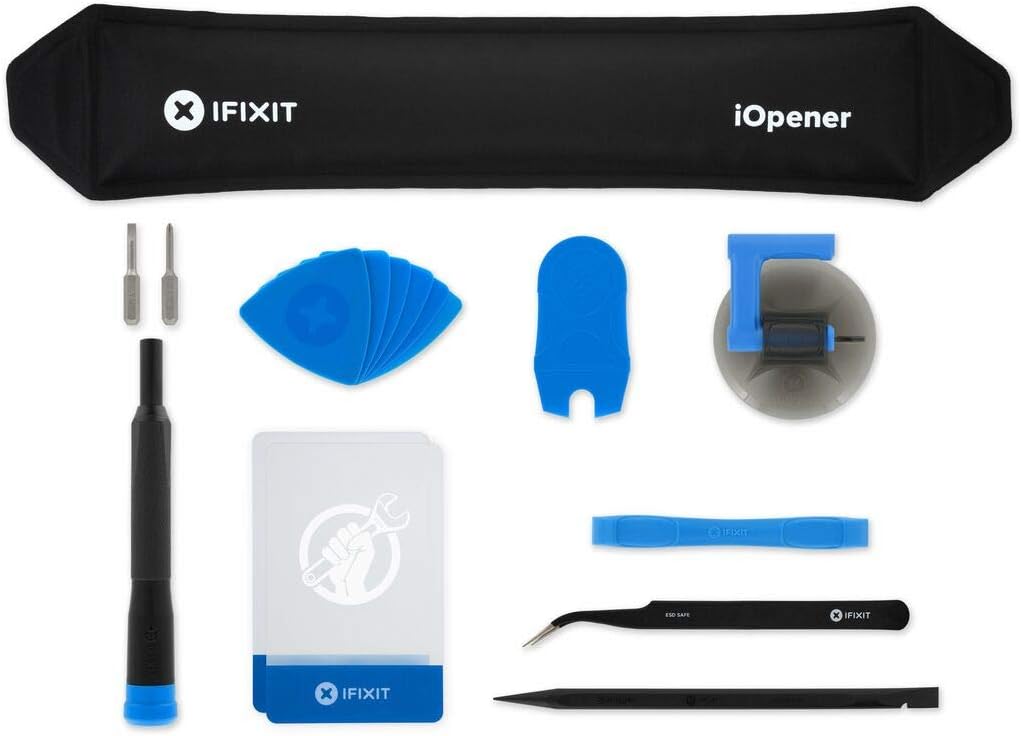
The iFixit iOpener is a heat pad tool used to soften adhesives in electronics. It is universal for phones and laptops. While not a blade tool, it prepares surfaces for opening or component removal.
We may earn a commission when you buy through this link, at no additional cost to you.
It is safe and non-toxic, making it suitable for general use. The tool helps loosen adhesive before scraping. This can assist in safely removing components without force.
While not a delid tool itself, it complements repairs by softening glue. It is widely used in repair workflows. The design is straightforward for consistent results.
This tool is ideal for those working on electronics with strong adhesives. It ensures a safe approach to separation. Use it alongside scraping tools for a complete repair kit.
Applying even heat softens adhesives, reducing the force required to remove components without damage.
The flexible design works across many device types, from phones to laptops, making it versatile.
We may earn a commission when you buy through this link, at no additional cost to you.
Choosing the right delidding kit depends on your hardware, skill level, and specific needs. This section outlines key factors to consider.
Ensure the kit matches your CPU or GPU socket. Some are designed for specific generations while others cover multiple types. Check product descriptions for exact compatibility.
Always verify socket support before purchasing to avoid buying a tool that does not fit your hardware.
Look for durable materials like SK5 steel or aluminum that resist bending. Sharp blades ensure clean cuts without slipping. Metal construction often lasts longer than plastic.
Choose high-quality metal blades to maintain precision over time and prevent accidental damage.
Tools with safety blocks or ergonomic grips reduce the risk of damaging the board. Design features that limit board contact are valuable. Ensure the tool protects the CPU during removal.
Prioritize tools with built-in safety features to minimize the risk of costly hardware damage.
Some kits include tools to reattach the spreader. This is useful if you plan to return the CPU to standard configuration later. Check if relid tools are included.
If resale or standard cooling is needed later, choose a kit that supports reinstallation of the original hardware.
Beginners should look for user-friendly tools with clear instructions. Experienced users may prefer professional-grade scrapers that require manual control. Select based on your comfort with electronics repair.
Honesty about your repair experience ensures you choose a tool that matches your ability to handle delicate work.
Decide if you need a tool for CPUs, GPUs, or general electronics. Some tools target consoles while others are for PCs. Match the tool to your primary repair goal.
Clearly defining your repair goal helps narrow down options to the most relevant kits.
Check reviews for signs of wear. Long-lasting blades save money in the long run. Ensure the material resists corrosion and heat.
Invest in a tool that can withstand multiple uses without degrading to maximize your investment.
Budget kits may lack precision while premium ones offer better materials. Determine how much you are willing to spend. Balance cost with quality for best results.
Find a balance between affordability and quality to ensure reliable performance without overspending.
Before starting, ensure the processor is removed from the motherboard and cooled down. Use the tool to carefully slide under the edges of the heat spreader and apply even pressure to separate it from the die.
After removal, clean any residue on the die with an acrylic scraper or isopropyl alcohol. Use a clean cloth to ensure the surface is free of dust and debris before applying new thermal paste.
Store the blades in a protective case to prevent dulling or accidental cuts. Regularly check blades for damage and replace them if they show signs of wear to maintain precision and safety.
Delidding can be risky for beginners as improper force can crack the CPU die. It is recommended to practice with spare hardware or watch detailed tutorials before attempting it on a main system. Safety and patience are key to success.
A delidding kit allows you to remove the integrated heat spreader from a processor. This enables direct contact between the thermal paste and the silicon, which can significantly reduce operating temperatures.
Most desktop CPUs and some GPUs include an integrated heat spreader to protect the die. However, some low-end mobile processors may not have one. Check your specific CPU specs to confirm.
Using a regular knife is not recommended as it may slip and damage the CPU. Delidding kits are precision engineered to reduce this risk. It is safer to invest in a dedicated tool for the task.
Temperatures can be reduced by 10 to 20 degrees Celsius with proper delidding and high-quality thermal paste. Actual gains depend on the CPU architecture and cooling setup used.
Yes, delidding typically voids the manufacturer's warranty on the CPU. Once the heat spreader is removed, the original seal is broken. Consider this risk before proceeding.
The top picks highlight the best options for various needs. Whether you need a specialized GPU tool or a budget-friendly multi-function set, there is a kit for you. Each option offers unique strengths.
Prioritize safety and compatibility when selecting a tool. A quality blade and ergonomic design are essential for successful results. Do not compromise on materials for long-term reliability.
Always check current prices and availability before purchasing. Product details may change over time. We hope this guide helps you make the right choice for your hardware needs.