
TECKNET Compact Ambidextrous Wireless Mouse
4.6Editor score
Compact size for travel
Soft quiet click buttons
Long battery life
Discover the 10 best cute laptop mouse options for style and performance. We compare wireless, Bluetooth, and rechargeable mice for laptops and Macs.
Finding a cute laptop mouse can transform your workspace into a personalized sanctuary. These devices blend aesthetic appeal with reliable functionality, ensuring your daily tasks are as enjoyable as they are efficient. Whether you prefer pastel hues or playful designs, there is a perfect match for your setup.
We evaluated ten top-rated models based on connectivity, ergonomics, and design uniqueness. Our analysis focuses on how each mouse performs in real-world scenarios, from office work to creative projects. We considered user feedback and technical specifications to ensure accuracy in our recommendations.
Each pick highlights specific strengths like silent clicks, long battery life, or unique shapes. Prices and availability may change frequently, so always check the latest details before purchasing. This guide helps you navigate the options to find the ideal companion for your laptop.
4.6Editor score

4.4Editor score

4.6Editor score
This side-by-side comparison highlights the unique features and specifications of each selected model. We examine connectivity types, design elements, and battery performance to help you make an informed decision based on your specific needs.




The Akko Cat Theme Wireless Gaming Mouse stands out as a top choice for those seeking a blend of functionality and aesthetics. With a rating of 4.4 stars, users appreciate its unique cat-shaped design that adds a playful touch to any workspace. This mouse is designed to be both a functional tool and a stylish accessory.
We may earn a commission when you buy through this link, at no additional cost to you.
Its tri-mode connectivity allows seamless switching between Bluetooth 3.0, Bluetooth 5.0, and 2.4GHz wireless. This flexibility makes it ideal for users with multiple devices. The ergonomic design ensures comfortable use during extended periods, while the anti-slip bottom provides stability. The optical sensor delivers smooth tracking suitable for daily tasks.
While the design is charming, it may not fit perfectly in all hand sizes due to its unique shape. Additionally, some users might find the design less versatile for certain types of surfaces. However, these trade-offs are generally acceptable for those prioritizing style and connectivity options.
This mouse is perfect for users who value design and flexibility in their peripherals. It works well with Mac and Windows systems, making it a versatile choice for various setups. If you are looking for a cute laptop mouse that doesn't compromise on performance, this model is highly recommended.
The tri-mode support ensures you can connect to multiple devices without needing multiple dongles, streamlining your setup.
Designed to fit the palm comfortably, this mouse reduces hand strain during long work sessions.
We may earn a commission when you buy through this link, at no additional cost to you.
The TECKNET Compact Ambidextrous Wireless Mouse is an excellent budget-friendly option for those needing a cute and functional mouse. With a high rating of 4.6 stars, it offers reliable performance at an accessible price. The compact size makes it ideal for travel and users with smaller hands.
We may earn a commission when you buy through this link, at no additional cost to you.
This mouse features soft, quiet click buttons that minimize noise, making it suitable for shared environments. The 2.4GHz wireless technology ensures a stable connection, and the smart sleep modes help conserve battery life. It is compatible with a wide range of operating systems, including Windows and Mac.
The only significant limitation is its reliance on a USB-A port for the receiver, which might be an issue for newer laptops without these ports. Additionally, the design is relatively basic compared to more stylized options. However, for a budget pick, these are minor drawbacks.
Ideal for students or professionals on a tight budget, this mouse delivers essential features without unnecessary costs. It is a practical choice for anyone needing a reliable, portable mouse that adds a touch of color to their setup. The long battery life ensures minimal interruptions during use.
Its small dimensions allow it to fit easily into bags, making it perfect for commuters and travelers.
Soft clicks ensure you won't disturb colleagues or family members in quiet environments.
We may earn a commission when you buy through this link, at no additional cost to you.
The FMOUSE Cute Cartoon Silent Wireless Mouse is a premium choice that combines whimsical design with advanced features. Rated 4.6 stars, it is known for its silent click technology and dual-mode connectivity. The unique office meme design with a cat makes it a standout accessory for any desk.
We may earn a commission when you buy through this link, at no additional cost to you.
This mouse supports both Bluetooth and USB 2.4G, allowing flexibility for devices with or without USB ports. The silent clicks are up to 90% quieter than standard mice, making it perfect for open offices or quiet meetings. The ergonomic shape is designed to fit small-to-medium hands comfortably.
While it runs on an AA battery, which requires replacement, this ensures uninterrupted use without charging downtime. The niche design might not appeal to everyone seeking a minimalist look. However, for those who appreciate personality in their tech, this is a significant plus.
Recommended for office workers and remote users who value quiet operation and style. It is an excellent gift option for coworkers or cat lovers. The compatibility with multiple systems ensures it can be used across various devices seamlessly.
Experience noise-free navigation that won't disrupt meetings or quiet environments.
Switch between Bluetooth and USB effortlessly to work with laptops and tablets alike.
We may earn a commission when you buy through this link, at no additional cost to you.
The wegear USB Wireless Mouse offers a robust set of features for users needing precision and comfort. With a 4.4 rating, it is praised for its adjustable DPI levels and ergonomic design. The pink color adds a cute element to a functional device.
We may earn a commission when you buy through this link, at no additional cost to you.
It features six buttons, including forward and backward navigation, which streamlines web browsing and document handling. The 2.4GHz wireless connection ensures stability within 33 feet, and the battery can last up to 24 months on a single AA battery. Sleep modes further conserve power.
One limitation is that the forward and backward buttons are not recognized on Mac systems, which might inconvenience Mac users. Additionally, it relies on a standard AA battery, which is not rechargeable. However, the longevity of the battery minimizes this inconvenience.
This mouse is great for productivity-focused users who need customizable cursor speeds. It suits those who prefer a traditional ergonomic shape with added functionality. For everyday tasks, it provides reliable performance with a stylish look.
Switch between five DPI levels to match your specific task needs, from browsing to design work.
Enjoy months of use without changing batteries, thanks to efficient power management.
We may earn a commission when you buy through this link, at no additional cost to you.
The Bluetooth Mouse for Laptop Donut Pink is a standout option for those prioritizing convenience and sustainability. With a 4.7 rating, it is highly regarded for its rechargeable battery and dual-device connection capabilities. The donut shape is unique and fits easily into bags.
We may earn a commission when you buy through this link, at no additional cost to you.
Users appreciate the ability to connect via Bluetooth or 2.4GHz wireless, offering flexibility for different devices. The silent clicks make it suitable for quiet environments, and the lightweight design ensures portability. It works across Windows, macOS, and iOS systems without driver issues.
The donut shape may not provide a traditional grip for everyone, potentially affecting comfort for some users. Pairing with Bluetooth might also require a brief learning curve for those unfamiliar with wireless setups. Despite this, the convenience features are highly valued.
Perfect for travelers and eco-conscious users who dislike disposable batteries. The ability to switch devices with one button streamlines workflow. If you need a portable mouse that charges easily, this model is a top contender.
No need for batteries; simply charge via USB to keep working uninterrupted for weeks.
Easily toggle between your laptop and tablet with a single button press.
We may earn a commission when you buy through this link, at no additional cost to you.
The Unipows Wireless Mouse is designed for portability and style with a slim form factor. With a 4.6 rating, it is appreciated for its gradient color design and responsive performance. The slim profile makes it an excellent choice for laptop bags.
We may earn a commission when you buy through this link, at no additional cost to you.
It features a nano receiver that stores inside the mouse, preventing loss. The silent buttons ensure quiet operation, and the high DPI movement allows smooth tracking on most surfaces. It is compatible with a wide range of systems including Windows and Mac.
It requires an AA battery, which means replacements are needed over time. Additionally, it is not compatible with devices that lack USB-A ports. However, for those with standard ports, the convenience of the hidden receiver is a significant benefit.
Recommended for users who prioritize portability and visual appeal. The ergonomic shape and quiet operation make it suitable for office environments. If you want a stylish mouse that fits easily into your travel kit, this is a solid choice.
The thin profile ensures it slips easily into laptop sleeves and pockets without bulk.
Keep the receiver safe and organized by storing it inside the mouse when traveling.
We may earn a commission when you buy through this link, at no additional cost to you.
The HuGuWdy Pink Wireless Car Mouse is a fun and unique option for users seeking a playful accessory. With a 4.4 rating, it is known for its sports car shape and LED lights that add a vibrant touch to the workspace. It is a compact mouse suitable for light use.
We may earn a commission when you buy through this link, at no additional cost to you.
The 2.4G wireless technology ensures a stable connection within 10 meters. The power-saving design helps extend battery life, and the bottom switch allows you to turn it off when not in use. It is ideal for those looking for a gift or a conversation starter.
The LED lights may drain the battery faster than non-lit models, and the shape might not be ergonomic for extended sessions. However, for short tasks or creative work, these trade-offs are acceptable for the added visual appeal.
This mouse is perfect for users who want a lighthearted addition to their desk. It is a great gift for children or anyone who enjoys unique tech accessories. If you value style over ergonomic precision, this is a delightful choice.
Stand out with a design that adds personality and fun to your desk setup.
Enjoy dazzling lights that illuminate your workspace, though they may impact battery life slightly.
We may earn a commission when you buy through this link, at no additional cost to you.
The JUHOO Wireless Mouse is engineered for quiet environments with its silent click technology. With a 4.5 rating, it is a reliable choice for those who need a mouse that does not create noise. The simple design ensures it fits into any workspace.
We may earn a commission when you buy through this link, at no additional cost to you.
It features a hidden nano receiver for convenience and a wide wireless range of up to 10 meters. The durable build ensures longevity, and the plug-and-play functionality means no software installation is needed. It is compatible with most computers and laptops.
While the design is basic, this ensures focus on functionality and noise reduction. Like many wireless mice, it requires an AA battery, but it lasts a long time. The silent operation is its main selling point for office settings.
Ideal for office workers or students in shared spaces where noise can be a distraction. It is a practical tool for those who value discretion and reliability. If you need a mouse that keeps the peace, this is a great pick.
The soundless design keeps you focused without disturbing those around you.
Works seamlessly with various devices and operating systems for versatile use.
We may earn a commission when you buy through this link, at no additional cost to you.
The TENMOS M101 Wireless Mouse combines a cute flower design with silent operation. With a 4.4 rating, it is a favorite for users who want a quiet and stylish peripheral. The accurate tracking ensures smooth navigation for everyday tasks.
We may earn a commission when you buy through this link, at no additional cost to you.
It uses 2.4GHz wireless technology for a reliable connection up to 10 meters. The silent buttons are designed to minimize noise, making it suitable for libraries or offices. The low power consumption helps extend battery life, reducing maintenance.
The design is relatively small, which might not be comfortable for users with large hands. It requires an AA battery, which must be replaced periodically. However, for those prioritizing quiet operation and aesthetics, these are minor considerations.
Perfect for users who want a functional yet decorative mouse. It is a great option for light office work or school tasks. If you enjoy subtle cute designs, this model delivers on both style and performance.
A unique floral aesthetic adds a touch of charm to your workspace.
Sleep modes ensure the battery lasts longer, reducing the frequency of changes.
We may earn a commission when you buy through this link, at no additional cost to you.
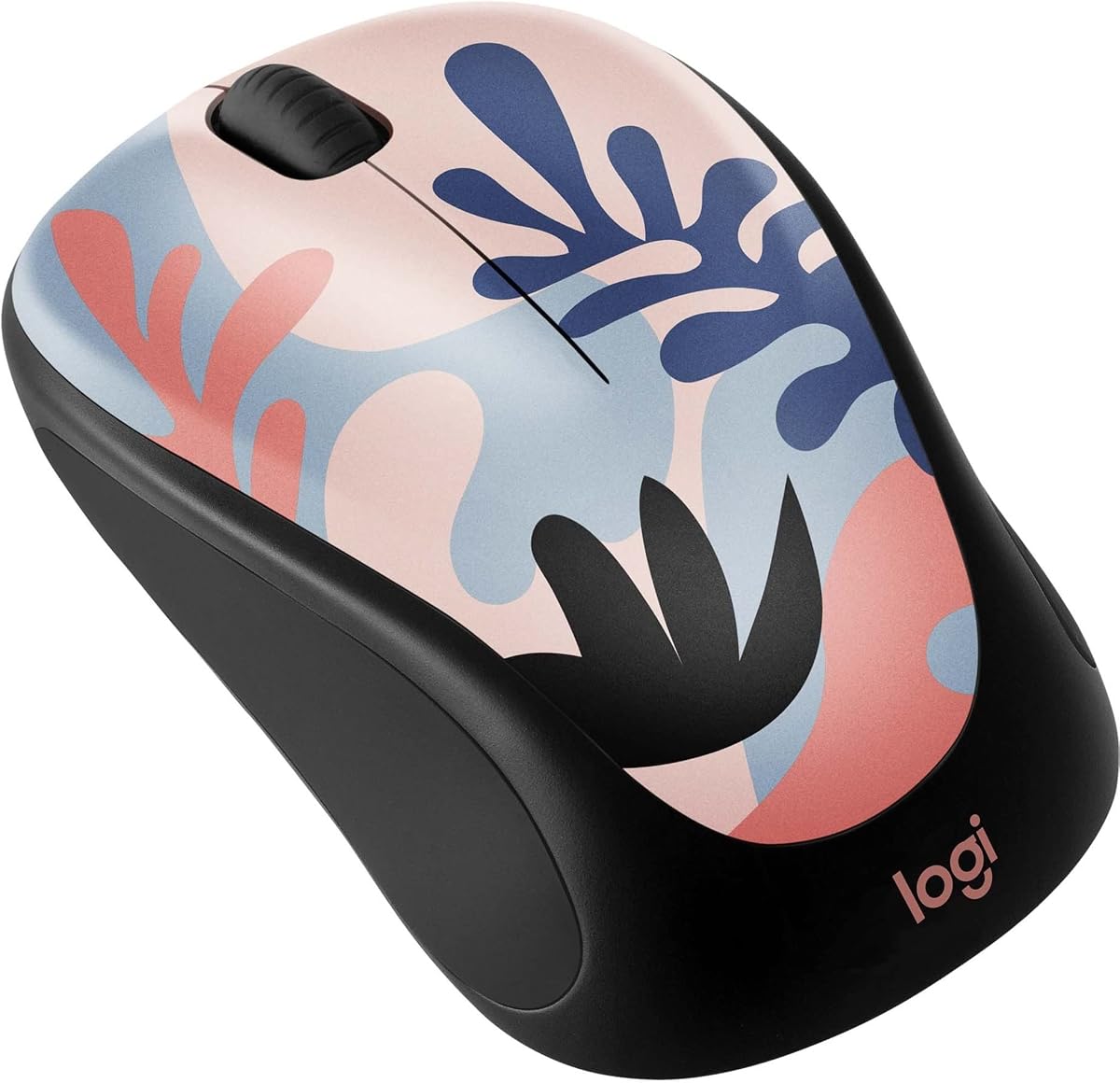
The Logitech Design Collection Limited Edition Mouse brings trusted brand quality to cute peripherals. With a 4.6 rating, it is known for its durable build and vibrant color options. The rubber grips ensure comfort during use, and the design is portable.
We may earn a commission when you buy through this link, at no additional cost to you.
It features a Unifying receiver that allows up to six devices to connect to one USB port, reducing clutter. The mouse is made with recycled plastic, adding an eco-friendly aspect to its design. Battery life is efficient, lasting up to 12 months.
The price may be higher than budget options, but the build quality and brand support justify it. Design choices are limited compared to others, but the colors are vivid. For those who trust the brand, this is a reliable investment.
Recommended for users who prioritize brand reliability and comfort. It is a great choice for those who want a mouse that lasts and looks good. If you are looking for a professional yet colorful option, this is a solid pick.
Connect multiple devices to one receiver to keep your workspace tidy and organized.
Enjoy a product that aligns with eco-conscious values without sacrificing style.
We may earn a commission when you buy through this link, at no additional cost to you.
Choosing the right cute laptop mouse involves more than just aesthetics. You must consider functionality, comfort, and how well it fits your daily workflow. Below are key factors to help you narrow down your options.
Wireless mice typically use 2.4GHz or Bluetooth. 2.4GHz requires a USB receiver but offers a stable connection. Bluetooth is great for devices without USB ports but may have a slight delay.
Choose based on your devices' available ports and your need for speed versus convenience.
Cute mice come in various shapes like cats, donuts, or cars. While appealing, ensure the shape fits your hand comfortably. Ergonomic shapes reduce strain during long sessions.
Prioritize comfort over pure aesthetics to avoid hand fatigue over time.
Some mice use disposable AA batteries, while others are rechargeable. Rechargeable options are more sustainable but require downtime for charging. Disposable batteries offer uninterrupted use but generate waste.
Select based on your preference for sustainability versus convenience of power management.
For shared spaces, silent clicks are a game-changer. Look for models specifically marketed as silent or quiet to avoid disturbing others during meetings or study.
If you work in quiet environments, silent buttons are a necessary feature.
DPI determines cursor speed. Adjustable DPI is useful for tasks requiring precision. Ensure the mouse supports your specific usage needs, from gaming to browsing.
Check for adjustable DPI if you switch between different types of tasks.
Ensure the mouse works with your operating system. Most support Windows and Mac, but some features may be limited on Mac. Check for driver requirements.
Always verify OS support before purchasing to avoid functional limitations.
If you travel often, look for compact designs with built-in receiver storage. This keeps all parts together and prevents loss during transit.
Portability is key for users who frequently move between locations.
Trusted brands often offer better build quality and warranties. While generic brands might be cheaper, established names provide reliability and support.
Consider brand reputation for long-term value and customer service.
Connect your mouse by inserting the receiver into a USB port or pairing via Bluetooth settings. Allow a few seconds for the system to recognize the device.
Clean the sensor on the bottom regularly to ensure smooth tracking. Use a soft, dry cloth to wipe the surface and remove dust or debris.
Replace or recharge batteries as needed to maintain performance. Store the mouse in a dry place when not in use to prevent damage.
Yes, most wireless mice work with Mac systems. However, some specific buttons like forward or backward may not function on macOS. Always check compatibility notes before buying.
While some models have gaming features, they are primarily designed for general use. High-performance gaming usually requires specialized equipment with higher DPI and polling rates.
If your mouse supports Bluetooth or dual modes, use the toggle switch on the bottom. Follow the pairing instructions to switch connections quickly and easily.
This could be due to low DPI settings or a dirty sensor. Adjust the DPI button or clean the sensor on the bottom of the mouse to resolve this issue.
Many optical mice struggle on glass. Check if the model specifies tracking on glass surfaces. Otherwise, a mouse pad is recommended for smooth operation.
Most cute mice are plug-and-play and do not require drivers. However, checking manufacturer instructions ensures you have the latest firmware or software if available.
Battery life varies from 20 days for rechargeable to 24 months for AA-powered models. Usage frequency and features like LEDs also impact battery duration.
Most are not waterproof. Avoid liquid exposure to prevent internal damage. If you spill something, turn off the mouse immediately and let it dry completely.
We have reviewed ten top options ranging from playful designs to professional features. Each mouse brings a unique blend of style and function to suit different needs.
Prioritize your main use cases whether it is portability, silent operation, or unique aesthetics. The right choice depends on how you interact with your laptop daily.
Prices and availability can fluctuate, so verify current details before purchasing. Finding the perfect accessory enhances both productivity and enjoyment of your workspace.