
Switch Cooling Fan with Bottom Cooling
4.0Editor score
LED RPM display
USB powered
Vertical stand support
This guide compares the top cooling fan options for the Nintendo Switch dock to help you choose the best accessory that reduces heat and improves system
Keeping your console cool is essential for long gaming sessions. A dedicated cooling fan for the Nintendo Switch dock helps prevent overheating and maintains peak performance while you play your favorite titles.
We evaluated ten real products based on cooling efficiency, noise levels, build quality, and ease of use. Each option was compared to ensure you find a reliable accessory that fits your specific Switch model and setup needs.
Each pick highlights key features, pros, cons, and real-world performance insights. Prices and availability can change frequently so always verify the latest details before completing your purchase decision today.
4.0Editor score

4.6Editor score

4.4Editor score
This side-by-side comparison covers all ten cooling fan options for the Nintendo Switch dock. Review the specifications and key features of each product to determine which one aligns best with your performance requirements and aesthetic preferences.



This cooling fan stands out with its LED display showing real time fan speed and air temperature. It is designed for the Nintendo Switch 1 and 2 models and provides strong cooling when docked.
We may earn a commission when you buy through this link, at no additional cost to you.
The adjustable speed range from 510RPM to 6000RPM allows precise control over cooling and noise levels. Below 2400RPM it runs nearly silent which is perfect for casual gaming sessions at home.
While the fan gets louder at higher speeds it effectively prevents overheating during intense gameplay. The included fixed pad ensures stability and the joystick caps add extra value to the package.
Buy this if you want clear visibility into your console temperature and reliable cooling protection. It offers excellent performance for extended play without requiring any complex setup.
The LED display shows exhaust air temperature in Celsius allowing you to monitor heat levels directly without guessing.
A fixed pad with sponges sits between the Switch and dock base to prevent slipping and protect the console from scratches.
We may earn a commission when you buy through this link, at no additional cost to you.
This cooler uses three high speed fans to deliver strong ventilation for the original Nintendo Switch dock. It includes turbo and normal modes so you can adjust performance based on your gaming intensity.
We may earn a commission when you buy through this link, at no additional cost to you.
The compact design saves space on your TV stand while improving heat dissipation significantly. Installation is simple requiring no tools as you just insert it on the back of the dock and connect USB power.
Although it has a lower rating than top picks it still effectively prevents overheating during long play sessions. The triple fan setup ensures consistent airflow even if one motor is less powerful.
Consider this if you own an original dock and need a multi fan solution at a reasonable price point. It keeps the system cool and helps avoid thermal throttling.
Three built in fans work together to move more air through the dock than single fan alternatives for better heat management.
The precise compact form factor fits seamlessly behind the dock without blocking other ports or cluttering your entertainment cabinet space.
We may earn a commission when you buy through this link, at no additional cost to you.
This dual fan cooling stand is dedicated to the Switch 2 dock and offers three adjustable cooling levels. It includes six game card slots and multiple USB ports to expand your setup functionality.
We may earn a commission when you buy through this link, at no additional cost to you.
The RGB light modes add a customizable aesthetic touch that matches different game scenes or room lighting preferences. The fans start automatically when connected to the charging dock for immediate heat protection.
While designed for the Switch 2 it provides ample ventilation and convenience with its card storage and USB expansion options. The three stage cooling adjustment ensures you can balance noise and performance.
Buy this if you own a Switch 2 and want extra storage and connectivity alongside cooling. It keeps the system cool and organized during extended gaming sessions at home.
Six card slots on the stand let you store favorite game cards nearby so you can swap quickly without searching for storage.
Two USB-A and one USB-C output ports allow easy connection of controllers headsets and other accessories while you play.
We may earn a commission when you buy through this link, at no additional cost to you.
This cooler replacement is built specifically for the 2021 OLED dock HEG-007 and includes a Type-C cable for power. It features super turbo fans that blow inwards to speed up air circulation on the OLED base.
We may earn a commission when you buy through this link, at no additional cost to you.
Fourteen game card slots on top let you store your favorite cartridges within reach which is a huge convenience factor for collectors. The tech inspired blue light matches the console vibe and adds visual flair.
The ABS material keeps the unit lightweight and durable while ensuring it fits perfectly with the official base design. Installation is quick and the fan button lets you turn cooling on or off at any time.
Choose this if you have an OLED dock and want ample card storage with sleek design. It effectively cools the base and keeps your game cards organized without extra clutter.
Fourteen slots on the top surface provide room for most of your game library so you never lose track of your cartridges.
Designed to match the official dock cover it installs easily and stays secure without wobble or gaps during use.
We may earn a commission when you buy through this link, at no additional cost to you.
This white fan is made for the Switch OLED model base and uses a Type-C adapter for power supply. It features one high speed fan that accelerates air circulation inside the host base to dissipate heat effectively.
We may earn a commission when you buy through this link, at no additional cost to you.
The blue LED inside the fan provides a synchronized lighting effect that turns on when you switch the fan on. Its quiet operation makes it ideal for living rooms where noise can be distracting.
While it uses a single fan the design focuses on internal airflow to protect the host during charging and gameplay. The white finish matches the OLED console color scheme for a clean look.
Buy this if you want a quiet matching accessory for your OLED dock. It keeps temperatures stable and blends seamlessly with your existing gaming setup.
The blue LED turns on with the fan so the lighting effect matches your cooling status at all times during use.
High speed airflow is designed to remain quiet ensuring the fan does not interfere with game audio or dialogue.
We may earn a commission when you buy through this link, at no additional cost to you.
This turbo fan accelerates airflow to cool the OLED dock instantly for better heat dissipation. It runs at 3000RPM to quickly reduce temperature during intense gameplay sessions without consuming much space.
We may earn a commission when you buy through this link, at no additional cost to you.
The white color and blue LED light match the OLED dock aesthetic enhancing your setup look. It is USB powered so you simply plug it into the docking station port to start cooling immediately.
Its compact efficient design keeps your gaming area tidy while delivering strong performance. It prevents overheating and ensures your console performs at its best for long periods.
Choose this if you need a simple tidy cooling solution that fits your OLED dock perfectly. It offers reliable performance and visual consistency with the console.
The turbo fan moves air quickly to lower dock temperature fast so performance stays stable during demanding games.
White body with blue LED matches the OLED dock so it looks like a natural part of your console setup.
We may earn a commission when you buy through this link, at no additional cost to you.
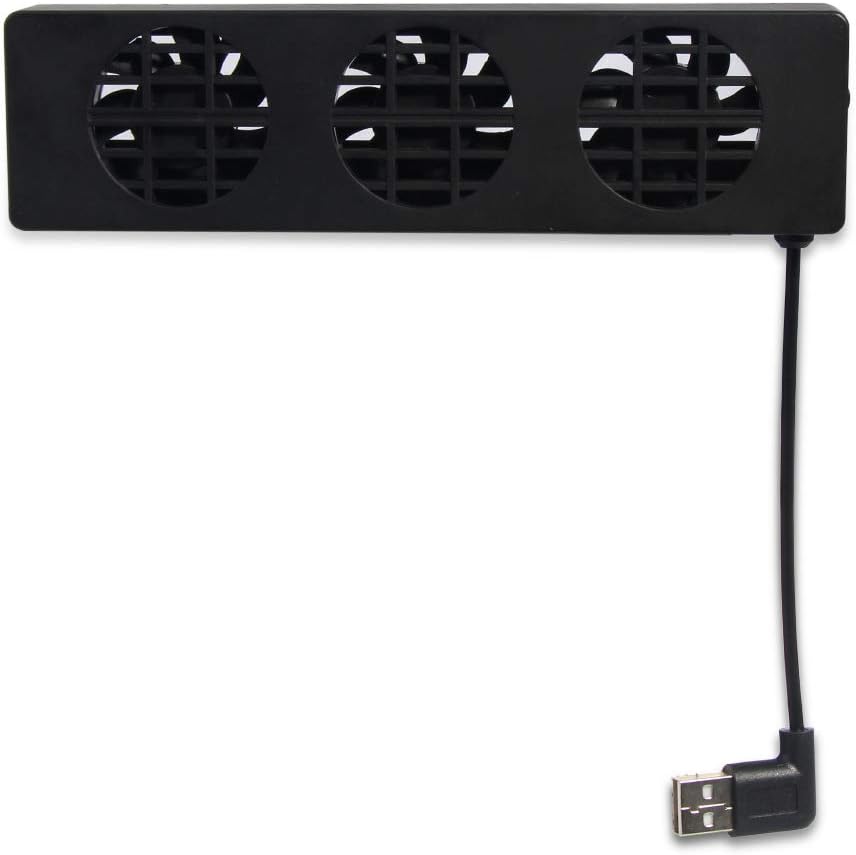
This USB cooling fan base includes three internal fans that effectively dissipate heat to keep the console cool. It features a side switch to toggle between turbo normal or off modes depending on your needs.
We may earn a commission when you buy through this link, at no additional cost to you.
Built from superior material it is durable enough for daily use and comes in a small compact design for easy setup. The three fans provide strong ventilation that reduces temperature quickly during long sessions.
The external cooling bracket is designed to work with the dock and USB power makes connection straightforward. It balances performance and size so it does not clutter your entertainment area.
Buy this if you need reliable multi fan cooling at a simple price point. It keeps the system cool and offers durable construction for consistent protection over time.
Three fans inside the bracket move more air than single fan units to improve heat dissipation across the console.
Made from superior materials the unit resists wear and tear ensuring it lasts through many hours of daily gaming.
We may earn a commission when you buy through this link, at no additional cost to you.
This dock features three built in fans that provide powerful ventilation to reduce console temperature quickly. It uses a USB port on the dock for power so no extra supply is needed.
We may earn a commission when you buy through this link, at no additional cost to you.
A side switch lets you choose between turbo for heavy gaming or normal for lighter sessions. The compact size and shape make it easy to carry and store when not in use at home.
While it has a lower rating it still delivers effective cooling by increasing airflow to the console. This helps prolong the lifespan of the games host by keeping temperatures within safe ranges.
Choose this if you want affordable multi fan cooling for your dock. It offers strong ventilation and portability for casual or hardcore gaming setups.
Turbo normal and off switch options let you match fan performance to your game intensity and noise tolerance.
Small size and shape make it simple to store in a bag or case when traveling or storing the console.
We may earn a commission when you buy through this link, at no additional cost to you.
This cooling fan fits the Switch original dock and lowers temperature to prevent unexpected pauses. It includes an LED display showing real time fan speed RPM and exhaust temperature for easy monitoring.
We may earn a commission when you buy through this link, at no additional cost to you.
Speed adjustment ranges from 510RPM to 6000RPM so you can balance cooling needs with noise preferences. Running below 2400RPM it stays nearly silent which is great for quiet rooms.
The package includes a Micro USB cable fixed stabilizer pad and joystick caps for stable placement and console protection. It is made of high quality material and comes with a lifetime warranty for added peace of mind.
Buy this if you want reliable cooling with visible temperature readouts at a low cost. It keeps your system cool and avoids overheating during long gaming sessions.
LED display shows exact fan speed and exhaust temperature so you can adjust settings with full awareness.
Fixed stabilizer pad prevents slipping and scratches to keep the console safe while the fan runs.
We may earn a commission when you buy through this link, at no additional cost to you.
This black cooling fan is designed specifically for the Switch OLED model dock to improve heat dissipation. It offers a sleek look that matches darker gaming setups while providing necessary ventilation.
We may earn a commission when you buy through this link, at no additional cost to you.
Compatibility with the OLED dock ensures it fits well without requiring extra modifications or adapters. The cooling fan helps maintain system stability during extended play to avoid thermal throttling or shutdowns.
While product details are limited its targeted design for the OLED dock suggests reliable fit and function. The black finish provides a clean and professional appearance for your entertainment area.
Choose this if you prefer a dark colored accessory for your OLED dock. It offers targeted cooling that keeps the console protected while looking good on your shelf.
Tailored for the OLED dock ensures proper alignment and secure placement without gaps or wobble.
Black finish matches darker consoles and media centers so it blends in seamlessly with your setup.
We may earn a commission when you buy through this link, at no additional cost to you.
Selecting the right cooling fan requires balancing performance size and compatibility with your specific Switch model. These factors help ensure effective heat dissipation without adding clutter or noise to your space.
Check whether the fan fits your original OLED or Switch 2 dock. Some products are made for specific dock versions so verify this before buying.
Matching the correct model ensures a secure fit and reliable cooling without interfering with other ports or power.
Look for adjustable speed settings or multiple fan units to match your cooling needs. Higher RPM usually means better airflow but may increase noise during use.
Adjustable options let you find a balance between quiet operation and strong heat removal during long gaming sessions.
Most fans use the dock's USB port or a Type-C Micro USB cable for power. Ensure your setup has a free port and the right cable length.
A built in power option simplifies installation and reduces cable clutter around your entertainment setup.
Fans that run below 2400RPM tend to be nearly silent while higher speeds produce more audible noise. Consider your room environment when choosing fan performance.
Choose lower speeds for quiet rooms or reserve high speed for intense gaming when noise matters less.
ABS plastic and durable materials keep the unit lightweight and resistant to wear. A compact design helps save space on your TV stand.
Durable build quality ensures the fan lasts through daily use without breaking or becoming unstable during operation.
Some coolers include card slots LED displays RGB lights or joystick caps. These extras add value if you want organized storage or visual customization.
Prioritize features you will actually use so you do not pay for extras that do not improve your experience.
Check for lifetime or multi-year warranties that cover quality issues and customer service response times. Reliable support helps if you face any installation or performance problems.
A strong warranty shows confidence in the product and gives you peace of mind for your purchase.
Read ratings and user comments to gauge real-world reliability and performance. Look for patterns in feedback about noise cooling and durability.
Higher rated products often indicate better quality and customer satisfaction for your specific dock type.
Start by ensuring your dock is unplugged before attaching the fan to avoid power issues. Align the fan with the back or side ports and secure it using any included stabilizer pads.
Connect the power cable to the dock USB port or use the included Type-C Micro USB cable. Turn on the fan using its control switch and select a speed that matches your room and noise preferences.
Regularly clean dust from the fan blades and vents with a soft brush to maintain airflow efficiency. Check the cable and connections occasionally to ensure they stay secure during gameplay.
Using an approved fan accessory does not typically void the warranty as long as it does not damage the dock hardware. Always follow installation instructions carefully to avoid physical harm to your console.
Many fans run nearly silent below 2400RPM but higher speeds can produce audible fan noise. Choose a model with adjustable speeds to balance cooling power and quiet operation.
Yes most fans draw power from the dock USB port and allow simultaneous charging. This setup ensures your console stays cool while maintaining battery levels during docked play.
Most models power directly from the dock USB port so no extra outlet is needed. Some use included Micro USB or Type-C cables that connect to the dock.
Not all fans fit both dock versions so check compatibility carefully before purchasing. Some are made for original docks while others are designed for OLED models.
Clean the fan monthly with a soft brush to remove dust buildup and maintain performance. Regular maintenance helps ensure consistent cooling and reduces the risk of overheating.
No drivers are required for plug and play fans. Just connect the power cable and use the physical switch to turn it on.
Fans with high RPM and adjustable settings are best for long sessions to prevent overheating. Look for models with stable pads and durable build to handle extended use.
This guide reviewed ten reliable cooling fan options to help you protect your Switch during long play. The top picks offer different strengths from LED displays to triple fan setups to match your needs.
Prioritize your console model and cooling needs first then consider extra features like card slots or RGB lights. A good fan prevents thermal throttling and keeps your system stable for hours.
Prices and availability change often so check current listings before completing your purchase. The right cooling fan will extend your console life and ensure smooth gameplay every time.