
Thames & Kosmos My Robotic Pet
4.1Editor score
Screen-free color sensor coding
Buildable robotic reptile design
Three unique play modes included
Explore our expert guide comparing the top ten coding toys for kids in October 2026. We evaluate features, ease of use, and educational value to help you
Coding toys have revolutionized how children learn technology by turning abstract programming concepts into tangible play. These devices encourage logical thinking, problem-solving, and creativity without requiring heavy screen time. Whether you are looking for a simple programmable mouse or an advanced robot, there is a perfect fit for every age group.
We evaluated the leading options on the market today based on durability, educational value, and user feedback. Our comparison considers screen-free options alongside app-based solutions to ensure a balanced selection. Each product was analyzed for its ability to teach sequencing, loops, and algorithms effectively through hands-on interaction.
Each pick in this guide highlights specific strengths and ideal use cases for different learners. We aim to provide clear insights so you can make an informed decision for your child. Please note that product availability and pricing can change frequently over time.
4.1Editor score
4.6Editor score

4.6Editor score
This side-by-side comparison highlights the key specifications and unique features of each selected coding toy to help you find the right match for your child learning needs.




This robotic chameleon offers a unique entry point into coding without screens. Rated 4.1 stars, it combines building with programming through physical action cards. Kids can assemble the reptile and then program it using colored cards to control movement.
We may earn a commission when you buy through this link, at no additional cost to you.
The standout quality is the color-sensing technology that allows the robot to react to its environment. It features three distinct play modes including coding wild and pet interactions. The manual guides users through assembly and explains the engineering concepts behind the design.
One trade-off is the assembly time which might require adult supervision for younger children. Additionally, the coding logic is simpler compared to app-based robots. However, this makes it ideal for introducing basic sequencing concepts without overwhelming screen time.
This toy is perfect for children who enjoy tactile building and hands-on science. It serves as a great starter kit for understanding sensors and feedback loops. We recommend it for families seeking an affordable screen-free STEM option.
The color action cards provide a tactile way to teach logic without needing a tablet.
The included manual explains how nature inspires engineering designs for deeper learning.
We may earn a commission when you buy through this link, at no additional cost to you.
The mBot is a highly rated robot that bridges the gap between play and serious programming. With a 4.6 rating, it supports coding from Scratch to Arduino which grows with the child. The kit is designed to be built quickly yet remains robust.
We may earn a commission when you buy through this link, at no additional cost to you.
Key strengths include the compatibility with over 100 electronic modules and LEGO parts. This allows for endless customization and expansion of the robot capabilities. The software ecosystem includes multiple apps for remote control and visual programming tasks.
A trade-off is the requirement for separate batteries which are not included in the box. The complexity might also be a hurdle for very young coders without guidance. However, the scalability makes it a long-term investment for engineering learning.
This robot is ideal for older kids ready to explore more advanced coding concepts. It works well for classroom settings or dedicated STEM hobbyists. We recommend it for families wanting a robust and expandable robotics platform.
Students can progress from visual blocks to text-based code as they advance.
Connectivity with LEGO and extra modules allows for complex custom projects.
We may earn a commission when you buy through this link, at no additional cost to you.
This tiny robot packs a surprising amount of functionality into a ping pong ball size. Rated 4.6 stars, it offers a fun entry point into coding and gaming for teens. It can be controlled via Bluetooth using various drive modes.
We may earn a commission when you buy through this link, at no additional cost to you.
The key strengths include the ability to code using JavaScript or drag and drop blocks. It comes with cones and pins to set up obstacle courses right out of the box. The Sphero Play app turns it into a controller for arcade games.
One trade-off is the reliance on a smartphone which might detract from screen-free goals. The battery life is limited to about one hour of play time. Despite this, its portability makes it excellent for travel or limited space.
This toy is best for kids who enjoy gaming and quick coding challenges. It is perfect for learning JavaScript basics in a fun context. We recommend it for families with mobile devices looking for a small robot.
The robot doubles as a game controller for fun arcade style mobile games.
Supports both block-based and JavaScript coding for different skill levels.
We may earn a commission when you buy through this link, at no additional cost to you.
This robot mouse is designed specifically for young children starting their coding journey. With a 4.5 rating, it teaches sequencing and logic using simple physical buttons. The set includes enough pieces to build a large maze for extended play.
We may earn a commission when you buy through this link, at no additional cost to you.
The primary strength is its ability to teach programming basics without any screen involvement. Kids can create paths using coding cards and watch the mouse navigate the maze. It includes walls and tunnels to add complexity to the challenge.
A limitation is the simplicity of the coding which may grow boring quickly for older kids. The battery usage requires a few AAA batteries which are not included. However, for preschoolers it provides a safe and engaging introduction to logic.
This toy is ideal for children ages four and up or early education settings. It helps build confidence through immediate physical feedback. We recommend it for parents looking for a gentle entry into STEM education.
The included grids and walls allow children to design their own coding courses.
The button interface directly teaches the concept of ordering commands logically.
We may earn a commission when you buy through this link, at no additional cost to you.
This mechanical robot kit focuses on engineering principles as much as coding. Rated 4.5 stars, it allows kids to build a machine that can throw lift and kick. The coding is done by snapping buttons onto a wheel to select actions.
We may earn a commission when you buy through this link, at no additional cost to you.
The standout feature is the focus on mechanical engineering rather than just electronic programming. It requires significant assembly time which teaches patience and attention to detail. The robot can draw and lift items using its physical structure.
The complexity might be a barrier for younger children who prefer instant play. It requires multiple hours of build time which some might find demanding. However this deep engagement is exactly what makes it valuable for future engineers.
This toy is best for kids aged ten and older who enjoy building complex sets. It bridges the gap between simple toys and real mechanical systems. We recommend it for those wanting a serious engineering experience.
The wheel system simplifies logic while keeping focus on physical mechanics.
The long assembly time ensures kids understand how mechanical parts interact.
We may earn a commission when you buy through this link, at no additional cost to you.
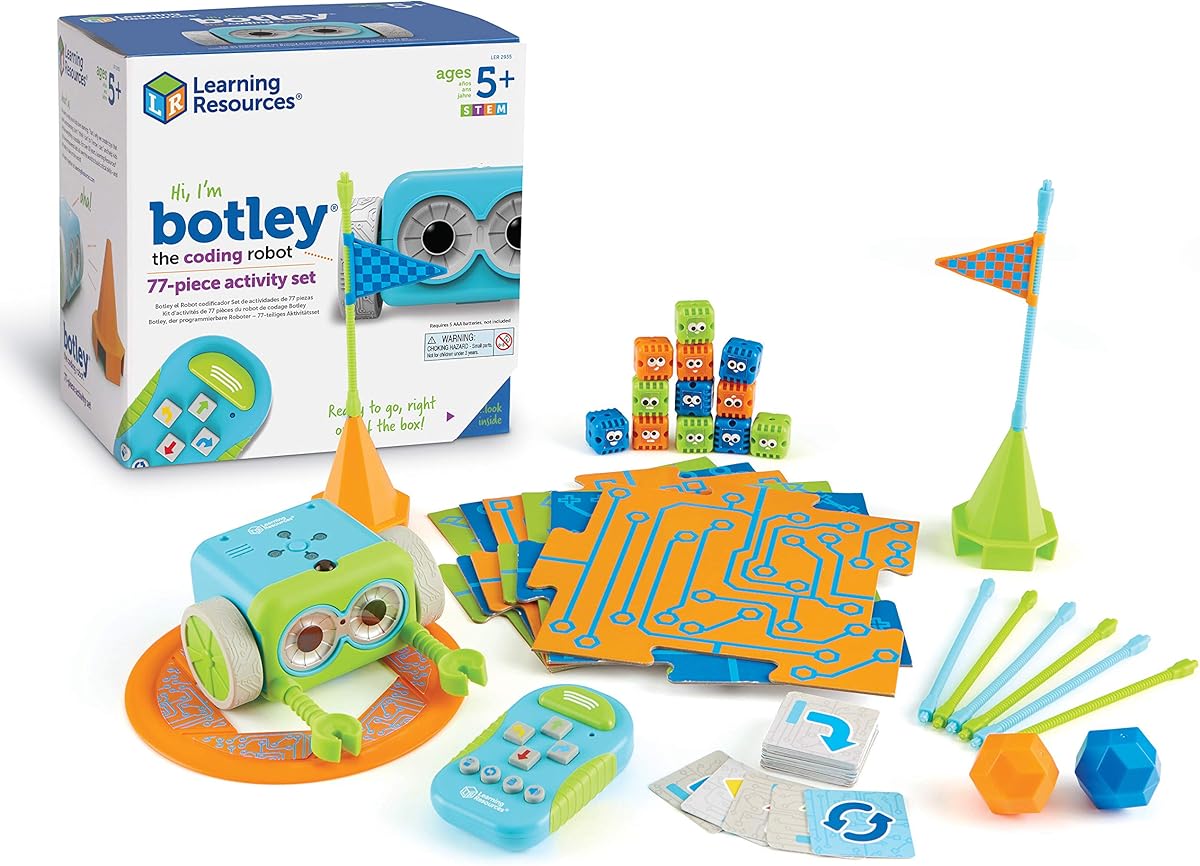
Botley is a top rated robot that eliminates screens entirely from the coding process. With a 4.6 rating, it uses a physical remote programmer to send commands to the robot. The 77-piece set includes obstacles to build challenging courses.
We may earn a commission when you buy through this link, at no additional cost to you.
The key strength is the total lack of screen dependency making it ideal for homes limiting devices. It can detect objects and avoid them allowing for more dynamic interaction. Hidden features add an element of discovery for curious kids.
One trade-off is the reliance on batteries for both the robot and remote unit. The remote programming logic might feel less flexible than app-based coding. Yet the physical interaction reinforces logic concepts very clearly for young minds.
This toy is perfect for families prioritizing screen-free time for their children. It works well for group play and classroom rotations due to its robust design. We recommend it as a top choice for screen-free coding.
The dedicated remote sends commands directly ensuring no need for a phone.
Object detection lets the robot react to its environment independently.
We may earn a commission when you buy through this link, at no additional cost to you.
This kit is designed to grow with a child offering five distinct skill levels. Rated 4.6 stars, it includes color markers for screen-free coding and app options for deeper learning. The Evo robot is built to withstand classroom environments.
We may earn a commission when you buy through this link, at no additional cost to you.
The main strength is the access to over 700 free lessons covering multiple subjects. It supports both Color Code and Blockly coding to suit different learning styles. The case helps keep markers organized for busy educational settings.
A trade-off is the higher cost compared to simpler toys. The reliance on markers means they may run out over time. However the educational depth makes it a strong long-term investment for serious learners.
This kit is ideal for educators or parents committed to extended coding education. It bridges early play with structured curriculum effectively. We recommend it for schools and serious home STEM programs.
Seven hundred free lessons provide structured curriculum for long term use.
Supports both marker drawing and digital programming for flexibility.
We may earn a commission when you buy through this link, at no additional cost to you.
Botley 2.0 builds on the original with more advanced sensing and movement features. It a 4.5 rating, it allows for 45 degree turns and more complex paths. The kit includes a remote and 78 pieces for building custom challenges.
We may earn a commission when you buy through this link, at no additional cost to you.
The key upgrade is the object-sensing technology which lets the robot react to its path. This adds depth to problem solving compared to basic line following. The lights and sounds add a multisensory layer to the play experience.
A limitation is the cost which is higher than simpler coding toys. The reliance on batteries for operation can be a maintenance concern. However the added complexity justifies the upgrade for experienced young coders.
This toy is best for children who have mastered basic coding concepts. It offers enough depth to keep older kids engaged. We recommend it for those ready for a more complex screen-free robot.
The 45 degree turns allow for more realistic movement paths.
Sixteen secret code combinations add an element of discovery and fun.
We may earn a commission when you buy through this link, at no additional cost to you.
Dash is a fully ready robot that requires no assembly out of the box. It has a 4.6 rating and is popular for its ability to sing dance and interact with voice commands. It connects to tablets for app-based coding activities.
We may earn a commission when you buy through this link, at no additional cost to you.
The main strength is its expressive personality which makes coding feel like playing with a friend. It has a long battery life of up to five hours allowing for extended sessions. The app ecosystem provides varied challenges for users.
A trade-off is the requirement for an iPad or Android device to unlock features. The price is higher than simple toys but justified by the interactive hardware. It excels as a companion for expressive and social coding play.
This toy is ideal for kids who want a robot that acts like a pet. It is perfect for interactive storytelling and performance based coding. We recommend it for families wanting a lively and responsive robot.
Kids can teach Dash to respond to voice commands for interactive fun.
The robot can sing dance and make sounds to create engaging stories.
We may earn a commission when you buy through this link, at no additional cost to you.
This robot is specifically designed for toddlers ages three to five to learn early programming. With a high 4.7 rating, it offers a screen-free experience with interactive maps and recording. Kids can record their own voice to control the robot.
We may earn a commission when you buy through this link, at no additional cost to you.
The key strength is the storytelling focus which helps develop language skills alongside logic. It works with Lego blocks and supports multiple languages for diverse households. The touch controls are simple enough for preschoolers to manage.
A limitation is that older kids might find it too basic after a few months. The map setup is needed for coding which adds steps. However for early learners it provides an excellent foundation for cognitive skills.
This toy is perfect for preschoolers learning basic sequencing and vocabulary. It is also noted as a great tool for children with specific learning needs. We recommend it for families seeking a toddler-friendly STEM toy.
The robot can play back recorded stories and commands for immersive play.
Simple touch controls make it safe for preschool hands to manage.
We may earn a commission when you buy through this link, at no additional cost to you.
Choosing the right coding toy depends on age, screen limits, and desired learning depth.
Coding toys are often designed for specific age ranges to match cognitive development. Younger kids need simple buttons and physical feedback while older ones can handle text-based coding. Check the recommended age to ensure the child can engage safely.
Always verify the age rating to prevent frustration or safety issues during play.
Some parents prefer screen-free options that use physical cards or remotes to teach logic. Others favor app-based robots that allow deeper programming like JavaScript or Python. Decide based on your family screen usage rules and goals.
Balance physical and digital tools to match your child learning learning style and screen limits.
Some kits require significant build time which teaches mechanical skills but needs patience. Others come pre-assembled for immediate play. Consider if you want a building project or instant coding action.
Choose pre-assembled for quick fun or build kits for deeper engineering lessons.
Many robots require disposable batteries which adds to the cost over time. Rechargeable models reduce waste but add to the initial price. Check what power source is needed for the specific robot.
Account for battery costs and availability when comparing long-term value.
Some toys focus on sequencing and loops while others teach variables and functions. Look for kits that grow with the child to provide lasting value. Comprehensive lesson libraries add significant educational benefits.
Select robots that offer progressive challenges to keep kids engaged longer.
Classroom or heavy use requires robust materials like metal or reinforced plastic. Check for warranty information and user feedback on durability. A sturdy robot withstands drops and rough handling better.
Prioritize durable construction to ensure the toy lasts for years of use.
Some robots work with standard building bricks or extra modules for expansion. This allows for more complex setups and creativity. Check if the system is open-source or proprietary before buying.
Choose compatible systems to expand play options as skills improve over time.
Start by reading the manual to understand the coding commands and assembly steps. Many kits include guides that teach basic logic concepts which are helpful for first-time users.
Store components like cards, tiles, and robots in a dedicated box to prevent losing pieces. Loose parts can interrupt play sessions and frustrate children trying to build mazes.
Keep electronic contacts clean and dry to ensure proper battery function. If using rechargeable models, charge fully before extended play to avoid interruptions during coding sessions.
Coding toys are educational devices that teach children programming logic through play. They use buttons, apps, or physical cards to control robots or machines. This makes learning algorithms and sequencing fun and interactive.
Some coding toys are completely screen-free using physical remotes or cards for input. Others require tablets or phones for app-based coding. Always check the product description to match your screen usage needs.
Children as young as four can start with simple button-based toys. More complex programming like Scratch usually starts around age eight. Begin with age-appropriate kits to avoid frustration.
Many modern robots connect via Bluetooth to tablets for app control. However screen-free options exist for those avoiding screens. Verify connectivity options in the product specs before buying.
They teach problem-solving, logical thinking, and sequential planning. Kids learn to break complex problems into smaller steps. This helps with math and reading skills as well as engineering.
Yes, many are designed for group work and STEM centers. They include durable materials and lesson guides for teachers. Look for kits with multiple obstacle pieces for group rotations.
We recommend the Botley set for screen-free families and the Ozobot Evo for structured learning. The Thames & Kosmos pet offers an affordable entry point for young builders.
Prioritize durability and compatibility if you plan to expand your child STEM collection over time. Choosing the right mix of physical and digital tools helps maintain long-term interest.
Always verify current stock and prices before purchase as availability changes often. We hope this guide helps you find a fun and educational coding toy for your child.