
Amzboy 15.6” Laptop
4.8Editor score
Quiet fanless design
Full HD display
Fast Type-C charging
Finding a cheap laptop for recording music requires balancing affordability with enough power to run digital audio workstations smoothly. You need reliable processing and low latency to avoid crashes during sessions.
We evaluated ten affordable models based on their processors, memory, storage speed, and connectivity options essential for musicians. Each candidate was reviewed against real-world music production demands to ensure practical value.
Every pick highlights specific strengths like RAM capacity or port selection for audio interfaces. Prices and stock change frequently so verify current details before purchasing to match your budget needs accurately.
4.8Editor score

5.0Editor score
4.3Editor score
As an Amazon Associate we earn from qualifying purchases.
This table compares all ten laptops side by side focusing on core specs needed for music creation including RAM, storage type, and processor speed for efficient workflow.



This model stands out for its surprising memory capacity which helps with running multiple tracks. Its high rating reflects consistent daily use without lag during standard recording sessions.
We may earn a commission when you buy through this link, at no additional cost to you.
The 12GB RAM allows smoother multitasking than typical budget devices. Combined with a responsive SSD startup times remain fast even when opening large audio projects regularly.
However the Pentium processor may struggle with complex plugins or heavy effects chains. Storage is limited but the upgrade slot lets you add more space for sample libraries later.
Ideal for beginners starting a home studio on tight budgets. It offers enough power for entry level recording and mixing with room to grow storage as your library expands.
Having 12GB RAM prevents bottlenecks when switching between your DAW browser and reference monitors efficiently.
The M.2 slot allows you to upgrade to a 1TB drive easily for storing large sample packs or project files.
We may earn a commission when you buy through this link, at no additional cost to you.
This Chromebook is built for mobility and basic audio recording tasks like voiceovers. Its dual array mics provide decent audio capture without external gear for simple inputs.
We may earn a commission when you buy through this link, at no additional cost to you.
The extended battery life supports long recording sessions away from power sources. However storage and memory are minimal limiting complex music production capabilities significantly.
While great for field recording or demos it lacks power for full studio work. Chrome OS also restricts native software choices making it best for cloud based tools.
Choose this if portability is your main priority for capturing ideas on the go. It serves well for podcasting or voice memos but not heavy audio editing tasks.
Dual digital microphones capture clear audio for voice notes without needing an external microphone for quick drafts.
Up to thirteen and half hours of streaming or light work means you can record anywhere without hunting outlets.
We may earn a commission when you buy through this link, at no additional cost to you.
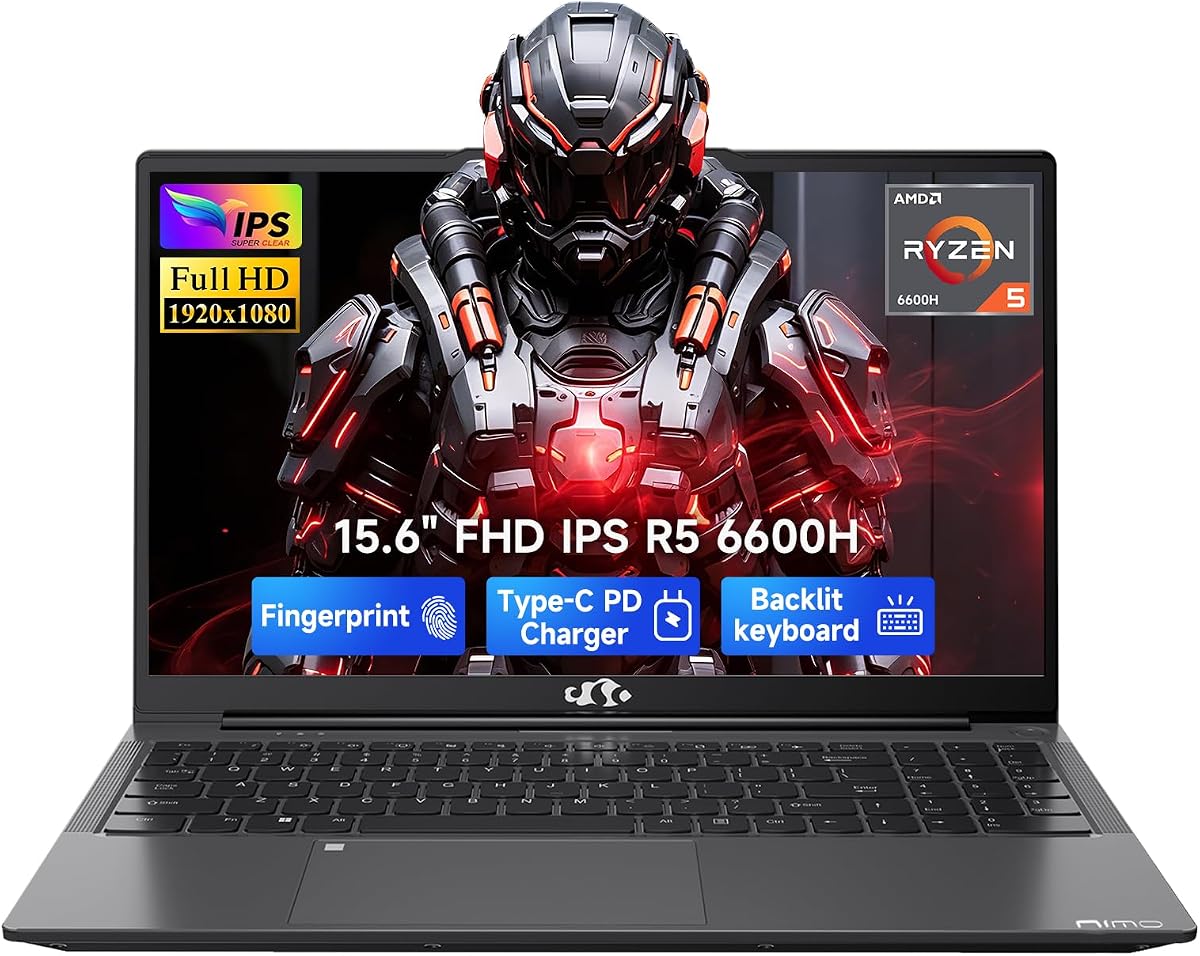
This laptop offers significantly more power than typical budget devices with a Ryzen processor and DDR5 memory. It handles complex DAW sessions with ease reducing latency during recording and mixing.
We may earn a commission when you buy through this link, at no additional cost to you.
The 16GB RAM ensures smooth operation even with many virtual instruments running. A large SSD provides quick load times for projects and samples essential for productive workflow.
Though more expensive than other picks it is a solid investment for growing musicians. The build quality includes useful features like a fingerprint reader and backlit keys for comfort.
Best suited for users needing performance headroom for advanced production work. It balances price and power better than entry level options for professional home studio setups.
Six cores deliver sustained performance for heavy plugins without thermal throttling during long mixing sessions at home.
DDR5 RAM improves data throughput allowing faster processing of audio streams compared to standard DDR4 laptops.
We may earn a commission when you buy through this link, at no additional cost to you.
This model matches the first pick with 12GB RAM making it great for handling multiple applications. The anti-glare screen reduces eye strain during late night mixing sessions at home.
We may earn a commission when you buy through this link, at no additional cost to you.
A privacy slider adds security during video calls or client meetings. USB connectivity is robust allowing direct connection to external monitors or audio interfaces without dongles.
Storage is modest but enough for essential tracks and software. The processor is adequate for basic recording but heavy mastering tasks may require upgrades later.
Choose this for students or remote workers needing a versatile machine. It fits well into a studio setup while keeping daily tasks responsive and reliable.
Anti-glare coating protects eyes during long mixing sessions in various lighting conditions comfortably.
Physical camera slider adds peace of mind when working remotely with sensitive audio files.
We may earn a commission when you buy through this link, at no additional cost to you.
This portable laptop shines with a vivid 100% sRGB display for accurate color work. It offers enough performance for simple editing and sketching ideas while remaining light to carry.
We may earn a commission when you buy through this link, at no additional cost to you.
Bluetooth 5.2 ensures stable wireless connections for headphones or controllers. A privacy slider adds security which is useful when working in public spaces like cafes.
However 8GB RAM restricts running heavy plugins alongside other apps. For serious music production you might need to close other programs to avoid slowdowns during recording.
Ideal for traveling musicians needing a backup machine. Its sleek design and modern connectivity make it a strong choice for light production tasks on the go.
Full sRGB gamut ensures visuals are true for media planning and video audio sync work.
Bluetooth 5.2 provides faster pairing and lower power drain for wireless peripherals.
We may earn a commission when you buy through this link, at no additional cost to you.
With 256GB storage this model offers double the space for samples and projects. Combined with 12GB RAM it provides a solid foundation for medium complexity music work.
We may earn a commission when you buy through this link, at no additional cost to you.
The ergonomic keyboard improves typing comfort for long session logging or notes. WiFi 5G support ensures stable internet for cloud backups or collaboration calls.
Battery life is average so expect to plug in during heavy workloads. Still the increased storage makes it a better value for users with large media libraries.
Best for producers needing space for libraries without paying for external drives. It balances budget and storage needs effectively for home studio use.
256GB allows storing hundreds of tracks and sample packs without immediate upgrades.
5G WiFi ensures faster data transfers for uploading large audio files or streaming.
We may earn a commission when you buy through this link, at no additional cost to you.
Quiet performance is a major plus here allowing you to focus on audio without fan noise interference. With 12GB RAM it handles multitasking smoothly for daily tasks.
We may earn a commission when you buy through this link, at no additional cost to you.
The 256GB SSD provides fast access to projects and samples. Connectivity options cover essentials like HDMI and USB for connecting external monitors or interfaces easily.
Performance is adequate for entry level recording but not heavy processing. Still the quiet nature makes it friendly for shared living spaces or home offices.
Good for podcasters or voice artists prioritizing silence. It delivers a clean workspace for recording sensitive audio without background noise.
Quiet hardware helps prevent fan noise from bleeding into sensitive vocal recordings.
Multiple USB and HDMI ports simplify setup for external audio interfaces and monitors.
We may earn a commission when you buy through this link, at no additional cost to you.
This device prioritizes storage with 256GB included which helps with sample-heavy workflows. The screen supports full color gamut making it suitable for visual planning too.
We may earn a commission when you buy through this link, at no additional cost to you.
Connectivity is robust with USB-C and HDMI ports available for peripherals. A privacy slider offers security during client sessions without compromising ease of use.
RAM is limited to 8GB so heavy multitasking may cause slowdowns. Still it remains a budget-friendly option for producers needing storage space.
Choose this for its storage value at this price point. It handles basic recording well but may require cloud services for larger file management.
100% sRGB ensures accurate visuals for media sync work during audio production.
Physical slider allows quick webcam cover for privacy during video calls.
We may earn a commission when you buy through this link, at no additional cost to you.
This model is the absolute budget king with a fanless design that ensures zero fan noise during recording. It is lightweight enough for on-the-go use in cafes.
We may earn a commission when you buy through this link, at no additional cost to you.
Type-C PD charging simplifies travel with one cable for laptop and phone. The display provides crisp visuals for tracking audio waveforms comfortably on screen.
Limitations include only 4GB RAM which restricts DAW complexity. Still it works well for voiceovers or simple beats where minimal resource usage is required.
Perfect for casual hobbyists or field recorders needing silent operation. It offers essential functionality at a very accessible price point for beginners.
No fan means zero noise interference during quiet vocal or acoustic recordings.
Type-C PD allows quick charging without bulky adapters keeping your travel kit minimal.
We may earn a commission when you buy through this link, at no additional cost to you.
Lightweight at 1.63kg this laptop is easy to carry to sessions. The Comet Lake processor delivers reliable responsiveness for daily music planning tasks.
We may earn a commission when you buy through this link, at no additional cost to you.
Security features like Kensington lock make it safe for public use. Windows 11 is pre-loaded providing a secure OS environment out of the box.
Storage expansion up to 512GB helps grow your library without external drives. Performance is steady for light tasks but heavy mixing needs more resources.
Great for commuters needing a secure reliable workhorse. It balances portability and basic functionality well for budget focused producers.
At 1.63kg this machine fits easily in a bag for daily transport.
Kensington lock allows physical security in public or shared office spaces.
We may earn a commission when you buy through this link, at no additional cost to you.
Choosing a laptop for music production involves balancing cost with technical specs that prevent audio dropouts.
The processor handles real-time audio processing. For music production choose a modern multi-core CPU to reduce buffer size and latency issues during recording.
Look for Intel Core i5 or AMD Ryzen 5 equivalents. Budget chips may struggle with complex effects chains or large track counts.
RAM stores active data for your digital audio workstation. Having enough memory prevents crashes when loading virtual instruments simultaneously.
Aim for at least 12GB or 16GB of RAM. 8GB is the minimum for light projects but may limit future expansion capabilities.
SSD speed impacts how fast your DAW loads projects and samples. Traditional hard drives can cause stuttering during playback.
Choose a laptop with an NVMe SSD. It ensures smooth streaming of audio files without interruptions during long sessions.
Ports are essential for connecting external audio interfaces. USB-C or USB 3.0 ports offer sufficient bandwidth for high-quality audio transfer.
Ensure there are multiple USB ports for peripherals. This reduces the need for adapters during complex home studio setups.
While most interfaces are external built-in microphone quality matters for quick demos. Look for dual array mics to reduce background noise.
Check headphone output quality for monitoring. High impedance support is ideal for professional studio headphones.
A 15.6-inch screen offers enough workspace for complex mixer views. Split screens help when referencing samples or lyrics.
IPS panels provide better color accuracy for visual planning. High resolution ensures waveforms are sharp during detailed editing.
Musicians often record in different locations. Lightweight laptops under four pounds make transport easy to studios or friends.
Battery life matters for field recordings away from power. Aim for at least eight hours of usage for flexibility.
Your music library will grow over time. Check if RAM can be upgraded or if there is a second M.2 slot.
Expandable storage ensures you don't need external drives immediately. Internal expansion is usually faster and more reliable.
Install your preferred Digital Audio Workstation software and configure audio drivers for low latency. Use ASIO drivers on Windows to minimize delays between input and output.
Keep your workspace cool since recording sessions can run hot for hours. Use a cooling pad to prevent thermal throttling that slows down performance.
Regularly back up your projects to cloud storage or external drives. Losing audio files to a single hardware failure can ruin your progress.
Yes many affordable laptops can run basic versions of DAWs like GarageBand or Reaper. Look for at least 12GB RAM and an SSD to ensure smooth operation without crashes.
For professional quality yes. Internal audio drivers have high latency. An external USB audio interface provides better inputs and lower delay for tracking vocals.
Start with at least 256GB SSD. Virtual instruments and multi-track sessions consume significant space. Expandable options help future-proof your setup.
Mac offers optimized audio drivers but costs more. Windows laptops with good hardware specs perform similarly if configured correctly with proper drivers.
DDR4 or DDR5 speeds above 2666MHz help. Higher speed memory improves data throughput for real-time processing but capacity matters more than speed.
It depends on the model. Some budget laptops have soldered RAM. Check specifications for upgradeable SO-DIMM slots before purchasing to ensure future options.
We found that the NIMO 15.6 AI Creator offers the best power while budget models like the Amzboy provide silent simplicity for field use.
Prioritize RAM and SSD speed over raw processor speed for most home studios to ensure smooth performance during complex mixing sessions.
Prices and availability change regularly so confirm current stock and warranty details before finalizing your purchase to secure the best deal.