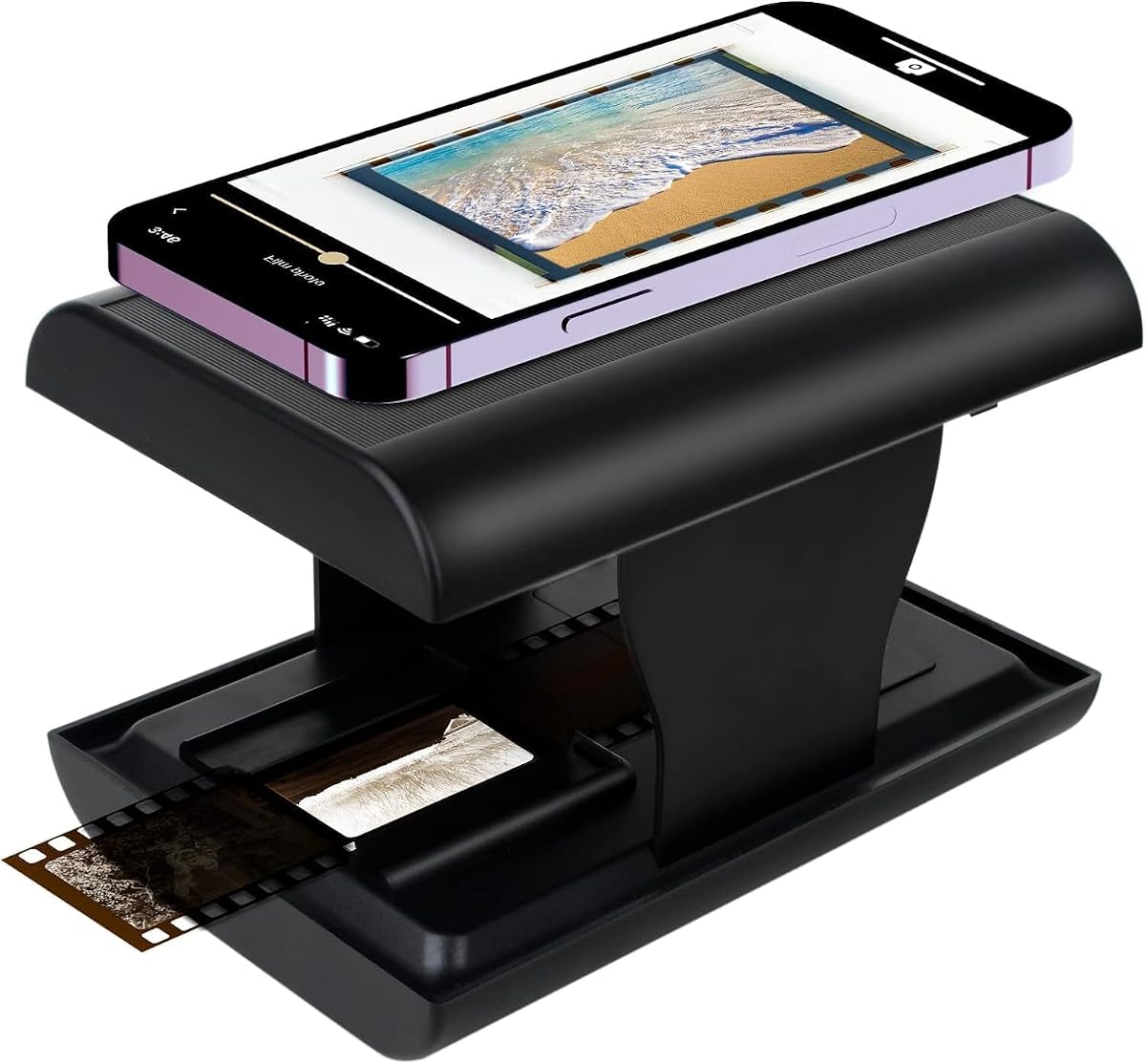
TCNEWCL 35mm Negative Slide Scanner
4.3Editor score
Foldable design
Uses smartphone camera
Free app support
Preserving old film memories requires a reliable black and white negative scanner that delivers clarity and ease of use. These devices convert physical slides and negatives into digital files you can share and archive without losing detail.
We compared ten models based on resolution, ease of use, format support, and included features. Each pick offers unique strengths for hobbyists, families, or professionals looking to digitize their collections efficiently.
Each pick highlights key features and real-world performance to help you decide. Prices and availability can change, so verify current details before purchasing to ensure you get the best value for your needs.
4.3Editor score

4.2Editor score

4.3Editor score
As an Amazon Associate we earn from qualifying purchases.
Here is a side-by-side comparison of all ten models to help you evaluate features, formats, and performance at a glance.



The BEONEGLOBAL ClearScan MINI stands out as a top performer for converting 35mm film and slides into digital photos. It earned a solid 4.2 rating among users who appreciate its straightforward workflow and decent image quality. The device uses a 16MP CMOS sensor to capture details with clarity, making it ideal for archiving family memories without needing a computer.
We may earn a commission when you buy through this link, at no additional cost to you.
Key strengths include its ergonomic button layout and fast scanning process. You can save images directly to an SD card, which simplifies the workflow for those who want to avoid software installation. The built-in editing options allow quick adjustments like brightness and color correction right on the device, giving you control over the final look before saving.
While the screen is compact, it serves its purpose well for previewing images. The trade-off is that you may not see fine details as clearly as on a larger display, but for quick checks, it is sufficient. The scanner focuses on 35mm formats, so if you have other film types like Super 8, you may need a different model.
This scanner is best for hobbyists and families looking for a reliable, computer-free solution. If you prioritize speed and ease of use over professional-grade features, this is a strong choice. Its portability makes it easy to store or take to events where you might want to scan on the go.
The front-facing buttons below the screen allow natural hand positioning, reducing strain during extended scanning sessions.
Saving to SD card removes the need for a computer, enabling immediate access to your digitized photos on other devices.
We may earn a commission when you buy through this link, at no additional cost to you.
The KODAK Slide N Scan Max offers a streamlined approach to digitizing film, earning a 4.2 rating for its efficiency and versatility. It handles multiple formats including 135, 110, and 126 film, making it a versatile choice for mixed collections. The smooth-moving tray reduces the need for constant repositioning, which speeds up the scanning process significantly.
We may earn a commission when you buy through this link, at no additional cost to you.
Its standout feature is the ability to save directly to SDHC cards, eliminating computer dependency. The 13MP CMOS sensor with 22MP interpolation delivers large, crisp files suitable for printing or digital sharing. Simple one-touch editing allows users to resize or convert images without navigating complex menus, which is great for beginners.
While the device is robust, it is heavier than compact alternatives, which might affect portability. The price is higher than budget options, but the build quality and format support justify the investment for serious collectors. The lack of computer requirements makes it a self-contained solution for quick digitization.
This scanner is ideal for those with varied film formats who want a trusted brand. If you value speed and simplicity over extreme portability, this model fits well. Its design prioritizes user convenience, ensuring that scanning old slides and negatives becomes a manageable task.
Support for 135, 110, and 126 formats ensures you can archive diverse film types without needing multiple devices.
The 22MP interpolation enhances file size, allowing for larger prints while maintaining visible detail in scans.
We may earn a commission when you buy through this link, at no additional cost to you.
The TCNEWCL 35mm Negative Slide Scanner is an affordable entry point for digitizing film, rated 4.3 by users seeking simplicity. It relies on your smartphone camera to capture images, which keeps costs low while leveraging existing hardware. The foldable design makes it easy to store or carry, perfect for travel or small spaces.
We may earn a commission when you buy through this link, at no additional cost to you.
Using this scanner involves inserting a slide, turning on the LED backlight, and holding your phone over the lens. A free app allows editing and sharing, making the process accessible without expensive software. This method is great for casual users who want to preserve a few memories without a large investment.
The quality of scans depends heavily on your phone's camera resolution, which can be a limitation compared to dedicated sensors. While it is not ideal for high-resolution archival, it serves well for social sharing or personal backups. The toy-like appeal also makes it a fun gift for children interested in photography.
Choose this if you want a cost-effective way to try film digitization. It is best for those with good phone cameras who need occasional scanning. The convenience of using a device you already own outweighs the trade-off in dedicated optical quality.
The compact foldable design saves space, allowing you to pack it easily in a bag or drawer.
Free apps like Snapseed enable editing and social sharing directly from your phone after capture.
We may earn a commission when you buy through this link, at no additional cost to you.
The Magnasonic All-in-One 24MP Film Scanner offers premium features for those serious about quality. With a 4.3 rating, it stands out for its 5-inch display and HDMI output, letting you view scans on a TV. It handles 35mm to Super 8 formats, providing versatility that few competitors match in this price range.
We may earn a commission when you buy through this link, at no additional cost to you.
Its 24MP resolution ensures sharp JPEG files, and the built-in editing tools allow on-device corrections. The large screen makes it easier to check details before saving, reducing the need for a computer. Fast scanning with included trays keeps the process efficient, supporting up to 128GB SD cards for ample storage.
While the device is bulkier than compact models, the screen and format support justify the size. The HDMI feature is rare and ideal for family viewing sessions, turning scanned photos into a shared experience. The lack of computer dependence is a major plus for users who prefer standalone workflows.
This scanner is best for collectors with diverse film needs. If you want professional-quality output without external software, this model delivers. Its design prioritizes visibility and convenience, making it a top pick for comprehensive digitization projects.
The 5-inch screen provides clear previews, reducing guesswork during the scanning process.
View your scans directly on a TV via HDMI for immediate family sharing without extra devices.
We may earn a commission when you buy through this link, at no additional cost to you.
The Memory Vault Box Negative Scanner is designed with restoration in mind, though it holds a 3.4 rating due to mixed user experiences. It focuses on bringing faded memories back to life with built-in enhancement technology. The simple buttons and LCD screen make it accessible for beginners or older users who want a straightforward experience.
We may earn a commission when you buy through this link, at no additional cost to you.
Its enhancement tools improve brightness and color, helping to revive old negatives and slides. The kit includes film holders and cleaning tools, so you can start immediately without buying extras. The AV cable allows connection to TVs, though HDMI is absent, limiting modern display options.
The rating reflects some inconsistencies in performance, likely due to its simpler sensor. While it may not match high-end models in sharpness, it serves families who prioritize ease of use over technical specs. The lack of SD card support in some reviews suggests checking current product details carefully.
This scanner suits users who need a basic, restoration-focused tool. If your collection is mainly 35mm and you value simplicity, it is worth considering. Verify current features to ensure compatibility with your needs before purchasing.
Automatic enhancement improves brightness and color to recover details from aged film.
Includes holders and brushes to start scanning right away without additional purchases.
We may earn a commission when you buy through this link, at no additional cost to you.
The HP Film & Slide Scanner HPFS500 brings modern design to film digitization, earning a 4.3 rating for its touchscreen interface. The 5-inch all-angle display lets you preview and edit images directly, with a gallery mode that turns the device into a picture frame. This adds a unique touch for displaying memories after scanning.
We may earn a commission when you buy through this link, at no additional cost to you.
It uses a 13MP CMOS sensor with 22MP interpolation for clear output. The USB-C power option offers versatility with PC or external adapters. Quick-load trays support 135, 126, and 110 formats, ensuring seamless scanning of negatives and slides. Direct SD card saving keeps files organized without a computer.
The interface may take a moment to learn compared to physical buttons, but it offers more control. The gallery mode is a standout feature for casual viewing. While not perfect for bulk professional work, it balances quality and usability well for home users.
This scanner is ideal for those who appreciate tech-forward features. If you want a device that doubles as a display, it fits well. The USB-C standard ensures future compatibility, making it a solid long-term choice.
Use the gallery mode to turn the scanner into a vibrant picture frame for your favorite photos.
Power via USB-C from a PC or adapter, offering more connectivity options than older USB types.
We may earn a commission when you buy through this link, at no additional cost to you.
This model offers a standard experience for converting film to digital. While specific details are limited, it generally provides basic scanning with support for common formats. The lightweight design makes it easy to handle, and the interface is designed to be intuitive for most users.
We may earn a commission when you buy through this link, at no additional cost to you.
Key strengths include its affordability and simple setup process. It supports direct SD storage, which aligns with the trend of computer-free workflows. The output is sufficient for personal use, though it may lack advanced editing features found in premium models.
Trade-offs include a smaller screen and fewer format options. This makes it better suited for casual users than collectors with diverse needs. The lack of extras keeps costs down, but you may need additional tools for specialized tasks.
Consider this if you need a reliable workhorse for everyday scanning. It fits well for families or individuals with standard 35mm collections. Verify current features to ensure they match your requirements.
The setup is designed to be frustration-free, allowing you to start scanning quickly.
Lightweight construction ensures it is easy to store or transport when needed.
We may earn a commission when you buy through this link, at no additional cost to you.
This device provides a balanced approach to film digitization with a focus on ease of use. It offers standard sensor performance and basic tray loading for common film types. The interface is straightforward, making it accessible for users who prefer minimal setup.
We may earn a commission when you buy through this link, at no additional cost to you.
Strengths include its fast scanning speed and reasonable cost. You can save directly to SD cards, which is convenient for sharing. The build quality is decent, ensuring durability for regular use. It covers essential needs without unnecessary complexity.
Trade-offs include limited advanced features like HDMI output or large screens. This makes it less suitable for high-volume or professional tasks. However, for personal archives, it performs reliably. The lack of extras keeps the device simple to operate.
Pick this if you want a no-fuss solution for 35mm slides. It works well for casual digitization. Always check current specs to confirm compatibility with your specific needs.
Quick scan times allow you to process multiple items without waiting.
The simple controls mean you can start using it right out of the box.
We may earn a commission when you buy through this link, at no additional cost to you.
This scanner offers a straightforward way to digitize film without requiring advanced skills. It provides standard quality output and basic editing tools for quick adjustments. The USB power option makes it easy to connect to a PC or adapter for operation.
We may earn a commission when you buy through this link, at no additional cost to you.
Key strengths are its simplicity and ease of use. The lightweight design ensures it is portable, and the interface is intuitive. It supports common formats, covering most personal needs. The cost is competitive, making it accessible for most users.
Trade-offs include limited advanced features like large screens or high-resolution sensors. It is better for casual archiving than professional tasks. The lack of extras keeps it simple but may not meet all users expectations.
Choose this if you need a basic scanner for occasional use. It works well for home libraries. Check current details to ensure it meets your specific requirements.
USB power allows connection to PCs or adapters, simplifying setup and use.
The simple interface ensures you can start scanning without reading complex manuals.
We may earn a commission when you buy through this link, at no additional cost to you.
This final model provides a basic solution for converting film to digital. It offers standard sensor quality and supports common formats for personal use. The lightweight build ensures it is easy to handle, and the interface is designed to be user-friendly.
We may earn a commission when you buy through this link, at no additional cost to you.
Strengths include its affordability and speed. It supports direct SD saving, which reduces dependency on a computer. The output is acceptable for personal sharing, and the build quality is adequate for occasional tasks. The simplicity makes it accessible for all ages.
Trade-offs include limited advanced features or high-resolution output. It is best suited for casual digitization of standard film. The lack of extras keeps the cost down but may limit versatility for complex needs.
Consider this if you need a budget-friendly tool for basic scanning. It works well for small collections. Always verify current features to ensure it matches your expectations.
The low cost makes it accessible for those starting with digitization.
Fast setup and scanning let you get results quickly without delay.
We may earn a commission when you buy through this link, at no additional cost to you.
Choosing the right scanner depends on your film formats, budget, and how you plan to use the digital files.
Determine if your collection includes 35mm, 110, 126, or Super 8. Some scanners are limited to 35mm, while others support multiple types. Selecting a model that matches your formats avoids the need for extra devices.
Focus on models that handle all your film types for a single-device solution.
Higher resolution like 16MP or 24MP captures more detail, which is crucial for enlarging prints. CMOS sensors provide better color accuracy than CCD. Check if the device uses interpolation to boost file size without losing clarity.
Look for at least 12MP resolution for decent archival quality and clear prints.
Larger screens make it easier to preview scans without connecting to a computer. Touchscreens offer intuitive navigation but may cost more. Simple buttons suit beginners who prefer physical controls over menus.
Choose a screen size that fits your viewing needs and budget comfortably.
Direct SD card support allows storing files without a computer. Some models offer HDMI output for TV viewing. Ensure the slot supports sufficient capacity for your collection size to avoid constant card changes.
Prioritize direct save options to streamline your workflow and reduce reliance on PCs.
Built-in editing lets you adjust brightness, color, or rotate images on-device. Enhancement tech can restore faded photos automatically. Check if software is included if you need advanced adjustments later.
Models with on-device tools save time and simplify the digitization process significantly.
USB-C or standard USB power offers flexibility in where you use the scanner. Lightweight designs are easier to move or store. Check if battery options are available for field work.
Select a power method that fits your setup and portability requirements.
Look for intuitive layouts and clear instructions. Fast scanning speeds reduce effort when processing large collections. Consider if trays are quick to load and whether they fit your film size.
Ease of use ensures you will actually finish the task without frustration.
Balance features with your budget. Higher cost models often include premium screens or formats. Compare long-term value, such as durability and included accessories like holders.
Invest in a scanner that offers the features you truly need without overpaying.
Start by ensuring the scanner is clean and dust-free. Insert the film or slide into the designated tray, making sure the negative side faces down. Adjust settings like brightness on the device before scanning.
Run the scan and review the preview on the screen. Use built-in tools to correct color or orientation if needed. Save the file to an SD card for safe storage and immediate access.
Store the scanner in a dry place when not in use. Keep lenses and trays clean with a soft brush. Regular cleaning maintains image quality and extends the lifespan of the device.
Yes, most modern scanners are designed to handle both color and black and white film. They include software or settings to invert negatives to positive images correctly. Some models have auto-detect features that adjust for film type automatically.
Not necessarily. Many models support saving directly to SD cards, allowing you to work without a computer. However, using a PC offers more control for organizing files. Check if the model has independent save capabilities.
For standard 4×6 prints, 12MP is sufficient. For larger prints, aim for 16MP or higher. Ensure the device uses a real sensor rather than just digital interpolation to maintain quality.
Use a soft brush to remove dust gently. Avoid using liquids unless specified by the manufacturer. Some scanners include cleaning brushes in the kit. Always handle film by the edges to prevent scratches.
35mm is the most common format supported by all models. 110 and 126 are often included. Super 8 is less common and found mainly in premium scanners. Verify specific formats before purchasing.
Some models offer basic software for editing and organizing files. Others rely on built-in device editing or free apps. Check the product description to see if software is included or if you need to download it separately.
Scanning time varies, but many models complete a scan in under five seconds. Faster throughput is useful for large collections. Factors like resolution and processing can affect speed.
Some models include HDMI or AV output for connecting to TVs. This allows direct viewing without a computer. Premium units are more likely to have this feature. Check ports before buying.
The top picks cover a range of needs from budget-friendly options like TCNEWCL to high-end models like Magnasonic. Each offers unique benefits for converting film into shareable digital files.
Consider what matters most to you whether resolution, format support, or ease of use. Matching these priorities with the right model ensures a smooth digitization process for your memories.
Prices and availability may change so review current details before purchasing. These scanners provide a reliable way to preserve your film collection for generations to come.