
Redragon S101-3 PRO Gaming Keyboard and Mouse
4.5Editor score
RGB backlit programmable keys
Dedicated macro record keys
Ergonomic wrist rest included
Discover the top keyboard and mouse combos optimized for Baldurs Gate 3 gameplay featuring performance comfort and customization for every type of player setup.
Finding the right input devices for Baldurs Gate 3 can transform your entire gaming experience from frustrating to immersive. A quality combo ensures your commands register instantly during critical combat moments while keeping your hands comfortable during long exploration sessions.
We compared ten real products based on durability responsiveness ergonomics and customization features relevant to role-playing games. Each entry offers unique strengths whether you prioritize budget friendly value wireless freedom or mechanical feel for precise tactical input.
This guide shows what makes each combo stand out for Baldurs Gate 3 play including lighting macro support and build quality. Remember that prices fluctuate regularly so check current listings before making your final purchase decision today.
4.5Editor score
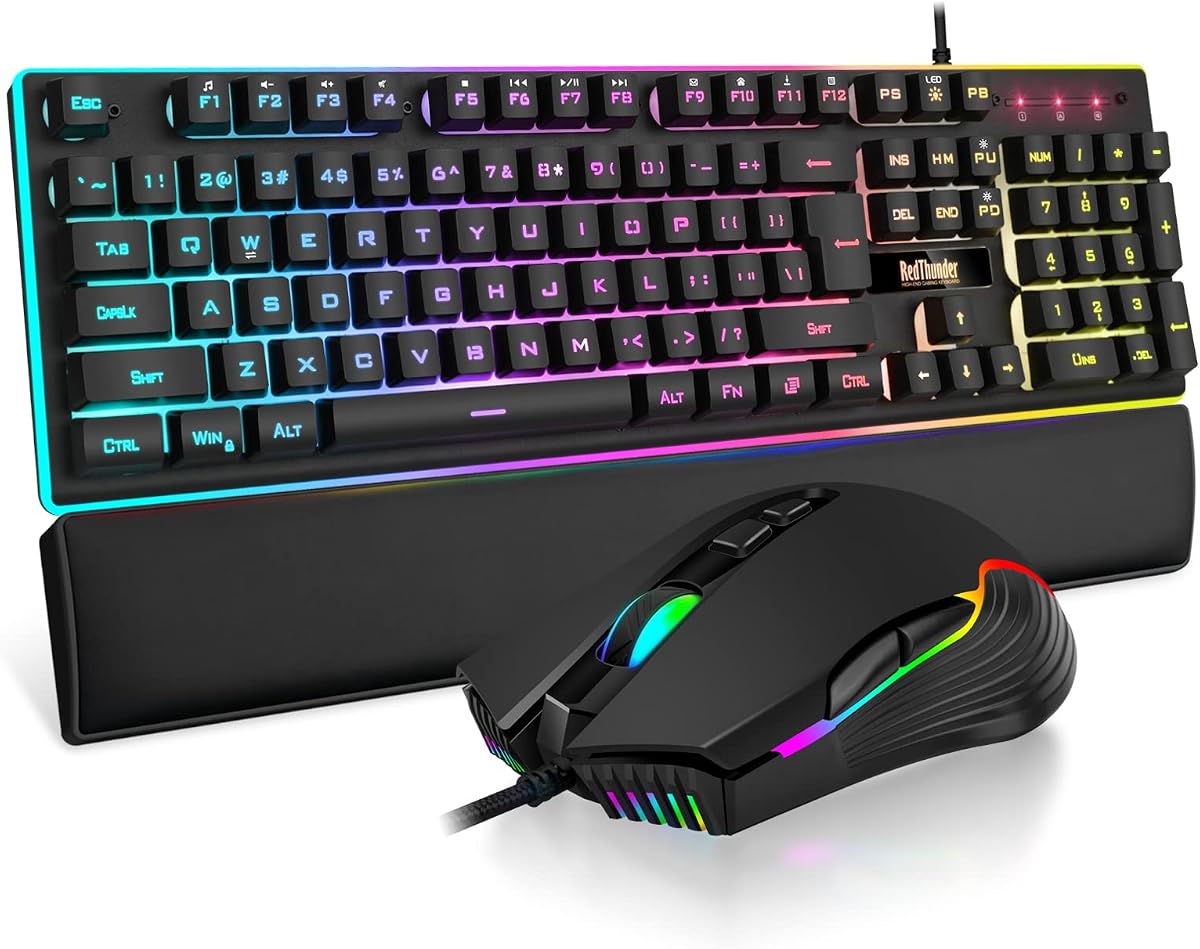
4.4Editor score
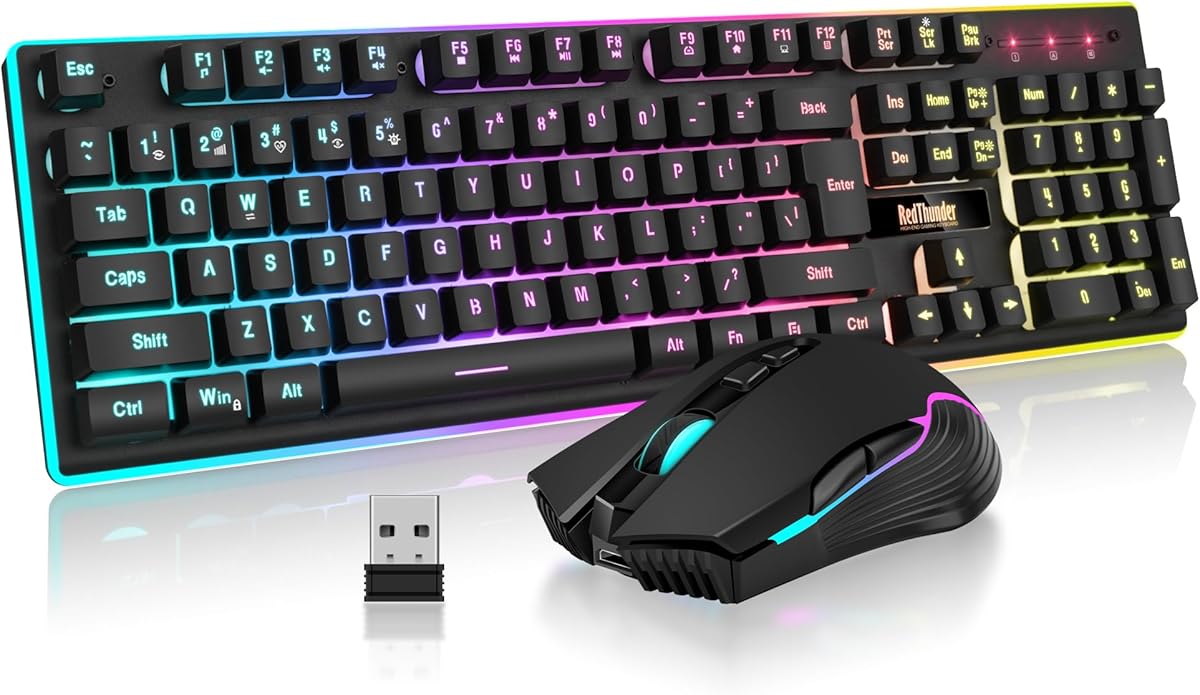
3.9Editor score
This side-by-side comparison highlights key specifications across all ten picks so you can quickly identify which features matter most for your Baldurs Gate 3 setup preferences and budget constraints.


The Redragon S101-3 PRO stands out as an all-in-one gaming solution for players seeking value without sacrificing essential features. This combo offers premium RGB backlighting and macro support at a budget friendly price point ideal for students or new gamers starting their Baldurs Gate 3 journey.
We may earn a commission when you buy through this link, at no additional cost to you.
Its standout qualities include independent macro record keys that let you script complex ability sequences without complex software. The ergonomic wrist rest reduces strain during long dungeon crawls while the anti-ghosting technology ensures every keystroke registers even during chaotic combat encounters.
Trade-offs involve the membrane key switch which lacks the tactile feedback of mechanical options. The software customization requires an internet download which may inconvenience offline users but saved settings persist on hardware after rebooting.
This set is perfect for budget conscious players who want full size layouts and lighting customization. Its reliable performance and quiet typing make it suitable for shared spaces or late night raid sessions.
Dedicated macro keys allow you to record and replay multi-step commands instantly giving you an edge in skill based combat without needing external tools.
Dynamic lighting modes sync with your mood or game time letting you personalize your setup with six keyboard modes and ten mouse effects for immersive atmosphere.
We may earn a commission when you buy through this link, at no additional cost to you.
The RedThunder K10 Wired delivers a professional gaming experience with its mechanical feel keys and high precision mouse sensor. It is ideal for players who demand responsive input and comfortable ergonomics during extended Baldurs Gate 3 exploration sessions.
We may earn a commission when you buy through this link, at no additional cost to you.
Its key strengths include a built-in steel plate that ensures durability and stability even during intense gaming. The adjustable tripod keyboard makes typing easier while the soft leather wrist rest filled with memory foam reduces hand fatigue significantly.
Trade-offs include the lack of software customization and a fixed cable which limits placement flexibility. The mechanical feel may not satisfy enthusiasts seeking full mechanical switches but offers excellent value for the price.
This combo is best for gamers seeking a reliable wired setup with premium ergonomic touches. Its high DPI sensor and durable construction make it a strong choice for competitive and casual players alike.
A 7200 DPI sensor with high scan rates ensures your cursor moves accurately across the screen helping you aim precisely during ranged combat encounters.
The steel plate base resists falling and bending guaranteeing the keyboard stays flat and responsive even after years of heavy daily use.
We may earn a commission when you buy through this link, at no additional cost to you.
The RedThunder K10 Wireless offers freedom from cables with its reliable 2.4G connection and rechargeable battery. This is perfect for players who prefer a clean desk setup and want to game from a distance without losing responsiveness.
We may earn a commission when you buy through this link, at no additional cost to you.
Key strengths include a massive 3800mAh battery that lasts through multiple gaming sessions on a single charge. The mechanical feel keys provide satisfying feedback while the rainbow backlighting adds a stylish touch to your gaming environment.
Trade-offs involve potential occasional connectivity drops compared to wired models and slightly higher weight due to the battery. These issues are minimal considering the convenience and wireless flexibility offered for most users.
Ideal for gamers who prioritize desk aesthetics and mobility this set delivers solid performance for Baldurs Gate 3. Its long battery life ensures you stay immersed without interruption during long quests.
A stable 2.4G transmission ensures minimal lag even during intense battles giving you the confidence to type and click without worrying about cables.
Rechargeable batteries power both devices for hours so you can game continuously without needing frequent recharges or disposable battery swaps.
We may earn a commission when you buy through this link, at no additional cost to you.
The Rii Gaming RK108 provides a comfortable usage experience with its ergonomic design and professional mechanical feel. This simple yet effective combo is great for players who value ease of use and reliable performance over flashy features.
We may earn a commission when you buy through this link, at no additional cost to you.
Key strengths include laser carved characters that never fade and a durable construction rated for millions of clicks. The ergonomic design helps release your hand from fatigue during long gaming or typing sessions effectively.
Trade-offs involve basic LED backlighting instead of full RGB and limited customization options. The build feels functional but lacks the premium materials found in higher-end models.
This set is best for casual gamers or those needing a straightforward reliable keyboard and mouse. Its wide compatibility ensures it works seamlessly across various systems without driver installation.
With keys rated for five million clicks and three million for the mouse you get a reliable setup that withstands daily heavy usage.
Designed to reduce hand fatigue this combo supports natural wrist positioning making it comfortable for extended play without causing strain.
We may earn a commission when you buy through this link, at no additional cost to you.
The K1 RGB LED Backlit combo stands out with its fantastic RGB backlight offering multiple colors and modes. This setup is ideal for players who want to personalize their desk aesthetics while enjoying a standard ergonomic keyboard layout.
We may earn a commission when you buy through this link, at no additional cost to you.
Key strengths include floating keycaps that feel good in the hand and a scientific layout reducing fatigue after prolonged use. The waterproof USB cable ensures stable data transmission even if liquids accidentally splash.
Trade-offs involve a basic mouse sensor without advanced DPI adjustments and lack of macro programming features. The lighting is customizable but software control is absent requiring manual hotkey adjustments.
This combo is perfect for users wanting colorful RGB effects on a budget. Its ergonomic design and reliable build make it suitable for daily work or gaming tasks alike.
Choose from eight light colors and five modes to match your mood or game environment while maintaining clear visibility in dark rooms.
A scientific layout of key heights and non-slip pads ensure the keyboard stays stable and comfortable during intense typing or gaming.
We may earn a commission when you buy through this link, at no additional cost to you.
The Wired Large Print Light Up combo offers accessibility features with its larger high-contrast keys and comfortable typing angle. This set is perfect for players who struggle with standard key sizes or need clear visibility during dark gaming sessions.
We may earn a commission when you buy through this link, at no additional cost to you.
Key strengths include high-contrast keys that help with visibility and adjustable 7 color backlight options for low-light environments. The quiet typing reduces noise distractions while the ergonomic feet reduce hand fatigue effectively.
Trade-offs involve basic gaming features and limited mouse DPI adjustments compared to specialized gaming combos. The focus remains on visibility and comfort rather than high-performance specs.
Ideal for users prioritizing readability and comfort this setup ensures effortless typing and clear visibility. Its simplicity makes it great for casual play and work environments alike.
Larger bold characters make typing easier and more accurate especially for those with vision challenges or in dimly lit rooms.
Adjustable feet provide a natural typing angle reducing wrist strain during extended use without requiring additional accessories.
We may earn a commission when you buy through this link, at no additional cost to you.
The BlueFinger RGB Gaming combo delivers a complete set with a keyboard mouse and pad all at once. It offers solid performance with rainbow backlighting and durable construction ideal for players seeking value and convenience.
We may earn a commission when you buy through this link, at no additional cost to you.
Key strengths include a built-in steel plate ensuring durability and 19 non-conflict keys for smooth multi-key gaming. The included mouse pad provides ample space for movement while the braided wire adds premium durability.
Trade-offs involve basic mouse features without adjustable DPI controls and limited lighting customization. The mouse lighting cycles automatically without manual user control options.
This set is best for players wanting an all-inclusive bundle ready to use out of the box. Its broad compatibility ensures seamless operation across different systems.
The built-in steel plate prevents falling and adds strength to the keyboard base ensuring long-term reliability during intense gaming.
Including a mouse pad reduces extra costs and provides a smooth surface for accurate mouse tracking during gameplay.
We may earn a commission when you buy through this link, at no additional cost to you.
The USB Wired Large Print combo offers oversized keys and an integrated wrist rest for comfortable extended use. This setup suits players who value comfort and visibility with silent keys for quiet environments.
We may earn a commission when you buy through this link, at no additional cost to you.
Key strengths include keys printed three times larger for better visibility and dynamic RGB lighting for customization. The ergonomic design with integrated rest supports natural wrist positions during long use.
Trade-offs involve limited advanced gaming features and basic mouse sensitivity options. The focus remains on everyday usability and comfort rather than competitive performance.
Ideal for casual gamers or office workers needing clear visibility and comfort. Its quiet operation and ergonomic design make it perfect for shared spaces.
Integrated wrist rest and low-profile keys reduce typing noise and wrist strain allowing focused use without distracting others.
Twelve multimedia hotkeys allow quick adjustment of audio volume and emails adding convenience for multitasking users.
We may earn a commission when you buy through this link, at no additional cost to you.
The SABLUTE Large Print combo features four times larger characters and an adjustable palm rest for maximum comfort. This setup is ideal for users needing clear visibility and ergonomic support during long typing or gaming sessions.
We may earn a commission when you buy through this link, at no additional cost to you.
Key strengths include a comfortable typing angle reducing wrist fatigue and an ergonomic mouse reducing misclicks. The 7-color backlight ensures visibility in low-light conditions effectively.
Trade-offs involve basic gaming specifications and lack of wireless connectivity. The design prioritizes comfort and clarity over advanced gaming features.
This set is best for students seniors and everyday users focused on comfort and readability. Its ergonomic design makes it suitable for extensive daily use.
Integrated palm rest and adjustable stand provide natural wrist angles reducing strain during extended use.
Backlit keys ensure letters are clearly visible even in dim environments making typing easier and more accurate.
We may earn a commission when you buy through this link, at no additional cost to you.
The VEILZOR Wireless combo offers a silent typing experience with rechargeable convenience and RGB customization. This set is perfect for users seeking a tidy workspace with minimal noise during work or gaming.
We may earn a commission when you buy through this link, at no additional cost to you.
Key strengths include silent keys reducing noise by 99 percent and a reliable 2.4G wireless connection. The phone holder adds versatility for multitasking while the RGB effects enhance desk ambiance.
Trade-offs involve basic mouse sensor DPI and limited customization options. The silent keys are excellent for quiet environments but may lack tactile feedback for some gamers.
Ideal for office workers and casual gamers prioritizing silence and cable-free setup. Its ergonomic design and rechargeable nature support daily long-term use.
Reduced noise keys help you concentrate without disturbing others while maintaining responsiveness for gaming and typing.
Rechargeable batteries eliminate disposable batteries and keep your workspace tidy with no cables to manage.
We may earn a commission when you buy through this link, at no additional cost to you.
Selecting the right keyboard and mouse combo for Baldurs Gate 3 requires understanding key factors that enhance your gameplay comfort and overall experience.
Long gaming sessions demand ergonomic designs that support natural wrist positions and reduce strain. Look for adjustable angles, built-in wrist rests, and comfortable key spacing to prevent fatigue during extended play.
Prioritize combos with ergonomic features if you plan on hours of daily use for maximum comfort and health.
Key switches determine tactile feedback and durability. Mechanical switches provide crisp clicks while membrane keys offer quieter and softer feedback suited for shared spaces.
Choose mechanical for responsive gameplay or membrane for quiet operation depending on your environment.
Customizable RGB lighting and macro support enhance immersion and tactical gameplay. Software tools let you adjust colors and record complex command sequences for streamlined ability casting.
Look for combos with independent macro keys and lighting modes to personalize your setup.
Wired connections ensure stable input with zero lag ideal for competitive play while wireless options reduce cable clutter and allow flexible seating.
Select wired for reliability or wireless for convenience based on your desk setup.
Durable materials like steel plates and braided cables extend product lifespan and stability. Avoid flimsy builds that may break or bend under regular use.
Invest in combos with reinforced bases and high-quality wires for long-term reliability.
Ensure compatibility with your operating system and devices like Windows or Mac without requiring complex driver installations.
Choose plug-and-play combos to avoid setup hassle and ensure seamless integration.
Set a realistic budget balancing essential features with cost. Entry-level combos offer functionality while premium models include advanced ergonomics and lighting.
Select what fits your financial plan while meeting core performance needs.
Some combos include mouse pads or phone holders adding extra value. Consider bundled accessories that enhance your gaming or work setup.
Look for complete sets to save time and money on peripherals.
Keep your combo clean by gently dusting keys and surfaces weekly to prevent debris buildup affecting performance.
Adjust lighting and DPI settings to match your gaming style and comfort preferences for optimal responsiveness.
Store devices in dry, cool places to maintain durability and prevent damage from humidity or heat.
A good keyboard for Baldurs Gate 3 offers responsive anti-ghosting keys and ergonomic comfort for long sessions. Customizable lighting and macro support enhance gameplay immersion and tactical command sequences.
Wireless combos can be suitable if they use reliable 2.4G connections with minimal latency. They reduce cable clutter and allow flexible seating while maintaining stable performance for most players.
Some combos require software to customize RGB effects fully while others offer onboard controls. Check product details to understand if download is necessary for lighting adjustments.
Macro keys allow you to record and replay complex multi-step commands instantly simplifying ability casting and inventory management during intense battles.
Adjustable DPI from 800 to 3200 works well for Baldurs Gate 3 allowing precise cursor control during both exploration and combat targeting.
Ergonomic wrist rests reduce strain during long sessions by supporting natural wrist angles. They are beneficial for comfort and preventing fatigue over extended play.
The top picks offer diverse options from budget friendly combos to premium wireless sets with advanced features. Whether you prefer tactile feedback or silent operation there is a setup here to match your needs.
Prioritize ergonomics and durability when selecting your combo to ensure comfort and reliability during extended gaming sessions. Features like anti-ghosting and customizable lighting add valuable enhancements to gameplay.
Remember to check current prices and availability as deals can change quickly. Choosing the right setup enhances your Baldurs Gate 3 experience and keeps you immersed for hours.