Keyboard Clickers for 3D Prints
4.7Editor score
Crisp clicky mechanical feedback
Premium durable material build
Wide compatibility with keyboards
Discover the top automated keyboard clicker models for 2026. We compare physical clickers, jiggers, and switches to help you choose the right tool for gaming
Automated keyboard clickers are essential tools for gamers and professionals who need to maintain activity without constant manual input. These devices simulate human clicking to keep games active or prevent screens from sleeping during long tasks.
We evaluated ten leading models based on build quality, customization options, and ease of use. Our selection includes physical arms, programmable units, and switch-based solutions to cover diverse user needs and budgets.
Each pick highlights key features, pros, and cons to guide your decision. Prices and availability fluctuate frequently, so verify current listings before purchasing to ensure you get the best value for your specific requirements.
4.7Editor score

5.0Editor score

4.3Editor score
The following table provides a side-by-side overview of the top ten automated keyboard clicker models available today. Compare their core specifications to find the device that aligns with your specific workflow or gaming requirements.


This top-rated physical clicker stands out for its simplicity and effectiveness. With a perfect rating from users, it delivers reliable performance for keeping systems active without installing software.
We may earn a commission when you buy through this link, at no additional cost to you.
Its random click setup ensures activity mimics human behavior closely. This feature is vital for avoiding detection on platforms that monitor for automated patterns. The device is easy to adjust for different keyboard heights.
While it lacks deep programmability compared to digital tools, the trade-off is enhanced security and privacy. Since it operates independently of your OS, there is no risk of triggering anti-cheat software or security flags.
This is the ideal choice for gamers or workers needing a discreet, reliable assistant. It excels at preventing sleep modes or idle timeouts without complex configuration.
The random click setup allows you to customize intervals to better mimic natural human activity patterns.
Its durable build ensures long-term use without breaking or overheating during extended operation.
We may earn a commission when you buy through this link, at no additional cost to you.
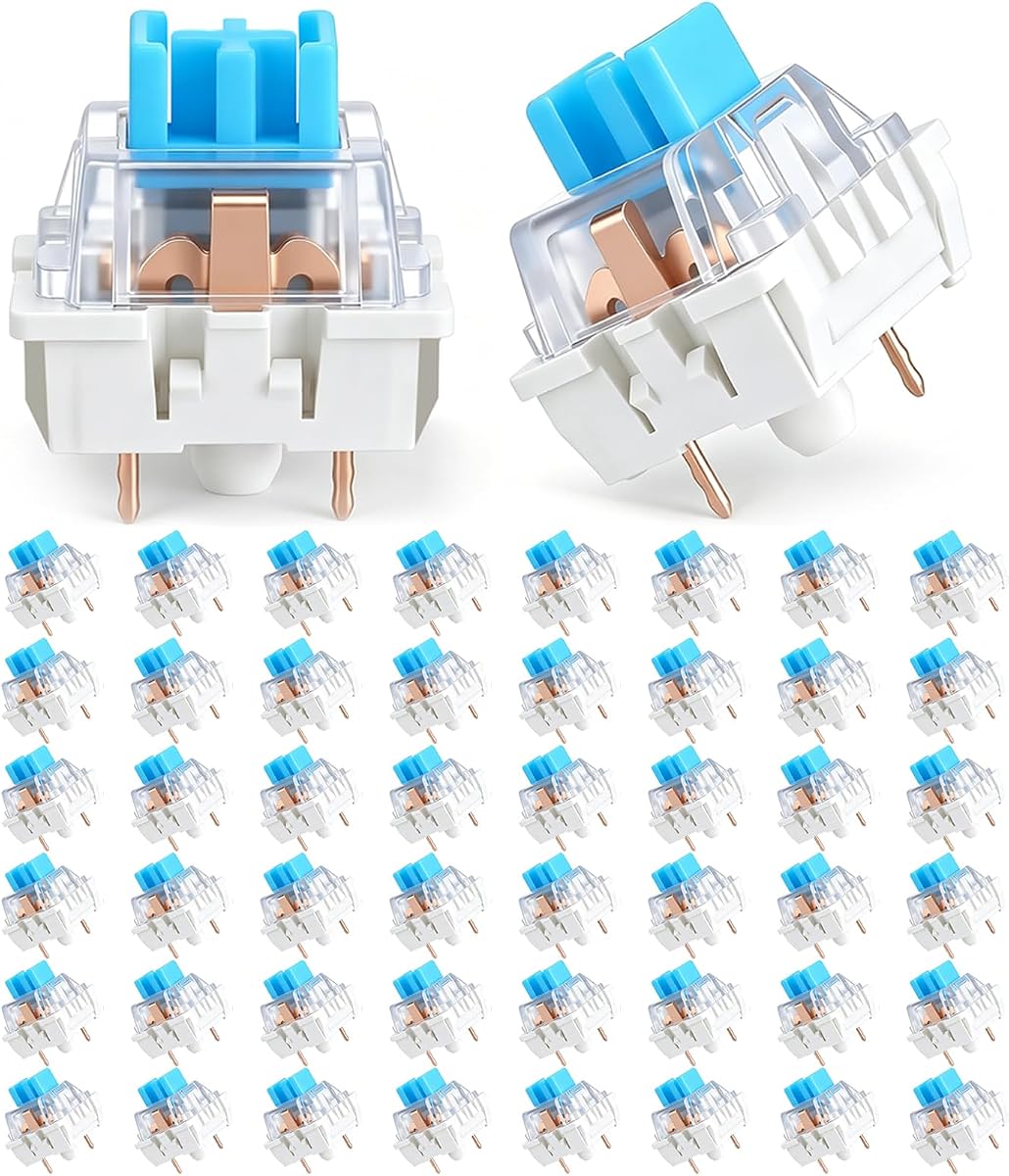
Offering excellent value, this pack of switches serves as a foundational component for DIY clickers. It appeals to hobbyists who want custom solutions at a minimal cost.
We may earn a commission when you buy through this link, at no additional cost to you.
The blue switches provide crisp tactile feedback and a distinct click sound. Made from premium materials, they are built to last up to fifty million cycles without failure.
Though they require assembly into a 3D printed casing, the result is a reliable and satisfying click experience. This approach is perfect for those interested in mechanical keyboard modification.
Buy this if you enjoy custom projects and need durable components. It is a budget-friendly way to build your own unique clicking tool.
Designed with a service life of up to 50 million cycles, these switches are built to withstand heavy use.
These switches are ideal for creating custom clickers using 3D printed casings or other DIY projects.
We may earn a commission when you buy through this link, at no additional cost to you.
This premium model stands out with its adjustable height and precise timing controls. It is designed for users who need specific settings to match their unique workflow.
We may earn a commission when you buy through this link, at no additional cost to you.
The wide range of time settings allows for detailed customization between 0.1 and 99 seconds. The rubberized cover protects surfaces while keeping noise levels low during operation.
While it is a pricier option, the versatility and build quality justify the investment for power users. It simulates manual clicking accurately to prevent detection on strict platforms.
Choose this if you need precise control over click timing and height. It is the best choice for high-end setups requiring flexibility.
The wide range of time settings allows you to customize intervals precisely between 0.1 and 99 seconds.
A rubberized cover protects your keyboard surface while ensuring quiet and smooth clicking action.
We may earn a commission when you buy through this link, at no additional cost to you.
This Pankia model offers a simple solution with fifteen different click speeds. It is straightforward to use for keeping devices active during idle times.
We may earn a commission when you buy through this link, at no additional cost to you.
The adjustable arm allows you to position the clicker precisely on the keyboard. A flashing indicator light helps you identify the selected speed mode quickly.
While it gets the job done, some users report average durability over long-term use. It is best suited for occasional needs rather than constant heavy operation.
It is a good entry-level option for those needing quick random click functionality without complex setup.
You can choose from 15 different random click speeds to find the rate that suits your needs.
The clicking arm extends and adjusts to fit different keyboard layouts and positions easily.
We may earn a commission when you buy through this link, at no additional cost to you.
This model offers high customization with programmable loop times and rest periods. It is designed for advanced users needing specific control over click intervals.
We may earn a commission when you buy through this link, at no additional cost to you.
Each port can be adjusted independently to handle multiple tasks. You can define click counts and durations to meet diverse needs efficiently.
The device warns against exceeding five clicks per second to avoid heat damage. While powerful, it requires careful configuration to ensure safe operation.
Buy this if you need deep programmability and multiple click channels. It is a robust tool for complex automation.
Each of the three ports can have its clicking speed adjusted independently to meet various needs.
You can define loop times, click intervals, and rest periods to precisely meet your diverse needs.
We may earn a commission when you buy through this link, at no additional cost to you.
This Pankia Box model provides a simple physical clicking solution. It helps keep laptops active by simulating finger taps automatically.
We may earn a commission when you buy through this link, at no additional cost to you.
The three adjusting parts make it easy to position the arm correctly. You can adjust speed separately for different needs.
It is compatible with a wide range of applications. However, users should not exceed the recommended click rate to prevent heat damage.
Choose this for straightforward automation needs where a physical arm is required.
All three ports can adjust the speed separately to meet different click speed requirements.
This device supports both keyboards and mice suitable for a variety of clicking applications.
We may earn a commission when you buy through this link, at no additional cost to you.
This ABC tool offers a digital display and advanced configuration options. It allows for arbitrary combinations of fixed and random times.
We may earn a commission when you buy through this link, at no additional cost to you.
You can set click head travel and direction using simple buttons. It supports power via USB or charger for wide application.
While powerful, the menu system can be complex for new users. It is best for those needing detailed automation logic.
Buy this if you need specific timing combinations without software.
The system supports any single-use combination with fixed random or fixed pressing time.
Powered by 5V through a charger, power bank, or USB interface for wide application.
We may earn a commission when you buy through this link, at no additional cost to you.
This is the replacement arm for the Pankia Box system. It must be used with the main unit to function.
We may earn a commission when you buy through this link, at no additional cost to you.
It helps meet screen click needs by simulating finger taps. The three adjusting parts make it easy to position.
It is designed for general clicking applications. Do not click more than five times per second to avoid heat.
Purchase this only if you already have the main Pankia Box controller.
The clicking arm is universal and compatible only with the main Pankia Box controller.
The clicking arm has three adjusting parts making it easier to click the keyboard.
We may earn a commission when you buy through this link, at no additional cost to you.
This 2-pack includes quiet and clicky fidgets for stress relief. They are manual toys rather than automated tools.
We may earn a commission when you buy through this link, at no additional cost to you.
Each fidget offers four keys for tactile feedback. The clip-on design makes them easy to carry on a bag.
They are great for shared spaces where noise might be a concern. Use the pink one in offices and green at home.
Buy this if you need a fidget toy rather than an automated clicker.
The set includes one quiet pink fidget and one clicky green fidget for different environments.
Each compact toy includes a keychain clip for carrying on keys or during commutes.
We may earn a commission when you buy through this link, at no additional cost to you.
This large pack of blue switches offers distinct feedback and long service life. It is ideal for building custom mechanical keyboards or clickers.
We may earn a commission when you buy through this link, at no additional cost to you.
The switches provide crisp tactile feedback and are waterproof for durability. They last up to eighty million cycles under normal use.
The loud sound makes them unsuitable for quiet libraries. They are best for personal gaming setups where feedback matters.
Buy this if you need high-quality switches for custom builds.
The distinct tactile feedback provides a pronounced click sensation when activated for precise typing.
These mechanical switches are made with waterproof materials and high quality springs for durability.
We may earn a commission when you buy through this link, at no additional cost to you.
Choosing the right automated keyboard clicker depends on your specific use case and technical requirements. Here are the key factors to consider before making your decision.
Physical devices operate independently of your operating system and do not require software installation. This makes them safer for use on shared computers or platforms that block third-party scripts.
Physical solutions offer better security and privacy since they do not interact with system files directly.
Randomization is critical for mimicking human behavior to avoid detection by automated monitoring systems. Look for models that offer variable time intervals and click counts.
Ensure the device allows for unpredictable timing to maintain effectiveness over long periods.
The physical arm or clicker head must adjust to fit your specific keyboard layout and key height. Adjustable arms help prevent missed clicks and accidental damage to other keys.
Choose a model with multiple adjustment points to ensure compatibility with your hardware.
More advanced users may require detailed programmability including loop times and rest periods. These features allow for precise automation tailored to complex workflows.
Look for models with digital displays or clear button interfaces for easier configuration.
High-quality materials like reinforced plastics and metal springs ensure long-term reliability. Durability is key when the device will be used frequently throughout the day.
Select a device made from durable components to avoid frequent replacements.
Noise can be a concern in shared environments like offices or homes. Models with rubberized covers or quieter motors help reduce sound during operation.
Opt for quieter designs if you need to remain discreet during use.
Most devices operate on standard USB power or built-in batteries. Ensure the model you choose supports convenient power sources that fit your setup.
USB-powered options are generally more convenient for desktop setups.
Reputable brands often provide better customer service and warranty coverage. Check for satisfaction guarantees or support options before purchasing.
Prioritize products with clear support channels for peace of mind.
Position the clicking arm carefully on the target key or mouse button. Ensure the device is stable to prevent slipping during operation.
Configure your desired speed or timing settings using the provided controls. If using a random mode, select the interval that suits your needs.
Regularly check the device for heat buildup and clean it to remove dust. Avoid exceeding the recommended click frequency to prolong its lifespan.
Using a physical clicker is generally legal as it does not modify software. However, check the terms of service for specific platforms like games or work systems.
Physical clickers do not require software installation. They operate as standalone devices powered by USB or battery, keeping your system clean.
Physical devices are harder to detect than software scripts because they act like real finger movements. Randomized timing further reduces the risk of detection.
Properly adjusted clickers should not damage keyboards. However, avoid setting speeds that are too fast to prevent excessive wear or heat damage.
High-quality models with durable materials can last for years of regular use. Avoid overheating by following the manufacturer's recommended usage limits.
Yes, most devices are compatible with laptops and desktop keyboards. Ensure the arm adjusts to fit the specific height of your laptop keys.
Many models include mouse clicking capabilities. You can position the arm on mouse buttons to automate clicking as well.
Allow the device to cool down and reduce the click speed. Do not operate it at speeds exceeding the recommended limit of five clicks per second.
We reviewed ten leading models to help you find the right automated keyboard clicker. Our top picks include the Physical Click Auto Keyboard for its reliability and ease of use.
Prioritize devices that offer randomization and physical operation to ensure security and effectiveness. Choose a model that fits your budget and technical needs.
Remember that prices and availability change frequently. Verify current listings before buying to ensure you get the best deal available.