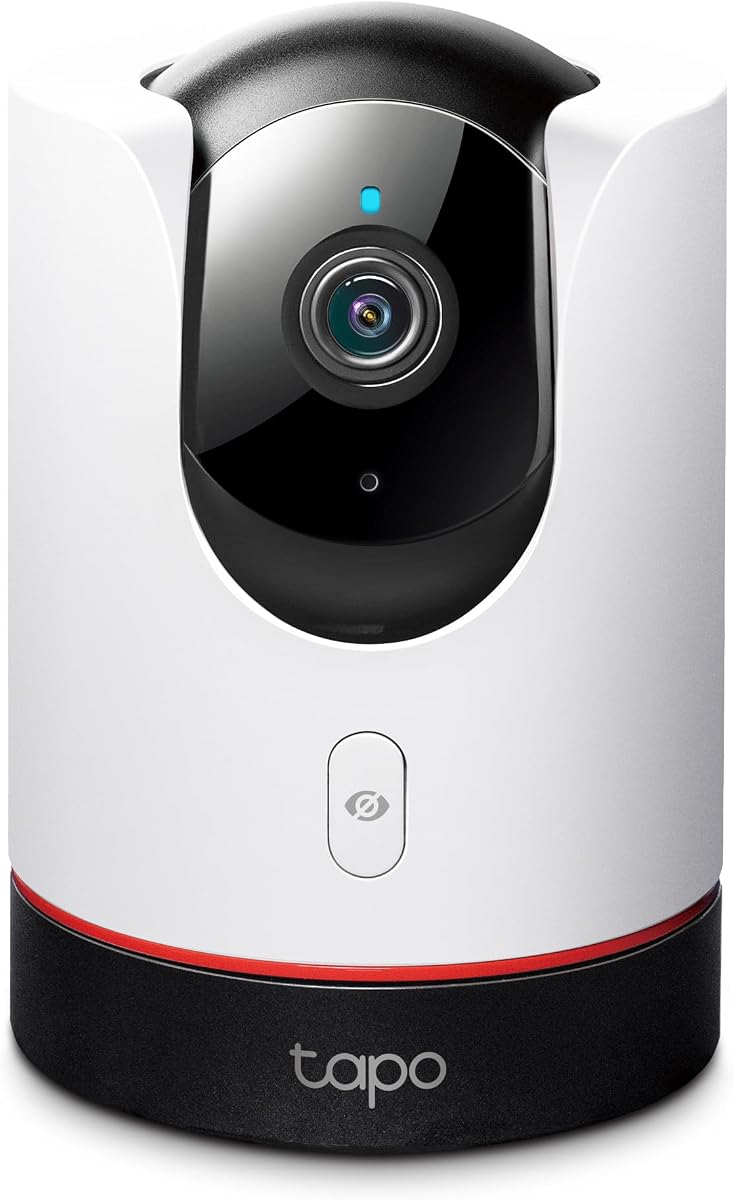
TP-Link Tapo 2K+ Pan/Tilt Security Camera Apple HomeKit, C225
4.5Editor score
2K QHD live view resolution
360 degree horizontal field of view
Innovative physical privacy mode included
This guide compares the top 10 Apple HomeKit security cameras for October 2026, evaluating video quality, privacy features, smart detection, and ecosystem
Home security is more important than ever, and integrating your cameras with Apple HomeKit offers seamless control and privacy. Choosing the right camera means balancing resolution, night vision, and smart detection features to fit your specific needs.
We evaluated ten leading models based on video clarity, HomeKit Secure Video support, local processing capabilities, and ease of setup. Each product was assessed for its ability to protect your home while maintaining the high privacy standards Apple users expect.
Each pick below highlights key strengths and potential limitations to help you make an informed decision. Please note that availability and pricing can change frequently, so checking the latest details on the product page is always recommended before purchasing.
4.5Editor score
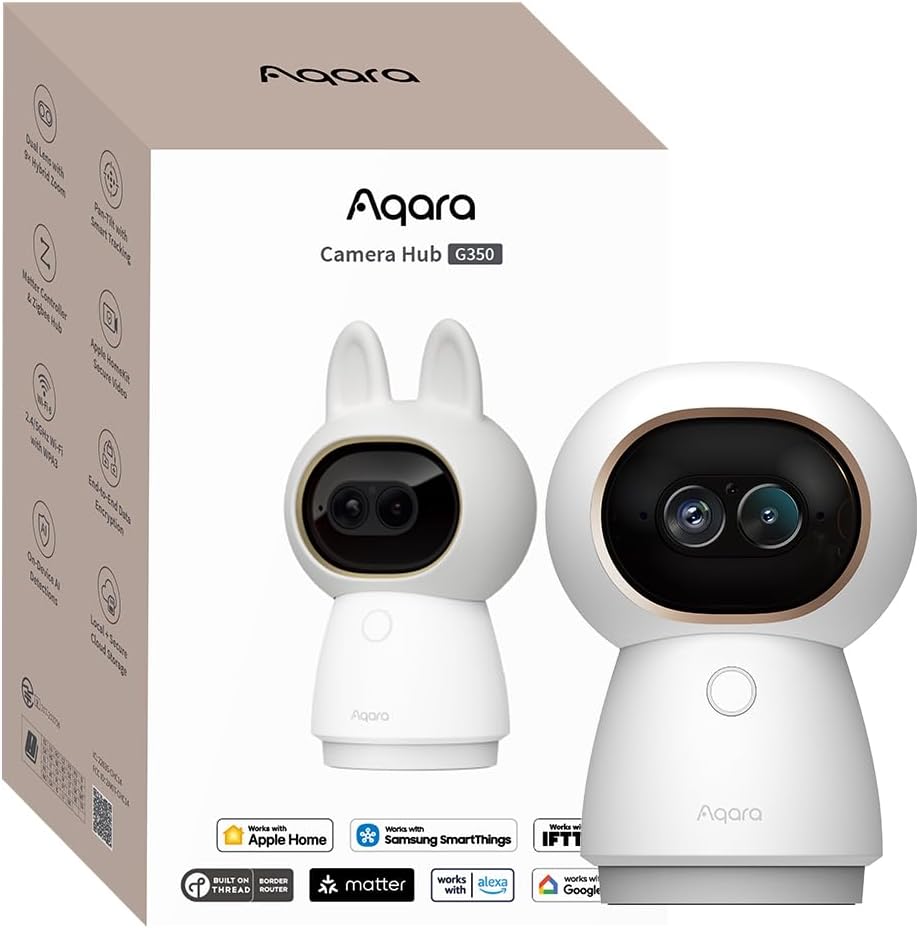
4.3Editor score
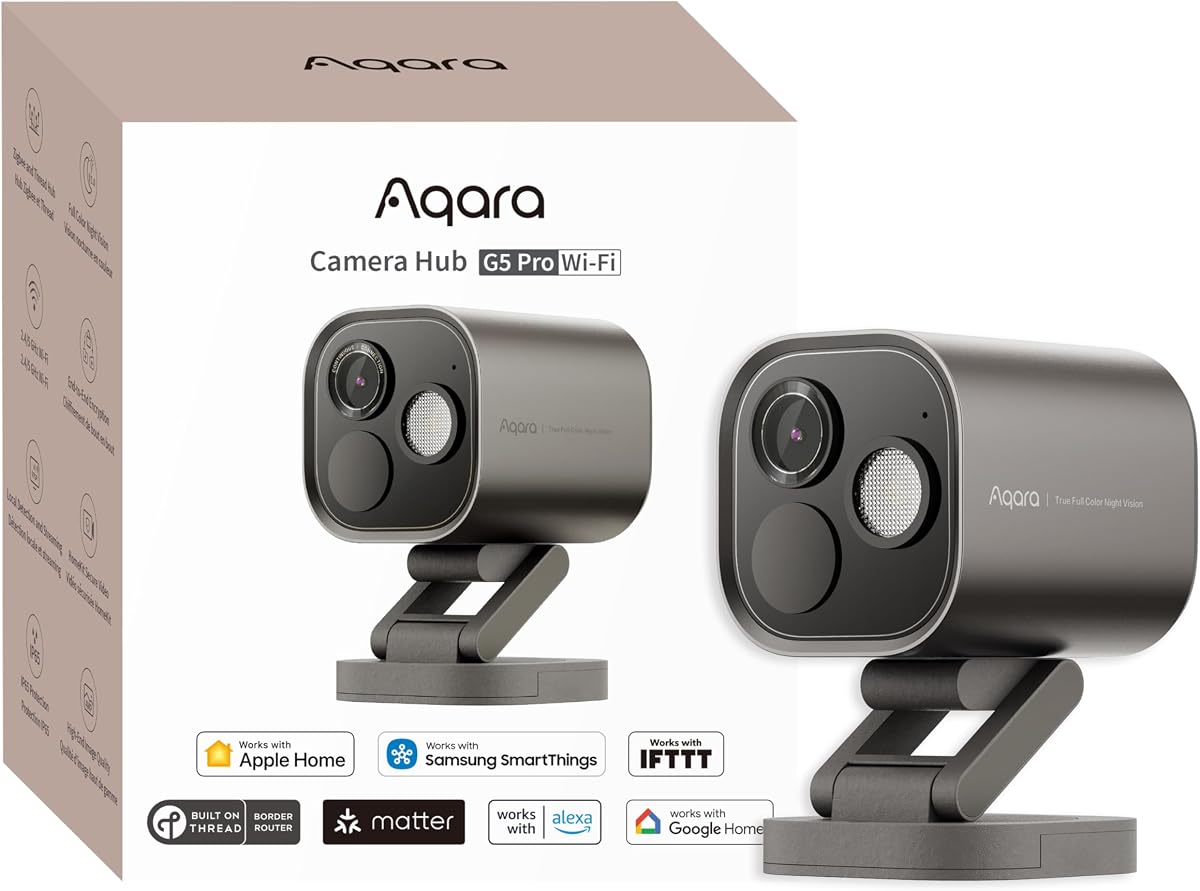
4.3Editor score
The following table provides a side-by-side comparison of all ten featured cameras, highlighting their core specifications and unique features to help you find the perfect fit for your home.
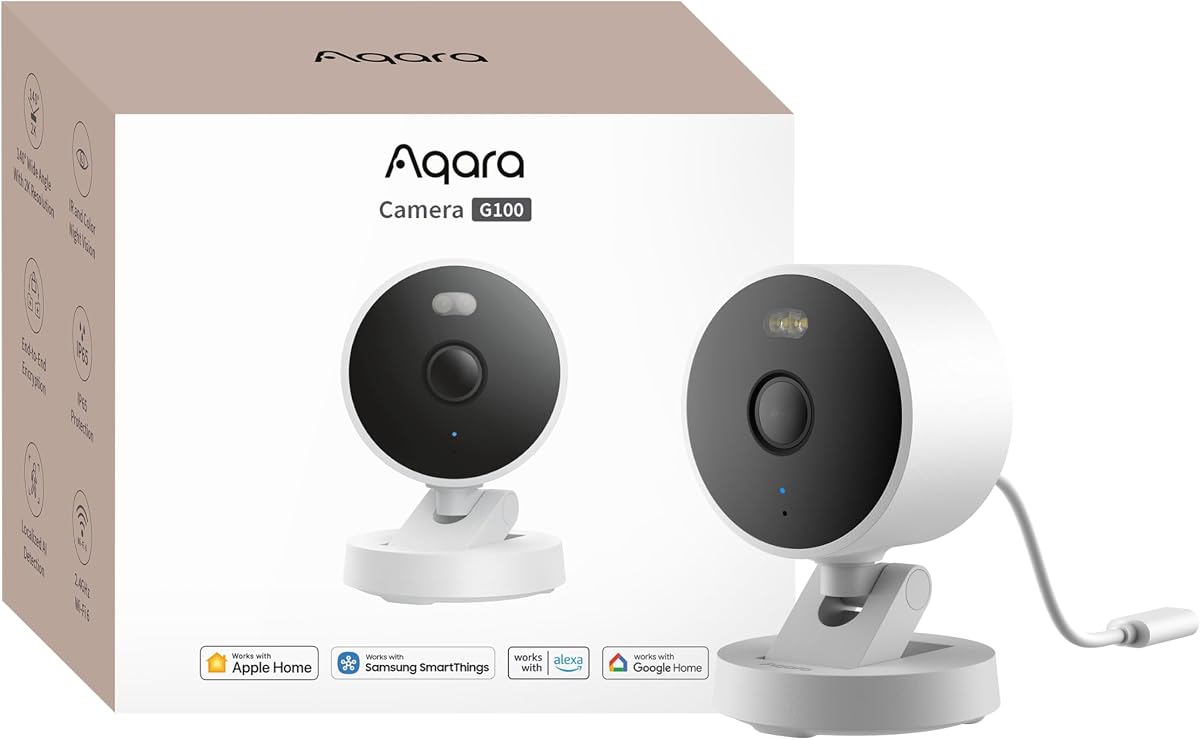



The Aqara G100 stands out as a versatile option for those needing both indoor and outdoor coverage. With a rating of 4.2, it delivers reliable performance through its 2K resolution and robust HomeKit integration.
We may earn a commission when you buy through this link, at no additional cost to you.
Its standout feature is the dual-night vision capability, offering both spotlight color night vision and IR detection. The camera supports local motion detection and can be extended with cloud-based AI recognition via a subscription, adding significant value for security-focused users.
While the HomeKit integration is strong, users should note that connecting to HomeKit limits the resolution to 1080p. Additionally, the night vision modes must be manually enabled, which might require initial setup adjustments to ensure optimal performance during dark hours.
This camera is ideal for homeowners looking for a flexible solution that bridges the gap between indoor convenience and outdoor durability. Its support for third-party ecosystems like Alexa and Google makes it a smart choice for mixed smart home setups.
The IP65-rated housing ensures the camera withstands rain and dust, making it suitable for any weather condition while maintaining high image quality.
Wi-Fi 6 support ensures smoother live views and lower latency, while WPA3 security enhances data protection for your network.
We may earn a commission when you buy through this link, at no additional cost to you.
The Eve Cam is designed specifically for users who prioritize privacy above all else. With a rating of 3.6, it offers a secure way to monitor your home without compromising personal data through cloud processing.
We may earn a commission when you buy through this link, at no additional cost to you.
This camera exclusively supports Apple HomeKit Secure Video, ensuring that all video analysis happens locally within your home. End-to-end encryption means that only you can view the live and recorded footage, providing peace of mind regarding data security.
Users should be aware that this camera requires a Home hub and an iCloud+ subscription to function fully. While this adds to the initial setup complexity, it is necessary for the privacy features that define the product's value proposition.
For Apple users deeply invested in the ecosystem who want to avoid third-party clouds, the Eve Cam is an excellent choice. Its instant notifications and smart automation features make it a convenient tool for daily home monitoring.
Video analysis is performed securely in your home, not in the cloud, ensuring your personal data remains private and under your control at all times.
Built exclusively for Apple HomeKit Secure Video from the ground up to ensure seamless integration with your Apple ecosystem.
We may earn a commission when you buy through this link, at no additional cost to you.
The Aqara G350 offers a premium indoor monitoring experience with its unique dual-lens system. Rated at 4.3, it combines wide-angle coverage with telephoto detail, making it ideal for large rooms where specific tracking is needed.
We may earn a commission when you buy through this link, at no additional cost to you.
Its AI auto-tracking feature follows movement while maintaining a close-up view, a capability typically found in more expensive systems. The camera also acts as a hub for Zigbee and Thread devices, adding significant value for users with an expanding smart home.
While the local AI processing enhances privacy, some advanced features like gesture recognition are configurable only within the Aqara Home app. This might limit flexibility for users who rely solely on HomeKit scenes for automation.
This camera is perfect for tech-savvy users who want a central hub and high-resolution video in one device. The combination of privacy features and smart home integration makes it a standout choice for modern homes.
A 133-degree wide-angle 4K lens and a 2.5K HD telephoto lens combine to deliver sweeping panoramic views and zoomed details without losing clarity.
As a hub, it supports both the Aqara Zigbee and Thread dual protocols, allowing you to connect up to 80 sub-devices for a comprehensive network.
We may earn a commission when you buy through this link, at no additional cost to you.
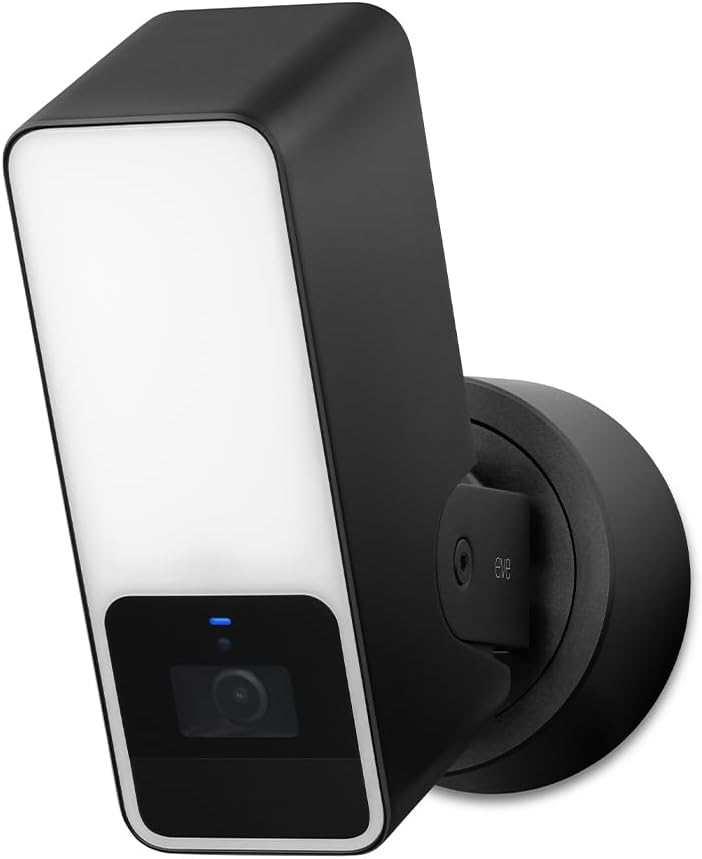
The Eve Outdoor Cam is a robust solution for exterior security that combines lighting and surveillance. With a rating of 3.5, it offers strong privacy features and reliable detection capabilities suitable for driveways or entryways.
We may earn a commission when you buy through this link, at no additional cost to you.
This model features a built-in floodlight that can be dimmed and controlled via HomeKit, providing both illumination and security. The camera operates exclusively on HomeKit Secure Video, ensuring no cloud storage on third-party servers.
Installation can be more complex than standard cameras since it requires a neutral wire and ground wire connection. Users should verify their existing wiring before purchase to avoid the need for an electrician.
For those who want a clean integration with HomeKit without relying on third-party clouds, this camera is a solid choice. Its privacy focus and local processing make it highly secure for outdoor monitoring.
A powerful, dimmable floodlight with light boost and infrared motion sensor ensures visibility and detection even in the darkest conditions.
Local intelligence and direct communication between Eve accessories and iPhone, iPad, or home hub without bridge or cloud dependency.
We may earn a commission when you buy through this link, at no additional cost to you.
The TP-Link Tapo C225 delivers impressive value with its 2K resolution and physical privacy features. Rated at 4.5, it is an excellent option for those who want high-quality indoor monitoring without a high cost.
We may earn a commission when you buy through this link, at no additional cost to you.
The physical privacy mode is a standout feature, using a mechanical block to cover the lens when not in use. This provides tangible assurance that your camera is off, which many users find reassuring for indoor spaces.
While it supports HomeKit Secure Video, users should note that it requires a 2.4GHz Wi-Fi connection. Additionally, advanced cloud storage features come with a subscription, though local microSD storage is a viable alternative.
This camera is perfect for budget-conscious buyers who do not want to sacrifice quality. Its strong design and privacy features make it a top contender in the affordable security camera market.
The camera's housing cleverly blocks the lens when privacy mode is enabled, ensuring your home privacy is always under your control.
Equipped with a high-sensitivity starlight sensor, this camera delivers superior image quality even in low-light conditions for clear viewing.
We may earn a commission when you buy through this link, at no additional cost to you.
The Aqara G5 Pro WiFi brings advanced night vision capabilities to the market. With a rating of 4.3, it distinguishes itself by offering true color imaging in low light through its large aperture and built-in spotlight.
We may earn a commission when you buy through this link, at no additional cost to you.
This camera utilizes a Neural Processing Unit for local AI detection, meaning it can recognize faces and abnormal sounds without sending data to the cloud. This enhances privacy while ensuring fast response times for alerts.
While it supports HomeKit Secure Video, the camera relies on USB-C power and has no battery backup. Users need to ensure a stable power source is available for uninterrupted monitoring during power outages.
For those seeking high-quality night vision and local processing, this camera is a strong choice. Its ability to function as a hub further cements its value in a connected home environment.
The built-in 3000K dimmable spotlight functions as an intruder deterrent and improves visibility during nighttime for clear color imaging.
Thanks to the powerful built-in Neural Processing Unit, the camera supports 7 types of visual detection and 4 types of abnormal sound detection locally.
We may earn a commission when you buy through this link, at no additional cost to you.
The Logitech Circle View is designed for durability and a wide viewing angle. Rated at 3.4, it offers a weatherproof solution that integrates cleanly with the Apple Home app without needing third-party apps.
We may earn a commission when you buy through this link, at no additional cost to you.
With a 180-degree field of view, this camera captures more area than standard 130-degree models. The TrueView video technology ensures razor-sharp detail, while the wide dynamic range helps in high-contrast lighting conditions.
This model relies on motion-based detection rather than continuous recording, which may not suit all users. It also requires a wired USB power supply, so planning the location for power access is important.
Ideal for homeowners who want a sleek, weather-resistant camera that looks good on their porch, the Circle View delivers reliable security and privacy through HomeKit Secure Video.
Featuring best-in-class Logitech TrueView video with 180-degree field-of-view optics and 1080p HD so everything is captured in razor-sharp detail.
Crafted for your home, Circle View features premium details like a metal base, matte finish, and a power cable that blends seamlessly with any space.
We may earn a commission when you buy through this link, at no additional cost to you.
The Aqara E1 brings high-quality indoor monitoring with full rotation capabilities. With a rating of 4.2, it is a versatile choice for covering large rooms where a fixed camera might miss important areas.
We may earn a commission when you buy through this link, at no additional cost to you.
The 360-degree viewing angle allows you to pan and tilt the camera to focus on specific areas. Automated privacy modes allow the lens to pivot away, ensuring physical privacy when you are home.
Users should note that the power supply is not included with the camera, which is a common oversight. Also, advanced sound detection features like baby crying require specific setup within the Aqara app.
This camera is suitable for parents monitoring nurseries or anyone needing full room coverage. Its combination of high resolution and privacy controls makes it a reliable choice for indoor security.
The Pan/Tilt motor allows for a full 360-degree viewing angle which enhances the person tracking feature for complete indoor monitoring.
The Camera E1 offers an automated privacy mode that can pivot the lens and deactivate the camera for enhanced security and peace of mind.
We may earn a commission when you buy through this link, at no additional cost to you.
The eufy E30 offers exceptional resolution and pet-specific features for indoor monitoring. With a rating of 4.5, it is a favorite among pet owners who want to keep an eye on their animals with high clarity.
We may earn a commission when you buy through this link, at no additional cost to you.
Its built-in spotlight allows for color night vision, which is a significant advantage over standard IR cameras. The AI automatically tracks movement when a person or pet is detected, ensuring you never miss a moment.
While it supports HomeKit, the resolution drops to 1080p within that ecosystem. For 4K viewing, you must use the eufy app, which may require a shift in monitoring habits for some users.
This camera is perfect for pet owners who want high-quality local storage without monthly fees. Its smart tracking and color night vision make it a versatile tool for modern indoor security.
The integrated spotlight allows seamless switching between color night vision and infrared night vision for crystal-clear nighttime surveillance.
Store your footage locally with an SD card and enjoy all functions without any subscription fees for a cost-effective security solution.
We may earn a commission when you buy through this link, at no additional cost to you.
The Aqara G5 Pro PoE simplifies outdoor installation with Power over Ethernet technology. With a rating of 4.5, it offers a stable, high-performance solution for users who prefer wired connections.
We may earn a commission when you buy through this link, at no additional cost to you.
By using a single cable for both power and data, this camera avoids the need for separate power outlets near the installation site. It retains all the advanced features of the WiFi version, including local AI detection and color night vision.
Users should have a PoE switch to utilize the primary power feature. If not, the camera can still be used with a USB-C power adapter, but the PoE method is more robust for permanent setups.
This camera is ideal for outdoor areas where Wi-Fi signals are weak or unreliable. Its wired stability and high-resolution imaging make it a top choice for professional-grade home security.
Thanks to the power over Ethernet technology, this PoE camera can transmit videos and receive power via only a single network cable for simplified wiring.
Local AI Visual and Abnormal Sound Detection enabled by the built-in Neural Processing Unit ensure fast response times even during an internet outage.
We may earn a commission when you buy through this link, at no additional cost to you.
Selecting the right HomeKit security camera involves understanding various technical and practical factors. This guide breaks down the key elements to consider.
Resolution is the primary factor determining how clear your footage will be. Look for cameras with at least 1080p HD, though many modern options now offer 2K or even 4K for more detailed views of faces and license plates.
Higher resolution is crucial for identifying details, but ensure your network can handle the increased bandwidth requirements.
HomeKit Secure Video allows for end-to-end encryption and storage of events directly in your iCloud. Verify that the camera supports this feature to maintain privacy and integrate seamlessly with your Apple ecosystem.
Without this feature, you lose the privacy benefits and the ability to view clips directly in the Home app.
Modern cameras use AI to distinguish between people, pets, vehicles, and other motion. This reduces false alerts and ensures you are notified only when it matters.
Local processing of these features often enhances privacy by keeping data within your home rather than uploading to the cloud.
Choose a camera that matches the environment where it will be installed. Outdoor cameras should be weatherproof with an IP rating like IP65 or IP67 to withstand rain and dust.
Indoor cameras may offer pan-and-tilt features and privacy shutters that are not necessary for outdoor use.
Storage can be local via microSD cards or NAS, or cloud-based via HomeKit Secure Video. Consider your budget and privacy preferences when choosing between these options.
Local storage avoids monthly fees, while cloud storage offers convenience and offsite backups for added security.
Night vision is essential for 24/7 monitoring. Infrared is standard, but some cameras now offer color night vision with built-in spotlights for better identification in the dark.
Check the range of the night vision to ensure it covers the area you need to monitor effectively.
Some cameras act as hubs for other smart home devices, such as Zigbee or Thread sensors. This can centralize your smart home management and reduce the number of hubs you need.
Ensure compatibility with your existing smart home ecosystem to make the most of automation and triggers.
Two-way audio allows you to speak through the camera to visitors or deter intruders. This feature is vital for doorbell cameras and entryway monitors.
High-quality microphones and speakers ensure clear communication, making this a key feature for interactive security setups.
Start by downloading the Home app on your iOS device and adding the camera by scanning the code or entering the key provided with the device. Ensure your Home Hub is active and connected to iCloud for full functionality.
Adjust the camera settings within the Home app to customize notifications, privacy modes, and smart detection zones. Regularly update your camera's firmware to keep security protocols up to date and fix any potential bugs.
For outdoor cameras, periodically check the lens and housing for dirt or debris that could block the view. For indoor models, ensure the angle remains correct and reset the privacy mode if it was activated during cleaning or maintenance.
Yes, HomeKit Secure Video requires an iCloud+ subscription to store video clips. The cost varies based on how much storage you need, but the basic plans often include enough space for a single camera.
Most HomeKit cameras require Wi-Fi to stream video and receive updates. However, some models support wired Ethernet connections via adapters, and local processing can still detect events even if the internet is temporarily down.
HomeKit Secure Video offers end-to-end encryption and processes video analysis on your local devices. This ensures that your footage is private and not accessible to third-party cloud providers.
Apple imposes certain limits on HomeKit Secure Video to optimize network usage and ensure privacy. While the camera might support higher resolutions in its native app, HomeKit often caps it at 1080p.
HomeKit Secure Video includes cloud storage in iCloud+ subscriptions. However, manufacturers often offer their own cloud services for extended history or advanced AI features, which may require separate subscriptions.
Many models like Aqara and TP-Link support third-party platforms. While HomeKit is the primary focus, these cameras often work with Alexa or Google Home via specific bridges or direct app support.
Whether you prioritize privacy with the Eve Cam or versatility with the Aqara G100, there is a HomeKit security camera for every need. The top picks balance resolution, smart features, and reliability to help you secure your home effectively.
Consider your specific requirements, such as indoor vs outdoor use and the need for local processing, when making your final decision. The best camera is the one that fits seamlessly into your existing smart home ecosystem.
Always verify current availability and features before purchasing. Security technology evolves quickly, so ensuring you have the latest support and firmware capabilities is essential for long-term satisfaction.