This guide compares the top ten angled keyboard riser models for ergonomic typing, stability, and design to help you choose the perfect desk accessory.
As an Amazon Associate we earn from qualifying purchases. We may earn a commission when you buy through links on this page, at no additional cost to you. Read our affiliate disclosure.As an Amazon Associate we earn from qualifying purchases.Purchases through our links may earn us a commission, at no extra cost to you. Read our affiliate disclosure.
Finding the right angled keyboard riser can transform your workspace into a healthier environment. A good riser elevates your typing surface to reduce wrist strain and improve posture during long work sessions. Look for stable materials like acrylic or nylon that provide a solid foundation for your input device.
We evaluated ten top-rated models based on their ergonomic design, build quality, and user feedback. Our comparison focuses on how well each unit supports standard keyboards, prevents slipping, and maintains a sleek aesthetic on modern desks. Each product was analyzed for its unique features and value proposition.
Every pick in this list highlights specific strengths such as adjustability, storage options, or minimalist styling. Please note that product availability and specific terms may change over time so always verify details before purchasing. This guide aims to streamline your decision process with clear and accurate information.
Top 3 Picks for Best Angled Keyboard Riser
Best Budget
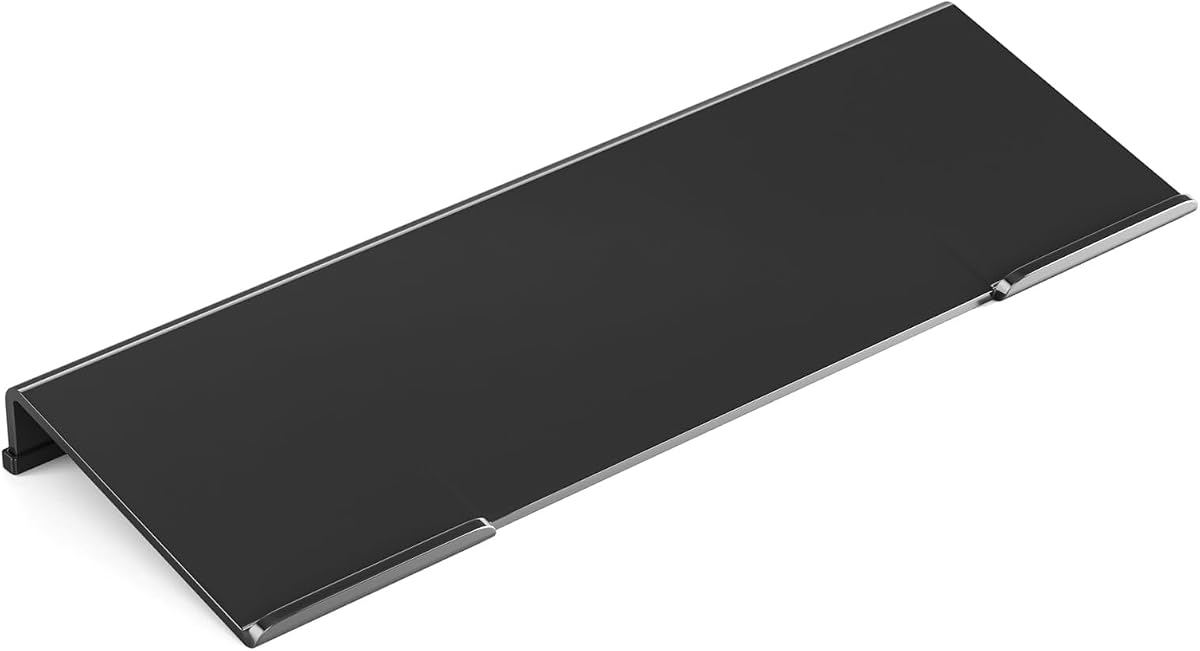
Richboom Computer Keyboard Stand Tilt PC Keyboard Stand Riser for Easy Ergonomic Typing, Acrylic Keyboard Tray Holder for Office Desk, Home, School, with Silicone Anti-Slip Case, Black
Top 10 Best Angled Keyboard Riser in 2026 Compared
This side-by-side comparison examines the key specifications and unique attributes of each selected model to help you understand their distinct advantages and potential limitations for your specific setup.
ProductsSpecificationsEditor scorePrice
1
Editor's Choice
Richboom Computer Keyboard Stand Tilt PC Keyboard Stand Riser for Easy Ergonomic Typing, Acrylic Keyboard Tray Holder for Office Desk, Home, School, with Silicone Anti-Slip Case, Black
Richboom Clear Acrylic Tilted Computer Keyboard Holder for Easy Ergonomic Typing, Upgraded Version, Keyboard Stand with Silicone Anti-Slip Case for Office Desk, Home, School, Clear
Beego Ergonomic Computer Keyboard Stand – Black Acrylic Keyboard Riser Tilted Keyboard Holder Keyboard Tray with Black Non-Slip Strip for Easy Typing at Home School Office Desk Accessories
GPG2 ESC Flip Keyboard Stand for Desk, Tilting Riser That Attaches to Your Keyboard – 3 Adjustable Angles, Compatible with Apple Magic Keyboard, Logitech MX Keys, K380 & Flat-Back Models
This Richboom model ranks highly due to its sturdy build and ergonomic focus. It features a premium acrylic design that provides a stable platform for typing while maintaining a sleek look on your desk.
Pros
Solid acrylic construction
Smooth polished edges
Effective anti-slip base
Minimalist aesthetic
Affordable price point
Cons
Limited angle adjustments
Not suitable for curved keyboards
We may earn a commission when you buy through this link, at no additional cost to you.
The low front lips ensure your hands rest comfortably without interference, and the silicone strip on the back prevents sliding. This combination creates a secure typing environment that supports long work sessions.
While it lacks adjustable angles, the fixed slant is scientifically designed to reduce wrist strain. The lack of flexibility might be a minor downside for users who prefer variable height settings.
It is an excellent choice for home office users seeking a simple and reliable solution. The polished finish and ease of use make it a top recommendation for standard keyboard setups.
Ergonomic Benefits
The slanted design lifts your keyboard to a natural angle, reducing neck and shoulder pain during extended use.
Durability and Style
Polished acrylic edges prevent injuries and ensure the unit remains scratch resistant and elegant over time.
The KOTEMON stand is widely praised for its ergonomic design and secure grip. It effectively prevents keyboard movement while providing a comfortable angle for typing and gaming sessions.
Pros
High user rating
Effective non-slip base
Comfortable hand placement
Sturdy acrylic material
Clean polished finish
Cons
Fixed height option
Standard dimensions only
We may earn a commission when you buy through this link, at no additional cost to you.
Its low front lip allows your wrists to rest naturally without pressure points. The environmental friendly silicone ensures that your device stays in place without damaging your desk surface.
Although it does not offer adjustable angles, the fixed tilt is optimized for general use. This simplicity makes it a reliable option for those who prioritize stability over versatility.
This model is ideal for users seeking a balance of style and function. The high rating reflects consistent performance and satisfaction among home and office users alike.
Stability Features
The silicone strip wraps the back fully to prevent any unwanted movement during intense typing.
Desk Organization
A minimalist profile keeps your workspace tidy and organized without adding visual clutter.
This upgraded clear version offers the same ergonomic benefits as its black counterpart but with a transparent look. It maintains the core functionality of stability and posture correction.
Pros
Transparent aesthetic
Sturdy construction
Effective anti-slip
Low front lip
Polished corners
Cons
Requires careful cleaning
Fixed angle setup
We may earn a commission when you buy through this link, at no additional cost to you.
The grade A acrylic ensures clarity and strength, while the food grade silicone provides a reliable grip. The design eliminates tension from wrists and elbows during long working hours.
While clear acrylic can show dust more easily, the polished edges make it easy to wipe down. The fixed angle is sufficient for most users needing basic wrist support.
It suits modern desks where visibility of the surface is preferred. This model is a great addition for those who want ergonomics without obstructing the view of their workspace.
Visibility and Style
The clear material allows your desk color to show through for a seamless and modern integration.
Comfort Features
Low front lips ensure hands are not restricted allowing for fluid typing movements.
The Beego stand focuses on providing a sturdy platform without requiring any setup. Its thick acrylic body ensures durability and stability for all-day typing sessions.
Pros
Solid acrylic build
No assembly needed
Secure silicone grip
Sleek black finish
Space efficient
Cons
Fixed height angle
Limited compatibility
We may earn a commission when you buy through this link, at no additional cost to you.
The molded silicone strip and rubber pads work together to secure the keyboard in place. This design eliminates wobbling and protects your desk from scratches.
While it offers a clean look, the fixed angle may not suit every preference. However, for most standard setups, the elevation provides immediate relief from wrist strain.
This is a great pick for users who want a plug-and-play solution. The modern design complements various office styles while delivering essential ergonomic support.
Stability
Molded silicone strips ensure the keyboard stays fixed during rapid typing without any sliding.
Ease of Use
The no assembly design allows you to start using the riser immediately upon unboxing.
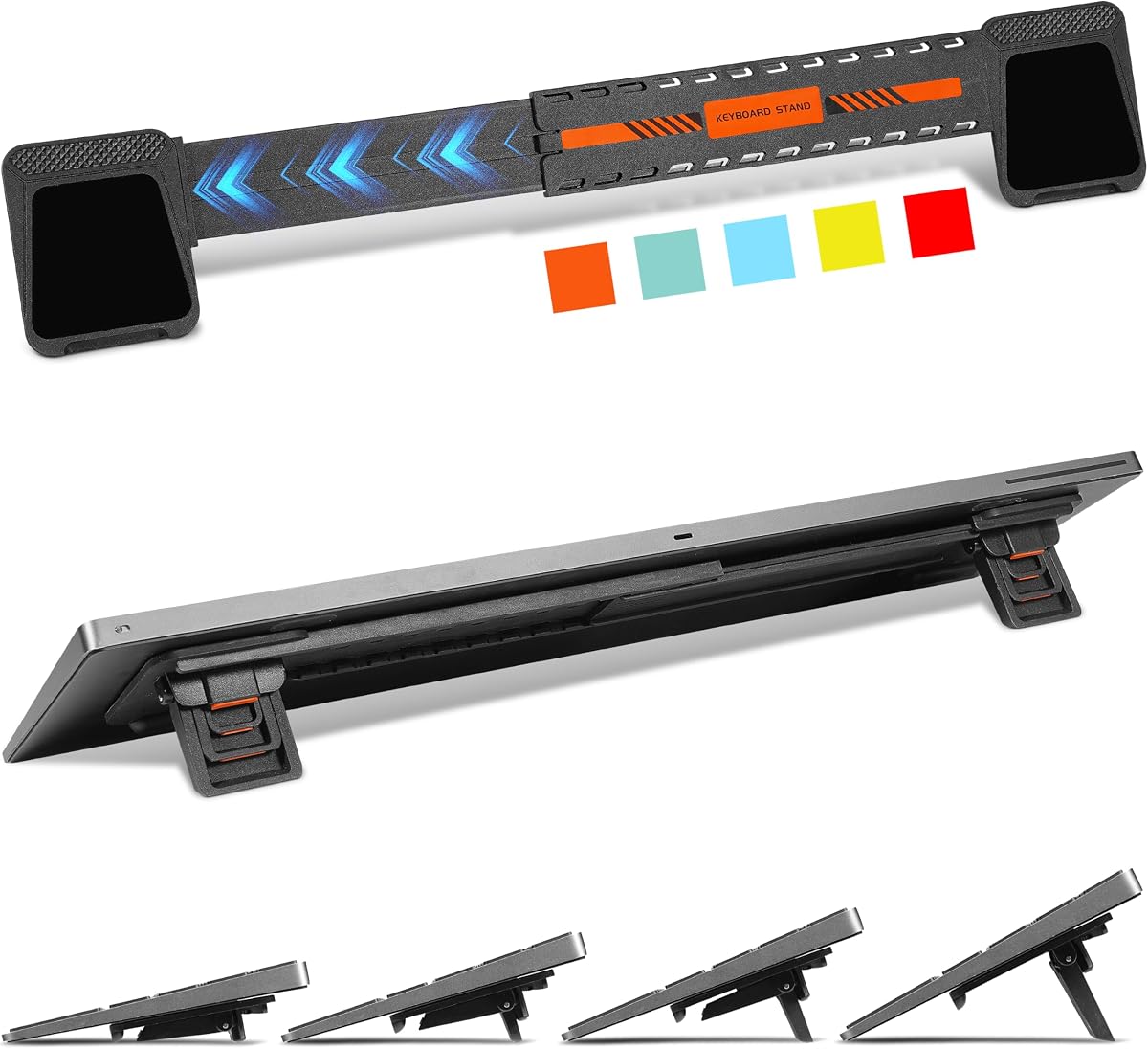
This stand stands out for its adjustable angles and extendable design. It allows you to choose between four height options to optimize your specific typing posture.
Pros
Multiple height options
Fits various keyboards
Reusable attachment
Compact design
Includes stickers
Cons
Only for flat-back keyboards
Suction requires clean surface
We may earn a commission when you buy through this link, at no additional cost to you.
The durable nylon construction supports stable typing without shifting. Micro-suction pads keep the unit firmly attached to your keyboard without leaving residue.
Note that it works best with flat-back models, which may limit compatibility with some mechanical keyboards. The reusable nature of the pads adds value over time.
It is ideal for users who need flexibility in their setup. The ability to adjust angles makes it a versatile choice for different desk heights.
Adjustability
Four height options let you find the perfect angle for your wrist and neck alignment.
Attachment Method
Micro-suction pads ensure a strong hold without damaging your desk or keyboard surface.
The GPG2 stand attaches directly to your keyboard, moving with it wherever you go. This design is perfect for users who switch between desks or workspaces.
Pros
Moves with keyboard
Washable grip
Lightweight design
Three tilt settings
No permanent adhesion
Cons
Flat-back compatibility only
Requires clean surface
We may earn a commission when you buy through this link, at no additional cost to you.
It features washable TPU pads that restore grip strength with water. The three ergonomic tilt settings allow for a neutral wrist position during work sessions.
While it does not work with curved keyboards, it is optimized for popular flat-back models. Its lightweight nature ensures it does not interfere with keyboard feel.
This option is best for those valuing portability and specific device compatibility. The USA design adds confidence in the build quality and functionality.
Portability
Since it mounts to the keyboard, you can easily carry it between home and office.
Grip Technology
Washable pads allow you to maintain a strong hold without using glue or tape.
This model includes a silicone wrist rest to further reduce strain during typing. The three-level height adjustment ensures you can customize the angle to your needs.
Pros
Integrated wrist support
Angle adjustable
Cable management
Storage for devices
Safe rounded edges
Cons
Compact width limits full size
Slightly larger footprint
We may earn a commission when you buy through this link, at no additional cost to you.
Additional features like cable management and a storage slot help keep your desk organized. The base provides stability through anti-slip strips that protect your surface.
It is designed for smaller spaces but may be tight for full-size keyboards. However, the storage slot is a unique benefit for keeping headphones or phones nearby.
Ideal for users seeking extra comfort and organization. The wrist rest and adjustable height make it a comprehensive ergonomic solution for compact desks.
Extra Comfort
The built-in wrist rest adds an extra layer of support to prevent fatigue.
Desk Organization
A storage slot offers a convenient place to hold small items like phones.
The HONKID stand offers three adjustable angles to help you find a neutral wrist position. It is constructed from high-quality nylon that ensures rock-solid stability.
Pros
Three angle settings
Solid nylon construction
Non-slip feet
Fits most keyboards
Desk friendly
Cons
Fixed nylon material
Limited color options
We may earn a commission when you buy through this link, at no additional cost to you.
Micro-suction pads and non-slip feet keep the unit securely in place during typing. It is compatible with a wide range of keyboards from small to full-size.
The desk-friendly design ensures it will not scratch or scuff your surface. However, the material is functional rather than visually premium compared to acrylic.
This model is a great choice for practical setups. The adjustability and stability make it a reliable accessory for both gaming and professional work.
Stability and Grip
Non-slip feet ensure the stand stays put even during intense typing sessions.
Ergonomic Flexibility
Three angle settings allow for customization based on your specific desk height.
This clear acrylic stand is designed with a scientifically tested 15-degree angle. It offers basic ergonomic benefits without unnecessary complexity or bulk.
Pros
Optimized angle
High quality material
Anti-slip strip
Polished corners
Fits most standard
Cons
Fixed height
Minimal features
We may earn a commission when you buy through this link, at no additional cost to you.
The grade A acrylic provides durability while the polished corners ensure a safe tactile experience. A silicone strip keeps your keyboard from sliding around.
It is a straightforward solution for those who want a slight elevation. While it lacks extra features, the core function is delivered effectively and efficiently.
Suitable for any user wanting a clean and simple setup. This model delivers the essential posture correction needed for long work hours.
Optimal Angle
The 15-degree incline is designed to reduce strain on wrists and forearms effectively.
Material Quality
Grade A acrylic ensures a polished look that matches various office aesthetics.
The WINFFOR stand offers a vibrant purple option for those wanting to personalize their setup. It is wide enough to fit various keyboard sizes comfortably.
Pros
Wide compatibility
No assembly
Anti-slip grips
Modern color
Smooth edges
Cons
Fixed angle
Limited color availability
We may earn a commission when you buy through this link, at no additional cost to you.
No assembly is required and the polished edges ensure safe handling. Silicone strips prevent wobbles and keep the unit stable during typing.
This design emphasizes simplicity and style without sacrificing ergonomic benefits. It is ideal for users who want a visually distinct accessory for their desk.
A great choice for home offices seeking a modern touch. The combination of function and color makes it a standout accessory for your workspace.
Visual Appeal
The purple finish adds a touch of personality to your standard office setup.
Practicality
Polished edges and no assembly ensure a smooth experience from unboxing to use.
We may earn a commission when you buy through this link, at no additional cost to you.
Buying Guide – How to Choose the Best Angled Keyboard Riser
Choosing the right keyboard riser involves considering material, adjustability, and design to fit your workspace needs.
Material and Build Quality
Materials like acrylic and nylon offer different benefits. Acrylic provides a sleek and polished look but may be brittle. Nylon is durable and stable but may lack visual appeal. Choose based on your aesthetic and durability priorities.
Prioritize Grade A acrylic or high-quality nylon for longevity.
Ergonomic Design and Adjustability
Look for a stand that offers a slanted surface to reduce wrist strain. Some models provide fixed angles while others offer multiple height settings. Adjustability allows you to tailor the position to your body.
Select a stand with adjustable angles for personalized comfort.
Stability and Anti-Slip Features
Ensure the stand has anti-slip strips or feet to prevent sliding. Silicone strips are common and effective at protecting your desk. Stability is crucial during intense typing or gaming sessions.
Choose units with silicone strips or rubber pads for security.
Compatibility with Your Keyboard
Verify that the riser fits your specific keyboard size and shape. Some stands only work with flat-back models. Ensure the width accommodates your full-size or compact setup without issues.
Check product descriptions to confirm keyboard compatibility.
Desk Space and Dimensions
Consider the footprint of the stand on your desk. Compact models save space but might have limited capacity. Ensure the length and depth align with your desk dimensions.
Measure your desk space before purchasing to ensure fit.
Additional Features and Storage
Some stands include wrist rests or cable management slots. These features add value and functionality to your desk setup. Identify which extras are useful for your workflow.
Look for storage slots if you need extra organization.
Assembly and Ease of Use
Many stands require no assembly and are ready to use out of the box. This saves time and effort compared to complex setups. Simplicity is a key factor for many users.
Opt for no-assembly designs for immediate use.
Aesthetic and Design Style
The visual appeal of the stand can impact your workspace vibe. Clear, black, or colored options allow you to match your decor. Ensure the design complements your existing accessories.
Choose a color or finish that matches your desk style.
How to Use and Care for Your Angled Keyboard Riser
Place the riser on a clean and flat surface to ensure stability. Make sure the anti-slip pads are free of dust for maximum grip.
Position your keyboard securely on the stand. Ensure it sits evenly without wobbling to prevent strain on your wrists.
Clean the surface regularly with a soft cloth to avoid scratches. For acrylic models, use a mild cleaner to maintain clarity and shine.
Frequently Asked Questions
Are these stands adjustable?
Some models in this list offer adjustable angles while others are fixed. Adjustable stands provide more flexibility for different wrist positions.
Do they work with all keyboards?
Most stands work with standard flat-back keyboards. Some units are not compatible with curved or vented backs. Always check compatibility before buying.
How do I prevent slipping?
Look for stands with silicone or rubber strips. These materials provide grip on both the keyboard and desk surface for stability.
Can I use this for gaming?
Yes, stable models with anti-slip features are suitable for gaming. Ensure the stand supports your keyboard without movement during play.
What is the best material for durability?
Grade A acrylic and high-quality nylon are top choices. Both materials offer strong support and resistance to wear and tear.
Does this help with wrist pain?
Yes, the slanted design reduces wrist strain by promoting a neutral position. Consistent use can alleviate discomfort during long typing sessions.
How do I clean the stand?
Use a soft cloth and mild cleaner for acrylic. Avoid harsh chemicals that might damage the polished finish.
Is assembly required?
Most stands in this list do not require assembly. They are ready to use out of the box for immediate setup.
Final Thoughts on Choosing the Best Angled Keyboard Riser
The Richboom and KOTEMON models offer excellent value with solid ergonomic features. The MEKASS stand is ideal if you need adjustable angles.
Prioritize stability and material quality when making your decision. Ensure the stand fits your keyboard and desk space comfortably.
Always check the latest product details before buying to ensure compatibility and availability.
Discover the top cable management solutions for 2026. This guide compares organizers, sleeves, and trays to help you hide wires and declutter your workspace.