
Alienware 34 240Hz QD-OLED Curved Gaming Monitor
4.5Editor score
Up to 240Hz refresh rate support
1000 nits peak HDR brightness
DisplayHDR TrueBlack 400 certified
Vast visuals with 1800R curve
Finding the right curved gaming monitor can transform your entire experience. Alienware offers several stunning options designed to wrap around your field of vision for maximum immersion. These displays combine sharp resolution with smooth motion to keep you engaged during long sessions.
We evaluated each model based on panel technology, refresh rate, and color accuracy. Our comparison focuses on real-world performance for both gaming and creative work. We considered connectivity options and ergonomic features to ensure every pick meets high standards.
Each recommendation highlights specific strengths like OLED clarity or fast response times. Prices fluctuate often so check current listings before buying. Use this guide to find the monitor that fits your needs and budget without sacrificing quality or performance.
4.5Editor score

4.3Editor score

4.6Editor score
As an Amazon Associate we earn from qualifying purchases.
The following table presents a side-by-side comparison of all ten models discussed in this guide. You will find key specifications and unique features listed for each product to help you quickly identify the right match for your requirements.





The Alienware AW3423DW stands out as a top choice for gamers seeking immersion. It holds a strong rating and delivers exceptional performance through its Quantum Dot OLED technology. The combination of fast refresh rates and deep blacks makes it a favorite among enthusiasts.
We may earn a commission when you buy through this link, at no additional cost to you.
Its key strength lies in the panel technology which offers infinite contrast and vibrant colors. The 175Hz refresh rate ensures smooth motion in fast-paced titles while the 0.1ms response time eliminates ghosting. NVIDIA G-SYNC ULTIMATE certification adds to its reliability during intense sessions.
While the price is higher than traditional LCD monitors the visual fidelity justifies the cost. There are minimal trade-offs given the quality but users should be mindful of static images to avoid burn-in. The included Creator Mode is a significant plus for content creators.
This monitor is ideal for serious gamers and professionals who need accurate color. If you want a display that elevates your visual experience without compromise this is the pick to choose. It sets a high bar for ultrawide curved gaming monitors.
Quantum Dot technology enables a wider color gamut for more lifelike visuals that draw you deeper into games.
With high refresh rates and fast response times you get fluid motion that gives you a competitive edge in action titles.
We may earn a commission when you buy through this link, at no additional cost to you.
This model represents the pinnacle of Alienware curved monitor technology. It offers a 240Hz refresh rate that caters to competitive players who need every advantage. The OLED panel delivers deep blacks and vivid colors that make open-world games look incredible.
We may earn a commission when you buy through this link, at no additional cost to you.
Its standout features include near-instant response times and high peak brightness for HDR content. The 1800R curve wraps around your vision to provide a natural field of view. FreeSync Premium Pro ensures smooth gameplay across various hardware configurations without tearing.
The main trade-off is the cost which is justified by the top-tier specs. Users should ensure their PC can handle the high refresh rates to get full value. The visual upgrades over standard panels are substantial and noticeable in dark scenes.
Buyers seeking the absolute best performance will love this monitor. It is perfect for those who demand speed and clarity in equal measure. If budget allows this display offers an unmatched premium experience for gaming and media.
The 240Hz refresh rate and 0.03ms response time provide fluid motion that keeps you ahead in fast-paced multiplayer games.
With high peak brightness and infinite contrast the HDR experience is stunning and realistic in both games and videos.
We may earn a commission when you buy through this link, at no additional cost to you.
For budget-conscious gamers this model offers excellent value with its high refresh rate and curve. It maintains strong ratings due to its balanced performance across gaming and general use. The design supports long sessions with features that reduce eye strain effectively.
We may earn a commission when you buy through this link, at no additional cost to you.
Key strengths include the 180Hz refresh rate which is smooth for most titles and the WQHD resolution for detail. AMD FreeSync Premium helps prevent tearing on supported GPUs. The 1500R curve provides immersion without being too aggressive for general tasks.
While it lacks the deep blacks of OLED it delivers vibrant visuals for a lower price. The trade-off is acceptable for those who prioritize refresh rate and cost over perfect contrast. Hardware-based low blue light helps keep eyes comfortable over time.
This is the ideal choice for gamers who want premium features without the premium price tag. It fits well in setups where performance and cost matter most. If you need a reliable curved display that performs well this pick is hard to beat.
The 180Hz refresh rate delivers smooth visuals for competitive play without requiring a high-end investment in panel technology.
Built-in low blue light and console mode help you game longer with less fatigue during extended play sessions.
We may earn a commission when you buy through this link, at no additional cost to you.
This model remains a popular choice for users prioritizing NVIDIA G-Sync compatibility. It offers reliable performance with good color accuracy suitable for both gaming and media consumption. The anti-glare coating helps reduce reflections in bright rooms effectively.
We may earn a commission when you buy through this link, at no additional cost to you.
Its strengths include the high DCI-P3 coverage which ensures cinematic colors. The curved panel enhances immersion without compromising desk space too much. G-Sync technology minimizes tearing providing a stable image during varying frame rates in games.
The main limitation is the lower refresh rate compared to modern high Hz monitors. However for those not chasing competitive edges this is sufficient for most titles. The response time is acceptable but not ideal for ultra-fast shooters.
Buyers with NVIDIA GPUs will appreciate the seamless sync experience. It is a great option for those who value stability and color over raw speed. If you want a proven workhorse this monitor delivers consistent performance.
NVIDIA G-Sync ensures smooth gameplay by matching the monitor refresh rate to your GPU output for tear-free visuals.
With 98% DCI-P3 coverage you get rich and accurate colors that make media and games look as intended.
We may earn a commission when you buy through this link, at no additional cost to you.
This bundle packages a top-tier OLED monitor with essential cables and a cleaning kit. It offers a turnkey solution for those who want everything needed to start gaming immediately. The monitor itself matches the performance of the standard AW3423DW model.
We may earn a commission when you buy through this link, at no additional cost to you.
Key strengths include the included DisplayPort and HDMI cables which ensures high-quality signal transmission. The factory calibration means color accuracy is high right from the start. You save time setting up since all necessary accessories are included.
The extra items add value if you do not already have premium cables. However if you have what you need the bundle cost may exceed buying separately. The core monitor performance remains excellent with deep blacks and fast response.
Buyers who prefer convenience will love this complete package. It is ideal for new setups where cabling is a priority. If you want a reliable OLED experience without extra shopping this bundle is a smart choice.
The included cables and cleaning kit let you start gaming immediately without waiting for extra accessories to arrive.
Factory calibration ensures accurate color performance that is perfect for creative work and high fidelity gaming visuals.
We may earn a commission when you buy through this link, at no additional cost to you.
This bundle offers the same strong OLED performance with added audio accessories. It targets users who value audio convenience alongside visual quality. The monitor itself maintains the high specs expected from the Alienware lineup for immersive gaming.
We may earn a commission when you buy through this link, at no additional cost to you.
The inclusion of a headphone extender helps manage audio cabling effectively. The OLED panel delivers deep blacks and fast response times ideal for competitive play. G-Sync Ultimate support ensures smooth visuals compatible with NVIDIA graphics cards.
Users should note that bundle value varies based on individual needs. If you already have audio gear the extra cost may not be justified. The monitor quality is strong but check reviews on specific bundle items before buying.
Buyers needing extra connectivity and audio support will find this useful. It is a solid option for those who want an all-in-one package. Verify current bundle contents to ensure they meet your specific setup requirements.
The bundle extends your setup with audio accessories that complement the high fidelity visuals for a complete gaming experience.
G-Sync Ultimate support ensures tear-free gaming which is essential for competitive players seeking every advantage.
We may earn a commission when you buy through this link, at no additional cost to you.
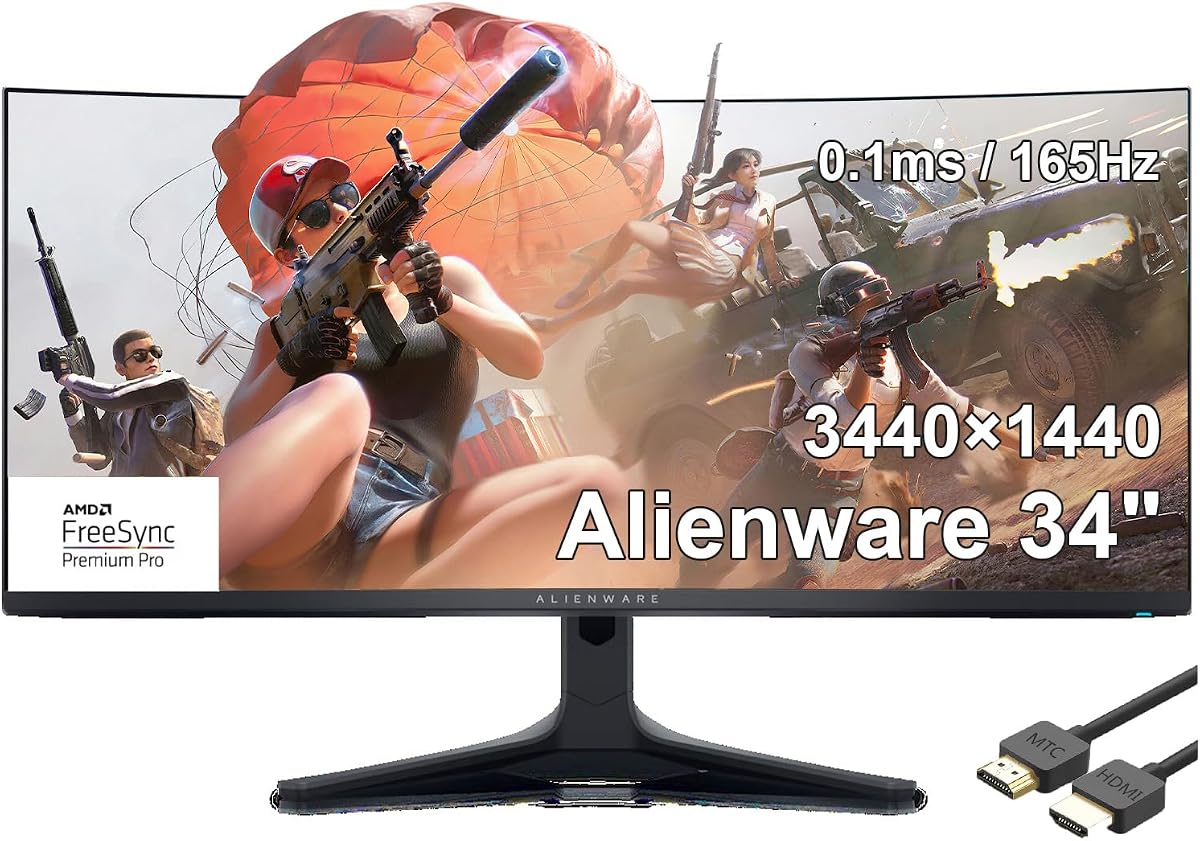
This model delivers strong performance for AMD users through FreeSync Premium Pro. It retains the high quality of Quantum Dot OLED technology for stunning visuals. The 165Hz refresh rate supports smooth gameplay across a range of titles.
We may earn a commission when you buy through this link, at no additional cost to you.
Key strengths include the fast response time and vivid colors that are typical of OLED panels. The included HDMI cable helps get you started quickly. It offers a balanced mix of performance and value for curved gaming setups.
User feedback varies so check current reviews before purchasing. The panel performance is excellent but bundle value and support can differ. Ensure your system supports FreeSync to get the most out of this monitor.
Buyers with AMD GPUs will find this a great fit for their setup. It is ideal for those who want OLED quality without paying premium prices. If you prioritize fluid motion and color this model delivers.
AMD FreeSync Premium Pro ensures smooth gameplay for users with AMD graphics without screen tearing or stuttering.
With a 165Hz refresh rate and fast response you get fluid visuals that help in fast-paced competitive games.
We may earn a commission when you buy through this link, at no additional cost to you.
This monitor offers a larger 32-inch screen with true 4K resolution for stunning clarity. The OLED technology ensures deep blacks and vibrant colors across the display. It is a great choice for media consumption and high detail gaming.
We may earn a commission when you buy through this link, at no additional cost to you.
Its main strength is the resolution which provides incredibly sharp details for games and work. The curved design wraps your vision and enhances immersion significantly. You get the best of both worlds with pixel clarity and visual depth.
The trade-off is the requirement for a strong GPU to drive 4K content. It may also cost more than standard ultrawide options. But for those who prioritize resolution this model delivers an exceptional visual experience.
Buyers seeking high resolution and OLED quality will love this display. It is ideal for media lovers and creators who need sharp visuals. If you want the next level of clarity this monitor is worth the investment.
The 3840 x 2160 resolution offers sharp details that make games and media look incredibly lifelike and crisp.
Curved OLED panel provides deep blacks and vibrant colors that enhance immersion in dark scenes and media content.
We may earn a commission when you buy through this link, at no additional cost to you.
This model targets competitive players with its 280Hz refresh rate for minimal lag. The IPS panel offers accurate colors and a bright image. It includes accessories to ensure your setup is ready right out of the box.
We may earn a commission when you buy through this link, at no additional cost to you.
Key strengths include the integrated USB hub for easy peripheral connection. The bundle saves you time by providing HDMI and printer cables along with cleaning supplies. The high refresh rate ensures smooth motion even in fast games.
The main trade-off is the flat panel design which lacks the immersion of curved screens. Also the smaller size means less workspace compared to ultrawide options. But for competitive gaming this speed is valuable.
Buyers who prioritize speed and accessories will find this perfect. It is ideal for competitive setups where reaction time matters most. If you want high refresh and convenience this bundle meets those needs well.
The 280Hz refresh rate ensures ultra-smooth visuals that give you an edge in fast-paced competitive multiplayer games.
Included cables and cleaning kit help you set up quickly and keep your display in top condition from day one.
We may earn a commission when you buy through this link, at no additional cost to you.
This Samsung monitor offers a massive 40-inch screen for ultimate immersion. The 1000R curve wraps around your field of vision more aggressively than Alienware options. It delivers high brightness and fast refresh for excellent gaming performance.
We may earn a commission when you buy through this link, at no additional cost to you.
Its main strength is the sheer size which provides a cinematic experience for games and movies. The HDR brightness ensures visibility in dark scenes. The 180Hz refresh rate supports smooth gameplay with minimal lag.
The trade-off is the significant desk space required. It may not fit smaller desks well without adjustment. Also it is a different brand from Alienware but offers comparable performance.
Buyers with large desks will enjoy the immersive benefits of this monitor. It is ideal for those who prioritize screen real estate over brand. If you want a massive ultrawide experience this model delivers.
The 40-inch width wraps your field of view providing a cinematic gaming experience that draws you into the action.
DisplayHDR 600 provides deep blacks and bright whites that make scenes in games and videos look realistic.
We may earn a commission when you buy through this link, at no additional cost to you.
Choosing the right curved monitor involves balancing performance needs and budget. Consider refresh rate panel type and curve intensity to find the best fit.
OLED panels offer superior contrast and color but cost more than LED models. Decide if you want infinite contrast or a lower price point.
Choose OLED for deep blacks or LED for budget-friendly performance.
Higher refresh rates like 180Hz or 240Hz reduce motion blur and improve smoothness in competitive games. Aim for 0.1ms response to minimize ghosting.
Prioritize high refresh rates if you play fast-paced multiplayer titles.
WQHD (3440×1440) is standard for ultrawide monitors and offers sharp details without requiring top tier GPUs. 4K models deliver more clarity but need stronger hardware.
Stick to WQHD for balanced performance or 4K for high detail.
A 1500R to 1800R curve wraps your view comfortably. Deeper curves like 1000R offer more immersion but may cause eye strain if seated too close.
Select a curve that feels natural at your typical viewing distance.
Ensure the monitor supports FreeSync Premium Pro or G-Sync to prevent screen tearing. Match the monitor to your graphics card brand for best results.
Check sync compatibility with your GPU before purchasing.
Look for height swivel and tilt adjustments to maintain good posture. Adjustable stands reduce neck strain during long gaming sessions.
Choose a model with full adjustability for long-term comfort.
Multiple HDMI and DisplayPort inputs allow you to connect consoles and PCs simultaneously. USB hubs can help organize peripherals on your desk.
Verify ports match your devices before buying to avoid adapters.
Bundles with cables and cleaning kits may offer better value. Compare total costs with standalone units to determine the best deal.
Weigh bundle extras against your needs to maximize savings.
Calibrate your monitor settings to ensure accurate colors and brightness. Use preset modes like Game or Cinema for different content types.
Keep the screen clean using a microfiber cloth and approved cleaning solutions. Avoid spraying liquids directly on the panel.
Enable ComfortView or similar features to reduce blue light during night gaming. This helps protect your eyes and improve sleep quality.
Curved monitors provide a more immersive experience by wrapping your field of view. They reduce peripheral distortion and can help with depth perception in games.
G-Sync is designed for NVIDIA GPUs while FreeSync works with AMD and many NVIDIA cards. Both prevent screen tearing by syncing frame rates between GPU and monitor.
Yes to achieve 165Hz or higher you typically need DisplayPort 1.4 or HDMI 2.1. Check your GPU and monitor specs to confirm the required cable type.
Curved monitors with wide color gamuts like DCI-P3 are suitable for creative tasks. However ensure color accuracy is calibrated for your specific workflow.
OLED offers perfect blacks and faster response times. LED is more affordable and avoids burn-in risk but has lower contrast and slower pixels.
Ultrawide monitors require wider desks often around 60 inches or more. Measure your workspace to ensure comfortable viewing distances.
Alienware combines strong build quality with optimized gaming features. Their OLED and high refresh models deliver consistent performance and design.
Bundles with cables and kits can save time and money if you need those items. Compare prices with standalone monitors to confirm value.
The top picks for November 2026 highlight performance and value across different needs. The AW3423DW remains a strong all-rounder while the 240Hz model sets a new benchmark for speed.
Prioritize refresh rate and panel technology based on your gaming habits. Competitive players should favor speed while creatives may prefer color accuracy and contrast.
Prices and availability change so check current listings for the latest deals. Use this guide to find the monitor that best fits your specific setup requirements.