
HP Smart Tank 5003
4.1Editor score
Up to 3 years ink
Mess-free refill
Borderless prints
Explore the top AI printers for home and office. We compare features, speed, ink costs, and smart capabilities to help you choose the right model.
Artificial intelligence is transforming how we print documents, photos, and creative projects. Modern AI printers optimize layouts, detect errors, and streamline workflows for better efficiency.
We evaluated ten leading models based on print quality, speed, connectivity, and AI-driven features. Our analysis focuses on real-world performance and user feedback to ensure reliability.
Each selection highlights unique strengths for different needs, from home offices to creative studios. Please note that prices and availability may change over time due to market conditions.
4.1Editor score

3.9Editor score

4.7Editor score
This table provides a quick side-by-side overview of all ten models, highlighting key specifications and unique features to help you narrow down your choice quickly.



The HP OfficeJet Pro 8125 stands out as a reliable workhorse for home offices needing professional quality with intelligent features. It carries a solid rating and offers essential tools like AI formatting to reduce wasted paper.
We may earn a commission when you buy through this link, at no additional cost to you.
Its standout feature is HP AI, which strips unwanted web content before printing. This ensures emails and pages look clean. The 225-sheet tray and ADF support heavy document handling effectively.
Trade-offs include the limited three-month Instant Ink trial and strict chip requirements for cartridges. These are standard industry practices but may limit flexibility for some users seeking open ink systems.
Buy this if you need a trustworthy office printer that saves time on document preparation. Its balanced mix of speed, security, and smart layout tools makes it a top contender for daily use.
HP AI removes unnecessary elements from web pages and emails before printing to save ink and improve professionalism.
Dual-band Wi-Fi automatically resolves connection issues while Wolf Essential Security protects your network from threats.
We may earn a commission when you buy through this link, at no additional cost to you.
The HP Smart Tank 5003 is ideal for families or home users printing large volumes without constant ink purchases. It includes enough ink for up to three years and offers a simple refill process.
We may earn a commission when you buy through this link, at no additional cost to you.
Its primary strength lies in cost efficiency. The refill system prevents spills and ensures you can print thousands of pages right out of the box. AI capabilities help format documents efficiently.
While it lacks fax functions and has moderate speeds, these do not hinder basic home use. The low running costs far outweigh these limitations for most households needing reliable daily printing.
Choose this if you want to avoid expensive cartridges and need a printer that keeps up with heavy workload demands. It is a practical long-term investment for budget-conscious buyers.
With up to three years of ink included, this model drastically reduces the cost per page compared to standard cartridge printers.
The cartridge-free ink tank allows you to refill bottles mess-free without squeezing or spilling ink during maintenance.
We may earn a commission when you buy through this link, at no additional cost to you.
The Bambu Lab P2S Combo redefines 3D printing with advanced AI tools and remarkable speed. It is designed for creators who need professional-grade output without complex manual tuning.
We may earn a commission when you buy through this link, at no additional cost to you.
AI failure detection ensures prints succeed by monitoring the process in real time. The AMS 2 Pro adds multi-color and multi-material support, enabling intricate designs effortlessly with consistent results.
The cost is higher than standard printers, but the time saved on calibration and failed prints justifies it. Beginners can set it up quickly while professionals get reliable high-speed precision.
Buy this if you are serious about 3D creation and need AI-assisted reliability. Its workflow efficiency and multi-color options make it a premium choice for makers and studios.
Built-in AI monitors prints to catch errors early and prevent waste of time and materials during long jobs.
The AMS 2 Pro enables seamless color changes and material switching for complex 3D models without manual intervention.
We may earn a commission when you buy through this link, at no additional cost to you.
The HP Envy 6155 focuses on vibrant photo prints and everyday documents with a touch of AI intelligence. It uses True-to-Screen tech to ensure colors match your display accurately.
We may earn a commission when you buy through this link, at no additional cost to you.
Its design emphasizes sustainability with high recycled content and efficient printing. The app and AI tools help streamline tasks, making it easy to manage printing from any mobile device.
It is slower than office models and has a smaller tray, which limits heavy volume. However, for occasional home use and creative projects, these trade-offs are minor and acceptable.
Choose this for a stylish, eco-friendly printer that handles photos well. It fits perfectly in small spaces while delivering reliable results for personal and household needs.
True-to-Screen technology ensures vibrant and accurate colors that match your device display for stunning photo prints.
Made with at least 60 percent recycled plastic, this model supports environmental goals without compromising print quality.
We may earn a commission when you buy through this link, at no additional cost to you.
The HP OfficeJet Pro 9135 delivers exceptional speed and versatility for busy office environments. Its fax capability and dual trays ensure smooth operations without constant paper refilling.
We may earn a commission when you buy through this link, at no additional cost to you.
AI formatting enhances document presentation by removing clutter. Wolf Pro Security keeps your network safe from threats, making it a secure choice for professional settings and sensitive data.
It comes at a higher price point with a short ink trial, but the performance justifies the cost. The dual trays save time and reduce interruptions during peak work hours.
Buy this if you need rapid printing and professional features. It balances speed and security effectively for businesses requiring reliable high-volume output.
With 25 pages per minute and two large trays, this printer handles high-volume jobs efficiently without slowing down your workflow.
Wolf Pro Security bolsters network protection, ensuring your business data remains safe from external threats and cyber risks.
We may earn a commission when you buy through this link, at no additional cost to you.
The HP Smart Tank 7603 combines massive ink capacity with essential office functions like faxing. It is built for home offices needing longevity and minimal maintenance over time.
We may earn a commission when you buy through this link, at no additional cost to you.
Its magic touch panel simplifies operations, while the high page count means fewer refills. AI capabilities help maintain quality and efficiency across various document types and daily tasks.
While larger and moderately fast, it saves money on ink and reduces frequent maintenance needs. For users prioritizing cost over speed, this balance is highly advantageous for long-term savings.
Select this for a durable home office solution with faxing. Its efficiency and capacity make it ideal for busy households managing diverse printing requirements daily.
With up to 8000 color pages included, this model minimizes ink costs and interruptions for high-volume home office needs.
The magic touch control panel provides intuitive navigation, making it easy to manage complex printing and scanning tasks.
We may earn a commission when you buy through this link, at no additional cost to you.
The HP OfficeJet Pro 8139 stands out for its one-year Instant Ink trial, offering extended convenience for home office users. It includes fax and solid security features for daily professional tasks.
We may earn a commission when you buy through this link, at no additional cost to you.
AI tools help optimize layouts to save waste. The 225-sheet tray provides ample capacity, ensuring smooth operation during busy periods without constant refilling or interruptions in workflow.
It shares some limitations with other HP models regarding chips and recycled content. However, the extended trial offers significant initial savings and ease of use for new buyers.
Choose this if you want long trial coverage and solid security. It is a balanced choice for home offices needing fax and professional document management capabilities.
The one-year trial ensures you have ink delivered automatically without worry, reducing hassle during the first year of ownership.
With fax, ADF, and duplex support, this model covers essential office functions needed for professional document handling daily.
We may earn a commission when you buy through this link, at no additional cost to you.
The HP Smart Tank 7603 D34F7A is a robust option for users needing fax capabilities and high yield. It offers the same benefits as the 9B5D1A version with reliable tank design.
We may earn a commission when you buy through this link, at no additional cost to you.
Its mess-free refill system simplifies maintenance. AI features ensure quality control. This variant provides a cost-effective solution for home offices needing fax and extended capacity.
The large size may not fit small desks, but the volume savings are worth it. It offers a practical solution for households printing documents regularly without ink worries.
Buy this for a reliable, high-volume home office printer. Its balance of capacity and utility makes it a strong contender for busy family workspaces.
Built-in faxing capabilities make this model versatile for home offices that still require traditional document transmission methods daily.
The cartridge-free ink tank refill system is designed to be mess-free, preventing spills and making maintenance easy for users.
We may earn a commission when you buy through this link, at no additional cost to you.
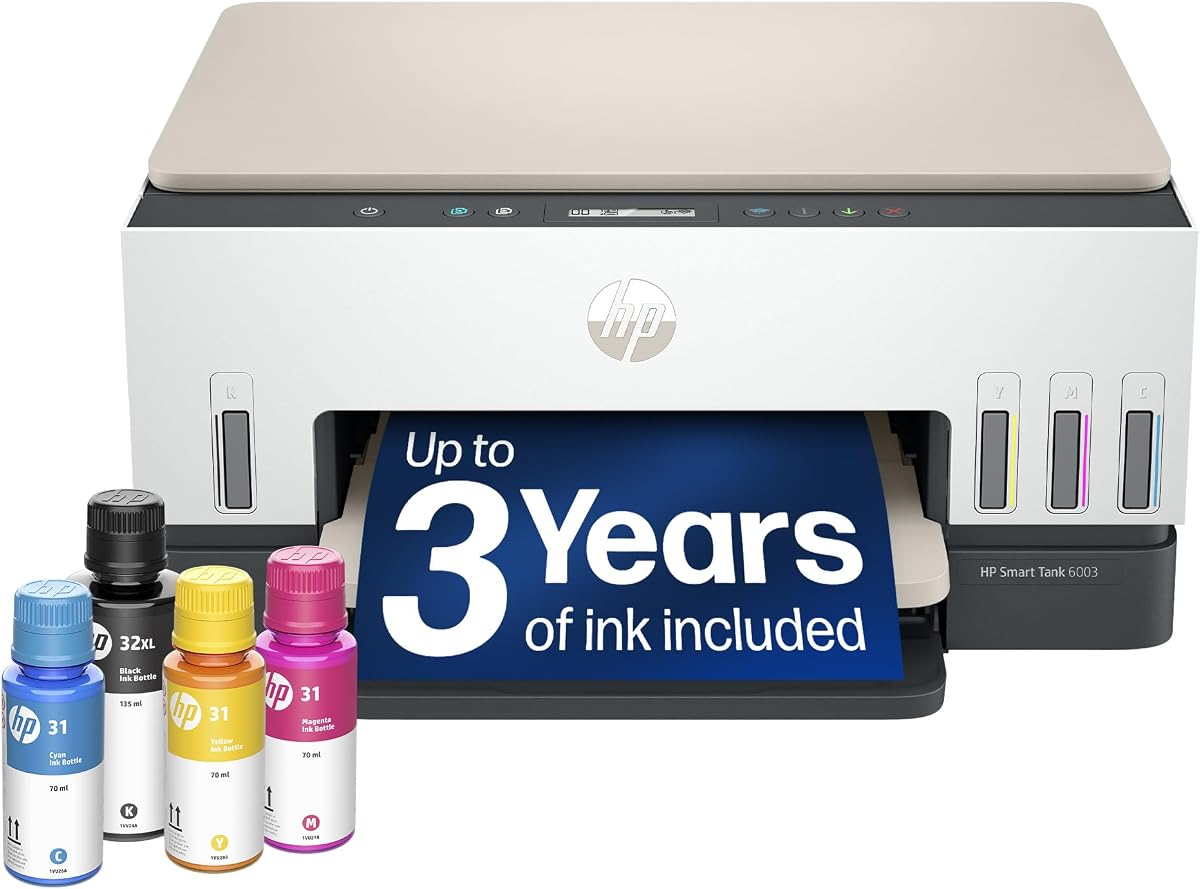
The HP Smart Tank 6003 brings high yield and convenience to smaller home spaces. It lacks fax but excels in photo printing and daily document tasks with significant ink savings.
We may earn a commission when you buy through this link, at no additional cost to you.
Its wireless connectivity and simple refill process make it accessible for all users. AI helps maintain output quality, ensuring every document looks professional without manual adjustment efforts.
While ratings are slightly lower than others, the savings are substantial. It fits well in tight spaces without sacrificing performance for basic home office needs and creative projects.
Choose this for a compact tank printer. It is perfect for users prioritizing ink savings and ease of use in a standard home environment.
Borderless printing allows you to create stunning photo prints without borders, perfect for personal albums and creative projects.
Seamless wireless printing enables you to send documents from any device, enhancing flexibility and convenience in home settings.
We may earn a commission when you buy through this link, at no additional cost to you.
The Liene PixCut S1 transforms home crafting with AI tools that extract subjects and cut stickers precisely. It uses thermal dye-sublimation to create durable waterproof labels and custom gifts.
We may earn a commission when you buy through this link, at no additional cost to you.
Its unique value lies in the all-in-one workflow. No separate cutting machine is needed, and the app offers thousands of templates and assets without any subscription fees or hidden costs.
Limitations include its focus on stickers rather than standard office documents. However, for crafters, this specialization ensures high-quality results for custom projects and creative business ventures.
Buy this if you want to create custom stickers effortlessly. Its AI capabilities and durability make it a standout for DIY projects and personalized gift making.
AI image extraction automatically recognizes subjects in photos, allowing you to create custom stickers without complex editing steps.
Thermal dye-sublimation technology laminates stickers during printing, ensuring they are waterproof and scratch-resistant for long-lasting use.
We may earn a commission when you buy through this link, at no additional cost to you.
Selecting the right AI printer requires considering how artificial intelligence enhances your specific workflow and budget. This guide outlines key factors to ensure you make an informed decision.
Look for printers offering AI tools like layout optimization, failure detection, or image extraction. These features save time, reduce waste, and improve the professional look of your output.
Prioritize models that use AI to automate tedious tasks, ensuring your printer adds value beyond basic mechanical printing functions.
Assess your monthly page count to decide between standard inkjet models and high-volume tank printers. Speed ratings in pages per minute matter if you handle large batches regularly.
Choose faster models for offices to minimize downtime, while home users can prioritize cost efficiency over raw speed.
Evaluate whether a cartridge-based or tank system suits your needs. Tank printers often include years of ink, lowering long-term costs compared to frequent cartridge replacements.
Consider trial offers and maintenance fees to estimate total cost of ownership beyond the initial purchase price.
Ensure the printer supports dual-band Wi-Fi and mobile apps for seamless integration into your network. Security features like encryption protect sensitive documents from unauthorized access.
Opt for models with reliable connection management to avoid frustrating downtime and ensure data safety.
Decide if you need fax capabilities, duplex printing, or automatic document feeders. These features streamline office workflows but may increase complexity and price.
Select a model that covers your essential functions without paying for unused capabilities that clutter your workspace.
Check for recycled content in construction and energy-saving features. Eco-friendly models reduce environmental impact and often align with modern corporate social responsibility goals.
Prioritize designs using recycled materials if sustainability is a key factor in your purchasing decision.
Touchscreen size, interface design, and refill mechanisms affect daily usability. Mess-free systems prevent spills and simplify maintenance tasks significantly.
Choose intuitive designs to minimize setup time and allow all household members to operate the device easily.
Review warranty terms and manufacturer support availability. Reliable customer service is crucial for resolving technical issues quickly without disrupting work.
Select brands with established support networks to ensure long-term reliability and peace of mind.
Start by connecting the printer to your network and installing the necessary driver software on your devices. Most modern models include apps that guide you through setup steps for both mobile and desktop use.
Regularly update firmware to keep AI features functional and secure. Check for software patches that optimize performance and address any bugs affecting print quality or connectivity.
Maintain the print heads and ink tanks by running cleaning cycles when prompted. For tank models, handle refills carefully to avoid spills, and store ink bottles properly to extend their lifespan.
AI in printers analyzes data to optimize layouts, detect print failures, or extract image subjects automatically. These features reduce waste, save time, and ensure professional results without manual adjustments.
Most branded AI printers enforce chip verification, so using non-original cartridges may void warranties. Always check manufacturer policies before purchasing third-party supplies to avoid compatibility issues.
Tank models like the Smart Tank series are best for high-volume home use due to included ink and low cost per page. They handle thousands of prints without frequent maintenance.
Yes, AI layout tools remove unnecessary web content before printing, reducing the number of pages needed. This optimization helps save paper and lowers overall ink consumption significantly.
Yes, the Bambu Lab P2S Combo is included as an advanced AI printing solution for 3D objects. It uses AI for failure detection and multi-color printing capabilities.
Use the printer's mobile app to diagnose connection problems. Restart your router and printer, or switch to the 2.4GHz network if issues persist for better stability.
The HP OfficeJet Pro 8125, Smart Tank 5003, and Bambu Lab P2S stand out as top picks for offices, value seekers, and creators respectively. Each offers unique AI features to enhance your workflow.
Prioritize cost efficiency for home use or speed for professional environments to find the right fit. AI tools can significantly streamline tasks, so choose based on which feature matters most to you.
Always verify current pricing and availability as market conditions change. These selections provide a strong starting point for finding a printer that combines technology and reliability effectively.