
AI Voice Recorder, AI Note Taker, Unlimited Transcription, Lite
4.4Editor score
Unlimited transcription on starter plan
Credit card sized portable design
Smart AI summary features
This expert guide compares the top AI lapel devices for recording transcribing and summarizing conversations to help you choose the best wearable recorder for
AI lapel devices are transforming how professionals capture meetings and conversations. These wearable recorders combine advanced microphones with artificial intelligence to transcribe speech and summarize key points instantly. Finding the right one depends on your specific workflow and privacy needs.
We evaluated ten leading models based on audio quality transcription accuracy battery life and ease of use. Each device offers unique features like voice assistants multilingual support and secure cloud storage. Our analysis focuses on real-world performance and practical utility for daily tasks.
Each pick below highlights standout capabilities and potential limitations to help you decide. Note that features and availability may vary by region and software updates. Always check current product details before purchasing to ensure it meets your requirements.
4.4Editor score

4.5Editor score

4.8Editor score
This side-by-side comparison highlights the core capabilities of each model to help you identify the best fit for your needs. We focus on recording duration language support and unique AI tools available.




The Plaud Note Pro stands out as a top choice for professionals needing detailed meeting insights. It combines high fidelity audio capture with multimodal input to let you type notes or snap photos while recording. This creates a richer context for transcription and summary tasks.
We may earn a commission when you buy through this link, at no additional cost to you.
Its Ask Plaud feature allows you to chat directly with your recordings to extract key points or draft follow up emails. The device uses four MEMS microphones to ensure clear speech capture even in noisy environments. This reliability makes it ideal for important business discussions.
While the device offers impressive capabilities it does rely on an app for advanced features and transcription. Some users might find the learning curve slightly steep initially. However the security compliance and battery life offset these minor inconveniences for enterprise users.
This recorder is perfect for legal medical and business professionals handling sensitive information. Its strong privacy features and team plan options make it a robust solution for organizations. We recommend it for those prioritizing data security and accuracy.
The ability to add images and notes during recording helps the AI understand the context better for more accurate summaries.
Built with ISO and SOC certifications the device ensures your data remains encrypted and compliant with global standards.
We may earn a commission when you buy through this link, at no additional cost to you.
Pocket serves as an ideal AI personal assistant for iPhone users who value hands free recording. Its MagSafe compatibility allows it to attach securely to your phone ensuring it captures audio without slipping. This design is perfect for capturing moments on the go.
We may earn a commission when you buy through this link, at no additional cost to you.
The device excels at organizing conversations into clear summaries and action items automatically. You can ask questions across your meetings to get instant insights without listening to hours of audio. This workflow is efficient for busy professionals and students.
One limitation is that advanced tools are optional and may require a subscription for power users. Also its magnetic attachment limits versatility for Android users. However the convenience factor for Apple users is a significant advantage for daily use.
We recommend this device for anyone deeply integrated into the Apple ecosystem who needs reliable meeting notes. The battery life supports travel and daily use without constant charging. It strikes a great balance between form and function.
Attaching to your phone via MagSafe means you never have to hold the device during a call or meeting.
The AI turns raw audio into structured maps and next steps so you can review what matters quickly.
We may earn a commission when you buy through this link, at no additional cost to you.
The Plaud NotePin S offers exceptional flexibility for users who want to wear their recorder discreetly. It comes with accessories to wear it as a pin necklace or wristband making it adaptable to any workflow. This is great for interviews or long lectures.
We may earn a commission when you buy through this link, at no additional cost to you.
It supports recording in over one hundred languages and uses top AI models to create structured insights. The physical record button gives precise tactile control which is helpful in formal settings. Local storage ensures you capture audio even without internet access.
The device is lightweight which might feel less premium than larger models. However the trade off is better comfort for all day wear. Privacy standards meet enterprise needs making it suitable for sensitive business discussions.
This device is ideal for professionals who need to record on the go without drawing attention. The variety of wearing options ensures it fits your style and needs. We suggest it for travelers and frequent speakers.
Four included accessories let you adapt the device to your workflow as a clip pin or necklace effortlessly.
Store up to sixty four gigabytes locally and sync to the cloud when you are ready.
We may earn a commission when you buy through this link, at no additional cost to you.
EurekaMind offers a compelling option for budget conscious users who need unlimited transcription immediately. It includes core features out of the box and lets you search the web for deeper insights beyond your recordings. This makes it a smart tool for research.
We may earn a commission when you buy through this link, at no additional cost to you.
The device identifies different speakers and highlights action items to help you review conversations quickly. Its credit card sized design means it fits easily into a wallet or card holder. This portability ensures you are always ready to record.
While it lacks some advanced features found in premium models it covers the essentials well. The web search integration is a unique touch that adds value to the core functionality. It is a solid choice for casual note takers.
We recommend this device for students and professionals who want to avoid subscription fees. The secure enterprise level privacy adds trust to its affordable profile. It is a great starting point for AI note taking.
Ask your AI assistant to search the web for deeper insights and context around your meeting topics.
Its slim profile allows you to tuck it inside your wallet or slide it into a card holder discreetly.
We may earn a commission when you buy through this link, at no additional cost to you.
Comulytic Note Pro brings a specialized edge to voice recording with its industry specific knowledge base. It understands terms in sectors like finance and real estate to create precise transcripts. This is a huge benefit for professionals in specialized fields.
We may earn a commission when you buy through this link, at no additional cost to you.
The device syncs to the cloud at ten times the speed of Bluetooth allowing you to keep talking during backup. It includes a built-in translator and supports over one hundred languages. This global reach supports international business needs.
One trade-off is that deep dive analysis requires an optional premium plan for access. However the starter plan is generous and free forever. This model supports a flexible approach to productivity and cost.
We suggest this device for sales agents consultants and executives who work in specific domains. The fast sync and accurate transcripts save time after long meetings. It is a powerful tool for daily productivity.
The vertical knowledge base captures industry terms precisely so your transcripts are more accurate for your field.
Push recordings to the cloud ten times faster than Bluetooth so you can stay focused on the conversation.
We may earn a commission when you buy through this link, at no additional cost to you.
Comu Action Pro sets a new standard for productivity by turning conversations into editable documents automatically. It creates slides emails and action items without needing complex prompts. This feature saves significant time for busy project managers and leaders.
We may earn a commission when you buy through this link, at no additional cost to you.
The audio system includes a bone-conduction mic and six microphones to ensure clarity in any setting. This setup captures the cleanest sound even in interviews or crowded meetings. The massive battery life supports weeks of use without recharging.
While the price is higher than average the features justify the investment for power users. The unlimited core features mean you do not pay per minute of transcription. This makes it a cost-effective premium tool over time.
We recommend this device for executives who need to turn meeting notes into action immediately. The auto-document drafting is a game changer for workflow efficiency. It is the top choice for those needing deep integration.
Let the AI decide on a suitable model to turn your conversations into editable slides and email drafts.
Six microphones work together with a bone-conduction mic to capture the clearest sound in interviews.
We may earn a commission when you buy through this link, at no additional cost to you.
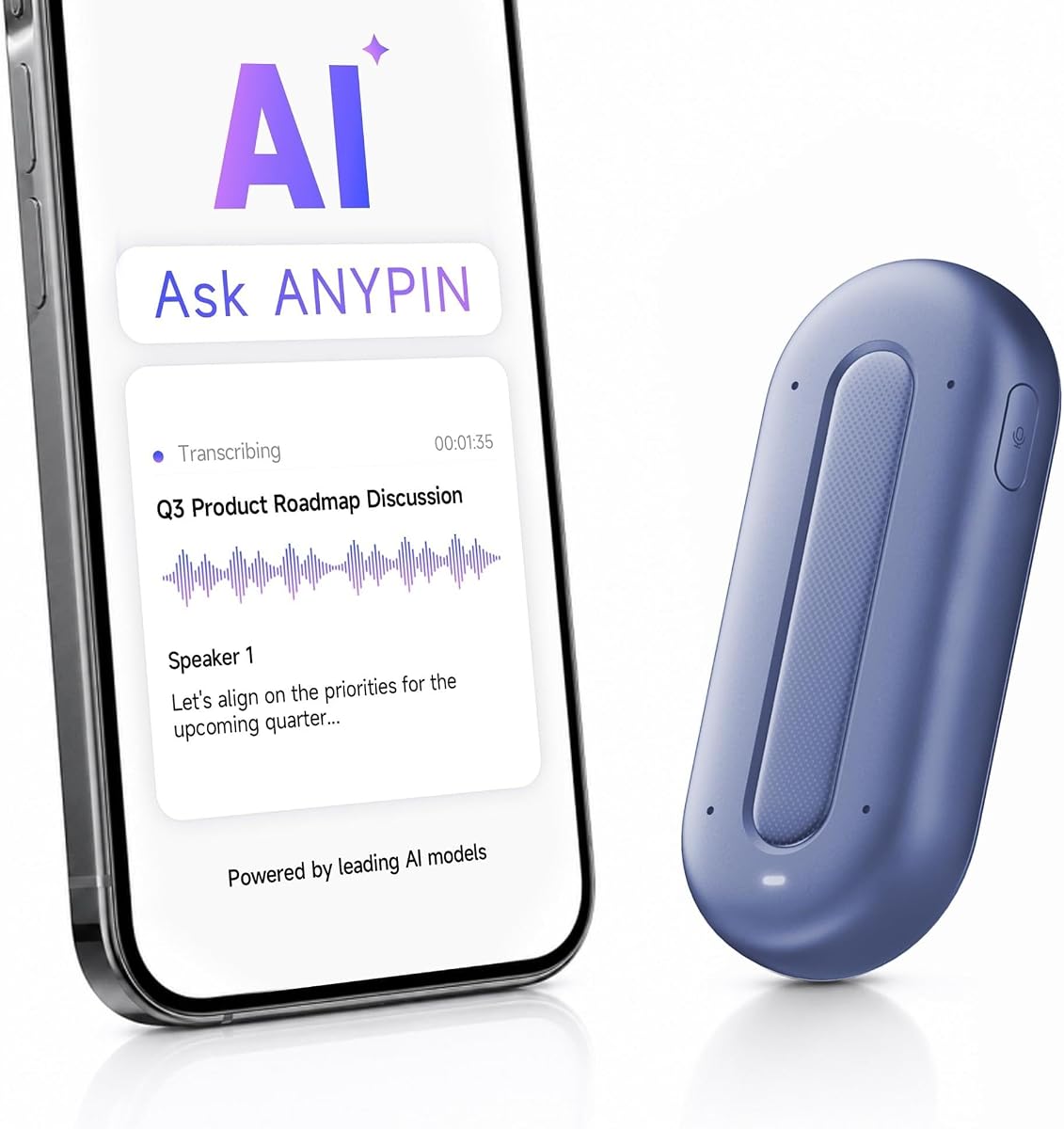
ANY PIN Note Pod P1 offers a generous one year of unlimited AI transcription with your purchase. This eliminates the need for monthly fees immediately after buying the device. It supports over one hundred languages for global communication.
We may earn a commission when you buy through this link, at no additional cost to you.
The device stays encrypted on-device and uses Wi-Fi to sync to the app for decryption. This private by design approach ensures your data remains secure throughout the process. It is a smart choice for privacy focused users.
Users may notice a lower rating compared to competitors but the value of free features is significant. USB-C data transfer is not supported which limits some connectivity options. Still the core functionality is robust for general use.
We recommend this device for those who want to try unlimited transcription without risk. The privacy features and translation support make it a versatile tool. It is a solid contender for budget conscious professionals.
Enjoy a full year of unlimited AI transcription with your purchase and no monthly fee or auto-renewal.
Data stays protected with enterprise-grade security and encrypted cloud storage to keep your info private.
We may earn a commission when you buy through this link, at no additional cost to you.
Z01 PRO acts as a wearable digital badge designed for travel and language learning. It supports translation across one hundred and two languages and connects via Bluetooth. The HD touchscreen allows you to personalize the device with custom patterns.
We may earn a commission when you buy through this link, at no additional cost to you.
Privacy is prioritized as all processing happens on-device with no cloud uploads. This ensures your personal data and queries remain locally stored. It serves well as a pocket encyclopedia for daily tasks and questions.
While it offers great portability translation requires an internet connection for full functionality. Recording features are less advanced than dedicated voice recorders. However its form factor is unique for those needing a digital accessory.
We suggest this device for travelers who want a stylish AI assistant in their pocket. The low energy connection ensures it stays ready when you need it. It is a great companion for daily cross-language communication.
Upload your own photos to create unique wallpapers and transform the device into a stylish digital accessory.
All processing happens on the device with no cloud uploads to ensure complete peace of mind for privacy.
We may earn a commission when you buy through this link, at no additional cost to you.
Z02 combines a voice recorder with a meeting assistant to help you stay organized. It features real-time speaker distinction and supports dual recording modes for better audio capture. This makes it easy to sort out key points automatically.
We may earn a commission when you buy through this link, at no additional cost to you.
The device includes eight powerful tools including mind maps and summaries to boost productivity. You can personalize it with custom wallpapers and control it with intuitive gestures. It is lightweight enough for daily school or business lectures.
Access to full AI dialogue requires a network connection via the dedicated app. While the screen is small it supports basic controls for brightness and recording. The high rating suggests strong user satisfaction with its features.
We recommend this device for students and professionals who need meeting minutes without effort. The gesture controls and multi-speaker capture make it efficient. It is a smart choice for staying connected.
Eight powerful AI tools automatically sort out key points keywords and action items to boost your work productivity.
Enjoy hassle-free operation with intuitive gestures like double-tap to start recording or swipe to wake the chatbot.
We may earn a commission when you buy through this link, at no additional cost to you.
SYNCO AI Mini is designed specifically for Android USB-C creators who record in real environments. Its AI noise reduction and voice enhancement keep speech clear in noisy places like cafeterias or offices. This ensures high quality audio without studio gear.
We may earn a commission when you buy through this link, at no additional cost to you.
It works with an app to organize recordings into summaries and mind maps for easy planning. The auto voice leveling balances sound even if you move during recording. This helps you get consistent results without editing later.
The lifetime free tools mean you do not pay monthly fees for these features. This makes it a smart investment for mobile content creation. However it is tailored for creators rather than general business note-taking.
We recommend this device for vloggers and mobile creators who need reliable audio on Android. The smart features help you move from recording to organized content fast. It is a powerful tool for everyday creation.
AI noise reduction helps reduce background distractions and keep speech clear in real-world recording environments.
Turn recordings into ready-to-use ideas with AI summaries and mind maps to plan content faster.
We may earn a commission when you buy through this link, at no additional cost to you.
Choosing the right wearable recorder depends on your specific workflow privacy needs and device compatibility. We highlight the most important factors to help you make an informed decision.
High quality audio is critical for accurate transcription. Look for devices with multiple microphones or noise cancellation to ensure clarity in meetings. This feature helps the AI capture every word even in busy environments.
A robust mic setup improves reliability for important conversations and legal use.
Different models vary in language support and translation capabilities. Ensure the device supports the languages you need for global communication. High accuracy reduces the need for manual correction and saves time.
Choose a model with broad language support to avoid limitations during international travel.
Battery life dictates how long you can record without interruptions. Some devices offer days of standby while others focus on short bursts of recording. Check if the device supports fast charging for convenience.
Long battery life is essential for all-day conferences and travel scenarios.
For professional use privacy standards like ISO and SOC are important. Look for encryption and local storage options to protect sensitive information. Ensure the vendor adheres to GDPR or HIPAA if needed for your industry.
Secure data handling builds trust for business and medical recording needs.
The companion app defines how you interact with your recordings. Advanced AI can summarize action items or draft emails. Check if these features are free or part of a subscription plan.
A strong app ecosystem extends the device value beyond simple recording.
The form factor impacts comfort and discretion. Consider if you need a clip necklace or magnetic attachment. A slim design fits easily in pockets or wallets for portability.
Comfortable wear ensures you keep the device with you throughout the day.
Some devices are optimized for specific phone ecosystems like iOS or Android. Check compatibility with your phone and operating system. Bluetooth and Wi-Fi support affect sync speed and usability.
Matching your recorder with your phone ensures seamless workflow and fewer errors.
Look for models with lifetime free tiers or reasonable subscription costs. Some devices charge for advanced features while others offer them for free. Evaluate the long-term cost before purchasing.
Avoid hidden fees by choosing a device with transparent pricing policies.
To get started place the device in a central location relative to speakers for best audio. Pair it with your phone via Bluetooth or Wi-Fi and download the companion app. Test the recording before important meetings to ensure settings are correct.
Keep your firmware updated to access the latest AI features and security patches. Charge the device regularly and avoid extreme temperatures to preserve battery health. Use the protective case if included to prevent scratches.
Respect privacy laws and inform participants before recording. Most devices have indicators to show when recording is active. Clear your local storage periodically if needed to manage space and performance.
Yes they are legal but local laws often require consent from participants. Always inform everyone involved before recording to comply with privacy regulations. Most devices have indicators to show recording status clearly.
Many models allow offline storage but require internet for cloud transcription. Some devices offer basic offline summaries using on-device processing. Check the specific model capabilities for offline usage.
Most devices record ambient sound and need to be near the call speaker. They cannot intercept digital call audio without special hardware. Use them to capture the speaker side of the conversation effectively.
Top models use AES encryption and comply with security standards like ISO. Many offer local storage options so data stays on the device. Always review the security policy before storing sensitive info.
Most apps allow you to correct text manually. Clear audio helps the AI process speech more accurately. Ensure the device is close enough to speakers to reduce noise interference.
Yes most platforms include secure sharing features for teams. Some offer centralized workspaces for collaboration. Check if the team plan supports multiple users and devices.
Most devices provide between ten to fifty hours of continuous recording. Standby time can extend to days for light usage. Fast charging options help you get back to work quickly.
Many models include a free starter plan with core features. Advanced tools like deep analysis may require a premium subscription. Always check what is included out of the box.
We have reviewed ten top models that range from compact budget options to advanced enterprise grade recorders. Each device brings unique strengths like multimodal input auto documents or industry specific tools to the table. Select the one that aligns best with your daily tasks.
Prioritize audio quality security and battery life when comparing features. Ensure the companion app fits your workflow and offers the AI tools you need. A good device should save time and reduce the mental load of note taking.
Remember that prices and features can change so check current product details before buying. We hope this guide helps you find the perfect wearable recorder for your needs. Stay productive and keep your insights secure.