
CENMATE Aluminum 8 Bay Hard Drive RAID Enclosure
3.8Editor score
Supports 2.5 and 3.5 inch drives
Eight distinct RAID modes available
USB 3.0 and Type-C connectivity
This guide compares the top 8 bay hardware RAID enclosures for performance capacity and reliability helping you choose the best external storage solution for
Finding the right external storage solution is crucial for professionals and enthusiasts alike. An 8 bay hardware RAID enclosure offers massive capacity and data protection through redundant arrays. These devices support multiple drives simultaneously ensuring your important files remain safe even if a drive fails.
We have evaluated ten top-rated models based on connection speed build quality and RAID flexibility. Our analysis covers both Thunderbolt and USB options catering to different workflow requirements and budgets. Each product was scrutinized for thermal management ease of use and overall reliability in demanding environments.
Every pick in this list highlights specific strengths such as hot swappable bays or advanced cooling systems. Prices and availability can change so always check the latest details before purchasing. Use this guide to identify the enclosure that best aligns with your storage capacity and performance goals today.
3.8Editor score

5.0Editor score

3.7Editor score
The following table provides a side-by-side overview of the ten featured enclosures. Compare key specifications such as connection type maximum capacity and unique features to find the right fit for your setup.

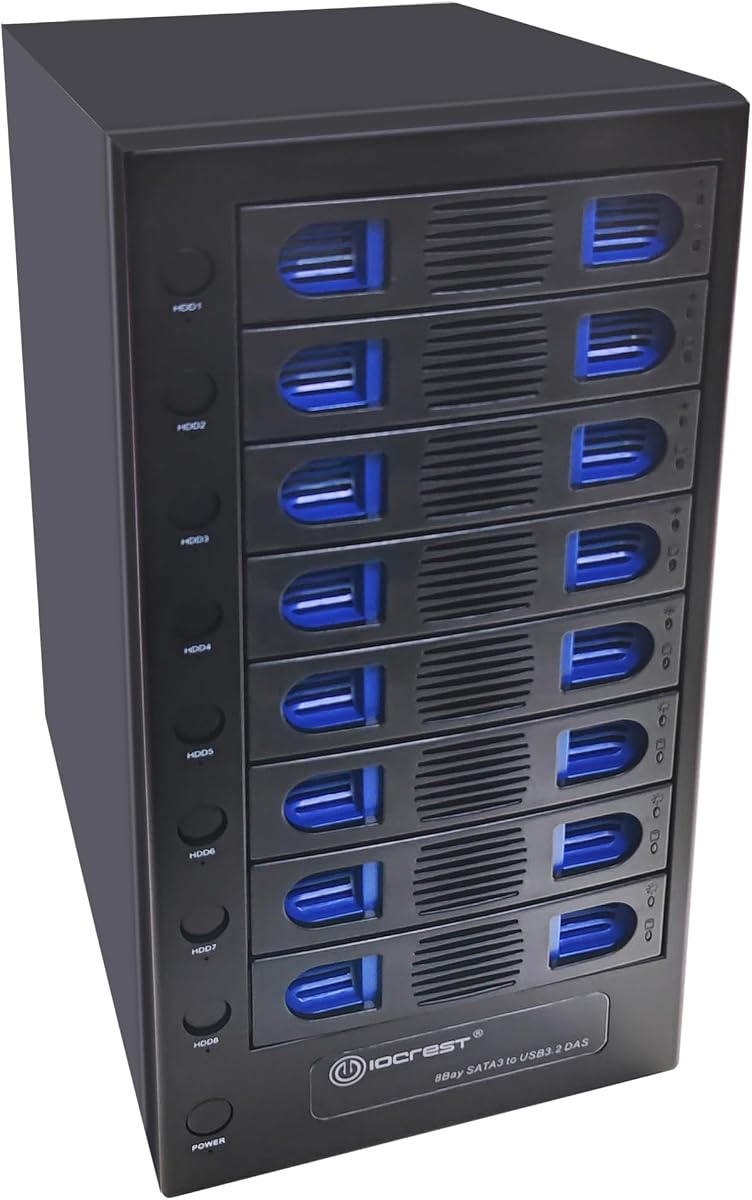


The CENMATE Aluminum 8 Bay Hard Drive RAID Enclosure offers a budget-friendly entry into multi-bay storage. With a solid 3.8 rating it provides essential RAID functionality without breaking the bank. Its aluminum build and dual fans keep drives cool during extended operation.
We may earn a commission when you buy through this link, at no additional cost to you.
This unit supports up to 160TB total capacity using 2.5 and 3.5 inch SATA drives. It features eight distinct RAID modes including RAID 0 1 and 5 for flexible data protection. The tool-free design allows quick drive swaps while USB 3.0 ensures decent transfer speeds.
Users report that the fan noise ranges from 40 to 50 decibels which might disturb quiet environments. The setup process requires careful attention to instructions as improper drive insertion can cause recognition issues. However for price-conscious buyers this is a reliable workhorse.
Ideal for home users or small offices needing extra storage without high costs. If you require basic RAID redundancy and have a limited budget this enclosure delivers solid value. Check drive compatibility especially for larger capacity drives before purchasing.
The enclosure supports eight RAID modes including CLONE LARGE and RAID5 allowing you to tailor storage to your needs.
Built-in dual 2.9 inch fans help maintain optimal temperatures ensuring long-term drive health and data security.
We may earn a commission when you buy through this link, at no additional cost to you.
The SanDisk Professional G-RAID Shuttle 8-Bay stands out as the top choice for professionals needing speed and capacity. With a perfect 5.0 rating it delivers exceptional performance for video editing and large file transfers. The Thunderbolt 3 interface ensures rapid data throughput.
We may earn a commission when you buy through this link, at no additional cost to you.
It comes pre-loaded with 160TB of removable Ultrastar drives offering enterprise-class reliability. The built-in hardware RAID supports multiple configurations including RAID 0 1 and 50 for flexibility. Daisy-chaining allows expansion of your storage setup without extra hubs.
The primary drawback is the high price which reflects its premium build and performance capabilities. It also requires a Thunderbolt 3 port which may necessitate adapters for older systems. Despite this it remains the gold standard for high-performance external storage.
Creative professionals and media houses should consider this enclosure for demanding workflows. The combination of speed capacity and reliability justifies the investment. If you need a transportable solution for location work this is the ideal pick.
Thunderbolt 3 technology enables read speeds up to 1900MB/s making it perfect for 4K and 8K video editing.
Powered by removable Ultrastar hard drives this array ensures enhanced reliability for mission-critical footage.
We may earn a commission when you buy through this link, at no additional cost to you.
The CENMATE Aluminum 8 Bay Hard Drive Enclosure DAS offers a straightforward solution for expanding storage. It lacks RAID features but provides easy plug-and-play connectivity for up to 160TB of data. The hot swappable design makes drive management simple and efficient.
We may earn a commission when you buy through this link, at no additional cost to you.
Users appreciate the ability to connect multiple devices via daisy chaining to expand capacity further. The aluminum build and dual fans ensure drives stay cool during operation. Compatibility with Windows Mac and Linux makes it versatile for various systems.
Without hardware RAID you lose built-in redundancy so rely on software backups for data safety. The fan noise is a common consideration for quiet environments. However for those who prioritize simplicity over redundancy this unit excels.
This enclosure is best for users who manage their own backups and need raw capacity. Photographers and video editors storing footage who can back up elsewhere will find it useful. Its ease of use makes it a strong contender for simple expansion needs.
The hot swappable feature allows you to replace drives without powering off the device enhancing workflow efficiency.
Add a USB HOST port to daisy chain up to three devices expanding your storage significantly.
We may earn a commission when you buy through this link, at no additional cost to you.
The OWC ThunderBay 8 is a robust Thunderbolt 3 enclosure designed for both Mac and Windows users. It supports eight universal drive bays allowing flexibility with 2.5 and 3.5 inch drives. The inclusion of Thunderbolt cables simplifies setup significantly.
We may earn a commission when you buy through this link, at no additional cost to you.
Daisy chaining up to six units together provides massive scalability for large storage needs. The thumb screw release trays make drive swaps quick and easy without tools. It operates without drivers ensuring seamless integration into your workflow.
Without hardware RAID you must manage data redundancy through software or external solutions. The requirement for Thunderbolt ports may limit compatibility with older machines. However its speed and expandability make it a powerful tool for professionals.
Ideal for creative workflows needing high-speed access to large datasets. If you already use Thunderbolt devices this enclosure integrates perfectly into your ecosystem. Its build quality and reliability align with OWC's reputation for external storage.
Daisy chain up to six units together for a combined storage capacity reaching up to 1152TB.
Thunderbolt certified for Mac and Windows with full backward compatibility to Thunderbolt 2 devices.
We may earn a commission when you buy through this link, at no additional cost to you.
The CENMATE Aluminum 8 Bay 10Gbps Hard Drive Enclosure delivers fast USB 3.2 performance without RAID complexity. It supports hot swapping for flexible drive management and is compatible with 2.5 and 3.5 inch drives. The USB-C interface ensures modern connectivity.
We may earn a commission when you buy through this link, at no additional cost to you.
Users benefit from transfer speeds up to 10Gbps which is significantly faster than older USB standards. The aluminum chassis helps dissipate heat keeping drives safe during intensive tasks. Daisy chaining allows further expansion of your storage array.
Like other DAS units it lacks hardware RAID so backups are essential for data safety. The fans provide cooling but may produce noise that some users find distracting. However the speed and cost balance make it attractive for many.
Best for users needing fast access to large volumes of data without RAID requirements. Video editors working on scratch disks will appreciate the throughput. If you value speed and simplicity this enclosure is a strong choice.
The advanced chip supports USB 3.2 Gen 2 offering up to 10Gbps under UASP control for rapid transfers.
The Type-C interface supports various computer interfaces including USB 3.0 3.1 and Thunderbolt 3 and 4.
We may earn a commission when you buy through this link, at no additional cost to you.
This 8 Bay Tool Less Tray enclosure focuses on flexibility and control for individual drives. Each drive has an independent control switch allowing you to power them off individually. This feature is useful for troubleshooting and saving power.
We may earn a commission when you buy through this link, at no additional cost to you.
The smart fan function adjusts speed based on thermal readings ensuring efficient cooling without excessive noise. USB 3.2 connectivity offers 10Gbps transfer speeds suitable for modern workflows. It supports drives up to 22TB providing massive storage potential.
The lack of RAID means data protection depends on software solutions. Some users note build quality inconsistencies but the functionality remains robust. The wide operating system support makes it accessible for diverse environments.
Ideal for administrators needing granular control over drive power states. If you manage a mix of active and archived drives this unit provides the necessary flexibility. Its capacity support future-proofs your storage investment.
Independent control switches allow drives to be powered off individually offering flexibility and power savings.
Smart fan function with thermal sensor support auto and manual modes with three levels of fan speed.
We may earn a commission when you buy through this link, at no additional cost to you.
The OWC ThunderBay Flex 8 is a premium docking solution offering more than just storage. It includes a PCIe slot for expansion cards and front ports for peripherals. This makes it an all-in-one workstation for demanding creative environments.
We may earn a commission when you buy through this link, at no additional cost to you.
Support for U.2 and M.2 NVMe drives allows for blistering speeds up to 2750MB/s. The front SD and CFexpress card readers streamline workflows for photographers. SoftRAID integration provides advanced management features for data integrity.
The price reflects its versatility and build quality but setup can be complex for average users. It requires a Thunderbolt host and careful planning for card installation. Despite this it offers unmatched expandability for professionals.
Best for high-end studios needing PCIe and storage in one unit. If you require direct access to NVMe speeds and front-facing ports this is the top choice. Its features justify the cost for those who need maximum flexibility.
The PCIe x16 connector offers a x4 lane slot for audio video capture networking or hardware RAID cards.
Convenient front mounted USB-C and USB-A ports plus card readers allow easy access for peripherals.
We may earn a commission when you buy through this link, at no additional cost to you.
The QNAP TL-D810TC4-US is designed primarily to expand storage for QNAP NAS systems but works well with PCs. It supports JBOD configurations allowing flexible use of drive capacities. The desktop tower design fits neatly under desks or shelves.
We may earn a commission when you buy through this link, at no additional cost to you.
Drive health can be monitored using free utilities ensuring proactive maintenance of your array. USB 3.2 Gen 2 connectivity provides 10Gbps speeds for rapid backups. It is compatible with Windows Mac and Linux workstations for versatile use.
While it lacks hardware RAID its integration with QNAP software offers robust management tools. Some users may prefer standalone RAID features over software-dependent solutions. However its reliability and speed make it a strong expansion option.
Ideal for existing QNAP users needing more storage space quickly. It is also suitable for those needing a reliable direct-attached storage unit for backups. Its straightforward setup ensures minimal downtime during implementation.
Manage JBOD configurations using the free QNAP JBOD Manager utility for efficient storage scaling.
Provides plug-and-play DAS expansion for QNAP NAS and workstations without purchasing a new NAS.
We may earn a commission when you buy through this link, at no additional cost to you.
This NAS case offers a versatile solution for building custom storage servers or media centers. It supports Mini ITX and Micro ATX motherboards allowing for a wide range of configurations. The hot swap bays simplify maintenance and upgrades.
We may earn a commission when you buy through this link, at no additional cost to you.
The dual independent air channels ensure that CPU and drive heat are managed separately. Three silent fans help maintain low noise levels even during operation. Indicator lights provide real-time status checks for each drive.
Assembly requires some technical skill as the case does not include a motherboard or CPU. This makes it unsuitable for those seeking a plug-and-play solution. However for DIY enthusiasts it offers significant customization potential.
Perfect for home media servers or small business data backups. If you have the components and know-how this case provides a solid foundation for your NAS. Its cooling design helps ensure longevity of your storage hardware.
Dual Cooling Quiet System adopts upper and lower separated air duct design for independent dissipation.
Wide compatibility with Mini-ITX and Micro-ATX motherboards brings high freedom for customized assembly.
We may earn a commission when you buy through this link, at no additional cost to you.
The ICY DOCK MB998SK-B is designed for internal installation in desktop towers with a 5.25 inch bay. It supports eight 2.5 inch SATA or SAS drives providing high density storage. The full metal build ensures durability and stability.
We may earn a commission when you buy through this link, at no additional cost to you.
Locking drive trays keep drives secure during operation and transport. This makes it ideal for workstations that need to be moved occasionally. It supports single channel SAS expanding compatibility beyond standard SATA drives.
Because it requires an internal bay it is not suitable for external portable use. The installation process involves mounting into a desktop chassis which may deter some users. However the build quality and security features are impressive.
Best for users building internal storage arrays within desktop workstations. If you need high-density 2.5 inch drive support this cage provides a reliable solution. Its design prioritizes security and durability for demanding environments.
Locking trays ensure drives are secured safely preventing movement during operation or transport.
Constructed from full metal materials this cage offers superior protection for your internal drives.
We may earn a commission when you buy through this link, at no additional cost to you.
Selecting the right enclosure depends on your specific workflow and technical needs.
Choose between Thunderbolt for maximum speed or USB for broader compatibility. Thunderbolt 3 offers 40Gbps ideal for video editing while USB 3.2 Gen 2 provides 10Gbps for general use.
Prioritize Thunderbolt if you need high throughput; USB is sufficient for backups and media libraries.
RAID enclosures provide hardware redundancy protecting data if a drive fails. Direct Attached Storage (DAS) offers more flexibility without redundancy but requires separate backup strategies.
If data safety is critical choose RAID; for pure capacity and simplicity DAS may be better.
Ensure the enclosure supports your drive sizes. Some units accept 2.5 and 3.5 inch drives while others are limited to one size. Check capacity limits per drive to match your needs.
Verify drive size and capacity support before purchase to avoid compatibility issues.
Eight drives generate significant heat so effective cooling is vital. Look for enclosures with multiple fans or smart thermal sensors to maintain safe operating temperatures.
Good thermal management prolongs drive lifespan and ensures stable performance.
Hot swappable bays let you replace drives without shutting down the system. This feature is essential for environments requiring continuous uptime and quick maintenance.
Choose hot swappable units if you need to minimize downtime during drive changes.
Metal chassis like aluminum or steel offer better heat dissipation and durability compared to plastic. A sturdy build protects your valuable data from physical shocks.
Invest in all-metal construction for reliability and longevity in demanding settings.
Look for tool-free designs and intuitive software for RAID setup. Complex configurations can lead to user errors so simpler interfaces save time and hassle.
Tool-free installation and straightforward setup tools improve the overall user experience.
Daisy chaining or additional ports allow you to scale storage as needs grow. Consider future needs when selecting a unit with limited expansion capabilities.
Units with expansion features provide better long-term value as your data grows.
First always read the manufacturer instructions carefully before inserting drives to ensure proper orientation and configuration. This prevents potential data loss during initial setup.
Second maintain good airflow around the enclosure to allow fans to operate efficiently. Keep the unit in a cool dry place to avoid overheating.
Third regularly check drive health using provided tools or system utilities to catch failures early. This proactive approach protects your data integrity over time.
RAID (Redundant Array of Independent Disks) provides data redundancy across multiple drives ensuring safety if one fails. DAS (Direct Attached Storage) allows independent drive access without built-in redundancy requiring separate backup solutions.
Most enclosures support both 2.5 and 3.5 inch SATA SSDs and HDDs. Always check compatibility lists for specific drive sizes and capacities to ensure proper function.
Fan noise typically ranges from 40 to 50 decibels depending on the model. Some units offer silent modes or smart fans to reduce noise when temperatures are lower.
Many models support daisy chaining allowing you to connect up to three to six units together. This expands your total storage capacity significantly without extra controllers.
Most units are plug and play requiring no drivers. However RAID configuration may need a dedicated tool or software utility provided by the manufacturer.
While RAID offers redundancy it is not a backup. Always maintain separate backups on another drive or cloud service to protect against accidental deletion or other failures.
In RAID levels like RAID 5 you can replace a failed drive and rebuild the array without data loss. However always monitor drive health and replace failing drives promptly.
We have reviewed ten top enclosures ranging from budget options to premium Thunderbolt solutions. The SanDisk Professional G-RAID Shuttle stands out for speed while CENMATE offers affordable versatility.
Prioritize connection speed and RAID features based on your workflow. Creative professionals should lean toward Thunderbolt options while general users may prefer USB DAS for simplicity.
Always verify current prices and availability before purchasing as market conditions change frequently. These enclosures provide a robust foundation for expanding your storage capacity today.