
MAIWO 4 Bay Hard Drive Enclosure
3.5Editor score
Temperature controlled cooling fans
HD-TV port for video output
Daisy chain expansion support
Finding the right storage solution is crucial for modern workflows. A 4 Bay Hard Drive Enclosure with Cooling Fans offers ample space for multiple drives while keeping them cool during heavy use.
We evaluated ten top models based on build quality, transfer speeds, and cooling efficiency. Our analysis focuses on real-world performance and compatibility across different operating systems.
Each pick highlights specific strengths like hot-swapping or RAID support. Note that availability and costs fluctuate regularly so check current listings before purchasing your preferred model today.
3.5Editor score

4.3Editor score
4.1Editor score
As an Amazon Associate we earn from qualifying purchases.
This side-by-side comparison helps you identify the right enclosure for your needs by highlighting key specifications and unique features across all ten models.


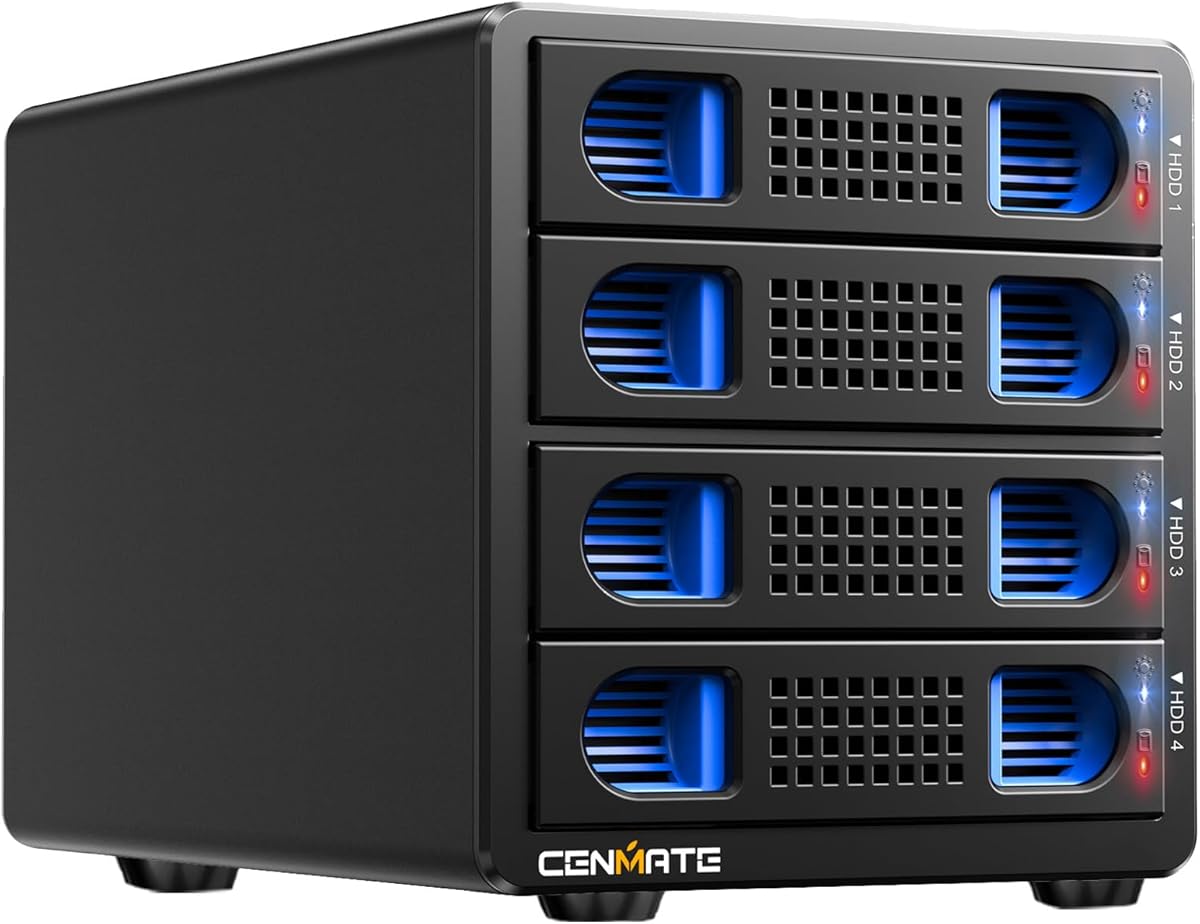
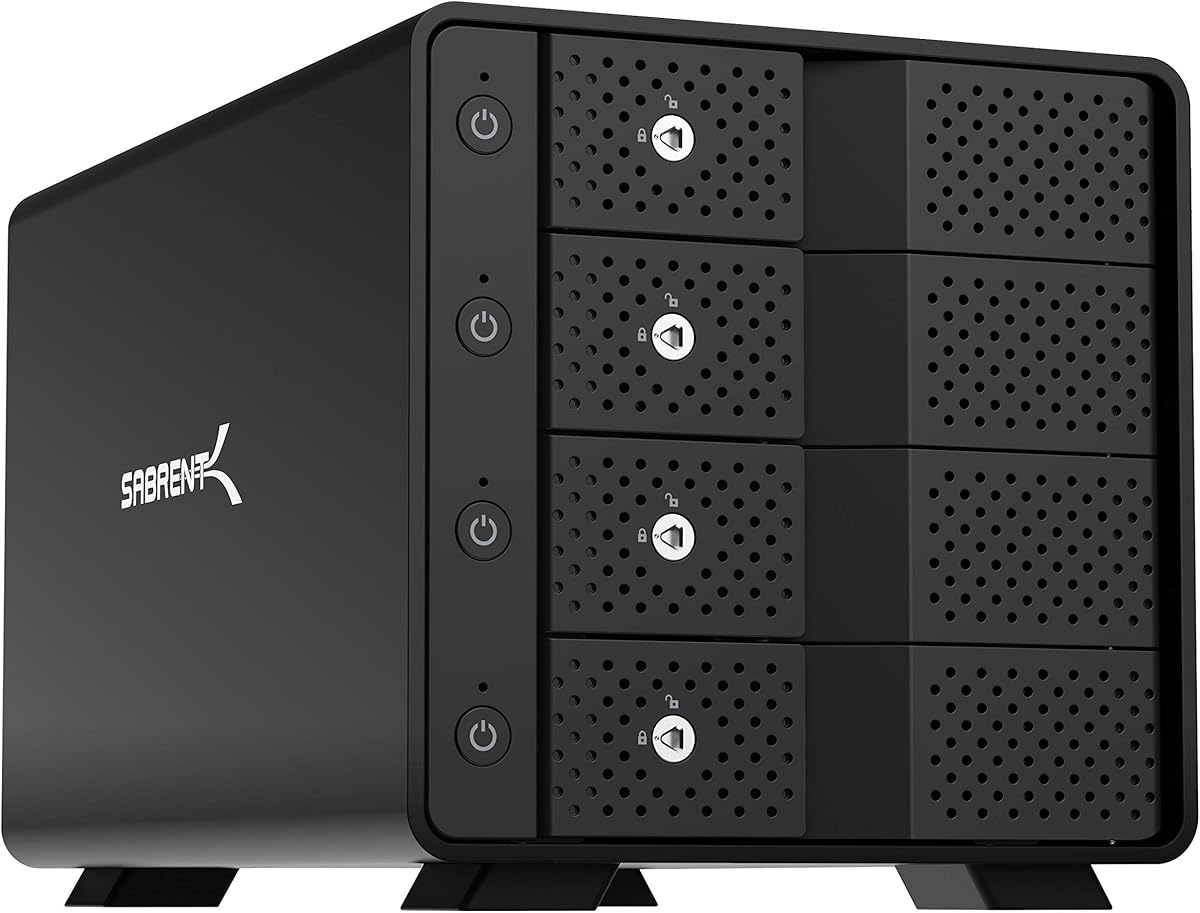
This enclosure ranks highest due to its balance of performance and price. It supports up to 80TB of storage across four bays while maintaining drive health through active cooling. The aluminum construction ensures durability and effective heat dissipation during continuous operation.
We may earn a commission when you buy through this link, at no additional cost to you.
Data transfer speeds reach up to 5Gbps via USB 3.0 which is significantly faster than older USB 2.0 standards. Users benefit from hot-swappable bays allowing drive changes without shutting down the system. This is ideal for professionals managing large media libraries or backups.
While the fan provides necessary cooling it operates at around 40-50 decibels which may be noticeable in quiet environments. Additionally the lack of RAID means you must manage data redundancy independently. These trade-offs are acceptable given the solid performance and competitive positioning.
Anyone needing reliable external storage for personal or business use should consider this model. It works seamlessly with Windows Mac and Linux systems without requiring extra drivers. We recommend it as the top choice for most users seeking dependable multi-drive access.
The built-in 2 inch fan activates automatically to prevent overheating during intensive data transfers.
Compatible with major operating systems right out of the box without needing additional software installation.
We may earn a commission when you buy through this link, at no additional cost to you.
This model stands out for its USB 3.2 Gen 2 interface delivering speeds up to 10Gbps. It handles massive file transfers with ease making it perfect for video editors or data analysts. The aluminum build paired with a 2 inch fan keeps drives secure during heavy loads.
We may earn a commission when you buy through this link, at no additional cost to you.
Users can store up to 80TB total across four drives with each bay supporting 20TB. Hot-swapping allows you to change drives without powering off the enclosure which saves time during routine maintenance. Compatibility spans Windows Mac and Linux without driver hassles.
The fan operates around 40-50 decibels which might be loud for home office settings. The premium price reflects the speed upgrade but may not be necessary for casual users. Still the performance gain justifies the cost for power users needing quick access to large datasets.
Select this enclosure if transfer speed is your top priority. It offers robust build quality and modern connectivity options. We advise ensuring your host system supports USB 3.2 Gen 2 to fully utilize the advertised performance capabilities.
Achieves transfer speeds up to 10Gbps doubling the performance of standard USB 3.0 interfaces.
Allows drive replacement without shutting down the system for uninterrupted workflow continuity.
We may earn a commission when you buy through this link, at no additional cost to you.
This enclosure offers a cost-effective solution for users needing multi-drive storage without breaking the bank. It supports up to 96TB across four bays and features dual fans that activate when drives exceed 48 degrees Celsius. The HD-TV port adds unique multimedia capabilities not found elsewhere.
We may earn a commission when you buy through this link, at no additional cost to you.
USB-C connectivity enables speeds up to 10Gbps allowing quick access to large files. Daisy chain functionality lets you connect multiple devices for even more storage flexibility. It works with Windows Mac and Linux systems making it versatile for mixed environments.
User feedback suggests the fan control logic could be more responsive. Some report delays in cooling activation which might impact drive longevity under sustained loads. However the price point makes it an attractive option for budget-conscious buyers who can manage thermal concerns.
Perfect for casual users or students needing extra space this model delivers solid value. The HD-TV port is a nice bonus for presentations or media viewing. We recommend it if cost is a primary concern and you monitor drive temperatures actively.
Fans automatically turn on when drive temperature exceeds 48 Celsius to prevent overheating.
Includes an HD-TV port allowing direct connection to televisions for 4K video output.
We may earn a commission when you buy through this link, at no additional cost to you.
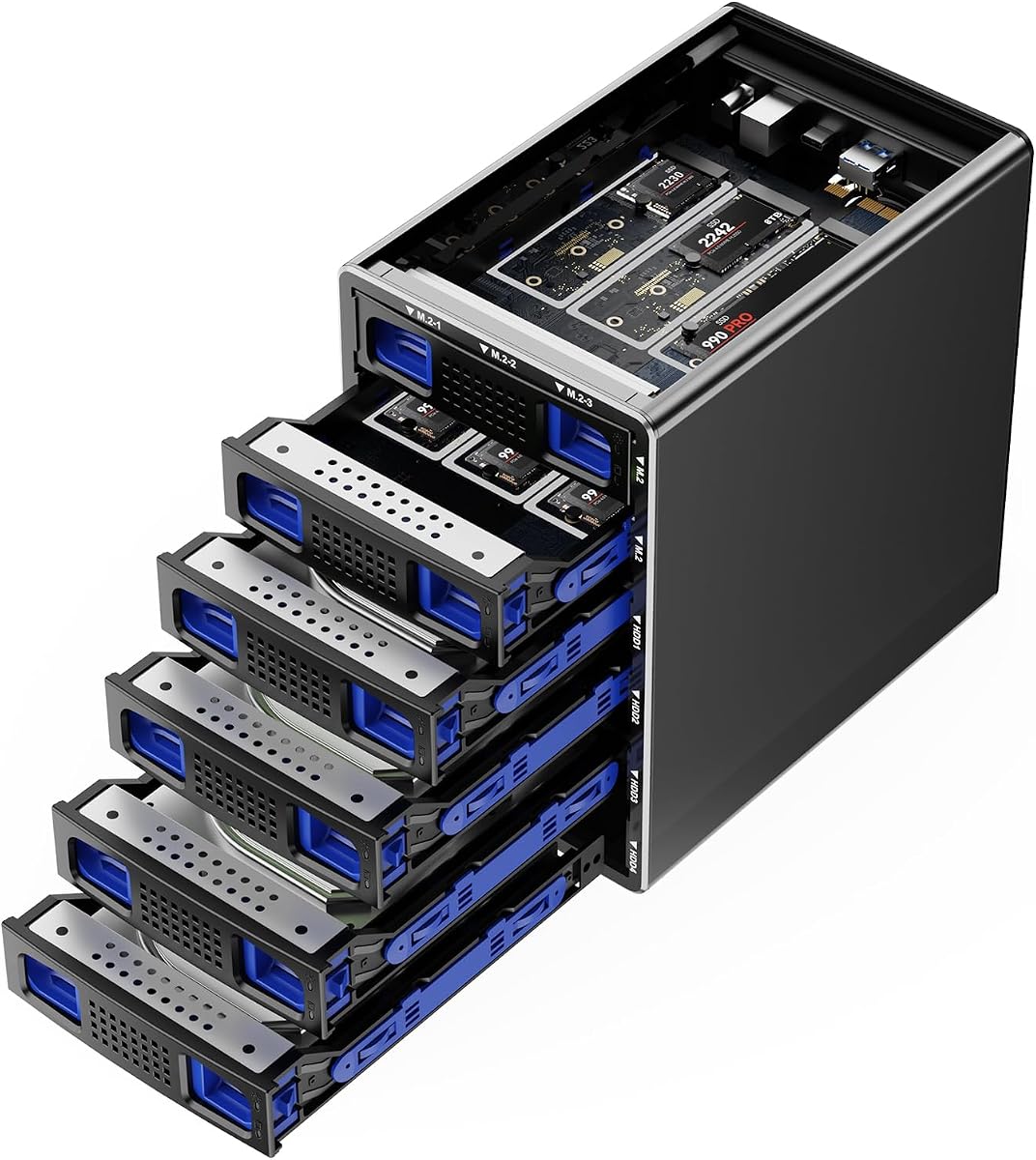
This innovative enclosure combines traditional SATA drives with modern NVMe SSDs in one unit. It supports up to four HDDs and six M.2 NVMe drives totaling over 136TB of storage. This flexibility allows users to balance cost and speed based on their specific needs.
We may earn a commission when you buy through this link, at no additional cost to you.
The USB 3.2 Gen 2 interface ensures fast data transfer speeds for all connected drives. Silent fans provide continuous cooling without disrupting quiet workspaces. Tool-free installation makes swapping drives simple and quick for routine maintenance tasks.
Managing both HDD and NVMe drives might require some technical knowledge to optimize performance. The higher price reflects the advanced capabilities but may not suit simple storage needs. Still it is unmatched for users wanting maximum flexibility in drive types.
Choose this if you need both capacity and speed in a single enclosure. It is ideal for power users or small businesses managing diverse data types. We recommend it for those who value versatility and future-proofing their storage infrastructure.
Accommodates both standard SATA and high-speed M.2 NVMe drives in one chassis.
Uses silent fans that cool drives without generating disruptive noise during operation.
We may earn a commission when you buy through this link, at no additional cost to you.
This docking station offers unique HDMI connectivity allowing direct 4K video output to a TV or monitor. It stores up to 88TB across four bays with temp-controlled fans activating at 48 degrees Celsius. The aluminum shell ensures robust construction and effective heat management.
We may earn a commission when you buy through this link, at no additional cost to you.
Independent power switches let you control each drive individually without affecting others. Hot-swappable design facilitates easy drive changes while the system remains powered. USB-C connectivity delivers up to 10Gbps speeds for rapid file transfers.
The HDMI feature works only if your host port supports video output which limits some setups. Fans operate loudly under load which might bother noise-sensitive users. These limitations are minor compared to the versatility it offers for multimedia workflows.
Ideal for users wanting both storage and display connectivity in one device. It suits media centers or workstations needing quick access to large files. We recommend checking host compatibility before purchasing to ensure full functionality of video features.
Features HDMI port supporting 4K video for direct connection to televisions or monitors.
Each bay has an ON/OFF switch allowing selective power management for individual drives.
We may earn a commission when you buy through this link, at no additional cost to you.
Designed for 2.5 inch drives this docking station saves space without sacrificing capacity. It supports up to 64TB total and features a whisper-quiet fan for silent operation. The magnetic cover allows rapid access to drives without tools for frequent swapping.
We may earn a commission when you buy through this link, at no additional cost to you.
USB 3.0 provides speeds up to 5Gbps which is sufficient for most backup tasks. Plug and play compatibility ensures it works with Windows Mac and Linux immediately. Continuous 24/7 operation capability makes it reliable for ongoing backup schedules.
Users needing 3.5 inch drives will find this model unsuitable as it only fits 2.5 inch units. The lack of USB-C might be a drawback for newer laptops. Still it remains excellent for compact setups focused on SSD or laptop drive storage.
Best for users prioritizing quiet operation and small size. It suits home offices where noise is a concern. We recommend it if you primarily use 2.5 inch drives and need a reliable silent docking solution.
Built-in whisper-quiet fan keeps drives cool without generating distracting noise.
Magnetic cover design enables fast drive access without requiring screws or tools.
We may earn a commission when you buy through this link, at no additional cost to you.
This enclosure offers dual connectivity via USB 3.0 and eSATA for versatile system integration. It supports up to 80TB capacity with a 2 inch fan keeping drives cool under load. The aluminum build ensures durability and effective thermal management.
We may earn a commission when you buy through this link, at no additional cost to you.
eSATA provides a stable connection option for older systems lacking modern USB ports. USB 3.0 enables fast data transfer speeds with hot-swapping capabilities for convenience. Power adapter ensures stable voltage for consistent performance across all drives.
The eSATA port requires specific host support which limits compatibility with newer computers. Hot-swapping works reliably via USB but may not function properly through eSATA depending on host. These constraints make it a niche choice for legacy system users.
Ideal for users with older hardware needing reliable multi-drive access. It provides backup options through dual interfaces. We recommend it if eSATA connectivity is essential for your specific workstation setup.
Includes both USB 3.0 and eSATA ports for flexible connection to various systems.
Equipped with a dedicated power adapter ensuring consistent performance during transfers.
We may earn a commission when you buy through this link, at no additional cost to you.
This model maximizes storage potential with support for up to 128TB across four bays. It delivers 10Gbps speeds via USB-C and includes HDMI for 4K video output. Temp-controlled fans activate at 48 degrees Celsius to protect data integrity during intense usage.
We may earn a commission when you buy through this link, at no additional cost to you.
Each bay features an independent power switch for selective drive control. Hot-swappable design ensures you can replace drives without powering down the entire unit. Aluminum construction provides durability and effective heat dissipation.
The HDMI function requires host USB-C video support which may not be universal. Noise levels can rise under heavy load which might disturb quiet environments. Still it offers top-tier capacity and versatility for power users needing massive space.
Select this if you require extreme storage capacity in a compact enclosure. It suits media servers or creative studios needing both data and display options. We recommend checking your host system for HDMI compatibility before purchase.
Accommodates drives up to 32TB each totaling 128TB for extensive data archiving.
Individual power switches allow managing each drive separately without affecting others.
We may earn a commission when you buy through this link, at no additional cost to you.
This enclosure adds RAID functionality offering eight different modes for data redundancy and performance. It supports up to 80TB total with USB 3.0 and eSATA for flexible connectivity. Aluminum construction and dual fans ensure drives stay cool during operation.
We may earn a commission when you buy through this link, at no additional cost to you.
RAID 0 1 3 5 and 10 options allow customization based on speed or safety needs. Independent power adapter maintains voltage stability for consistent performance. Compatible with Windows Mac and Linux without needing extra drivers.
Switching RAID modes requires powering down and using a screwdriver which complicates setup. Hot-swapping is not supported meaning you must shut down to change drives. These hurdles might discourage casual users preferring simplicity over redundancy features.
Best for users needing hardware-level RAID without building a full NAS. It suits small offices wanting data protection. We recommend it if you understand RAID configurations and value redundancy in a compact package.
Supports eight RAID modes including RAID 0 1 3 5 and 10 for various data strategies.
Aluminum alloy housing with dual fans ensures durability and proper thermal management.
We may earn a commission when you buy through this link, at no additional cost to you.
This docking station uses a dedicated controller for each bay ensuring stable independent connections. It supports up to 80TB with 10Gbps USB-C speed for fast data handling. A large 92mm fan provides active cooling for continuous operation.
We may earn a commission when you buy through this link, at no additional cost to you.
Tool-free tray-less design allows quick drive swaps with activity LEDs per bay. Kensington slot adds physical security for shared workspaces. It works with Windows Mac and Linux systems as direct-attached storage without RAID.
The lack of video output limits multimedia uses compared to other models. Price is higher than basic options reflecting the premium controller design. Still reliability and independent connectivity make it a standout for professional environments.
Ideal for users needing robust and reliable multi-drive access. It suits professionals managing critical data where connection stability matters. We recommend it if independent drive control and security features are priorities for your setup.
Each bay has a dedicated controller for stable connections without bandwidth sharing.
Features a Kensington slot to secure the unit against theft in shared environments.
We may earn a commission when you buy through this link, at no additional cost to you.
Selecting the right enclosure involves understanding key technical factors that impact performance and drive longevity.
The interface determines how fast data moves between drives and your computer. USB 3.0 offers up to 5Gbps while USB 3.2 Gen 2 reaches 10Gbps. If you work with large video files or datasets the higher speed option reduces wait times significantly.
Always check if your host system supports the latest USB standards to maximize performance.
Active cooling fans are essential when running multiple drives continuously. Look for models with temperature-controlled fans that activate only when needed to reduce noise. Fan size and placement affect airflow efficiency which directly impacts drive lifespan.
Choose enclosures with fans rated for continuous operation if you run 24/7 backups.
Ensure the enclosure supports both 2.5 and 3.5 inch drives if you mix laptop and desktop HDDs. Some models restrict thickness or key types especially with NVMe SSDs. Check manufacturer specs to confirm support for your specific drive sizes and types.
Verify physical dimensions before purchasing to avoid issues with thicker high-capacity drives.
Hot-swapping lets you remove or insert drives without powering down the system. This feature saves time during maintenance and is ideal for frequent drive swaps. Look for tool-free trays and independent power switches for maximum convenience.
Prioritize hot-swappable models if you manage changing data sets regularly.
Aluminum alloys offer superior heat dissipation compared to plastic housings. A sturdy build protects internal components from physical damage and improves cooling. Check for solid construction and effective heat sinks around drive bays.
Invest in metal enclosures to ensure longevity and stable thermal performance.
Extra ports like eSATA or HDMI can add versatility depending on your workflow. eSATA provides stable connections for older systems while HDMI enables direct video output. Evaluate if these extras justify the cost for your specific needs.
Focus on primary USB performance first and consider extras as secondary benefits.
RAID allows combining drives for redundancy or speed while DAS keeps drives separate. Most budget models are DAS only which simplifies setup but lacks redundancy. RAID models offer modes like RAID 1 or 5 for data protection at higher complexity.
Select DAS for simplicity or RAID if you need hardware-level data redundancy.
High-capacity drives need stable external power supplies to function correctly. Look for units with included adapters rated for sufficient wattage to prevent drops. Efficient power management ensures drives spin up reliably and avoid data corruption.
Confirm the power adapter matches your region and supports the required voltage.
Connect the enclosure to a powered USB port using the supplied cable. Ensure the power adapter is plugged in for stable operation especially with multiple drives installed. Wait for the LED indicators to confirm all drives are detected.
Install drives by sliding them into trays without forcing connections. Close the cover securely and avoid touching internal connectors directly. This prevents physical damage and ensures proper electrical contact.
Keep the enclosure in a well-ventilated area away from dust sources. Clean fan vents periodically with compressed air to maintain airflow and cooling efficiency. Regular maintenance prevents overheating and extends the lifespan of both the enclosure and drives.
Most modern enclosures use plug and play technology meaning no drivers are required. They work directly with Windows Mac and Linux operating systems. However specific advanced features may require optional software provided by the manufacturer.
If the fan stops working drives may overheat and fail over time. Monitor drive temperatures using system tools. If overheating occurs shut down immediately and replace the fan or enclosure to prevent data loss.
Yes most models support both sizes simultaneously. You may need adapters for 2.5 inch drives if the tray is designed for 3.5 inch. Check product specifications to confirm mixed drive support.
RAID is useful for redundancy but not strictly necessary. You can backup data manually to external media. Many users prefer DAS models for simplicity and cost savings without sacrificing storage capacity.
Use a USB port that matches the enclosure type for best speed. USB 3.0 or higher ports are required for advertised transfer rates. Avoid old USB 2.0 ports if you need fast performance.
Yes many models are designed for 24/7 operation. Ensure the cooling system is effective and ventilation is unobstructed. Regular maintenance helps avoid overheating during extended use periods.
Most are compatible with macOS out of the box. Some may require reformatting to APFS or ExFAT file systems. Always check the product details for specific macOS version requirements.
Warranties usually range from one to two years depending on the brand. Check the specific product details for exact terms and registration requirements. Manufacturers typically cover defects but not physical damage or wear.
We reviewed ten models offering various features from basic DAS storage to advanced RAID capabilities. The CENMATE Aluminum 4 Bay stands out for its overall balance of performance and affordability.
When making your decision prioritize transfer speeds and cooling efficiency to match your workload. Ensure the enclosure supports your specific drive sizes and provides necessary connectivity options.
Prices and availability change frequently so verify current listings before completing your purchase. Check official product pages for the most up-to-date specifications and warranty details.