
Pen Adapter for Sharpie Pens
4.5Editor score
Six pack for variety
Color-coded identification
No calibration required
Cricut users often seek flexible writing tools to enhance their creative projects beyond standard cutting. A quality pen adapter allows diverse markers and pens to work seamlessly with your machine for detailed art and personalized designs.
We evaluated ten highly rated adapters based on compatibility across models, ease of installation, and stability during use. Our analysis focuses on real-world performance to ensure your drawings remain precise without frequent recalibration.
Each selection highlights key features, pros, and cons to guide your purchase decision effectively. Prices may fluctuate due to market demand, so verify current listings before ordering to secure the best value for your crafting needs.
4.5Editor score

4.7Editor score

4.7Editor score
As an Amazon Associate we earn from qualifying purchases.
The following table provides a side-by-side comparison of all ten selected Cricut Pen Adapter options, highlighting key specifications to help you identify the best fit for your machine and pen type.



This CRAVERLAND Pens Adapters set stands out as a top contender with its impressive compatibility rating. It supports over forty pens and twenty brands, making it versatile for various crafting needs. Users appreciate the dual-coding manual that simplifies identification.
We may earn a commission when you buy through this link, at no additional cost to you.
Key strengths include the ability to replace a broken original adapter and the lack of depth calibration. This ensures your machine runs smoothly without constant adjustments. The adapters are tested repeatedly to ensure performance and stability during drawing tasks.
Trade-offs involve a slightly higher cost compared to simpler universal options. Additionally, the manual takes up space but remains useful for quick reference. These minor issues are acceptable given the extensive functionality provided.
If you own a Venture, Explore, or Maker series machine, this kit offers exceptional value. It maximizes creative potential by allowing you to use existing pens. The recommendation is strong for frequent crafters seeking reliability.
With support for forty pens and twenty brands, you can utilize Sharpie, Crayola, and Pilot tools effectively.
The design ensures a perfect fit in the pen clamp, eliminating the need for depth calibration before projects.
We may earn a commission when you buy through this link, at no additional cost to you.
The CRAVERLAND Universal Pen Adapter Set offers great value for crafters on a budget. It is compatible with Maker and Explore series machines, supporting pens under 0.5 inches. The package includes calibration units to assist with setup.
We may earn a commission when you buy through this link, at no additional cost to you.
Its strength lies in ease of use and storage. The gift box design keeps components organized, and the creamy white color matches machines well. Installation is simple, requiring just a quick calibration for proficient use.
Some users note that deviation may exist due to versatility. Testing before running a project helps mitigate this. The limitation to specific machines is clear, so verify compatibility if you have newer models.
For those needing a cost-effective solution without sacrificing quality, this set is ideal. It works with Sharpie and Bic pens effectively. We recommend it for entry-level users or casual crafters.
The included gift box organizes adapters and units neatly for easy access during crafting sessions.
Supports Sharpie, BIC, and Crayola pens, expanding your creative options beyond standard tools.
We may earn a commission when you buy through this link, at no additional cost to you.
This adapter replacement is a premium choice designed specifically for Cricut Explore and Maker machines. It installs easily into the A clamp, expanding creative options for drawing and scoring. It earns a high rating for reliability.
We may earn a commission when you buy through this link, at no additional cost to you.
Key strengths include its targeted design which ensures seamless integration. Users can write and score effortlessly without compatibility issues. It is perfect for those seeking a dedicated accessory replacement.
The trade-off is limited machine support excluding Explore One. If you own an older model, this may not fit. However, for targeted users, the value is unmatched in terms of ease of use.
Recommended for owners of Explore and Maker series who want a guaranteed fit. It simplifies creative workflows significantly. The purchase is justified for those who prioritize functionality over cost.
Once installed, the adapter instantly adds drawing and scoring capabilities to your machine workflow.
The adapter fits directly into the A clamp, ensuring a secure and stable position during operation.
We may earn a commission when you buy through this link, at no additional cost to you.
This CRAVERLAND adapter simplifies setup with its 'one fits all' concept. It supports over twenty brands and fits pens under 0.5 inches snugly. The compact design ensures easy handling during projects.
We may earn a commission when you buy through this link, at no additional cost to you.
Strengths include stability and brand versatility. Users can switch between Sharpie and Sakura pens without issues. The instruction manual aids in proper installation for new users.
Compatibility with Explore 5 is excluded, which limits some users. A test run before full projects is recommended to ensure alignment. These are minor considerations for the overall utility.
Ideal for those who want flexibility and ease. It is a solid choice for diverse pen types. We suggest it for crafters seeking a versatile universal solution.
The single adapter design accommodates various pen diameters, reducing clutter in your workspace.
The snug fit ensures pens do not wobble during drawing tasks, maintaining precision.
We may earn a commission when you buy through this link, at no additional cost to you.
This adapter is engineered for accurate pen alignment, ensuring smooth writing and clean lines. It is made from high-quality ABS material for durability. The plug-and-play design makes installation quick and simple.
We may earn a commission when you buy through this link, at no additional cost to you.
Strengths include its sturdy build and expansion of machine capabilities. It allows you to use most pens without proprietary tools. The lightweight nature makes it easy to handle.
The rating is slightly lower than top competitors, which might indicate minor issues. Brand options are fewer compared to universal sets. These are acceptable trade-offs for its targeted design.
Good for users prioritizing durability and alignment. It fits well with Maker and Explore series. We recommend it for those seeking a reliable basic adapter.
Constructed from high-quality ABS material, this adapter withstands repeated crafting use effectively.
Insert the adapter and pen to start creating immediately without complex setup steps.
We may earn a commission when you buy through this link, at no additional cost to you.
The dual-thread design secures pens firmly, reducing side-to-side wobbling effectively. This adapter is easy to install without tools. It is ideal for creative projects like invitations and labels.
We may earn a commission when you buy through this link, at no additional cost to you.
Strengths include stability and ease of use. The drop-in mechanism allows quick swaps between markers. It handles pens under 0.5 inches with consistent line results.
It does not work with Explore 5, which is a key limitation. If you use newer models, check compatibility first. This restriction is clear but limits universality.
Recommended for owners of specific Maker and Explore models. It provides stable lines for precise art. We suggest it for project-based crafting needs.
The dual-thread design ensures pens stay in place, minimizing movement during drawing.
Swap between pens quickly with the easy drop-in installation process requiring no extra tools.
We may earn a commission when you buy through this link, at no additional cost to you.
MW Precision Designs offers a specialized adapter set compatible with Sharpie Fine Point and Ultra Fine Point markers. The three-pack is designed for Explore Air and Maker series machines. It supports easy identification via inscribed abbreviations.
We may earn a commission when you buy through this link, at no additional cost to you.
Key strengths include accurate alignment and lack of calibration needs. Users benefit from direct business support and reliable quality. It is tailored for specific marker types.
The limitation is specificity to Sharpie brands only. If you use other brands, this may not fit. The small pack size offers limited variety compared to universal sets.
Ideal for Sharpie loyalists seeking precision. It simplifies identification with abbreviations. We recommend it for dedicated brand users.
Inscribed abbreviations like SFP help you quickly identify the correct adapter for your marker type.
As a small USA-based business, support is responsive and friendly for any questions.
We may earn a commission when you buy through this link, at no additional cost to you.
This adapter set is compatible with Joy, Joy 2, and Joy Xtra machines. It includes carved abbreviations for quick identification and is made with durable ABS plastic. It works with Sharpie and Pilot pens effectively.
We may earn a commission when you buy through this link, at no additional cost to you.
Strengths include the budget-saving aspect for existing Sharpie users. The insert-to-go design simplifies installation. It maintains quality with ABS plastic construction.
It does not support felt tip pens, which limits some options. The design is specific to Joy models, so verify compatibility. This specificity is clear to avoid confusion.
Good for Joy machine owners seeking versatility. It supports a variety of pen types. We recommend it for casual and detailed crafting.
Each adapter has a carved abbreviation to help you identify the correct pen quickly.
Reuse your existing fine point pens to save money on proprietary tools and accessories.
We may earn a commission when you buy through this link, at no additional cost to you.
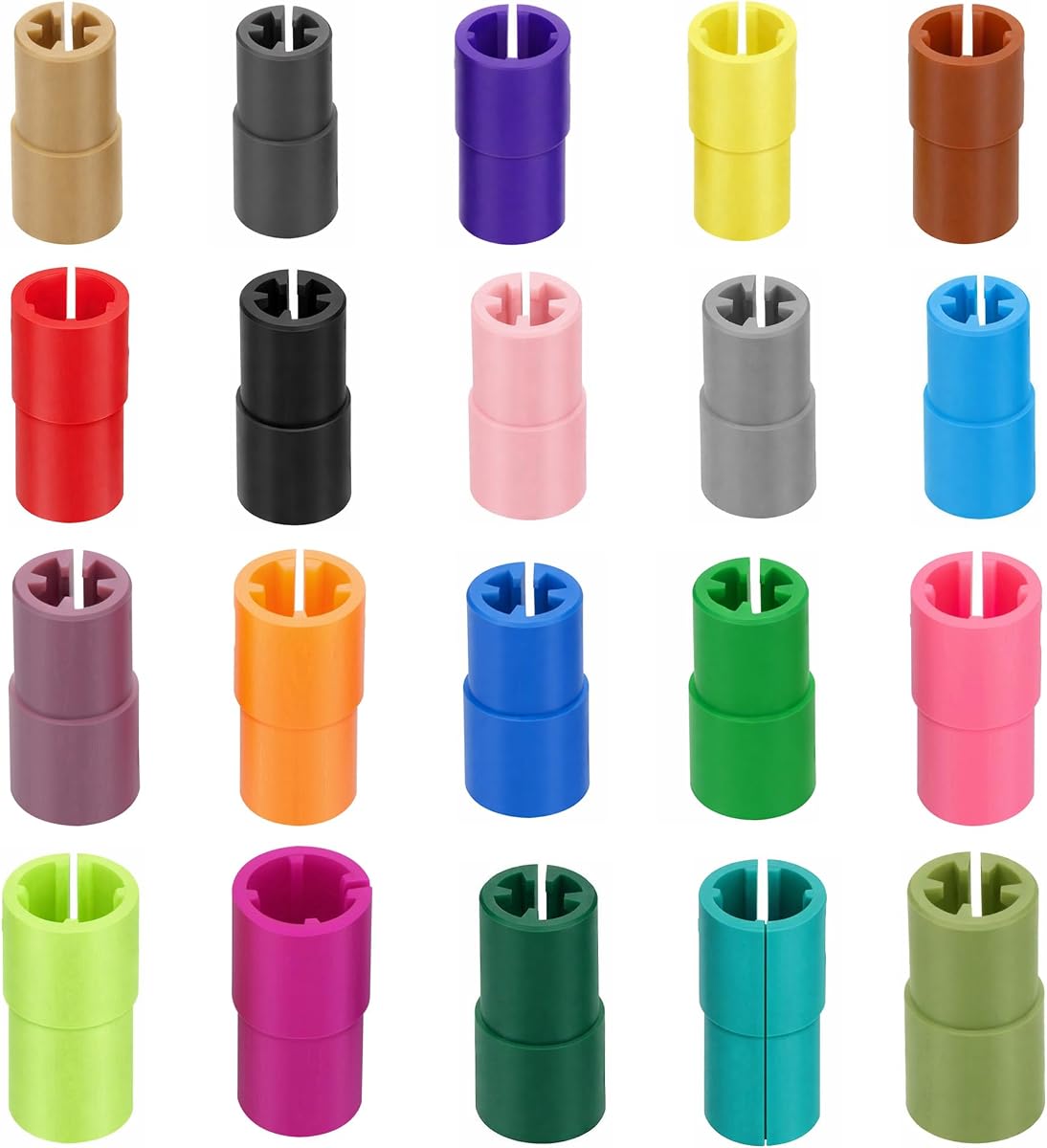
This Likart adapter set offers six packs for variety, compatible with Cricut Maker and Explore. It features color-coded identification for easy use. It works precisely to match the original holder alignment.
We may earn a commission when you buy through this link, at no additional cost to you.
Strengths include cost savings and sturdy utility. The color coding helps organize pens quickly. It enables more writing and coloring options.
It does not work with Explore One, which is a key limit. The range is limited to Sharpie styles. This is clear for avoiding purchase errors.
Ideal for those seeking a versatile basic set. It simplifies identification and saves money. We recommend it for general creative tasks.
Green for Fine Point, Pink for Ultra Fine, and Blue for Art Pen ensures fast selection.
Save lots of money on pens by reusing your favorite branded markers with the adapter.
We may earn a commission when you buy through this link, at no additional cost to you.
This set offers twenty pieces for extensive pen options, compatible with Explore and Maker series. It features engraved abbreviations and high-quality ABS plastic. Depth calibration is not needed for use.
We may earn a commission when you buy through this link, at no additional cost to you.
Strengths include the number of options and identification features. Users can choose from Sharpie, Bic, and Sakura pens. The design ensures alignment for perfect cuts.
It does not work with Explore One or joy machines. The packaging is bulky but offers value. These are acceptable trade-offs for the variety provided.
Great for frequent crafters needing flexibility. It saves time with no calibration. We recommend it for versatile crafting needs.
The twenty-piece set gives you extensive options for writing and coloring on cut designs.
Each adapter is engraved with abbreviations to help identify the correct pen model quickly.
We may earn a commission when you buy through this link, at no additional cost to you.
Selecting the right adapter requires considering machine compatibility, pen types, and ease of use. This guide outlines key factors to help you make an informed decision.
Check which models are supported, as adapters vary between Maker, Explore, and Joy series. Ensure the product explicitly mentions your machine version to avoid fit issues.
Always verify model numbers before purchasing to ensure proper installation and use.
Most adapters support pens under 0.5 inches in diameter. Check your favorite markers to ensure they fit the adapter shaft without forcing.
Select adapters that specify size ranges clearly to prevent damage to your tools or machine.
Look for materials like ABS plastic that offer durability and stability. A sturdy adapter ensures your pen remains aligned during complex drawing tasks.
Higher build quality typically translates to smoother performance and longer lifespan.
Many modern adapters require no depth calibration, saving you time. If you prefer convenience, choose products labeled as plug-and-play or no calibration needed.
Avoid kits that require frequent adjustments to maintain accuracy during projects.
Adapters with engraved abbreviations or color coding help you identify markers quickly. This is useful when switching between pen types during a project.
Prioritize options with clear labeling to streamline your workflow.
Consider how many adapters are included and if storage options like gift boxes are provided. More pieces allow for greater variety in your collection.
Check if the package includes calibration units or manuals to support setup.
Universal adapters support brands like Sharpie, Pilot, and Crayola, offering more choice than proprietary tools. This reduces dependency on expensive branded pens.
Select sets that explicitly list compatible brands for broader options.
Smaller businesses often provide responsive support if issues arise. Check for warranty offers or return policies before buying.
Prioritize sellers who stand behind their product quality.
Remove the original pen adapter from your machine by gently releasing the clamp. Insert the new adapter securely until it fits snugly in place without wobbling.
Select a pen under 0.5 inches and slide it into the adapter holder. Ensure the tip protrudes slightly for optimal contact with the material.
Run a test design on scrap paper to check alignment and depth. Calibrate only if necessary and clean the adapter periodically to prevent debris buildup.
No, most adapters currently available do not support Explore 5. Check product descriptions explicitly before purchasing to confirm compatibility. Using incompatible adapters may damage your machine or tools.
Adapters are designed for pens under 0.5 inches in diameter. Using thicker markers may prevent proper fitting or cause alignment issues. Always verify your pen size before installation.
Most modern adapters are designed to eliminate the need for depth calibration. Just insert the pen and run a quick test to ensure alignment. Adjust only if you notice discrepancies in drawings.
Yes, universal adapters support various brands like Sharpie, Pilot, and Bic. Check the compatible list to ensure your preferred markers fit the shaft diameter properly.
Use a dry cloth to wipe off ink residue or debris from the adapter. Avoid harsh chemicals that could damage the plastic or internal components. Store in a dry place to prevent mold.
Wobbling indicates a loose fit or mismatched pen size. Ensure the pen fits snugly in the adapter. If issues persist, try a different adapter from your kit.
Our top picks highlight options like the Pens Adapters Compatible with Maker 4 3 for overall versatility and the Universal Pen Adapter Set for budget-friendly utility.
Prioritize compatibility with your machine model and pen size to ensure smooth performance. Features like no calibration needs and identification methods can greatly enhance your workflow.
Always check current prices and listings before ordering to secure the best deal. With the right adapter, you can expand your creative possibilities effectively.