
Harvopu for iPad Pro 13 Inch Case with Keyboard
4.4Editor score
7-color backlit keys
Detachable keyboard design
High-sensitivity trackpad
Finding the right keyboard case for your iPad Pro 13 M4 is essential for maximizing productivity and protecting your investment. These accessories transform your tablet into a versatile laptop alternative.
We compared ten top-rated options based on typing comfort, trackpad quality, build durability, and unique features like backlighting and magnetic detachment. Each choice offers distinct advantages.
Each pick below highlights specific strengths and weaknesses to help you decide which model fits your workflow best. Please note that prices and availability may change over time.
4.4Editor score

4.3Editor score

3.7Editor score
As an Amazon Associate we earn from qualifying purchases.
This comparison table lists the key features and specifications for every keyboard case included in our review to help you make a quick informed decision.



The Apple Magic Keyboard offers the most premium typing experience available for the iPad Pro 13 M4. It holds a 4.3 star rating and delivers a true laptop feel with its glass trackpad and scissor keys.
We may earn a commission when you buy through this link, at no additional cost to you.
Its standout feature is the built-in glass trackpad with haptic feedback that supports Multi-Touch gestures. This allows you to navigate your apps seamlessly without touching the screen. The function row adds significant versatility for power users.
While excellent, this keyboard is heavier than third-party options and offers fewer viewing angles. The high price may also be a barrier for some users seeking basic functionality over premium features.
This keyboard is ideal for professionals who type frequently and want a seamless experience. If you value build quality and haptic feedback over portability and cost, this is the top choice.
The scissor mechanism keys provide a satisfying and responsive typing experience that rivals traditional laptops.
The case folds to cover both the front and back of your device ensuring full protection while in use.
We may earn a commission when you buy through this link, at no additional cost to you.
This ESR keyboard case transforms your iPad into a productivity machine with its magnetic stand. It holds a 4.2 rating and offers multiple modes to suit different tasks like typing or browsing.
We may earn a commission when you buy through this link, at no additional cost to you.
The key strength is the quick-set magnetic stand that allows for easy angle adjustment. The back case detaches for instant access to the tablet screen which is perfect for reading or drawing without the keyboard.
Some users may find the trackpad slightly less responsive than Apple's official option. Compatibility is also strict so ensure your model number matches exactly before purchasing.
Buy this if you need versatile viewing angles and easy access to the tablet screen. It is great for students and casual users who switch between typing and media consumption often.
The stand supports raised screen view for better posture and portrait mode for FaceTime calls.
The extended trackpad uses every millimeter for precise taps pinches and swipes.
We may earn a commission when you buy through this link, at no additional cost to you.
This keyboard is highly rated with 4.4 stars and features a massive trackpad that supports full iOS gesture support. It allows for effortless switching between portrait and landscape modes for any task.
We may earn a commission when you buy through this link, at no additional cost to you.
The largest feature is the 65% larger click-anywhere trackpad which provides smoother control for editing and browsing. The magnetic detachable design lets you remove the keyboard for a streamlined tablet experience.
The low-angle support is sturdy but not adjustable which might limit comfort for some users. The fit is tight so ensure your specific model is listed in the compatibility notes.
This is a great choice for artists and writers who need a large trackpad and stylus holder. The versatility of removing the keyboard makes it ideal for those who use their iPad in tablet mode often.
The 112 by 70 mm trackpad surface offers more room for gestures and navigation.
Reinforced corners and magnets keep your iPad safe from drops dust and scratches.
We may earn a commission when you buy through this link, at no additional cost to you.
The typecase Edge offers a versatile keyboard case with an innovative floating cantilever design. It holds a 4.2 rating and allows for effortless adjustment to your preferred viewing angle during use.
We may earn a commission when you buy through this link, at no additional cost to you.
Its standout feature is the 11-color backlight with 3 brightness levels that lets you adapt to any lighting condition. The magnetic clasp ensures the safety of your iPad while also holding your Pencil.
The keyboard lacks a dedicated Pencil holder which is a downside for artists. The stand angles are limited compared to fully adjustable stands on other models.
Buy this if you prioritize style and colorful backlights for your workspace. It is ideal for users who want a lightweight and portable companion for on-the-go work and creativity.
Adjusting 11 backlight and 3 levels ensures clear visuals in every setting.
The floating cantilever design allows for smooth angle changes without locking mechanisms.
We may earn a commission when you buy through this link, at no additional cost to you.
The Logitech Combo Touch is known for its infinite use modes that let you switch tasks without removing the iPad. It has a 3.7 rating and features the biggest trackpad yet for intuitive tracking.
We may earn a commission when you buy through this link, at no additional cost to you.
Its main strength is the flexible kickstand which lets you find the perfect angle for any task. The detachable keyboard gives you total freedom to sketch or watch videos without the bulk.
Users report a heavier build compared to slim options which might reduce portability. The rating suggests mixed experiences with durability or fit for some model generations.
This is a robust choice for students who need a flexible workspace. The large trackpad and versatile modes make it great for multitasking between writing and media consumption.
You can switch to type, sketch, watch videos, read, or hop on video calls easily.
The Multi-Touch trackpad allows you to swipe, pinch, double-tap, and more.
We may earn a commission when you buy through this link, at no additional cost to you.
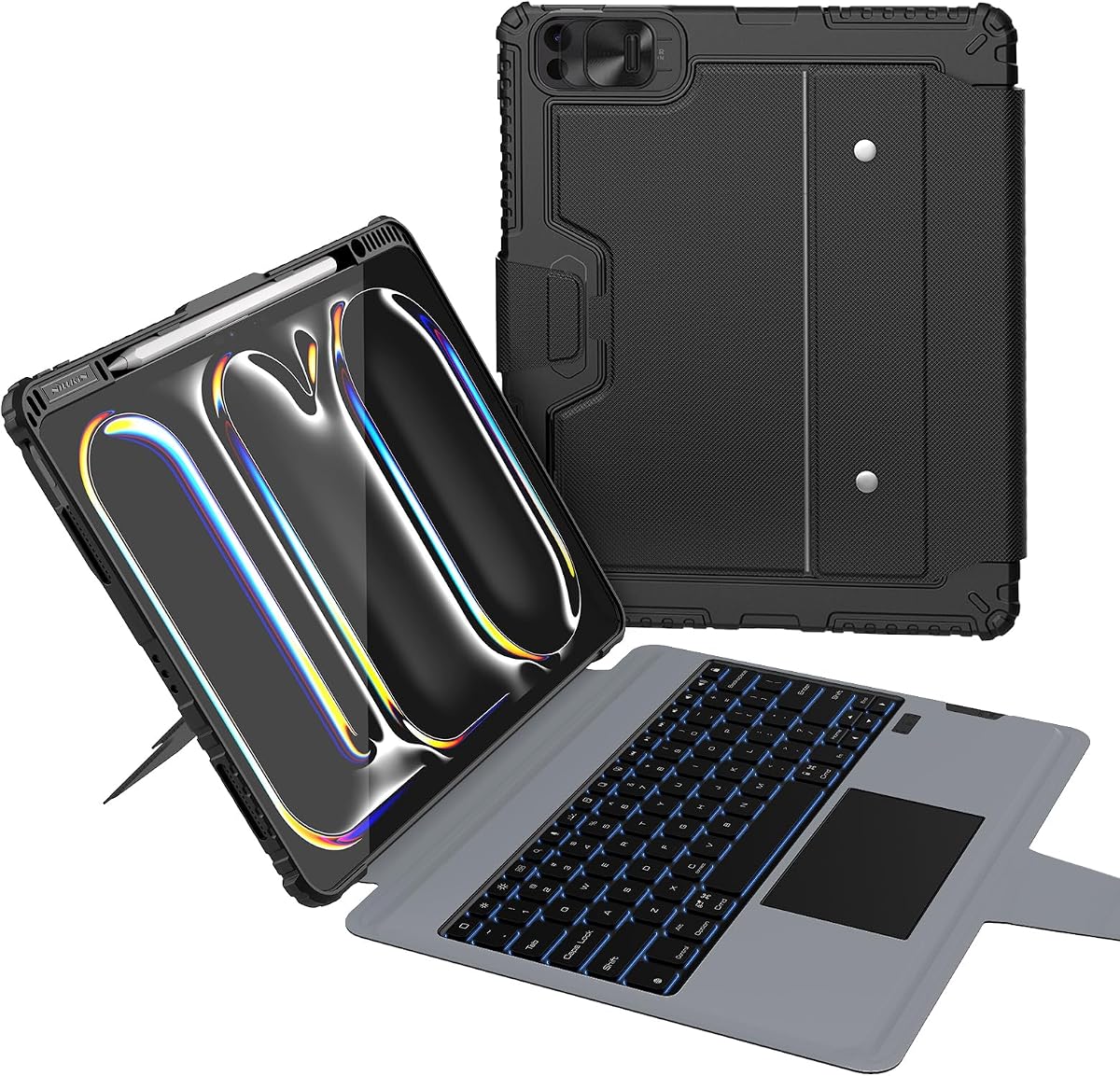
This Harvopu case offers a magnetic detachable keyboard with 7-color backlit keys at a budget friendly price. It holds a 4.4 rating and features a high-sensitivity trackpad to improve productivity.
We may earn a commission when you buy through this link, at no additional cost to you.
The keyboard runs on a built-in rechargeable battery which is a major plus compared to solar or pass-through options. The stain-resistant PU material makes it easy to wipe clean after spills or dirt.
You will need to charge the keyboard separately which adds a cable to your setup. The viewing angles are fixed compared to adjustable hinges on premium models.
This is the best value for users on a tight budget who still want backlit keys and a trackpad. It is great for students or home office use where price is the main deciding factor.
7-color backlight mode and 3 brightness levels let you customize your typing view.
The special stain-resistant PU material easily wipes away dirt for a clean feel.
We may earn a commission when you buy through this link, at no additional cost to you.
This keyboard case features powerful N54H magnets that securely attach the keyboard and back case for stability. It has a 4.2 rating and allows you to switch between typing, sketching, and reading modes.
We may earn a commission when you buy through this link, at no additional cost to you.
The wider stable hinge and magnetic floating stand provide reliable support up to 135 degrees. The 33% larger touchpad improves productivity and creativity for detailed design work.
The magnets may feel too strong for some users who prefer easier detachment. Compatibility is very specific to the 2024 and 2025 models only.
Buy this if you need a very stable connection and a large trackpad for design tasks. It is perfect for those who value durability and style in their accessory choices.
The powerful magnets securely attach the keyboard and back case for a stable connection.
The 33% larger touchpad provides smooth and precise navigation for all tasks.
We may earn a commission when you buy through this link, at no additional cost to you.
This wireless keyboard case comes with a built-in 360 omnidirectional rotating stand for precise angle adjustments. It has the highest rating of 4.6 stars and offers vibrant 7-color illumination for customization.
We may earn a commission when you buy through this link, at no additional cost to you.
The transparent back highlights your device's original design while ensuring all-around protection against drops. You can lock the viewing angle to maintain a healthy sitting posture during long sessions.
The stand might be stiff for some users when trying to change the angle quickly. The fit is very specific so check your model number before buying.
This is the best choice for those who want a unique rotating feature and stylish transparent case. It is perfect for presentations and flexible workspaces where view angle changes often.
The omnidirectional rotating stand allows smooth and precise angle adjustment for any task.
The sleek transparent back highlights your device's original design perfectly.
We may earn a commission when you buy through this link, at no additional cost to you.
This rugged case is designed for durability and drops it is 1.2-meter drop tested to keep your iPad safe. It holds a 4.3 rating and features a sliding camera cover for privacy and lens protection.
We may earn a commission when you buy through this link, at no additional cost to you.
The 0-180 kickstand range allows you to find your perfect angle for typing or drawing. The keyboard features 7 backlight colors and a long battery life of up to 100 hours.
The case adds significant bulk and weight compared to slim alternatives which may reduce portability. The rugged look may not fit a minimalist style preference.
Buy this if you work in tough environments and need maximum protection. It is ideal for field workers or users who travel frequently and face rough handling.
1.2-meter drop tested and heavy-duty TPU frame wrap your iPad in protection.
The sliding camera cover stays shut when you do not need it to keep privacy intact.
We may earn a commission when you buy through this link, at no additional cost to you.
This clear wireless keyboard case is crafted exclusively for the latest 2024 and 2025 iPad Pro 13 inch models. It has a 4.3 rating and features a futuristic acrylic design that reveals intricate circuitry.
We may earn a commission when you buy through this link, at no additional cost to you.
The crystal-clear hard case showcases your iPad's design while reinforced corners guard against drops. The 360 rotating stand with 5 adjustable angles lets you switch between typing and streaming with ease.
The transparent panel may show fingerprints easily which could affect the aesthetic. The keyboard feel might be less refined than metal alternatives.
Buy this if you want a unique and modern look for your setup. It is perfect for tech enthusiasts who love a futuristic and transparent design that stands out.
The crystal-clear hard case showcases your iPad's design while protecting it from drops.
The luxe inspired 7-color glow keyboard adds a touch of sophistication to your setup.
We may earn a commission when you buy through this link, at no additional cost to you.
Choosing the right keyboard case involves balancing features like trackpad quality, typing comfort, and portability to suit your daily workflow needs.
Look for scissor mechanism keys or similar designs that offer sufficient travel distance for a comfortable typing feel. The spacing and tactile feedback should match your personal preference for precision and speed.
Prioritize models with a good key feel to avoid fatigue during long work sessions.
Ensure the trackpad supports Multi-Touch gestures for navigation. Larger trackpads are generally better for precision work like design or detailed document editing.
A high-sensitivity trackpad improves overall navigation efficiency.
Check if the case provides full front and back protection or just the screen. Rugged options add durability but increase weight and bulk compared to slim versions.
Choose a build quality that matches your usage environment to ensure device safety.
Decide between Bluetooth keyboards that require charging and Smart Connector options that draw power from the iPad. Battery life is crucial if you choose a wireless model.
Select a power method that minimizes maintenance and fits your routine.
Some cases offer fixed angles while others have hinges that allow for a range of positions. A flexible stand helps with ergonomics during long work hours.
Look for multi-mode stands if you need different positions for typing and media consumption.
Backlit keys are useful for low-light environments. Check the number of colors and brightness levels available to ensure visibility in your workspace.
Backlighting adds both utility and style to your typing experience.
Consider how often you carry your iPad. Heavier cases may be too bulky for daily commuting while slim ones might offer less protection.
Balance weight and protection based on your mobility needs.
Always align the magnets or Smart Connector carefully when attaching the keyboard to avoid damage to the ports or case.
Clean the keyboard keys and trackpad regularly with a soft cloth to prevent dust buildup and ensure smooth operation.
Store your iPad in the case with the keyboard folded securely to protect both devices during travel and storage.
Most cases listed are designed specifically for the 2024 M4 and 2025 M5 models. Please check the model number on your device back to ensure a perfect fit before purchasing.
It depends on the model. Some connect via Smart Connector and draw power from the iPad while others use Bluetooth and have a rechargeable internal battery.
Many options feature a detachable magnetic design that allows you to remove the keyboard. This gives you full access to the screen for reading or drawing.
Most modern keyboard cases include shortcut keys for brightness volume and media controls. Check the specific product details for a full list of supported shortcuts.
Yes all models listed in this guide include an integrated trackpad for mouse-like navigation without touching the screen.
Most models support Apple Pencil use with dedicated slots or holders. Some cases allow you to sketch even with the keyboard attached.
We reviewed ten distinct keyboard cases ranging from premium official options to budget-friendly alternatives. Each offers unique benefits like backlighting and trackpad size and stand flexibility.
Prioritize factors like trackpad quality and typing comfort if you plan to use your iPad as a primary workstation for daily tasks.
Prices and availability change so please verify the current details before making your final purchase decision.