
TCL 55" T7 4K QLED Google TV
4.3Editor score
144Hz refresh rate support
QLED quantum dot color
Google TV smart platform
Finding the right display for your next-gen console is essential for immersive gameplay. A gaming TV for PS5 and Xbox needs high refresh rates and low latency to ensure every move counts during competitive sessions.
We evaluated ten top models based on panel technology, connectivity options, and smart features. Our comparison focuses on how each screen handles fast motion, HDR content, and input responsiveness across different price points.
Each pick highlights specific strengths like mini-LED brightness or native 144Hz support. Note that pricing fluctuates frequently so verify current deals before making your final decision for your living room setup.
4.3Editor score

4.3Editor score
4.4Editor score
As an Amazon Associate we earn from qualifying purchases.
This side-by-side comparison details the key specifications of ten leading gaming television models available this year. We highlight panel types, refresh rates, and input features to help you match the right screen to your console needs.




The iFFALCON 55U85 stands out as a compelling option for console gamers seeking high performance without breaking the bank. It holds a solid rating from users who appreciate its ability to handle modern game demands.
We may earn a commission when you buy through this link, at no additional cost to you.
Its native 144Hz panel combined with Variable Refresh Rate support ensures smooth visuals during fast-paced gameplay. The inclusion of four HDMI 2.1 ports means you can connect your PS5 Xbox and PC simultaneously without switching cables.
While it offers robust features like Dolby Vision Gaming and MiniLED local dimming, some users might need to adjust settings for optimal picture quality. The hotel mode feature is an unexpected bonus for multi-use environments.
This model is ideal for buyers who want premium gaming specs like high refresh rates and advanced HDR formats at a mid-range price point. It delivers excellent value for those prioritizing raw performance over brand prestige.
The 144Hz refresh rate minimizes motion blur ensuring you react quickly to in-game events without visual lag.
Four HDMI 2.1 ports allow full 4K at 144Hz connections for multiple next-gen consoles and gaming PCs.
We may earn a commission when you buy through this link, at no additional cost to you.
The TCL 55 T7 brings 144Hz gaming capabilities to a budget-friendly price bracket making it accessible for many console owners. It has earned positive feedback for its balance of performance and cost.
We may earn a commission when you buy through this link, at no additional cost to you.
QLED technology delivers rich colors covering a wide color space while the 144Hz refresh rate ensures fluid motion in action titles. Google TV provides a smart platform that aggregates streaming apps and games easily.
Although the contrast is decent it does not match OLED levels in dark rooms. The audio is handled by Dolby Atmos but external speakers enhance immersion for competitive shooters.
Budget-conscious gamers looking for high refresh rates without overspending should consider this model. It offers a strong foundation for PS5 and Xbox experiences without sacrificing essential visual specs.
QLED Quantum Dot technology ensures vibrant colors that pop during dynamic gaming scenes and HDR content.
Google TV streamlines access to apps and streaming services with intuitive voice control and navigation.
We may earn a commission when you buy through this link, at no additional cost to you.
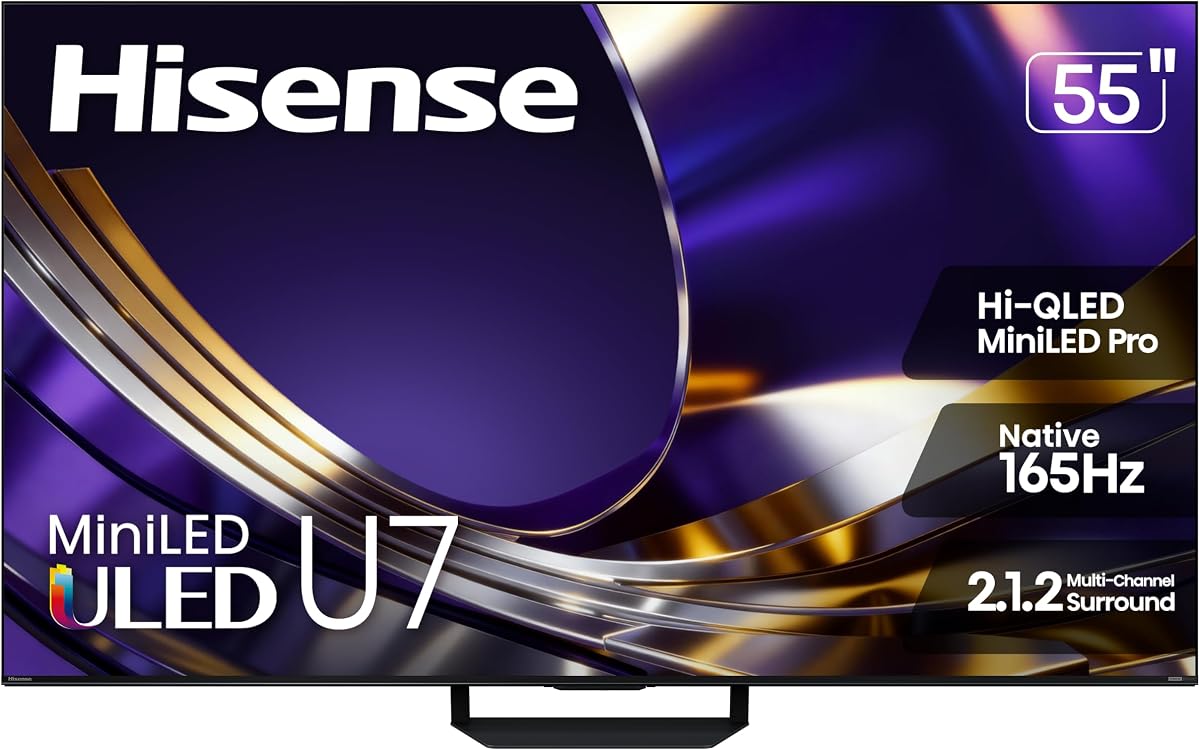
The Hisense 55U7SG represents a premium choice for enthusiasts demanding peak visual performance. With a native 165Hz refresh rate and high peak brightness it stands out in competitive gaming environments.
We may earn a commission when you buy through this link, at no additional cost to you.
Its Mini-LED backlighting provides deep blacks and bright highlights essential for HDR gaming. The anti-reflection coating reduces glare significantly which is vital for well-lit rooms during long sessions.
While the cost is higher than standard models the feature set justifies the investment for serious players. The 2.1.2 channel audio adds a layer of immersion that complements the visual fidelity.
Gamers who prioritize motion clarity and HDR impact should look to this unit. It sets a high bar for gaming TVs with its advanced specifications and polished implementation of key features.
The 165Hz native rate ensures extremely fluid motion reducing blur during fast action sequences significantly.
Anti-reflection technology and high nits ensure the image remains clear even with bright ambient lighting.
We may earn a commission when you buy through this link, at no additional cost to you.
The Hisense 55U6SF Pro offers a reliable balance of specs for mid-range buyers. It features a native 144Hz refresh rate and Mini-LED technology for enhanced contrast and motion clarity.
We may earn a commission when you buy through this link, at no additional cost to you.
The glare-free display is a key selling point for bright rooms ensuring visibility during daytime gaming. The Hi-VIEW AI engine automatically adjusts picture settings to suit different content types seamlessly.
Users should note that Fire TV includes ads on the home screen which might detract from the experience. However the picture quality remains strong for the price with good color accuracy.
This unit is suitable for those seeking strong gaming performance without the premium cost of high-end models. It delivers solid motion handling and contrast suitable for most console gaming needs.
Anti-reflection layers maintain view clarity in bright environments minimizing distractions from windows or lights.
The AI engine optimizes settings for each scene ensuring consistent quality across games movies and sports.
We may earn a commission when you buy through this link, at no additional cost to you.
Sony BRAVIA 3 II is tailored for PlayStation owners with exclusive features like Auto HDR Tone Mapping. It ensures the picture matches the game design perfectly without manual adjustments.
We may earn a commission when you buy through this link, at no additional cost to you.
The XR Processor enhances clarity and color using AI to recognize scenes. While it supports 120Hz gaming it may not offer the same raw refresh rates as newer competitors.
The Game Menu overlay allows quick access to settings enhancing control during sessions. However the pricing reflects Sony brand value which might be steep for budget gamers.
PS5 enthusiasts who value ecosystem integration and picture accuracy will appreciate this model. It delivers a premium experience that aligns well with high-end console capabilities.
Auto Genre Picture Mode optimizes settings for games automatically simplifying setup for players.
The XR Processor uses AI to sharpen detail and reduce noise in every frame for clarity.
We may earn a commission when you buy through this link, at no additional cost to you.
The TCL 65 QM6K provides a cinematic experience with its large 65 inch panel. It uses Mini LED QLED technology to deliver deep blacks and high brightness for immersive gaming.
We may earn a commission when you buy through this link, at no additional cost to you.
The Halo Control System enhances local dimming to reduce blooming around bright objects. This makes dark scenes look crisp without unwanted halos affecting visibility.
At this size the TV demands ample space and high-speed cables for full resolution support. The audio system with Onkyo branding adds depth to the surround sound experience.
Gamers wanting a massive screen for competitive shooters or RPGs should consider this unit. It balances size with performance making it suitable for living room setups.
The 65-inch canvas offers a wide field of view for better immersion in open world games.
Halo Control minimizes light bleeding ensuring dark areas remain distinct and detailed.
We may earn a commission when you buy through this link, at no additional cost to you.
Samsung 55 M70H features a Mini LED processor for enhanced contrast and brightness. It supports Motion Xcelerator Plus for smoother action scenes which benefits sports and gaming.
We may earn a commission when you buy through this link, at no additional cost to you.
The Gaming Hub centralizes cloud and console games making it easy to find content. Pure Color Spectrum technology offers a wide color range for lifelike images.
Users may find the setup menus dense compared to simpler platforms. The lack of dedicated HDMI 2.1 ports might limit next-gen console performance compared to rivals.
Casual gamers and streamers who want a polished interface and free content options will like this model. It provides a versatile viewing experience for mixed entertainment needs.
Gaming Hub brings multiple game services and apps into one place for easy discovery.
Motion Xcelerator Plus keeps fast scenes sharp and fluid reducing blur during action.
We may earn a commission when you buy through this link, at no additional cost to you.
The Roku 55 Select Series simplifies streaming with an intuitive interface and robust QLED display. It handles casual gaming well but lacks advanced gaming features like high refresh rates.
We may earn a commission when you buy through this link, at no additional cost to you.
Setup is quick and the remote control is straightforward with dedicated shortcuts. The voice remote makes searching across apps effortless for users who value convenience.
Input lag might be higher than dedicated gaming TVs making it better for single player titles. For streaming focused users the picture quality and simplicity are strong assets.
This model fits casual gamers who prioritize ease of use and app availability over competitive specs. It is a practical choice for everyday entertainment setups.
The Roku interface simplifies navigation and setup allowing quick access to content.
QLED screen enhances color accuracy making shows and games look vivid on screen.
We may earn a commission when you buy through this link, at no additional cost to you.
The Samsung 50 U8000H serves as an entry-level option for smaller spaces. It uses a Crystal Processor to deliver decent 4K upscaling and vibrant colors for streaming.
We may earn a commission when you buy through this link, at no additional cost to you.
Motion Xcelerator helps smooth out action but high frame rate gaming is not its strength. The compact 50 inch size makes it suitable for apartments or bedrooms.
While not designed for competitive play it handles casual gaming adequately. Color Booster enhances visuals for standard content improving the overall viewing experience.
Buyers looking for a basic smart TV for occasional gaming should consider this model. It provides reliable performance for the price without demanding high technical skills.
The 50 inch form factor fits well in smaller rooms without overwhelming the space.
Color Booster transforms content into vivid visuals improving contrast and saturation.
We may earn a commission when you buy through this link, at no additional cost to you.
The Hisense 55 E6QF delivers a balanced budget experience with Hi-QLED color support. It includes Game Mode Plus to lower input lag making it responsive for casual gaming.
We may earn a commission when you buy through this link, at no additional cost to you.
An AI Light Sensor adjusts brightness based on ambient light improving energy efficiency and comfort. Dolby Vision and Atmos enhance streaming content for a cinematic feel.
Motion Rate 120 is adequate but lacks the speed of high refresh rate panels. It works well for slower paced games and movies where motion blur is less critical.
This model is a solid choice for budget buyers who want decent picture quality and smart features. It offers a reliable base for casual gaming and daily viewing.
AI Light Sensor adapts the screen to room lighting for comfort and efficiency.
Game Mode Plus reduces input lag for a more direct connection between controller and screen.
We may earn a commission when you buy through this link, at no additional cost to you.
Selecting the right gaming TV requires balancing resolution refresh rate and connectivity. This guide helps you understand key specs to ensure smooth and immersive gameplay.
Refresh rate measured in Hertz determines how many frames a TV displays per second. High refresh rates like 120Hz or 144Hz are vital for smooth motion in fast-paced shooters.
Look for a TV with at least 120Hz support to match next-gen console capabilities for better fluidity.
HDMI 2.1 ports allow for higher bandwidth enabling 4K resolution at high refresh rates. Without these your console may be limited to lower refresh rates.
Ensure the TV has enough HDMI 2.1 inputs for all your gaming devices and sound systems.
Input lag is the delay between pressing a button and seeing the action on screen. Low lag is essential for competitive gaming to keep reactions precise.
Choose a model with a dedicated Game Mode that minimizes processing to reduce input delay.
Panel type impacts contrast and color performance. OLED offers perfect blacks while Mini LED provides high brightness without blooming in dark scenes.
Select a panel based on your room lighting conditions and preference for brightness versus contrast.
High Dynamic Range enhances color and contrast making games look more vivid. Support for formats like Dolby Vision ensures optimal picture quality.
Verify that the TV supports major HDR formats to fully utilize console output capabilities.
Variable Refresh Rate synchronizes the TV refresh rate with the console frame rate preventing screen tearing. This is crucial for smooth gameplay in variable frame rate games.
Check for VRR support such as FreeSync or G-Sync compatibility for better motion quality.
A smart operating system helps you manage streaming apps and console inputs easily. Intuitive interfaces save time when switching between games and media.
Choose a platform that supports your favorite apps and offers quick navigation options.
Screen size affects immersion and detail visibility. Larger screens offer a cinematic feel but require enough viewing distance to avoid strain.
Consider your room layout to ensure the screen size fits comfortably without overwhelming the space.
Set your TV to Game Mode immediately after connecting your console to reduce input lag. This disables certain image processing features that delay your controls.
Adjust brightness and contrast settings based on room lighting to reduce eye strain. Use built-in light sensors to maintain consistent picture quality throughout the day.
Regularly update the TV firmware to ensure compatibility with new game titles. Also clean the screen with a microfiber cloth to maintain clarity.
Not all TVs support 144Hz gaming. Most standard models max out at 60Hz or 120Hz. Check the product specifications for native refresh rate support before purchasing.
VRR stands for Variable Refresh Rate. It matches the TV refresh rate to the console frame rate to prevent screen tearing. This ensures smoother visuals during intense gameplay moments.
Yes for 4K at 120Hz or higher. Standard HDMI cables often lack the bandwidth for high refresh rate signals. Ensure you use Ultra High Speed HDMI cables for optimal performance.
OLED offers perfect blacks but risks burn-in with static game HUDs. MiniLED provides high brightness and lower risk. Choose based on your lighting needs and usage patterns.
Enable Game Mode on your TV to disable post-processing features. Also ensure you use a high-quality cable and update console firmware to minimize latency.
Yes if the TV has enough HDMI ports. Check the number of HDMI 2.1 ports to ensure both consoles can run at full specs without switching cables.
The ten models reviewed offer diverse options for every budget and room size. Top picks like the iFFALCON 55U85 balance features and price effectively.
Prioritize refresh rate and HDMI 2.1 support to unlock the full potential of your console. These specs ensure fluid motion and high-resolution visuals.
Always verify current prices and availability before buying. Market conditions change frequently so check local listings for the best deals.