
Mediasonic HomeWorx HW250STB
3.8Editor score
Supports up to 2TB storage
Clear QAM function included
Front display panel for info
This guide compares the top DVR recorders for TV including OTA DVRs and capture devices to help you record and watch live shows without subscriptions.
Choosing the right DVR recorder for your TV setup can transform how you watch and save your favorite shows. Whether you prefer over-the-air broadcasts or need to digitize old analog tapes, there is a device tailored to your needs.
We have evaluated ten top-rated models based on tuner count, storage options, ease of setup, and compatibility with modern smart TVs. Our analysis focuses on reliability, feature sets, and value for home entertainment systems.
Each pick below highlights key strengths and potential limitations to help you decide quickly. Prices and availability fluctuate regularly, so check the current listings before making your final purchase decision.
3.8Editor score

3.2Editor score

4.1Editor score
Here is a side-by-side look at the ten leading DVR recorders for TV. This table highlights core specifications to help you compare functionality, input types, and tuner counts across different brands and models.
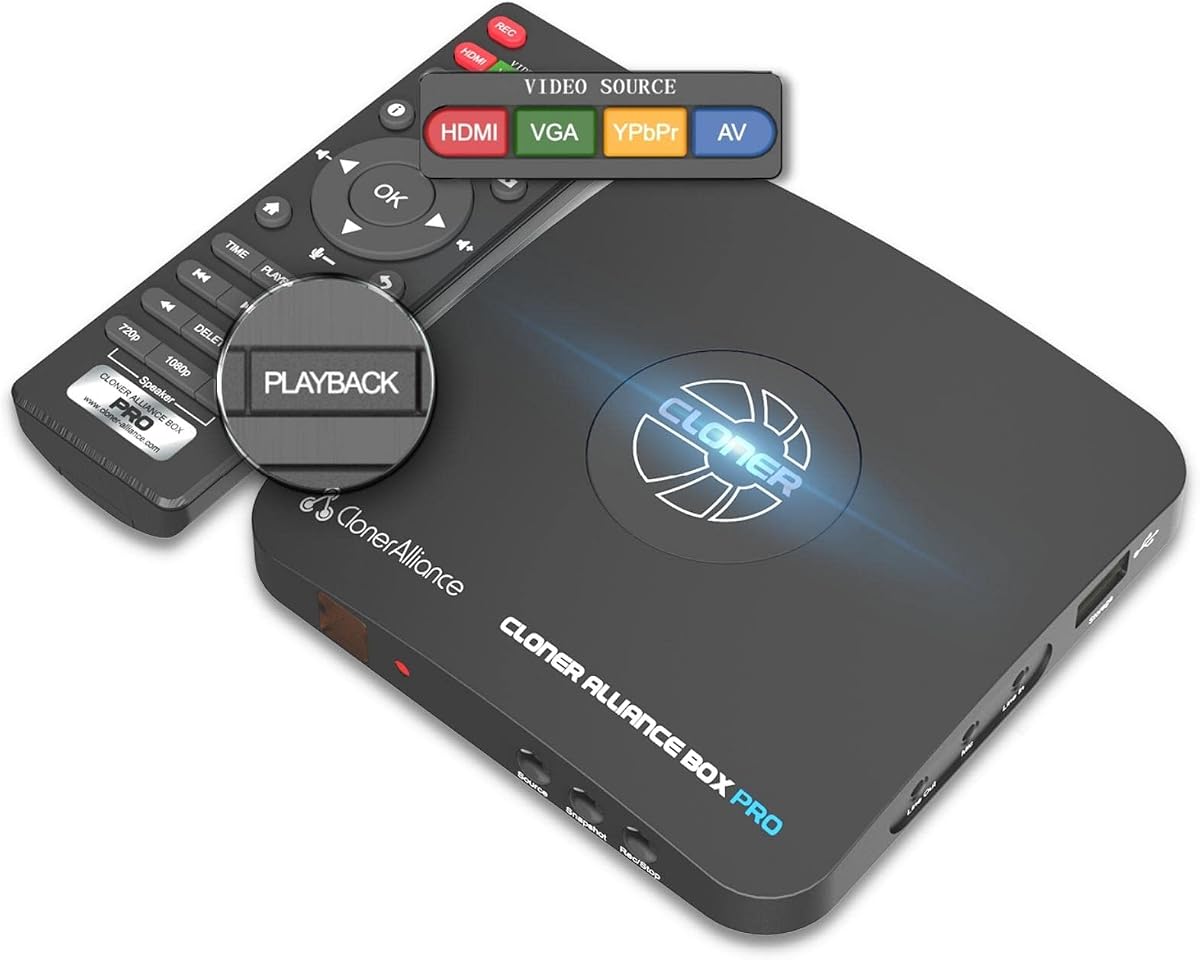


The ClonerAlliance Box Pro is a standout device for digitizing analog video sources. With a solid 4.0 rating, it captures 1080p content at 60fps without needing a PC connection. Its versatility makes it ideal for archiving VHS tapes or capturing gameplay from consoles.
We may earn a commission when you buy through this link, at no additional cost to you.
This recorder supports HDMI, RCA, Composite, Component, and VGA inputs, covering almost any legacy device you might own. The included remote allows playback directly on your TV, which is convenient for quick reviews. It also includes free video editing software for Windows users to trim files.
However, it does not bypass HDCP content protection, meaning it cannot record from sources that block copying. There is no Wi-Fi streaming to smart devices, so you must manage files locally via USB. These limitations are acceptable for users focused on archiving physical media.
If you need a reliable standalone unit to convert analog signals to digital files, this device delivers strong value. It is user-friendly for older adults and tech enthusiasts alike, offering a seamless path to preserve your video library in modern formats.
This device functions independently without requiring a computer to manage recordings or playback.
Multiple video inputs allow you to connect VCRs, camcorders, and game consoles easily.
We may earn a commission when you buy through this link, at no additional cost to you.
Tablo TV 4th Gen with four tuners offers robust recording for households that want to watch multiple live shows. It captures free over-the-air networks like ABC and NBC. The device streams to phones and smart TVs via Wi-Fi, providing flexible viewing anywhere in the home.
We may earn a commission when you buy through this link, at no additional cost to you.
You can watch one channel while recording others thanks to the four-tuner setup. There are no hidden fees or subscriptions, just a one-time purchase for the device. The Tablo app guides you through setup quickly using a QR code on the manual.
A consistent high-speed internet connection is necessary for streaming features to work properly. It does not work with non-smart TVs or computers, which limits its use in some rooms. However, for smart homes, it offers excellent control over live TV.
This model is perfect for cord-cutters who want a centralized system for local broadcasts. It balances ease of use with advanced multi-tuner capabilities, making it a top choice for families who want to avoid cable contracts.
With four tuners you can record one show while watching another simultaneously.
Pay once for the device and enjoy free live TV without monthly recurring fees.
We may earn a commission when you buy through this link, at no additional cost to you.
The Mediasonic HomeWorx HW250STB is an affordable digital converter that doubles as a DVR. It captures ATSC broadcasts and plays back media via USB. With support for up to 2TB of storage, you can save plenty of shows without extra hardware costs.
We may earn a commission when you buy through this link, at no additional cost to you.
Its Clear QAM function allows it to access unscrambled cable channels if provided by your carrier. The front display panel shows channel numbers and clock info even in standby mode. This practical design helps you keep track of time and broadcasts easily.
It does not support the newer ATSC 3.0 standard, so future-proofing might be limited. You need a USB hard drive for recording functions which is not included in the box. These factors make it a budget option rather than a premium one.
For those looking to upgrade an analog TV to digital with basic recording features this box is a solid choice. It offers essential functionality at a low cost, making it accessible for anyone wanting to cut cable expenses.
Watch unscrambled cable channels directly without needing a separate cable box.
Enjoy photos music and videos from your USB flash drive or external hard drive.
We may earn a commission when you buy through this link, at no additional cost to you.
Tablo TV 4th Gen 2-Tuner provides a balanced solution for households needing simultaneous recording. It allows you to watch one channel while recording another. This model includes access to over 100 additional free streaming channels to enhance your viewing options.
We may earn a commission when you buy through this link, at no additional cost to you.
The setup is straightforward with a QR code guide and Wi-Fi connectivity. You can stream live or recorded TV to phones and tablets throughout your home. It maintains the same no-fee structure as other Tablo DVRs in the lineup.
Licensing restrictions may disable recording for some free streaming channels which could be a minor inconvenience. It also does not work with non-smart TVs which limits where you can place the hardware. However the streaming access adds value.
This DVR is ideal for users who want flexibility without complex setups. It offers a good mix of local broadcast recording and streaming content for those who want to explore more channels without a subscription.
Access more than 100 additional free streaming channels beyond your local antenna.
Record one live channel while watching another for ultimate viewing flexibility.
We may earn a commission when you buy through this link, at no additional cost to you.
This bundle includes the Tablo TV 4th Gen 2-Tuner DVR along with a 35-mile range indoor antenna. It gives you everything needed to start recording local broadcasts immediately. The DVR connects via Wi-Fi or Ethernet to your home network.
We may earn a commission when you buy through this link, at no additional cost to you.
You can watch and record live TV on major networks like ABC and CBS. The device streams to compatible smart devices in your home. With two tuners you can manage recording schedules effectively without missing your favorite shows.
The included antenna may vary in performance based on your local topography and obstructions. It still has the limitation of not working with non-smart TVs which might require additional adapters. However having the antenna included saves time.
For those new to over-the-air TV this kit is a convenient starting point. It simplifies the process of setting up a free local TV system and ensures you have the necessary hardware to get started.
Get both the DVR and a 35-mile range antenna in one convenient package.
Pay once for the device and enjoy local TV without ongoing monthly fees.
We may earn a commission when you buy through this link, at no additional cost to you.
The Toshiba DVR670/DVR670KU combines DVD VHS recording with a built-in ATSC tuner. This unit is perfect for preserving VHS tapes in digital formats. It supports Dolby Digital audio and upconversion to 1080p via HDMI output.
We may earn a commission when you buy through this link, at no additional cost to you.
You can use one-touch recording to capture shows on DVD or VHS. It also supports MP3 WMA JPEG and DivX files for multimedia playback. The front AV inputs make it easy to connect digital video cameras to record directly.
Since this is a 2009 model it may be harder to find in new condition. It also lacks modern Wi-Fi streaming which limits remote access. However for archiving physical tapes it remains a reliable option.
If you have a large collection of VHS tapes this device offers a direct way to preserve them. It is a specialized tool for nostalgia archivers rather than a mainstream streaming solution.
Copy your VHS tapes to DVD or record directly to tapes easily.
Play back music and photos stored on discs via the built-in decoder.
We may earn a commission when you buy through this link, at no additional cost to you.
Tablo TV 4th Gen 4-Tuner combined with an antenna provides a complete over-the-air DVR solution. It lets you record up to four shows at once while watching another. The included indoor antenna helps secure a solid local signal.
We may earn a commission when you buy through this link, at no additional cost to you.
You can stream content to compatible devices via Wi-Fi for whole-home viewing. There are no monthly subscription fees for this service. The app helps manage your recordings and live TV schedule easily.
Internet connectivity is required for full functionality such as streaming and guide data. Like other Tablo models it does not work with non-smart TVs directly. However the tuner count is excellent for busy households.
This bundle is best for families who want to maximize recording capacity and signal quality. It simplifies the setup process by including both the tuner and antenna in one purchase.
Receive both the 4-tuner DVR and a 35-mile range antenna to start immediately.
Record four different live shows at the same time for maximum flexibility.
We may earn a commission when you buy through this link, at no additional cost to you.
The ClonerAlliance UHD Pro is a high-end 4K video recorder designed for quality capture. It records in Ultra-HD with H.265 and H.264 codecs. The ultra-low latency makes it suitable for gaming or live events where timing matters.
We may earn a commission when you buy through this link, at no additional cost to you.
You can use it to capture screen contents of PCs or record from consoles. It supports pause resume recording which helps keep important moments in one file. The device is standalone and does not need a PC.
Like similar devices it cannot bypass HDCP protected content from certain sources. It also does not have built-in Wi-Fi for streaming to smart devices. However the 4K support is rare for standalone recorders.
This device is ideal for tech enthusiasts who need high fidelity recordings. It offers professional grade specs at a reasonable price for those prioritizing resolution and codec support.
Capture content in 4K Ultra-HD resolution for high detail retention.
Choose cinematic frame rates like 24fps for film quality video capture.
We may earn a commission when you buy through this link, at no additional cost to you.
Tablo TV 4th Gen 2-Tuner Renewed offers a cost-effective way to get over-the-air recording. It includes 128GB of onboard storage to save your shows. The renewed condition helps save money compared to buying new.
We may earn a commission when you buy through this link, at no additional cost to you.
You can access more than 100 free streaming channels to supplement local TV. Wi-Fi connectivity allows you to position the antenna for the best signal. Setup is easy with the Tablo app on your phone.
Renewed items may show signs of use so check descriptions carefully. Warranty terms are usually shorter than for new products. However for budget shoppers this provides significant savings.
This unit is a great choice for those who want Tablo features without the full price. It delivers the same streaming and recording capabilities as the new model.
Save money by choosing a renewed unit that meets quality standards.
Place your antenna wherever you want without being near a network cable.
We may earn a commission when you buy through this link, at no additional cost to you.
The Tablo TV 4th Gen 4-Tuner Renewed provides a budget friendly path to four-tuner recording. It offers significant savings over the new model while keeping core features intact. This makes it accessible for households on a tight budget.
We may earn a commission when you buy through this link, at no additional cost to you.
You get access to over 100 free streaming channels to enhance your viewing. The four tuners allow you to record multiple shows at once. Wi-Fi connectivity ensures you can stream content throughout your home.
As a renewed product there may be minor cosmetic imperfections. Internet is required for streaming functionality. However the recording capacity is excellent for the price.
This device is ideal for users needing high tuner counts without spending a premium. It balances cost and performance effectively for cord-cutters.
Record up to four shows simultaneously for maximum scheduling freedom.
Enjoy access to 100+ free channels via the Tablo app.
We may earn a commission when you buy through this link, at no additional cost to you.
Selecting the right DVR recorder depends on your specific needs and existing equipment. Consider these factors to ensure compatibility and value.
Tuner count determines how many shows you can record simultaneously. Devices with four tuners allow you to watch one show while recording others. Choose a model that fits your household's viewing habits.
More tuners mean greater flexibility for scheduling. For most households two to four tuners is sufficient to avoid conflicts.
Storage options include onboard memory and external hard drives. Some units support up to 2TB of external storage. Check if the device includes any initial storage space.
Large storage allows you to save many episodes without deleting. External drives offer expandability if you record frequently.
Check which inputs are supported for analog and digital sources. HDMI inputs are needed for modern devices while RCA or VGA are needed for older ones. Ensure the device matches your equipment.
Universal input support makes the device versatile. This is key if you plan to digitize old tapes or playbacks from consoles.
Wi-Fi connectivity allows you to stream recorded shows to other devices. Some DVRs require Ethernet cables instead. Wireless options offer more placement flexibility.
Smart streaming capabilities enhance usability. If you want to watch on tablets look for Wi-Fi supported models.
Most modern DVRs like Tablo have no subscription fees. You pay one-time for the device. Check if there are hidden costs for advanced features.
No-fee models save money in the long run. Always verify if extra costs apply for cloud storage or streaming.
Ensure the DVR works with your smart TV or streaming device. Some models do not support non-smart TVs. Check the app list for your TV brand.
Compatibility prevents extra spending on adapters. Confirm the device supports your specific smart TV platform.
HDCP protection prevents recording from certain streaming devices. Devices without HDCP bypass may not work with all sources. Read the notes on protected content.
This matters if you plan to capture from Blu-ray players. Check if the device supports protected content or only analog inputs.
Video quality varies between 1080p and 4K resolution. High-end models support 4K recording. Ensure your storage can handle higher resolution files.
Higher quality means more storage space used. Choose resolution based on your display and storage needs.
First connect the DVR to your TV antenna or video source using the provided cables. Then link the device to your home network via Wi-Fi or Ethernet. Follow the app instructions to pair your mobile device with the DVR.
Next configure recording schedules for your favorite shows through the app or remote. You can choose to record live shows or set timers. Ensure external hard drives are formatted correctly for recognition.
Finally maintain your device by keeping firmware updated and avoiding direct sunlight. Regularly check connections to prevent signal loss. Clear unused files to save storage space over time.
Most modern DVR recorders like Tablo do not need a cable subscription. They work with over-the-air antenna signals. You can also add free streaming channels without contracts.
Yes OTA DVRs are designed to record from TV antennas. You connect the coaxial cable from your antenna to the DVR. The device captures local channels automatically.
Storage needs depend on how much you record. Many devices have onboard storage. Some support external hard drives up to 2TB or more for expanding capacity.
HDCP protects content from unauthorized copying. Some standalone DVRs cannot record from protected sources. Check product specs if you plan to use modern streaming devices.
Many DVRs allow streaming to phones via Wi-Fi. This depends on the specific model. Look for whole-home access features to enable mobile viewing.
Most DVR recorders work without a computer. You can record and playback directly on your TV. Some have PC software but it is optional for basic use.
Use the DVR app or remote to set timers for shows. Most systems sync with TV guides automatically. This ensures you never miss your favorite programs.
Most standalone DVRs do not have monthly fees. You pay one-time for the hardware. However streaming services may require separate subscriptions.
We reviewed ten top models ranging from budget boxes to premium 4K recorders. Each offers unique features for different needs. Selecting the right one depends on your storage and tuner requirements.
Prioritize tuner count and connectivity when making a choice. Ensure compatibility with your existing TV and antenna setup. This ensures smooth operation and easy integration into your home.
Always check current prices and availability before buying. Technology changes quickly so verify specs match your needs. With the right DVR you can enjoy flexible TV viewing.