
SSK Portable SSD
4.5Editor score
Affordable price tag
Lightweight design
Good transfer speed
This guide compares the top external SSD for Linux options to help you find the fastest and most reliable drive for your system.
Linux users need reliable external storage for backups and media. An external SSD for Linux offers speed and durability that traditional drives cannot match.
We compared ten top models based on speed, compatibility, and durability. Our list includes options from major brands known for Linux support.
Each pick highlights key specs and real-world performance. Prices change often so check current deals before you buy your new drive.
4.5Editor score

4.7Editor score

4.6Editor score
Here is a side-by-side comparison of all ten drives to help you compare key features at a glance.





The Samsung T7 Portable SSD is the top choice for Linux users. It offers fast speeds and a compact design that fits easily in a pocket.
We may earn a commission when you buy through this link, at no additional cost to you.
Its NVMe technology delivers up to 1050MB/s read speeds. This makes file transfers and backups quick and efficient for your daily workflow.
While it is durable it can run warm during heavy use. The thermal guard helps manage heat but it may feel hot after long sessions.
Buy this if you need a reliable drive for general storage. It works great with Linux systems and offers excellent performance for the price.
Transfer large files in seconds with PCIe NVMe technology that supports USB 3.2 Gen 2 for maximum speed on Linux devices.
The aluminum unibody construction protects internal components from drops and shocks while keeping the drive lightweight for travel.
We may earn a commission when you buy through this link, at no additional cost to you.
The SSK Portable SSD offers great value for Linux users on a budget. It provides fast speeds and a lightweight design at a lower price point.
We may earn a commission when you buy through this link, at no additional cost to you.
It supports SLC caching to maintain steady speeds during large file transfers. The aluminum case helps dissipate heat effectively during use.
Some users note the LED indicator is always on. This may be distracting in dark environments but does not affect performance or reliability.
Choose this drive if you want performance without spending too much. It is an excellent option for backups or portable storage needs.
Get high-speed NVMe performance with USB 3.2 Gen 2 connectivity at a price that undercuts major competitors significantly.
The 2mm thick aluminum alloy case ensures superior heat dissipation to keep the drive cool during extended use sessions.
We may earn a commission when you buy through this link, at no additional cost to you.
The Samsung T9 Portable SSD is the fastest option for Linux users. It delivers speeds up to 2000MB/s for rapid data access.
We may earn a commission when you buy through this link, at no additional cost to you.
Its dynamic thermal guard ensures consistent performance even during heavy workloads. This prevents throttling and keeps the drive cool.
The main limitation is the need for USB 3.2 Gen2x2 ports. Older systems may not reach full speeds making this better for newer setups.
Opt for this if you need maximum speed for professional tasks. It is ideal for video editing or handling large datasets on Linux.
Experience sustained read and write speeds of up to 2000MB/s with USB 3.2 Gen 2×2 for fastest transfer times.
The advanced thermal solution controls heat to keep the SSD at ideal temperatures even during intense heavy use tasks.
We may earn a commission when you buy through this link, at no additional cost to you.
The Sandisk 2TB Extreme is built for rugged use. It offers IP65 water and dust resistance making it perfect for outdoor Linux environments.
We may earn a commission when you buy through this link, at no additional cost to you.
Its 3-meter drop protection adds extra durability. The included software offers 256-bit AES hardware encryption to keep your data secure.
The drive is slightly bulkier than others. This adds weight which may not suit users prioritizing minimal portability for daily carry.
Select this if you need high capacity and protection. It is great for field work or storage that faces harsh conditions regularly.
Designed with IP65 water and dust resistance plus 3-meter drop protection to withstand tough outdoor and travel conditions.
Keep private content safe with included password protection featuring 256-bit AES hardware encryption for top security.
We may earn a commission when you buy through this link, at no additional cost to you.
The Samsung T7 Shield combines speed with ruggedness. It handles dust and water while maintaining fast performance for Linux systems.
We may earn a commission when you buy through this link, at no additional cost to you.
It supports 1050MB/s read speeds and drop resistance up to 9.8 feet. The rubber exterior ensures it can take a beating.
The added protection makes it heavier than the standard T7. This might be a downside if you need a drive for light pocket use.
Buy this for work that involves travel or rough handling. It balances durability and performance for demanding Linux users well.
Withstand whatever adventure with an IP65 rating for water and dust resistance to keep projects safe in rain or dust.
Shock-resistant design offers drop protection up to 9.8 feet so you can dare to reach higher without damaging data.
We may earn a commission when you buy through this link, at no additional cost to you.
The Western Digital My Passport SSD is a solid secure option for Linux users. It features password protection and fast NVMe speeds.
We may earn a commission when you buy through this link, at no additional cost to you.
It is shock and vibration resistant for travel. The USB 3.2 Gen-2 interface ensures rapid data transfers across various devices.
Some users may find the bundled software heavy on their system. It can be ignored but might be better to use native tools.
Choose this for secure portable storage needs. It is excellent for sensitive files and professional use requiring encryption and speed.
Protect your files with password enabled 256-bit AES hardware encryption ensuring sensitive data remains private and safe.
Enjoy blazing fast speeds of up to 1050MB/s read and 1000MB/s write for efficient workflow and quick file access.
We may earn a commission when you buy through this link, at no additional cost to you.
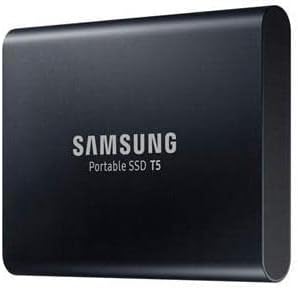
The Samsung T5 2TB offers great storage space for Linux users. It is highly rated and features a durable metal design for protection.
We may earn a commission when you buy through this link, at no additional cost to you.
It supports up to 540MB/s read speeds with USB 3.1. While slower than newer models it remains reliable for general storage tasks.
The older USB interface limits top speed compared to newer options. This is acceptable for backups but not for video editing.
Opt for this if you need a lot of space on a budget. It is a proven drive that performs well for everyday Linux users.
With a 2TB capacity you can store large working files games and media all in one portable and reliable drive.
The top to bottom metal design fits in the palm of your hand and provides shock resistance for everyday travel.
We may earn a commission when you buy through this link, at no additional cost to you.
The Samsung T7 500GB is a compact option for Linux users needing speed. It fits in a pocket and delivers fast transfer rates.
We may earn a commission when you buy through this link, at no additional cost to you.
It includes Dynamic Thermal Guard technology to prevent overheating during long sessions. This makes it suitable for gaming or editing tasks.
The 500GB capacity is limited for large media libraries. You might need to manage files more frequently if working with heavy datasets.
Buy this if you prioritize portability and speed. It is a great companion for students or professionals needing quick access on Linux.
Dynamic Thermal Guard protects the drive from overheating by automatically slowing data transfer if necessary for safety.
The small portable SSD design allows you to carry it easily in your pocket for fast file access anywhere.
We may earn a commission when you buy through this link, at no additional cost to you.
The Lexar ES3 is thin and stylish for Linux users. It weighs only 42g and fits easily in a pocket for travel.
We may earn a commission when you buy through this link, at no additional cost to you.
It supports fast USB 3.2 Gen 2 speeds. The included Type-C cable makes setup quick without needing extra hardware for Linux.
It is a simple drive without many advanced features. This is great for general use but may lack tools for power users.
Choose this for basic portable storage needs. It offers a great balance of style and function for casual Linux users.
The thin stylish durable design is only 10.5mm thick and fits smaller than a card in your pocket.
Lexar DataShield 256-bit AES encryption software protects your files to ensure safety while storing sensitive data.
We may earn a commission when you buy through this link, at no additional cost to you.
The Samsung T5 500GB is an affordable choice for Linux users. It offers a high rating and a durable metal design for reliability.
We may earn a commission when you buy through this link, at no additional cost to you.
It supports transfer speeds up to 540MB/s. While not the fastest it handles daily backups and file sharing with ease.
The older USB 3.1 interface limits peak speeds compared to Gen 2 models. This is acceptable for most general storage needs.
Buy this for entry-level portable storage. It is a proven drive that offers great value for students or casual Linux users.
Includes USB type C to C and USB type C to A cables to connect to PCs and other devices easily.
The shock resistant metal design fits in the palm of your hand and slides in your pocket for entertainment.
We may earn a commission when you buy through this link, at no additional cost to you.
Choosing the right external SSD involves understanding key factors like speed and compatibility. Here are the most important things to consider.
The interface you choose determines how fast your drive operates. USB 3.2 Gen 2 offers speeds up to 1050MB/s which is ideal for most Linux users.
Look for drives that support USB-C for modern connectivity. Faster interfaces ensure your system can utilize the full potential of the SSD.
Linux support is critical for smooth operation. Most modern SSDs work well with Ubuntu and Fedora but check if specific software is needed.
Ensure the drive supports UASP for faster performance. This protocol reduces overhead and improves efficiency on Linux systems.
If you travel frequently a rugged drive is essential. Look for IP ratings for water and dust resistance to protect your data.
Drop resistance is also a key feature. Drives with solid metal bodies offer better protection against accidental drops and shocks.
Capacity needs vary by user. General storage might only need 500GB but professionals should consider 1TB or 2TB options.
Larger capacities cost more but reduce the need for multiple drives. Choose a size that fits your current and future data needs.
Security features like hardware encryption are vital for sensitive data. Look for drives with 256-bit AES encryption.
Password protection ensures that only you can access files. This is essential for business use or storing confidential information.
Manufacturer software can enhance performance and security. Tools like Samsung Magician help monitor health and update firmware.
Ensure any included software has Linux support. If not plan to use native tools like fdisk for management and partitioning.
A good warranty protects your investment. Look for at least a three-year warranty from the manufacturer.
Check if support is responsive for Linux issues. Good customer service ensures you get help if the drive fails early.
Prices vary significantly by brand and features. Budget options offer good speeds but may lack advanced security or durability.
Decide on your spending limit before buying. This helps you balance performance and features without overspending on unneeded tech.
To use your SSD plug it into a USB port. Linux will usually auto-mount the drive. You can access files through the file manager or terminal.
Always eject the drive safely before unplugging. Use the eject option in the file manager to prevent data corruption during active transfers.
Keep the drive cool and dry. Avoid exposing it to extreme temperatures or water. Regularly check its health using system tools to ensure reliability.
Yes most modern external SSDs work seamlessly with Linux distributions. They use standard USB protocols like UASP that are supported natively without extra drivers.
ExFAT is great for cross-platform use but EXT4 is better for Linux performance. Choose based on whether you need to access files on Windows too.
You can use a modern drive with USB 2.0 but speeds will be limited. You will not get the full 1050MB/s speed promised by USB 3.2.
Many drives come preformatted in exFAT. You may not need to reformat but doing so to EXT4 optimizes it for Linux operations.
Use smart tools in Linux to monitor drive health. Utilities like smartmontools give detailed reports on temperature and wear levels.
Yes SSDs are significantly faster than HDDs for read and write operations. This reduces boot times and makes file transfers nearly instant.
Yes you should use the included USB-C cable for best performance. Old USB-A cables may limit speed even if the port supports USB 3.2.
Modern SSDs have high endurance measured in TBW. For typical home use they will last many years without wearing out from standard read write cycles.
We reviewed ten top external SSDs for Linux performance and reliability. The Samsung T7 offers the best balance of speed and value.
Consider your needs for capacity and durability before buying. Premium options like the T9 offer faster speeds for heavy workflows.
Prices change frequently so check current deals before purchase. Choose the drive that best fits your Linux system requirements.