
LONELY BINARY Logic Analyzer Kit
4.2Editor score
24MHz sampling rate
8 input channels
Includes breakout boards
This guide compares the top 10 logic analyzers for electronics projects, covering features, speed, and compatibility to help you choose the right tool for your
Logic analyzers are essential tools for debugging digital circuits and understanding signal behavior in modern electronics projects. They help engineers and hobbyists visualize data streams accurately.
We evaluated ten distinct models based on sampling rates, channel counts, software support, and overall usability. Each unit was assessed for its ability to handle common protocols effectively.
Every pick highlights key strengths and ideal use cases for different skill levels. Please note that prices fluctuate frequently, so check current listings before purchasing any item.
4.2Editor score

4.5Editor score
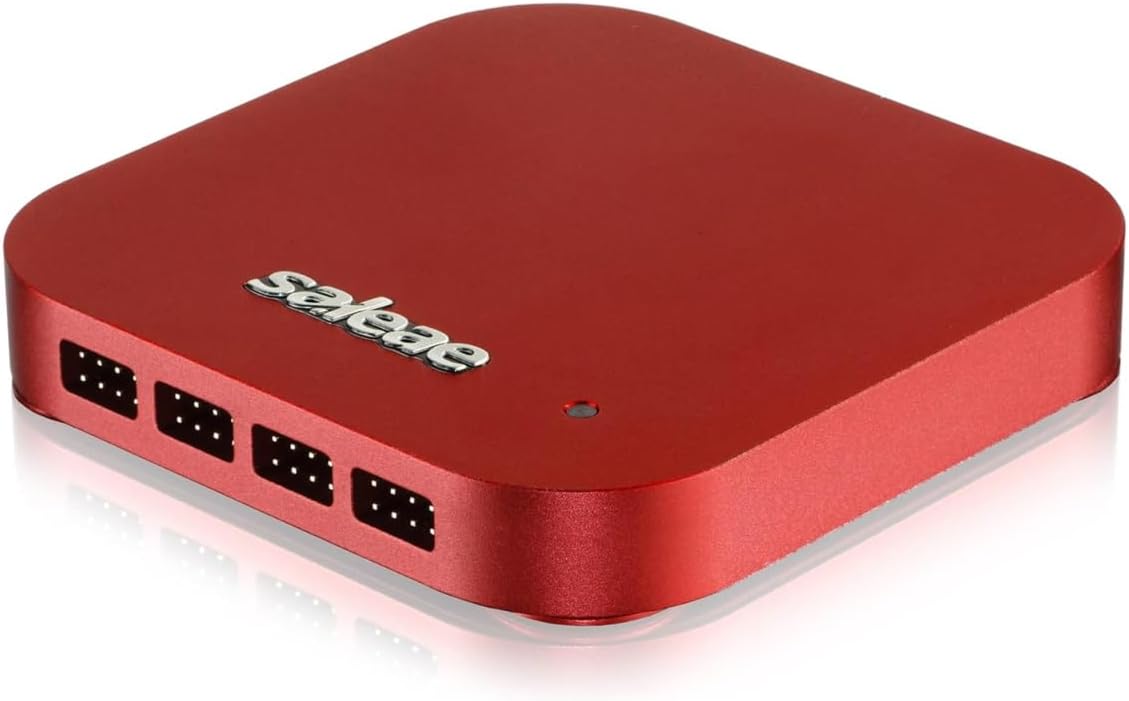
4.8Editor score
This table provides a quick side-by-side comparison of all ten selected logic analyzers. Use it to identify key specifications like channel count and sampling speed at a glance.


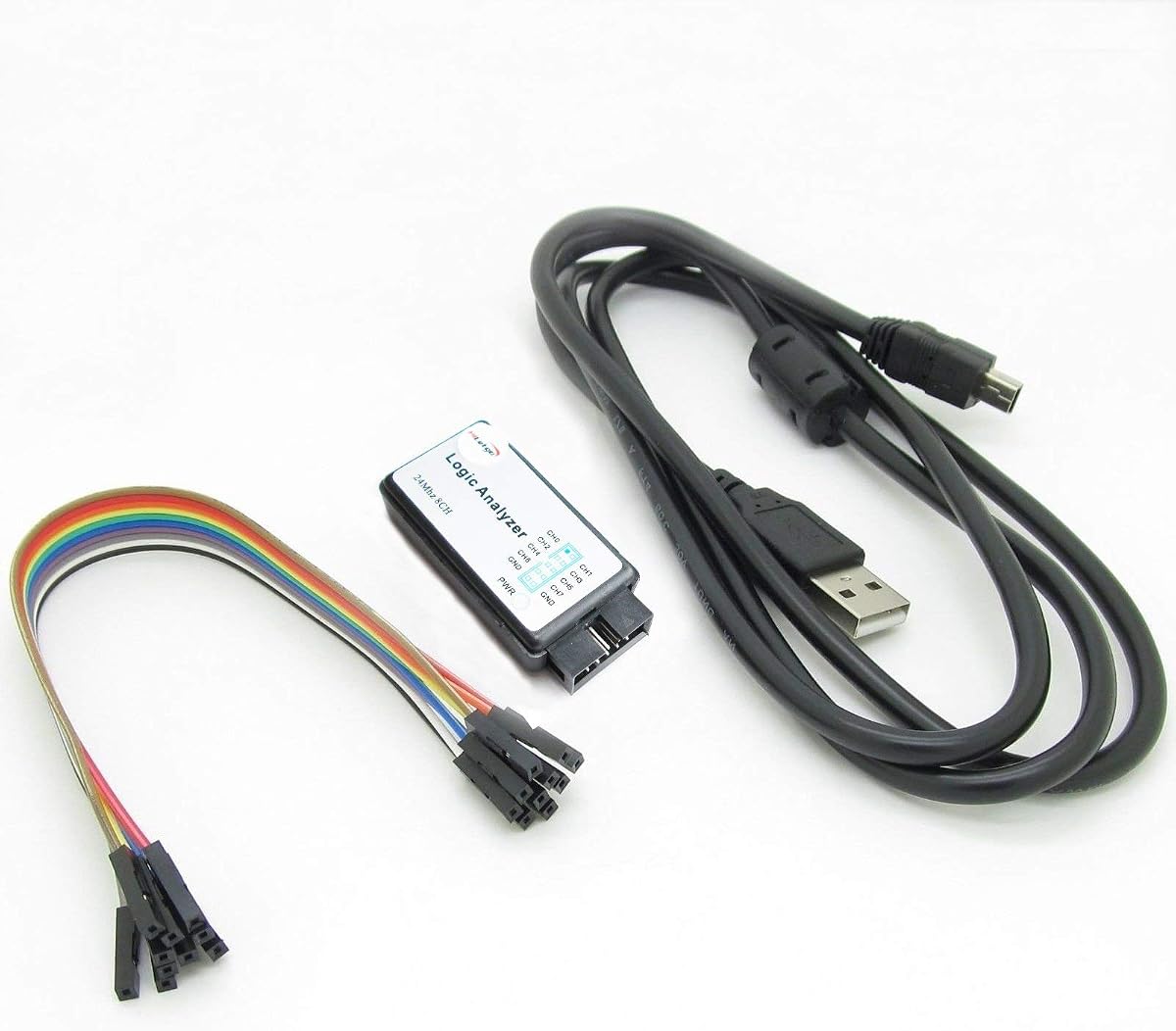


The LONELY BINARY Logic Analyzer Kit offers an accessible entry into digital signal debugging with eight channels and a 24MHz sampling rate. It is highly rated for students and hobbyists needing reliable connectivity without breaking the bank.
We may earn a commission when you buy through this link, at no additional cost to you.
Its standout quality lies in the included breakout boards and adapter kit which simplify connections to breadboards and microcontrollers. The dual USB connectivity ensures it works with both older and modern laptops seamlessly.
While the sampling rate is lower than premium models, it is sufficient for common protocols like I2C and UART. The compact storage case keeps all necessary clips and wires organized during transport.
Buyers looking for a cost-effective tool for basic embedded systems or STEM projects will find this kit ideal. It provides immediate out-of-the-box usability with everything needed to start testing quickly.
The included breakout board expands all eight channels to standard pins making it easy to attach alligator clips for secure connections.
Users receive ten test clips five alligator clips and jumper wires ensuring no extra purchases are needed to begin prototyping immediately.
We may earn a commission when you buy through this link, at no additional cost to you.
The LA1010 USB Logic Analyzer stands out as an editor's choice due to its impressive 100MHz sampling rate and sixteen input channels. It is widely praised for its cost-effective performance in developing and debugging embedded systems.
We may earn a commission when you buy through this link, at no additional cost to you.
Key strengths include the ability to decode over thirty standard protocols such as I2C and SPI. The software converts digital signals into clear waveforms for precise analysis on any supported operating system.
The handheld instrument design is portable but may lack some advanced trigger options found in benchtop units. However its low power consumption makes it suitable for long-term signal monitoring sessions.
Engineers working on microcontrollers or FPGA projects will benefit from the extensive protocol decoding capabilities. It balances high performance with affordability making it a top recommendation for serious hobbyists.
The included software extracts human-readable communication data from captured signals significantly accelerating the debugging process for complex digital circuits.
Auto-installing drivers ensure compatibility with Windows 10 and 11 macOS and Linux without requiring manual configuration steps for users.
We may earn a commission when you buy through this link, at no additional cost to you.
The Saleae Logic Pro 16 represents the pinnacle of logic analyzer technology with a 500MS/s digital sample rate and sixteen mixed digital and analog inputs. It is highly rated for saving time and frustration in complex debugging tasks.
We may earn a commission when you buy through this link, at no additional cost to you.
Its standout feature is the ability to capture over ten billion digital samples using PC memory via USB 3.0. This allows for extended analysis without worrying about buffer limitations during long captures.
While the price is significantly higher than entry-level options the software experience is unmatched in smoothness and protocol support. The ultra-portable design ensures it fits easily into any professional toolkit.
Professional engineers requiring precise analysis of high-speed serial protocols should invest in this model. It delivers reliability and speed that justifies the cost for demanding electronics projects.
Storing data in PC memory allows for continuous capture of long signals without running out of onboard buffer space on the device.
The software interface is designed for ease of use reducing the learning curve for new users while offering deep features for experts.
We may earn a commission when you buy through this link, at no additional cost to you.
The Saleae Logic Pro 8 offers eight digital and analog inputs with the same high-speed performance as its sixteen-channel sibling. It is praised for its ultra-portable design and ability to save time during development cycles.
We may earn a commission when you buy through this link, at no additional cost to you.
Its primary strength is the ability to sample at up to 500MS/s while capturing ten billion digital samples using PC memory. This makes it suitable for analyzing high-speed data streams without data loss.
The reduced channel count compared to the Pro 16 makes it more affordable while still maintaining premium quality. Users can decode SPI and I2C protocols effortlessly through the intuitive software.
Those needing a balance between channel count and performance will find this model ideal. It brings professional-grade capabilities to a slightly more accessible price point for most developers.
The eight inputs can be used as digital or analog channels allowing flexibility for mixed signal analysis in complex circuit debugging.
Leveraging PC memory for storage ensures that large capture files do not overwhelm the device hardware during extended testing sessions.
We may earn a commission when you buy through this link, at no additional cost to you.
This USB Logic Analyzer is designed specifically to be compatible with the popular Saleae Logic Analyzer software. It offers eight channels and a 24MHz sampling rate for a very affordable price point.
We may earn a commission when you buy through this link, at no additional cost to you.
Its key strength lies in its flexibility to run on PulseView or Saleae software making it a versatile tool for users who already know these environments. The sampling rate is adjustable down to 25KHz for slower signals.
While it lacks its own dedicated software interface the supported compatibility ensures robust analysis features. The voltage range supports 3.3V and 5V logic levels commonly found in Arduino projects.
Users on a tight budget who need reliable protocol decoding will find this tool effective. It delivers essential functionality for UART and IIC debugging without requiring expensive hardware upgrades.
Support for both Saleae and PulseView software allows users to choose their preferred interface for viewing waveforms and decoding data.
Users can lower the sampling rate to save memory when debugging slower protocols ensuring efficient data capture for all project types.
We may earn a commission when you buy through this link, at no additional cost to you.
The DSLogic Plus offers a 400MHz sampling rate and sixteen channels with 256Mbits of onboard memory. It is highly rated for supporting open-source software and dual-mode capture functionality.
We may earn a commission when you buy through this link, at no additional cost to you.
Its standout feature is the ability to switch between stream mode for long durations and buffer mode for high speeds. This flexibility allows users to capture both short bursts and extended sequences effectively.
The shielded fly wires help reduce noise and ensure cleaner waveforms during analysis. The open-source nature of the DSView software provides transparency and customization options for advanced users.
Engineers needing high-speed analysis without proprietary software costs will appreciate this device. It combines professional performance with the benefits of an open community ecosystem for development.
Switching between stream and buffer modes allows users to optimize for either long recording times or high-resolution short captures as needed.
The availability of DSView on GitHub enables continuous improvement and community-driven feature additions for better user experience over time.
We may earn a commission when you buy through this link, at no additional cost to you.
The HiLetgo USB Logic Analyzer is designed for basic debugging tasks with eight channels and a 24MHz sampling rate. It includes an EMI ferrite ring cable to reduce electrical interference during use.
We may earn a commission when you buy through this link, at no additional cost to you.
Its primary strength is the inclusion of noise reduction hardware which helps ensure cleaner signal readings. The input voltage range supports standard logic levels including 3.3V and 5V safely.
Users can adjust the sampling rate from 24MHz down to 25KHz depending on the speed of their digital signals. This flexibility is useful for analyzing slower microcontroller communications.
This tool is ideal for students learning basic digital electronics or hobbyists needing a simple solution. It provides essential functionality for UART and SPI debugging without unnecessary complexity.
The included EMI ferrite ring on the USB cable minimizes external interference allowing for more accurate signal capture in noisy environments.
Support for various input voltage levels ensures compatibility with different microcontrollers and logic families without requiring external converters.
We may earn a commission when you buy through this link, at no additional cost to you.
The Logic 8 is a compact eight-channel analyzer that combines digital and analog inputs for versatile testing. It is praised for its ultra-portability and ability to capture vast amounts of data using PC memory.
We may earn a commission when you buy through this link, at no additional cost to you.
Its standout quality is the combination of portability and powerful software support from Saleae. Users can decode over twenty protocols directly within the interface for efficient workflow.
While it uses USB 2.0 which limits data transfer speed compared to newer models it remains robust for most standard projects. The analog inputs add value for mixed signal analysis needs.
Those who need to carry a reliable tool to field projects will find this model convenient. It balances a small form factor with sufficient speed for most embedded system debugging tasks.
The eight channels can be configured as either digital or analog allowing flexible connection options for diverse circuit testing scenarios.
Using PC memory for storage enables the capture of ten billion digital samples ensuring no data is lost during long test sequences.
We may earn a commission when you buy through this link, at no additional cost to you.
This DSLogic Plus USB unit offers sixteen channels and a 400MHz sampling rate with up to 16G sampling depth in stream mode. It is highly rated for its open-source software compatibility and deep memory.
We may earn a commission when you buy through this link, at no additional cost to you.
Its primary strength is the ability to capture incredibly long sequences of data without interruption. This makes it perfect for analyzing complex protocols that require extended observation periods.
The adjustable thresholds and shielded wires ensure that the captured data is accurate and free from noise. Users can rely on these features to maintain signal integrity across different environments.
Developers needing to troubleshoot rare intermittent bugs will find the deep sampling depth invaluable. It provides the necessary visibility into system behavior over time that other tools might miss.
The 16G sampling depth allows for recording of hours of digital activity making it easier to catch rare intermittent errors in code.
Being open source on GitHub ensures that the software continues to receive updates and improvements from a dedicated community of developers.
We may earn a commission when you buy through this link, at no additional cost to you.
The Analog Discovery 3 combines a logic analyzer, oscilloscope, and power supply into one USB device. It is highly rated for replacing multiple instruments and offering a complete lab solution.
We may earn a commission when you buy through this link, at no additional cost to you.
Its standout quality is the ability to perform digital and analog analysis simultaneously with a power source. This versatility makes it an ideal tool for comprehensive circuit debugging and testing.
The SDK and support for programming languages allow advanced users to automate their testing workflows efficiently. Waveform generation capabilities add another layer of utility for signal injection testing.
Educational labs and professional engineers needing a portable test station will find this device excellent. It simplifies bench work by consolidating several tools into one compact and powerful unit.
Combining an oscilloscope logic analyzer and power supply in one device reduces clutter and streamlines the testing process significantly.
Support for C Python and LabVIEW enables users to script custom tests and automate repetitive measurements for higher productivity.
We may earn a commission when you buy through this link, at no additional cost to you.
Selecting the right logic analyzer involves evaluating several critical factors such as channel count, sampling rate, and software compatibility to meet your specific project needs.
Most projects require between eight and sixteen channels to capture multiple digital signals simultaneously. Ensure the analyzer offers enough inputs for your current design and future expansion needs.
Choose a model with at least eight channels for basic debugging and sixteen for complex systems involving multiple buses.
The sampling rate determines how accurately the device captures high-speed signals. Higher rates allow you to analyze faster protocols without missing critical data transitions.
Look for at least 24MHz for basic UART work but consider 100MHz or higher for modern embedded systems requiring precise timing analysis.
The accompanying software is just as important as the hardware itself. It should support your operating system and offer protocol decoders for the specific chips you are using.
Prioritize models that support Windows Mac and Linux with built-in decoders for I2C SPI and UART to streamline your debugging workflow.
If you work across multiple locations a compact and portable analyzer will be more useful than a benchtop unit. Robust build quality ensures durability during travel and daily use.
Select a device that fits easily in your toolkit and includes sturdy cables to withstand frequent connection and disconnection cycles.
Deep memory allows you to capture long sequences of data without losing samples during high-speed recording. This is vital for analyzing complex interactions over time.
Opt for analyzers that use PC memory or offer large onboard buffers to support extended capture sessions for thorough diagnostics.
Logic analyzers range from budget-friendly entry-level tools to expensive professional units. Identify your maximum budget and prioritize features that directly impact your daily workflow efficiency.
Invest in a mid-range model if you need reliability and decent speed without paying for unnecessary high-end capabilities you do not use.
Accessories like breakout boards test clips and adapters simplify connections to breadboards and prototyping boards. Having the right connectors saves time and prevents wiring errors.
Ensure the package includes the cables and accessories you need or check if replacements are easily available from the manufacturer.
Devices with open source software often benefit from community contributions and faster updates. This can lead to better long-term compatibility and feature additions.
Consider models that support community-driven tools like PulseView if you value transparency and customizable analysis workflows.
Begin by connecting the logic analyzer to your computer via USB and installing the required software drivers. Ensure the device is recognized by the system before starting any analysis.
Connect the test probes to the specific digital signal lines you wish to capture on your circuit board. Use breakout boards or jumpers to maintain stability during testing.
Save your captured data regularly to prevent loss during long sessions. Store probes in a protective case to prevent damage to the delicate wires and connectors.
For most basic projects involving UART SPI or I2C a sampling rate of 24MHz is sufficient. However for high-speed data transfers a rate of 100MHz or higher is recommended to ensure accuracy.
Eight channels are typically enough for hobbyist projects and simple microcontrollers. If you work with complex systems or multiple buses sixteen channels provide greater flexibility and coverage.
Most logic analyzers are designed for digital signals but some high-end models include mixed analog inputs. For dedicated analog work an oscilloscope is generally a better tool.
Open source software offers transparency and community support which can lead to faster updates. It allows users to customize workflows and integrate with other development tools easily.
Some analyzers auto-install drivers on modern operating systems while others require manual setup. Always check the manufacturer website for the latest driver files before starting your first capture.
Use shielded cables and keep test leads as short as possible to minimize interference. Connecting a ferrite ring to the USB cable can also help reduce electromagnetic noise.
This guide highlighted ten distinct logic analyzers suitable for various skill levels and project requirements from budget-friendly entry tools to professional-grade instruments.
Prioritize sampling rate and channel count based on your specific protocol needs while considering software ease of use for long-term productivity on complex tasks.
Remember that prices fluctuate frequently so always check current listings and deals before making your final purchase decision today.