
5X Magnifying Glass with Clip
3.6Editor score
5X optical lens with minimal distortion
14-inch flexible gooseneck adjustment
Detachable clip for versatile mounting
Finding the right magnifying glasses for computer monitors can transform your daily computing experience. Whether you struggle with small text or want to reduce eye strain during long sessions, a quality screen magnifier offers a practical solution for clearer viewing.
We analyzed ten top-rated products based on optical quality, adjustability, and user comfort. Each entry includes detailed specifications, real-world performance insights, and honest assessments to help you choose the right tool for your specific workspace needs and visual requirements.
Each pick highlights key features, pros, cons, and ideal use cases. Please note that product availability and specifications may change over time. Always verify current details before purchasing to ensure the device meets your evolving needs and workspace setup.
3.6Editor score

4.5Editor score
3.4Editor score
As an Amazon Associate we earn from qualifying purchases.
This side-by-side comparison highlights the core features of each magnifying glass option. Evaluate optical quality, mounting style, and adjustability to determine which model aligns best with your viewing distance, monitor size, and daily usage patterns.


The YOCTOSUN Magnifying Glasses with Light offer a versatile solution for close-up tasks and computer monitoring. With a 4.5 rating, users appreciate the five interchangeable lenses ranging from 0.75X to 4.0X, providing flexibility for different visual needs without needing multiple tools.
We may earn a commission when you buy through this link, at no additional cost to you.
Its standout features include three LED lights with adjustable brightness levels to illuminate detailed surfaces effectively. The rechargeable lithium battery ensures long-lasting use, while the ergonomic frame with a rubber-wrapped nose bridge distributes pressure evenly for comfortable extended wear during tasks like reading or crafting.
While the device is designed for durability, users should note the need to recharge via the included USB-C cable. The weight distribution is generally comfortable, but individual tolerance may vary. This trade-off is acceptable given the hands-free convenience and superior illumination it provides.
This headset is ideal for professionals or hobbyists who need clear vision for detailed work. Whether repairing electronics or reading small text on a monitor, the YOCTOSUN model delivers reliable performance. We recommend it for those seeking a balanced mix of magnification and lighting.
The three LED lights with two brightness levels ensure you can illuminate any surface without glare or shadow.
Built-in lithium battery charges via USB-C, eliminating the need for constant battery replacements and saving energy.
We may earn a commission when you buy through this link, at no additional cost to you.
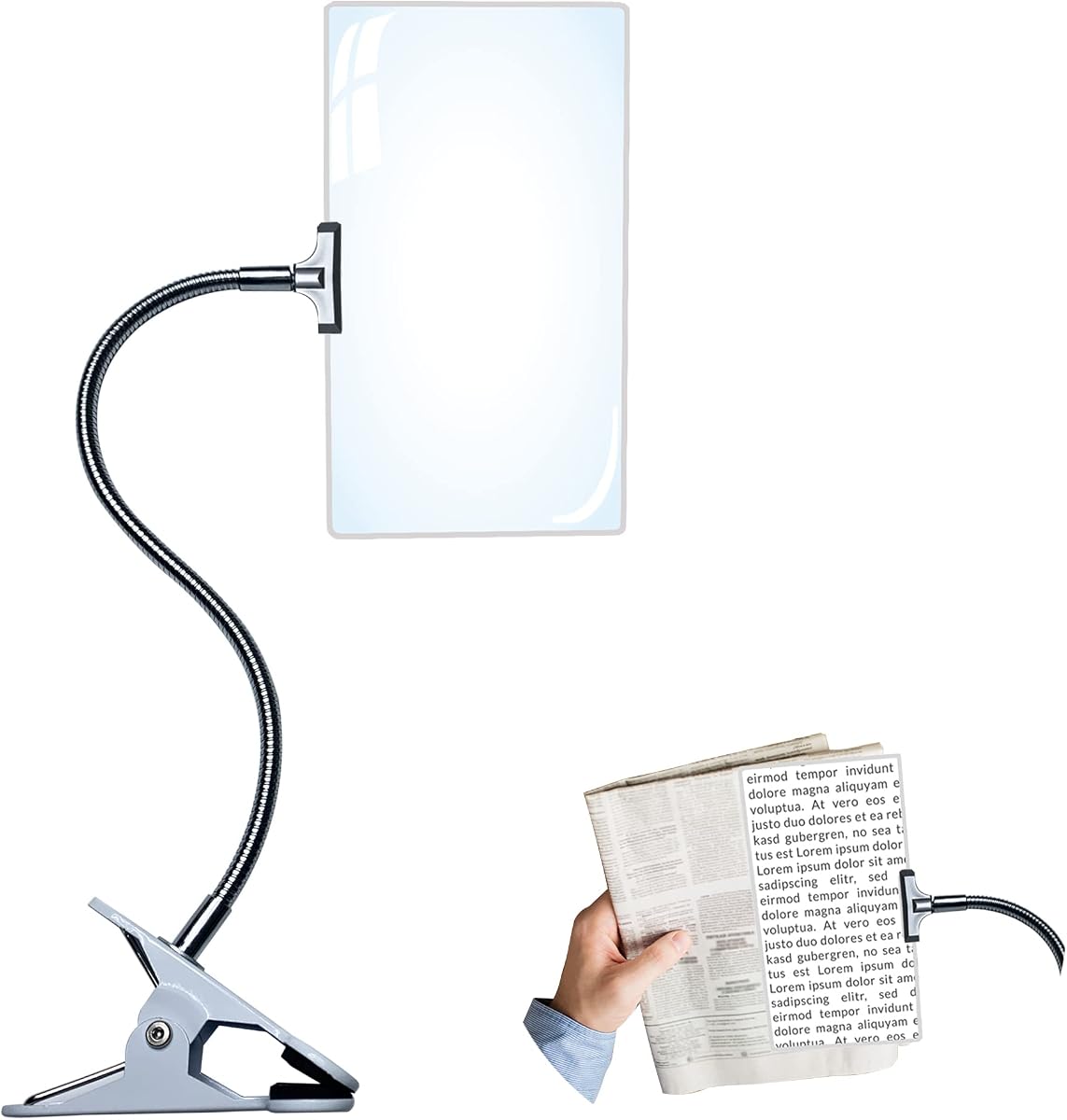
This 5X Magnifying Glass with Clip offers an affordable entry point for those needing a large magnification tool. With a 3.6 rating, it features a 10×6 inch viewing area made of optical-grade PVC, delivering a clear image with minimal distortion for seniors and hobbyists alike.
We may earn a commission when you buy through this link, at no additional cost to you.
Its flexible 14-inch gooseneck allows 360-degree adjustment, enabling users to position the lens precisely for comfortable viewing. The lightweight 3.5oz design makes it easy to handle, and the detachable clip allows for versatile mounting on desks or beds without permanent fixtures.
While the PVC lens is durable and shatter-resistant, it may not match the clarity of higher-end glass lenses. Additionally, users on smooth surfaces might find the clip less secure. However, for casual reading or crafting, these trade-offs are often acceptable given the low cost.
This magnifier is perfect for daily hobbies, painting, or embroidery where hands-free operation is key. The combination of a large viewing area and flexible neck makes it a practical choice for seniors or anyone needing to magnify documents. We recommend it for budget-conscious buyers.
The oversized lens covers a significant portion of the page or screen for easy reading without constant repositioning.
The long gooseneck bends in any direction to find the perfect angle for your eyes and posture.
We may earn a commission when you buy through this link, at no additional cost to you.
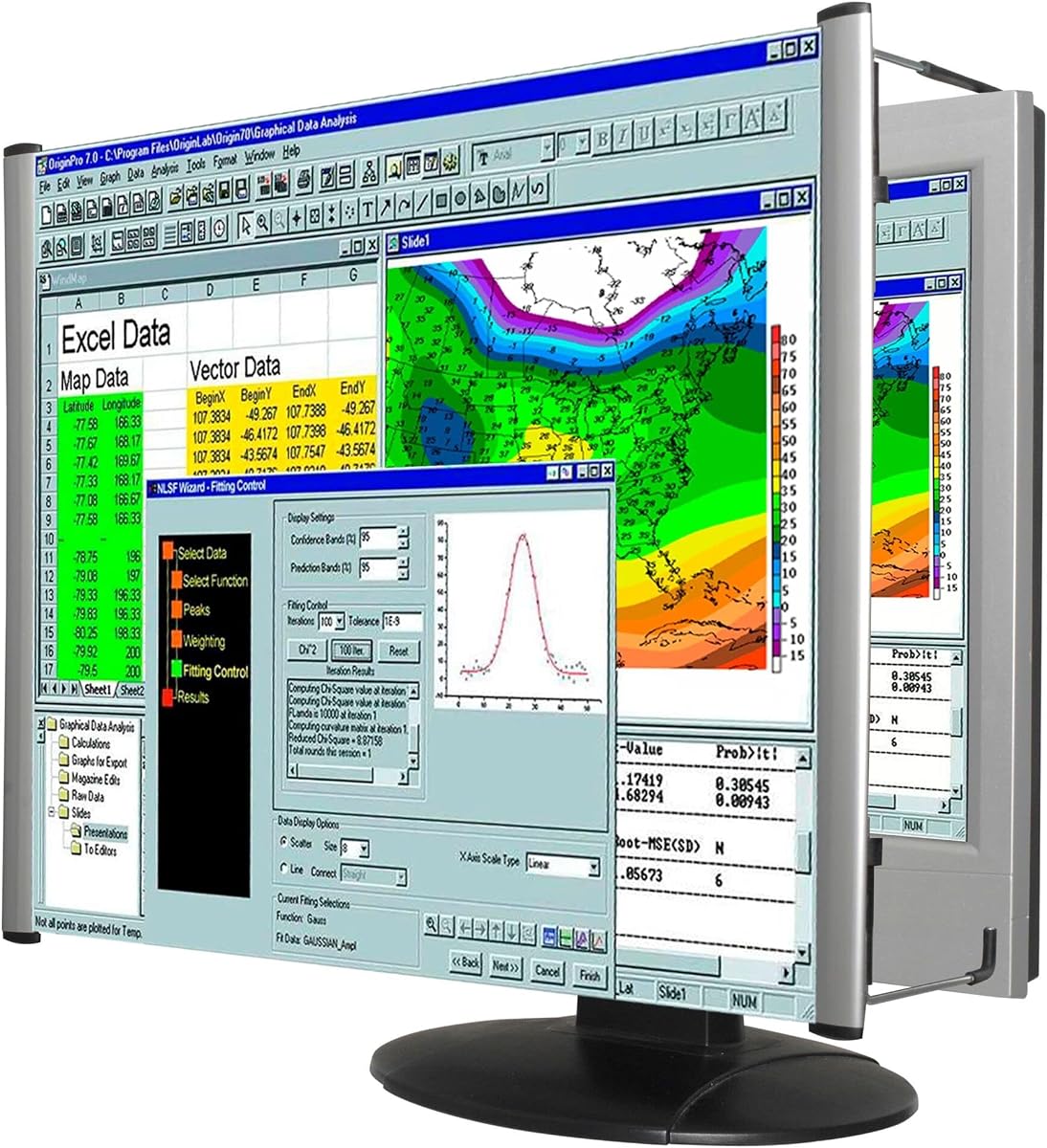
The Kantek MAXVIEW LCD Computer Monitor Screen Magnifier stands out for its professional-grade optical quality. With a 3.4 rating, it is engineered for 21.5 to 22-inch widescreen monitors, using an optical-grade acrylic Fresnel lens to enhance contrast and increase image size up to double.
We may earn a commission when you buy through this link, at no additional cost to you.
Its patented design offers a lightweight alternative to conventional heavy glass lenses, making installation easier on the monitor frame. The magnification level is adjustable by moving the unit closer or farther, allowing users to customize their viewing experience without electronic interference.
However, this premium tool requires precise measurement to fit your monitor correctly, and it is not suitable for laptops. The tinted lens may restrict visibility for visually impaired users. Despite these limitations, its build quality and optical performance justify the investment for office professionals.
This magnifier is ideal for general office use in normal ambient light environments. It helps reduce eye strain during long work sessions by providing a clear, magnified view of text and graphics. We recommend it for desktop users seeking reliable long-term optical support.
The light-tinted lens enhances contrast for increased readability while maintaining clarity without heavy weight.
Move the unit closer or farther to find the perfect magnification level for your specific display and needs.
We may earn a commission when you buy through this link, at no additional cost to you.
This 21 Inch Screen Magnifier for Laptop provides a practical way to view screens without straining your eyes. With a 3.2 rating, the 3D screen amplifier magnifies laptop displays by 3 to 5 times, utilizing an HD acrylic Fresnel lens to reduce visual fatigue and radiation exposure.
We may earn a commission when you buy through this link, at no additional cost to you.
Its design allows for 0 to 90-degree viewing angle adjustments, making it versatile for standing or lying down reading. The collapsible structure adds portability, ideal for travel or home use. It requires no power, relying solely on optics for magnification.
The product performs best in low-light environments, which can be a limitation for bright office settings. Also, users must avoid direct sunlight to prevent glare. These constraints are acceptable given the comfort benefits for seniors or those with vision challenges.
This magnifier is recommended for watching movies, news, or reading small fonts on laptops. Its stylish design makes it a thoughtful gift for family members needing visual aid. We suggest it for casual users prioritizing comfort over high-end optical precision.
The 3D lens curvature matches human eye focus, creating a more immersive and comfortable viewing experience.
Lightweight and foldable, this magnifier is easy to store and transport for use in different locations.
We may earn a commission when you buy through this link, at no additional cost to you.
This Magnifying Glasses Computer Screen Magnifier uses high-definition optical technology to magnify laptop and phone screens. Although no rating is available, its construction emphasizes eco-friendly materials, featuring a wooden frame bracket that adjusts multiple viewing angles for comfortable viewing distances.
We may earn a commission when you buy through this link, at no additional cost to you.
The total length spans roughly 22 inches, with specific screen dimensions designed to fit various devices. The pivot points allow rotation over 180 degrees, enabling flexible setups for reading newspapers or viewing piano scores. It claims to reduce radiation exposure from mobile devices.
While the wooden frame adds a stylish touch, assembly might be more involved than clip-on models. Users should verify dimensions before purchase to ensure compatibility with their specific monitor size. These factors are manageable for those seeking a durable and eco-friendly option.
Ideal for family members needing gift options or professionals needing stable magnification, this tool combines utility and aesthetics. The ability to rotate and adjust angles makes it versatile for different tasks. We recommend it for those prioritizing a stable stand over a clip.
The HD optical technology ensures clear magnification of 3 to 5 times for detailed viewing tasks.
Six branch points and four pivot points allow you to place the magnifier in various orientations easily.
We may earn a commission when you buy through this link, at no additional cost to you.
This Magnifying Glass with Light offers four detachable lenses ranging from 1.5X to 5.0X, providing flexibility for various tasks. With a 4.4 rating, users value the HD optical clarity and the adjustable LED light that can be directed up and down for precise illumination.
We may earn a commission when you buy through this link, at no additional cost to you.
The ergonomic frame with a silicone-coated nose bracket ensures comfort during extended use. A battery power indicator helps track charge levels, while the Type-C charging provides up to seven hours of continuous light. The one-lens slot design simplifies quick lens changes.
Each lens has a fixed focal length, requiring distance adjustments for optimal focus. Fingerprint smudges can affect clarity, so the included cleaning cloth is essential. These minor inconveniences are outweighed by the hands-free convenience and durable acrylic resin lenses.
Perfect for hobbies like cross stitch or soldering, this headset reduces eye strain by lighting the work area. Its lightweight design makes it suitable for elderly users needing low vision support. We recommend it for detailed close work requiring lighting.
The LED light can be angled up or down to eliminate shadows and brighten the exact working spot.
Silicone-coated nose bridge and elastic headband prevent slipping and reduce pressure on the head.
We may earn a commission when you buy through this link, at no additional cost to you.
These Magnifying Glasses with Light offer 200% magnification with blue light blocking technology. With a 4.1 rating, they are designed for comfort and visibility, featuring bright LED lights on both sides of the frame to reduce eye strain during detailed work or reading.
We may earn a commission when you buy through this link, at no additional cost to you.
The ergonomic fit ensures they remain lightweight and stable, with a charging time of just 1.5 hours via USB. The blue light blocking feature helps protect eyes from harmful electronic emissions, making them ideal for users who spend long hours in front of screens.
While the magnification is fixed at 200%, it suits general tasks like repairs or needlework. The battery capacity is not explicitly detailed, so users should expect standard USB rechargeable durations. These constraints are acceptable for a hands-free daily tool.
This product is great for crafts, sewing, or circuit board repairs. The combination of lighting and magnification makes it a reliable utility tool. We recommend it for hobbyists seeking affordable, hands-free visual assistance with added eye protection.
Built-in blue light protection shields your eyes from harmful emissions emitted by electronic devices and artificial lighting.
Integrated LEDs on both sides illuminate your workspace evenly to reduce eye strain and fatigue.
We may earn a commission when you buy through this link, at no additional cost to you.
The Kantek LCD Monitor Magnifier Filter provides a simple, lightweight solution for 22-inch widescreen monitors. With a 3.4 rating, its Fresnel lens features an antiglare coating to improve readability without distorting the image significantly. It is fully assembled for quick installation.
We may earn a commission when you buy through this link, at no additional cost to you.
The adjustable magnification allows users to tune the viewing experience to their specific visual needs. The lightweight design ensures it does not obstruct monitor ventilation or operation. The antiglare coating helps reduce screen reflections in bright environments.
This filter works best with standard widescreen aspect ratios. Users should verify their monitor dimensions before purchase. While the magnification is adjustable, it may not offer high contrast for severe vision impairments. Still, it is a solid office tool.
Recommended for office environments needing a quick visual aid, this filter reduces eye strain without complex setup. It is easy to install and remove. We suggest it for professionals with 22-inch monitors seeking a basic magnification upgrade.
The antiglare coating minimizes screen reflections and distractions for clearer text viewing during long workdays.
Fully assembled design ensures it installs quickly and securely without requiring extra tools or effort.
We may earn a commission when you buy through this link, at no additional cost to you.
This Large Clip-On Magnifier features a high-definition lens providing up to 5x magnification for detailed tasks. With a 4.6 rating, its alloy spring clamp offers a stable desktop design that does not obstruct keyboard use, making it versatile for repair work and reading.
We may earn a commission when you buy through this link, at no additional cost to you.
The bendable hose design allows users to change lens angles and height with ease. Its super-large lens ensures small text and fine details are visible, helping users complete tasks comfortably without fatigue. It is designed for daily use in home or office settings.
While the clamp works on many monitors, users with very thick screens may need to test fit first. The fixed viewing area means repositioning is necessary for large documents. These limitations are acceptable given the stable and hands-free design.
Ideal for seniors or repair technicians, this magnifier combines stability with optical clarity. The high-definition glass ensures a distortion-free view. We recommend it for users needing a reliable desktop solution for reading labels or working on electronics.
The flexible hose lets you tilt and raise the lens to find the exact angle for comfortable viewing.
The stable base takes up little desk space while holding the lens firmly during use.
We may earn a commission when you buy through this link, at no additional cost to you.
This 10×6 Inch Magnifying Glass with Clip is designed for seniors and those with low vision. With a 3.3 rating, it features a large viewing area that can magnify a full page by 400% without distortion, making reading in bed or at a desk effortless.
We may earn a commission when you buy through this link, at no additional cost to you.
The 360-degree flexible gooseneck adapts to complex scenarios, ensuring the lens positions perfectly for your viewing idea. The non-glass Fresnel lens is lightweight and scratch-resistant, making it durable for long-term use. It attaches securely to desks or beds without worry.
While the plastic lens is durable, it may not offer the same sharpness as high-end optical glass. However, for seniors or casual reading, the trade-off in weight and safety is beneficial. The large size helps reduce eye strain significantly.
Perfect for visually impaired users or hobbyists needing large magnification, this tool is easy to handle. Its design helps you read and sew without fatigue. We recommend it for seniors looking for a reliable hands-free reading aid.
The plastic Fresnel lens is lightweight and shatter-resistant, reducing risk of breakage while maintaining magnification.
Adjust the flexible gooseneck to any position to display the viewing area perfectly for your needs.
We may earn a commission when you buy through this link, at no additional cost to you.
Choosing the right magnifier depends on your specific visual needs, workspace setup, and comfort preferences. This guide outlines key factors to consider before making a purchase.
Magnification power determines how large text or images appear. Common options range from 2X to 5X, depending on the lens design. Higher magnification allows for better detail viewing but may reduce the field of view.
For most users, a magnification of 2X to 3X is sufficient for reading and general tasks. Consider your specific needs and how much detail you require when selecting a product.
Lens material impacts clarity, durability, and weight. Optical grade PVC or acrylic lenses are lightweight and shatter-resistant, making them ideal for seniors or handheld use. Glass lenses offer superior clarity but add weight and fragility.
Choose lightweight acrylic or Fresnel lenses for comfort and portability. Ensure the lens material is scratch-resistant to maintain image quality over time.
Mounting style affects how the magnifier stays in place. Clip-on models secure to desk edges, while stand-based options provide a stable base. Hands-free headsets allow for total mobility during tasks.
Select a mounting style that matches your workspace. Clip-ons are great for laptops, while stands work well for desktop monitors and detailed repair work.
Adjustability ensures the lens can be positioned for comfortable viewing angles. Flexible goosenecks or rotating pivot points allow users to tilt the lens to reduce glare and fatigue.
Prioritize products with flexible necks or multiple pivot points. Proper adjustability helps maintain a healthy posture and reduces neck strain during extended use.
Integrated lighting is essential for low-light conditions and detailed tasks. LED lights can reduce eye strain by illuminating the work area directly. Rechargeable batteries offer convenience over disposable cells.
Look for adjustable brightness levels and long battery life. Good lighting ensures you can work comfortably regardless of ambient light conditions.
Weight impacts comfort during long sessions. Lighter models reduce fatigue, while ergonomic nose bridges and headbands help distribute pressure evenly. Heavy glass lenses may cause discomfort over time.
Choose lightweight materials like plastic or acrylic. Ensure any wearable magnifier has adjustable nose bridges and soft headbands for maximum comfort.
Monitor compatibility ensures the magnifier fits your screen size. Desktop filters need specific dimensions, while clip-ons must match the thickness of the monitor bezel.
Check the product specifications for compatible monitor sizes. Always measure your screen before purchasing a filter to ensure a secure fit.
Durability ensures the product withstands daily wear. Look for scratch-resistant lenses and sturdy clips. Warranty coverage provides peace of mind for accidental damage or defects.
Prioritize durable materials like acrylic resin. Review warranty terms to ensure you are protected if the product fails or breaks during normal use.
To use your magnifier effectively, place it on a stable surface or attach it securely to your monitor. Adjust the gooseneck or pivot points to find an angle that minimizes glare and maximizes text clarity for your eyes.
Clean lenses regularly with a soft cloth to prevent smudges from affecting vision. Avoid using harsh chemicals or abrasive materials that could scratch the optical surface. Store the device in a protective case when not in use to prevent damage.
If your magnifier includes LED lights, ensure they are charged or have fresh batteries before use. Periodically check all hinges and clamps for wear. Tighten or replace parts as needed to maintain a secure fit on your workspace.
The best size depends on your screen dimensions. For small monitors, 10×6 inch lenses are sufficient. For larger displays, consider a 22-inch filter or a stand model that covers a wider viewing area without obstructing the keyboard.
Yes, handheld magnifiers work for desktop screens if you can hold them steady. However, clip-on or stand models are recommended for extended use to reduce hand fatigue and provide a stable viewing experience.
Yes, quality magnifiers reduce eye strain by allowing you to view text from a greater distance. They also often include anti-glare coatings that minimize screen reflections that can contribute to fatigue.
Not all monitors have the same bezel thickness. Check the clamp specifications before buying. If your monitor is thicker than the clamp range, consider a stand-based model or a desktop filter instead.
Use a soft microfiber cloth to gently wipe the lens. Avoid paper towels or rough fabrics that can cause micro-scratches. For stubborn smudges, a small amount of lens cleaning solution can be used.
Many models include LED lights that require batteries or rechargeable cells. Passive magnifiers with no lights do not need power. Always check the product description for power requirements before purchasing.
Most products are designed for mild to moderate vision support. For severe vision loss, consult an eye specialist. Some models specifically cater to seniors but may not replace professional visual aids.
Fresnel lenses are thinner and lighter than standard glass lenses, using grooves to magnify. They are more portable and less prone to shattering, making them ideal for large viewing areas.
Choosing the right magnifying glasses for computer monitors enhances productivity and reduces eye strain. Our top picks, such as the YOCTOSUN Headset and the 5X Clip, offer excellent value for diverse needs. Consider your specific tasks to find the ideal tool.
Prioritize adjustable features, comfortable mounting, and optical quality when making your decision. A lightweight design with good lighting can transform your viewing experience significantly. Invest in a model that matches your daily workspace habits.
Remember to verify compatibility with your monitor size before purchase. Prices and availability may fluctuate, so check current listings before finalizing your order. A quality magnifier can serve as a reliable daily utility for years.