
HapAttend H4 Time Clock
4.8Editor score
Standalone operation without WiFi
Multiple punch methods supported
Power failure data protection
Compare the top 10 fingerprint time clocks for employees to find the best biometric attendance tracker for your small business needs today.
Finding the right attendance system ensures accurate payroll and smooth operations. Modern fingerprint time clocks for employees provide secure, efficient tracking that eliminates buddy punching and reduces administrative errors significantly.
We evaluated ten leading models based on recognition speed, storage capacity, connectivity options, and ease of setup. Our analysis covers standalone units and cloud-connected devices suitable for diverse workplace environments and team sizes.
Each selection highlights specific strengths like app control, backup security, or multi-method verification. Note that pricing and availability fluctuate regularly, so verify current offers before finalizing your purchase decision for your business.
4.8Editor score

4.6Editor score

4.4Editor score
This side-by-side comparison highlights key specifications across all ten models to help you identify the system that best fits your operational requirements and budget constraints.

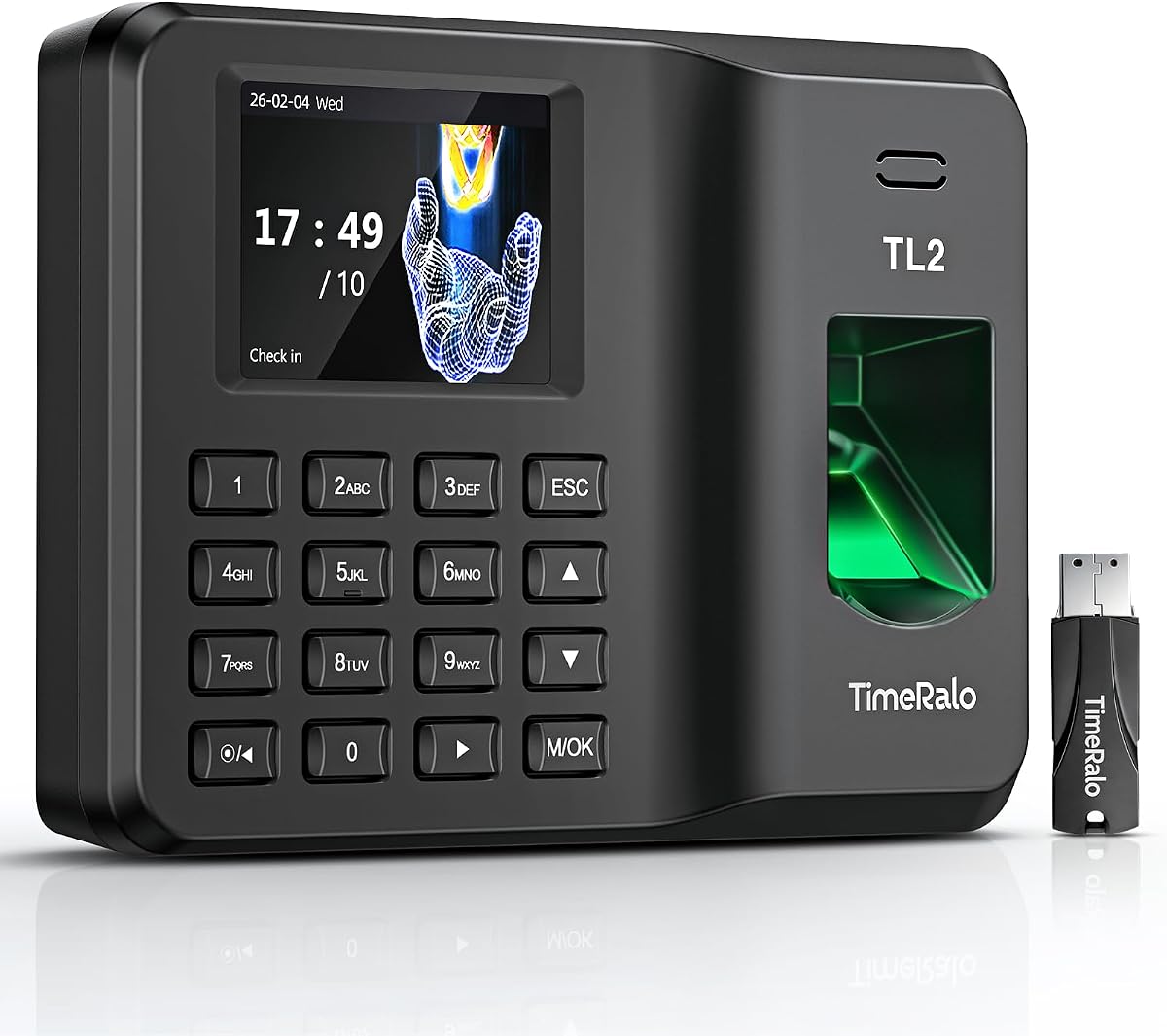


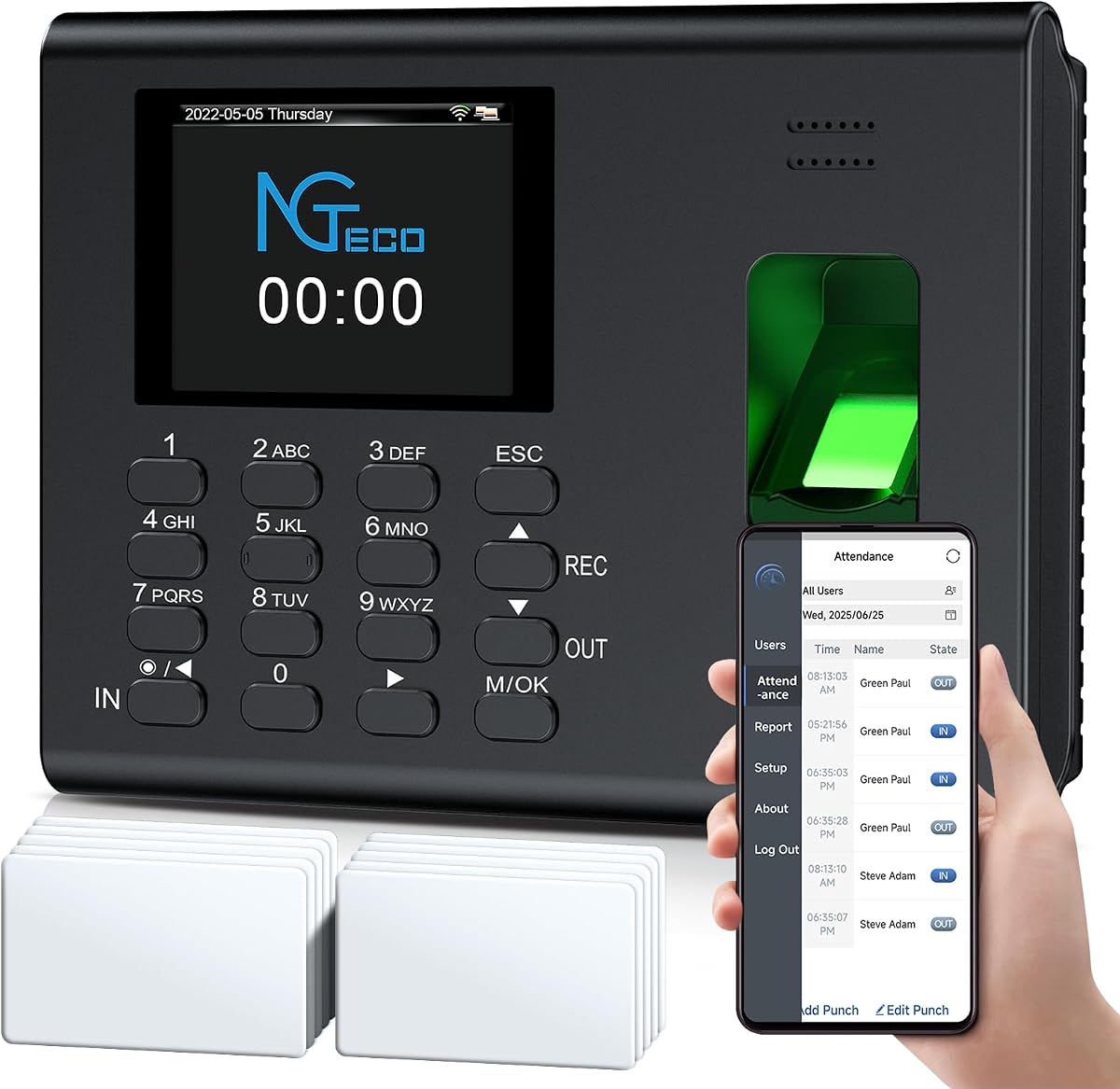
This device delivers reliable time tracking with rapid fingerprint recognition suitable for busy entrances. It combines a physical terminal with mobile app flexibility to streamline attendance management for small teams effectively.
We may earn a commission when you buy through this link, at no additional cost to you.
The system automatically calculates work hours and allows easy editing through the app. Employees clock in quickly using wet or dry fingerprints while admins export clean data for payroll processing without manual errors.
While the app requires a local network connection for syncing, this ensures security. Advanced features like GPS require a separate subscription, but core functions remain free and functional for standard attendance needs.
Ideal for small businesses wanting modern controls without complex IT setups. Its speed and reliability make it a strong choice for daily operations where quick clock-ins matter.
The sensor recognizes fingerprints in half a second even if wet, ensuring lines stay short during shift changes.
Built-in backup protects attendance records during power failures, preventing loss of critical payroll information.
We may earn a commission when you buy through this link, at no additional cost to you.
The H4 offers a robust solution for businesses without network access. It operates independently, calculating hours automatically and supporting multiple verification methods to prevent unauthorized clock-ins effectively.
We may earn a commission when you buy through this link, at no additional cost to you.
Employees can use fingerprints, cards, or PINs to log time. The system handles night shifts accurately and exports reports via USB. Its setup is straightforward, making it accessible for non-technical managers.
Remote management is not possible since it lacks connectivity. However, the one-time purchase model avoids recurring costs. The device is durable and suitable for warehouses or retail environments requiring simple, secure tracking.
Best for owners who prefer offline control and minimal setup. Its high rating reflects reliability and cost efficiency for teams that do not need cloud features.
Without needing WiFi, this clock works in remote locations while keeping data secure on local storage.
Three verification options ensure flexibility while reducing disputes about who actually clocked in or out.
We may earn a commission when you buy through this link, at no additional cost to you.
This high-end model features a bright touchscreen and multiple punch options including facial recognition. It allows managers to oversee attendance remotely via a mobile app or web portal for complete flexibility.
We may earn a commission when you buy through this link, at no additional cost to you.
The dual-band WiFi ensures stable connections even in congested networks. Users can customize shifts and breaks easily. Data is stored securely on AWS servers, providing confidence against local hardware failures or data loss.
While the price is higher, the user experience and remote capabilities justify it for growing companies. The touchscreen simplifies interactions, though reliance on internet connectivity may be a limitation for some rural sites.
Top choice for businesses needing advanced control and modern interfaces. It supports diverse work environments where quick setup and clear visual feedback are priorities for all staff members.
The large display makes clocking in simple and reduces training time for new employees across all shifts.
All records are encrypted and stored remotely, ensuring your payroll data remains safe even if the device fails.
We may earn a commission when you buy through this link, at no additional cost to you.
A robust standalone unit designed for expanding teams needing large storage without internet dependencies. It holds thousands of punch records and profiles, making it suitable for growing small businesses easily.
We may earn a commission when you buy through this link, at no additional cost to you.
Setup takes minutes with no complex configuration. The device captures accurate records automatically and saves them securely. Exporting data via USB to Excel simplifies integration with most payroll programs without extra steps.
The lack of app connectivity limits remote oversight. However, its durability and capacity make it practical for sites like warehouses where network issues might disrupt cloud systems frequently.
Recommended for owners prioritizing longevity and simplicity over digital features. It handles high-volume recording efficiently while keeping maintenance requirements low for busy operations.
Supporting up to 500 profiles allows this clock to grow with your business without needing an upgrade soon.
Industrial-grade materials ensure the device withstands daily use in demanding environments like construction or retail.
We may earn a commission when you buy through this link, at no additional cost to you.
This affordable model provides essential biometric tracking without monthly fees or software hassles. It replaces paper cards efficiently, offering digital precision for smaller workforces needing immediate results.
We may earn a commission when you buy through this link, at no additional cost to you.
Setting it up requires minimal effort. Data moves easily via a USB drive for processing. The unit protects records during power outages so you never lose valuable attendance information unexpectedly.
It lacks advanced cloud reporting or app controls. Yet for straightforward needs, its reliability and price point are hard to beat. The plastic build is solid enough for typical office or retail use.
Best suited for startups or small shops on a tight budget. It fulfills basic requirements accurately while avoiding hidden costs or complicated technical support needs.
One-time purchase pricing means you avoid subscriptions, keeping long term operational expenses predictable and low.
Whether mounted on a wall or placed on a desk, the unit adapts to different spatial layouts easily.
We may earn a commission when you buy through this link, at no additional cost to you.
Designed for flexible workforce management, this device handles complex shifts and overtime automatically. Managers can access data remotely and adjust schedules via a user-friendly web portal or mobile application.
We may earn a commission when you buy through this link, at no additional cost to you.
The dual-band WiFi connection ensures stability for consistent data uploads. Overtime calculations follow your specific rules, reducing manual payroll work. Secure cloud storage protects your information from local hardware failures or data loss events.
Access to advanced features like GPS requires a subscription. Internet dependency means offline tracking is limited. Still, it offers strong administrative control for businesses needing detailed shift compliance and remote monitoring capabilities.
Ideal for businesses with diverse shift patterns requiring digital oversight. It balances connectivity with security effectively for modern remote management needs.
Customizable OT rules help ensure accurate pay calculations while reducing administrative workload significantly.
Monitor attendance anytime from any location, keeping operations transparent even when managers are away from the office.
We may earn a commission when you buy through this link, at no additional cost to you.
This system blends hardware with a cloud service designed to handle complete attendance and payroll workflows. It supports multiple biometric methods and offers real-time data access from any internet-connected device easily.
We may earn a commission when you buy through this link, at no additional cost to you.
Setup is straightforward with an intuitive interface. Reporting tools provide insights into labor trends and productivity. Data backups occur automatically ensuring your records remain accessible even if local devices fail unexpectedly.
Some users report connectivity issues or limited offline capabilities. The subscription model adds ongoing cost. However, businesses needing a unified system for HR and payroll may find its integration valuable.
Suitable for organizations prioritizing integrated software solutions over standalone devices. It centralizes attendance tracking with broader human resource management features.
Automated data transfer to payroll systems reduces manual entry errors and streamlines end of month processing.
Advanced reporting helps identify trends and labor cost patterns to inform better business decisions.
We may earn a commission when you buy through this link, at no additional cost to you.
This unit emphasizes accessibility by offering free core cloud services without hidden costs. It captures punches locally and syncs once connected, ensuring reliable tracking even with unstable network conditions or remote sites.
We may earn a commission when you buy through this link, at no additional cost to you.
Managers can configure shifts easily through the software portal. The system supports various languages for diverse workforces. Security standards meet global regulations, providing peace of mind regarding data privacy and compliance requirements.
Advanced GPS and smart reminders require a separate subscription. While the free tier covers basic needs, users might want more features later. Still, it stands out for transparency and cost control.
Best for teams needing secure cloud access without recurring fees. It offers a balanced approach for businesses cautious about long-term subscription commitments.
Punch data is stored safely and uploaded automatically once the internet connection is restored.
Multi-language support ensures all employees can use the interface comfortably regardless of their primary language.
We may earn a commission when you buy through this link, at no additional cost to you.
A cloud-connected device allowing employees to view their own hours via a mobile app. This self-service model reduces administrative queries while maintaining accurate automated calculations for overtime and break times.
We may earn a commission when you buy through this link, at no additional cost to you.
Setup involves just three steps and needs no IT expertise. Reports are emailed directly to you on set schedules. The system handles night shifts and cross-day punches automatically, ensuring consistent hour tracking.
Lacking a web portal means all management happens via app. This may limit complex configurations for larger HR teams. However, for small businesses, the simplicity and direct employee engagement are significant benefits.
Great for companies valuing transparency and mobile-first workflows. It streamlines communication and reduces manual verification steps significantly.
Staff can verify their own hours instantly, which builds trust and reduces common attendance disputes.
Automated reports sent to your inbox ensure you always have the latest attendance data without logging in.
We may earn a commission when you buy through this link, at no additional cost to you.
This unit focuses on app-based control for managers needing quick remote edits. It supports multiple methods and a large battery to keep running during power outages for continuous data safety.
We may earn a commission when you buy through this link, at no additional cost to you.
The system allows flexible shift changes and auto-exports reports. It handles up to 500 staff members easily. Physical construction resists wear and allows wall or desktop placement for various workspace layouts.
App-only control limits management to mobile devices or local network access. Some might prefer a web interface for broader reporting. Still, its battery and app integration offer convenience for mobile-first users.
Recommended for businesses needing strong backup power and simple app connectivity. It delivers reliable tracking with minimal ongoing costs for small teams.
A 2000mAh backup keeps the clock running during outages, ensuring no data loss occurs unexpectedly.
Zero hidden fees and a one-time purchase model keep long-term operational costs low and predictable.
We may earn a commission when you buy through this link, at no additional cost to you.
Selecting the right clock requires balancing features like connectivity, capacity, and ease of use with your specific budget and operational needs.
Decide between standalone units and cloud-connected models based on your need for remote management. Standalone devices work offline and export data via USB while cloud systems offer real-time access and app syncing.
If your business needs remote monitoring or complex reporting, cloud connectivity is essential. For simple local tracking, standalone units reduce dependency on internet stability.
Check how many employee profiles and punch records the device can store. Larger teams require higher capacity to avoid frequent data resets or transfers that may cause errors.
Ensure the device holds enough data for your busiest periods. Look for models supporting at least 500 profiles if your team size grows.
Modern clocks often support fingerprint, RFID, and PIN options. Multi-method systems reduce buddy punching risks and offer flexibility for employees with damaged or wet fingerprints.
Choose a device that matches your staff needs. Combining biometric and card options provides backup access while maintaining strong security standards.
Power outages can disrupt attendance logging. Devices with built-in backup batteries ensure continuous operation and data safety during unexpected electrical failures.
Prioritize models with sufficient battery life. This prevents data loss and ensures your records remain intact regardless of utility issues.
If you operate complex shifts or overtime rules, look for systems that support custom scheduling. Automated calculations simplify payroll and prevent manual errors.
Verify the device allows you to define break times and overtime rates. This flexibility reduces administrative workload significantly.
Seamless integration with payroll software saves time. Devices offering CSV, Excel, or direct email exports make processing data easier for accountants and managers.
Check how easily you can extract and format data. Automated reporting tools reduce manual entry and human errors during end-of-month processing.
Consider upfront costs versus recurring subscriptions. Some models charge monthly fees for cloud features while others are one-time purchases with basic functionality.
Calculate total cost of ownership over a few years. Choose a model that aligns with your long-term financial planning.
Reliable technical support ensures quick issue resolution. Look for warranties and clear support channels such as phone or email during business hours.
Choose brands with proven customer service records. Good support prevents downtime and helps you get the most out of your device.
Begin by installing the device securely on a wall or desk using the provided mounting kit. Ensure it is at a comfortable height for all employees to reach comfortably during shifts.
Register employee fingerprints or cards according to the manual. Clean the scanner regularly with a soft cloth to ensure accurate readings. Avoid touching the sensor with dirty hands.
Export attendance data regularly via USB or cloud sync to avoid storage limits. Review reports weekly to catch any missed punches or errors before payroll processing.
Most modern devices use advanced sensors capable of recognizing wet or dry fingerprints quickly. However, extremely dirty or damaged fingers may require alternative methods like PIN codes or cards.
Standalone units do not support remote tracking. For remote work, consider systems offering GPS-enabled mobile app attendance or geofencing features to verify location.
Many models include batteries sufficient for several hours or days depending on usage. Always check specs to ensure backup duration meets your needs during long outages.
Standalone units typically require no monthly fees. Cloud-based systems may offer free tiers but often charge for advanced features like GPS or detailed analytics.
Most business-grade clocks support 500 employees or more. Ensure the model you choose matches your current and future team sizes to avoid needing an upgrade soon.
Export data as CSV or Excel files from the device. Import these files into your payroll software. Some systems offer direct integration for smoother processing.
We reviewed ten top models including the HapAttend H4 for budget and NGTeco devices for app control. Each offers distinct features like standalone operation or cloud syncing to meet varied business needs.
Prioritize connectivity, data backup, and capacity when selecting. If remote oversight matters, choose cloud models. For simplicity and lower cost, standalone units work well for smaller teams.
Prices fluctuate frequently so check current listings before buying. The right clock improves payroll accuracy and reduces admin burdens significantly for any growing business.