
Logitech G213 Prodigy
4.2Editor score
Durable liquid resistant construction
Customizable RGB lighting zones
Integrated palm rest included
Discover the top Mac gaming keyboard options reviewed for compatibility, performance, and design to help you choose the ideal setup for your Apple system.
Finding the right keyboard for your Mac setup can be challenging due to compatibility issues. A good gaming keyboard offers precise controls and durable construction tailored for long sessions.
We evaluated ten top models based on switch types, connectivity options, and software support. Each product was analyzed for its ability to work seamlessly with macOS environments.
This guide highlights key strengths and weaknesses to help you decide. Keep in mind that pricing and availability fluctuate, so check current listings before purchasing your next gear.
4.2Editor score
4.3Editor score

4.0Editor score
This side-by-side comparison outlines the essential specifications and features of each model to help you quickly identify the best fit for your specific needs.


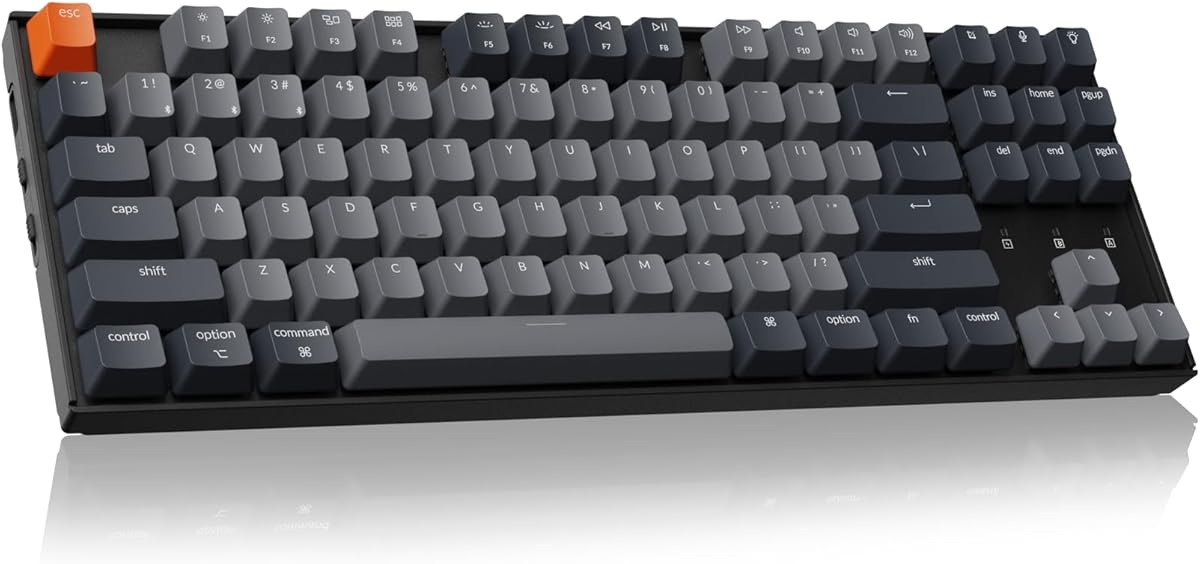
The Keychron K8 stands out as a top contender for Mac users seeking a mechanical experience. It holds a strong rating for its balance of productivity features and gaming performance.
We may earn a commission when you buy through this link, at no additional cost to you.
Its brown tactile switches provide feedback without excessive noise, making it suitable for shared spaces. The inclusion of extra keycaps ensures seamless integration with macOS shortcuts.
While it lacks the exact layout of Apple boards, the compromise allows for mechanical benefits. Wireless switching between three devices adds significant utility for multi-platform workflows.
Buyers looking for a reliable wireless option that respects Mac inputs will find this keyboard an excellent choice for daily use and gaming.
This model includes dedicated multimedia and function keys for both macOS and Windows environments.
It supports up to three devices via Bluetooth 5.1 and offers a reliable USB Type-C wired mode.
We may earn a commission when you buy through this link, at no additional cost to you.
The SteelSeries Apex 3 offers a compelling entry point for those needing a gaming keyboard that works with Mac OS X. Its rating reflects high satisfaction among budget-conscious users.
We may earn a commission when you buy through this link, at no additional cost to you.
Features like IP32 water resistance ensure longevity against accidental liquid spills. The quiet switches allow for late-night gaming sessions without disturbing others in the room.
While it lacks advanced macro tools found in higher-end models, the basic controls are sufficient for casual play. The wrist rest adds comfort during extended typing or gaming.
This keyboard is ideal for students or casual gamers who want reliability and basic lighting effects without a high cost barrier.
It includes IP32 water resistance to prevent accidental damage from liquid spills effectively.
A premium magnetic wrist rest provides full palm support for better comfort during use.
We may earn a commission when you buy through this link, at no additional cost to you.
The Logitech G915 X delivers a sleek, premium experience for those willing to invest in top-tier performance. While wired, it offers next-gen engineering suitable for serious gaming setups.
We may earn a commission when you buy through this link, at no additional cost to you.
Its low-profile switches enable rapid actions with a short actuation point, enhancing reaction times during competitive play. The aluminum top plate ensures structural rigidity and a modern look.
Users may find the cost steep compared to standard mechanical boards. However, the build quality and customization options justify the investment for power users seeking precision.
This keyboard is best suited for enthusiasts who demand high-end materials and advanced programmability in a slim package.
It increases actions per minute with a 1.3 mm actuation point and 3.2 mm total travel distance.
You can set up to 15 functions per key and remap commands via KEYCONTROL.
We may earn a commission when you buy through this link, at no additional cost to you.
The EPOMAKER X Aula F75 MAX introduces unique features like a TFT screen and volume knob for enhanced control. It ranks highly for users who value aesthetic and functional personalization.
We may earn a commission when you buy through this link, at no additional cost to you.
Its Gasket-Mount structure provides a soft typing feel by separating the PCB from the shell. This design reduces harsh bottom-outs and improves overall acoustic quality.
While the customization is extensive, the learning curve for software settings might be steep for beginners. Still, the tactile feedback is satisfying for both typing and gaming.
This keyboard is perfect for enthusiasts who enjoy tweaking every aspect of their device's look and feel.
A customizable screen allows you to show gifs and manage connectivity or battery status easily.
The Gasket-Mount structure helps eliminate harsh bottom-out for a softer and soothing typing experience.
We may earn a commission when you buy through this link, at no additional cost to you.
The Logitech G413 TKL SE offers a rugged design with tactile switches tailored for gaming. It is a solid choice for users who prioritize durability and build quality.
We may earn a commission when you buy through this link, at no additional cost to you.
PBT keycaps resist wear and heat better than standard plastics, ensuring longevity over time. The brushed aluminum-magnesium alloy top case provides a sturdy backbone with minimal flex.
Lacking wireless capabilities limits desk flexibility. However, the wired connection ensures zero latency during critical gaming moments.
This model is recommended for gamers who want a reliable mechanical keyboard with premium materials at a reasonable cost.
It features heat- and wear-resistant PBT keycaps designed for durability in gaming environments.
The full-size option allows for 6-key rollover anti-ghosting performance for reliable key input.
We may earn a commission when you buy through this link, at no additional cost to you.
The Redragon K742 combines gasket sound dampening, multi-mode connectivity to offer a versatile option for hybrid setups. Its rating suggests strong performance for the price.
We may earn a commission when you buy through this link, at no additional cost to you.
Tri-mode connectivity lets you switch between Bluetooth, 2.4GHz, and wired connections easily. QMK VIA support adds deep customization for remapping keys and macros.
While it may require initial software configuration, the flexibility is unmatched in this price range. The 4000mAh battery supports long usage periods without frequent charging.
Buyers seeking a compact, highly customizable keyboard with wireless features will find this model very appealing.
This wireless keyboard allows tri-mode connectivity with one-click switching between devices.
The VIA Software offers possibilities in remapping keys, editing macros, and customizing layers.
We may earn a commission when you buy through this link, at no additional cost to you.
The Keychron K4 fits a full numeric pad into a 96% layout, saving desk space while keeping functionality. It is a great option for productivity-focused gamers.
We may earn a commission when you buy through this link, at no additional cost to you.
Mac layout keys ensure smooth operation on macOS systems. The 4000mAh battery allows for extended use with backlight off, reaching up to 240 hours.
Some users might find the key density tight. However, the trade-off is a smaller footprint that leaves more room for mouse movement.
This keyboard is ideal for those who need a numpad but cannot afford a full-size desktop footprint.
A 96 percent layout with a number pad offers a compact design built for productivity.
The large battery lasts up to 240 hours with backlight disabled for efficient power usage.
We may earn a commission when you buy through this link, at no additional cost to you.
The Logitech MX Mechanical is designed for users who need a quiet, premium keyboard that transitions easily between work and play. Its tactile switches offer feedback without loud clicks.
We may earn a commission when you buy through this link, at no additional cost to you.
Smart illumination adjusts to lighting conditions, conserving power and enhancing visibility. The low-profile keys improve ergonomics and typing comfort over long hours.
It may be costly compared to standard gaming boards. However, the build quality and Flow cross-computer features justify the expense for power users.
This keyboard is best for professionals who want a mechanical feel without disturbing colleagues during meetings.
It features tactile quiet mechanical key switches that provide precise feedback and less noise.
Low-profile keys and a full-size form factor offer better ergonomics for everyday typing.
We may earn a commission when you buy through this link, at no additional cost to you.
The GravaStar Mercury K1 features a stunning aluminum alloy exoskeleton that makes it a visual centerpiece. It combines aesthetics with solid mechanical performance.
We may earn a commission when you buy through this link, at no additional cost to you.
Gasket-mounted design with sound dampening foam ensures a pleasant typing experience. The switches are custom-tuned for smooth, rapid reactions during gaming.
Its style is polarizing, and some may find the curves impractical. However, for those who value appearance, it delivers a unique look.
This keyboard is perfect for streamers or users who want a standout device that also performs well.
The Mercury K1 features a unique aluminum alloy exoskeleton with a gradient black finish.
Five layers of sound-dampening foam enhance acoustics and reduce noise for comfortable sessions.
We may earn a commission when you buy through this link, at no additional cost to you.
The Logitech G213 Prodigy provides a full-sized experience with RGB customization without a high cost. It remains a favorite for budget buyers needing reliable performance.
We may earn a commission when you buy through this link, at no additional cost to you.
Its anti-ghosting gaming matrix ensures responsive control during complex inputs. Dedicated media controls allow quick adjustments without leaving the game.
It uses hybrid keys rather than full mechanical ones, which may lack travel depth for some. However, the price and durability make it a solid starter.
This model is best for casual gamers who need a durable keyboard with customizable lighting zones.
The slim body features durable construction to repel liquids, crumbs, and dirt for easy cleanup.
It features dedicated media controls for play, pause, and mute music and videos instantly.
We may earn a commission when you buy through this link, at no additional cost to you.
Selecting the right gaming keyboard involves understanding key features that impact performance and usability on macOS systems.
Most modern keyboards offer Bluetooth or wired connections. Ensure the selected model supports macOS Bluetooth pairing for seamless integration.
Prioritize models with both wireless and wired modes for flexibility in different scenarios.
Mechanical switches come in tactile, linear, and clicky varieties. Tactile switches offer feedback while keeping noise manageable.
Choose switches that match your preference for sound and feel to ensure comfort over long sessions.
Some keyboards are tailored for Windows and may lack macOS function keys. Look for models that include dedicated Mac-specific shortcuts or extra keycaps.
This compatibility ensures you can navigate your system efficiently without relying on software tricks.
Customization tools allow mapping macros and adjusting lighting. Verify that the software works smoothly on your version of macOS.
Limited software support can hinder personalization, so check reviews for compatibility notes before purchasing.
Materials like aluminum or magnesium alloys offer durability. A sturdy frame reduces flex and extends the lifespan of the keyboard.
Investing in robust materials ensures the device withstands intense gaming and daily typing alike.
Comfort features like wrist rests and adjustable feet help prevent strain during long sessions. Proper support keeps typing efficient and reduces fatigue.
A well-designed ergonomic layout can improve your gaming performance and typing comfort significantly.
Gaming keyboards range from affordable to premium. Determine how much you are willing to spend on features like RGB lighting and wireless connectivity.
Set a clear budget to narrow down options while ensuring you do not sacrifice essential performance elements.
For wireless models, battery life impacts daily usability. Look for keyboards with large capacities to minimize charging frequency.
Extended battery life ensures you can game or work for hours without interruption.
To set up, connect the keyboard to your Mac via Bluetooth or USB-C. Install any required software to enable full customization and lighting effects.
Keep the keys clean by regularly wiping them with a soft cloth. Avoid liquids and dust to prevent damage to the internal switches.
For wireless models, charge the battery before first use and keep it plugged in occasionally to maintain battery health.
Not all mechanical keyboards are fully compatible. Look for models with macOS-specific keys or software. Check product descriptions for Mac OS X support.
Wireless latency is usually minimal on modern Bluetooth models. However, wired connections are safer for competitive gaming. Consider tri-mode options for flexibility.
Linear switches are typically the quietest option. They lack the clicky bump of tactile switches. Use them if you need minimal noise during play.
Some keyboards require drivers for advanced functions. Basic typing works out of the box. Check system requirements before buying for full compatibility.
Yes, you can, but some keys may not align correctly. Use the included Mac keycaps to map Command and Option keys properly for better workflow.
Use compressed air to remove dust and a damp cloth for surfaces. Never spray liquid directly on the board. Remove keycaps for deep cleaning if possible.
This could be a software limitation. Install the official Mac app or use a browser alternative. Some models support basic RGB without software.
TKL saves desk space, allowing more mouse movement. It is great for competitive play. However, full-size boards offer numeric keypads for productivity.
We have highlighted ten top options that balance performance and compatibility for Mac users. Whether you prefer wireless or wired, there is a fit for everyone.
Prioritize switch type and software support to ensure a smooth experience. Look for models that respect macOS layouts to avoid workflow interruptions.
Prices and availability may change, so always verify details before purchase. Check current listings for the best deals on your chosen model.