
Antool Wired Earbuds
4.3Editor score
Plug and play simplicity
Lightweight ergonomic fit
Multi-function remote control
This expert guide compares the top 10 earbuds for laptop conference calls in October 2026 based on microphone quality, battery life, and noise cancellation
Finding the right earbuds for laptop conference calls is essential for remote workers and professionals who need clear audio during meetings. The market offers a wide range of options from budget-friendly wired models to premium wireless sets with advanced noise cancellation. You need to consider factors like microphone clarity, comfort during long sessions, and reliable connectivity to ensure your voice is heard clearly by colleagues.
We have carefully selected and analyzed ten distinct products that excel in virtual meeting environments. Our evaluation focuses on real-world performance metrics including call clarity, battery endurance, and ease of pairing with laptops. Each product in this list has been chosen for its ability to handle the specific demands of conference calls, from background noise suppression to long-lasting comfort.
Every pick in this guide highlights key strengths and potential trade-offs to help you make an informed decision. We provide detailed reviews and comparison data so you can choose the model that fits your workflow best. Please note that prices and availability change frequently, so check the latest offers before purchasing to ensure you get the best value available today.
4.3Editor score

4.2Editor score

4.1Editor score
The following comparison table details the core specifications and unique attributes of each top-rated model to help you quickly identify the best fit for your laptop setup and conference needs.


The Soundcore Liberty 5 Pro Max stands out as the most feature-rich option for professionals who need more than just audio. It combines high-fidelity sound with advanced AI capabilities that can transcribe and summarize meetings, making it a powerful productivity tool for laptop users.
We may earn a commission when you buy through this link, at no additional cost to you.
Its standout quality is the Whisper-Clear Call technology which uses ten sensors per earbud to isolate your voice even in noisy environments. The Thus AI Chip processes signals at incredible speed to ensure your voice is always heard clearly during critical conference calls without distortion or dropouts.
A unique feature is the AI Note-Taker built into the charging case which records in-person meetings and generates summaries. While this requires a subscription for full functionality it offers a significant workflow benefit for those who need to keep detailed records of their discussions and action items.
This model is ideal for executives and remote workers who prioritize call clarity and privacy. The robust encryption and compliance standards ensure your conversations remain secure. If you need an earbud that acts as a conference assistant as well as audio hardware this is the top recommendation.
The built-in case microphone allows you to record face-to-face meetings and get AI summaries instantly without needing your laptop.
AES-256 encryption and ISO compliance make these earbuds suitable for handling confidential business information during calls.
We may earn a commission when you buy through this link, at no additional cost to you.
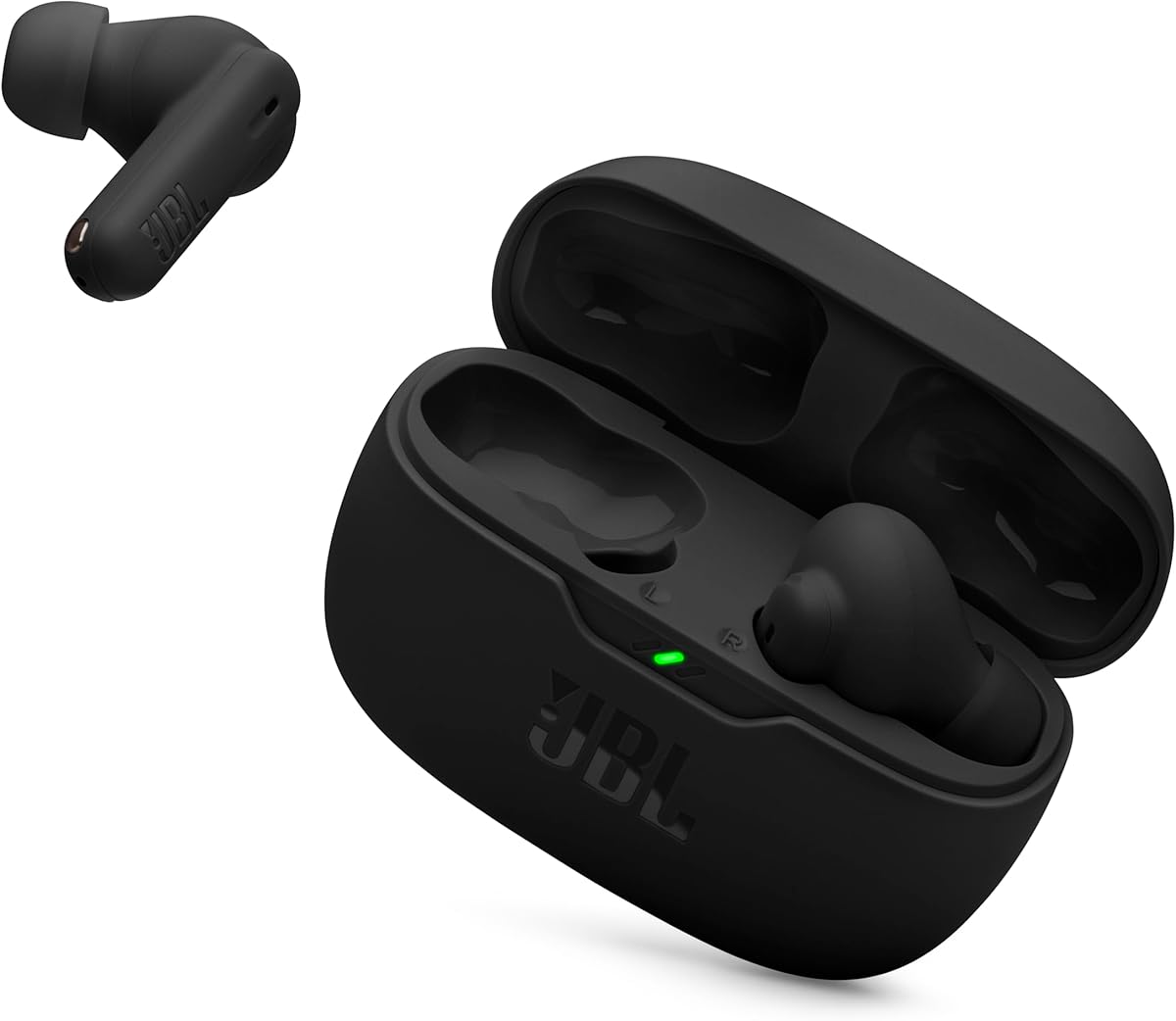
The JBL Vibe Beam 2 brings the brand's signature audio quality to the conference call market. It is designed for users who want immersive sound for video meetings without sacrificing voice clarity. The inclusion of four microphones helps balance audio output and input effectively.
We may earn a commission when you buy through this link, at no additional cost to you.
Its key strength is the JBL Pure Bass sound which makes media consumption during breaks or presentations more engaging. The Active Noise Cancelling helps block office noise so you can focus on the speaker. The Smart Ambient feature lets you hear colleagues nearby without removing the earbuds.
The battery life offers ten hours per charge and the case provides up to forty hours total which is sufficient for a full work week. A ten-minute quick charge gives you three hours of playtime which is useful if you forget to charge overnight before a big meeting.
This model is great for media professionals or anyone who appreciates high-quality audio during calls. While it lacks some premium AI features the sound signature and ANC performance make it a reliable choice for daily conference use and general entertainment.
The 8mm drivers deliver deep bass that enhances voice depth and makes video content sound more dynamic during presentations.
Switch between ANC and transparency mode easily with the JBL Headphones app to suit different meeting environments.
We may earn a commission when you buy through this link, at no additional cost to you.
The Dell Pro Plus Earbuds EB525 are engineered specifically for professional environments where call clarity is paramount. These earbuds leverage AI to filter out background noise ensuring your voice is heard clearly. They are designed to integrate seamlessly with your laptop and workspace setup.
We may earn a commission when you buy through this link, at no additional cost to you.
The Intelligent Audio feature is the main selling point as it recognizes your voice and filters out distractions automatically. This ensures that colleagues hear you without interruption regardless of how busy your office or home environment is. The Adaptive ANC adjusts to your surroundings for focused listening.
Comfort is another priority with an ergonomic fit that allows for long conference calls without discomfort. On-device touch controls make it easy to manage calls and switch modes without reaching for your phone or computer. This streamlined control scheme is designed for productivity.
If you are looking for an earbud that prioritizes speech quality and professional use this is an excellent choice. The advanced mic technology and thoughtful design make it a top contender for anyone who spends hours on video calls daily and needs reliable performance.
The AI mic intelligently isolates your voice from background chatter so you sound professional in every call.
Use pinch gestures to toggle between ANC and transparency mode so you stay aware of your office environment.
We may earn a commission when you buy through this link, at no additional cost to you.
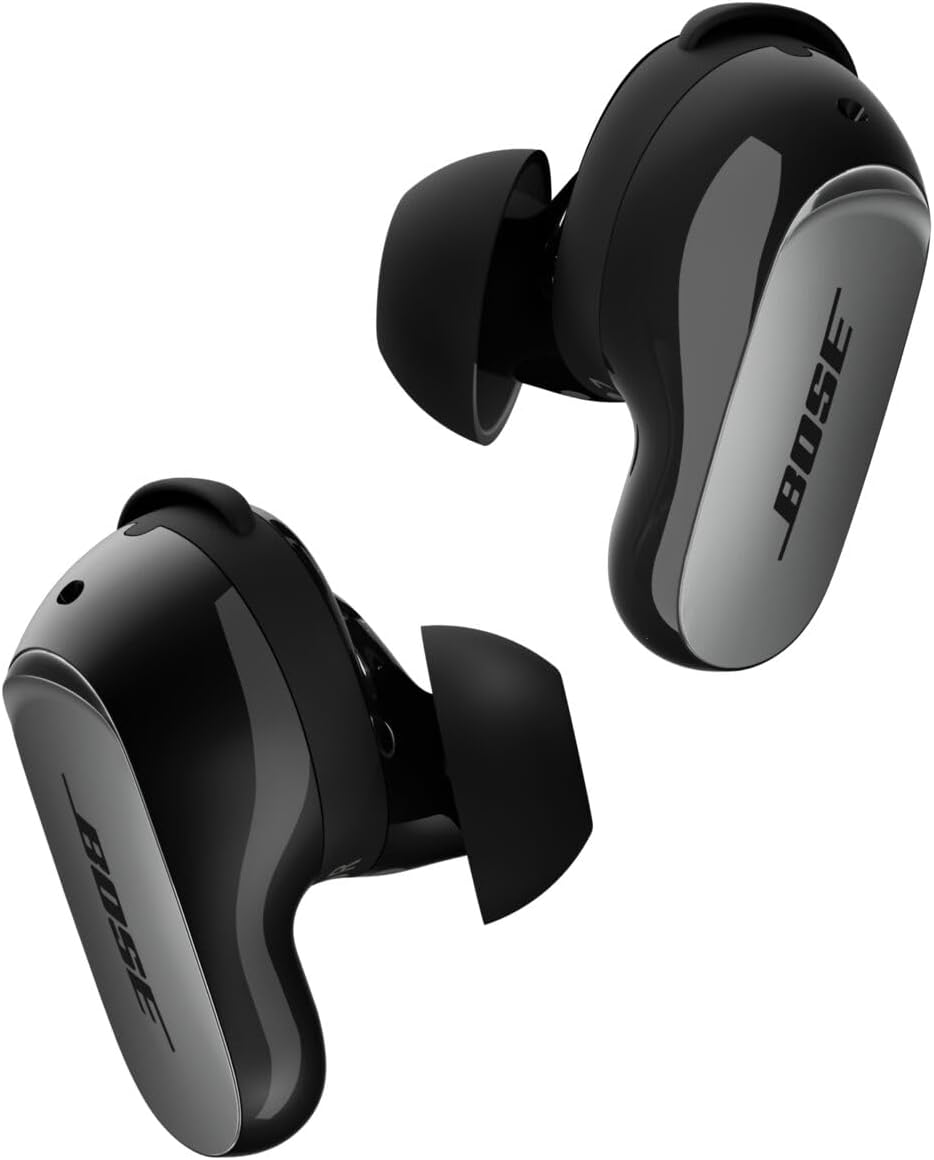
The Bose QuietComfort Ultra Earbuds offer the industry leading noise cancellation that defines the brand. They are built for professionals who need absolute silence during calls. The ActiveSense technology smooths sound spikes so you remain focused on the conversation even in loud places.
We may earn a commission when you buy through this link, at no additional cost to you.
CustomTune technology analyzes your ears to adjust the audio profile for maximum comfort and isolation. This personalized approach ensures that the noise cancellation works perfectly for your specific ear shape. The result is a highly effective barrier against external noise and distractions.
For calls the SpeechClarity technology uses noise-rejecting mics to focus on your voice and filter out wind or background sound. This ensures you are heard clearly. Bluetooth multipoint connectivity allows you to switch between your laptop and phone effortlessly without missing a beat.
These earbuds are perfect for frequent travelers or those in open offices. While the price is high the quality of silence and audio fidelity is unmatched. If your primary goal is to eliminate background noise and focus on your meeting the QuietComfort Ultra is the best choice.
CustomTune adapts the audio and ANC to your ear shape for consistent performance throughout your work day.
Switch between laptop and phone seamlessly with Bluetooth multipoint so you never miss a call or meeting.
We may earn a commission when you buy through this link, at no additional cost to you.
The XIAOWTEK Wireless Earbuds offer exceptional battery life which is critical for long days of back to back conference calls. With up to fifty hours of total playtime you can go days without recharging. This makes them highly reliable for users who prioritize endurance over premium features.
We may earn a commission when you buy through this link, at no additional cost to you.
The included four ENC microphones ensure that your voice is picked up clearly even when there is some background noise. Bluetooth 5.4 provides a stable connection with low latency which is important for syncing audio during video calls. The LED display on the case lets you track battery levels easily.
These earbuds are designed with an ergonomic fit to keep them secure during use. The IPX7 waterproof rating means they can handle sweat or light rain if you are working from a gym or outdoors. This durability adds to their appeal as a versatile tool for any workspace.
For those who need a dependable companion for meetings without breaking the bank these earbuds are a smart choice. While they may not have the most advanced ANC their call clarity and battery performance make them a strong contender for daily laptop conference use.
The 50 hour battery life ensures you won't run out of power during multi day conferences or long work weeks.
4 ENC mics and noise cancelling tech ensure your voice comes through clearly without background interference.
We may earn a commission when you buy through this link, at no additional cost to you.
These Wireless Earbuds featuring Bluetooth 5.4 deliver a stable connection that is essential for uninterrupted conference calls. The faster signal transmission ensures that your voice syncs perfectly with your video feed. This reliability is a key factor for professional meetings where lag can be distracting.
We may earn a commission when you buy through this link, at no additional cost to you.
The dual 14.2mm drivers provide a balanced audio experience that is suitable for both voice calls and media. With up to thirty six hours of total battery life you can rely on them for a full work week without frequent charging. The LED display keeps you informed of the power levels at a glance.
Designed for daily use these earbuds are also IPX7 waterproof which protects them from sweat or moisture. The touch controls allow you to manage calls and music easily without needing to access your laptop. This hands-free convenience is ideal for multitasking during your work day.
If you need a reliable pair of earbuds that won't disconnect during an important call this model is a strong option. The combination of Bluetooth 5.4 technology and decent battery life makes it a practical choice for laptop users on a budget.
Bluetooth 5.4 ensures low latency so your voice matches the video stream perfectly during online meetings.
With 36 hours of total battery you can use these for an entire week of meetings without needing a charger.
We may earn a commission when you buy through this link, at no additional cost to you.
The Soundcore P30i is unique because it includes a charging case that doubles as a phone stand for hands-free viewing. This is incredibly useful if you are using your phone as a secondary screen during meetings. It adds a layer of convenience that other models do not offer.
We may earn a commission when you buy through this link, at no additional cost to you.
With up to forty two dB of active noise cancelling you can focus deeply on your conversation. The 4-Mic AI Enhanced Calls ensure that your voice is transmitted clearly even in noisy environments. You can switch to transparency mode when you need to hear your surroundings.
The battery life is robust with up to ten hours per charge and forty five hours total. A quick charge gives you two hours of use which is helpful if you are running low before a meeting. The soundcore app allows you to customize EQ and ANC settings.
This model is best for mobile professionals who need both earbuds and a convenient way to view their devices. The strong ANC and battery performance make it a solid daily driver for calls and media consumption on the go.
The case opens to form a stand so you can watch videos or view documents hands-free while listening.
ANC technology reduces noise by 42dB so you stay focused on the call without external distractions.
We may earn a commission when you buy through this link, at no additional cost to you.
The JLab Work Buds are designed specifically for work environments with a detachable boom mic that ensures superior call clarity. This feature allows you to switch between a standard wireless feel and a headset mode for critical calls. It is a versatile solution for hybrid workers.
We may earn a commission when you buy through this link, at no additional cost to you.
Battery life is outstanding with over fifty five hours of total playtime when using the charging dock. This dock keeps your earbuds and mic organized and charged for work or travel. The multipoint feature lets you connect to multiple devices so you can switch seamlessly between laptop and phone.
The boom mic has noise cancelling technology to eliminate background noise and ensure your voice is heard clearly. This is particularly useful in busy offices. The overall design focuses on functionality and endurance rather than premium sound or aesthetic features.
If you need a dedicated work headset that does not rely on built-in mics for quality this is a great choice. The long battery life and docking station make it easy to keep your gear ready for any meeting schedule without constant charging.
Attach the boom mic for clear calls or remove it for a lighter daily experience depending on your needs.
The USB-C charging dock organizes your earbuds and mic while providing extra battery for all day use.
We may earn a commission when you buy through this link, at no additional cost to you.
The Antool Wired Earbuds offer a simple and effective solution for users who prefer a wired connection for calls. There is no need to charge or pair these earbuds as they connect instantly to your laptop via a 3.5mm jack. This reliability ensures you never run out of battery during a meeting.
We may earn a commission when you buy through this link, at no additional cost to you.
They are designed with an ergonomic 45 degree angle that fits securely in your ear for long call sessions. The built-in microphone filters noise to deliver clear conversations on platforms like Zoom or Skype. The remote control lets you manage calls without touching your computer.
The cable is made from TPE material which is tangle-free and durable. It includes a 24K gold-plated plug for rust resistance and Hi-Fi sound. This durability ensures that the earbuds can withstand daily use without breaking or degrading over time.
For students or professionals on a budget who want a no-nonsense device for conference calls these are an excellent choice. The 2-pack value and 2-year warranty provide extra peace of mind. If you need simplicity and reliability without wireless complications pick this model.
No pairing or charging required so you are ready for your next call in seconds without delay.
The built-in mic filters background noise so your voice is heard clearly during Zoom or Teams meetings.
We may earn a commission when you buy through this link, at no additional cost to you.
The Panasonic ErgoFit Wired Earbuds are designed with a focus on comfort and sound quality for extended use. The ergonomic shape conforms to your ear and comes with three sizes of earpads for a custom fit. This ensures they stay in place and reduce noise leakage during calls.
We may earn a commission when you buy through this link, at no additional cost to you.
Panasonic brings its legacy of sound mastery to deliver a tonally balanced audio experience with crisp highs and deep lows. The integrated microphone and call controller allow you to handle calls with ease. This simplicity makes them reliable for daily use without the hassle of wireless pairing.
The wired connection ensures consistent power and audio quality throughout your call. There is no risk of Bluetooth dropouts which is valuable for important meetings. The design prioritizes stability so you can focus on your conversation rather than adjusting your headset.
If you prefer a simple lightweight wired option that offers reliable audio and comfort this is a solid choice. The three earpad sizes ensure a good fit for most users. It is an ideal pick for users who want a dependable tool for laptop calls without extra features.
Three sizes of earpads let you find the perfect fit so the earbuds stay secure during long meetings.
Panasonic audio engineering ensures crisp highs and deep lows for clear voice reproduction in every call.
We may earn a commission when you buy through this link, at no additional cost to you.
Selecting the right earbuds for conference calls involves evaluating several key factors that affect audio quality and comfort. This guide breaks down what you should look for to ensure clear communication and productivity.
The microphone is the most important component for conference calls. Look for earbuds with multiple microphones and ENC or AI noise reduction to ensure your voice is clear. Avoid models with a single mic in an open design as they may pick up too much background noise.
Prioritize earbuds with dedicated call noise cancellation technology for professional settings.
Battery life determines how long you can stay connected without interruption. Aim for at least six to eight hours per charge with a case that provides additional charges for multiple days of use. Wireless models with charging docks or high capacity cases are best for heavy users.
Choose a model that offers enough runtime to cover your longest meeting days without recharge.
Stable Bluetooth connections are essential for avoiding dropouts during meetings. Look for the latest Bluetooth standards like 5.3 or 5.4 which offer better range and lower latency. Wired options are also viable if your laptop has a 3.5mm jack and you prefer no pairing issues.
Ensure the connection protocol matches your laptop's capabilities for seamless pairing.
Active Noise Cancellation helps you focus on your calls by blocking out office noise. Some models offer Adaptive ANC that adjusts to your environment automatically. Transparency mode is also useful when you need to hear colleagues without removing the earbuds.
Select ANC features based on how noisy your typical workspace environment is.
Comfort is critical for all day use during back to back meetings. Ergonomic designs with multiple ear tip sizes ensure a secure fit without pain. Wireless models should be light while wired ones should have flexible cables to reduce strain.
Test the fit or check reviews to ensure the earbuds won't cause fatigue over time.
Easy controls allow you to manage calls without interruption. Touch controls should be responsive but not accidental while physical buttons offer precision. Look for features like multipoint connectivity if you switch between multiple devices regularly.
Choose controls that align with your workflow to minimize distractions during calls.
To maximize performance start by pairing your earbuds with your laptop via Bluetooth settings or plugging in the 3.5mm jack. Ensure your laptop's audio output is set to the earbuds and test the microphone levels before joining a meeting.
Keep the earbuds clean by wiping the mesh and sensors with a dry cloth. If you use a charging case ensure the contacts are free of dust to maintain efficient charging. Regular cleaning extends the life of the components and ensures clear audio.
Store your earbuds in the case or a protective pouch when not in use to prevent damage. If they are wired coil the cable loosely to avoid fraying. For wireless models charge them fully before long work days to avoid interruptions during important calls.
Wired earbuds eliminate the risk of battery depletion or Bluetooth interference which can be beneficial during critical calls. However wireless models offer convenience and mobility with advanced features like noise cancellation. The best choice depends on whether you prioritize reliability or flexibility.
ENC stands for Environmental Noise Cancellation and it uses microphones to filter out background sounds from your voice. This technology ensures your voice is transmitted clearly even in noisy environments. It is a key feature to look for in any call focused earbuds.
Yes most modern noise cancelling earbuds are designed specifically for video meetings. They use sensors to isolate your voice and block distractions so you remain focused. Ensure you check that the ANC does not distort your own voice during speaking.
For a full work day of meetings you should look for earbuds with at least eight hours of playback on a single charge. The charging case should provide additional hours to cover the entire work week. Models with fast charging are useful for quick top ups between meetings.
Yes several brands offer business focused earbuds with features like multi point connectivity and dedicated call modes. Models from Dell and JLab Work are examples designed for productivity and stability. These often include better mic tech and longer battery life for professionals.
To prevent discomfort ensure you use the correct ear tip size to get a secure fit. Take short breaks during long meetings to let your ears rest. Look for ergonomic designs that distribute weight evenly to avoid pressure points during extended use.
Choosing the right earbuds for conference calls can significantly improve your remote work experience and productivity. We highlighted top performers like the Soundcore Liberty 5 Pro Max for AI features and the Dell Pro Plus for workspace optimization.
When making your decision prioritize call clarity microphone quality and battery life to meet your daily needs. Consider whether you prefer the simplicity of wired models or the flexibility of wireless options with advanced noise cancellation.
We hope this guide helps you find the perfect model for your workflow. Remember that prices and features may change so check the latest offers and reviews before finalizing your purchase to ensure you get the best value available today.