
Crucial P310 1TB
4.7Editor score
Gen4 NVMe Performance
Broad System Compatibility
Includes Recovery Software
Compare the top 10 Crucial Internal NVME SSDs for laptops, desktops, and consoles with speed, capacity, and reliability insights for 2026.
Choosing the right internal storage is critical for modern computing performance. Crucial offers a wide range of NVMe SSDs tailored for various needs including gaming productivity and creative workloads.
This guide evaluates ten top models based on real world benchmarks compatibility and feature sets. We compare read speeds capacities and thermal management to help you find the perfect drive for your system.
Each pick highlights specific strengths and ideal use cases so you can decide confidently. Remember that availability and pricing fluctuate so verify details before purchase to ensure the best deal.
4.7Editor score
4.8Editor score

4.6Editor score
This table provides a side-by-side view of all ten models highlighting their form factors speeds and key specifications for easy decision making.


The Crucial P310 1TB stands out as a top budget option delivering Gen4 NVMe speeds at an affordable entry point. With a 4.7 rating it is a reliable choice for everyday users and casual gamers alike.
We may earn a commission when you buy through this link, at no additional cost to you.
Its read speeds reach up to 7100MB/s ensuring quick boot times and fast application launches. The drive is compatible with laptops desktops and popular handheld consoles like ROG Ally and Lenovo Legion Go making it versatile for many setups.
While it lacks a dedicated heatsink the thermal control features ensure stability during typical usage. However sustained heavy workloads may cause throttling which is acceptable given the budget focused design of this drive.
This model is ideal for users seeking a balance of capacity and speed without overspending. If you need a dependable upgrade for your laptop or handheld console the P310 is a smart investment.
Experience quicker game load times and smoother multitasking thanks to PCIe 4.0 performance optimized for casual gaming scenarios.
Seamlessly works with various systems including laptops desktops and handheld consoles ensuring flexible upgrade paths for all users.
We may earn a commission when you buy through this link, at no additional cost to you.
This variant of the P310 is specifically tailored for PlayStation 5 owners needing extra storage for AAA titles. It retains the same robust performance while adding a heatsink to manage heat during intense gaming sessions.
We may earn a commission when you buy through this link, at no additional cost to you.
The built in heatsink ensures the drive operates within safe temperatures even during long play sessions. This makes it a superior choice over the standard version for console users where physical space and cooling are constraints.
Although it costs slightly more than the non heatsink version the added convenience of not needing a separate thermal solution is worth it. Users avoid compatibility issues with the PS5 slim expansion bay thanks to precise dimensions.
If you own a PS5 and want a hassle free storage upgrade this drive is the perfect fit. It delivers the speed and reliability needed to keep your library of games running smoothly.
Meets PlayStation 5 specs perfectly allowing easy installation without worrying about additional cooling components or physical fit issues.
The integrated heatsink ensures silent stable operation under heavy gaming sessions preventing throttling during critical gameplay moments.
We may earn a commission when you buy through this link, at no additional cost to you.
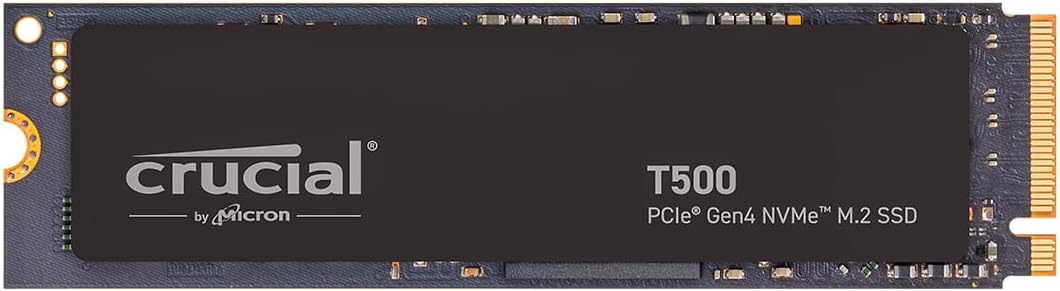
The Crucial T500 is our Editor's Choice due to its exceptional performance for both gamers and content creators. With TLC NAND and high IOPS it ensures fast and consistent data handling essential for large files.
We may earn a commission when you buy through this link, at no additional cost to you.
Creative professionals will appreciate the 42% boost in application performance for tasks like rendering and multitasking. The included one month Adobe Creative Cloud subscription adds significant value for those starting new projects.
While it is priced higher than budget options the performance gains justify the cost for power users. It supports Microsoft DirectStorage for faster game loading which future proofs your system for upcoming titles.
If you need a drive that excels in real world productivity and creative workflows the T500 is the best choice. It combines speed reliability and software perks to deliver a premium experience.
Boost creative apps by up to 42% for faster rendering and multitasking handling large video and image files effortlessly.
Comes with Acronis cloning software and a one month Adobe Creative Cloud All-Apps subscription for immediate productivity.
We may earn a commission when you buy through this link, at no additional cost to you.
This 2TB version offers massive storage for users who need to keep many large files and games locally without slowing down their system. It provides the same Gen4 speed as the 1TB model but doubles the available space.
We may earn a commission when you buy through this link, at no additional cost to you.
For those who store extensive media libraries or multiple AAA games this capacity is essential. The 3D NAND technology ensures reliability making it a solid long term storage solution for desktops and laptops.
However it does not include a heatsink so users with high air flow cases may need to add one for peak thermal performance. The endurance is slightly lower than TLC models but sufficient for most general use cases.
If you prioritize capacity over extreme performance this drive is an excellent choice. It balances speed and storage at a reasonable price point for heavy users.
Provides ample room for AAA games apps and media with standard Gen4 NVMe performance for casual gamers and home users.
Built with trusted Micron quality and 3D NAND for reliable performance in everyday computing and gaming scenarios.
We may earn a commission when you buy through this link, at no additional cost to you.
The P510 brings next generation Gen5 speeds to a more accessible price point making it a great choice for early adopters. It delivers read speeds up to 11000MB/s which is significantly faster than standard Gen4 options.
We may earn a commission when you buy through this link, at no additional cost to you.
Users can experience quicker game load times and smooth multitasking for demanding workloads. The TLC NAND ensures better durability compared to QLC drives found in some budget models enhancing the overall lifespan of the drive.
While it requires a Gen5 slot for full speed it is backward compatible with Gen4 systems for flexible upgrades. This allows you to use it now and upgrade your motherboard later without replacing the storage.
For those seeking future proof performance without breaking the bank the P510 is a smart buy. It offers exceptional balance of Gen5 performance and price for savvy buyers.
Delivers up to 11000MB/s read speeds for quicker game load times bootups and smooth multitasking on supported systems.
Comes with Acronis cloning software and a one month Adobe Creative Cloud subscription to help you get started quickly.
We may earn a commission when you buy through this link, at no additional cost to you.
The T710 is a powerhouse designed for tech enthusiasts who need the fastest storage available. With read speeds up to 14900MB/s it handles 8K video and large datasets with incredible efficiency.
We may earn a commission when you buy through this link, at no additional cost to you.
Security conscious users will appreciate the AES-256 hardware encryption with TCG Opal 2.01+ which protects sensitive files without slowing down performance. This is a crucial feature for professional environments.
It requires a compatible heatsink to sustain peak speeds during demanding workloads so ensure your system has proper airflow. The Micron G9 TLC NAND ensures the drive remains reliable even under heavy usage.
If you are building a high end workstation or gaming rig this drive is the premium choice. It delivers the raw speed and security needed for professional and hardcore applications.
Features AES-256 hardware encryption to help protect sensitive data and keep your files secure from unauthorized access.
Designed for sustained gaming sessions and demanding workloads with thermal control and G9 TLC NAND reliability.
We may earn a commission when you buy through this link, at no additional cost to you.
The E100 is an entry level Gen4 drive perfect for upgrading older laptops or budget desktops. It offers speeds up to 4700MB/s which is still much faster than traditional SATA SSDs.
We may earn a commission when you buy through this link, at no additional cost to you.
At 480GB it is ideal for boot drives or secondary storage rather than primary game libraries. The simple design ensures easy installation with clear instructions provided for cloning your old drive.
While it lacks the high capacity of other models it is a great first step into NVMe territory. The limited 3 year warranty is standard for this class of product and covers typical consumer usage.
If you need a fast reliable drive for basic tasks without spending much this is a solid pick. It brings Gen4 speed to budget friendly price points effectively.
Follow step-by-step instructions for easy installation and cloning to get your system running faster in no time.
Gen4 performance is significantly faster than SATA and hard drives ensuring smooth responsive everyday computing.
We may earn a commission when you buy through this link, at no additional cost to you.
This QLC version of the P310 offers a cost effective way to get 1TB of NVMe storage. It uses 232L Micron QLC NAND which provides decent speed for general computing and light gaming.
We may earn a commission when you buy through this link, at no additional cost to you.
While endurance is lower than TLC models it is sufficient for typical consumer usage patterns. The Gen4 interface ensures you do not bottleneck your system even with QLC NAND underneath.
It is best suited for users who need space over sustained write speeds. The drive is compatible with standard M.2 slots making it easy to install in modern laptops and desktops.
If you are on a tight budget and need 1TB this drive delivers value. It balances capacity and price well for everyday storage needs.
Provides ample space for files and apps with Gen4 NVMe performance at a very competitive price point.
Built with trusted Micron quality ensuring reliability for general consumer and home user workloads.
We may earn a commission when you buy through this link, at no additional cost to you.
This variant of the T500 is designed for PS5 users who want the best performance possible. It combines the speed of the T500 with a built-in heatsink to meet strict console requirements.
We may earn a commission when you buy through this link, at no additional cost to you.
The TLC NAND ensures consistent high speeds without throttling even during long gaming sessions. The integrated heatsink provides silent stable operation which is crucial for a console that sits in a living room.
It also includes the Adobe CC bundle giving extra value beyond storage. While it is pricier than standard PS5 drives the added reliability and software make it worth the investment.
If you want the absolute best storage experience for your PS5 this drive is the top choice. It ensures fast load times and reliable performance for the next generation of games.
Integrated heatsink ensures silent stable operation under heavy gaming sessions preventing heat related performance drops.
Load games up to 16% faster with Microsoft DirectStorage and boost creative apps by up to 42% for multitasking.
We may earn a commission when you buy through this link, at no additional cost to you.
The T700 is another strong contender in the Gen5 space offering high speeds for gaming and high speed storage needs. It is designed for Intel and AMD Ryzen 7000 platforms ensuring broad compatibility.
We may earn a commission when you buy through this link, at no additional cost to you.
With read speeds up to 11700MB/s it handles 8K video and large creative files efficiently. The TLC NAND ensures better longevity than QLC alternatives making it suitable for power users.
It requires a heatsink to prevent throttling during sustained loads so ensure your cooling solution is adequate. The software bundle adds value by including cloning tools and creative software for immediate use.
If you are building a high end system this drive provides the speed you need for future applications. It balances performance and reliability in a next generation package.
Store AAA titles and creative assets with blazing fast Gen5 NVMe throughput for rapid data access.
Designed for Intel 13th/14th Gen and AMD Ryzen 7000 in M.2 Gen5 slots for easy system integration.
We may earn a commission when you buy through this link, at no additional cost to you.
Choosing the right storage involves balancing speed capacity and compatibility with your existing hardware.
Consider whether your system supports PCIe Gen4 or Gen5. Gen5 offers faster speeds but requires compatible motherboards and may need active cooling to sustain performance.
For most users Gen4 is sufficient for modern gaming and productivity. Gen5 is better for those wanting future proof speeds.
Determine how much storage you need based on your game library and file sizes. Larger capacities like 2TB are great for libraries but cost more per unit.
For general use 1TB is a solid baseline. Larger storage is ideal for professional workflows.
TLC NAND generally offers better endurance and speed stability than QLC. Check the specific model to understand the NAND technology used.
TLC is preferred for primary drives while QLC is acceptable for storage drives.
Some models include built in heatsinks which are vital for systems with poor airflow. Without cooling high speed drives may throttle under load.
Check if your motherboard or case has space for a heatsink before buying.
If upgrading a PS5 ensure the drive meets the specific dimensions and speed requirements. Some models come with heatsinks tailored for consoles.
Always verify the dimensions match the expansion slot in your console.
Look for drives that include cloning software or creative subscriptions. These add value and simplify the installation process.
Software like Acronis can save time during the upgrade process.
Check the warranty period to ensure you are covered for potential defects. Most SSDs come with limited warranties ranging from three to five years.
A longer warranty provides peace of mind for long term usage.
Balance your budget with performance needs. Entry level drives offer great speed for basic tasks while premium drives cater to professionals.
Prioritize speed over capacity if you do frequent large file transfers.
Install the drive carefully into the M.2 slot and secure it with a screw. Ensure the slot is free from dust to prevent connection issues.
Update your motherboard drivers and BIOS to ensure the drive operates at maximum speed. Firmware updates often improve stability and performance.
Avoid extreme heat by ensuring good case airflow. High temperatures can reduce the lifespan of the drive so keep your system well cooled.
Yes the P310 with a heatsink is compatible with PS5. It meets the speed and size requirements for console expansion slots allowing you to play games directly from the SSD.
It depends on your system. For handhelds and consoles a heatsink is mandatory. For desktops it is recommended if your case has poor airflow or if you plan to sustain heavy workloads.
TLC NAND stores three bits per cell and offers better endurance and speed. QLC stores four bits per cell and is cheaper but has lower endurance. TLC is generally better for primary drives.
Yes most models are designed for laptops as long as they have an M.2 NVMe slot. Check your laptop manual to confirm the specific form factor supported.
Some drives include software bundles to add value for creators. It gives you access to Adobe apps for a limited time which is useful for starting creative projects.
For most users Gen4 is fast enough. Gen5 is beneficial if you handle huge files or want future proofing. It requires a compatible motherboard and cooling solution.
Use software like Acronis which is often included with these drives. Connect both drives to your PC and follow the cloning wizard to migrate your data.
Ensure your firmware is updated and there is adequate airflow. If the drive is full it may slow down so try to keep some free space available for optimal performance.
We found the P310 series ideal for budget users and the T500 and T710 excellent for performance seekers. Each model offers specific benefits based on capacity and speed needs.
Prioritize TLC NAND and a heatsink if you want stability. Console users should pick models with integrated cooling to avoid compatibility issues.
Check current prices before buying as deals change frequently. Ensure the drive matches your motherboard slot for a smooth upgrade experience.